Kubernetes has become the de facto standard for container orchestration, revolutionizing the way applications are deployed and managed. However, as with any technology, the question arises: will it remain relevant in the years to come, or will new, more advanced solutions emerge to take its place? In this article, we'll explore the potential future of Kubernetes and the factors that could shape its trajectory.
#1: Kubernetes is Overly Complex and a New Layer of Abstraction Will Emerge
While Kubernetes has successfully solved many challenges in the IT industry, its current form is arguably overcomplicated, attempting to address every modern IT problem. As a result, it is logical to expect the emergence of a new layer of abstraction that could simplify the application of this technology for ordinary users.
Tired of Complex Deployments? Streamline Your Apps with Gart's Kubernetes Solutions. Get a Free Consultation!s
#2: Kubernetes Solved an Industry Problem, but More Efficient Alternatives May Arise
Kubernetes provided a clear and convenient way to package, run, and orchestrate applications, addressing a significant industry problem. Currently, there are no worthy alternative solutions. However, it is possible that in the next 5-10 years, new solutions may emerge to address the same challenges as Kubernetes, but in a faster, more efficient, and simpler manner.
#3: Kubernetes Will Become More Complex and Customizable
As Kubernetes evolves, it is becoming increasingly complex and customizable. For each specific task, there is a set of plugins through which Kubernetes will continue to develop. In the future, competition will likely arise among different distributions and platforms based on Kubernetes.
#4: Focus Will Shift to Security and Infrastructure Management
More attention will be given to the security of clusters and applications running within them. Tools for managing infrastructure and third-party services through Kubernetes, such as Crossplane, will also evolve.
#5: Integration of ML and AI for Better Resource Management
It is likely that machine learning (ML) and artificial intelligence (AI) tools will be integrated into Kubernetes to better predict workloads, detect anomalies faster, and assist in the operation and utilization of clusters.
#6: Kubernetes Won't Go Away, but Worthy Competitors May Emerge
Kubernetes won't disappear because the problem it tries to solve won't go away either. While many large companies will continue to use Kubernetes in the next 5 years, it is possible that a worthy competitor may emerge within the next 10 years.
#7: Kubernetes Will Remain Popular and Ubiquitous
Kubernetes has proven its usefulness and is now in the "adult league." It is expected to follow a path similar to virtualization or Docker, becoming increasingly adopted by companies and transitioning from a novelty to an expected standard.
#8: Kubernetes Will Evolve, but Alternatives May Be Elusive
While Kubernetes faces challenges, particularly in terms of complexity, there are currently no clear technologies poised to replace it. Instead, Kubernetes itself is likely to evolve to address these challenges.
Unlock Scalability & Efficiency. Harness the Power of Kubernetes with Gart's Expert Services. Boost Your ROI Today!
Perspective 9: Kubernetes as the New "Linux" for Distributed Applications
Kubernetes has essentially become the new "Linux" – an operating system for distributed applications – and is therefore likely to remain popular.
Kubernetes has rapidly evolved from a tool for container orchestration to something much more foundational and far-reaching. In many ways, it is becoming the new operating system for the cloud-native era – providing a consistent platform and set of APIs for deploying, managing, and scaling modern distributed applications across hybrid cloud environments.
Just as Linux democratized operating systems in the early days of the internet, abstracting away underlying hardware complexities, Kubernetes is abstracting away the complexities of executing workloads across diverse infrastructures. It provides a declarative model for describing desired application states and handles all the underlying work of making it happen automatically.
The core value proposition of Linux was portability across different hardware architectures. Similarly, Kubernetes enables application portability across any infrastructure - public clouds, private clouds, bare metal, etc. Containerized apps packaged to run on Kubernetes can truly run anywhere Kubernetes runs.
Linux also opened the door for incredible community innovation at the application layer by standardizing core OS interfaces. Analogously, Kubernetes is enabling a similar flourishing of creativity and innovation in cloud-native applications, services, and tooling by providing standardized interfaces for cloud infrastructure.↳
As Kubernetes ubiquity grows, it is becoming the new common denominator platform that both cloud providers and enterprises are standardizing on. Much like Linux became the standard operating system underlying the internet, Kubernetes is positioning itself as the standard operating system underlying the cloud era. Its popularity and permanence seem virtually assured at this point based on how broadly and deeply it is becoming embedded into cloud computing.
Perspective 10: Kubernetes Will Become More Commonplace
Kubernetes has taught developers and operations engineers to speak the same language, but developers still find it somewhat foreign. New solutions will emerge to abstract away Kubernetes' complexity, allowing developers to focus on business tasks. However, Kubernetes itself will not disappear; it will continue to evolve and be used as a foundation for these new technologies.
Conclusion
In conclusion, while Kubernetes may face challenges and competition in the future, its core functionality and the problem it solves are unlikely to become obsolete. As new technologies emerge, Kubernetes will likely adapt and evolve, potentially becoming a foundational layer for more specialized solutions. Its staying power will depend on its ability to simplify and address emerging complexities in the ever-changing IT landscape.

Ever wondered how to make your software deployment smoother than ever? Let's dive into the world of containerization and Kubernetes – your secret sauce for hassle-free operations.
[lwptoc]
Think of containers as compact packages that hold everything your software needs to run. They're like mini-environments, making sure your apps work the same way no matter where they're placed. This means less compatibility fuss and more reliability.
Now, meet Kubernetes – the conductor of your app orchestra. It takes those containers and arranges them flawlessly, ensuring they scale up when there's a crowd and heal themselves if something goes awry. It's like having an expert team always looking after your apps.
So, why should you care? Because with containerization and Kubernetes, your business gains flexibility, consistency, and efficiency. Say goodbye to those deployment headaches and hello to a smoother, more streamlined way of running your show.
Elevating Your Business with Containerization Magic
Let's talk about a game-changer for your business: containerization. Containerization is a technology that allows you to package and isolate applications along with their dependencies into a single, portable unit known as a "container." These containers provide a consistent environment for software to run, regardless of the underlying system's configuration.
Containers are a cornerstone of DevOps practices, enabling consistent testing and deployment environments. They also fit well with continuous integration and continuous deployment (CI/CD) pipelines.
Think of it like packaging your software in a neat box – a container – that holds all its stuff. Now, here's why it's a smart move:
Isolation for Peace of Mind
Containers keep your apps snug in their own little worlds. So, if one app misbehaves, it won't drag the others down. Your business stays smooth, even in stormy software seas.
Portability: Apps on the Go
Containers are like digital nomads. They're built to work the same way everywhere they go. So, you can move them from your laptop to the cloud, and they'll still perform their magic. No more "It works on my machine" dramas!
Consistency: One Recipe, Many Dishes
Imagine having one recipe that works for all your favorite meals. That's what containers do for your apps. You build them once, and they run consistently anywhere. Your customers get the same awesome experience every time.
Simplifying the Software Dance
Now, picture your software as a choreographed dance. Containers make sure everyone's in step. They bundle everything your app needs, so you don't have to worry about missing parts or jumbled moves.
See, containerization isn't just tech talk; it's about making your business smoother, more flexible, and ready to dazzle your customers.
Containerization is a ubiquitous practice embraced by a diverse range of well-known businesses. From Coca-Cola, which employs it to ensure consistent user experiences across diverse markets and regions, to NASA, where it facilitates the development and deployment of software for intricate simulations and data analysis, the benefits of containerization are evident across industries.
? Ready to Revolutionize Your Deployment Process?
Discover the future of application deployment with Containerization and Kubernetes.
Start your journey towards seamless deployments today!
Core Components of Kubernetes
Ever wondered how Kubernetes makes the magic happen? It's all about the core components working behind the scenes to orchestrate your containers seamlessly.
Master Node: This is the big boss that makes decisions and plans the show.
Worker Nodes: They're the performers on stage, following the master's instructions.
API Server: It's like the messenger between you and the boss, passing along your requests.
etcd: Imagine it as the memory that remembers everything the team needs to know.
Controller Manager: It keeps an eye on everyone, making sure they're doing what they should be.
Scheduler: Just like a choreographer, it assigns tasks to the performers, making sure everyone's busy but not overwhelmed.
Master Node: The Maestro's Brain
Think of the master node as the brain of Kubernetes. It's the control center that oversees everything – making decisions, coordinating tasks, and ensuring harmony among all components.
Worker Nodes: The Dedicated Performers
Worker nodes are like the dancers on stage, executing the master node's instructions. They run your containers, ensuring your apps shine brightly for your audience (or users) to enjoy.
API Server: The Communication Hub
The API server is the messenger that relays your commands to the master node. It's like talking to the director of a play – your requests go through here to make things happen in the Kubernetes universe.
Scheduler: The Task Master
Just like a choreographer assigns dances to dancers, the scheduler assigns tasks to worker nodes. It ensures workloads are distributed evenly and everyone gets their fair share of action.
etcd: The Memory Bank
Imagine etcd as the memory of Kubernetes. It stores all the important information – like configurations and state – so that everything remains consistent and everyone's on the same page.
Controller Manager: The Choreographer
This component keeps the show in line. It watches over your containers, making sure they match the desired state you set. If something drifts off, the controller manager nudges it back on track.
Understanding these core components helps you grasp how Kubernetes orchestrates your containers flawlessly. It's like a well-coordinated dance, where each member of the orchestra plays their part to create a harmonious performance.
? Read more: DevOps for Fashion Circularity Web App
Navigating Container Workloads in Kubernetes: A Simple Breakdown
Let's explore the cast of characters in Kubernetes' container world – Pods, Deployments, StatefulSets, and DaemonSets. Each has a unique role in the app performance, just like actors on a stage.
Pods: Team Players
Imagine a pod as a group of friends working together. It holds one or more containers that share resources, like memory and storage. Perfect for when apps need to collaborate closely.
In Kubernetes, a "pod" is the smallest deployable unit and the fundamental building block of an application. A pod can contain one or more closely related containers that share networking, storage, and runtime resources within the same host.
Pods are designed to be ephemeral. They can be easily created, scaled, and terminated as needed. Kubernetes takes care of managing the deployment, scaling, and lifecycle of pods, ensuring the desired number of replicas are running and healthy according to your defined configuration.
Pods provide a level of isolation, but it's important to note that they share the same IP address and port space. This means that containers within the same pod can communicate with each other using "localhost," as if they were on the same machine, simplifying internal communication.
Deployments: Scene Changers
Deployments are like directors that handle changes gracefully. They manage updates and rollbacks, ensuring your app transitions smoothly from one version to another. Great for keeping your app's performance consistent.
StatefulSets: Individual Stars
StatefulSets are for those apps that need a spotlight. They give each pod a unique identity and maintain order, making sure data isn't lost during updates. Think of them as solo acts that love their special attention.
In Kubernetes, a "StatefulSet" is a higher-level abstraction used to manage the deployment and scaling of stateful applications.
StatefulSets provide ordered, unique network identities, and stable hostnames for each instance, making them suitable for applications like databases, key-value stores, and other systems where data consistency and identity are crucial.
DaemonSets: Behind-the-Scenes Heroes
DaemonSets work backstage. They make sure a copy of a specific pod runs on every node. Useful for stuff like monitoring or networking tasks that need to happen everywhere.
In Kubernetes, a "DaemonSet" is a type of controller that ensures that a specific pod runs on every node within a cluster. Unlike other controllers that aim for a specified number of replicas across the entire cluster, DaemonSets focus on running one copy of a pod on each node.
DaemonSets are commonly used for tasks that need to be executed on every node, such as log collection, monitoring agents, or network configuration. They help ensure that these tasks are consistently carried out across all nodes in the cluster, regardless of the cluster's size or changes in the node count.
Just like a play, different scenes require different characters. Similarly, in Kubernetes, you choose the workload type that fits your app's story best. It's all about giving your app the stage it needs to shine!
? Read more: IoT Device Management Using Kubernetes
Accelerate Your Business with Kubernetes
Implementing Kubernetes can lead to a remarkable increase in speed and efficiency. Many businesses have reported up to a 50% reduction in deployment times and a significant decrease in operational complexities. This means faster updates, quicker response to market demands, and improved resource utilization.
Moreover, Kubernetes empowers teams to focus on innovation rather than managing infrastructure intricacies. It streamlines app deployment, scales resources on-demand, and ensures high availability – ultimately allowing your team to channel their efforts into delivering value to customers.
Kubernetes offers not only technical advantages but also a strategic edge. By harnessing its power, businesses can expedite processes, enhance application reliability, and drive customer satisfaction.
Ready to transform? Let's talk about how Kubernetes can elevate your business journey.
Kubernetes is becoming the standard for development, while the entry barrier remains quite high. We've compiled a list of recommendations for application developers who are migrating their apps to the orchestrator. Knowing the listed points will help you avoid potential problems and not create limitations where Kubernetes has advantages. Kubernetes Migration.
Who is this text for?
It's for developers who don't have DevOps expertise in their team – no full-time specialists. They want to move to Kubernetes because the future belongs to microservices, and Kubernetes is the best solution for container orchestration and accelerating development through code delivery automation to environments. At the same time, they may have locally run something in Docker but haven't developed anything for Kubernetes yet.
Such a team can outsource Kubernetes support – hire a contractor company, an individual specialist, or, for example, use the relevant services of an IT infrastructure provider. For instance, Gart Solutions offers DevOps as a Service – a service where the company's experienced DevOps specialists will take on any infrastructure project under full or partial supervision: they'll move your applications to Kubernetes, implement DevOps practices, and accelerate your time-to-market.
Regardless, there are nuances that developers should be aware of at the architecture planning and development stage – before the project falls into the hands of DevOps specialists (and they force you to modify the code to work in the cluster). We highlight these nuances in the text.
The text will be useful for those who are writing code from scratch and planning to run it in Kubernetes, as well as for those who already have a ready application that needs to be migrated to Kubernetes. In the latter case, you can go through the list and understand where you should check if your code meets the orchestrator's requirements.
The Basics
At the start, make sure you're familiar with the "golden" standard The Twelve-Factor App. This is a public guide describing the architectural principles of modern web applications. Most likely, you're already applying some of the points. Check how well your application adheres to these development standards.
The Twelve-Factor App
Codebase: One codebase, tracked in a version control system, serves all deployments.
Dependencies: Explicitly declare and isolate dependencies.
Configuration: Store configuration in the environment - don't embed in code.
Backing Services: Treat backing services as attached resources.
Build, Release, Run: Strictly separate the build, release, and run stages.
Processes: Run the application as one or more stateless processes.
Port Binding: Expose services through port binding.
Concurrency: Scale the application by adding processes.
Disposability: Maximize reliability with fast startup and graceful shutdown.
Dev/Prod Parity: Keep development, staging, and production environments as similar as possible.
Logs: Treat logs as event streams.
Admin Processes: Run administrative tasks as one-off processes.
Now let's move on to the highlighted recommendations and nuances.
Prefer Stateless Applications
Why?
Implementing fault tolerance for stateful applications will require significantly more effort and expertise.
Normal behavior for Kubernetes is to shut down and restart nodes. This happens during auto-healing when a node stops responding and is recreated, or during auto-scaling down (e.g., some nodes are no longer loaded, and the orchestrator excludes them to save resources).
Since nodes and pods in Kubernetes can be dynamically removed and recreated, the application should be ready for this. It should not write any data that needs to be preserved to the container it is running in.
What to do?
You need to organize the application so that data is written to databases, files to S3 storage, and, say, cache to Redis or Memcache. By having the application store data "on the side," we significantly facilitate cluster scaling under load when additional nodes need to be added, and replication.
In a stateful application where data is stored in an attached Volume (roughly speaking, in a folder next to the application), everything becomes more complicated. When scaling a stateful application, you'll have to order "volumes," ensure they're properly attached and created in the right zone. And what do you do with this "volume" when a replica needs to be removed?
Yes, some business applications should be run as stateful. However, in this case, they need to be made more manageable in Kubernetes. You need an Operator, specific agents inside performing the necessary actions... A prime example here is the postgres-operator. All of this is far more labor-intensive than simply throwing the code into a container, specifying five replicas, and watching it all work without additional dancing.
Ensure Availability of Endpoints for Application Health Checks
Why?
We've already noted that Kubernetes itself ensures the application is maintained in the desired state. This includes checking the application's operation, restarting faulty pods, disabling load, restarting on less loaded nodes, terminating pods exceeding the set resource consumption limits.
For the cluster to correctly monitor the application's state, you should ensure the availability of endpoints for health checks, the so-called liveness and readiness probes. These are important Kubernetes mechanisms that essentially poke the container with a stick – check the application's viability (whether it's working properly).
What to do?
The liveness probes mechanism helps determine when it's time to restart the container so the application doesn't get stuck and continues to work.
Readiness probes are not so radical: they allow Kubernetes to understand when the container is ready to accept traffic. In case of an unsuccessful check, the pod will simply be excluded from load balancing – no new requests will reach it, but no forced termination will occur.
You can use this capability to allow the application to "digest" the incoming stream of requests without pod failure. Once a few readiness checks pass successfully, the replica pod will return to load balancing and start receiving requests again. From the nginx-ingress side, this looks like excluding the replica's address from the upstream.
Such checks are a useful Kubernetes feature, but if liveness probes are configured incorrectly, they can harm the application's operation. For example, if you try to deploy an application update that fails the liveness/readiness checks, it will roll back in the pipeline or lead to performance degradation (in case of correct pod configuration). There are also known cases of cascading pod restarts, when Kubernetes "collapses" one pod after another due to liveness probe failures.
You can disable checks as a feature, and you should do so if you don't fully understand their specifics and implications. Otherwise, it's important to specify the necessary endpoints and inform DevOps about them.
If you have an HTTP endpoint that can be an exhaustive indicator, you can configure both liveness and readiness probes to work with it. By using the same endpoint, make sure your pod will be restarted if this endpoint cannot return a correct response.
Aim for More Predictable and Uniform Application Resource Consumption
Why?
Almost always, containers inside Kubernetes pods are resource-limited within certain (sometimes quite small) values. Scaling in the cluster happens horizontally by increasing the number of replicas, not the size of a single replica. In Kubernetes, we deal with memory limits and CPU limits. Mistakes in CPU limits can lead to throttling, exhausting the available CPU time allotted to the container. And if we promise more memory than is available, as the load increases and hits the ceiling, Kubernetes will start evicting the lowest priority pods from the node. Of course, limits are configurable. You can always find a value at which Kubernetes won't "kill" pods due to memory constraints, but nevertheless, more predictable resource consumption by the application is a best practice. The more uniform the application's consumption, the tighter you can schedule the load.
What to do
Evaluate your application: estimate approximately how many requests it processes, how much memory it occupies. How many pods need to be run for the load to be evenly distributed among them? A situation where one pod consistently consumes more than the others is unfavorable for the user. Such a pod will be constantly restarted by Kubernetes, jeopardizing the application's fault-tolerant operation. Expanding resource limits for potential peak loads is also not an option. In that case, resources will remain idle whenever there is no load, wasting money. In parallel with setting limits, it's important to monitor pod metrics. This could be kube-Prometheus-Stack, VictoriaMetrics, or at least Metrics Server (more suitable for very basic scaling; in its console, you can view stats from kubelet—how much pods are consuming). Monitoring will help identify problem areas in production and reconsider the resource distribution logic.
There is a rather specific nuance regarding CPU time that Kubernetes application developers should keep in mind to avoid deployment issues and having to rewrite code to meet SRE requirements. Let's say a container is allocated 500 milli-CPUs—roughly 0.5 CPU time of a single core over 100 ms of real time. Simplified, if the application utilizes CPU time in several continuous threads (let's say four) and "eats up" all 500 milli-CPUs in 25 ms, it will be frozen by the system for the remaining 75 ms until the next quota period. Staging databases run in Kubernetes with small limits exemplify this behavior: under load, queries that would normally take 5 ms plummet to 100 ms. If the response graphs show load continuously increasing and then latency spiking, you've likely encountered this nuance. Address resource management—give more resources to replicas or increase the number of replicas to reduce load on each one.
Get a sample of IT Audit
Sign up now
Get on email
Loading...
Thank you!
You have successfully joined our subscriber list.
Leverage Kubernetes ConfigMaps, Secrets, and Environment Variables
Kubernetes has several objects that can greatly simplify life for developers. Study them to save yourself time in the future.
ConfigMaps are Kubernetes objects used to store non-confidential data as key-value pairs. Pods can use them as environment variables or as configuration files in volumes. For example, you're developing an application that can run locally (for direct development) and, say, in the cloud. You create an environment variable for your app—e.g., DATABASE_HOST—which the app will use to connect to the database. You set this variable locally to localhost. But when running the app in the cloud, you need to specify a different value—say, the hostname of an external database.
Environment variables allow using the same Docker image for both local use and cloud deployment. No need to rebuild the image for each individual parameter. Since the parameter is dynamic and can change, you can specify it via an environment variable.
The same applies to application config files. These files store certain settings for the app to function correctly. Usually, when building a Docker image, you specify a default config or a config file to load into Docker. Different environments (dev, prod, test, etc.) require different settings that sometimes need to be changed, for testing, for example.
Instead of building separate Docker images for each environment and config, you can mount config files into Docker when starting the pod. The app will then pick up the specified configuration files, and you'll use one Docker image for the pods.
Typically, iftheconfig files are large,youuse a Volume to mount them into Docker as files. If the config files contain short values, environment variables are more convenient. It all depends on yourapplication's requirements.
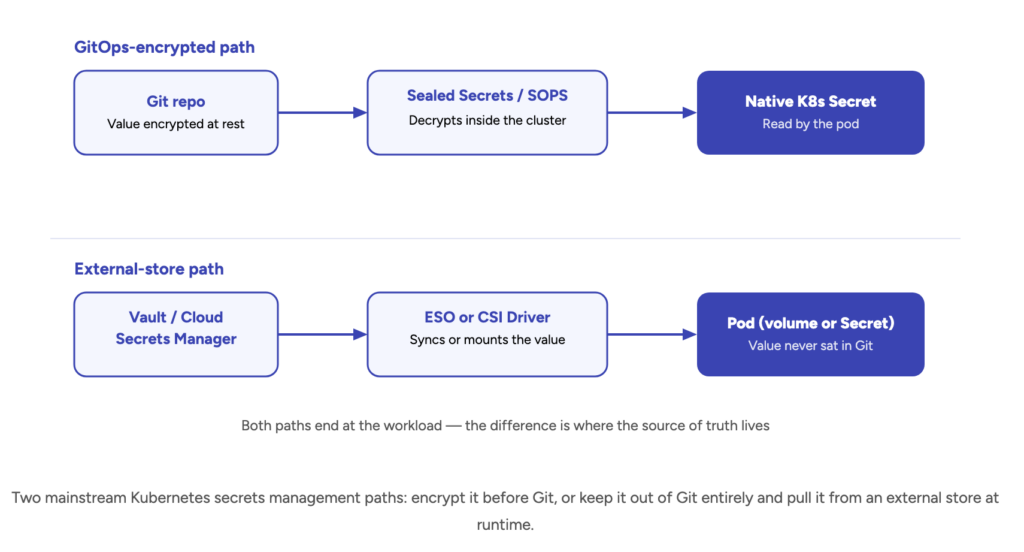
Another useful Kubernetes abstraction is Secrets. Secrets are similar to ConfigMaps but are meant for storing confidential data—passwords, tokens, keys, etc. Using Secrets means you don't need to include secret data in your application code. They can be created independently of the pods that use them, reducing the risk of data exposure. Secrets can be used as files in volumes mounted in one or multiple pod containers. They can also serve as environment variables for containers.
Disclaimer: In this point, we're only describing out-of-the-box Kubernetes functionality. We're not covering more specialized solutions for working with secrets, such as Vault.
Knowing about these Kubernetes features, a developer won't need to rebuild the entire container if something changes in the prepared configuration, for example, a password change.
Ensure Graceful Container Shutdown with SIGTERM
Why?
There are situations where Kubernetes "kills" an application before it has a chance to release resources. This is not an ideal scenario. It's better if the application can respond to incoming requests without accepting new ones, complete a transaction, or save data to a database before shutting down.
What to Do
A successful practice here is for the application to handle the SIGTERM signal. When a container is being terminated, the PID 1 process first receives the SIGTERM signal, and then the application is given some time for graceful termination (the default is 30 seconds). Subsequently, if the container has not terminated itself, it receives SIGKILL—the forced termination signal. The application should not continue accepting connections after receiving SIGTERM.
Many frameworks (e.g., Django) can handle this out of the box. Your application may already handle SIGTERM appropriately. Ensure that this is the case.
Here are a few more important points:
The Application Should Not Depend on Which Pod a Request Goes To
When moving an application to Kubernetes, we expectedly encounter auto-scaling—you may have migrated for this very reason. Depending on the load, the orchestrator adds or removes application replicas. The application mustn't depend on which pod a client request goes to, for example, static pods. Either the state needs to be synchronized to provide an identical response from any pod, or your backend should be able to work across multiple replicas without corrupting data.
Your Application Should Be Behind a Reverse Proxy and Serve Links Over HTTPS
Kubernetes has the Ingress entity, which essentially provides a reverse proxy for the application, typically an nginx with cluster automation. For the application, it's enough to work over HTTP and understand that the external link will be over HTTPS. Remember that in Kubernetes, the application is behind a reverse proxy, not directly exposed to the internet, and links should be served over HTTPS. When the application returns an HTTP link, Ingress rewrites it to HTTPS, which can lead to looping and a redirect error. Usually, you can avoid such a conflict by simply toggling a parameter in the library you're using, checking that the application is behind a reverse proxy. But if you're writing an application from scratch, it's important to remember how Ingress works as a reverse proxy.
Leave SSL Certificate Management to Kubernetes
Developers don't need to think about how to "hook up" certificate addition in Kubernetes. Reinventing the wheel here is unnecessary and even harmful. For this, a separate service is typically used in the orchestrator — cert-manager, which can be additionally installed. The Ingress Controller in Kubernetes allows using SSL certificates for TLS traffic termination. You can use both Let's Encrypt and pre-issued certificates. If needed, you can create a special secret for storing issued SSL certificates.