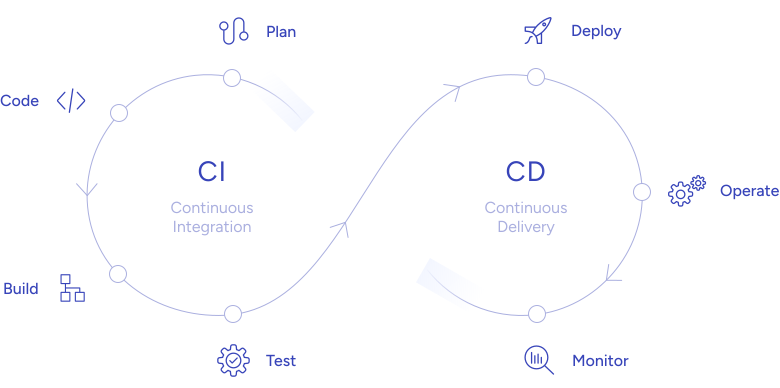
Role-Based Access Control (RBAC) is no longer just a nice-to-have in modern software delivery – it is the foundation of a secure CI/CD pipeline. As organizations accelerate release cycles and adopt complex multi-cloud environments, the attack surface inside the pipeline itself expands. Who can trigger a production deployment? Who can read secrets stored in your CI runner? Who is allowed to approve a merge to main? Without a clear, enforced answer to these questions, you are one compromised credential away from a supply chain breach.
This guide breaks down how to implement Role-Based Access Control across your entire CI/CD pipeline from source control to production with practical, tool-specific guidance for DevSecOps teams. Whether you are just getting started or auditing an existing setup, you will find actionable best practices, a comparison of RBAC models, and the most common mistakes teams make when locking down their pipelines.
- What is Role-Based Access Control?
- Why Role-Based Access Control Is Critical in CI/CD Pipelines
- Benefits of RBAC in DevSecOps
- Implementing RBAC in the DevSecOps pipeline
- Core Components of RBAC in a CI/CD Pipeline
- RBAC vs. ABAC vs. PBAC: Choosing the Right Model
- Implementing Role-Based Access Control Across the DevSecOps Pipeline
- Best Practices for Role-Based Access Control in DevSecOps
- Common RBAC Mistakes in CI/CD Pipelines (and How to Avoid Them)
- The Future of Role-Based Access Control: AI-Driven and Context-Aware
- Conclusion
What is Role-Based Access Control?
Role-Based Access Control (RBAC) is an access management model in which permissions are assigned to roles rather than to individual users. A user receives access rights by being assigned to one or more roles and the role, not the user, defines what actions are permitted.
In a DevSecOps context, this means that a developer role might allow reading and writing code, running unit tests, and opening merge requests but explicitly cannot approve its own merge requests or push directly to the production branch. An operations role can trigger deployments to staging and production but cannot modify application source code. A security engineer role can view pipeline logs, access vulnerability scan results, and adjust security policies but is not a code committer.
NIST defines RBAC as a policy-neutral access control mechanism built around roles and privileges. According to the NIST Zero Trust Architecture (SP 800-207), role-based and attribute-based access controls are a foundational pillar of a zero-trust posture a standard that enterprise engineering teams are increasingly expected to meet.
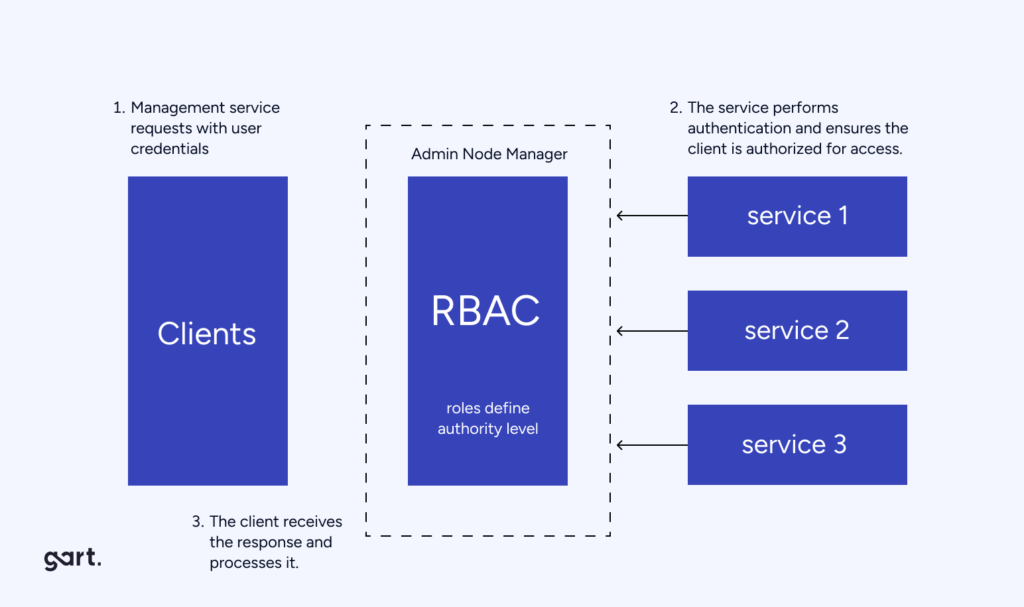
In a CI/CD pipeline, RBAC means giving different access rights to each stage of the pipeline based on user roles.
The Five Core Rules of RBAC
RBAC operates on five foundational principles that, when applied together, create a robust access control framework:
- Role Assignment – user can only exercise a permission if they have been assigned a role that carries that permission.
- Role Authorization – user’s active role must be authorized, preventing them from assuming roles they are not entitled to.
- Permission Authorization – user can only exercise a permission if it is authorized for their active role.
- Least Privilege – Every role carries only the minimum permissions necessary to fulfill its function.
- Separation of Duties (SoD) – Conflicting permissions are distributed across different roles so no single user can complete a sensitive operation alone.
RBAC has some main parts:
- Role: This is about who can do what. Each role defines what actions are allowed.
- Permissions: This decides how much access someone has. It specifies what actions are not allowed or what actions are linked to the role. For instance, if you can read, write, execute, or delete.
- Users: These are the people or things in the organization assigned to roles.
- Role Hierarchy: This is about how roles relate to each other. Some roles might be above others, like a parent and child. This can also mean inheriting permissions from higher roles.
- Policies: These are the rules that control how roles and permissions are given out and how access rules are enforced.
Why Role-Based Access Control Is Critical in CI/CD Pipelines
A CI/CD pipeline is a high-value target. It has access to source code, secrets, cloud credentials, container registries, and production infrastructure. A misconfigured pipeline is functionally equivalent to leaving the server room door unlocked and the consequences of a breach are severe.
The 2023 SolarWinds and 3CX supply chain attacks both exploited the pipeline itself, not just the application code. The Cloud Native Computing Foundation (CNCF) now considers pipeline security a tier-one concern in its cloud native security white paper, listing access control as the first line of defense for software supply chain integrity.
Key risk areas in an unprotected CI/CD pipeline: unauthorized production deploys, secret exfiltration via pipeline logs, privilege escalation through misconfigured service accounts, and insider threats from overly-permissioned developers with access to all environments simultaneously.
Benefits of RBAC in DevSecOps
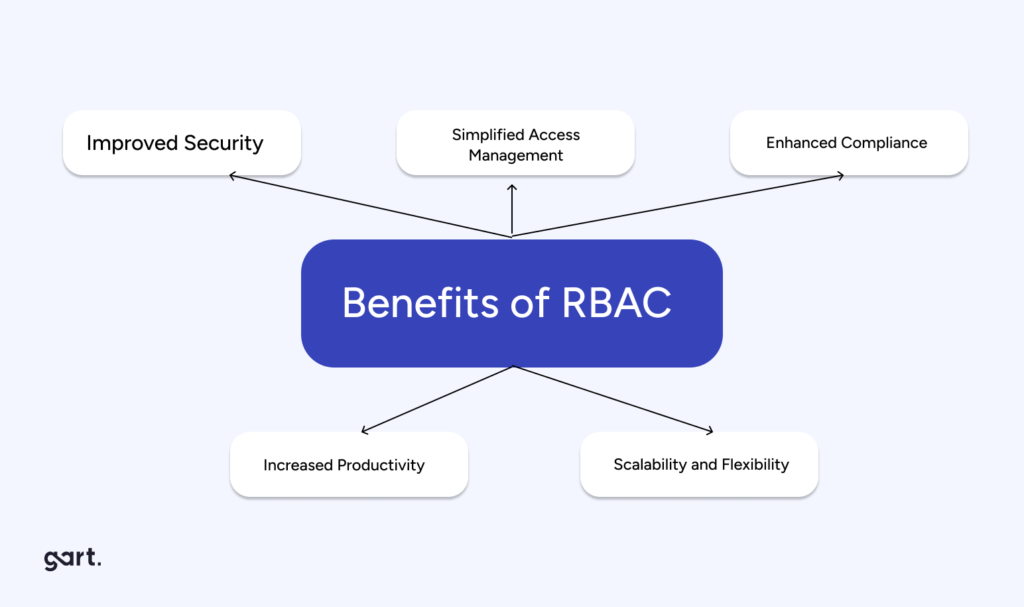
Implementing RBAC in a DevSecOps environment offers several benefits, including:
- Better Security: RBAC makes sure that people only have the access they need, reducing the chances of someone getting into things they shouldn’t. This helps prevent security problems.
- Easier Access Management: With RBAC, managing who can do what is simpler. All permissions and roles are in one place, making it easier to control access and reducing the work for administrators.
- Meeting Rules: RBAC helps meet rules and regulations by organizing access control in a clear way. It also keeps track of what users are doing, which is important for audits.
- Flexible: RBAC can change as the organization grows or as projects change. It’s good for environments that are always evolving.
- Boosts Productivity: By making sure everyone has what they need to work, RBAC helps teams work together better and make decisions faster. It keeps things running smoothly.
Implementing Role-Based Access Control in your pipeline directly addresses these risks by ensuring that pipeline actions triggering builds, approving releases, accessing secrets, modifying infrastructure are gated by role, not merely by having repository access.
Implementing RBAC in the DevSecOps pipeline
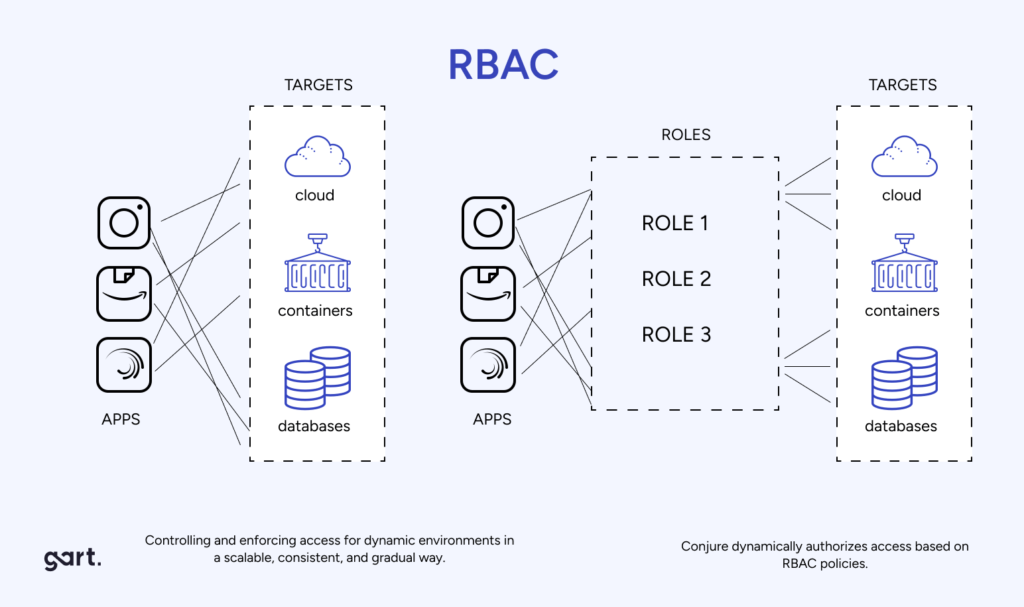
Mapping out permissions and privileges
When setting up permissions, use your CI/CD platform’s built-in RBAC features or add external RBAC tools. Create roles like developer, QA tester, etc. Then, specify permissions in detail. For example, developers can read and write code but only read deployment settings.
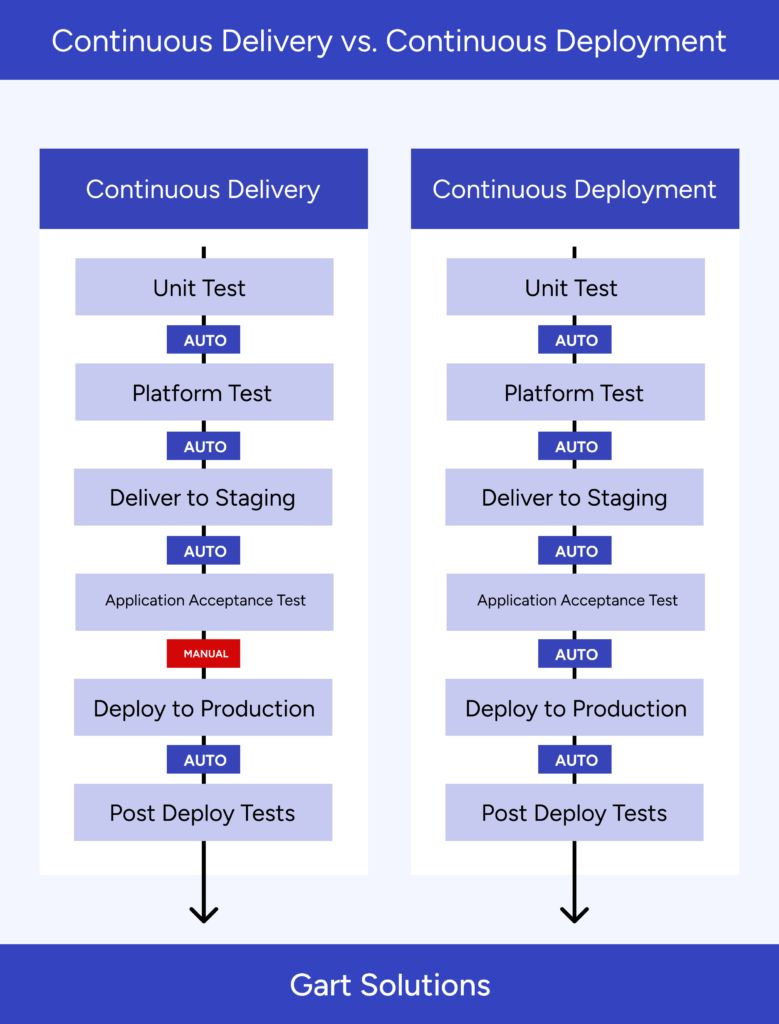
Integration with CI/CD tools
Incorporate RBAC into CI/CD pipelines to control access during software development. Use built-in RBAC features in tools like Jenkins, GitLab CI, or CircleCI. You can also create custom solutions for managing roles and permissions. Utilize APIs to automate access control and add plugins or extensions to improve RBAC capabilities.
Automation of role assignment and permission management
Automate role and permission setups using scripts or tools for efficiency. Use Infrastructure as Code (IaC) to set RBAC rules with infrastructure settings for consistency. Integrate RBAC automation into version control and configuration tools for easy tracking. Regularly check access logs for any unusual activity and use monitoring tools like Splunk or ELK stack for alerts.
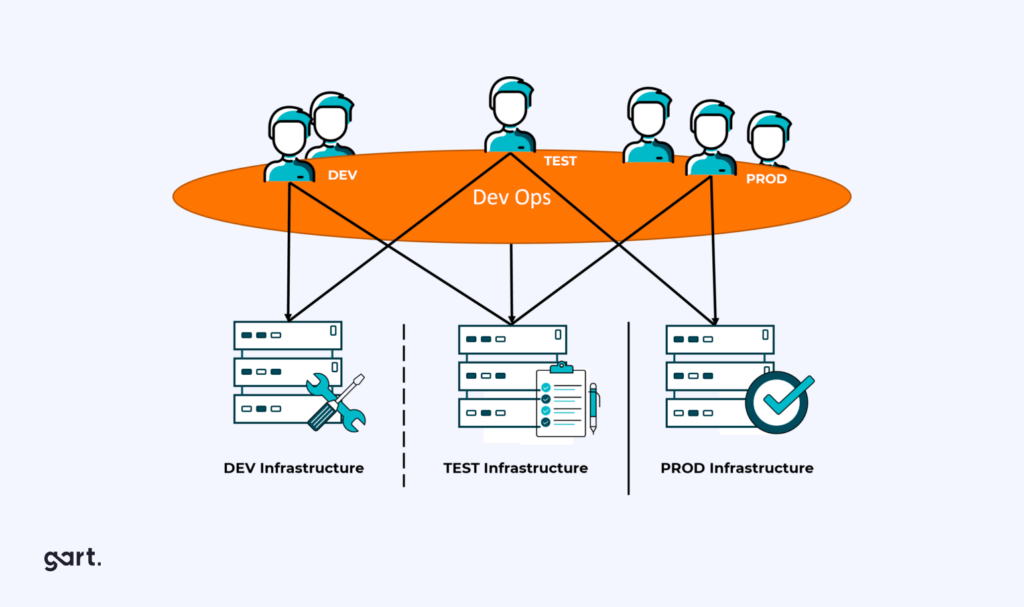
Separate environments
Create separate spaces, either physically or virtually, for different stages of work (such as development, staging, and production). Apply specific RBAC rules to each space. Use conditional access policies to add extra layers of security, like requiring more authentication or approvals, especially for critical areas like production.
Implementing Role-Based Access Control in your pipeline directly addresses these risks by ensuring that pipeline actions triggering builds, approving releases, accessing secrets, modifying infrastructure are gated by role, not merely by having repository access.
Core Components of RBAC in a CI/CD Pipeline
Understanding these building blocks is essential before designing any RBAC implementation for your DevSecOps pipeline:
| Component | Description | CI/CD Pipeline Example |
|---|---|---|
| Users / Principals | Human users, service accounts, or automated agents that need pipeline access | Developer, QA engineer, CI runner service account, deploy bot |
| Roles | Named collections of permissions representing a job function | Developer, Reviewer, Release Manager, SecOps, Read-Only Auditor |
| Permissions | Specific actions that can be allowed or denied | push-to-main, trigger-deploy, read-secrets, approve-release, view-logs |
| Resources | Objects or pipeline stages that permissions apply to | Git branches, pipeline jobs, secret vaults, artifact registries, environments |
| Role Hierarchy | Parent-child relationships where higher roles inherit lower-role permissions | Release Manager inherits Developer permissions + additional deployment rights |
| Policies | Rules governing how roles are assigned and how access is enforced | No direct push to production without MR approval; two-person rule for release |
| Environments | Scoped contexts where different RBAC rules apply | Dev, Staging, Production each with its own role permissions |
RBAC vs. ABAC vs. PBAC: Choosing the Right Model
Role-Based Access Control is the most widely adopted model in CI/CD environments, but it is not the only option. Understanding the differences helps you decide when to use RBAC alone and when to layer in additional models.
Role-Based Access Control (RBAC)
Permissions are assigned to roles, and users are assigned to roles. Simple to manage at scale, well-supported by tooling (GitLab, GitHub, Jenkins, Azure DevOps all have native RBAC), and easy to audit. Best suited for most CI/CD pipelines where job functions map cleanly to roles.
Attribute-Based Access Control (ABAC)
Access decisions are made based on attributes of the user, resource, environment, and action evaluated in real time. More granular than RBAC (e.g., “allow deployment only if the environment is staging AND the time is between 09:00 – 18:00 AND the user’s team attribute is ‘ops'”), but significantly more complex to configure and maintain. Tools like Open Policy Agent (OPA) can implement ABAC policies in pipelines.
Policy-Based Access Control (PBAC)
A superset that combines role and attribute information into centralized, declarative policies often codified as Policy-as-Code. This is the most expressive model and aligns well with zero-trust architectures. Increasingly common in Kubernetes-native pipelines using tools like Kyverno or OPA/Gatekeeper.
Practical recommendation: Start with RBAC as your baseline across all CI/CD tooling. Layer ABAC or PBAC on top specifically for high-risk gates such as production deployments, secrets access, and infrastructure changes where time, environment context, or team attributes should influence the decision.
Implementing Role-Based Access Control Across the DevSecOps Pipeline
A complete RBAC implementation covers every layer of your pipeline: source control, the CI platform itself, secrets management, artifact registries, and target deployment environments. Here is how to approach each layer.
1. Source Control (Git)
Git is the first gate. Branch protection rules enforced by role are the most important RBAC control in your source control layer. Configure your Git platform so that:
- Only the Maintainer / Release Manager role can push directly to
mainorrelease/*branches. - All code changes including from senior engineers must go through a merge request reviewed by a peer who did not write the code.
- Force-push is disabled globally for protected branches.
- Status checks (CI passing, security scan clean) are required before merge, regardless of the requester’s role.
In GitLab, this is managed via project-level Member roles (Guest, Reporter, Developer, Maintainer, Owner) combined with Protected Branch settings. In GitHub, use Branch Protection Rules and the repository Collaborators & Teams page. In Azure DevOps, use Branch Policies and Security Groups at the repository level.
2. CI Platform Access (Jenkins, GitLab CI, GitHub Actions, Azure DevOps)
Each CI platform has its own RBAC model. The critical controls are: who can trigger pipeline runs, who can modify pipeline configuration (.gitlab-ci.yml, Jenkinsfile, workflow files), and which jobs run with elevated permissions.
For Jenkins, use the Role Strategy Plugin and the Matrix Authorization Strategy. Define fine-grained permissions at the folder and job level not just globally. Restrict who can configure jobs to a Maintainer role only.
For GitLab CI, RBAC extends naturally from your project member roles. Additionally, use protected environments and protected variables so that only Maintainers can trigger deployments to production, and only protected jobs can access production secrets.
For GitHub Actions, use Environments with required reviewers for production workflows, limit the GITHUB_TOKEN permissions to the minimum required per-workflow using the permissions key, and use repository-level or organization-level OIDC token federation instead of long-lived credentials.
For Azure DevOps, configure Environment approvals and checks so that production deployment pipelines require explicit approval from designated Release Managers before execution.
3. Secrets Management
Secrets should never be broadly available to every job in a pipeline. Apply RBAC at the secrets management layer using your vault tool of choice:
- HashiCorp Vault: Use Vault policies mapped to AppRoles or JWT/OIDC tokens issued by your CI platform. Each pipeline role requests only the secrets it needs for that stage.
- AWS Secrets Manager / SSM Parameter Store: IAM roles attached to pipeline runners should follow least privilege a build role should not have access to production database credentials.
- GitLab / GitHub Secrets: Scope secrets to specific environments (e.g.,
production) and protect them so they are only exposed to jobs running on protected branches.
4. Container Registries and Artifact Stores
Only CI service accounts with an explicit “push” role should write to your container registry. Developers, QA engineers, and read-only consumers should have pull-only access. In Kubernetes environments, use image signing (Sigstore/Cosign) combined with admission controllers that enforce role-tagged image provenance before allowing a deploy.
5. Deployment Environments
Apply environment-scoped RBAC so that the permissions required to deploy to dev are completely separate from those required to deploy to production. A developer should be able to self-serve deployments to development and staging. Production deployments should always require a second role approval implementing a “four-eyes” principle enforced by your platform, not just by convention.
Best Practices for Role-Based Access Control in DevSecOps
Enforce the Principle of Least Privilege at Every Layer
Every role including your CI service accounts should carry exactly the permissions required for its task and no more. Service accounts used by pipeline runners are often over-permissioned because they were set up quickly during initial configuration and never revisited. Audit these accounts quarterly. A build runner does not need write access to your production environment, and a test runner does not need access to production secrets.
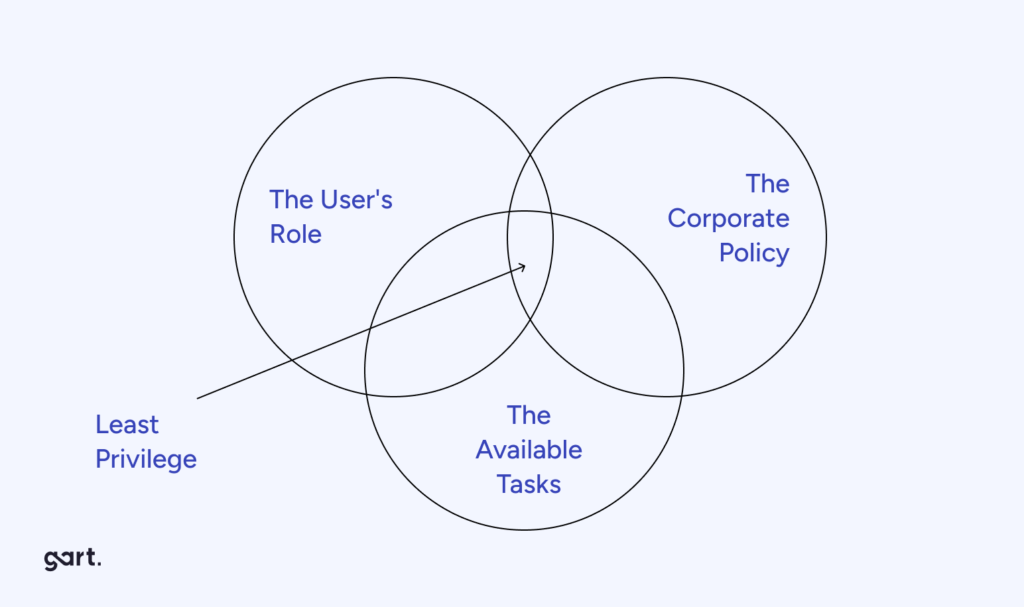
Implement Separation of Duties (SoD) as Policy
Separation of duties must be enforced by the platform not by trust. Use your CI/CD platform’s native controls to ensure that the engineer who writes the code cannot be the same person who approves it for production. Define this as a branch protection rule or environment approval policy, not a team agreement.
In a mature DevSecOps pipeline, the critical SoD controls are: separate write-code and approve-code roles; separate trigger-deploy and approve-deploy roles; and a dedicated security-review role that is independent of both development and operations.
Use Just-in-Time (JIT) Access for Elevated Permissions
Permanent elevated access is the most common source of privilege abuse in pipeline environments. Instead of assigning a Release Manager role persistently, use Just-in-Time access controls that grant elevated permissions for a specific, time-bounded window for example, the duration of a release window and automatically revoke them afterward.
Tools like HashiCorp Vault’s dynamic secrets, AWS IAM temporary credentials via STS, or purpose-built PAM solutions can automate JIT access within your pipeline workflow.
Automate Role Assignment via Infrastructure as Code
Never manage RBAC manually in the console. Codify your role assignments, permission bindings, and policy definitions in Terraform, Pulumi, or your platform’s native IaC tooling. This ensures that role changes go through code review, are tracked in version control, and can be audited by your security team via the same processes used for infrastructure changes. This is the only way to maintain RBAC consistency at scale across multiple teams and environments.
Conduct Quarterly Access Reviews
Role assignments drift over time. Engineers change teams, project phases end, and temporary access granted for specific tasks never gets revoked. Implement quarterly access reviews either automated (using tools that compare current assignments against your IaC definitions) or manual for smaller teams. Pay particular attention to service accounts, which are often forgotten and accumulate permissions silently.
Integrate RBAC Audit Logs into Your SIEM
Every role assumption, permission escalation, and access denial in your pipeline should generate an audit log event. Feed these events into your SIEM or observability stack and create alerts for anomalous patterns: off-hours deployments, role assumptions from unexpected IP ranges, bulk secret reads, or failed authorization attempts at production gates. This connects your RBAC policy to real-time threat detection.
Common RBAC Mistakes in CI/CD Pipelines (and How to Avoid Them)
Mistake 1: Using a Single All-Powerful Service Account
It is tempting to create one powerful CI service account that has access to everything secrets, deployment targets, registries, cloud APIs so that pipelines “just work.” This is also the configuration that turns a single pipeline compromise into a complete environment takeover. The fix is to create scoped service accounts per pipeline stage, each with only the permissions that stage requires. Automate this in Terraform so it scales without manual overhead.
Mistake 2: Conflating Repository Access with Pipeline Access
Having read access to a repository does not mean a user should be able to trigger a production deployment from a pipeline associated with that repository. Many teams configure CI/CD platforms so that any contributor can manually trigger any pipeline run including production deploys. Explicitly restrict manual pipeline triggers for protected environments to named roles.
Mistake 3: Not Protecting Pipeline Configuration Files
Your .gitlab-ci.yml, Jenkinsfile, or GitHub Actions workflow files are code that runs with elevated permissions. A developer who can modify the pipeline configuration file can effectively grant themselves any permission the pipeline runner holds. Treat pipeline configuration changes like infrastructure changes require peer review, protect the relevant branches, and run a policy-as-code check on pipeline config changes in your security scanning stage.
Mistake 4: Ignoring Role Hierarchy Inheritance
Most RBAC systems support role inheritance, where a higher-level role automatically inherits permissions from a lower-level role. This is convenient but dangerous if not mapped explicitly. Audit your role hierarchy to ensure that no inherited permission chain grants an unintended escalation path for example, a “Staging Deployer” role that inherits from a role that has production secret access.
Mistake 5: Neglecting RBAC in Kubernetes Clusters
If your CI/CD pipeline deploys to Kubernetes, Kubernetes RBAC is a separate, equally important control surface. Pipeline service accounts that interact with the cluster should have namespace-scoped roles, not ClusterAdmin. Use admission controllers (OPA/Gatekeeper or Kyverno) to enforce that workloads requesting elevated Kubernetes RBAC permissions are explicitly approved. The Linux Foundation‘s Kubernetes Security Specialist certification curriculum covers this in detail as a mandatory competency for any team running production workloads on Kubernetes.
The Future of Role-Based Access Control: AI-Driven and Context-Aware
The next evolution of Role-Based Access Control in DevSecOps is moving beyond static role assignments toward dynamic, context-aware access decisions informed by machine learning. Several directions are already emerging in enterprise tooling:
Behavioral anomaly detection layers ML models on top of existing RBAC logs to flag when a user or service account is behaving outside their normal pattern for example, a developer role suddenly reading production secrets at 2 AM from an unusual geographic location. This does not replace RBAC but adds a detection layer on top of it.
AI-assisted access reviews use usage telemetry to recommend permission reductions: “This role has not used its write access to the production artifact registry in 90 days consider downgrading it to read-only.” Tools like Brainwave GRC and some CIEM (Cloud Infrastructure Entitlement Management) platforms already offer this capability.
Dynamic role provisioning aligned with zero-trust principles moves toward a model where a role is not assigned persistently at all. Instead, the pipeline requests a role token for a specific task, the identity provider evaluates a policy combining role, time, environment, and behavioral context, and issues a short-lived token. This is the direction that Platform Engineering teams are building toward as internal developer platforms mature.
For most teams, the practical step today is to ensure your RBAC system generates the rich audit logs that will feed these ML models when you are ready to adopt them rather than retroactively trying to add observability to a pipeline that was built without it.
Conclusion
In the future, RBAC for DevSecOps will likely integrate with emerging technologies like AI and blockchain. AI algorithms can dynamically adjust access privileges based on user behavior patterns, while blockchain offers decentralized and immutable access control solutions.
Expect the evolution of RBAC standards to address emerging security challenges and technological advancements, with a focus on interoperability and compatibility.
RBAC adoption will shape DevSecOps culture by promoting a security-first mindset and fostering collaboration between teams. Training and education on RBAC principles may become a priority, and organizations may establish dedicated access control teams or integrate RBAC into their toolchains and processes.

See how we can help to overcome your challenges