A poorly planned cloud migration costs enterprises an average of $1.2 million in overruns alone. This guide gives CTOs, CIOs, and engineering leaders a battle-tested cloud migration strategy — from infrastructure assessment to post-migration FinOps — so you move fast, stay secure, and actually save money.
Building a robust cloud migration strategy is no longer optional — it is the defining infrastructure decision of this decade. As of 2026, cloud migration has become the mainstream operating model: 94% of enterprises use at least one cloud service, and the global cloud migration services market is valued at $31.5 billion, growing at a 22.4% CAGR. Yet despite this momentum, 38% of migration projects still exceed their original budget, and 31% miss their planned timelines.
The gap between success and failure almost always comes down to strategy — not technology. The cloud platforms themselves (AWS, Azure, GCP, OVHcloud, Hetzner) are mature and capable. What determines outcomes is how methodically you assess, plan, execute, and optimize your migration. This guide walks you through every phase.
94% of enterprises now use at least one cloud serviceSource: MarketsandMarkets 2026
38% of cloud migration projects exceed their original budgetSource: Medhacloud 2026
$31.5B cloud migration services market in 2026, growing at 22.4% CAGRSource: MarketsandMarkets
What Is a Cloud Migration Strategy?
A cloud migration strategy is a structured plan that defines what you move, where you move it, how you move it, and in what order — all mapped against your business objectives, security posture, compliance requirements, and budget. It bridges the gap between the decision to adopt cloud and the operational reality of running workloads there.
Without a strategy, organizations default to ad-hoc migration — moving whatever is easiest first, discovering incompatibilities mid-flight, and accumulating cloud debt they spend years unwinding. With a strategy, migration becomes a phased, measurable, reversible program of work that delivers business value at each stage
Why Your Cloud Migration Strategy Matters More Than Ever in 2026
Several forces are converging to make cloud migration strategy more consequential — and more complex — than at any previous point:
AI readiness is a forcing function
AI and machine learning compatibility now influences 39% of migration strategies, according to SQ Magazine's 2026 cloud adoption survey. Organizations that migrate without an AI-ready architecture are embedding technical debt from day one.
Cost pressure is intensifying
The average enterprise now allocates 29% of its IT budget to cloud infrastructure. Organizations implementing FinOps practices saw an average 19% cost reduction in 2025 — but only when FinOps was built into the migration strategy itself, not bolted on afterward.
Repatriation risk is real
25% of organizations have moved at least one workload back on-premises after cloud migration — primarily due to cost (54%) and performance (31%) issues. The majority of those organizations said better upfront cost optimization would have prevented the reversal.
Regulatory complexity is accelerating
GDPR, HIPAA, and emerging data sovereignty laws influenced cloud decisions for 31% of firms in 2025. A migration strategy that does not address data residency, compliance controls, and audit trails is a liability.
What is Cloud Migration Lifecycle?
The cloud migration lifecycle encompasses a series of phases, from assessment and planning to execution, monitoring, and optimization.
Common stages in the cloud migration lifecycle include:
1) Assessment and Discovery:
Assessing the existing IT landscape, identifying workloads and applications suitable for migration, and conducting a comprehensive analysis of dependencies, performance requirements, and compliance considerations.
2) Planning and Preparation:
Developing a detailed migration plan, defining migration strategies and priorities, estimating costs and resource requirements, and establishing governance and security frameworks to ensure a smooth migration process.
3) Migration Execution:
Executing the migration plan, including provisioning cloud resources, migrating data and applications, configuring networking and security policies, and validating functionality and performance in the cloud environment.
4) Post-Migration Testing and Validation:
Conducting thorough testing and validation to ensure that migrated workloads and applications meet performance, security, and compliance requirements in the cloud environment.
5) Optimization and Continuous Improvement:
Continuously monitoring and optimizing cloud resources, refining governance and security policies, and leveraging cloud-native services and automation tools to drive efficiency and innovation.
Here is a table outlining the steps involved in a cloud migration strategy
StepDescription1. Define ObjectivesClearly state the goals and reasons for migrating to the cloud.2. Assessment and InventoryAnalyze current IT infrastructure, applications, and data. Categorize based on suitability.3. Choose Cloud ModelDecide on public, private, or hybrid cloud deployment based on your needs.4. Select Migration ApproachDetermine the approach for each application (e.g., rehost, refactor, rearchitect).5. Estimate CostsCalculate migration and ongoing operation costs, including data transfer, storage, and compute.6. Security and ComplianceIdentify security requirements and ensure compliance with regulations.7. Data MigrationDevelop a plan for moving data, including cleansing, transformation, and validation.8. Application MigrationPlan and execute the migration of each application, considering dependencies and testing.9. Monitoring and OptimizationImplement cloud monitoring and optimize resources for cost-effectiveness.10. Training and Change ManagementTrain your team and prepare for organizational changes.11. Testing and ValidationConduct extensive testing and validation in the cloud environment.12. Deployment and Go-LiveDeploy applications, monitor, and transition users to the cloud services.13. Post-Migration ReviewReview the migration process for lessons learned and improvements.14. DocumentationMaintain documentation for configurations, security policies, and procedures.15. Governance and Cost ControlEstablish governance for cost control and resource management.16. Backup and Disaster RecoveryImplement backup and recovery strategies for data and applications.17. Continuous OptimizationContinuously review and optimize the cloud environment for efficiency.18. Scaling and GrowthPlan for future scalability and growth to accommodate evolving needs.19. Compliance and AuditingRegularly audit and ensure compliance with security and regulatory standards.20. Feedback and IterationGather feedback and make continuous improvements to your strategy.This table provides an overview of the key steps in a cloud migration strategy, which should be customized to fit the specific needs and goals of your organization.
Pre-migration preparation: analyzing your current IT landscape
Before your cloud migration journey begins, gaining a deep understanding of your current IT setup is crucial. This phase sets the stage for a successful migration by helping you make informed decisions about what, how, and where to migrate.
Assessing Your IT Infrastructure:
Inventory existing IT assets: List servers, storage, networking equipment, and data centers.
Identify migration candidates: Note their specs, dependencies, and usage rates.
Evaluate hardware condition: Decide if migration or cloud replacement is more cost-effective.
Consider lease expirations and legacy system support.
Application Assessment:
Catalog all applications: Custom-built and third-party.
Categorize by criticality: Identify mission-critical, business-critical, and non-critical apps.
Check cloud compatibility: Some may need modifications for optimal cloud performance.
Note dependencies, integrations, and data ties.
Data Inventory and Classification:
List all data assets: Databases, files, and unstructured data.
Classify data: Based on sensitivity, compliance, and business importance.
Set data retention policies: Avoid transferring unnecessary data to cut costs.
Implement encryption and data protection for sensitive data.
Based on assessments, categorize assets, apps, and data into:
Ready for Cloud: Suited for migration with minimal changes.
Needs Optimization: Benefit from pre-migration optimization.
Not Suitable for Cloud: Better kept on-premises due to limitations or costs.
These preparations ensure a smoother and cost-effective migration process.
Choose a cloud model
After understanding cloud deployment types, it's time to shape your strategy. Decide on the right deployment model:
Public Cloud: For scalability and accessibility, use providers like AWS, Azure, or Google Cloud.
Private Cloud: Ensure control and security for data privacy and compliance, either on-premises or with a dedicated provider.
Hybrid Cloud: Opt for flexibility and workload portability by combining on-premises, private, and public cloud resources.
Multi-Cloud: Multi-cloud refers to the use of multiple cloud providers to host different workloads and applications. Organizations adopt a multi-cloud strategy to mitigate vendor lock-in, enhance redundancy and fault tolerance, and optimize costs by leveraging the
Choose from major providers like AWS, Azure, Google Cloud, and others.
Read more: Choosing the Right Cloud Provider: How to Select the Perfect Fit for Your Business
Your choices impact migration success and outcomes, so assess needs, explore options, and consider long-term scalability when deciding. Your selected cloud model and provider shape your migration strategy execution and results.
Key cloud migration strategies
With your cloud model and provider(s) in place, the next critical step in your cloud migration strategy is to determine the appropriate migration approach for each application in your portfolio. Not all applications are the same, and selecting the right approach can significantly impact the success of your migration.
Here are the five common migration approaches and how to choose the appropriate one based on application characteristics:
Lift and Shift (Rehost)
Also known as rehosting, this is the simplest migration approach. Applications and workloads are moved to the cloud without modifications to their architecture. While cost-effective, it often requires post-migration optimization to harness the full benefits of the cloud. For example:
Rehosting involves moving an application to the cloud with minimal changes. It's typically the quickest and least disruptive migration approach. This approach is suitable for applications with low complexity, legacy systems, and tight timelines.
Cost Savings: Organizations pay only for what they use, reducing idle resources.
Time Efficiency: Applications can be migrated quickly, enabling businesses to explore cloud capabilities with minimal disruption.
When to Choose: Opt for rehosting when your application doesn't require significant changes or when you need a quick migration to take advantage of cloud infrastructure benefits.
Refactor (Lift Tinker and Shift)
Refactoring involves making significant changes to an application's architecture to optimize it for the cloud. This approach is suitable for applications that can benefit from cloud-native features and scalability, such as microservices or containerization.
When to Choose: Choose refactoring when you want to modernize your application, improve performance, and take full advantage of cloud-native capabilities.
Rearchitect (Rebuild)
Re-architecting involves rebuilding applications to exploit cloud-native features fully. It is ideal for:
Applications reliant on legacy technologies.
Organizations aiming for significant agility and innovation.
Handling data-intensive tasks through scalable hybrid cloud architectures.
Rearchitecting is a complete overhaul of an application, often involving a rewrite from scratch. This approach is suitable for applications that are outdated, monolithic, or require a fundamental transformation.
When to Choose: Opt for rearchitecting when your application is no longer viable in its current form, and you want to build a more scalable, resilient, and cost-effective solution in the cloud.
Replace or Repurchase (Drop and Shop)
Typically, solutions are implemented using the best available technology. SaaS applications may offer all needed functionality, allowing for future replacement and easing the transformation process.
Replatform (Lift, Tinker, and Shift)
This strategy involves making minimal changes to optimize the application for cloud environments. It enables organizations to:
Leverage managed services.
Scale resources dynamically, such as adjusting CPU throughput or reserving instances.
Discard legacy components while modernizing infrastructure.
Replatforming involves making minor adjustments to an application to make it compatible with the cloud environment. This approach is suitable for applications that need slight modifications to operate efficiently in the cloud.
When to Choose: Choose replatforming when your application is almost cloud-ready but requires a few tweaks to take full advantage of cloud capabilities.
Retire (Eliminate)
Retiring involves decommissioning or eliminating applications that are no longer needed. This approach helps streamline your portfolio and reduce unnecessary costs.
When to Choose: Opt for retirement when you have applications that are redundant, obsolete, or no longer serve a purpose in your organization.
Retain
To select the right migration approach for each application, follow these steps:
Assess each application's complexity, dependencies, and business criticality. Consider factors like performance, scalability, and regulatory requirements.
Ensure the chosen approach aligns with your overall migration goals, such as cost savings, improved performance, or innovation.
Assess the availability of skilled resources for each migration approach. Some approaches may require specialized expertise.
Conduct a cost-benefit analysis to evaluate the expected return on investment (ROI) for each migration approach.
Consider the risks associated with each approach, including potential disruptions to operations and data security.
Ready to harness the potential of the cloud? Let us take the complexity out of your migration journey, ensuring a smooth and successful transition.
Challenges in cloud migration
Despite its advantages, cloud migration comes with challenges:
Integration Complexity: Legacy systems often rely on proprietary formats, making seamless integration with cloud platforms challenging.
Data Security: Ensuring compliance with regional regulations and implementing robust encryption is critical.
Performance Optimization: Addressing latency, data transfer speeds, and workload distribution is essential for a successful migration.
For instance, businesses leveraging Platform as a Service (PaaS) benefit from streamlined operations but must manage compatibility issues with legacy systems.
Security and compliance in cloud migration
When you're thinking about moving to the cloud, security should be at the top of your mind. Think about it – you're dealing with massive amounts of data, and some of it might be pretty sensitive stuff. If something goes wrong and there's a security breach, it's not just about losing data – your organization's reputation could take a serious hit, and you might find yourself in hot water legally.
One of the biggest challenges is making sure only the right people can get their hands on your cloud resources. You definitely don't want unauthorized users poking around in there, as that's basically leaving the door open for data leaks and security nightmares.
And here's something you can't afford to overlook – compliance. Whether you're in healthcare dealing with HIPAA, handling credit card data under PCI DSS, or working with European customers under GDPR, there are some serious rules you need to follow. Skip these requirements, and you could be looking at hefty fines and legal troubles. Trust me, that's not a headache anyone wants to deal with.
Here's a short case study for HIPAA compliance - CI/CD Pipelines and Infrastructure for an E-Health Platform
Cloud migration success stories
When considering cloud migration, success stories often serve as beacons of inspiration and guidance. Here, we delve into three real-life case studies from Gart's portfolio, showcasing how our tailored cloud migration strategies led to remarkable outcomes for organizations of varying sizes and industries.
Case Study 1: Migration from On-Premise to AWS for a Financial Company
Industry: Finances
Our client, a major player in the payment industry, sought Gart's expertise for migrating their Visa Mastercard processing application from On-Premise to AWS, aiming for a "lift and shift" approach. This move, while complex, offered significant benefits.
Key Outcomes:
Cost Savings: AWS's pay-as-you-go model eliminated upfront investments, optimizing long-term costs.
Scalability and Flexibility: Elastic infrastructure allowed resource scaling, ensuring uninterrupted services during peak periods.
Enhanced Performance: AWS's global network reduced latency, improving user experience.
Security and Compliance: Robust security features and certifications ensured data protection and compliance.
Reliability: High availability design minimized downtime, promoting continuous operations.
Global Reach: AWS's global network facilitated expansion to new markets and regions.
Automated Backups and Disaster Recovery: Automated solutions ensured data protection and business continuity.
This migration empowered the financial company to optimize operations, reduce costs, and deliver enhanced services, setting the stage for future growth and scalability.
Case Study 2: Implementing Nomad Cluster for Massively Parallel Computing
Industry: e-Commerce
Our client, a software company specializing in Earth modeling, faced challenges in managing parallel processing on AWS instances. They sought a solution to separate software from infrastructure, support multi-tenancy, and enhance efficiency.
Key Outcomes:
Infrastructure Efficiency: Infrastructure-as-Code and containerization simplified management.
High-Performance Computing: HashiCorp Nomad orchestrates high-performance computing, addressing spot instance issues.
Vendor Flexibility: Avoided vendor lock-in with third-party integrations.
This implementation elevated infrastructure management, ensuring scalability and efficiency while preserving vendor flexibility
Future trends of cloud migration
The evolution of cloud computing will continue to redefine business strategies. Emerging trends include:
Green IT: Sustainable cloud solutions aim to balance scalability with energy efficiency.
AI Integration: Leveraging artificial intelligence in cloud platforms enhances automation and decision-making processes.
At Gart, we stand ready to help your organization embark on its cloud migration journey, no matter the scale or complexity. Your success story in the cloud awaits – contact us today to turn your vision into reality.
Fedir Kompaniiets
Co-founder & CEO, Gart Solutions · Cloud Architect & DevOps Consultant
Fedir is a technology enthusiast with over a decade of diverse industry experience. He co-founded Gart Solutions to address complex tech challenges related to Digital Transformation, helping businesses focus on what matters most — scaling. Fedir is committed to driving sustainable IT transformation, helping SMBs innovate, plan future growth, and navigate the "tech madness" through expert DevOps and Cloud managed services. Connect on LinkedIn.
IT infrastructure is the digital backbone—without it, your business is basically running on duct tape and good vibes. At its core, it’s the mix of hardware, software, networks, and facilities that keep everything from email to enterprise apps alive and kicking.
There are different types of IT infrastructure to know about:
Physical: servers, storage, routers, switches—plus the data centers that keep them cool and secure.
Logical: operating systems, databases, middleware, and apps like CRM or ERP that turn raw hardware into actual business value.
Networks: LANs, WANs, firewalls, and protocols—the traffic cops making sure data flows where it should.
Once, infrastructure was just expensive boxes humming in basements. Now it’s a strategic asset—and the smarter you choose and manage it, the faster, leaner, and more competitive your business becomes.
The Core Models of IT Infrastructure
When it comes to types of IT infrastructure, there are three big players on the field—each balancing control, cost, and flexibility in its own way. Let’s break it down.
1. Traditional On-Premises: The Control Freak’s Dream
Old-school but not obsolete. On-premises means you own it all—servers, storage, networking gear, and the data center they live in. The big perk? Total control. You get to customize everything, keep data locked inside your walls, and deliver low-latency performance for mission-critical apps. That’s why banks, hospitals, and industries with tough compliance rules still love it.
But here’s the catch: it’s pricey. Think massive upfront CapEx (hardware, licenses, cooling, IT staff salaries—the works). Scaling is slow and painful because every upgrade means buying and installing more gear. Still, for organizations with legacy systems or strict data rules, on-prem remains a solid bet—and it’s evolving with modern twists like on-prem clouds that give a cloud-like experience without going full migration.
2. Cloud Infrastructure: Agility on Tap
Now flip the script. Cloud says, “Stop buying servers, rent them instead.” Providers like AWS, Azure, and Google Cloud run massive global data centers, and you tap into their resources on demand. Pay-as-you-go (OpEx) keeps costs flexible, and scaling is as easy as a few clicks.
You’ve got two main flavors:
Public Cloud → Shared infrastructure, cheap, and endlessly scalable. Think of it like renting an apartment—you don’t own the building, but you can move in fast. Downsides? Less control and potential security concerns in multi-tenant setups.
Private Cloud → Dedicated to just your org, either in your own data center or managed elsewhere. More secure, more control, easier for compliance-heavy industries—but higher cost and less elasticity than public.
Cloud is the go-to for agility, but every company has to weigh control vs. convenience. (And spoiler: hybrid models are where a lot of businesses land, blending the best of both worlds.)
ModelOwnershipCost StructureScalabilitySecurity & ControlCompliance FitPrimary Use CasePublic CloudThird-party providerOpEx (Pay-as-you-go)High/ElasticShared/LessGeneralVariable workloads, web appsPrivate CloudSingle organizationCapEx/Fixed OpExLimitedDedicated/FullStrictRegulated industries, mission-critical systemsHybrid CloudMixedMixedHigh/FlexibleSplit/CustomizableBest of both worldsBlended needs, gradual migration
3. The “As-a-Service” Stack: IaaS, PaaS & SaaS
If on-prem vs. cloud is about where your infrastructure lives, the “as-a-service” stack is about how you use it. Think of it like housing options: do you want to build it, partly furnish it, or just move in with your suitcase?
Infrastructure as a Service (IaaS) → Renting the raw materials. You get compute, storage, and networking on demand. The provider keeps the data center humming; you handle the OS, apps, and data. Perfect for website hosting, analytics, disaster recovery, or as the backbone of a hybrid cloud.
Platform as a Service (PaaS) → Hiring a contractor for a move-in-ready shell. Servers, networking, databases—it’s all handled. Developers just write code, ship faster, and skip the messy infrastructure stuff. Great for agile teams, DevOps, and IoT projects.
Software as a Service (SaaS) → The turnkey option. Fully furnished, Wi-Fi included, just bring your login. Apps like Microsoft 365, Google Workspace, or Salesforce are ready to roll with zero setup. Easy, convenient—but limited customization.
Most companies don’t stick to just one layer. They mix and match all three to keep costs predictable, speed up innovation, and stay flexible as business needs change.
The Strategic Evolution of Infrastructure
Gone are the days when companies had to pick a side—on-prem or cloud, Coke or Pepsi. Today, smart organizations play mix-and-match with their infrastructure, building strategies that flex with business needs. Enter hybrid and multi-cloud: the power couples of modern IT.
1. Hybrid Cloud: The Best of Both Worlds
Think of hybrid cloud as the “work hard, play hard” model of IT. You keep mission-critical or sensitive workloads safe in your private data center, while pushing less-sensitive tasks—like dev and testing—into the public cloud for speed and scale. When traffic suddenly spikes, you can “burst” into the public cloud instead of overbuilding your private setup.
Why it rocks:
Flexibility & Scale → Dynamic resource allocation without overbuying hardware.
Cost Efficiency → Pay-as-you-go for variable workloads, CapEx savings for the rest.
Control Where It Counts → Sensitive data stays locked down.
A real-world example: One company ditched aging on-prem gear, moved to a colocation facility with direct cloud connections, boosted performance, cut downtime, and shaved 40% off bandwidth costs. That’s hybrid cloud in action.
The trade-off? Complexity. Stitching together private and public environments is tricky. Misconfigurations, compatibility issues, and data integration headaches are par for the course. But if done right, hybrid cloud delivers agility without losing control.
2. Multi-Cloud: The Strategy of Choice
If hybrid is about balance, multi-cloud is about freedom of choice. Instead of putting all your eggs in one provider’s basket, you spread workloads across AWS, Azure, Google Cloud, and friends.
Why companies love it:
No Vendor Lock-In → Negotiate better, avoid surprises in pricing or service shifts.
Best-of-Breed Services → Grab Google’s ML smarts, AWS’s compute muscle, and Azure’s Microsoft-native integrations—all at once.
Resilience → If one provider has an outage, your business doesn’t grind to a halt.
Of course, there’s a catch. Multi-cloud requires a squad of cloud ninjas to juggle different APIs, billing systems, and security models. And don’t underestimate those pesky data transfer fees—they add up faster than you’d think.
Still, for organizations that value freedom, flexibility, and resilience, multi-cloud is the power move.
3. Hybrid vs. Multi-Cloud: A Strategic Comparison
The distinction between hybrid cloud and multi-cloud can be a source of confusion. The core difference lies in their primary strategic driver. A hybrid cloud is about connecting a private environment with a public cloud, often to orchestrate a single solution or to satisfy compliance and security requirements. A multi-cloud strategy, by contrast, is about using multiple public cloud services, often for distinct functions, to gain flexibility and avoid vendor lock-in. The following table provides a concise comparison to help guide strategic decision-making.
FeatureHybrid CloudMulti-CloudPrimary DriverRegulatory compliance, existing infrastructure, gradual migration Avoiding vendor lock-in, resilience, best-of-breed services Key AdvantageControl over sensitive data, cost efficiency by right-sizing workloads Flexibility, cost optimization through competition, improved redundancy Primary DisadvantageManagement complexity, potential data integration issues Increased management complexity, unexpected data egress fees Common Use CaseWorkloads with strict compliance, companies modernizing legacy systems Cloud-native applications, web services, variable workloads
Strategic Shifts and Emerging Trends
IT infrastructure isn’t standing still. The rules are changing, and organizations are rethinking where workloads live, how they’re managed, and what tools will power the next decade of digital growth. Three big shifts stand out: repatriation, new architectures, and the rise of AI + automation.
1. Cloud Repatriation: Workloads Come Home
The old mantra was cloud-first. Now it’s more like cloud-smart. Companies are pulling certain workloads back from the public cloud to private or on-prem setups. Why?
Cost surprises → Pay-as-you-go sounds great until data egress and variable usage fees balloon. For steady workloads, on-prem can be cheaper.
Performance needs → Latency matters. Think high-frequency trading or real-time analytics—you don’t want packets making a world tour.
Regulations & control → Finance, healthcare, and other heavily regulated industries often need data sovereignty and ironclad compliance.
This isn’t a cloud “breakup.” It’s a maturity move: placing each workload where it performs best, whether that’s cloud, edge, or on-prem.
2. New Architectures: Rethinking the Stack
Three trends are reshaping the very DNA of IT:
Hyperconverged Infrastructure (HCI) → Storage, compute, and networking rolled into one software-defined package. Cloud-like simplicity, but on-prem.
Infrastructure as Code (IaC) → Forget manual tinkering. Provision and manage infrastructure like you’d ship code: fast, repeatable, transparent. A must-have for hybrid and multi-cloud ops.
Edge Computing → Push compute closer to the action—factories, hospitals, cars—so data gets processed in real time. Perfect for IoT, AI, and latency-sensitive workloads.
Together, these trends blur the line between cloud and on-prem, creating a distributed continuum that stretches from edge devices to global hyperscale data centers.
3. AI + Automation: Running at Machine Speed
Modern infrastructure is simply too complex for humans to manage solo. Enter AI and automation:
AIOps → AI-powered ops that handle event correlation, anomaly detection, and performance monitoring automatically. Less firefighting, more strategy.
AI in Cybersecurity → Threats move faster than human teams. AI steps in with real-time detection, automated response, and continuous access validation.
The new IT pro isn’t just patching servers. They’re coding, orchestrating, and governing intelligent systems that do the heavy lifting. In other words: less “hands on keyboard,” more “architect of the future.”
Navigating the Future of IT Infrastructure
The next era of IT isn’t about picking one model and sticking with it. It’s about orchestration—managing a continuum of interconnected resources that flex around business needs. We’re moving from cloud-first to workload-first: every decision starts with the workload, not with the hype.
1. A Strategic Framework for Workload Placement
Instead of defaulting to “cloud everywhere,” leaders should evaluate workloads through four lenses:
Workload requirements → Is demand predictable or spiky? Does it need extreme performance, like high-frequency trading or real-time analytics?
Compliance & security → Does regulation (GDPR, HIPAA, data sovereignty) lock it down to private or on-prem?
Cost model → CapEx vs. OpEx. Is predictable cost stability more important than flexibility?
Internal expertise → Can the team realistically manage multi-cloud APIs, hybrid setups, and complex security models?
The result: right-sizing infrastructure, placing each workload where it balances cost, performance, and compliance best.
2. What Analysts See on the Horizon
Industry forecasts point to a hybrid, intelligent, and highly distributed future:
Gartner → By 2027, 90% of orgs will run hybrid cloud strategies. Public cloud spend still soars, hitting $723B in 2025—much of it AI-driven.
IDC → By 2025, half of the Global 2000 will shift HPC workloads back on-prem, colocation, or managed services. Cloud isn’t disappearing—it’s diversifying.
Forrester → The “intelligent composable cloud” will let businesses assemble bespoke environments—AI-enhanced, abstracted, and modular.
McKinsey → Infrastructure is splitting into two speeds: giant hyperscale data centers powering AI training, and lightweight edge systems running in cars, factories, and phones. Winning means balancing both.
3. The Dynamic and Composable Future
The takeaway: IT infrastructure is no longer a binary choice. It’s a living, adaptive system. Organizations that thrive will:
Blend on-prem, private, and public cloud in one flexible continuum.
Use IaC, automation, and AI to manage complexity at scale.
Shift from manual firefighting to strategic, code-driven governance.
The future isn’t static—it’s composable. The businesses that succeed will be the ones that stop chasing a “perfect model” and instead master the art of constant orchestration.
Key takeaways
Repatriation is usually selective. Surveys show most enterprises plan to move some workloads back, but only a small minority plan a full exit.
The best candidates are steady, storage-heavy, egress-heavy or latency-sensitive workloads. Bursty, early-stage and globally distributed workloads usually belong in the cloud.
Published savings cases are real but specific: Dropbox and 37signals are large, stable, storage-intensive businesses. Your result depends on your own TCO model.
In our illustrative mid-size SaaS model below, run-rate savings reach about 47%, payback takes roughly two years, and five-year savings are about 28%. With a heavier operations team or a smaller cloud bill, the case weakens or disappears.
In the EU, DORA exit-strategy rules and the Data Act's ban on switching charges (from 12 January 2027) make exit readiness a governance topic, not only a cost topic.
What cloud repatriation is (and isn't)
Cloud repatriation means moving selected workloads, data or applications from a public cloud provider to private infrastructure — colocation, bare metal, a private cloud or an on-premises data centre — while usually keeping other workloads in the public cloud.
It is not a verdict that the cloud failed. For early-stage products, uncertain demand and global distribution, public cloud remains hard to beat. Repatriation becomes relevant later, when some workloads have settled into predictable patterns and the premium paid for elasticity is no longer buying anything.
We find it more useful to think in terms of workload placement: each system runs where its cost, performance and compliance profile fit best, and that placement is reviewed as the business matures.
How widespread is it? What the surveys actually say
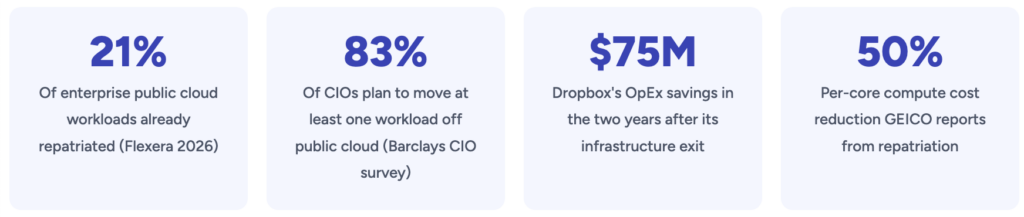
The headline figure most often quoted comes from Barclays' CIO survey: in the first half of 2024, 83% of enterprise CIOs said they planned to move at least some workloads back from public cloud, up from 43% in late 2020 (EE Times Europe). A later edition of the survey put the figure at 86% (Cyfuture summary).
Two caveats matter. First, "plan to move at least one workload" is a low bar — it says nothing about what share of spend moves. Second, IDC research cited across the industry suggests only around 8–9% of companies plan a full-scale repatriation (CNIC Solutions summary). The realistic picture is partial moves and hybrid estates, not a mass exodus.
Why the economics shift as workloads mature
Public cloud pricing bundles three things: the infrastructure itself, the provider's operations, and the option to scale up or down at will. Early on, that option is valuable. Once a workload runs at a steady baseline 24/7, you keep paying for flexibility you no longer use.
Andreessen Horowitz's widely cited analysis, The Cost of Cloud, a Trillion Dollar Paradox (2021), put numbers on this for public software companies. The authors estimated that committed cloud spend averaged roughly half of cost of revenue across the companies they studied, and reported one billion-dollar private company whose cloud spend reached 81% of cost of revenue. Based on expert interviews, they used a working assumption that repatriation runs equivalent workloads at one-third to one-half of the cloud cost (a16z).
That analysis is an estimate built on interviews and filings, not a controlled study, and it focused on large software companies. It is a useful frame for why margins matter, not a forecast for any individual company.
The cost drivers to measure in your own bill
This is the Cloud Paradox:
the infrastructure that accelerates early growth becomes a structural tax on mature businesses.
Venture capital and public market analysts have quantified the impact. Across large software companies, cloud spend has been shown to suppress gross margins by 15–25 percentage points. Because valuation is a function of gross profit, this does not merely reduce cash flow—it destroys equity value.
At scale, cloud costs are no longer an operational detail. They become a board-level concern.
From Agility to Efficiency: A Two-Stage Infrastructure Model
The emerging consensus among infrastructure leaders is not “cloud versus on-prem,” but phase-appropriate infrastructure.
Stage 1: The Agility Phase
In the early lifecycle of a product or platform, uncertainty dominates.
Demand is volatile
Architecture is still evolving
Speed matters more than efficiency
Public cloud excels here. Elasticity, managed services, and global reach justify the premium. Paying for flexibility makes sense because flexibility is actively used.
Stage 2: The Efficiency Phase
As products mature, priorities change.
Workloads enter steady state
Usage becomes predictable
Margins and cost per transaction matter
At this stage, elasticity becomes overhead. Enterprises continue paying for burst capacity they no longer need, for abstraction layers they cannot tune, and for network paths they do not control.
Infrastructure Maturity means recognizing when a workload has crossed from Stage 1 to Stage 2—and moving it accordingly.
Deconstructing the Cloud Tax
The “cloud tax” is not a single line item. It is the cumulative effect of multiple structural costs that only become visible at scale.
1. Data Egress and Network Friction
Ingress is cheap. Egress is not.
For data-intensive workloads, network charges routinely account for 20–40% of total cloud spend. Cross-region replication, analytics pipelines, AI training data, and customer exports all trigger fees that are difficult to forecast and harder to optimize.
This creates economic lock-in: data can enter easily, but leaving is expensive.
2. Virtualization Overhead
Public cloud relies on deep abstraction. That abstraction introduces measurable performance loss—typically 5–15% per workload, which must be compensated for with additional compute.
For high-throughput databases, AI inference, real-time analytics, and latency-sensitive systems, this overhead translates directly into higher cost per request and inconsistent performance.
3. Cost Volatility
Usage-based pricing creates financial unpredictability. Infrastructure becomes a variable expense tied not just to growth, but to architectural decisions, user behavior, and even API design.
For CFOs and boards, this volatility complicates forecasting, valuation, and long-term planning.
Rather than relying on generic percentages, these are the line items we examine first in a repatriation assessment:
Data egress and transferInternet egress, cross-region replication, cross-AZ traffic and NAT processing are billed per GB. At AWS list prices, internet egress starts at about $0.09/GB in most regions. For data-heavy products, this line can grow faster than compute.
Steady-state computeInstances running at a stable baseline around the clock are the clearest candidates, especially after Savings Plans or Reserved Instances are already applied.
Storage growth. Object and block storage that grows continuously but is rarely deleted.
Performance-sensitive systemsDatabases, real-time analytics and inference services where you may be over-provisioning to compensate for noisy neighbours or abstraction overhead. The size of that overhead varies by workload, so we benchmark it rather than assume it.
Cost volatility. How much monthly spend deviates from forecast, and how hard that makes budgeting and margin planning.
If you haven't yet optimised the cloud bill itself — rightsizing, commitments, storage tiers, VPC endpoints — do that first. Many "repatriation" cases turn out to be optimisation cases.
See our guide to cloud cost optimization traps.
Real-world cases, with their context
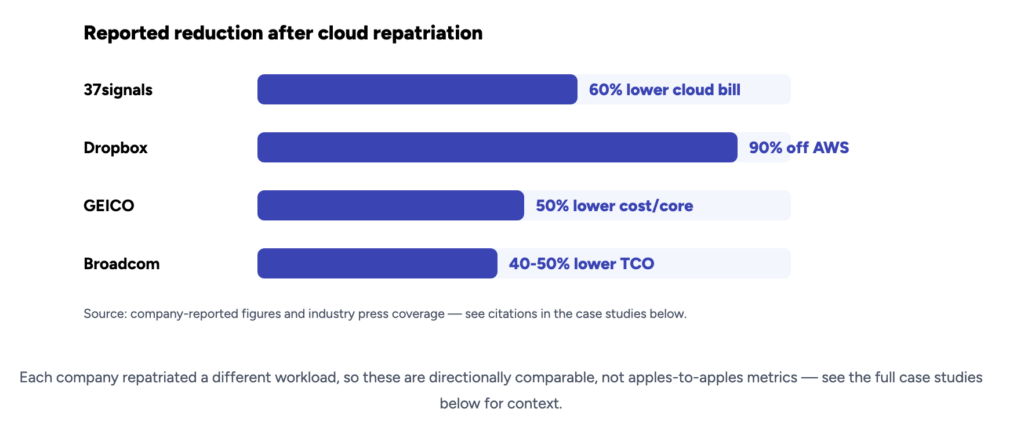
DropboxDropbox's 2018 S-1 filing describes an "Infrastructure Optimization" programme that moved most user data from a third-party provider to its own custom infrastructure in leased colocation facilities. In 2016, payments to the third-party provider fell by $92.5M, offset by a $53.0M increase in depreciation, facilities and support costs — a net decrease of $39.5M. A further $35.1M reduction followed in 2017, for about $74.6M over two years (Dropbox S-1, SEC; GeekWire). Context: Dropbox operates at very large storage scale and kept using AWS for a portion of its storage and for some regions.
37signals (Basecamp, HEY)37signals reported a 2022 cloud bill of about $3.2M. In early 2023 it projected spending roughly $840,000 a year on owned hardware (amortised over five years) and colocation, versus about $2.3M in comparable cloud costs, and estimated $7M saved over five years (DatacenterDynamics). In October 2024 the company said its annual cloud bill had dropped to about $1.3M (remaining S3 storage), that the ~$700K of new servers had been recouped from savings during 2023, and raised its five-year estimate to more than $10M once storage moves too (DatacenterDynamics). Context: these are company-reported figures, and observers note they exclude some costs, such as future hardware refreshes and part of the operations overhead. 37signals also already had operations staff and existing data centre space.
What both cases share: large, stable, storage-heavy workloads, existing in-house infrastructure skills, and a hybrid end state rather than zero cloud.
How we built the numbers: methodology
The worked example below is illustrative. It is a composite of the cost structures we typically see in mid-size SaaS assessments, not a single client's data. These are the assumptions behind it:
ScopeOne production platform: steady compute, ~500 TB of block and object storage, ~150 TB/month of internet egress, managed databases and load balancers.
Cloud baselineCurrent monthly bill after existing Savings Plans and storage-tier optimisation, so we compare against an already-optimised cloud, not list price.
Time horizon3 and 5 years. Hardware is depreciated over 5 years; no refresh falls inside the window.
Upfront costsServer and storage hardware, plus a one-off migration budget covering engineering time, dual-running both environments during cut-over, and data transfer.
Ongoing private costsColocation rack space and power, internet transit, hardware support contracts (8% of hardware cost per year), operations staffing (fully loaded), software licences, and a residual cloud footprint for DR, burst capacity and edge delivery.
ExcludedPrice changes over the period, financing costs, tax effects, and the opportunity cost of engineering time not spent on product.
When we run this for a client, every input comes from their billing exports, utilisation metrics and vendor quotes, and we document each assumption so finance can challenge it.
Worked example: 5-year TCO for a mid-size SaaS platform
Current public cloud spend (monthly, after commitments)
Line itemMonthlyAnnualCompute (after Savings Plans)$46,000$552,000Block + object storage (~500 TB)$14,000$168,000Internet egress (~150 TB)$11,000$132,000Managed databases, load balancers, misc.$9,000$108,000Total$80,000$960,000
Repatriated / hybrid alternative
ItemCostHardware (servers, storage, network) — one-off$650,000Migration, dual-running and data transfer — one-off$250,000Colocation, 4 racks incl. power — per year$120,000Internet transit — per year$36,000Hardware support (8% of hardware) — per year$52,000Operations staffing (1.5 FTE, fully loaded) — per year$165,000Software licences — per year$40,000Residual cloud (DR, burst, CDN/edge) — per year$96,000Ongoing total — per year$509,000
Results
MetricValueRun-rate saving per year$451,000 (≈47% of the cloud bill)Upfront investment$900,000Simple payback≈24 months3-year cumulative cost: cloud vs. hybrid$2.88M vs. $2.43M → saving ≈$453K (≈16%)5-year cumulative cost: cloud vs. hybrid$4.80M vs. $3.45M → saving ≈$1.36M (≈28%)
Note how different the three numbers look. The run-rate saving (47%) is the figure people like to quote. The 3-year saving (16%) is what a CFO sees once the upfront investment is included. Both are true; only one belongs in a board deck without a footnote.
Sensitivity: what breaks the case
ScenarioEffectOperations team needs 3 FTE instead of 1.5Payback stretches to ≈38 months; 5-year saving falls to ≈$530K (≈11%)Cloud bill is $30K/month instead of $80K (smaller footprint, ~$450K upfront, 1 FTE)5-year result turns negative: roughly –$105KWorkload becomes bursty (needs 2× peak capacity on-prem)Hardware and colocation costs rise sharply; usually stay in cloud
The two variables that move results most are operations staffing and the size and stability of the cloud bill. If you can't staff the private environment (or buy managed colocation and remote hands), the savings evaporate.
When repatriation is the wrong move
Repatriation is a poor fit — or premature — in these situations:
Your cloud bill is modestBelow a few hundred thousand dollars a year, fixed costs (staff, contracts, minimum rack commitments) tend to eat the savings, as the sensitivity table shows.
Demand is spiky or unpredictableSeasonal retail, event-driven platforms and new products benefit from paying only for peaks.
You rely heavily on managed or proprietary servicesRebuilding the equivalent of a managed data warehouse, serverless stack or ML platform can cost more than it saves.
You lack infrastructure operations skills and don't want to build or buy them.
You need global reach or low-latency edge delivery in many regions.
You haven't optimised the cloud yetRightsizing, commitments and storage tiering often recover a meaningful share of spend for far less effort.
The architecture is about to changeCommitting to five years of hardware just before a major re-platforming locks in the wrong capacity.
The business case depends on hard-to-forecast growthIf capacity needs could double or halve within two years, flexibility is worth paying for.
In these cases, the right move is usually cloud cost optimisation, better commitment planning, or keeping an exit plan on paper rather than executing it.
AI workloads: a case to model, not to assume
GPU-heavy AI training and inference have renewed interest in dedicated infrastructure. The reasoning: long-running training jobs keep expensive accelerators busy for weeks, large datasets are costly to move repeatedly, and teams want predictable capacity.
The economics are highly specific, though. Compare on-demand, reserved and spot GPU pricing from hyperscalers, specialised GPU cloud providers and colocation options against your actual utilisation. Dedicated GPU clusters pay off when they stay busy; idle accelerators are among the most expensive assets a company can own. For more on planning this, see building AI-ready infrastructure.
Regulation: exit readiness in the EU
Two EU regulations make exit planning a concrete obligation rather than a nice-to-have:
DORA (Digital Operational Resilience Act). Applicable to EU financial entities since 17 January 2025, DORA Article 28(8) requires documented exit strategies for ICT services that support critical or important functions, and these should be tested and reviewed (Swfte overview; FAST LTA).
EU Data Act. Its cloud-switching rules allow only cost-based switching charges until 12 January 2027; from that date, switching charges — including data egress fees tied to a switch — are prohibited. The ban covers switching providers or moving to on-premises, not ordinary day-to-day egress (Lindahl)
Major hyperscalers already waived egress fees for customers making a full exit in 2024. Lower exit costs don't make repatriation automatically worthwhile, but they remove one barrier and make a credible exit plan easier to document. Read more: Digital Sovereignty of Europe: Choosing the EU Cloud Provider.
Why it is more feasible now
A decade ago, leaving the cloud often meant giving up operational convenience. That gap has narrowed:
Kubernetes and infrastructure-as-code (Terraform, Ansible) behave consistently across cloud and bare metal.
Modern deployment tooling supports zero-downtime releases outside hyperscalers.
Open storage and networking standards preserve portability.
Colocation providers offer remote hands and managed facilities, so you don't need to run your own building.
The operational gap is smaller, but not zero. Someone still has to own hardware lifecycle, capacity planning, security patching and incident response.
Regulation and infrastructure sovereignty
Cost and performance are no longer the only drivers.
By 2026, documented exit capability is becoming a regulatory requirement across multiple jurisdictions. Financial services, healthcare, critical infrastructure, and government-adjacent organizations must now prove they can disengage from cloud providers without service disruption.
This shifts repatriation from an optimization choice to a compliance obligation.
Infrastructure that cannot be exited is no longer considered resilient.
Read more: Digital Sovereignty of Europe: Choosing the EU Cloud Provider
Why Cloud Repatriation is feasible now
A decade ago, leaving the cloud meant sacrificing operational convenience. That is no longer true.
Modern deployment tools enable zero-downtime releases on bare metal with minimal operational overhead
Kubernetes behaves consistently across environments
Open storage and networking standards preserve portability
Colocation providers offer managed facilities without hyperscaler markups
The operational gap between public cloud and private infrastructure has narrowed dramatically. What remains is a cost and control gap—and that gap favors maturity.
Building a cloud exit strategy: a maturity framework
Successful cloud repatriation is selective, not absolute.
Audit and classify workloadsIdentify steady-state systems paying for unused elasticity.
Model long-term economicsCompare 3–5 year total cost of ownership, including margin impact—not just infrastructure invoices.
Assess operational readinessDetermine whether to own operations fully or pair private hardware with managed facilities.
Ensure portabilityStandardize data formats, deployment pipelines, and orchestration layers.
Rehearse the exitTreat exit readiness as an operational capability, not a contingency document.
The hybrid maturity era
The future is not cloud-only or on-prem-only. It is hybrid by design.
Public cloud remains the best tool for experimentation, global distribution, and burst workloads
Private infrastructure anchors predictable compute, core data, and margin-sensitive systems
Enterprises that succeed by 2026 will be those that treat infrastructure placement as a strategic lever—not a default setting.
Repatriation is not a step backward.It is the moment an organization proves it understands its own economics.
Strategic priorities for 2025–2026
Identify workloads that have outgrown elasticity
Reassess AI infrastructure economics early
Embed exit readiness into governance
Standardize on portable tooling
Elevate infrastructure cost to a valuation metric
The cloud was never the destination. It was the on-ramp.
Infrastructure Maturity is knowing when to change lanes.
The hybrid end state
In most of the engagements we see, the result is hybrid by design. Public cloud handles experimentation, burst capacity and global distribution. Private infrastructure carries predictable compute, core data and margin-sensitive systems. The placement is reviewed as workloads change — some may move back to the cloud later, and that should be easy too.
Repatriation isn't a step backwards. Done well, it shows an organisation understands its own unit economics well enough to put each workload where it belongs.
Want a fact-based view of your own numbers? Gart's IT audit maps your workloads, models 3- and 5-year TCO from your actual billing data, and shows which systems — if any — are worth moving.
Contact us