- What Does Cloud Computing Mean and Why Most Enterprises Use It?
- What Is On-Premises Infrastructure?
- On-Premises Infrastructure
- Key Market Statistics for 2026
- Cost & Total Cost of Ownership (TCO)
- Security & Compliance
- Scalability & Performance
- Control & Customization
- Maintenance & Operational Overhead
- Performance and Scalability: Cloud vs. Bare Metal
- Compliance, Data Sovereignty & Security: Cloud vs. On‑Premises
- Cloud Provider Security Measures vs. In-House Security
- Full Cloud vs. On-Premises Comparison
- The Future is Hybrid
- When to Choose Cloud
- When to Choose On-Premises
- The Hybrid Approach: The Best of Both Worlds
- Typical Hybrid Architecture Pattern
- Pros & Cons Summary
- Conclusion: There Is No Universal Answer
- Not Sure Which Path Is Right for You?
- In Conclusion
Every growing organization eventually faces the same pivotal question: should workloads run in the cloud or on your own servers? The answer shapes your IT budget, your security posture, your team’s agility, and your long-term competitive position.
The cloud vs. on-premises debate is no longer a binary choice between “modern” and “outdated.” In 2026, both models coexist — sometimes even inside the same organization — each solving different problems better than the other. What matters is knowing which problems each solves, so you can build infrastructure that fits your strategy instead of the other way around.
This guide covers every dimension that actually matters: total cost of ownership, security, scalability, compliance, control, and operational overhead. By the end, you’ll have a clear, data-backed framework for your decision — and you’ll know exactly when to call in a specialist to help you execute it.
What Does Cloud Computing Mean and Why Most Enterprises Use It?
Cloud computing delivers computing resources — servers, storage, databases, networking, software, analytics, and intelligence — over the internet (“the cloud”) on a pay-as-you-go basis. Instead of owning and operating physical data centers, you rent capacity from a provider that manages the underlying infrastructure.
The three major cloud deployment models are:
- Public Cloud — Resources are owned and operated by a third-party provider (AWS, Microsoft Azure, Google Cloud) and shared across multiple customers. Highest elasticity, lowest upfront cost.
- Private Cloud — Cloud infrastructure dedicated exclusively to one organization, either on-site or hosted by a third party. More control, less sharing.
- Hybrid Cloud — A combination of public and private cloud environments integrated to allow data and applications to move between them. The dominant model in enterprise IT by 2026.
The three primary cloud service models are IaaS (Infrastructure as a Service), PaaS (Platform as a Service), and SaaS (Software as a Service) — each shifting a different amount of management responsibility from your team to the provider.
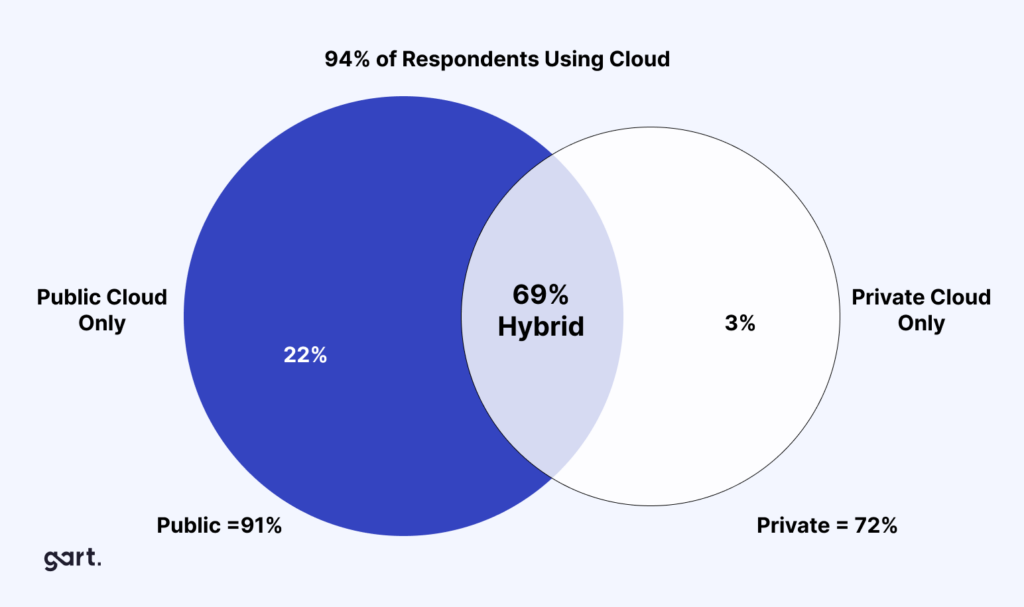
As of 2019, 94% of enterprises used cloud services (Source: Flexera), and by 2025, 85% of IT strategies will be cloud-first (Source: Gartner).
Why?
Cloud eliminates the upfront costs of buying and maintaining hardware. You only pay for the resources you use, leading to significant potential savings.
Cloud providers handle software updates and security patches, freeing up your IT staff for other tasks. Access your data and applications from anywhere with an internet connection, promoting remote work and collaboration.
Key Cloud Benefits:
- Elastic Resources: Scale up or down instantly.
- Reduced Maintenance: Providers handle updates, patches, and uptime.
- Cost Efficiency: Pay only for what you use (OpEx model).
- Remote Access: Support distributed teams and collaboration.
- Innovation Ready: Experiment faster with new tools and services.
What Is On-Premises Infrastructure?
On-premises (on-prem) infrastructure means that all hardware and software is physically located within your organization’s own facilities — your office, your data center, or a co-location space you lease. Your IT team is responsible for purchasing, installing, maintaining, securing, and eventually replacing every component. Also known as bare metal, it refers to computing resources physically located and managed within your organization’s facilities.
On-premises deployments give organizations full physical and logical control over their data and systems. There are no shared tenancy concerns, no egress fees, and no dependency on a third-party provider’s uptime or policy changes. The trade-off is that all of that responsibility — and cost — falls entirely on your own team.
Key distinction:
On-premises is sometimes confused with “private cloud.” A private cloud can be hosted off-site by a managed services provider; on-premises always means the hardware is physically in your building or a dedicated facility under your control.
While cloud is trending, on-premises still holds relevance for:
- Customization: Full control over hardware/software.
- Data Security Preference: Some industries view on-prem as more secure.
- Regulatory Pressure: Industries like finance or defense may require data to stay in-house.
The global bare metal cloud market was valued at $5.6B in 2021 and is expected to reach $56.6B by 2031 (CAGR of 26.1%).
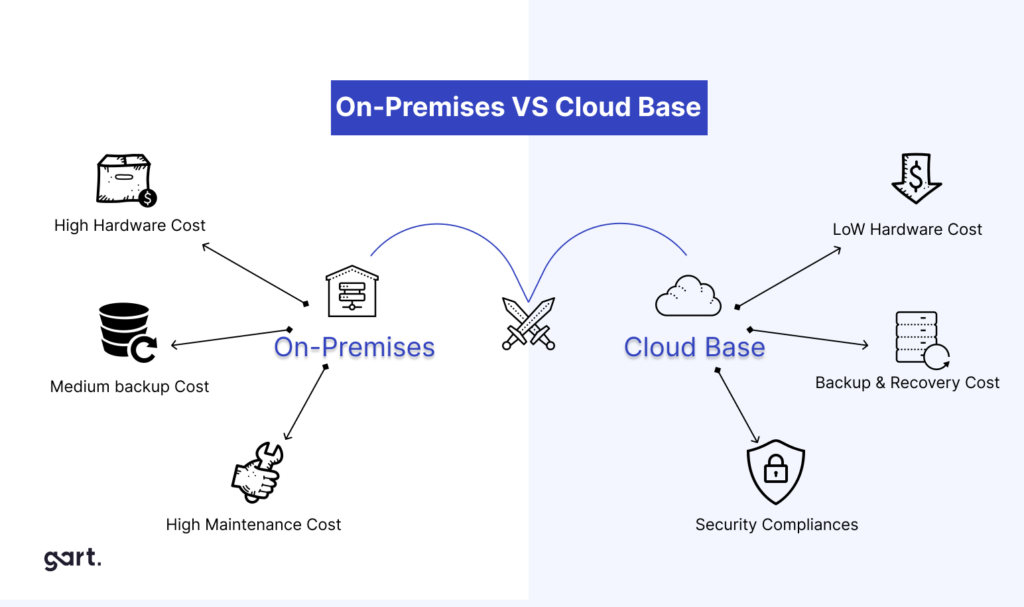
On-Premises Infrastructure
On-premises or bare metal refers to a computing infrastructure that is installed and run on computers on the premises of the organization using the software, rather than at a remote facility or in the cloud. The global bare metal cloud market was valued at $5.6 billion in 2021, and is projected to reach $56.6 billion by 2031, growing at a CAGR of 26.1% from 2022 to 2031. (Source: Verified Market Research).
On average, organizations using on-premises infrastructure spend 55% of their IT budgets on maintenance, compared to 45% for cloud users (Source: Deloitte).
While cloud computing is gaining traction, on-premises solutions still hold value for some businesses:
- You have complete control over your hardware and software, allowing for high levels of customization.
- Some businesses might prefer to keep sensitive data in-house, perceived to be more secure. However, with advanced security measures, reputable cloud providers offer robust data protection.
- Certain industries may have strict data residency regulations that favor on-premises storage.
Key Market Statistics for 2026
The infrastructure landscape has shifted dramatically. Here’s where the market stands today:
Despite the cloud’s rapid growth, on-premises infrastructure remains firmly in the picture. Regulated industries, mission-critical workloads with predictable demand, and organizations with strict data residency requirements continue to run significant on-prem footprints — often alongside cloud environments.
Cost & Total Cost of Ownership (TCO)
Cost is almost always the first factor organizations compare — and it’s the most frequently misunderstood. A simple monthly bill comparison misses the true picture. Proper evaluation requires a full Total Cost of Ownership (TCO) analysis across a 3–7 year horizon.
Cloud Cost Structure
Cloud follows an operational expenditure (OpEx) model. You pay a recurring subscription or usage-based fee with no large upfront capital investment. This lowers the barrier to entry significantly and preserves capital for core business activities.
- No hardware purchasing, rack space, or power infrastructure costs
- No depreciation schedules or hardware refresh cycles
- Costs scale with usage — you only pay for what you consume
- Potential “bill shock”: 60%+ of organizations have received unexpectedly high cloud bills without proper FinOps governance
- Data egress fees can accumulate rapidly for data-intensive workloads
On-Premises Cost Structure
On-premises follows a capital expenditure (CapEx) model. You invest heavily upfront in hardware, facilities, power, cooling, and networking — but the ongoing costs are more predictable once the infrastructure is in place.
- High upfront hardware, licensing, and facility costs
- Hardware refresh cycles every 3–5 years create recurring CapEx spikes
- Staffing: full-time engineers, system administrators, and security specialists
- Predictable monthly costs once the environment is built and stable
- No per-GB egress fees; internal data movement is essentially free
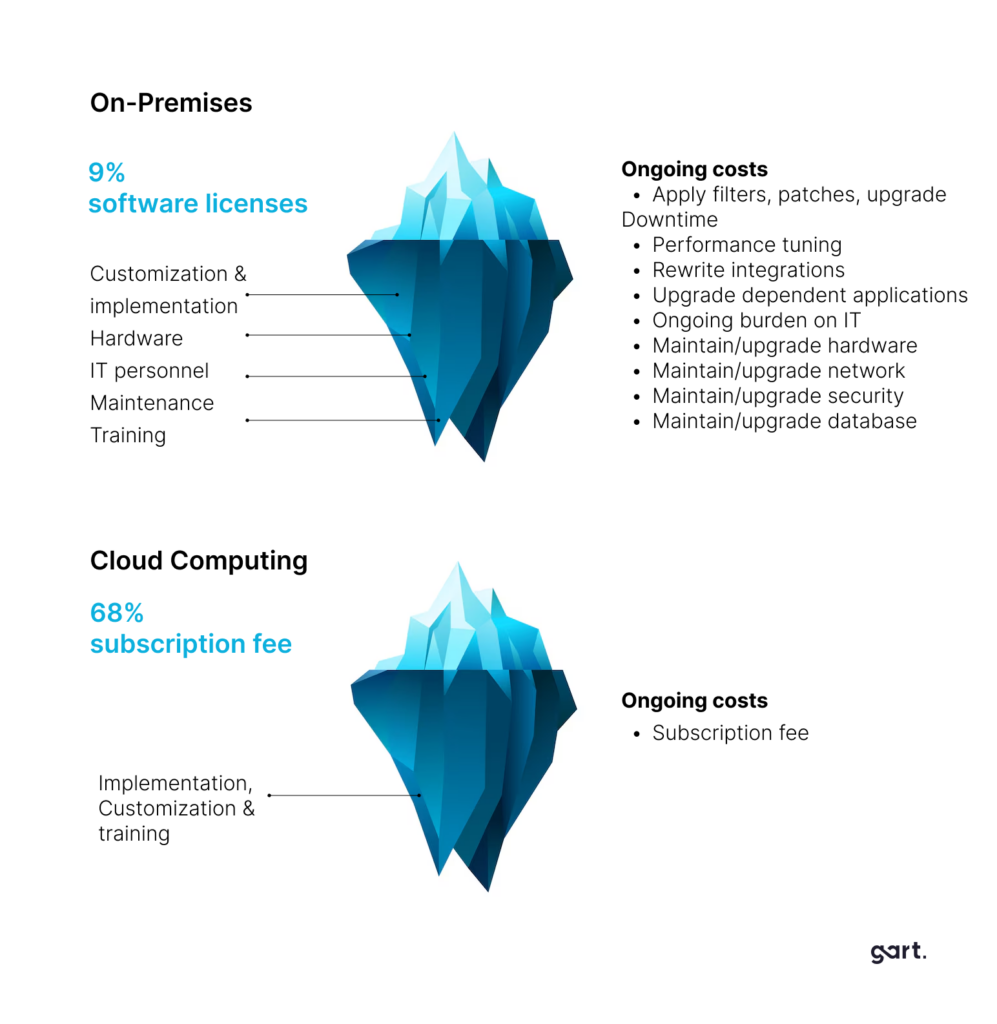
Cloud uses an OpEx model (pay-as-you-go), while on-premises requires CapEx (hardware + setup). However, the total cost includes hidden factors, such as maintenance, refresh cycles, and staff, which can make on-prem more expensive over time.
| Feature | Cloud Computing | On-Premises (Bare Metal) |
|---|---|---|
| Initial Investment | Low (OpEx) | High (CapEx) |
| Hidden Costs | Fewer (no cooling, staffing) | Higher (power, cooling, facilities, staff) |
| Hardware Refresh | Handled by provider | Requires internal planning and expense |
| Resource Utilization | Pay only for what you use | Risk of overprovisioning and idle hardware |
| Scalability | Instant, elastic, cost-efficient | Requires physical scaling and long lead times |
Key Insights:
- On-prem may appear cheaper upfront, but over time, TCO (Total Cost of Ownership) can be significantly higher.
- Many organizations overspend due to underused hardware and frequent refresh cycles.
5-Year TCO Reality Check
For a 50–150 user organization, independent TCO analysis shows: 5-year cloud TCO ranges from approximately $350,000–$820,000, versus $553,000–$1,138,000 for fully loaded on-premises. However, for stable, high-volume compute workloads at larger scale, on-premises can be more cost-efficient over a 7-year horizon — but only when all staffing, maintenance, power, and refresh costs are included in the comparison.
Bottom line on cost: Cloud wins on Year 1 cash outlay and variable workloads. On-premises can be cheaper long-term for stable, predictable, high-volume workloads — provided the hidden costs of staffing and operations are properly accounted for. Neither answer is universal.
Security & Compliance
Security is often cited as the primary concern when evaluating cloud vs. on-premises — and it deserves a nuanced analysis, because the conversation in 2026 is no longer about which model is inherently safer. It’s about who retains decision-making authority over security controls.
Cloud Security
Major cloud providers invest billions of dollars annually in security infrastructure that no mid-sized organization could match independently. They employ thousands of dedicated security engineers, operate globally distributed threat intelligence networks, and continuously update defenses against emerging attack vectors.
- Enterprise-grade DDoS protection, intrusion detection, and WAFs included by default
- End-to-end encryption at rest and in transit, built into the platform
- Regular third-party audits and certifications: SOC 2, ISO 27001, HIPAA, PCI DSS
- Automatic security patching for managed services — no patching lag
- Shared responsibility model: the provider secures the infrastructure; you secure your data, identities, and applications running on it
On-Premises Security
On-premises gives you complete ownership of your security stack. Every firewall rule, access control list, encryption key, and audit log is under your jurisdiction — which can be a competitive advantage for organizations with mature security teams and strict regulatory requirements.
- Full physical security control — no shared tenant risk
- No dependency on a vendor’s security policies or disclosure timelines
- Air-gapped environments possible for ultra-sensitive workloads
- Requires dedicated security staff to implement and maintain all controls
- Patching and vulnerability management is entirely your responsibility — delays create risk
A RapidScale study found that 94% of businesses saw an improvement in security after switching to the cloud, and 91% said cloud makes it easier to meet government compliance requirements. This reflects the operational advantage of provider-managed security — but doesn’t diminish the value of on-prem control for organizations that can invest in it properly.
Compliance Considerations
Compliance requirements often dictate infrastructure decisions more than any other factor. Key frameworks to evaluate against include GDPR, HIPAA, SOC 2, ISO 27001, PCI DSS, and sector-specific regulations.
- Cloud: Providers offer extensive compliance documentation, built-in audit tools, and hold certifications across major frameworks. Data residency options allow you to keep data in specific geographic regions.
- On-premises: You hold every certification independently, which can be burdensome but also offers the most control over what data leaves your environment and how it’s handled.
Scalability & Performance
The ability to scale resources quickly and efficiently is one of the most important operational capabilities for modern businesses — and it’s where cloud infrastructure holds its most significant structural advantage.
Cloud Scalability
Cloud infrastructure was architected for elasticity. Resources can be provisioned or de-provisioned in minutes, automatically scaling to match demand spikes — a product launch, a seasonal surge, a viral event — without any advance planning or procurement lead time.
- Vertical scaling: Upgrade CPU, RAM, or storage with a configuration change
- Horizontal scaling: Add more instances automatically via auto-scaling groups
- Global distribution: Deploy to 20+ regions worldwide; serve users from the edge
- Disaster recovery: Multi-region redundancy with RPO/RTO in minutes
On-Premises Scalability
Scaling on-premises requires physical procurement: ordering hardware, waiting for delivery, installing, configuring, and integrating it — a process that can take weeks or months. Organizations must anticipate future capacity needs and over-provision to handle peak demand, leading to underutilized resources during normal operations.
- Lead times of 4–12 weeks for server procurement and deployment
- Over-provisioning is common — paying for unused capacity to handle peaks
- DR/HA requires maintaining a full secondary facility or significant co-lo investment
- Performance for low-latency, on-network workloads can exceed cloud
Performance nuance: For workloads with extremely low-latency requirements or heavy local data processing, on-premises can outperform cloud — particularly when data doesn’t need to traverse public networks. Many real-time manufacturing, financial trading, and edge processing workloads benefit from on-premises deployment.
Control & Customization
Control is the domain where on-premises retains a genuine, lasting advantage — and why it remains the right choice for certain use cases regardless of what cloud technology achieves.
On-Premises Control
- Full access to hardware configuration, BIOS settings, network topology
- Custom kernel builds, specialized OS configurations, proprietary software stacks
- No vendor lock-in to specific APIs or proprietary services
- Absolute certainty about where data resides — down to the physical drive
- No risk of vendor price changes, service discontinuations, or policy shifts
Cloud Control
- Infrastructure-as-Code (IaC) tools (Terraform, CloudFormation, Pulumi) provide precise, version-controlled environment management
- Managed services abstract complexity — less control over underlying stack, but less to manage
- Multi-cloud strategies can reduce lock-in risk
- Vendor dependency is a real consideration for mission-critical services
- Some regulated data cannot legally reside on third-party infrastructure in certain jurisdictions
Maintenance & Operational Overhead
The operational burden of maintaining infrastructure is one of the most underestimated costs in the cloud vs. on-premises decision — both financially and in terms of team capacity.
Cloud: Reduced Operational Overhead
One of cloud’s most compelling advantages is the shift of operational burden to the provider. Managed services handle patching, updates, backups, redundancy, and hardware failure — allowing your team to focus on building and improving your product.
- No physical hardware maintenance, parts replacement, or facility management
- Automatic updates for managed services (databases, compute, networking)
- 24/7 provider-side monitoring and infrastructure incident response
- Smaller internal IT team required for day-to-day operations
On-Premises: Full Operational Responsibility
On-premises demands a dedicated, skilled IT team capable of handling everything from cable management to zero-day patch deployments. For organizations without that team, on-premises becomes a liability rather than an asset.
- Regular hardware maintenance, replacement, and capacity planning
- 24/7 monitoring and on-call rotation for incident response
- Manual patch management across OS, firmware, and application layers
- Facilities management: power, cooling, fire suppression, physical access
Performance and Scalability: Cloud vs. Bare Metal
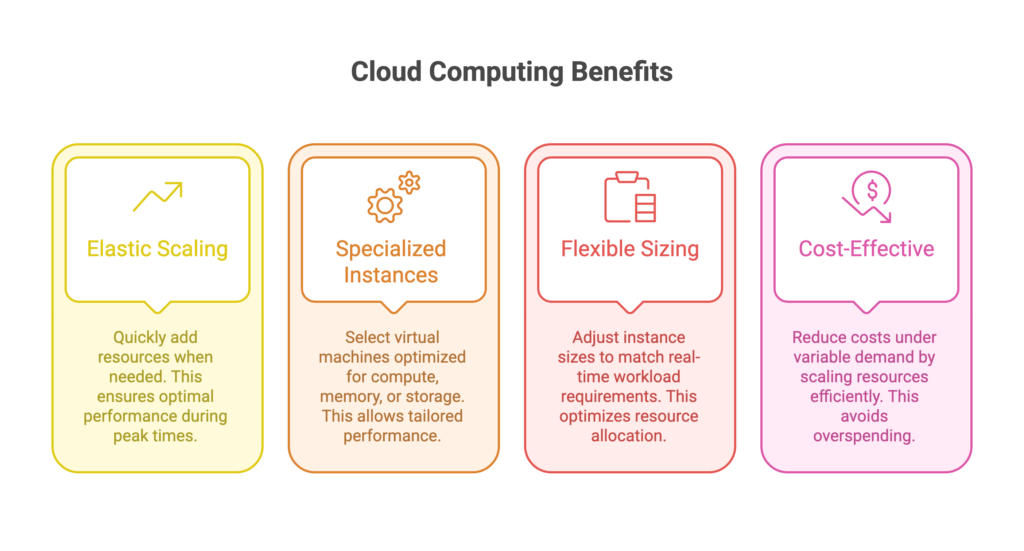
Cloud offers elastic scalability— ideal for dynamic workloads. Bare-metal provides raw power and consistency — ideal for latency-sensitive, compute-heavy tasks.
Cloud computing offers elasticity, allowing you to rapidly scale resources (processing power, storage) up or down based on real-time demand. This ensures optimal performance during peak loads without sacrificing resources during low usage periods. A 2023 study by Flexera found that 73% of businesses reported improved application performance after migrating to the cloud.
Examples:
▪️ You can choose from a range of instance types optimized for different workloads, such as compute-optimized, memory-optimized, and storage-optimized instances. For example, an m5.2xlarge instance provides 8 vCPUs and 32 GB of memory, suitable for high-performance computing tasks.
▪️ Azure offers virtual machine sizes tailored for specific scenarios, such as the D-series for general-purpose workloads and the H-series for high-performance computing.
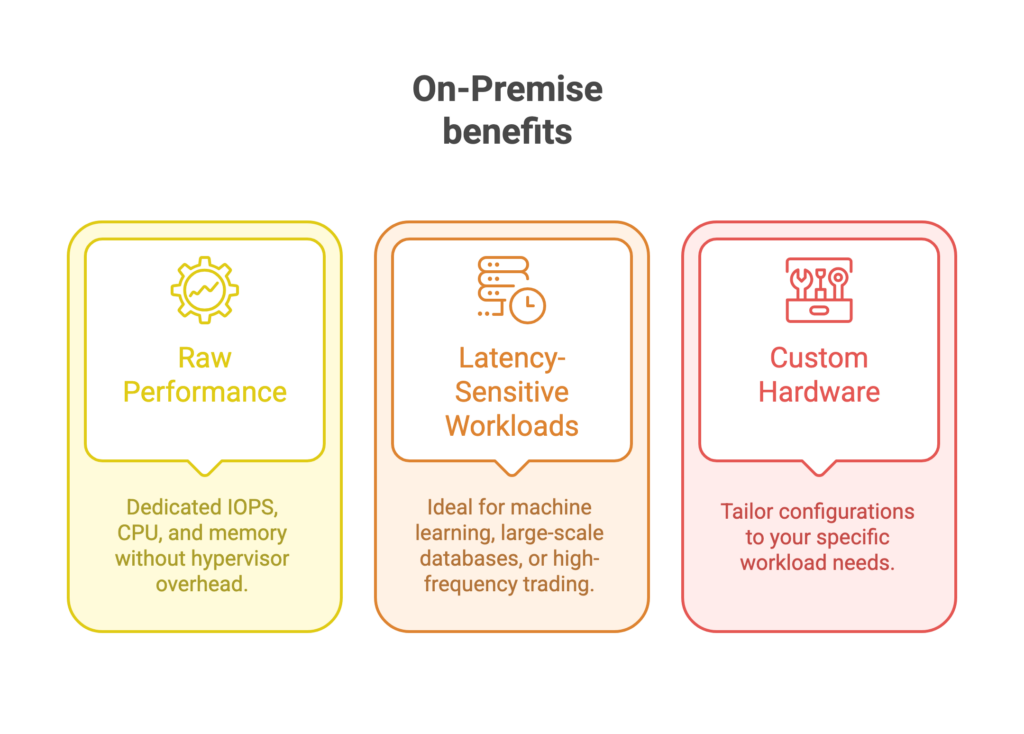
Bare metal servers often provide superior performance for certain high-demand workloads due to their dedicated hardware. This can be critical for applications requiring high I/O throughput, low latency, or substantial computational power. With bare metal, you have the flexibility to configure hardware to meet specific performance requirements. This is particularly beneficial for specialized applications, such as machine learning models or high-frequency trading platforms.
Examples:
▪️ A bare metal server with Intel Xeon Platinum CPUs and NVMe SSDs can handle large-scale databases or data-intensive applications with minimal latency. For instance, benchmarks show that a single bare metal server can achieve up to 1 million IOPS (input/output operations per second) compared to 100,000 IOPS for a typical cloud SSD instance.
▪️ IBM offers customizable bare metal servers with up to 192 GB of RAM and 16 vCPUs, providing the raw performance needed for demanding workloads. These servers are often used for tasks that require consistent, high-speed performance without the overhead of virtualization.
Scaling on-premises infrastructure typically requires purchasing and installing additional hardware. This process involves significant planning, procurement, and installation time. For example, scaling from a small data center to a larger one may involve several months of lead time for new hardware and infrastructure.
Compliance, Data Sovereignty & Security: Cloud vs. On‑Premises
Cloud providers offer robust security and global compliance, but you must manage shared responsibilities. On-premises gives full control, but also full accountability.
Major cloud providers comply with a range of international and industry-specific standards. For example:
- AWS Compliance: AWS holds certifications such as ISO 27001, SOC 1/2/3, GDPR compliance, and HIPAA compliance.
- Azure Compliance: Microsoft Azure is compliant with standards including ISO 27001, SOC 1/2/3, GDPR, and HIPAA.
- Google Cloud Compliance: Google Cloud complies with standards like ISO 27001, SOC 1/2/3, GDPR, and HIPAA.
Cloud providers offer data residency options, allowing organizations to choose the geographical location where their data is stored. For instance, AWS provides data centers across various regions globally, and users can select the region that aligns with their data sovereignty requirements.
Cloud providers ensure compliance with local data protection laws, such as the EU’s General Data Protection Regulation (GDPR), which mandates that data of EU citizens must be stored within the EU or in countries with adequate protection levels.
On‑Prem Compliance Pros and Cons:
- Full control over data and infrastructure.
- Ideal for strict regulations in finance, defense, or healthcare.
- But: You’re fully responsible for audits, reporting, and security hardening.
A study by IAPP found that GDPR compliance costs average $1.5M per organization — cloud providers often absorb parts of this burden via shared responsibility.
On-premises environments require organizations to ensure compliance with local and industry regulations. This often involves implementing complex data protection measures and ensuring that all aspects of the infrastructure adhere to regulatory standards.
With on-premises infrastructure, organizations have complete control over their data and its location, which can be advantageous for meeting specific data sovereignty requirements. However, this also means that the organization is fully responsible for implementing and maintaining compliance measures.
Cloud Provider Security Measures vs. In-House Security
In cloud environments, security is a shared responsibility between the cloud provider and the customer. Providers like AWS, Azure, and Google Cloud are responsible for the security of the cloud infrastructure, including physical security, network security, and virtualization layers. Customers are responsible for securing their data, applications, and configurations within the cloud.
On-premises security involves dedicated resources for managing physical security, network security, and data protection. This includes physical access controls, firewalls, intrusion detection systems, and regular security audits.
According to a Ponemon Institute study, organizations with in-house security teams spend an average of $3.6 million annually on security, compared to $2.6 million for organizations using managed security services. This highlights the potential cost advantage of cloud security solutions, where many security services are included as part of the subscription.
Full Cloud vs. On-Premises Comparison
Here’s a comprehensive side-by-side breakdown of both infrastructure models across all critical dimensions:
| Factor | Cloud | On-Premises | Winner |
|---|---|---|---|
| Upfront Cost | Minimal — pay-as-you-go OpEx model; no hardware purchase required | High CapEx — servers, networking, facilities, licensing all required upfront | Cloud |
| Long-term TCO | Can exceed on-prem for stable, high-volume workloads; egress fees add up | Potentially lower over 7+ years for predictable workloads with proper planning | Depends |
| Scalability | Instant, elastic scaling — up or down — in minutes | Slow procurement process; over-provisioning required for peak capacity | Cloud |
| Security | Enterprise-grade, provider-managed; shared responsibility model | Full owner-controlled security; air-gap possible; higher internal cost | Depends |
| Compliance | Built-in certifications (SOC 2, ISO 27001, HIPAA); data residency options | Independent certification required; complete control over data location | Depends |
| Performance | Excellent globally; slight latency for ultra-low-latency local workloads | Optimal for latency-sensitive, on-network, or local processing tasks | Depends |
| Control | High via IaC and APIs; some limits on underlying hardware | Complete — hardware, OS, network, software stack, firmware | On-Prem |
| Vendor Lock-in | Risk with proprietary services; mitigated via multi-cloud strategy | No vendor dependency; full portability of data and systems | On-Prem |
| Maintenance Burden | Low — provider handles hardware, patching, and infrastructure upkeep | High — dedicated team required for all hardware and software maintenance | Cloud |
| Disaster Recovery | Built-in multi-region redundancy; fast failover; low RTO/RPO | Requires separate DR site or significant co-lo investment | Cloud |
| Deployment Speed | Minutes to hours — new environments provisioned via API or IaC | Weeks to months — hardware procurement, delivery, and configuration | Cloud |
| Data Sovereignty | Region-locking available but data still on provider infrastructure | Absolute — data never leaves your physical premises | On-Prem |
| IT Staff Requirements | Smaller ops team; cloud engineers and FinOps specialists needed | Larger team required: sysadmins, network engineers, security specialists | Cloud |
| Innovation Velocity | Access to cutting-edge AI, ML, analytics, and managed services instantly | Slower adoption; must evaluate, procure, and integrate new technology | Cloud |
The Future is Hybrid
Many businesses are adopting a hybrid approach, combining cloud and on-premises infrastructure. This allows them to leverage the benefits of both: cost-effectiveness, scalability, and control over sensitive data.
| Feature | Cloud Computing | On-premises/Bare Metal |
|---|---|---|
| Deployment Model | Off-site, delivered over the internet | On-site, within your data center |
| Scalability | Easy to scale up or down resources | Scaling can be slow and expensive |
| Cost | Pay-as-you-go model | High upfront costs for hardware, software, and IT staff |
| Accessibility | Accessible from anywhere with an internet connection | Access might be restricted to the local network |
| Security | Robust security features offered by cloud providers | Requires strong internal security measures |
| Maintenance | Managed by the cloud provider | Requires in-house IT staff for maintenance |
| Control | Less control over hardware and software | Full control over hardware and software |
| Customization | Limited customization options | Highly customizable |
Why Hybrid Works:
- Critical apps or sensitive data stay on-premises.
- Web apps, backups, and analytics move to the cloud.
- You gain cost-efficiency, resilience, and agility.
When to Choose Cloud
Cloud infrastructure is the right primary choice in the following scenarios:
Variable or Unpredictable Workloads
- SaaS or consumer apps with traffic spikes
- Seasonal peaks (e-commerce, events)
- Dev/test environments that run intermittently
- Analytics jobs that run on demand
Fast-Growing Startups & Scale-Ups
- Rapid iteration requires speed over stability
- Capital preservation is critical in early stages
- Global expansion without data center investments
- No in-house infrastructure team yet
Globally Distributed Teams or Users
- Need to serve users across multiple continents
- Remote team collaboration and access
- Multi-region redundancy is a business requirement
- Edge computing and CDN integration needed
AI, ML, & Analytics Workloads
- GPU access for training without hardware costs
- Managed data warehouses and ML pipelines
- Rapid experimentation with new services
- Integration with cloud-native AI offerings
When to Choose On-Premises
On-premises infrastructure is the right choice — or a necessary component — in these situations:
Strict Regulatory or Data Sovereignty
- Government or defense workloads with classified data
- Healthcare with specific data residency mandates
- Financial institutions with strict regulatory frameworks
- Jurisdictions restricting cross-border data transfer
Predictable, High-Volume Stable Workloads
- Large-scale manufacturing or ERP systems
- High-frequency trading requiring microsecond latency
- Video rendering or large-scale batch processing
- Databases processing terabytes of local data daily
Specialized Hardware Requirements
- Custom FPGA or GPU accelerator configurations
- Specialized research computing equipment
- Industrial control systems and OT networks
- Custom network topology requirements
Existing Infrastructure Investment
- Recently refreshed hardware with years of life remaining
- Mature, capable internal IT operations team
- Legacy applications not cloud-compatible
- CapEx budget available; OpEx not preferred
The Hybrid Approach: The Best of Both Worlds
For most organizations in 2026, the real question is not “cloud or on-premises” — it’s “which workloads belong where?” More than 70% of enterprises now operate in hybrid or multi-cloud environments, and that number is expected to reach 90% by 2027.
A well-designed hybrid architecture places each workload in the environment best suited to its requirements:
Hybrid isn’t simply “some things on-prem, some in the cloud.” It requires deliberate architecture: consistent identity and access management across environments, encrypted connectivity between private and public infrastructure, unified monitoring and observability, and clear data governance policies for how data flows between environments.
Organizations that rush to hybrid without a clear strategy often end up with the complexity of both worlds and the benefits of neither. Getting the architecture right from the start — with expert guidance — is the difference between hybrid that works and hybrid that creates operational debt.
Pros & Cons Summary
Cloud Infrastructure
Summary Analysis
✅ Pros
- No upfront capital expenditure
- Instant, elastic scalability
- Built-in disaster recovery and redundancy
- Global deployment in minutes
- Access to cutting-edge managed services
- Reduced maintenance and operational burden
- Automatic security patching
- Pay only for resources you use
❌ Cons
- Ongoing costs can exceed on-prem long-term
- Data egress fees for high-bandwidth
- Vendor lock-in risk with proprietary services
- Less control over underlying infrastructure
- Internet dependency for performance
- Requires FinOps discipline to avoid bill shock
- Compliance complexity in regulated sectors
Summary Analysis
✅ Pros
- Complete control over hardware and software
- Absolute data sovereignty — physical custody
- No vendor dependency or lock-in
- Predictable costs for stable workloads
- Optimal latency for local, on-network apps
- Suitable for air-gapped environments
- No egress fees for internal movement
❌ Cons
- High upfront capital expenditure
- Slow, expensive scaling process
- Hardware refresh cycles add recurring costs
- Full security and compliance burden falls on you
- Requires large, skilled internal IT team
- Disaster recovery is expensive and complex
- Slower access to new technology
Conclusion: There Is No Universal Answer
The cloud vs. on-premises decision is not a choice between old and new, or safe and risky. It is a strategic decision about where to place each workload based on its requirements for cost efficiency, performance, security, compliance, and operational simplicity.
For most organizations in 2026, the answer is hybrid: cloud for agility, innovation velocity, and elastic workloads; on-premises for sensitive data, regulated workloads, and stable high-volume compute. The organizations that thrive are those that implement both deliberately — with a clear architecture, strong governance, and expert operational support across both environments.
The most expensive infrastructure decision is often not cloud or on-prem — it’s making the wrong choice for a given workload, then spending years dealing with the consequences.
Cloud Computing
Full-stack architecture, migration, and optimization on AWS, Azure, and Google Cloud.
Infrastructure Mgmt
Managed services for servers, networks, and databases with 24/7 monitoring included.
IT Consulting
Objective architecture consulting to evaluate cloud vs. on-prem and design hybrid roadmaps.
DevOps Engineering
CI/CD pipelines, IaC, and container orchestration to accelerate your delivery velocity.
SRE & Monitoring
Site Reliability Engineering and real-time observability to maximize uptime and reduce MTTR.
Digital Transformation
End-to-end strategy from legacy modernization to cloud-native application development.
Ready to find the right infrastructure strategy? Let’s talk — no obligation.
Explore Our Services →In Conclusion
Cloud computing has revolutionized how businesses manage IT. With elastic scalability, global reach, and reduced CapEx, it fits most modern businesses.
However, on-premises remains valuable for highly regulated, security-conscious, or performance-driven environments.
For many, a hybrid approach offers the best balance — agility, control, and cost-efficiency combined.
Still unsure?
Let’s discuss your infrastructure needs and tailor a solution that fits both your tech and your compliance goals.
See how we can help to overcome your challenges