Your engineering team is talented. But if they are spending 30–40% of their time on infrastructure maintenance — patching, monitoring, incident response, storage management — they are not doing the work that actually builds your competitive advantage. IT infrastructure outsourcing is how high-growth companies reclaim that time.
This guide gives you a realistic, technically grounded view of what outsourcing infrastructure operations actually looks like in 2026: what it costs, which models work, when it is the wrong choice, and what separates providers who deliver outcomes from those who deliver invoices. If you want to jump straight to what we do at Gart, explore our IT infrastructure management services — or use the ROI calculator below to estimate your savings before reading further.
$639B
Global IT outsourcing market in 2026 (projected)
38%
Average operational cost reduction our clients see in year one
99.97%
Average uptime delivered across Gart-managed environments
90%
of companies will face critical IT skills shortages by end of 2026
Gart Solutions
What is IT Infrastructure Outsourcing?
Imagine you’re running a marathon, but you’re also carrying your heavy backpack. That’s what managing IT infrastructure in-house often feels like for many companies. You’re trying to focus on winning the race (your business goals), but the weight of maintaining servers, networks, data centers, and security is slowing you down.
IT infrastructure outsourcing is like handing over that backpack to a professional support team running beside you. They carry it efficiently, ensuring everything inside remains organized, protected, and accessible, allowing you to focus solely on your pace and strategy.
At its core, IT infrastructure outsourcing means entrusting a specialized external provider with the management, maintenance, and optimization of your IT systems and hardware, including:
Servers and storage
Networks and connectivity
Data centers and cloud infrastructure
Security protocols and compliance requirements
Instead of managing all these internally, you leverage the expertise and resources of professionals dedicated solely to this domain.
What Falls Under IT Infrastructure?
The scope of an IT infrastructure outsourcing engagement typically covers some or all of the following:
Cloud infrastructure — multi-cloud environments (AWS, Azure, GCP), Kubernetes clusters, FinOps and cost governance, cloud-native architecture optimization
On-premises & hybrid data centers — server lifecycle management, virtualization (VMware, Hyper-V), storage (SAN/NAS/object), data center operations
Networking — LAN/WAN, SD-WAN, VPN management, firewall policy, performance monitoring, BGP/routing
Security operations — SIEM, 24/7 SOC, vulnerability management, patch compliance, penetration test coordination, compliance tooling
Backup & disaster recovery — RPO/RTO-aligned backup architecture, DR runbooks, regular failover testing
Service desk & incident management — L1/L2/L3 ticket routing, SLA-governed response times, on-call escalation paths
Why is IT Infrastructure Outsourcing Becoming Essential Today?
Today’s business landscape demands agility, security, and innovation – all while keeping costs under control. Here’s why outsourcing IT infrastructure has shifted from being a strategic option to a critical necessity:
Rapid Technological AdvancementsIT evolves so fast that in-house teams struggle to keep up with emerging tools, frameworks, and security protocols. Outsourcing partners invest heavily in continuous skill upgrades, ensuring your business benefits from the latest advancements without the learning curve.
Cybersecurity Threats Are RisingThe sophistication of cyberattacks increases daily. Outsourcing ensures your infrastructure is protected by advanced threat detection systems and experts monitoring for vulnerabilities 24/7.
Need for Scalability and FlexibilityWhether it’s Black Friday traffic spikes or sudden global expansions, businesses must scale their IT resources seamlessly. Outsourcing provides elasticity without the delays and overhead of in-house provisioning.
Pressure to Focus on Core BusinessEvery hour spent fixing servers is an hour not spent innovating or delighting customers. Outsourcing allows businesses to focus on strategic initiatives while leaving technical operations to experts.
In essence, IT infrastructure outsourcing is not about relinquishing control – it’s about gaining freedom to drive your business forward faster.
Breaking Down IT Infrastructure Outsourcing
At its simplest, IT infrastructure outsourcing is the strategic delegation of your company’s IT infrastructure management to a trusted external provider. This includes:
Hardware management: Procuring, installing, configuring, and maintaining servers, storage devices, and network hardware.
Software management: Managing operating systems, infrastructure software, and middleware.
Network management: Ensuring secure, reliable, and optimized connectivity within and beyond your organization.
Security management: Implementing and maintaining cybersecurity measures to protect systems and data.
Cloud infrastructure management: Designing, deploying, and maintaining cloud resources in platforms like AWS, Azure, or Google Cloud.
It’s like hiring a specialized external team to maintain, upgrade, and optimize the entire “engine room” of your business so your internal teams can steer the ship confidently towards strategic goals.
Components Included in IT Infrastructure Outsourcing
Here’s a breakdown of what infrastructure outsourcing usually covers:
Servers:Physical and virtual servers host your applications, databases, and services.
Networks:LAN, WAN, VPNs, and connectivity solutions ensure data flows securely and efficiently.
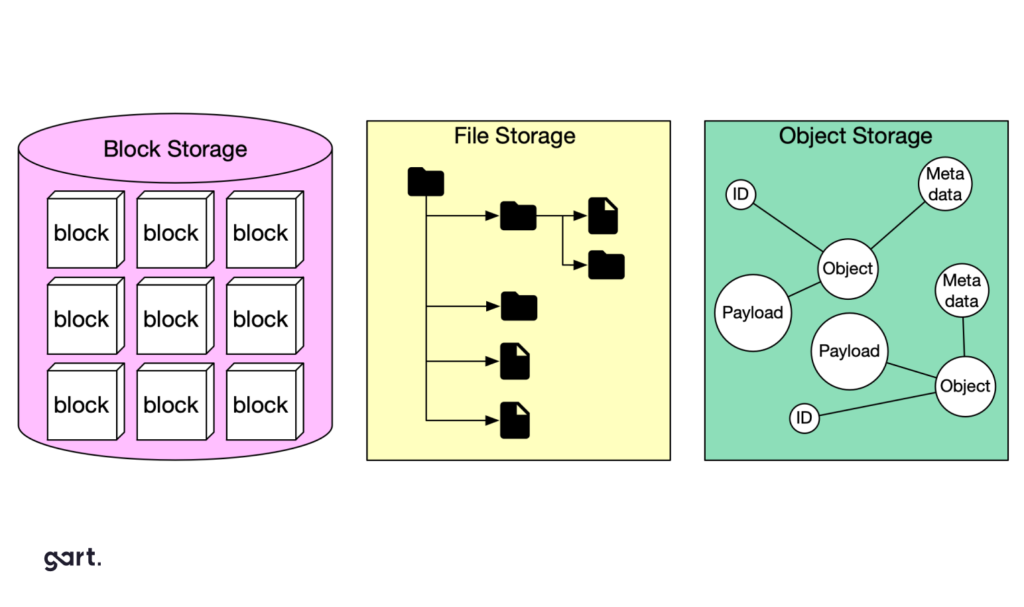
Storage Systems:Data storage solutions, backup infrastructure, and disaster recovery planning.
Data Centers:Management of on-premises data centers or leveraging third-party colocation and cloud facilities.
Security Systems:Firewalls, intrusion detection and prevention, endpoint security, and compliance management.
Cloud Infrastructure:Public, private, or hybrid cloud management, including architecture design, resource provisioning, monitoring, and cost optimization.
By outsourcing these components, companies gain access to specialized expertise, advanced technologies, and robust security protocols without the overhead of building these capabilities internally.
Benefits of IT Infrastructure Outsourcing
Outsourcing IT infrastructure brings numerous benefits that contribute to business growth and success.
Manage Cloud Complexity
Over the past two years, there’s been a surge in cloud commitment, with more than 86% of companies reporting an increase in cloud initiatives.
Implementing cloud initiatives requires specialized skill sets and a fresh approach to achieve comprehensive transformation. Often, IT departments face skill gaps on the technical front, lacking experience with the specific tools employed by their chosen cloud provider.
Cloud migration and management aren’t as simple as clicking “deploy.” Each cloud provider (AWS, Azure, GCP) has unique architectures, tools, and services requiring specialized skills and certifications.
Many organizations lack the expertise needed to develop a cloud strategy that fully harnesses the potential of leading platforms such as AWS or Microsoft Azure, utilizing their native tools and services.
For instance:
AWS requires expertise in services like EC2, S3, RDS, Lambda, and VPC configurations.
Azure demands proficiency in Resource Groups, Virtual Networks, Azure AD, and cost management tools.
GCP needs knowledge of Compute Engine, Kubernetes Engine, Cloud Functions, and BigQuery integrations.
Without this expertise, companies risk:
Cost overruns due to improper provisioning
Security misconfigurations exposing critical data
Failed migrations disrupting business operations
Outsourcing to experienced infrastructure providers ensures cloud initiatives are implemented efficiently, securely, and cost-effectively.
Access to Specialized Expertise
Outsourcing IT infrastructure allows businesses to tap into the expertise of professionals who specialize in managing complex IT environments.
As a CTO, I understand the importance of having a skilled team that can handle diverse technology domains, from network management and system administration to cybersecurity and cloud computing.
Outsourcing partners bring in strategic cloud architecture design that aligns with your business goals:
Hybrid or multi-cloud setups for redundancy and compliance
Auto-scaling and elasticity to handle traffic spikes seamlessly
Disaster recovery and high availability architectures to minimize downtime risks
Cost optimization strategies like reserved instances, spot instances, and resource right-sizing
These capabilities are critical as over 86% of companies have increased their cloud initiatives in the last two years, according to Gartner, but lack in-house expertise to fully leverage them.
"Gart finished migration according to schedule, made automation for infrastructure provisioning, and set up governance for new infrastructure. They continue to support us with Azure. They are professional and have a very good technical experience"
Under NDA, Software Development Company
Enhanced Focus on Core Competencies
Outsourcing IT infrastructure liberates businesses from the burden of managing complex technical operations, allowing them to focus on their core competencies. I firmly believe that organizations thrive when they can allocate their resources towards activities that directly contribute to their strategic goals.
By entrusting the management and maintenance of IT infrastructure to a trusted partner like Gart, businesses can redirect their internal talent and expertise towards innovation, product development, and customer-centric initiatives.
For example, SoundCampaign, a company focused on their core business in the music industry, entrusted Gart with their infrastructure needs.
We upgraded the product infrastructure, ensuring that it was scalable, reliable, and aligned with industry best practices. Gart also assisted in migrating the compute operations to the cloud, leveraging its expertise to optimize performance and cost-efficiency.
One key initiative undertaken by Gart was the implementation of an automated CI/CD (Continuous Integration/Continuous Deployment) pipeline using GitHub. This automation streamlined the software development and deployment processes for SoundCampaign, reducing manual effort and improving efficiency. It allowed the SoundCampaign team to focus on their core competencies of building and enhancing their social networking platform, while Gart handled the intricacies of the infrastructure and DevOps tasks.
"They completed the project on time and within the planned budget. Switching to the new infrastructure was even more accessible and seamless than we expected."
Nadav Peleg, Founder & CEO at SoundCampaign
Cost Savings and Budget Predictability
Managing an in-house IT infrastructure can be a costly endeavor. By outsourcing, businesses can reduce expenses associated with hardware and software procurement, maintenance, upgrades, and the hiring and training of IT staff.
As an outsourcing provider, Gart has already made the necessary investments in infrastructure, tools, and skilled personnel, enabling us to provide cost-effective solutions to our clients. Moreover, outsourcing IT infrastructure allows businesses to benefit from predictable budgeting, as costs are typically agreed upon in advance through service level agreements (SLAs).
"We were amazed by their prompt turnaround and persistency in fixing things! The Gart's team were able to support all our requirements, and were able to help us recover from a serious outage."
Ivan Goh, CEO & Co-Founder at BeyondRisk
Scaling Quickly with Market Demands
Business is dynamic. Whether it’s expanding into new markets, onboarding thousands of new users overnight, or handling seasonal traffic spikes – your IT infrastructure must scale without delays or failures.
With outsourcing, companies have the flexibility to quickly adapt to these changing requirements. For example, Gart's clients have access to scalable resources that can accommodate their evolving needs.
Outsourcing partners provide:
Elastic server capacity: Add or remove resources instantly.
Flexible storage solutions: Expand databases or object storage without hardware procurement delays.
Network optimization: Enhance bandwidth and connectivity as user demands grow.
For example, Twilio scaled its COVID-19 contact tracing platform rapidly by outsourcing infrastructure to cloud providers. This automatic scaling ensured millions of people were contacted efficiently without infrastructure bottlenecks, a feat nearly impossible with only internal teams.
Whether it's expanding server capacity, optimizing network bandwidth, or adding storage, outsourcing providers can swiftly adjust the infrastructure to support business growth. This scalability and flexibility provide businesses with the agility necessary to respond to market dynamics and seize growth opportunities.
Robust Security Measures
Imagine guarding a fortress with outdated locks and untrained guards. That’s the risk many companies face managing security internally without dedicated resources.
Outsourcing IT infrastructure brings enterprise-level security expertise and tools within reach for businesses of all sizes. Here’s how:
24/7 Monitoring and Threat DetectionOutsourcing partners deploy advanced Security Information and Event Management (SIEM) tools, intrusion detection systems, and AI-powered threat analytics to monitor your infrastructure around the clock.
Regular Security Audits and Compliance AuditsThey conduct periodic vulnerability assessments, penetration testing, and compliance checks to ensure you meet industry standards like GDPR, HIPAA, and ISO 27001 without adding internal workload.
Data Encryption and Access ControlsProviders implement end-to-end encryption protocols for data at rest and in transit, along with strict identity and access management policies to control who accesses sensitive systems.
As the CTO of Gart, I prioritize the implementation of robust security measures, including advanced threat detection systems, data encryption, access controls, and proactive monitoring. We ensure that our clients' sensitive information remains protected from cyber threats and unauthorized access.
"The result was exactly as I expected: analysis, documentation, preferred technology stack etc. I believe these guys should grow up via expanding resources. All things I've seen were very good."
Grigoriy Legenchenko, CTO at Health-Tech Company
Piyush Tripathi About the Benefits of Outsourcing Infrastructure
Looking for answers to the question of IT infrastructure outsourcing pros and cons, we decided to seek the expert opinions on the matter. We reached out to Piyush Tripathi, who has extensive experience in infrastructure outsourcing.
Introducing the Expert
Piyush Tripathi is a highly experienced IT professional with over 10 years of industry experience. For the past ten years, he has been knee-deep in designing and maintaining database systems for significant projects. In 2020, he joined the core messaging team at Twilio and found himself at the heart of the fight against COVID-19. He played a crucial role in preparing the Twilio platform for the global vaccination program, utilizing innovative solutions to ensure scalability, compliance, and easy integration with cloud providers.
What are the potential benefits of IT infrastructure outsourcing?
High scale: I was leading Twilio COVID-19 platform to support contact tracing. This was a fairly quick announcement as the state of New York was planning to use it to help contact trace millions of people in the state and store their contact details. We needed to scale and scale fast. Doing it internally would have been very challenging, as demand could have spiked, and our response could not have been swift enough to respond. Outsourcing it to a cloud provider helped mitigate that; we opted for automatic scaling, which added resources in the infrastructure as soon as demand increased. This gave us peace of mind that even when we were sleeping, people would continue to get contacted and vaccinated.
Potential Risks of IT Infrastructure Outsourcing
While outsourcing unlocks significant benefits, it’s important to be aware of potential risks:
Risks:
Infra domain knowledge: if you outsource infra, your team could lose knowledge of setting up this kind of technology. for example, during COVID 19, I moved the contact database from local to cloud so overtime I anticipate that next teams would loose context of setting up and troubleshooting database internals since they will only use it as a consumer.
Limited direct control: since you outsource infrastructure, data, business logic and access control will reside in the provider. in rare cases, for example using this data for ML training or advertising analysis, you may not know how your data or information is being used.
Vendor Lock-in:Relying heavily on a single outsourcing provider may create challenges if switching vendors later becomes necessary. Migrating away can be complex and costly.
Compliance Risks:Data privacy regulations require careful vendor selection. Not knowing how your vendor stores, processes, or uses your data could pose legal and reputational risks, especially for sectors like healthcare and finance.
The 5 Core Benefits of IT Infrastructure Outsourcing — With Real Numbers
1. Cost Reduction That Is Measurable, Not Theoretical
The economics work because a managed provider amortizes the cost of senior expertise, monitoring tooling, and 24/7 coverage across multiple clients. A single enterprise-grade monitoring platform (Datadog, Dynatrace, or equivalent) can cost $15,000–$60,000 per month at scale — but your managed provider spreads that cost across their entire client base. For talent: a senior SRE in North America costs $180,000–$240,000 in base salary alone, before benefits, equity, and recruitment costs. Your managed infrastructure provider gives you access to that expertise without the headcount overhead. Our clients typically see 30–40% total cost of ownership reduction within 12 months.
2. Access to the Full Specialist Stack
No single hire gives you a cloud security architect, a Kubernetes platform engineer, a FinOps specialist, and a database performance engineer. Outsourcing does. This matters especially when you are navigating a complex modernization — migrating from monolith to microservices, exiting a data center, or adopting a new cloud region. Our guide on IaC tools outlines the kind of tooling depth a capable provider should bring to any modern infrastructure engagement.
3. Elastic Scalability Aligned to Your Business Cycle
Growth events create sudden infrastructure demand. A product launch, a market expansion, or an acquisition integration can require rapid provisioning capacity that a fixed in-house team simply cannot absorb without burning out or creating bottlenecks. Managed infrastructure partners scale resources in alignment with your roadmap — without the six-month hiring cycle that in-house expansion requires.
4. Reclaimed Internal Engineering Bandwidth
In most organizations, infrastructure maintenance consumes 30–50% of engineering time. That is time that could be spent on the product capabilities, data pipelines, and developer experience improvements that actually differentiate your business in market. Outsourcing operational maintenance returns that bandwidth to your team.
5. Built-In Compliance Coverage
Qualified managed infrastructure providers embed compliance tooling — automated evidence collection, audit-ready reporting, continuous security scanning — directly into their service delivery. What used to require a dedicated GRC hire or a quarterly consultant sprint becomes a continuous, always-on operational function.
Why the Business Case for IT Infrastructure Outsourcing Is Stronger Than Ever in 2026
Three forces have permanently shifted the calculus for most organizations:
The talent gap is structural, not cyclical. According to Gartner's latest IT spending forecast, worldwide IT expenditure is growing 10.8% in 2026 — reaching $6.15 trillion — yet the talent supply has not kept pace. By 2027, Gartner projects companies will spend 50% more on IT contractors than internal IT staff across most industries, as hiring senior infrastructure engineers has become structurally difficult and expensive.
The second force is infrastructure complexity sprawl. A typical mid-market company in 2026 runs workloads across two or three cloud providers, manages legacy on-premises systems in parallel, operates containerized workloads on Kubernetes, and is adopting AI/ML pipelines that require GPU clusters and specialized networking. The surface area that needs to be monitored, secured, and optimized has grown faster than any lean in-house team can realistically govern.
The third force is continuous compliance pressure. SOC 2 Type II, ISO 27001, HIPAA, GDPR, PCI DSS — the audit burden on engineering organizations is no longer a once-a-year event. It is continuous evidence collection, continuous monitoring, and continuous remediation. Organizations without a dedicated compliance infrastructure function are simply accumulating risk. You can build a picture of the current threat landscape in our guide to IT infrastructure security best practices.
Case Study
How we reduced infrastructure costs by 38% for a Series B fintech
A financial technology company with 280 employees approached Gart Solutions after their annual infrastructure bill crossed $2.4M — a 64% year-over-year increase driven by unmanaged cloud sprawl and three redundant monitoring tools their in-house team had neither the time nor the mandate to consolidate.
Over a 90-day transition and a six-month optimization phase, Gart assumed full managed operations of their multi-cloud environment (AWS primary, Azure DR), consolidated observability tooling onto a single OpenTelemetry-based stack, right-sized 140+ EC2 instances, implemented IaC governance via Terraform, and established SOC 2 Type II-aligned security monitoring.
38%
Reduction in annual operating costs
100%
DevOps time redirected to product
IT Infrastructure Outsourcing Models: Which One Is Right for You?
One of the most common mistakes companies make is choosing the wrong engagement model — then blaming outsourcing itself when the results disappoint. Here is a clear-eyed breakdown:
ModelWho Owns OperationsBest ForTypical Cost StructureControl LevelFully Managed ServicesProvider end-to-endLean IT teams; companies scaling fast; orgs without mature in-house opsMonthly flat fee or per-device/workloadMedium — outcomes defined by youCo-Managed (Hybrid)Shared — provider handles defined layers, client retains othersMid-market firms with existing IT staff who need specialized depth in specific domainsTiered subscription + domain-specific feesHigh — shared accountability modelStaff AugmentationClient manages — provider supplies engineersOrgs with defined processes needing headcount, not a managed serviceMonthly retainer per engineerFull — client directs all workProject-Based OutsourcingProvider during project; client post-deliveryOne-time transformation initiatives (cloud migration, DC exit, DR build)Fixed-price or T&MHigh — outcome-scoped engagementOutcome-Based ContractProvider — paid on delivered KPIsMature buyers seeking strategic partnership with financial accountabilityBase fee + SLA performance bonuses/penaltiesMedium — results-driven governanceIT Infrastructure Outsourcing Models: Which One Is Right for You?
The co-managed model has become the dominant choice for companies in the $30M–$500M revenue range. It preserves your team's strategic control while offloading the operational layer. For guidance on how consulting fits into your infrastructure strategy, see our IT infrastructure consulting services overview.
In-House vs. IT Infrastructure Outsourcing: A Direct Decision Framework
FactorIn-House TeamIT Infrastructure OutsourcingTotal Cost of OwnershipHigh — salary + benefits + tooling licenses + PTO + attrition replacement (often 1.5–2× base)Predictable monthly fee; tooling typically included; no hiring overhead24/7 CoverageDifficult without 6–8+ engineers; on-call rotation burns out small teams24/7/365 NOC and SOC coverage included in managed serviceExpertise BreadthLimited by hiring budget; skill gaps are common and expensive to fillFull specialist stack: cloud, security, networking, DB, FinOps — on-demandScalability Speed3–6 month hiring cycles for senior roles; slower than business demandElastic — capacity adjusted with days or weeks of noticeTooling & LicensingFull cost borne by the organization; often duplicated across teamsShared across provider's client base; enterprise rates; typically includedCompliance & AuditRequires dedicated internal resource or expensive consultant engagementsEmbedded in service delivery with automated evidence collectionArchitecture ControlFull ownership of design and roadmapRetained at architecture level; execution delegatedKey-Person RiskHigh — losing one senior engineer can destabilize operationsLow — provider manages bench, continuity, and knowledge transferIn-House vs. IT Infrastructure Outsourcing: A Direct Decision Framework
When IT Infrastructure Outsourcing Is the Wrong Choice
Outsourcing is not the right answer for every organization. Here are the situations where keeping operations in-house — or taking a more limited co-managed approach — is the better call:
Your infrastructure is your product.If your core business is the infrastructure itself (you are a cloud provider, a CDN, a hardware company), operational knowledge is too central to your competitive advantage to delegate. You need to own it.
You cannot yet describe what "good" looks like.Outsourcing before you have defined SLAs, runbooks, and success metrics means handing over control without accountability. You will not be able to evaluate whether the provider is doing a good job — and neither will they.
Your environment is undocumented and high-risk.A provider cannot safely take over what has not been documented. If your infrastructure has no runbooks, no architecture diagrams, and no incident history, you need a discovery and documentation phase first — often best done internally or through a consulting engagement rather than a managed services handover.
You are at pre-product stage.Early-stage startups with small, experimental infrastructure and a CTO who wants to stay close to the stack are generally better served by a cloud-native, self-service approach (AWS managed services, GCP managed databases, etc.) than by a full managed services engagement.
What a Modern IT Infrastructure Outsourcing Stack Looks Like in 2026
A credible managed infrastructure provider should be able to demonstrate working knowledge — not just vendor logos — across the core tooling categories that define modern infrastructure operations. At Gart, our delivery stack includes:
Expertise across the modern stack
Cloud & Compute
AWS (EKS, ECS, EC2, RDS, S3)
Azure (AKS, Virtual Machines, Azure SQL)
Google Cloud Platform
Kubernetes (on-prem & managed)
VMware vSphere / Hyper-V
Infrastructure as Code & Automation
Terraform & Terragrunt
Ansible
Pulumi
GitLab CI / GitHub Actions
ArgoCD / Flux (GitOps)
Observability & Security
Prometheus + Grafana
OpenTelemetry
Datadog / Dynatrace
Elastic SIEM
Wazuh / Falco
Vault (secrets management)
For a detailed breakdown of the IaC tooling landscape, see our comparison of top Infrastructure as Code tools. According to the Cloud Native Computing Foundation's annual survey, Kubernetes adoption has reached 96% among enterprises — which means operational complexity has too. Providers who cannot demonstrate deep Kubernetes expertise are behind the curve.
The Process for Outsourcing IT Infrastructure
Gart aims to deliver a tailored and efficient outsourcing solution for the client's IT infrastructure needs. The process encompasses thorough analysis, strategic planning, implementation, and ongoing support, all aimed at optimizing the client's IT operations and driving their business success.
Free Consultation
Project Technical Audit
Realizing Project Targets
Implementation
Documentation Updates & Reports
Maintenance & Tech Support
The process begins with a free consultation where Gart engages with the client to understand their specific IT infrastructure requirements, challenges, and goals. This initial discussion helps establish a foundation for collaboration and allows Gart to gather essential information for the project.
Then Gart conducts a comprehensive project technical audit. This involves a detailed analysis of the client's existing IT infrastructure, systems, and processes. The audit helps identify strengths, weaknesses, and areas for improvement, providing valuable insights to tailor the outsourcing solution.
Based on the consultation and technical audit, we here at Gart work closely with the client to define clear project targets. This includes establishing specific objectives, timelines, and deliverables that align with the client's business objectives and IT requirements.
The implementation phase involves deploying the necessary resources, tools, and technologies to execute the outsourcing solution effectively. Our experienced professionals manage the transition process, ensuring a seamless integration of the outsourced IT infrastructure into the client's operations.
Throughout the outsourcing process, Gart maintains comprehensive documentation to track progress, changes, and updates. Regular reports are generated and shared with the client, providing insights into project milestones, performance metrics, and any relevant recommendations. This transparent approach allows for effective communication and ensures that the project stays on track.
Gart provides ongoing maintenance and technical support to ensure the smooth operation of the outsourced IT infrastructure. This includes proactive monitoring, troubleshooting, and regular maintenance activities. In case of any issues or concerns, Gart's dedicated support team is available to provide timely assistance and resolve technical challenges.
Evaluating the Outsourcing Vendor: Ensuring Reliability and Compatibility
When evaluating an outsourcing vendor, it is important to conduct thorough research to ensure their reliability and suitability for your IT infrastructure outsourcing needs. Here are some steps to follow during the vendor checkup process:
Google Search
Begin by conducting a Google search of the outsourcing vendor's name. Explore their website, social media profiles, and any relevant online presence. A well-established outsourcing vendor should have a professional website that showcases their services, expertise, and client testimonials.
Industry Platforms and Directories
Check reputable industry platforms and directories such as Clutch and GoodFirms. These platforms provide verified reviews and ratings from clients who have worked with the outsourcing vendor. Assess their overall rating, read client reviews, and evaluate their performance based on past projects.
Read more: Gart Solutions Achieves Dual Distinction as a Clutch Champion and Global Winner
Freelance Platforms
If the vendor operates on freelance platforms like Upwork, review their profile and client feedback. Assess their ratings, completion rates, and feedback from previous clients. This can provide insights into their professionalism, technical expertise, and adherence to deadlines.
Online Presence
Explore the vendor's presence on social media platforms such as Facebook, LinkedIn, and Twitter. Assess their activity, engagement, and the quality of content they share. A strong online presence indicates their commitment to transparency and communication.
Industry Certifications and Partnerships
Check if the vendor holds any relevant industry certifications, partnerships, or affiliations.
Technical Expertise:Review their team’s skills across infrastructure domains – servers, networks, cloud, security, and automation.
Cultural Fit and Communication:Effective communication ensures smooth collaboration. Assess their language proficiency, time zone overlap, and responsiveness during initial consultations.
Scalability and Flexibility:Check if they can scale resources quickly to match your evolving business needs.
Service Level Agreements (SLAs):Evaluate guarantees on uptime, issue resolution times, data security, and exit processes.
By following these steps, you can gather comprehensive information about the outsourcing vendor's reputation, credibility, and capabilities. It is important to perform due diligence to ensure that the vendor aligns with your business objectives, possesses the necessary expertise, and can be relied upon to successfully manage your IT infrastructure outsourcing requirements.
Why Ukraine is an Attractive Outsourcing Destination for IT Infrastructure
Ukraine has emerged as a prominent player in the global IT industry. With a thriving technology sector, it has become a preferred destination for outsourcing IT infrastructure needs.
Ukraine is renowned for its vast pool of highly skilled IT professionals. The country produces a significant number of IT graduates each year, equipped with strong technical expertise and a solid educational background. Ukrainian developers and engineers are well-versed in various technologies, making them capable of handling complex IT infrastructure projects with ease.
One of the major advantages of outsourcing IT infrastructure to Ukraine is the cost-effectiveness it offers. Compared to Western European and North American countries, the cost of IT services in Ukraine is significantly lower while maintaining high quality. This cost advantage enables businesses to optimize their IT budgets and allocate resources to other critical areas.
English proficiency is widespread among Ukrainian IT professionals, making communication and collaboration seamless for international clients. This proficiency eliminates language barriers and ensures effective knowledge transfer and project management. Additionally, Ukraine shares cultural compatibility with Western countries, enabling smoother integration and understanding of business practices.
The Gart 5-Step Infrastructure Optimization Model
Every Gart managed infrastructure engagement follows the same structured delivery model — designed to eliminate the instability that plagues most outsourcing transitions and to move from reactive management to proactive optimization as fast as possible.
Discovery & Current State Assessment
We conduct a full technical inventory of your environment: cloud accounts, compute and storage footprint, network topology, security posture, observability coverage, runbook completeness, and open incident backlog. This produces a CSA document that becomes the baseline for SLA definitions and optimization targets. Duration: 2–4 weeks.
Shadow Operations & Knowledge Transfer
Before assuming responsibility, our team shadows your current operations — monitoring alongside your team, documenting tribal knowledge, and running fire drills for the most common incident types. This eliminates blind spots and ensures continuity. Duration: 2–4 weeks (overlapping with discovery).
Controlled Handover & Stabilization
Operational responsibility transfers domain by domain — not all at once. We start with monitoring and alerting, then incident response, then change management. Each domain is handed over only after documented runbooks are in place and the shadow period has been completed. Duration: 4–8 weeks.
Baseline Optimization
Once in steady-state, we conduct a structured optimization pass: right-sizing compute resources, consolidating overlapping tooling, implementing or improving IaC coverage, and establishing automated compliance reporting. This is where the majority of cost savings are realized. Duration: months 3–6.
Continuous Improvement & Strategic Partnership
From month 6 onward, the engagement shifts to continuous improvement: quarterly architecture reviews, proactive capacity planning, FinOps governance, and contribution to your engineering roadmap. Monthly business reviews track KPIs against baseline. This is the phase where the real strategic value of outsourcing is realized.
Our managed IT infrastructure services are structured around this model for every engagement. If you want to understand how this maps to your specific environment, request a free infrastructure cost audit - we typically turn these around in 48 hours.
Long Story Short
IT infrastructure outsourcing empowers organizations to streamline their IT operations, reduce costs, enhance performance, and leverage external expertise, allowing them to focus on their core competencies and achieve their strategic goals.
By delegating complex infrastructure management to specialized providers, businesses can:
Access advanced expertise and technologies
Scale flexibly with market demands
Strengthen cybersecurity and compliance
Focus internal teams on strategic innovation
Optimize costs with predictable budgets
In a world where digital resilience defines market leadership, outsourcing IT infrastructure is your ticket to agility, efficiency, and sustainable success.
Ready to unlock the full potential of your IT infrastructure through outsourcing? Reach out to us and let's embark on a transformative journey together!
Gart Solutions — Managed IT Infrastructure
Get a Free Infrastructure Cost Audit in 48 Hours
We will review your current infrastructure environment, identify the top cost optimization and reliability improvement opportunities, and give you a clear picture of what a managed services engagement would look like — with no obligation and no sales pressure.
18+ years of infrastructure delivery. Real engineers, not account managers.
Managed Cloud Operations
DevOps & SRE
24/7 NOC + SOC
FinOps & Cost Optimization
Security & Compliance
Kubernetes & Container Ops
Disaster Recovery
Get Free Infrastructure Audit →
Explore Managed Services
Large enterprises don't just have more infrastructure — they have fundamentally different infrastructure problems. Where a startup might have a single cloud environment and a five-person team, a large enterprise has hundreds of interdependencies, multiple sites, siloed departments, decades of legacy systems, and regulatory obligations spanning multiple jurisdictions.
Every IT infrastructure assessment starts with the same question: do we actually know what's happening inside our systems? Monitoring and observability are often used interchangeably — but treating them as synonyms is one of the most expensive mistakes an engineering organization can make. This article unpacks the real difference, explains where each fits in your infrastructure strategy, and shows you how to build a stack that gives your team genuine insight — not just alerts, drawing insights from Davids Achonu's comprehensive study.
This guide covers what makes enterprise infrastructure assessment different, how to structure the process across distributed organizations, which methodologies and tools fit large-scale environments, and how to manage the stakeholder complexity that comes with it.
What Is an IT Infrastructure Assessment — and Why Visibility Matters
An IT infrastructure assessment is a systematic evaluation of your organization's compute, networking, storage, and application layers. Its goal is to surface risks, inefficiencies, and blind spots before they become outages or security incidents. According to CNCF's 2024 Annual Survey, over 60% of organizations running cloud-native workloads report that lack of end-to-end visibility is their top operational challenge — ahead of cost and staffing.
Historically, assessments relied on point-in-time audits: a consultant would review architecture diagrams, interview engineers, and produce a report. That model is increasingly inadequate. Modern infrastructure — spanning multi-cloud environments, Kubernetes clusters, microservices, and serverless functions — changes continuously. A snapshot taken today is stale by next sprint. What you need instead is a living understanding of system behavior, built on two complementary disciplines: monitoring and observability.
💡 Key Insight
An IT infrastructure assessment in 2026 is not a one-time event. It's a continuous capability powered by the right combination of monitoring signals and observability tooling — enabling teams to ask, and answer, questions they haven't thought of yet.
60%
of cloud-native teams cite lack of visibility as their #1 ops challenge
(CNCF 2024)
$5,600
average cost of IT downtime per minute
(Gartner)
3×
faster MTTR for teams with full observability vs. monitoring-only stacks
Engineering Benchmark
Monitoring vs. Observability: The Core Difference Explained
The distinction isn't academic — it determines how quickly your team can diagnose an unknown failure in a complex, distributed system.
What Monitoring Tells You
Monitoring is the practice of collecting predefined metrics from known system components and alerting when those metrics cross a threshold. CPU utilization above 85%? Alert. Response time above 500ms? Alert. Monitoring answers questions you've already formulated. It's excellent for operational consistency, capacity planning, and catching known failure modes.
Classic monitoring tools — Nagios, Zabbix, CloudWatch, Datadog dashboards — work by instrumenting specific points and watching those points over time. The limitation: monitoring can only tell you that something is wrong, not why.
What Observability Adds
Observability — rooted in control theory — describes a system's ability to allow engineers to infer its internal state purely from external outputs. In practice, this means being able to ask novel, ad-hoc questions about your system's behavior without rewriting instrumentation. The three pillars are logs, metrics, and traces — but what matters is their correlation: the ability to jump from a high-latency trace to the log line that explains it, and then to the infrastructure metric that caused it.
Observability answers questions you didn't know to ask. A new microservice deployment causes a cascading timeout two service hops downstream? Monitoring alerts you that response times spiked. Observability lets you trace the exact request path, identify the offending dependency, and reproduce the conditions in staging — in minutes, not hours.
Monitoring vs. Observability: Side-by-Side Comparison
Use this table during your IT infrastructure assessment to determine which capability gaps you're facing and where to invest first.
DimensionMonitoringObservabilityCore questionIs something wrong?Why is it wrong — and where exactly?Data modelPre-defined metrics & thresholdsLogs + Metrics + Traces (correlated)DiscoveryKnown unknowns onlyKnown & unknown unknownsInstrumentationPredefined at setupFlexible, ad-hoc queryingBest fitStable, well-understood systemsDistributed, microservices, cloud-nativeMTTR impactDetects fasterDiagnoses & resolves fasterTooling examplesNagios, Zabbix, CloudWatch AlarmsGrafana, Jaeger, OpenTelemetry, HoneycombCardinality supportLow–MediumHigh (essential for microservices)Implementation effortLowerHigher — requires cultural & architectural buy-inMonitoring vs. Observability: Side-by-Side Comparison
Why Enterprise IT Infrastructure Assessment Is Different
The core questions of any infrastructure assessment are the same regardless of organization size: Is this secure? Is it scalable? Is it cost-efficient? But how you answer those questions changes dramatically at enterprise scale.
Scale and complexity
Large organizations typically run hundreds of services, dozens of teams, and infrastructure spread across multiple cloud providers, data centers, and geographic regions. A single misconfiguration in one environment can have cascading effects across the entire ecosystem. The assessment must map these dependencies — not just the components in isolation.
Organizational silos
In large enterprises, infrastructure ownership is often fragmented. The networking team manages one layer, the security team another, cloud operations a third — and frequently, no one has a complete picture. Effective assessment must bridge these silos and produce a unified view.
Legacy systems at scale
Most large enterprises run a mix of modern cloud-native systems and legacy infrastructure that has been running for years or decades. The challenge isn't just evaluating current performance — it's understanding the risk and cost of maintaining systems that were never designed to integrate with each other or with modern tooling.
Regulatory and compliance complexity
Enterprises in regulated industries — finance, healthcare, critical infrastructure — face overlapping compliance frameworks: SOC 2, ISO 27001, HIPAA, GDPR, NIS2. Each adds requirements around data handling, access control, audit logging, and incident response that must be evaluated as part of the assessment.
Change management burden
In a small team, implementing a recommendation takes days. In a large enterprise, it requires stakeholder sign-off, change advisory board approval, risk assessments, and coordinated rollouts across multiple teams. The assessment must account for organizational inertia, not just technical gaps.
Importance of IT Infrastructure Assessment
The assessment of IT infrastructure is not merely a technical exercise; it is a strategic imperative for large enterprises. The complex and dynamic nature of today's business environment presents numerous challenges that necessitate a thorough evaluation of IT systems and resources. Enterprises must contend with fierce competition, the constant demand for innovative services, and the need to manage vast amounts of data efficiently. An effective IT infrastructure assessment addresses these challenges by providing a clear picture of the current state of IT assets, identifying potential risks, and uncovering opportunities for optimization.
One of the primary benefits of IT infrastructure assessment is its role in enhancing the return on investment (ROI) from IT resources. By systematically examining the performance and utilization of hardware, software, networks, and other critical components, organizations can pinpoint inefficiencies and implement targeted improvements. This process not only boosts operational efficiency but also supports business stability by ensuring that IT systems are robust, scalable, and aligned with organizational goals.
Furthermore, IT infrastructure assessments are essential for informed decision-making. They provide a data-driven foundation for strategic planning, helping businesses to prioritize investments, mitigate risks, and adapt to emerging technologies. The insights gained from these assessments enable IT leaders to make evidence-based decisions that drive innovation and support the enterprise's long-term vision.
Stakeholder Management in Enterprise Assessments
One of the most underestimated challenges in enterprise infrastructure assessment is not technical — it's organizational. Getting an accurate picture of a large organization's infrastructure requires cooperation from multiple teams who may have competing priorities, different levels of technical literacy, and varying degrees of willingness to expose problems.
Who needs to be involved:
CIO / CTO — Sets the strategic context, approves scope, and owns the final recommendations
CISO — Must be involved in any security-related findings; often a gatekeeper for access to sensitive system data
Department or team leads — Own specific infrastructure domains; essential for accurate data collection
Finance / procurement — Needed for cost analysis and to understand licensing, contracts, and vendor relationships
Compliance / legal — Required when assessment findings touch regulated data or systems
How to structure engagement:
Start with a kickoff meeting that sets expectations clearly: what will be assessed, what access is needed, what the outputs will be, and who owns each area. Avoid making teams feel audited or blamed — frame the assessment as a shared initiative to reduce risk and improve performance.
Establish a single point of contact within the organization who can coordinate access requests, schedule interviews, and escalate blockers. Without this, enterprise assessments stall.
Reporting to different levels:
Executive summary (1–2 pages): Risk level, top 5 findings, recommended investment priorities
Department-level report: Findings specific to each team's ownership area, with actionable next steps
Technical appendix: Full inventory, tool configurations, raw assessment data for engineering teams
Timeline and Scope Expectations for Large Organizations
Enterprise infrastructure assessments take longer than most organizations expect — and that's appropriate. Rushing the process produces incomplete findings and recommendations that don't account for organizational complexity.
Typical timeline for a large enterprise assessment:
PhaseDurationScoping and stakeholder alignment1–2 weeksDiscovery and data collection2–4 weeksAnalysis and validation1–2 weeksReport preparation and review1 weekExecutive presentation and planning1 weekTotal6–10 weeksTypical timeline for a large enterprise assessment:
For organizations with very large environments (1,000+ employees, multi-continent operations, or complex regulatory requirements), 12–16 weeks is not unusual.
What drives scope:
Number of distinct environments (dev, staging, production, disaster recovery)
Number of cloud accounts or data center locations
Degree of existing documentation — well-documented environments move faster
Regulatory scope — each compliance framework adds review requirements
Organizational cooperation — access delays and stakeholder availability are the most common causes of timeline overrun
Methodologies and Approach
Conducting an effective IT infrastructure assessment requires a structured methodology that ensures a comprehensive evaluation of all IT components. The process involves several critical steps that together provide a clear and actionable understanding of the current IT environment.
Generic IT Infrastructure Assessment Process
The generic assessment process begins with identifying the IT components that need evaluation. This includes hardware such as servers and desktops, software applications, network infrastructure, and other critical systems.
The steps involved in this process are:
Identifying IT Components: Determine which components of the IT infrastructure will be assessed. This typically includes servers, desktops, networks, and applications.
Data Collection: Gather comprehensive data on the identified components. This can involve automated tools and manual collection methods to ensure all relevant information is captured.
Developing an Inventory Report: Compile the collected data into a detailed inventory report. This report serves as a foundational document for the assessment.
Data Validation: Validate the accuracy of the collected data by consulting with IT stakeholders and verifying against existing records.
Final Assessment Report: Generate a final report that summarizes the findings of the assessment, highlights key areas for improvement, and provides recommendations for optimization.
The practical application of these methodologies can vary depending on the specific needs and goals of the organization. Two common approaches are:
Centralized Assessment
This approach involves conducting the assessment from a central location, focusing on a holistic view of the entire IT infrastructure. It is beneficial for organizations with a unified IT management structure.
Benefits:
Consistency: Ensures uniformity in data collection and assessment methodologies, leading to consistent results.
Efficiency: Streamlines the assessment process by leveraging centralized resources and expertise.
Simplified Management: Easier to manage and coordinate the assessment activities from a single point of control.
Drawbacks:
Limited Local Insight: May miss out on specific local nuances or issues that could be critical for a thorough assessment.
Scalability Issues: Can become less efficient for very large organizations with multiple locations, as central teams might struggle to cover all areas effectively.
Distributive Assessment
In contrast, a distributive approach involves assessing IT components at various locations or departments. This method is suitable for large enterprises with decentralized IT operations, allowing for a more granular evaluation.
Benefits:
Local Expertise: Local teams have better knowledge of their specific environments, leading to more accurate and relevant assessments.
Scalability: Easier to scale across large organizations with multiple locations, as each local team handles their own assessment.
Flexibility: Can adapt to local conditions and requirements more effectively.
Drawbacks:
Inconsistency: Potential for variations in assessment methodologies and results across different locations.
Coordination Challenges: Requires effective coordination and communication between local teams to ensure overall coherence.
Resource Intensive: May require more resources and personnel to manage assessments at multiple locations.
Assessment Phases
The assessment process typically follows three main phases:
Discovery, Audit, and Monitoring: Initial data collection and analysis to create an accurate inventory and understand current performance levels.
Decision Making: Using the collected data to identify areas for improvement, prioritize actions, and develop a strategic plan.
Reporting: Generating detailed reports that outline the findings, recommendations, and actionable steps for optimization.
Phase 1: Discovery, Audit, and Monitoring
Discovery: Identify all IT assets, including hardware, software, networks, and other critical components. This involves creating a comprehensive inventory of the IT environment.
Audit: Conduct a thorough audit to verify the existence and status of the identified assets. This step ensures the accuracy of the inventory.
Monitoring: Implement continuous monitoring of the IT environment to gather performance data and identify any issues or anomalies. This helps in understanding the current state and performance of the infrastructure.
Phase 2: Decision Making
Data Analysis: Analyze the collected data to identify patterns, inefficiencies, and areas that need improvement.
Prioritization: Prioritize the issues and opportunities based on their impact on the business and the feasibility of addressing them.
Strategic Planning: Develop a strategic plan for optimizing the IT infrastructure, including short-term and long-term goals, resource allocation, and timelines.
Phase 3: Reporting
Comprehensive Reports: Generate detailed reports that summarize the findings of the assessment. These reports should include inventories, performance metrics, identified issues, and recommendations.
Stakeholder Communication: Present the reports to key stakeholders, ensuring they understand the findings and the proposed actions. This step is crucial for securing buy-in and support for the optimization initiatives.
Actionable Recommendations: Provide clear, actionable recommendations for addressing the identified issues and optimizing the IT infrastructure. These recommendations should be practical and aligned with the organization’s strategic goals.
📌 Assessment Checkpoint
Ask your engineering team: "If a customer reports intermittent slow checkout, can you trace that request across every service it touched and find the slowest segment within 10 minutes?" If the answer is no — your observability stack needs investment. Talk to our infrastructure team to scope the gap.
Assessment Tools and Techniques
A thorough IT infrastructure assessment relies heavily on the use of specialized tools that can automate data collection, provide detailed insights, and support informed decision-making.
Microsoft Assessment and Planning (MAP) Toolkit
The Microsoft Assessment and Planning (MAP) Toolkit is a powerful, agentless inventory, assessment, and reporting tool that helps organizations streamline their IT infrastructure assessment processes. The MAP Toolkit provides a comprehensive platform for collecting data on hardware and software assets, analyzing performance metrics, and generating detailed reports. Here are some key features and benefits of using the MAP Toolkit:
Agentless Inventory: The MAP Toolkit does not require any software installation on the devices being assessed. It performs an agentless inventory, which means it can gather data without interfering with the normal operations of the IT environment.
Comprehensive Data Collection: The toolkit collects data on a wide range of IT assets, including servers, desktops, network devices, and installed software. This data is crucial for creating an accurate inventory and understanding the current state of the IT infrastructure.
Performance Metrics Analysis: In addition to inventory data, the MAP Toolkit also gathers performance metrics. This includes information on CPU, memory, disk usage, and network performance. Analyzing these metrics helps identify bottlenecks and areas where improvements are needed.
Capacity Planning: The MAP Toolkit supports capacity planning by providing insights into current resource utilization and future growth needs. This helps organizations plan for hardware upgrades, software deployments, and other IT initiatives.
Cloud Readiness: The tool includes features for assessing cloud readiness, helping organizations evaluate their existing infrastructure’s suitability for migration to cloud services. It provides recommendations for moving workloads to the cloud, enhancing flexibility and scalability.
Detailed Reporting: The MAP Toolkit generates comprehensive reports that summarize the findings of the assessment. These reports include detailed inventories, performance analysis, and actionable recommendations, which are essential for informed decision-making.
Assessment Outcomes
The outcomes of an IT infrastructure assessment typically include:
Detailed Inventory: A comprehensive inventory of all IT assets, including hardware, software, and network components.
Performance Insights: Detailed performance metrics that highlight the current state and utilization of IT resources.
Identified Issues: A list of identified issues and inefficiencies within the IT infrastructure.
Optimization Opportunities: Opportunities for optimization and improvement, including potential cost savings, performance enhancements, and risk mitigations.
Strategic Recommendations: Strategic recommendations for addressing the identified issues and optimizing the IT infrastructure.
Migration Strategy
After the assessment, the next steps often involve developing and implementing a migration or optimization strategy. This strategy typically includes:
Develop a detailed migration plan that outlines the steps, timelines, and resources required for moving IT components to a new or optimized environment.
Implement the migration in phases to minimize disruption and ensure a smooth transition. This may involve migrating critical components first, followed by less critical ones.
Thoroughly test the migrated components to ensure they function correctly and meet performance expectations in the new environment.
Deploy the migrated components into the production environment, ensuring minimal downtime and disruption to business operations.
Continuously monitor and optimize the migrated environment to ensure it meets the organization’s performance and efficiency goals.
Document the new environment and provide training to IT staff to ensure they are equipped to manage and maintain the optimized infrastructure.
By following these steps, organizations can effectively assess, migrate, and optimize their IT infrastructure, ensuring it is robust, efficient, and aligned with their strategic goals.
Common IT Infrastructure Challenges
Enterprises often face a variety of persistent challenges when managing their IT infrastructure, which can impede business agility and innovation.
One of the most frequent issues is the lack of visibility into the complete IT environment, making it difficult to conduct a thorough IT infrastructure audit or IT system health check. Without a clear and accurate inventory, organizations struggle with infrastructure gap analysis, resulting in underutilized assets, redundant resources, and hidden vulnerabilities.
Another major challenge lies in cloud migration readiness. Many enterprises underestimate the complexity of migrating workloads to the cloud, overlooking dependencies, compliance requirements, and integration hurdles. This can lead to prolonged migration timelines and unexpected costs.
Additionally, legacy systems and fragmented infrastructure create operational silos that hinder enterprise infrastructure optimization efforts and prevent seamless interoperability between on-premises and cloud environments.
Security risks and compliance gaps further complicate the picture, especially for large organizations subject to strict regulations. Addressing these challenges requires a comprehensive enterprise infrastructure audit combined with continuous monitoring and proactive IT infrastructure assessment to identify bottlenecks and plan for enterprise IT optimization.
Implementing regular cloud infrastructure reviews helps enterprises stay aligned with evolving technology landscapes, optimize IT infrastructure costs, and enhance overall performance and resilience.
How to Conduct an IT Infrastructure Assessment Using Observability Principles
A modern IT infrastructure assessment should follow a structured methodology that goes beyond reviewing architecture diagrams. Here's the framework we use at Gart Solutions when engaging with enterprise clients:
Inventory & Topology Mapping: Document every service, its dependencies, and the network paths between them. Tools like Cilium's Hubble or AWS X-Ray service maps can automate this for cloud-native stacks.
Telemetry Coverage Audit: For every service, determine which of the three pillars (metrics, logs, traces) are instrumented and at what depth. Flag services with zero tracing coverage.
SLO Gap Analysis: Map current alerting rules against business-defined SLOs. Many organizations monitor infrastructure metrics (CPU, memory) without correlating them to user-facing SLOs (availability, p99 latency).
Tooling Fragmentation Review: Count the number of distinct observability tools in use. Fragmented stacks — where different teams use different agents, exporters, and dashboards — dramatically increase MTTR and onboarding cost.
Incident Review: Analyze the last 5–10 significant incidents. For each, calculate how long it took to detect, diagnose, and resolve. This produces your current MTTD, MTTR, and MTTF baselines — and quantifies the business cost of observability gaps.
Common Mistakes in Monitoring vs. Observability Implementation
After conducting dozens of infrastructure assessments, these are the failure patterns we see most often:
Alert fatigue by default: Teams instrument everything and threshold-alert on everything, producing hundreds of low-priority alerts that on-call engineers learn to ignore. Effective monitoring requires deliberate SLO-based alerting, not alert-on-all.
Observability theater: Organizations deploy Grafana dashboards and call it "observability." A dashboard of pre-built charts is monitoring, not observability. True observability means the ability to ask new questions without redeploying instrumentation.
Siloed telemetry: Infrastructure metrics live in CloudWatch, application logs in Splunk, and traces — if they exist — in a separate APM tool. Without correlation IDs and a unified query interface, your team can't connect a failing trace to the node it ran on.
No OpenTelemetry adoption: Proprietary agents lock you into vendor pricing and migration costs. The Platform Engineering community's consensus in 2025–2026 is clear: standardize on OpenTelemetry for all new instrumentation.
Skipping the human layer: Tools alone don't deliver observability. You need runbooks, on-call practices, and post-mortems that build institutional knowledge from every incident. The Linux Foundation's engineering research consistently shows that culture and process gaps are bigger MTTR drivers than tooling gaps.
Difference Between IT Infrastructure Assessment and IT Infrastructure Audit
IT infrastructure assessment and IT infrastructure audit are both crucial processes for managing and optimizing an organization's IT resources. However, they differ in their objectives, scope, methodologies, and outcomes. Understanding these differences can help organizations determine which process is more appropriate for their specific needs.
IT Infrastructure Assessment:
Purpose: To evaluate the overall performance, efficiency, and capacity of the IT infrastructure.
Scope: Broad, covering various aspects such as hardware, software, network, and processes.
Outcome: Recommendations for improvements, optimizations, and future growth planning.
Frequency: Periodic or as needed, based on business needs.
IT Infrastructure Audit:
Purpose: To ensure compliance with internal policies and external regulations, and to identify security vulnerabilities.
Scope: Specific, focusing on compliance, security, and adherence to standards.
Outcome: Audit report highlighting compliance status, security issues, and areas for improvement.
Frequency: Regular intervals, often mandated by regulatory requirements.
Cloud-IT-Infrastructure-AuditDownload
In summary
IT infrastructure assessment is a vital practice for large enterprises aiming to thrive in a competitive market. It ensures that IT resources are optimized, risks are managed, and the organization is well-prepared to meet future demands. By leveraging proven methodologies and tools, such as those outlined in David Achonu's research, businesses can achieve a higher level of IT maturity and operational excellence.
Professional Services
Get a Comprehensive IT Infrastructure Assessment
Not sure where your monitoring ends and your observability gaps begin? Our engineering team has assessed infrastructure for enterprise organizations across finance, retail, and SaaS — from single-cloud to complex hybrid architectures. We deliver a clear, prioritized roadmap.
🔍
Telemetry Audit
Full coverage review of metrics, logs, and traces
📊
SLO Gap Analysis
Map infrastructure to business reliability targets
🛠️
Stack Consolidation
Reduce tool sprawl with a unified platform
⚡
OpenTelemetry
Vendor-neutral, future-proof instrumentation
Request a Free Assessment Scoping Call
Explore Our Services →
Fedir Kompaniiets
Co-founder & CEO, Gart Solutions · Cloud Architect & DevOps Consultant
Fedir is a technology enthusiast with over a decade of diverse industry experience. He co-founded Gart Solutions to address complex tech challenges related to Digital Transformation, helping businesses focus on what matters most — scaling. Fedir is committed to driving sustainable IT transformation, helping SMBs innovate, plan future growth, and navigate the "tech madness" through expert DevOps and Cloud managed services. Connect on LinkedIn.
The business world feels like it's on fast forward these days. New tech pops up all the time, and keeping your data safe is getting trickier by the minute. No wonder businesses need to make sure their IT infrastructure is in tip-top shape! An IT infrastructure audit is basically a checkup for your tech systems, making sure they're ready for whatever comes next.
An IT infrastructure audit evaluates your cloud environment, networking, compute, security controls, data management, and operational processes to ensure your systems are secure, performant, compliant, and cost-efficient.
What Is an IT Infrastructure Audit?
An IT infrastructure audit is a structured assessment of an organization’s technology environment. It evaluates architecture, security posture, resource utilization, compliance alignment, cost efficiency, and operational resilience.
The goal is to answer five critical questions:
Is our infrastructure secure?
Is it reliable and scalable?
Are we overspending?
Are we compliant with relevant regulations?
Is our architecture ready for growth or migration?
In our audit engagements, we follow a structured scope similar to the one outlined in our migration audit proposal audit, covering infrastructure review, cost assessment, performance analysis, and security evaluation.
Key Objectives of an IT Infrastructure Audit
An IT infrastructure audit plays a crucial role in shaping an organization's technical and business development plans. The technical plan outlines the requirements, goals, architecture, and resources for IT infrastructure development. An audit helps identify the strengths and weaknesses of the current system, define requirements for future development and improvement of IT infrastructure, and plan the necessary resources and budget to accomplish these tasks.
Core Objectives of an IT Infrastructure Audit:
1. Security & Compliance Evaluation
An audit performs a comprehensive review of:
IAM configuration and access control
Credential rotation policies
Encryption practices (EBS, S3, databases)
Security groups and network ACLs
Backup integrity
Logging and monitoring configuration
Compliance alignment (ISO 27001, GDPR, HIPAA where applicable)
For example, in one recent audit Infrastructure Audit Example, we identified:
Multiple IAM users without MFA enabled
Security groups potentially unused
Network ACLs allowing unrestricted inbound/outbound traffic
EBS volumes lacking encryption
Missing CloudWatch alarms for production services
VPC Flow Logs not enabled in critical environments
These are common infrastructure risks that organizations often overlook until an incident occurs.
2. Cost Optimization & Resource Efficiency
Infrastructure audits uncover waste and hidden inefficiencies.
We typically analyze:
Current cloud spend breakdown
Over-provisioned or unused resources
Reserved Instance/Savings Plan opportunities
Tagging strategy effectiveness
Budget and alert configuration
In our audit findings Infrastructure Audit Example, we frequently observe:
Lack of cost allocation tags
Missing AWS Budgets and billing alerts
Underutilized instances that could be right-sized
FARGATE workloads that could reduce cost by moving to ARM architecture
Dev environments running inefficiently without spot instance usage
Even modest improvements in right-sizing and cost governance can reduce infrastructure spend by 15–30%.
3. Reliability & High Availability
An infrastructure audit evaluates your ability to withstand failure.
Key checks include:
Multi-AZ deployment usage
Disaster recovery readiness
Snapshot automation
Auto-scaling configuration
Service limit monitoring
In one audit Infrastructure Audit Example, we identified that critical services such as RDS and ECS were not fully configured for Multi-AZ redundancy. While backups were enabled for RDS, other services lacked automated snapshot coverage.
These gaps can significantly increase recovery time during incidents.
4. Architecture & Networking Review
A structured infrastructure review includes:
Compute resources
Networking (VPCs, subnets, routing, security groups)
Storage & backup configuration
Databases and data flows
Monitoring & logging setup
High availability configuration
Disaster recovery readiness
For example, we often detect architectural risks such as:
Production and development environments sharing the same AWS account
Insufficient isolation between VPCs
Missing DNS health checks
No VPC Flow Logs for traffic visibility Infrastructure Audit Example
Proper environment segregation reduces blast radius and improves governance.
5. Data Management & Backup Strategy
An audit also examines:
Lifecycle policies for storage
Backup frequency and testing
Data retention compliance
Database optimization
In one review Infrastructure Audit Example, lifecycle policies were applied only to selected S3 buckets, and backup testing was limited to RDS, leaving other critical services unverified.
Regular backup testing is just as important as backup creation.
The Full IT Infrastructure Audit Checklist
Work through each domain.
Mark items as ✅ Confirmed / ⚠️ Partial / ❌ Missing.
1. Network and Connectivity
VPC/VNet design follows least-access network segmentation — production workloads are in private subnets, not directly internet-facing
Security groups and network ACLs follow deny-by-default — no 0.0.0.0/0 inbound rules on production systems
All open ports are reviewed and documented — no legacy or forgotten ports exposed
Bastion hosts or VPN required for all administrative access — no direct SSH/RDP exposure to the internet
VPC Flow Logs enabled in all production environments and accounts
DNS health checks configured for all critical public and internal endpoints
Web Application Firewall (WAF) deployed in front of all public-facing applications
DDoS protection enabled for internet-facing resources (AWS Shield, Azure DDoS Protection, or equivalent)
Private endpoints used for cloud service access where available (S3, databases, queues) to avoid unnecessary public traffic
Network topology is documented and the diagram reflects actual current configuration — not an outdated drawing
Inter-environment routing is reviewed — dev/staging traffic cannot reach production network segments
VPN configuration is reviewed for split tunneling, encryption standards, and authentication requirements
2. Identity and Access Management (IAM)
Principle of least privilege is enforced — no users or roles with broader permissions than required for their specific function
Multi-Factor Authentication (MFA) is enabled for all accounts with console or production environment access — no exceptions
Root/administrator accounts have no active API access keys — root account is used only for account-level operations
All IAM policies are reviewed — unused policies are removed; overly permissive wildcards (*) are documented with justification
Service accounts and machine identities are scoped to the specific resources they access — no shared credentials between services
Access key rotation is enforced — no long-lived credentials older than 90 days in production
Privileged access is time-limited where the platform supports it (just-in-time access, temporary role assumption)
Orphaned accounts are identified and removed — all active accounts correspond to current employees or active services
Third-party and vendor access is scoped, time-limited, logged, and reviewed quarterly
Offboarding process removes access within 24 hours of employee departure — verified by reviewing recent offboarding events
Secrets and API keys are stored in a secrets manager (AWS Secrets Manager, HashiCorp Vault, Azure Key Vault) — not in code, environment files, or Slack
Service account keys are rotated on a defined schedule and there is a process to detect leaked credentials
3. Compute and Storage
All compute resources (EC2 instances, VMs, containers, functions) are inventoried — no unknown or orphaned instances running
All resources are tagged with at minimum: environment, owner, and project/cost center
Instance types and sizes are validated against actual utilization — CPU, memory, and disk usage reviewed over the past 30 days
Current-generation instance types are used — no deprecated or end-of-life compute left in production
Auto-scaling is configured for variable workloads — scaling policies have been tested, not just configured
Spot or preemptible instances are used for fault-tolerant and batch workloads to reduce cost
All production EBS volumes and managed disks are encrypted at rest
EBS volume type is reviewed — gp3 preferred over gp2 for cost efficiency; io2 used only where IOPS requirements justify it
Snapshot schedules are configured for all critical volumes — retention period meets business requirements
S3/object storage has encryption enabled and public access is blocked at the account level unless explicitly required
S3 lifecycle policies are configured on all buckets — data is automatically tiered or expired based on access patterns
Storage cost is reviewed — unused volumes, unattached disks, and aged snapshots are deleted on a defined schedule
Container images are scanned for known vulnerabilities before deployment — base images are updated regularly
4. Databases
All databases are encrypted at rest and in transit — no unencrypted database instances in production
Database instances are not publicly accessible — access is through private endpoints, VPC peering, or VPN only
Database credentials are stored in a secrets manager and rotated on a defined schedule — no hardcoded passwords
Multi-AZ or equivalent high-availability configuration is enabled for all production databases
Automated backups are enabled — retention period is documented and meets RPO requirements
Backup restoration has been tested within the last 90 days — test results are documented
Database audit logging is enabled — queries and administrative actions are logged and retained
Database parameter groups are reviewed for security settings — verbose logging, slow query logs, and audit plugins where applicable
Read replicas are evaluated — instances exist only where genuinely needed, not left from previous testing
Database version is current and within vendor support lifecycle — no end-of-life engines in production
5. Monitoring, Logging, and Alerting
Centralized logging is enabled across all production environments — logs flow to a single platform (CloudWatch, Datadog, Grafana Loki, Splunk, or equivalent)
CloudTrail or equivalent audit logging is enabled in all regions and accounts — logs are stored in a separate, tamper-resistant location
Log retention meets compliance requirements — minimum 90 days accessible, 1 year archived for most regulated industries
VPC Flow Logs are enabled and retained — network traffic is visible for security investigation
Alerts exist and are tested for: failed authentication attempts, privilege escalation events, resource deletion, cost anomalies, service degradation, and latency spikes
Each alert has a defined owner and escalation path — "alert exists" is not the same as "alert is actioned"
Alert volume is reviewed for fatigue — noisy or consistently ignored alerts are tuned or removed
Dashboards exist for: infrastructure health, error rates, latency, cost trends, and security events
SIEM integration is in place for environments with compliance or high-security requirements
On-call rotation is defined and documented — there is always a named person responsible for production alerts outside business hours
Incident response runbooks are in place for the most likely failure scenarios — they are accessible outside the production environment
6. Security and Compliance
Applicable compliance frameworks are identified: GDPR, HIPAA, ISO 27001, SOC 2, PCI DSS, NIS2 — each requirement is mapped to a specific technical control
Vulnerability scanning is conducted on a regular schedule — all production systems and container images are in scope
Patch timelines are defined and enforced — critical vulnerabilities are patched within a documented SLA (typically 24–72 hours for critical, 30 days for high)
Secure configuration baselines are defined for all major infrastructure components — drift from baseline triggers an alert or automated remediation
Penetration testing is conducted at least annually for internet-facing systems and critical internal services
Data residency requirements are met — personal data does not rest or transit through regions that violate compliance obligations
Data Processing Agreements (DPAs) are in place with all cloud providers and vendors that process personal data
Encryption standards are documented — TLS 1.2 minimum for data in transit; no deprecated cipher suites or SSL versions in use
Incident response plan is documented, personnel are trained, and the plan has been tested within the last 12 months
Evidence collection for compliance is automated or scheduled — not a manual scramble before each audit
Security group and firewall rules are reviewed quarterly — rules are removed when the systems or services they served are decommissioned
7. Cost and Resource Governance
Budget alerts are configured for each cloud account, subscription, or project — unexpected spend triggers notification within 24 hours
Cost allocation is in place — each team, product, or project can see its cloud spend independently
All resources have the minimum required tags — untagged resource creation is blocked via policy where the platform supports it
Reserved Instances or Savings Plans are evaluated annually — baseline predictable workloads are covered, not running on On-Demand continuously
Idle and unused resources are reviewed monthly — a documented process exists to identify and decommission them
Dev and test environments scale to zero or shut down outside working hours where workload permits
Cost anomaly detection is configured — automated detection flags unexpected spend patterns without requiring manual review
Cost visibility reports are shared with engineering teams and leadership on a regular cadence — cloud spend is not a finance-only conversation
Data transfer costs are reviewed — egress charges and cross-region transfers are mapped and minimized where possible (private endpoints, CDN, regional data locality)
8. CI/CD and Deployment Pipeline
All deployments to production are automated through a CI/CD pipeline — no manual file transfers, FTP uploads, or ad-hoc changes to production
Rollback procedures are documented and tested for all critical services — a deployment failure has a defined recovery path, not just "redeploy and hope"
Secrets and credentials are injected at runtime via secrets manager — not stored in pipeline configuration files, .env files, or source code
All infrastructure changes are version-controlled as code (Terraform, Pulumi, Ansible) and go through code review before apply
Pipeline failures trigger alerts — there are no silent failures in production deployments
Container image scanning is integrated into the CI pipeline — images with critical vulnerabilities do not proceed to production
Pipeline permissions follow least privilege — CI/CD service accounts cannot access resources outside their required scope
Staging environment mirrors production in configuration — test results on staging are meaningful indicators of production behavior
9. Backup and Disaster Recovery
Automated backups are configured for all critical databases, stateful applications, storage, and infrastructure configuration state
Backup frequency matches documented RPO (Recovery Point Objective) for each system — the most critical systems have the shortest backup intervals
Backups are stored in a separate account, region, or physical location from production — a single event cannot destroy both production data and its backup
Backup restoration has been successfully tested within the last 90 days — results are documented, not assumed
Disaster recovery plan is written, reviewed within the last 12 months, and accessible outside the production environment
RTO (Recovery Time Objective) targets are defined for each critical system — personnel know what "recovered" means and how long it should take
DR drills are conducted at minimum annually — tabletop exercises are not a substitute for tested restoration
Multi-AZ or multi-region deployment is validated for all systems with uptime SLAs — failover has been tested, not just configured
Runbooks for the most likely failure scenarios are written, current, and available without requiring access to the failing system
Business continuity plan covers the full recovery sequence from declaration to restored operations — not just the technical restore step
Checklist by Trigger: Which Domains to Prioritize
Not every situation requires equal depth across all domains. Use this guide to focus your effort based on why you're running the audit.
Pre-Migration Checklist Focus
Preparing to move workloads to the cloud or between cloud providers:
Priority 1: Networking (VPC design, connectivity, security groups) — architecture decisions made here are expensive to undo
Priority 2: IAM (access patterns that need to change in the new environment)
Priority 3: Compute and storage (right-sizing and storage type decisions before migration lock-in)
Priority 4: Backup and DR (verify restore procedures before cutting over)
Full compliance and cost governance review can follow migration
Compliance Readiness Checklist Focus
Preparing for ISO 27001, SOC 2, HIPAA, or GDPR audit:
Priority 1: Security and compliance (controls mapping, evidence collection, vulnerability management)
Priority 2: IAM (access control is a core requirement of every framework)
Priority 3: Monitoring and logging (audit trail completeness is required for every framework)
Priority 4: Backup and DR (business continuity controls are required by ISO 27001, SOC 2, and HIPAA)
Compute cost optimization is lower priority for a compliance-driven audit
Annual Review Checklist Focus
Routine annual infrastructure health check:
Run all domains at consistent depth
Focus on changes since the last review — new services, new team members, new cloud accounts
Pay particular attention to IAM (access accumulates over time) and cost governance (waste accumulates over time)
Validate that DR procedures tested last year still work with the current infrastructure
Post-Incident Checklist Focus
Following a security incident, data breach, or significant outage:
Priority 1: IAM (determine whether compromised credentials were involved)
Priority 2: Monitoring and logging (determine whether the incident was detectable and what was missed)
Priority 3: Security and compliance (identify the control gap that permitted the incident)
Priority 4: Backup and DR (verify recovery procedures were followed and worked)
Run a full audit after initial remediation to identify any lateral issues the incident may have exposed
What You Should Receive After an Infrastructure Audit
If you've worked through this checklist and engaged an external auditor, here is what a professional audit engagement should deliver — not just a report, but a usable roadmap:
Audit Report (PDF and editable format): Findings organized by domain, each finding classified by severity (critical, high, medium, low), with evidence and remediation guidance for each item.
Infrastructure Architecture Diagram: Current-state ("as-is") architecture reflecting what was discovered during the audit — not what the documentation says exists.
Prioritized Action List: Findings ranked by business impact and remediation effort so that leadership can make investment decisions, not just receive an undifferentiated list of problems.
Cost Optimization Analysis: Identified savings opportunities with estimated monthly impact — specific resources, specific actions.
Compliance Gap Summary: For regulated organizations, a mapping of findings against the relevant framework controls with a gap classification for each.
Implementation Roadmap: Phased plan with timelines, ownership assignments, and dependencies — so findings move into execution rather than sitting in a PDF.
Gart Solutions' Quick Wins IT Audit delivers an initial findings report in approximately 10 hours of senior architect time, starting at $500. It's the right entry point if you've worked through this checklist, identified gaps, and want expert validation and prioritization before committing to a larger engagement. Learn more about the Quick Wins Audit.
How Often Should You Audit?
Annually at minimum for most organizations — covering all domains as a full review.
Every six months for organizations handling sensitive data, operating in regulated industries (healthcare, finance, payments), or running infrastructure at significant scale.
Before any major change — cloud migration, new compliance certification, acquisition or merger, significant headcount growth.
After any security incident — not as a punishment but as a diagnostic. The incident revealed at least one control gap; the audit finds whether others exist alongside it.
When an IT Infrastructure Audit is Essential
Alright, let's talk about when you'd want to get that IT infrastructure audit done. These audits are crucial for organizations these days - they help make sure your tech is running smoothly and can handle whatever comes your way.
Here are some key times when you'd definitely want to get an audit going:
Implementing new systems and tech
Bringing in new software, hardware, or information systems? Get an audit done first. It'll help you catch any potential issues or risks before you roll everything out, so you can make sure the new stuff integrates seamlessly and operates safely.
Your business is growing or changing
If your company is expanding, shifting gears, or just generally evolving, an audit can tell you if your IT infrastructure is ready to support those changes. It'll help you identify any problem areas, optimize your processes, and make sure your tech can keep up with the new business demands.
Beefing up your security
With all the cyberthreats out there these days, evaluating your system security is huge. An audit will show you where your vulnerabilities lie so you can shore up your defenses and protect your critical data and resources.
Streamlining operations
Audits don't just check for risks and problems - they can also uncover opportunities to optimize your processes and resources. Having that detailed look at how your tech is being used can help you cut costs, boost efficiency, and set the right performance metrics.
So in a nutshell, IT infrastructure audits are essential for organizations dealing with growth, changes, security concerns, or just a need to run a tighter, more cost-effective tech operation. They give you the insights you need to keep your systems performing at their best.
If you skip the audits, problems will just start piling up over time. Here's what can happen:
Lack of info and unreliable data
No IT audits means limited intel on the current state of your systems. You could end up using outdated or just plain wrong data when making important decisions. That makes planning a real headache and can lead to some seriously misguided strategic calls.
Security risks and vulnerabilities
Without regular audits, your organization is wide open to cyberattacks, data breaches, and other security issues. If you're not checking for weaknesses on the regular, you'll have no idea where you're vulnerable - and that's a disaster waiting to happen.
Wasted resources
No audits means you could be over- or underutilizing your resources, which kills productivity and wastes money on ineffective solutions. That's a surefire way to lose your competitive edge.
Doing those IT audits lets you get out in front of problems, optimize your resources, lock down your security, and make sure your tech is running like a well-oiled machine. It helps you make smart decisions, minimize risks, and keep up with your current needs.
IT Infrastructure Audit Process: Step-by-Step
A professional audit typically follows these phases:
1. Discovery & Scope Definition
Define systems, accounts, environments, and compliance scope.
2. Infrastructure Mapping
Document compute, networking, databases, storage, IAM, and dependencies.
3. Risk & Gap Analysis
Identify vulnerabilities, misconfigurations, and compliance gaps.
4. Performance & Cost Benchmarking
Analyze resource utilization and detect bottlenecks or waste.
5. Compliance & Governance Review
Evaluate policy alignment and monitoring coverage.
6. Deliverables & Roadmap Creation
Provide prioritized recommendations and remediation strategy.
IT Infrastructure Audit Checklist
Alright, on top of that stuff about the challenges of selecting an IT auditor, we've also put together an IT infrastructure audit checklist for you. This is like a handy reference guide to make sure you've covered all your bases when getting that audit done.
The checklist hits on all the major areas an auditor is gonna want to dig into - things like your cloud infrastructure, virtual environment, data storage, and overall service architecture. We break down the key things that need to be evaluated in each of those domains.
Cloud IT Infrastructure AuditDownload
It's a comprehensive list, but easy to follow along with. Helps ensure the audit is thorough and you're not missing any critical components of your IT setup. Just go through it step-by-step and you'll have a clear roadmap for the auditor to follow.
What You Should Receive After an Infrastructure Audit
Based on our structured audit deliverables audit, clients typically receive:
1. Audit Report (PDF + Editable Format)
Findings
Risks
Architecture gaps
Prioritized action list
2. Infrastructure Diagrams
Current (“as-is”) architecture
Proposed optimized structure
3. Migration or Modernization Roadmap
Phases
Timelines
Responsibilities
Risk mitigation plan
Testing & validation steps
4. Implementation Recommendations
Security hardening measures
Performance optimization steps
Cost reduction strategy
Backup and DR improvements
This transforms the audit from a report into a decision-making tool.
Common Infrastructure Audit Findings Across Industries
Across audits, the most frequent issues include:
IAM users without MFA
Overly permissive security groups
Lack of encryption on storage volumes
Missing production-level monitoring alerts
Unused or idle resources
Missing cost allocation tags
Incomplete disaster recovery testing
Shared prod/dev environments
No budget alerts configured
Underutilized auto-scaling
These are rarely intentional — they accumulate gradually as systems evolve.
Key Considerations when Vetting IT Infrastructure Auditors
Alright, let's talk about the common issues and challenges that organizations face when selecting an IT infrastructure auditor:
Auditor Qualifications. One of the main problems is determining the true qualifications and professionalism of the auditor. Customers often have a hard time evaluating the auditor's actual experience.
Accuracy and Objectivity. Ensuring the auditor will provide an unbiased, objective assessment is crucial. Customers want to be confident the auditor will thoroughly evaluate all aspects of the IT infrastructure without any preconceptions or subjectivity. Finding a reliable, responsible auditor who can guarantee the accuracy and objectivity of their work is a tricky task.
Service Costs. The cost of the auditor's services is another significant challenge. Customers need to strike the right balance between service quality and price. Comprehensive IT infrastructure audits can be quite expensive, putting them out of reach for some organizations. However, the lowest price isn't always the best criteria, as rock-bottom costs may signal low-quality work.
Availability and Timelines. Auditor availability and their ability to complete the work on schedule are other problems. Auditors are often booked on other projects or have time constraints, making it hard to find one who can fit the customer's schedule. Flexibility on timelines is important.
Trust Issues. Trusting the auditor is a core challenge. Customers need to be confident in the auditor's reliability and their ability to provide an accurate assessment. Checking references, reviews, and credentials can help address this.
Selecting an IT infrastructure auditor is a complex, high-stakes process. Thoroughly researching the auditor's background, experience, and reputation online can provide valuable insights. For example, at Gart Solutions, we publish client reviews and share details on our completed audit engagements.
How Often Should You Conduct IT Infrastructure Audits?
As a general rule, companies should conduct an IT infrastructure audit at least once a year. However, in some cases, more frequent audits might be necessary. For instance, companies handling sensitive data may require audits every six months or even quarterly.
The results of an IT infrastructure audit should lead to a series of action items, such as:
Addressing security vulnerabilities: The audit should identify any security weaknesses within the IT infrastructure, and steps should be taken to close those gaps.
Enhancing performance: The audit should pinpoint areas where IT infrastructure performance can be improved, and actions should be taken to implement those improvements.
Reducing costs: The audit should identify areas where IT infrastructure costs can be lowered, and actions should be taken to achieve those cost savings.
Developing a Business Continuity Plan (BCP): A BCP outlines how the company will continue operations in case of an IT outage. The audit should contribute to developing or updating an existing BCP.
A well-conducted IT infrastructure audit can significantly help businesses maintain a secure, performant, and cost-effective IT infrastructure.
The final report's got the full scoop on any issues or weaknesses they found in the infrastructure. This gives the leadership team a clear, unbiased view of where things are at and what needs to be fixed. Armed with those audit results, they can put together an action plan to boost the efficiency of the tech, optimize the processes, and shore up any vulnerabilities in the system.
The key is using that audit as a roadmap to getting the IT infrastructure operating at peak performance. No more guesswork - just cold, hard data to drive the improvements.
Gart Solutions - Your Trusted DevOps & Cloud Services Provider.
We have extensive experience conducting IT infrastructure audits that deliver the insights organizations need.
Our case studies:
Infrastructure Optimization and Data Management in Healthcare
AWS Infrastructure Optimization and CI/CD Transformation for a Crypto Exchange
New Infrastructure Design and GCP Cost Optimization for Telecom SaaS Application
AWS Migration & Infrastructure Localization for Sportsbook Platform
Infrastructure Audit Report Example
Infrastructure-Audit-ExampleDownload
Final Thoughts
An IT infrastructure audit is not a formality. It is a structured risk management and optimization strategy.
It enables organizations to:
Reduce security exposure
Improve performance
Control cloud costs
Strengthen compliance posture
Prepare for migration or scaling
Modernize with confidence
Skipping audits does not save money — it postpones problems.
A well-executed audit provides clarity, roadmap, and measurable improvements.
Fedir Kompaniiets
Co-founder & CEO, Gart Solutions · Cloud Architect & DevOps Consultant
Fedir is a technology enthusiast with over a decade of diverse industry experience. He co-founded Gart Solutions to address complex tech challenges related to Digital Transformation, helping businesses focus on what matters most — scaling. Fedir is committed to driving sustainable IT transformation, helping SMBs innovate, plan future growth, and navigate the "tech madness" through expert DevOps and Cloud managed services. Connect on LinkedIn.