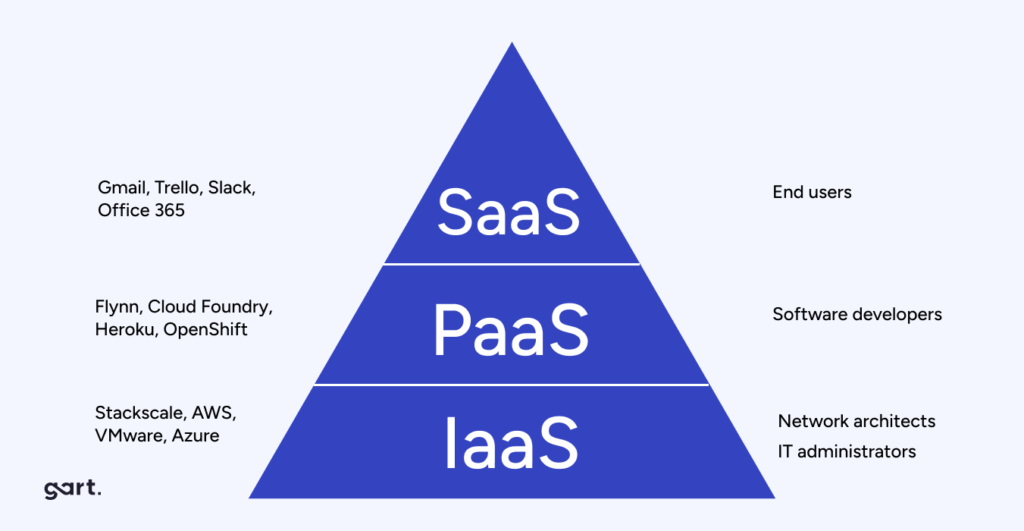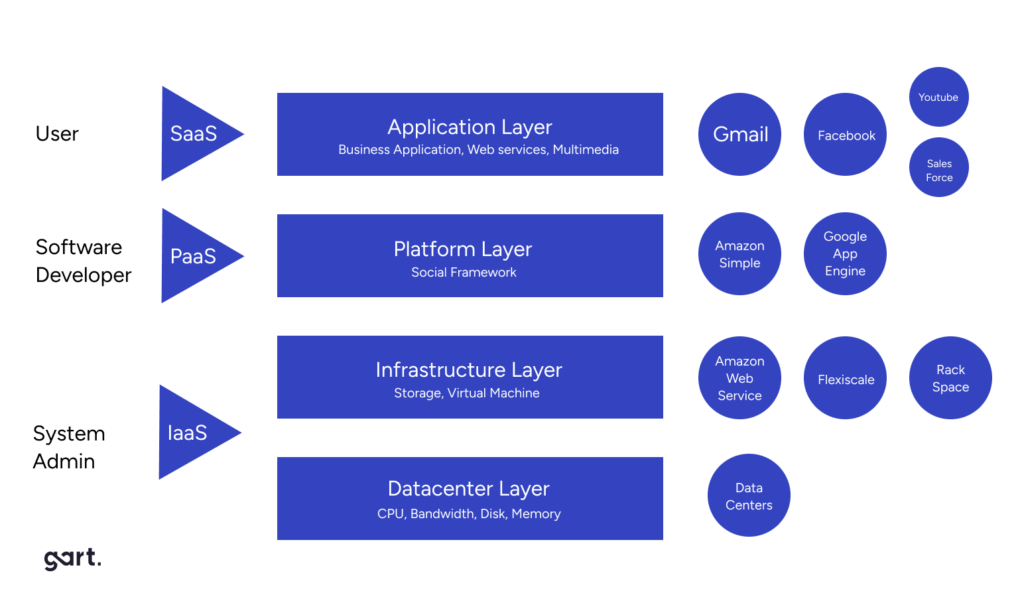
In my experience optimizing cloud costs, especially on AWS, I often find that many quick wins are in the "easy to implement - good savings potential" quadrant.
[lwptoc]
That's why I've decided to share some straightforward methods for optimizing expenses on AWS that will help you save over 80% of your budget.
Choose reserved instances
Potential Savings: Up to 72%
Choosing reserved instances involves committing to a subscription, even partially, and offers a discount for long-term rentals of one to three years. While planning for a year is often deemed long-term for many companies, especially in Ukraine, reserving resources for 1-3 years carries risks but comes with the reward of a maximum discount of up to 72%.
You can check all the current pricing details on the official website - Amazon EC2 Reserved Instances
Purchase Saving Plans (Instead of On-Demand)
Potential Savings: Up to 72%
There are three types of saving plans: Compute Savings Plan, EC2 Instance Savings Plan, SageMaker Savings Plan.
AWS Compute Savings Plan is an Amazon Web Services option that allows users to receive discounts on computational resources in exchange for committing to using a specific volume of resources over a defined period (usually one or three years). This plan offers flexibility in utilizing various computing services, such as EC2, Fargate, and Lambda, at reduced prices.
AWS EC2 Instance Savings Plan is a program from Amazon Web Services that offers discounted rates exclusively for the use of EC2 instances. This plan is specifically tailored for the utilization of EC2 instances, providing discounts for a specific instance family, regardless of the region.
AWS SageMaker Savings Plan allows users to get discounts on SageMaker usage in exchange for committing to using a specific volume of computational resources over a defined period (usually one or three years).
The discount is available for one and three years with the option of full, partial upfront payment, or no upfront payment. EC2 can help save up to 72%, but it applies exclusively to EC2 instances.
Utilize Various Storage Classes for S3 (Including Intelligent Tier)
Potential Savings: 40% to 95%
AWS offers numerous options for storing data at different access levels. For instance, S3 Intelligent-Tiering automatically stores objects at three access levels: one tier optimized for frequent access, 40% cheaper tier optimized for infrequent access, and 68% cheaper tier optimized for rarely accessed data (e.g., archives).
S3 Intelligent-Tiering has the same price per 1 GB as S3 Standard — $0.023 USD.
However, the key advantage of Intelligent Tiering is its ability to automatically move objects that haven't been accessed for a specific period to lower access tiers.
Every 30, 90, and 180 days, Intelligent Tiering automatically shifts an object to the next access tier, potentially saving companies from 40% to 95%. This means that for certain objects (e.g., archives), it may be appropriate to pay only $0.0125 USD per 1 GB or $0.004 per 1 GB compared to the standard price of $0.023 USD.
Information regarding the pricing of Amazon S3
AWS Compute Optimizer
Potential Savings: quite significant
The AWS Compute Optimizer dashboard is a tool that lets users assess and prioritize optimization opportunities for their AWS resources.
The dashboard provides detailed information about potential cost savings and performance improvements, as the recommendations are based on an analysis of resource specifications and usage metrics.
The dashboard covers various types of resources, such as EC2 instances, Auto Scaling groups, Lambda functions, Amazon ECS services on Fargate, and Amazon EBS volumes.
For example, AWS Compute Optimizer reproduces information about underutilized or overutilized resources allocated for ECS Fargate services or Lambda functions. Regularly keeping an eye on this dashboard can help you make informed decisions to optimize costs and enhance performance.
Use Fargate in EKS for underutilized EC2 nodes
If your EKS nodes aren't fully used most of the time, it makes sense to consider using Fargate profiles. With AWS Fargate, you pay for a specific amount of memory/CPU resources needed for your POD, rather than paying for an entire EC2 virtual machine.
For example, let's say you have an application deployed in a Kubernetes cluster managed by Amazon EKS (Elastic Kubernetes Service). The application experiences variable traffic, with peak loads during specific hours of the day or week (like a marketplace or an online store), and you want to optimize infrastructure costs. To address this, you need to create a Fargate Profile that defines which PODs should run on Fargate. Configure Kubernetes Horizontal Pod Autoscaler (HPA) to automatically scale the number of POD replicas based on their resource usage (such as CPU or memory usage).
Manage Workload Across Different Regions
Potential Savings: significant in most cases
When handling workload across multiple regions, it's crucial to consider various aspects such as cost allocation tags, budgets, notifications, and data remediation.
Cost Allocation Tags: Classify and track expenses based on different labels like program, environment, team, or project.
AWS Budgets: Define spending thresholds and receive notifications when expenses exceed set limits. Create budgets specifically for your workload or allocate budgets to specific services or cost allocation tags.
Notifications: Set up alerts when expenses approach or surpass predefined thresholds. Timely notifications help take actions to optimize costs and prevent overspending.
Remediation: Implement mechanisms to rectify expenses based on your workload requirements. This may involve automated actions or manual interventions to address cost-related issues.
Regional Variances: Consider regional differences in pricing and data transfer costs when designing workload architectures.
Reserved Instances and Savings Plans: Utilize reserved instances or savings plans to achieve cost savings.
AWS Cost Explorer: Use this tool for visualizing and analyzing your expenses. Cost Explorer provides insights into your usage and spending trends, enabling you to identify areas of high costs and potential opportunities for cost savings.
Transition to Graviton (ARM)
Potential Savings: Up to 30%
Graviton utilizes Amazon's server-grade ARM processors developed in-house. The new processors and instances prove beneficial for various applications, including high-performance computing, batch processing, electronic design automation (EDA) automation, multimedia encoding, scientific modeling, distributed analytics, and machine learning inference on processor-based systems.
The processor family is based on ARM architecture, likely functioning as a system on a chip (SoC). This translates to lower power consumption costs while still offering satisfactory performance for the majority of clients. Key advantages of AWS Graviton include cost reduction, low latency, improved scalability, enhanced availability, and security.
Spot Instances Instead of On-Demand
Potential Savings: Up to 30%
Utilizing spot instances is essentially a resource exchange. When Amazon has surplus resources lying idle, you can set the maximum price you're willing to pay for them. The catch is that if there are no available resources, your requested capacity won't be granted.
However, there's a risk that if demand suddenly surges and the spot price exceeds your set maximum price, your spot instance will be terminated.
Spot instances operate like an auction, so the price is not fixed. We specify the maximum we're willing to pay, and AWS determines who gets the computational power. If we are willing to pay $0.1 per hour and the market price is $0.05, we will pay exactly $0.05.
Use Interface Endpoints or Gateway Endpoints to save on traffic costs (S3, SQS, DynamoDB, etc.)
Potential Savings: Depends on the workload
Interface Endpoints operate based on AWS PrivateLink, allowing access to AWS services through a private network connection without going through the internet. By using Interface Endpoints, you can save on data transfer costs associated with traffic.
Utilizing Interface Endpoints or Gateway Endpoints can indeed help save on traffic costs when accessing services like Amazon S3, Amazon SQS, and Amazon DynamoDB from your Amazon Virtual Private Cloud (VPC).
Key points:
Amazon S3: With an Interface Endpoint for S3, you can privately access S3 buckets without incurring data transfer costs between your VPC and S3.
Amazon SQS: Interface Endpoints for SQS enable secure interaction with SQS queues within your VPC, avoiding data transfer costs for communication with SQS.
Amazon DynamoDB: Using an Interface Endpoint for DynamoDB, you can access DynamoDB tables in your VPC without incurring data transfer costs.
Additionally, Interface Endpoints allow private access to AWS services using private IP addresses within your VPC, eliminating the need for internet gateway traffic. This helps eliminate data transfer costs for accessing services like S3, SQS, and DynamoDB from your VPC.
Optimize Image Sizes for Faster Loading
Potential Savings: Depends on the workload
Optimizing image sizes can help you save in various ways.
Reduce ECR Costs: By storing smaller instances, you can cut down expenses on Amazon Elastic Container Registry (ECR).
Minimize EBS Volumes on EKS Nodes: Keeping smaller volumes on Amazon Elastic Kubernetes Service (EKS) nodes helps in cost reduction.
Accelerate Container Launch Times: Faster container launch times ultimately lead to quicker task execution.
Optimization Methods:
Use the Right Image: Employ the most efficient image for your task; for instance, Alpine may be sufficient in certain scenarios.
Remove Unnecessary Data: Trim excess data and packages from the image.
Multi-Stage Image Builds: Utilize multi-stage image builds by employing multiple FROM instructions.
Use .dockerignore: Prevent the addition of unnecessary files by employing a .dockerignore file.
Reduce Instruction Count: Minimize the number of instructions, as each instruction adds extra weight to the hash. Group instructions using the && operator.
Layer Consolidation: Move frequently changing layers to the end of the Dockerfile.
These optimization methods can contribute to faster image loading, reduced storage costs, and improved overall performance in containerized environments.
Use Load Balancers to Save on IP Address Costs
Potential Savings: depends on the workload
Starting from February 2024, Amazon begins billing for each public IPv4 address. Employing a load balancer can help save on IP address costs by using a shared IP address, multiplexing traffic between ports, load balancing algorithms, and handling SSL/TLS.
By consolidating multiple services and instances under a single IP address, you can achieve cost savings while effectively managing incoming traffic.
Optimize Database Services for Higher Performance (MySQL, PostgreSQL, etc.)
Potential Savings: depends on the workload
AWS provides default settings for databases that are suitable for average workloads. If a significant portion of your monthly bill is related to AWS RDS, it's worth paying attention to parameter settings related to databases.
Some of the most effective settings may include:
Use Database-Optimized Instances: For example, instances in the R5 or X1 class are optimized for working with databases.
Choose Storage Type: General Purpose SSD (gp2) is typically cheaper than Provisioned IOPS SSD (io1/io2).
AWS RDS Auto Scaling: Automatically increase or decrease storage size based on demand.
If you can optimize the database workload, it may allow you to use smaller instance sizes without compromising performance.
Regularly Update Instances for Better Performance and Lower Costs
Potential Savings: Minor
As Amazon deploys new servers in their data processing centers to provide resources for running more instances for customers, these new servers come with the latest equipment, typically better than previous generations. Usually, the latest two to three generations are available. Make sure you update regularly to effectively utilize these resources.
Take Memory Optimize instances, for example, and compare the price change based on the relevance of one instance over another. Regular updates can ensure that you are using resources efficiently.
InstanceGenerationDescriptionOn-Demand Price (USD/hour)m6g.large6thInstances based on ARM processors offer improved performance and energy efficiency.$0.077m5.large5thGeneral-purpose instances with a balanced combination of CPU and memory, designed to support high-speed network access.$0.096m4.large4thA good balance between CPU, memory, and network resources.$0.1m3.large3rdOne of the previous generations, less efficient than m5 and m4.Not avilable
Use RDS Proxy to reduce the load on RDS
Potential for savings: Low
RDS Proxy is used to relieve the load on servers and RDS databases by reusing existing connections instead of creating new ones. Additionally, RDS Proxy improves failover during the switch of a standby read replica node to the master.
Imagine you have a web application that uses Amazon RDS to manage the database. This application experiences variable traffic intensity, and during peak periods, such as advertising campaigns or special events, it undergoes high database load due to a large number of simultaneous requests.
During peak loads, the RDS database may encounter performance and availability issues due to the high number of concurrent connections and queries. This can lead to delays in responses or even service unavailability.
RDS Proxy manages connection pools to the database, significantly reducing the number of direct connections to the database itself.
By efficiently managing connections, RDS Proxy provides higher availability and stability, especially during peak periods.
Using RDS Proxy reduces the load on RDS, and consequently, the costs are reduced too.
Define the storage policy in CloudWatch
Potential for savings: depends on the workload, could be significant.
The storage policy in Amazon CloudWatch determines how long data should be retained in CloudWatch Logs before it is automatically deleted.
Setting the right storage policy is crucial for efficient data management and cost optimization. While the "Never" option is available, it is generally not recommended for most use cases due to potential costs and data management issues.
Typically, best practice involves defining a specific retention period based on your organization's requirements, compliance policies, and needs.
Avoid using an undefined data retention period unless there is a specific reason. By doing this, you are already saving on costs.
Configure AWS Config to monitor only the events you need
Potential for savings: depends on the workload
AWS Config allows you to track and record changes to AWS resources, helping you maintain compliance, security, and governance. AWS Config provides compliance reports based on rules you define. You can access these reports on the AWS Config dashboard to see the status of tracked resources.
You can set up Amazon SNS notifications to receive alerts when AWS Config detects non-compliance with your defined rules. This can help you take immediate action to address the issue. By configuring AWS Config with specific rules and resources you need to monitor, you can efficiently manage your AWS environment, maintain compliance requirements, and avoid paying for rules you don't need.
Use lifecycle policies for S3 and ECR
Potential for savings: depends on the workload
S3 allows you to configure automatic deletion of individual objects or groups of objects based on specified conditions and schedules. You can set up lifecycle policies for objects in each specific bucket. By creating data migration policies using S3 Lifecycle, you can define the lifecycle of your object and reduce storage costs.
These object migration policies can be identified by storage periods. You can specify a policy for the entire S3 bucket or for specific prefixes. The cost of data migration during the lifecycle is determined by the cost of transfers. By configuring a lifecycle policy for ECR, you can avoid unnecessary expenses on storing Docker images that you no longer need.
Switch to using GP3 storage type for EBS
Potential for savings: 20%
By default, AWS creates gp2 EBS volumes, but it's almost always preferable to choose gp3 — the latest generation of EBS volumes, which provides more IOPS by default and is cheaper.
For example, in the US-east-1 region, the price for a gp2 volume is $0.10 per gigabyte-month of provisioned storage, while for gp3, it's $0.08/GB per month. If you have 5 TB of EBS volume on your account, you can save $100 per month by simply switching from gp2 to gp3.
Switch the format of public IP addresses from IPv4 to IPv6
Potential for savings: depending on the workload
Starting from February 1, 2024, AWS will begin charging for each public IPv4 address at a rate of $0.005 per IP address per hour. For example, taking 100 public IP addresses on EC2 x $0.005 per public IP address per month x 730 hours = $365.00 per month.
While this figure might not seem huge (without tying it to the company's capabilities), it can add up to significant network costs. Thus, the optimal time to transition to IPv6 was a couple of years ago or now.
Here are some resources about this recent update that will guide you on how to use IPv6 with widely-used services — AWS Public IPv4 Address Charge.
Collaborate with AWS professionals and partners for expertise and discounts
Potential for savings: ~5% of the contract amount through discounts.
AWS Partner Network (APN) Discounts: Companies that are members of the AWS Partner Network (APN) can access special discounts, which they can pass on to their clients. Partners reaching a certain level in the APN program often have access to better pricing offers.
Custom Pricing Agreements: Some AWS partners may have the opportunity to negotiate special pricing agreements with AWS, enabling them to offer unique discounts to their clients. This can be particularly relevant for companies involved in consulting or system integration.
Reseller Discounts: As resellers of AWS services, partners can purchase services at wholesale prices and sell them to clients with a markup, still offering a discount from standard AWS prices. They may also provide bundled offerings that include AWS services and their own additional services.
Credit Programs: AWS frequently offers credit programs or vouchers that partners can pass on to their clients. These could be promo codes or discounts for a specific period.
Seek assistance from AWS professionals and partners. Often, this is more cost-effective than purchasing and configuring everything independently. Given the intricacies of cloud space optimization, expertise in this matter can save you tens or hundreds of thousands of dollars.
More valuable tips for optimizing costs and improving efficiency in AWS environments:
Scheduled TurnOff/TurnOn for NonProd environments: If the Development team is in the same timezone, significant savings can be achieved by, for example, scaling the AutoScaling group of instances/clusters/RDS to zero during the night and weekends when services are not actively used.
Move static content to an S3 Bucket & CloudFront: To prevent service charges for static content, consider utilizing Amazon S3 for storing static files and CloudFront for content delivery.
Use API Gateway/Lambda/Lambda Edge where possible: In such setups, you only pay for the actual usage of the service. This is especially noticeable in NonProd environments where resources are often underutilized.
If your CI/CD agents are on EC2, migrate to CodeBuild: AWS CodeBuild can be a more cost-effective and scalable solution for your continuous integration and delivery needs.
CloudWatch covers the needs of 99% of projects for Monitoring and Logging: Avoid using third-party solutions if AWS CloudWatch meets your requirements. It provides comprehensive monitoring and logging capabilities for most projects.
Feel free to reach out to me or other specialists for an audit, a comprehensive optimization package, or just advice.
Choosing between AWS vs Azure for startups is one of the most consequential infrastructure decisions a founding team makes — and it goes far beyond which provider hands you the bigger credit check. In 2026, the gap between platforms has narrowed on price, but widened dramatically on ecosystem depth, AI tooling, and enterprise go-to-market support.
With traditional hosting, you purchase a server and deploy your application on it. In contrast, the cloud simplifies this process: you upload a ZIP file or a source code folder, and you don’t have to worry about crashes. The cloud ensures high reliability by automatically restarting your application if it crashes, eliminating the need for a 24/7 engineer.
Cloud providers offer managed services that simplify development, enhance scalability, and reduce the need for maintenance, allowing startups to focus on their core code and business needs.
But dependency on specific cloud provider technologies can create lock-in, making it difficult to migrate to other providers or infrastructure in the future.
Choosing the right cloud platform is a crucial decision for any startup, and the good news is, all the major players – AWS, Google Cloud Platform (GCP), and Microsoft Azure – offer generous startup programs to help you get started.
This guide helps you whether you are a pre-seed team validating an MVP or a Series A company scaling toward enterprise customers, we break down exactly what AWS Activate and Microsoft for Startups offer, where each platform excels, and how to make the decision that fits your specific growth stage.
AWS Activate
AWS Activate is a comprehensive program designed to provide startups with resources to quickly get started on the AWS Cloud. It offers qualifying startups a range of benefits including AWS credits, training, support, and tools to build and scale their businesses.
Key features of AWS Activate include:
AWS Credits: Startups can receive up to $100,000 in AWS service credits to offset their cloud computing costs.
Technical Support: Access to AWS technical experts for architectural and product guidance.
Training: Free training resources, including self-paced labs and AWS Essentials courses.
Third-Party Tools: Discounts on select third-party tools and services from AWS Partners.
Community: Opportunities to connect with other startup founders and the AWS startup community.
The program aims to reduce the undifferentiated heavy lifting for startups, allowing them to focus on their core product and leverage the scalable AWS infrastructure. AWS Activate supports startups from the idea stage through growth phases as they build, launch, and scale their applications on AWS.
Google for Startups Cloud Program
The Google for Startups Cloud Program is Google's offering to provide startups with resources and support to build on Google Cloud Platform (GCP). It aims to help early-stage startups gain a competitive advantage by leveraging Google's cloud infrastructure and technologies.
Key benefits of the Google for Startups Cloud Program include:
Cloud Credits: Qualifying startups receive GCP credits up to $100,000 to cover compute, storage, and other services.
Technical Support: Access to GCP technical experts, architectural guidance, and best practice recommendations.
Learning Resources: Training programs, workshops, office hours, and other educational resources tailored for startups.
Community & Networking: Opportunities to connect with other founders, investors, and the broader Google Cloud startup community.
Partnerships: Exclusive partner offers and discounts on third-party solutions and services.
The program focuses on providing startups with the tools, mentorship, and ecosystem support to build, scale, and optimize their applications on Google Cloud. It fosters collaborations with accelerators, incubators, and venture capital firms to better serve the needs of early-stage startups.
Microsoft for Startups program
Microsoft for Startups is Microsoft's global program designed to help startups successfully launch and grow their companies by leveraging Microsoft's cloud platform, Azure, along with technical resources, business support, and a world-class partner ecosystem.
Key benefits of the Microsoft for Startups program include:
Azure Credits: Qualifying startups can receive up to $120,000 in Azure credits to build and run their applications and workloads on Azure.
Technical Support: Access to cloud architects, technical advisors, developer tools, and best practice guidance for building on Azure.
Marketplace Exposure: Opportunity to publish and showcase startup solutions on the Azure Marketplace, connecting with Microsoft's global customer base.
Partner Ecosystem: Connections to Microsoft's partner network, including venture capital firms, incubators, and accelerators for networking and potential investments.
Community & Events: Access to global startup community events, meetups, and co-working spaces for knowledge sharing and collaboration.
The program aims to provide startups with a comprehensive cloud platform, technical resources, business mentorship, and a thriving ecosystem to accelerate their growth and innovation trajectories from idea to unicorn.
AWS vs Azure for Startups at a Glance
Before diving deep, here is a high-level summary of both programs as they stand in 2026. Use this table to orient yourself — the detailed breakdown follows below.
DimensionAWS ActivateMicrosoft for Startups (Azure)Max Credits (Standard)Up to $100,000 UPFRONTUp to $150,000 over ~4 yearsAI-First Track CreditsUp to $300,000 (via VC partners)Azure AI credits bundled with OpenAI accessCredit DeliveryBulk upfront — faster burn flexibilityDrip-fed (~$25k–$50k/year), slower scaleEcosystem Size200+ services, largest global partner network LEADERStrong Azure Marketplace, Microsoft ecosystemAI & ML ToolingSageMaker, Bedrock, Rekognition, Trainium chipsAzure OpenAI Service, Azure ML, Copilot StudioEnterprise Co-sellAWS Marketplace co-sell availableMicrosoft co-sell (ISV path) STRONGEROpen-Source FriendlinessVery high — Kubernetes, Linux, multi-cloud SDKs LEADERGood; GitHub integration excellentMicrosoft Product IntegrationMinimalTeams, GitHub, Office 365, Dynamics LEADEREase of OnboardingSteeper learning curveSimpler for non-cloud-native founders LEADERGlobal Infrastructure33+ regions, most mature LEADER60+ regions globallyBootstrapped Founder AccessAWS Founders path (smaller amount)Up to $5k without investor backingAWS vs Azure for Startups at a Glance
AWS Activate: What Startups Get in 2026
AWS Activate is Amazon's flagship startup program, and it remains the most widely distributed cloud credit system in the world. Tens of thousands of startups pass through AWS-connected accelerators, incubators, and venture capital firms every year — and the automatic distribution of credits through these partner networks makes AWS often the default first cloud for new companies.
Credits & Tiers
$100K
Standard Max
(Portfolio)
$300K
AI-First Track
(VC-Nominated)
$1K–$5K
Founders
(Self-Serve)
The standard Portfolio tier provides up to $100,000 in credits — delivered largely upfront — which is critical for startups with unpredictable compute spikes during product launches. For generative AI startups that can demonstrate compute-heavy workloads (clusters of P5 or G5 GPU instances), AWS has introduced a specialist tier offering up to $300,000, typically accessible via high-profile VC partner nomination. This is restricted to teams building foundation models, not application wrappers.
Beyond Credits: The AWS Ecosystem
AWS Activate goes beyond billing discounts. Accepted startups gain access to:
AWS Marketplace visibility: List your product in front of 300,000+ active customers, including enterprise procurement teams
Technical architecture review: Dedicated AWS Solutions Architects for startups at higher tiers
Training & certifications: AWS Skill Builder, free exam vouchers, and startup-focused workshops
Partner network: Access to over 100,000 AWS Partners — ISVs, MSPs, and system integrators globally
Business support: Curated resources, migration tools, and co-sell introductions at scale stage
The AWS ecosystem's flywheel effect is real. Once a startup is embedded into the AWS Marketplace and partner network, switching costs rise — not just technically, but commercially. For startups targeting enterprise buyers, this is a feature, not a bug.
Microsoft for Startups Founders Hub: Azure's Offer
Microsoft's answer to AWS Activate is the Founders Hub — a revamped program that bundles Azure cloud credits with access to Microsoft's broader product suite, enterprise sales network, and AI tooling including Azure OpenAI Service.
Credits & Structure
$150K
Max
(Investor Network)
$5K
Bootstrapped
/ Self-Serve
4 Yrs
Program
Duration
The maximum $150,000 in Azure credits is distributed over a longer period — typically drip-fed at roughly $25,000–$50,000 per year across up to 4 years. This structure supports long-duration runway management but can limit startups during high-growth sprints that demand massive burst capacity. As of July 2025, Microsoft significantly tightened bootstrapped founder access — self-serve applicants without investor backing now receive up to $5,000, down considerably from previous rounds.
The Microsoft Bundle Advantage
Where Azure truly differentiates itself in the AWS vs Azure for startups debate is the Microsoft product bundle. Founders Hub participants often receive:
GitHub Copilot: Free enterprise seats for the dev team — a genuine productivity multiplier for small engineering teams
Azure OpenAI Service: Rate-limited access to GPT-4 and o1 models with enterprise SLA — without managing your own API cost exposure
Microsoft 365: Office, Teams, and collaboration tools bundled into the startup package
LinkedIn Sales Navigator: Available at select program tiers, powerful for B2B startups building pipeline
Microsoft co-sell program: ISV co-sell paths that put your product in front of Microsoft's 40,000-person field sales team
Head-to-Head Comparison: 7 Critical Dimensions
Let's go deeper on the factors that actually determine which platform wins for your startup. The AWS vs Azure for startups decision rarely hinges on one variable — it's the combination of your team's technical profile, your product's architecture, and your go-to-market motion.
AWS Activate
The Engineering Choice
Credits delivered upfront — better for launch spikes
200+ services, broadest catalogue
Best-in-class Kubernetes (EKS) and container tooling
Largest global partner & accelerator network
Multi-cloud friendly, open-source first
AWS Marketplace: 300K+ enterprise buyers
Stronger for technical, multi-stack engineering teams
Microsoft for Startups
The Enterprise Ecosystem
Full Microsoft product suite (Teams, GitHub, Office)
Azure OpenAI — enterprise-grade GPT access
Best co-sell path to enterprise customers
Simpler onboarding for non-cloud-native founders
60+ global regions — slightly more distributed
Azure VM Scale Sets — fast MVP deployments
Stronger for Microsoft-stack & enterprise-focused teams
1. Credits: Speed Matters More Than Total Amount
AWS delivers the bulk of its credits upfront. Azure drip-feeds over 4 years. For a startup that needs to run intensive load tests, train ML models, or handle a viral product launch, AWS's upfront delivery is a tangible operational advantage. Azure's longer duration benefits startups with steady, predictable workloads — but that's rarely the reality in early-stage companies.
2. Ecosystem & Services
AWS offers more than 200 services — compute, storage, databases, networking, AI, IoT, satellite, and more. Azure follows closely with a comparable catalogue, but its deepest strengths are in hybrid cloud (Azure Arc), Windows/.NET workloads, and enterprise identity management (Azure Active Directory / Entra ID). If your startup is polyglot and multi-cloud, AWS wins on breadth. If you are building on .NET, SharePoint integrations, or Windows Server, Azure is the path of least resistance.
3. AI & ML Tooling
Both platforms have made aggressive AI investments. AWS offers SageMaker for end-to-end MLOps, Amazon Bedrock for foundation model access (Anthropic, Llama, Cohere), and custom Trainium and Inferentia chips for cost-efficient AI inference. Azure counters with Azure OpenAI Service — which gives Azure-native startups enterprise-grade access to GPT-4, o1, and Codex behind Microsoft SLA — plus Azure ML, Cognitive Services, and Copilot Studio for building custom AI agents. For startups building OpenAI-powered products, the Azure OpenAI access is a meaningful differentiator.
4. Pricing & Cost Predictability
AWS's pricing model is exhaustively detailed and highly configurable — Spot Instances, Reserved Instances, Savings Plans, and On-Demand options give precise control. The trade-off is complexity; predicting bills requires discipline. Azure offers comparable flexibility but its Hybrid Benefit pricing (for Microsoft-licensed workloads) creates meaningful cost advantages for teams already running Windows Server or SQL Server. Both platforms have free tiers that typically expire earlier than founders expect — budget accordingly.
5. Enterprise Co-sell & GTM Support
This is where Azure has a structural advantage. Microsoft's co-sell program — part of the ISV Success and Commercial Marketplace track — connects validated Azure-native startups to Microsoft's field sales team directly. When your product solves a problem that Microsoft's enterprise account executives face with their clients, the co-sell motion can add millions in ARR without a single outbound call. AWS Marketplace offers a comparable path, but Microsoft's enterprise relationships (particularly with Fortune 500 IT departments already running Microsoft 365) tend to be stickier. For B2B SaaS startups targeting enterprise buyers, Azure's co-sell advantage is often decisive.
6. DevOps & Developer Experience
AWS has long been the developer community's default. Its SDK maturity, CLI tools, CloudFormation and CDK for infrastructure-as-code, and the sheer volume of open-source projects on GitHub targeting AWS make it the preference of senior cloud engineers. Azure counters with deep GitHub integration (Microsoft owns GitHub), Azure DevOps (one of the best CI/CD platforms in enterprise), and excellent Visual Studio and VS Code tooling. The right answer depends on your team's background: AWS rewards experienced cloud engineers; Azure lowers the bar for mixed or Microsoft-centric teams.
7. Global Infrastructure & Compliance
AWS operates 33+ geographic regions with 105+ availability zones — the most mature global footprint, particularly strong in North America, Europe, and Southeast Asia. Azure follows closely with 60+ regions. Both meet enterprise compliance standards: SOC 2, HIPAA, GDPR, FedRAMP, ISO 27001. Azure has a slight edge in government cloud and specific regulated industry compliance (particularly in Europe), while AWS leads on overall region depth and network performance. For startups with strict data residency requirements in the EU or APAC, verify specific region availability before deciding.
Further reading: For cloud market share data and infrastructure benchmarks, see Synergy Research Group's cloud market analysis. For open-source cloud standards relevant to your architecture decisions, the Linux Foundation's cloud-native resources and CNCF provide vendor-neutral guidance.
When to Choose AWS for Your Startup
The AWS vs Azure for startups decision leans toward AWS when one or more of these factors apply:
Your team is cloud-native or polyglot: Senior engineers who are comfortable with infrastructure-as-code, multi-service architectures, and Kubernetes will move faster on AWS
You need massive burst compute early: Credit-heavy product launches, load testing, or ML training runs benefit from AWS's upfront credit delivery and Spot Instance pricing
Open-source is core to your architecture: AWS has the richest ecosystem of open-source compatible managed services — from OpenSearch to managed Kafka (MSK) to EKS
You are going multi-cloud from day one: AWS's tooling is the most widely integrated across Terraform, Pulumi, Crossplane, and other IaC platforms
You are entering AWS Marketplace as a GTM channel: If your ICP (Ideal Customer Profile) is IT buyers who procure via marketplace, AWS's 300K+ active buyers is the larger audience
You come from an AWS-connected accelerator or VC: The automatic credit distribution through AWS's partner network makes AWS the path of least resistance for accelerator cohorts
When to Choose Azure for Your Startup
The decision swings toward Azure when:
Your product targets enterprise Microsoft customers: If your ICP already uses Teams, SharePoint, Dynamics, or Azure AD, Microsoft's co-sell motion and native integrations dramatically reduce your sales cycle
You are building on .NET, Windows Server, or SQL Server: Azure Hybrid Benefit and native Microsoft stack compatibility give you a cost and performance advantage
Your team is not cloud-native: Azure's Virtual Machine Scale Sets and App Service abstractions lower the operational burden for teams without dedicated DevOps engineers
OpenAI-powered features are core to your product: Azure OpenAI Service offers enterprise SLA-backed access to GPT-4 and o1 — valuable if you need reliability guarantees at scale
GitHub is central to your engineering workflow: GitHub Copilot Enterprise and GitHub Actions have the deepest Azure integrations
You are targeting regulated industries in Europe: Azure's EU Data Boundary and specific GDPR compliance tooling are mature and well-documented
A Note on GCP: Still Worth Considering
The traditional comparison is AWS vs Azure vs GCP — and while this article focuses on the AWS vs Azure for startups decision, Google Cloud Platform deserves a mention. GCP offers up to $200,000 in standard credits and up to $350,000 for AI-first startups, making it the most generous credit program by raw dollar amount for teams building on Vertex AI, Gemini models, and TPU infrastructure.
For startups whose entire product is built on generative AI or heavy ML pipelines, GCP's combination of credit volume, Vertex AI maturity, and BigQuery analytics makes it a compelling third option. However, GCP's smaller partner ecosystem and narrower enterprise co-sell network compared to AWS and Azure remain disadvantages for B2B startups focused on enterprise sales. We cover GCP in depth in our full three-way comparison guide.
💡 Strategic Tip: You Can Stack Cloud Credits
Many experienced startup founders do not choose one provider exclusively at the early stage. They apply to multiple programs simultaneously — using AWS Activate for backend infrastructure, Azure credits for AI/OpenAI workloads and enterprise demos, and GCP credits for data analytics pipelines. This approach maximizes runway without locking into a single vendor too early. Talk to a cloud architect before finalizing your infrastructure decisions.
Gart Solutions Cloud Advisory
Not Sure Which Cloud Is Right for Your Startup?
At Gart Solutions, we help startups and scale-ups design, migrate, and optimize cloud infrastructure across AWS, Azure, and GCP. We're a team of hands-on cloud architects and FinOps practitioners — not vendor salespeople.
We've helped engineering teams at seed-stage startups to Series B companies navigate exactly this decision: which provider fits your architecture, your GTM motion, and your 18-month runway.
☁️ Cloud Architecture
💰 FinOps & Cost Optimization
🔄 Cloud Migration
🤖 AI/ML Infrastructure
🔐 DevSecOps
📊 Kubernetes & Platform Eng.
Talk to a Cloud Architect →
Short summary
Free Credits and Funding:
AWS Activate: Up to $100,000 in AWS credits over a year.
Google for Startups Cloud Program: Offers two tiers – Start ($100,000) and Scale ($200,000) – in Google Cloud credits over 2 years, with an extended limit of $350,000 for AI-focused startups.
Microsoft for Startups: Azure credits vary depending on the program stage (individual, seed, or Series A+), but can reach up to $150,000 per year.
Additional Benefits:
AWS Activate: Provides access to business and technical guidance, curated resources, partner offers, and migration support.
Google for Startups Cloud Program: Offers free training, mentorship opportunities, and credits for Firebase, Google's mobile app development platform.
Microsoft for Startups: Includes access to BizSpark program with free Azure services, Azure credits, developer tools, and various Microsoft products.
Additional Tips:
Read the fine print: Understand eligibility requirements, credit limitations, and spending restrictions for each program.
Explore free tiers: All three platforms offer free tiers with limited service usage, allowing you to experiment before committing.
Talk to experts: Consider seeking advice from cloud specialists or mentors familiar with these programs to make an informed decision.
Free Cloud for Startups: Avoiding the Hidden Cost Traps
While free cloud credits and technical support through provider startup programs sound incredibly appealing for cash-strapped startups, it's important to be wary of the potential hidden costs. Too often, startups neglect optimizing their cloud infrastructure for long-term scale during the free period, leading to skyrocketing costs once it ends. There's also the risk of vendor lock-in, making it expensive to migrate to another provider down the line.
One startup leveraged the Google Cloud Startup Program's free credits and support to quickly build and scale their innovative product. However, when the free period lapsed, they faced crippling infrastructure costs from lack of optimization along with substantial expenses to move to a different cloud due to lock-in. Proper planning for post-free period usage and avoiding vendor lock-in is crucial.
Startups should carefully weigh the pros and cons of each cloud's startup program, considering long-term scalability, costs, and flexibility needs. Working with experienced cloud consultants can help startups develop a cloud strategy aligned with their long-term roadmap to avoid falling into costly pitfalls after the initial free period.
Read more this case study: DevOps for Microsoft HoloLens Application Run on GCP
Factors to Consider When Choosing a Cloud Partner
Consider your stage: If you're a very early-stage startup, Google's program with its larger credit pool might be ideal. For later-stage startups with specific needs, Microsoft's tiered program with BizSpark benefits could be attractive.
Focus on your technology stack: If you're heavily invested in AI/ML, Google's expertise and additional credits might be a significant advantage. For startups already using Microsoft products, Azure's integration might be smoother.
Think long-term: While free credits are important, consider the ongoing costs and support offered by each platform.
By carefully evaluating your needs and comparing the offerings of AWS Activate, Google for Startups Cloud Program, and Microsoft for Startups, you can select the cloud partner that will best fuel your startup's growth. Remember, the best program is the one that aligns with your specific business goals and future technology roadmap.
As climate change, resource depletion, and environmental issues loom large, businesses are turning to technology as a powerful ally in achieving their sustainability goals. This isn't just about saving the planet (although that's pretty important), it's also about creating a more efficient and resilient future for all.
Data is the new oil, and when it comes to sustainability, it's a game-changer. Technology empowers businesses to collect and analyze vast amounts of data, allowing them to make informed decisions about their environmental impact. By automating processes, streamlining operations, and enabling data-driven decision-making, businesses can minimize waste, reduce energy consumption, and optimize resource utilization.
Digital technologies, such as cloud computing, remote collaboration tools, and virtual platforms, have the potential to reduce the need for physical infrastructure and travel, thereby minimizing the associated environmental impacts.
One of the primary challenges is striking a balance between sustainability goals and profitability. Many businesses struggle to reconcile the perceived trade-off between environmental considerations and short-term financial gains. Implementing sustainable practices often requires upfront investments in new technologies, infrastructure, or processes, which can be costly and may not yield immediate returns. Convincing stakeholders and shareholders of the long-term benefits and value of sustainability can be a complex task.
The Environmental Impact of IT Infrastructure
One of the primary concerns regarding IT infrastructure is energy consumption. Data centers, which house servers, storage systems, and networking equipment, are energy-intensive facilities. They require substantial amounts of electricity to power and cool the hardware, contributing to greenhouse gas emissions and straining energy grids. According to estimates, data centers account for approximately 1% of global electricity consumption, and this figure is expected to rise as data volumes and computing demands continue to grow.
Furthermore, the manufacturing process of IT equipment, such as servers, computers, and other hardware components, involves the extraction and processing of raw materials, which can have detrimental effects on the environment. The mining of rare earth metals and other minerals used in electronic components can lead to habitat destruction, water pollution, and the depletion of natural resources.
E-waste, or electronic waste, is another pressing issue related to IT infrastructure. As technological devices become obsolete or reach the end of their lifecycle, they often end up in landfills or informal recycling facilities, posing risks to human health and the environment. E-waste can contain hazardous substances like lead, mercury, and cadmium, which can leach into soil and water sources, causing pollution and potential harm to ecosystems.
By addressing the environmental impact of IT infrastructure, businesses can not only reduce their carbon footprint and resource consumption but also contribute to a more sustainable future. Striking a balance between technological innovation and environmental stewardship is crucial for achieving long-term sustainability goals.
DevOps and Sustainability
DevOps practices play a pivotal role in optimizing resources and reducing waste, making them a powerful ally in the pursuit of sustainability. By seamlessly integrating development and operations processes, DevOps enables organizations to achieve greater efficiency, agility, and environmental responsibility.
At the core of DevOps is the principle of automation and continuous improvement. By automating repetitive tasks and streamlining processes, DevOps eliminates manual efforts, reduces human errors, and minimizes resource wastage. This efficiency translates into lower energy consumption, decreased hardware utilization, and a reduced carbon footprint.
CI/CD for Improved Eco-Efficiency
Continuous Integration and Continuous Delivery (CI/CD) are essential DevOps practices that contribute to sustainability. CI/CD enables organizations to rapidly and frequently deliver software updates and improvements, ensuring that applications run optimally and efficiently. This approach minimizes the need for resource-intensive deployments and reduces the overall environmental impact of software development and operations.
Moreover, CI/CD facilitates the early detection and resolution of issues, preventing potential inefficiencies and resource wastage. By integrating automated testing and quality assurance processes, organizations can identify and address performance bottlenecks, security vulnerabilities, and other issues that could lead to increased energy consumption or resource utilization.
Monitoring and Analytics for Identifying and Eliminating Inefficiencies
DevOps emphasizes the importance of monitoring and analytics as a means to gain insights into system performance, resource utilization, and potential areas for improvement. By leveraging advanced monitoring tools and techniques, organizations can gather real-time data on energy consumption, hardware utilization, and application performance.
This data can then be analyzed to identify inefficiencies, such as underutilized resources, redundant processes, or areas where optimization is required. Armed with these insights, organizations can take proactive measures to streamline operations, adjust resource allocation, and implement energy-saving strategies, ultimately reducing their environmental footprint.
For a deeper dive into how monitoring and analytics can drive efficiency and sustainability, explore this case study of a software development company that optimized its workload orchestration using continuous monitoring.
Our case study: Implementation of Nomad Cluster for Massively Parallel Computing
Cloud Computing and Sustainability
Cloud computing has emerged as a transformative technology that not only enhances efficiency and agility but also holds significant potential for promoting sustainability and reducing environmental impact. By leveraging the power of cloud services, organizations can achieve remarkable energy and resource savings, while simultaneously minimizing their carbon footprint.
Energy and Resource Savings through Cloud Services
One of the primary advantages of cloud computing in terms of sustainability is the efficient utilization of shared resources. Cloud service providers operate large-scale data centers that are designed for optimal resource allocation and energy efficiency. By consolidating workloads and leveraging economies of scale, cloud providers can maximize resource utilization, reducing energy consumption and minimizing waste.
Additionally, cloud providers invest heavily in implementing cutting-edge technologies and best practices for energy efficiency, such as advanced cooling systems, renewable energy sources, and efficient hardware. These efforts result in significant energy savings, translating into a lower carbon footprint for organizations that leverage cloud services.
Flexible Cloud Models for Cost Optimization for Sustainable Operations
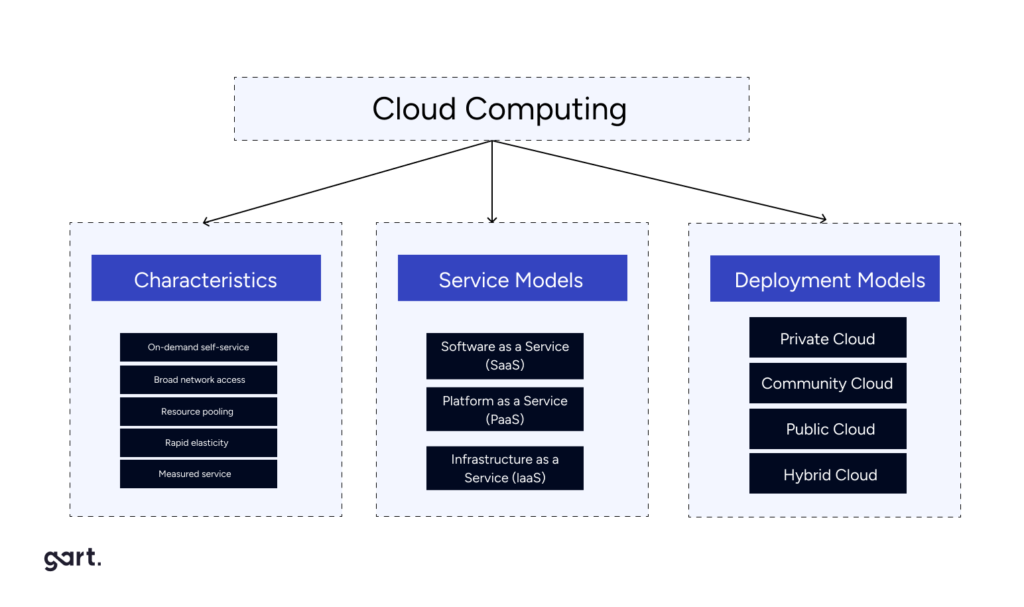
Cloud computing offers flexible deployment models, including public, private, and hybrid clouds, allowing organizations to tailor their cloud strategies to meet their specific needs and optimize costs. By embracing the pay-as-you-go model of public clouds or implementing private clouds for sensitive workloads, businesses can dynamically scale their resource consumption, avoiding over-provisioning and minimizing unnecessary energy expenditure.
Cloud providers offer a diverse range of compute and storage resources with varying payment options and tiers, catering to different use cases and requirements. For instance, Amazon Web Services (AWS) provides Elastic Compute Cloud (EC2) instances with multiple pricing models, including Dedicated, On-Demand, Spot, and Reserved instances. Choosing the most suitable instance type for a specific workload can lead to significant cost savings.
Dedicated instances, while the most expensive option, are ideal for handling sensitive workloads where security and compliance are of paramount importance. These instances run on hardware dedicated solely to a single customer, ensuring heightened isolation and control.
On-demand instances, on the other hand, are billed on an hourly basis and are well-suited for applications with short-term, irregular workloads that cannot be interrupted. They are particularly useful during testing, development, and prototyping phases, offering flexibility and scalability on-demand.
For long-running workloads, Reserved instances offer substantial discounts, up to 72% compared to on-demand pricing. By investing in Reserved instances, businesses can secure capacity reservations and gain confidence in their ability to launch the required number of instances when needed.
Spot instances present a cost-effective alternative for workloads that do not require high availability. These instances leverage spare computing capacity, enabling businesses to benefit from discounts of up to 90% compared to on-demand pricing.
Our case study: Cutting Costs by 81%: Azure Spot VMs Drive Cost Efficiency for Jewelry AI Vision
Additionally, DevOps teams employ various cloud cost optimization practices to further reduce operational expenses and environmental impact. These include:
- Identifying and deleting underutilized instances
- Moving infrequently accessed storage to more cost-effective tiers
- Exploring alternative regions or availability zones with lower pricing
- Leveraging available discounts and pricing models
- Implementing spend monitoring and alert systems to track and control costs proactively
By adopting a strategic approach to resource utilization and cost optimization, businesses can not only achieve sustainable operations but also unlock significant cost savings. This proactive mindset aligns with the principles of environmental stewardship, enabling organizations to thrive while minimizing their ecological footprint.
Read more: Sustainable Solutions with AWS
Reduced Physical Infrastructure and Associated Emissions
Moving to the cloud isn't just about convenience and scalability – it's a game-changer for the environment. Here's why:
Bye-bye Bulky Servers
Cloud computing lets you ditch the on-site server farm. No more rows of whirring machines taking up space and guzzling energy. Cloud providers handle that, often in facilities optimized for efficiency. This translates to less energy used, fewer emissions produced, and a lighter physical footprint for your business.
Commuting? Not Today
Cloud-based tools enable remote work, which means fewer cars on the road spewing out emissions. Not only does this benefit the environment, but it also promotes a more flexible and potentially happier workforce.
Cloud computing offers a win-win for businesses and the planet. By sharing resources, utilizing energy-saving data centers, and adopting flexible deployment models, cloud computing empowers organizations to significantly reduce their environmental impact without sacrificing efficiency or agility. Think of it as a powerful tool for building a more sustainable future, one virtual server at a time.
Get a sample of IT Audit
Sign up now
Get on email
Loading...
Thank you!
You have successfully joined our subscriber list.
Effective Infrastructure Management and Sustainability
Effective infrastructure management plays a crucial role in achieving sustainability goals within an organization. By implementing strategies that optimize resource utilization, reduce energy consumption, and promote environmentally-friendly practices, businesses can significantly diminish their environmental impact while maintaining operational efficiency.
Virtualization and Consolidation Strategies for Reducing Hardware Needs
Virtualization technology has revolutionized the way organizations manage their IT infrastructure.
By ditching the extra servers, you're using less energy to power and cool them. Think of it like turning off all the lights in empty rooms – virtualization ensures you're only using the resources you truly need. This translates to significant energy savings and a smaller carbon footprint.
Fewer servers mean less hardware to manufacture and eventually dispose of. This reduces the environmental impact associated with both the production process and electronic waste (e-waste). Virtualization helps you be a more responsible citizen of the digital world.
Our case study: IoT Device Management Using Kubernetes
Optimizing with Third-Party Services
In the pursuit of sustainability and resource efficiency, businesses must explore innovative strategies that can streamline operations while reducing their environmental footprint. One such approach involves leveraging third-party services to optimize costs and minimize operational overhead. Cloud computing providers, such as Azure, AWS, and Google Cloud, offer a vast array of services that can significantly enhance the development process and reduce resource consumption.
A prime example is Amazon's Relational Database Service (RDS), a fully managed database solution that boasts advanced features like multi-regional setup, automated backups, monitoring, scalability, resilience, and reliability. Building and maintaining such a service in-house would not only be resource-intensive but also costly, both in terms of financial investment and environmental impact.
However, striking the right balance between leveraging third-party services and maintaining control over critical components is crucial. When crafting an infrastructure plan, DevOps teams meticulously analyze project requirements and assess the availability of relevant third-party services. Based on this analysis, recommendations are provided on when it's more efficient to utilize a managed service, and when it's more cost-effective and suitable to build and manage the service internally.
For ongoing projects, DevOps teams conduct comprehensive audits of existing infrastructure resources and services. If opportunities for cost optimization are identified, they propose adjustments or suggest integrating new services, taking into account the associated integration costs with the current setup. This proactive approach ensures that businesses continuously explore avenues for reducing their environmental footprint while maintaining operational efficiency.
One notable success story involves a client whose services were running on EC2 instances via the Elastic Container Service (ECS). After analyzing their usage patterns, peak periods, and management overhead, the DevOps team recommended transitioning to AWS Fargate, a serverless solution that eliminates the need for managing underlying server infrastructure. Fargate not only offered a more streamlined setup process but also facilitated significant cost savings for the client.
By judiciously adopting third-party services, businesses can reduce operational overhead, optimize resource utilization, and ultimately minimize their environmental impact. This approach aligns with the principles of sustainability, enabling organizations to achieve their goals while contributing to a greener future.
Our case study: Deployment of a Node.js and React App to AWS with ECS
Green Code and DevOps Go Hand-in-Hand
At the heart of this sustainable approach lies green code, the practice of developing and deploying software with a focus on minimizing its environmental impact. Green code prioritizes efficient algorithms, optimized data structures, and resource-conscious coding practices.
At its core, Green Code is about designing and implementing software solutions that consume fewer computational resources, such as CPU cycles, memory, and energy. By optimizing code for efficiency, developers can reduce the energy consumption and carbon footprint associated with running applications on servers, desktops, and mobile devices.
Continuous Monitoring and Feedback
DevOps promotes continuous monitoring of applications, providing valuable insights into resource utilization. These insights can be used to identify areas for code optimization, ensuring applications run efficiently and consume less energy.
Infrastructure Automation:
Automating infrastructure provisioning and management through tools like Infrastructure as Code (IaC) helps eliminate unnecessary resources and idle servers. Think of it like switching off the lights in an empty room – automation ensures resources are only used when needed.
Containerization
Containerization technologies like Docker package applications with all their dependencies, allowing them to run efficiently on any system. This reduces the need for multiple servers and lowers overall energy consumption.
Cloud-Native Development
By leveraging cloud platforms, developers can benefit from pre-built, scalable infrastructure with high energy efficiency. Cloud providers are constantly optimizing their data centers for sustainability, so you don't have to shoulder the burden alone.
DevOps practices not only streamline development and deployment processes, but also create a culture of resource awareness and optimization. This, combined with green code principles, paves the way for building applications that are not just powerful, but also environmentally responsible.
How Businesses Are Using DevOps, Cloud, and Green Code to Thrive
Case Study 1: Transforming a Local Landfill Solution into a Global Platform
ReSource International, an Icelandic environmental solutions company, developed elandfill.io, a digital platform for monitoring and managing landfill operations. However, scaling the platform globally posed challenges in managing various components, including geospatial data processing, real-time data analysis, and module integration.
Gart Solutions implemented the RMF, a suite of tools and approaches designed to facilitate the deployment of powerful digital solutions for landfill management globally.
Case Study 3: The #1 Music Promotion Services Cuts Costs with Sustainable AWS Solutions
The #1 Music Promotion Services, a company helping independent artists, faced rising AWS infrastructure costs due to rapid growth. A multi-faceted approach focused on optimization and cost-saving strategies was implemented. This included:
Amazon SNS Optimization: A usage audit identified redundant notifications and opportunities for batching messages, leading to lower usage charges.
EC2 and RDS Cost Management: Right-sizing instances, utilizing reserved instances, and implementing auto-scaling ensured efficient resource utilization.
Storage Optimization: Lifecycle policies and data cleanup practices reduced storage costs.
Traffic and Data Transfer Management: Optimized data transfer routes and cost monitoring with alerts helped manage unexpected spikes.
Results: Monthly AWS costs were slashed by 54%, with significant savings across services like Amazon SNS and EC2/RDS. They also established a framework for sustainable cost management, ensuring long-term efficiency.
Partner with Gart for IT Cost Optimization and Sustainable Business
As businesses strive for sustainability, partnering with the right IT provider is crucial for optimizing costs and minimizing environmental impact. Gart emerges as a trusted partner, offering expertise in cloud computing, DevOps, and sustainable IT solutions.
Gart's cloud proficiency spans on-premise-to-cloud migration, cloud-to-cloud migration, and multi-cloud/hybrid cloud management. Our DevOps services include cloud adoption, CI/CD streamlining, security management, and firewall-as-a-service, enabling process automation and operational efficiencies.
Recognized by IAOP, GSA, Inc. 5000, and Clutch.co, Gart adheres to PCI DSS, ISO 9001, ISO 27001, and GDPR standards, ensuring quality, security, and data protection.
By partnering with Gart, businesses can optimize IT costs, reduce their carbon footprint, and foster a sustainable future. Leverage Gart's expertise to align your IT strategies with environmental goals and unlock the benefits of cost optimization and sustainability.