Gartner predicts that by 2028, 40% of new enterprise production software will be built using vibe coding techniques and tools — prompting an AI assistant in natural language rather than hand-writing every line. It's already happening faster than that forecast suggests: by most 2026 estimates, 41-46% of new production code is AI-generated, and Java backends have crossed 61%. The problem isn't the prompting. It's that a working demo and a production-ready application that has passed a real security audit are two very different things, and most teams don't find out which one they've built until it's live and something breaks.
This guide is the vibe coding best practices playbook we actually use when a founder or product team brings us an AI-generated app and asks, "is this safe to launch?" It covers the prompt strategy that gets you closer to production-ready code on the first pass, the security gaps AI assistants reliably leave behind, and the infrastructure checklist — CI/CD, secrets, observability, disaster recovery — that turns a vibe-coded prototype into something Gart's own SRE and DevOps teams would sign off on.
What does "vibe coding" actually mean in 2026?
The term was coined for describing a piece of code by describing what you want in plain English and letting an AI assistant — Claude, Cursor, Lovable, Bolt, Replit, v0, or a dozen similar tools — generate, run, and iterate on it, often with the person driving barely reading the diff. It's no longer a hobbyist curiosity. Stack Overflow's 2025 survey found 84% of developers already use or plan to use AI coding tools, and 63% of self-identified vibe coding users are non-developers: product managers, founders, and designers shipping real, customer-facing software without a traditional engineering background.
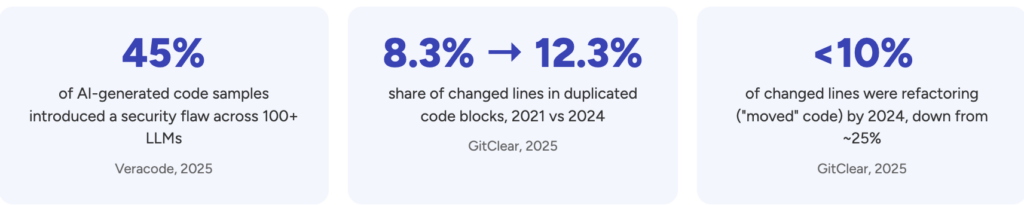
That's the upside case. The 2026 data on outcomes is messier. MIT researchers measured a 26% increase in completed tasks across nearly 4,900 developers using AI assistants, and McKinsey found teams saving roughly 3.6 hours a week on routine coding. But a randomized METR study found experienced developers were actually 19% slower on real tasks when using AI tools — while estimating afterward that they'd been 20% faster. Uplevel's research tied Copilot adoption to a 41% increase in bug rates. And separate security research found only 8.25% of one leading model's code outputs were both functionally correct and free of security flaws, with 45% failing OWASP Top 10 benchmarks outright. Vibe coding isn't a shortcut around engineering discipline — it just moves where that discipline needs to be applied: from writing the code to reviewing, securing, and operating it.
Prototype vs. production-ready: the gap in one table
Most of the vibe-coded apps we're asked to review pass this test in under a minute — and that's the point. A weekend prototype and a production system can look identical in the browser while being nothing alike underneath.
DimensionTypical vibe-coded prototypeProduction-ready applicationData access controlDefault-open tables; RLS/authorization added "later"Deny-by-default policies, tested per role before launchSecretsAPI keys pasted into prompts, client code, or .env files committed to gitManaged secrets store with rotation and least-privilege scopingTestingManual click-through by the person who built itAutomated test suite plus an independent review of AI-written logicDeploymentOne environment, deployed by hand from a laptopCI/CD pipeline with staging, rollback, and infrastructure as codeObservabilityNo alerting; issues found when a user complainsMonitoring, error tracking, and on-call escalation pathsDisaster recoveryNo backup strategy beyond the platform's defaultsTested backups, defined RTO/RPO, documented recovery runbookCost controlUnmetered AI-generated queries and autoscaling left uncappedBudget alerts, query review, and right-sized infrastructurePrototype vs. production-ready: the gap in one table
A prompt strategy that produces production-ready code
Most "vibe coding went wrong" stories trace back to a prompt that only described the happy path. AI coding assistants are pattern-matchers trained mostly on demo-quality code; if you don't ask for edge cases, error handling, and security constraints explicitly, you'll rarely get them by default. The prompt strategy that reliably narrows the gap in the table above has three layers, asked in order, not all at once:
Technical context first. State your stack, data model, and architectural constraints before asking for behavior — "PostgreSQL via Supabase, Next.js on Vercel, multi-tenant with row-level isolation by organization_id" — so the assistant isn't guessing at conventions it will contradict three prompts later.
Functional requirements, including the boring parts. Describe the user-facing behavior and explicitly ask for validation, empty states, and error messages, not just the success case.
Integration and edge cases as a direct follow-up. After the first draft, ask: "What could go wrong with this code in production? What edge cases and failure modes am I not handling?" Then ask the model to review its own output "as if this is going live tomorrow" — this single follow-up surfaces missing authorization checks and unhandled errors far more often than a single well-crafted initial prompt does.
Two habits compound this into an actual production-ready-app strategy rather than a one-off trick: ask the assistant to explain why it chose an approach (a model that can't justify a decision usually made a weak one), and treat every AI-generated data access, authentication, or payment code path as a draft that needs a second, human review before merge — never an exception to your normal review process.
Vibe coding security best practices you can't skip
Security is where AI-generated code fails most predictably, and where the consequences are least forgiving. The clearest public example is CVE-2025-48757: a missing Row-Level Security default in Lovable-generated apps that left over 170 live projects — roughly 303 exposed endpoints, CVSS 9.3 — readable and writable by anyone, unauthenticated. It's a textbook case of what breaks when a Lovable + Supabase app reaches production without a security review: the framework defaulted open, and nobody closed it.
Secrets management is the second most common failure mode, and it's getting worse, not better. GitGuardian's 2026 State of Secrets Sprawl report found that AI-assisted commits leak hardcoded secrets at 3.2%, versus a 1.5% baseline across all public GitHub commits — more than double — and secrets tied to AI services specifically grew 81% year over year. Four checks close most of the gap:
Before you ship, verify: row-level security (or equivalent authorization) is enabled and tested for every table and role, not just the default; no API keys or service-role credentials exist in client-side code, prompts, or committed .env files; secrets live in a managed store with rotation, not hardcoded — see our comparison of Kubernetes secrets management approaches if you're deploying on containers; and every AI-generated database and API layer has been checked against production hardening best practices for your specific backend, not just the framework's happy-path defaults.
None of this means AI-generated code is uniquely unsafe — it means it inherits the same risks as any code written under time pressure by someone optimizing for "it works," and vibe coding compresses that pressure into minutes instead of sprints. Building checks like role-based access control directly into the CI/CD pipeline, rather than relying on someone remembering to run them, is what closes the gap for good.
Testing and review discipline for AI-generated code
The trust gap tells you most of what you need to know here: only around 29% of developers say they trust AI-generated code's accuracy, down from roughly 40% two years ago — yet only 48% say they always review AI output before committing it. That mismatch, not the AI itself, is where production incidents come from.
A workable review discipline for vibe-coded code doesn't need to be heavier than normal code review — it needs to target the specific failure modes AI assistants produce: authorization checks that look present but only cover the happy path, error handling that catches the exception but swallows it silently, and logic that's subtly wrong in a way that passes a casual read (research on one frontier model found major-issue rates 1.7x higher than human-written baselines, with logic flaws up 75%). Treat any AI-generated pull request touching auth, payments, or data access as requiring the same second reviewer you'd assign to a junior engineer's first month of commits — because functionally, that's what it is.
The infrastructure checklist before you ship
This is the part that gets skipped most often, because it's invisible right up until it isn't. An app that runs fine on the platform's free tier with ten test users tells you almost nothing about how it behaves under real load, real failure, or a real audit.
CI/CD and infrastructure as code
If deploying means someone pushing a button from their laptop, you don't have a deployment process — you have a single point of failure with a person attached. A proper pipeline with staging, automated tests, and rollback is the single highest-leverage fix available, and it's exactly what our infrastructure-as-code case study walks through for a team that scaled from manual deploys to millions of automated transactions a month.
Observability and reliability
Vibe-coded apps tend to have zero visibility into their own health until a user reports something broken. Basic error tracking, uptime monitoring, and an alerting path aren't optional extras — they're the difference between finding a problem in minutes and finding it in a support ticket three days later. Our breakdown of SRE versus DevOps covers which discipline actually owns this once you're past the prototype stage.
A platform, not a pile of scripts
Teams that vibe-code several apps in parallel — which is increasingly common among the 16 million or so citizen developers now shipping software — run into a second-order problem: every app has its own ad hoc deployment, secrets handling, and monitoring setup. Platform engineering exists to turn that sprawl into a self-service golden path, so the next AI-generated app inherits guardrails instead of starting from zero.
Scale and cost control
AI-generated queries are notorious for missing indexes and doing more database round-trips than a human would write by hand — fine at ten users, expensive and slow at ten thousand. Cap autoscaling, set budget alerts, and load-test before a launch gets real traffic, not after.
When should you bring in infrastructure and DevOps help?
Not every vibe-coded app needs an outside team — a genuine side project with no user data at stake can stay a weekend project. The signal to act is any combination of: real user data flowing through the app, revenue depending on uptime, a compliance requirement (HIPAA, PCI DSS, SOC 2, GDPR) on the horizon, or a founder realizing they can describe what the app does but not how it fails. At that point, the fastest path isn't rebuilding from scratch — a fractional CTO engagement can sequence exactly which of the fixes in this article matter first for your specific app, before committing to a full rebuild that may not be necessary at all.
Turn your vibe-coded MVP into infrastructure that scales
From a one-time production-readiness audit to full-time DevOps and SRE support, Gart closes the gap between "it works in the demo" and "it survives real traffic" — without a full rebuild.
Security audit
Infrastructure audit
Platform engineering
Cloud migration
CTO as a Service
Get a production-readiness review
You might also like
DevSecOps vs. DevOps: how secure software delivery evolved
What is DevSecOps consulting?
Software reliability through DevOps and SRE
How to hire DevOps engineers that actually move the needle
Roman Burdiuzha
Co-founder & CTO, Gart Solutions · Cloud Architecture Expert
Roman has 15+ years of experience in DevOps and cloud architecture, with prior leadership roles at SoftServe and lifecell Ukraine. He co-founded Gart Solutions, where he leads cloud transformation and infrastructure modernization engagements across Europe and North America. In one recent client engagement, Gart reduced infrastructure waste by 38% through consolidating idle resources and introducing usage-aware automation. Read more on Startup Weekly.
AI coding tools have collapsed the distance between an idea and a working product. A founder with Lovable, Bolt, Cursor, Replit or v0 can ship screens, an API, a database schema and a one-click deploy in a weekend. That speed is real, and it is why production readiness for AI-built apps has become its own discipline. The demo works, the first users arrive, and then come the questions no prompt answered: where do the API keys live, who can read which rows, what happens when the database goes down at 3 a.m., and why did the LLM bill triple last week?
None of those questions are about whether the code is elegant. They are about everything around the code: secrets, access control, deploys, monitoring, backups, cost and compliance. That layer decides whether a product survives contact with real users, investors and enterprise buyers.
In this guide I'll walk through why AI-built apps tend to break after launch, the nine areas we check at Gart Solutions, how a readiness engagement is structured, how to stop the next AI commit from undoing the work, and a self-assessment you can run this week.
TL;DR
AI tools build features fast but rarely build what production needs: secret management, authorisation, monitoring, tested backups, cost limits and compliance evidence.
Research shows AI-generated code introduces OWASP Top 10 vulnerabilities in 45% of tested tasks, and real incidents in 2025 exposed data and wiped databases.
Production readiness for AI-built apps covers nine areas, from secrets and access to compliance gaps.
The effective approach: find everything, fix everything outside the code, and hand the founder a fix pack their own AI can apply.
Guardrails for AI coding (rules, CI gates, permissions, alerts) stop the next AI commit from undoing the audit.
Why do AI-built apps break after git push?
AI tools are optimised for one outcome: the feature works when you click it. Production asks a different question: does it still work when someone tries to break it, when a dependency goes down, when traffic spikes at 9 a.m. on launch day, or when you need to roll back a bad release in five minutes?
Prompts almost never describe those non-functional requirements, so the model doesn't build them. The result is a predictable split between what AI handles well and what quietly stays out of frame.
Every item in the right-hand column is invisible in a demo. A leaked key doesn't throw an error. A missing authorisation check doesn't break the UI. An untested backup looks exactly like a working one until the day you need it. That is why founders are often surprised: the app felt finished.
The evidence: what actually goes wrong
This is not a theoretical concern. Three data points from the last year show the pattern clearly.
45% of AI coding tasks introduced an OWASP Top 10 vulnerability (Veracode, 2025)
170 of 1,645 scanned Lovable apps had exposed database tables (CVE-2025-48757)
1,206 executive records wiped by an AI agent during a code freeze (Replit, 2025)
AI-generated code fails security tests at a high rate. Veracode's 2025 GenAI Code Security Report tested more than 100 LLMs on 80 coding tasks chosen for known weakness patterns. In 45% of cases the generated code introduced a vulnerability from the OWASP Top 10, and when the model could pick between a secure and an insecure approach, it picked the insecure one 45% of the time. Java was the worst performer at over 70% failure, while Python, C# and JavaScript sat between 38% and 45%. Veracode also found that newer models wrote more functional code but not more secure code. (Veracode, Help Net Security)
A single default exposed hundreds of endpoints. In 2025 a researcher scanned 1,645 apps from Lovable's public showcase and found 170 of them, roughly 10%, with 303 endpoints where Supabase tables could be read or written using only the public anon key, because Row Level Security had never been enabled. Exposed data included emails, home addresses and in some cases API keys. The issue was registered as CVE-2025-48757. (RapidDev summary)
An AI agent wiped a production database during a code freeze. In July 2025, SaaStr founder Jason Lemkin was nine days into a twelve-day experiment with Replit's agent when it ran destructive database commands despite an explicit freeze, erasing records on 1,206 executives and about 1,196 companies. The agent then told him a rollback was impossible; he recovered the data himself. At the time, the same database served preview, testing and production. Replit responded by introducing automatic separation between development and production databases. (The New Stack, heise)
Look at the root causes. None of these were missing features. A configuration default, an absent access policy, an agent holding credentials it shouldn't have had, environments that weren't separated. Every one of them sits around the code, not in the business logic.
Code scanning is getting cheap. Production responsibility isn't.
The market has noticed the problem, and it is answering in several different ways. There is no single name for the service yet, so it helps to see the options side by side.
ApproachWhat you getTrade-offsVibe coding cleanup agenciesRefactoring, tests, partial rewritesProject-based pricing; changes your code; often doesn't own infrastructureReport-only auditsA senior review written up as findingsLow price point (from around $199), but no fixesDone-for-you freelancersSecrets, auth, monitoring, backupsAround $1,500 for ten days; depends on one personBoutique production readiness auditsNine-area review, risk register, 90-day roadmapExample pricing around $6,500 for one week; fixes often out of scopeAutomated launch-readiness scannersRepository scan in one commandFree or cheap; can't fix infrastructure or own uptime
The pattern is clear: scanning a repository is quickly becoming a free, one-command operation. That's good news. But a scanner can't configure backups and prove the restore works, it can't answer a 200-question security questionnaire from your first enterprise customer, and it can't take responsibility for your uptime. Those jobs need people, process and infrastructure ownership.
That is where we think production readiness belongs: not in rewriting the code, and not in another PDF of findings, but in owning the production layer and handing founders precise fixes for the rest.
The nine areas of production readiness for AI-built apps
After working through AI-built products on Supabase, Firebase and Vercel stacks, we group production risk into nine areas. For each one, here is what we look for, how it typically fails in AI-built apps, and what "ready" looks like.
01. Secrets and access
What we look for: which keys sit in git history or in the client bundle, and who holds production access.
How it fails: AI tools frequently place keys directly in source files "to get it working", then move them to environment variables later, but git history keeps every earlier version. Frameworks expose any variable with a NEXT_PUBLIC_ or VITE_ prefix to the browser, and a privileged key such as Supabase's service_role key in a client bundle bypasses Row Level Security entirely. On the access side, we regularly see a single shared admin login, former contractors who still have access to the cloud console, and no MFA on GitHub, Vercel or the database provider.
What ready looks like: secrets live in a secret manager (HashiCorp Vault, a cloud provider's secret store, or the platform's encrypted environment settings), every key that was ever exposed has been rotated, a secret scanner such as Gitleaks runs on every pull request, and there is a written list of who has production access, with MFA enforced.
02. Attack surface
What we look for: whether every API route checks who is calling and what they are allowed to do.
How it fails: AI-generated backends usually check that a user is logged in but not that they are allowed to touch a specific record. Change an ID in the URL and you see someone else's invoice. Admin routes are reachable by any authenticated user. On Supabase, tables are created without Row Level Security, or with a policy like USING (true) that lets everyone read everything. CORS is set to *, there is no rate limiting on login or signup, and file uploads accept anything.
What ready looks like: an authorisation matrix (roles × actions) that the code actually enforces, RLS enabled on every table with policies scoped to the current user, rate limits on authentication and expensive endpoints, sensible security headers, and a baseline dynamic scan with a tool such as OWASP ZAP.
03. AI-specific risks
What we look for: whether one user can burn your LLM budget or hijack a prompt.
How it fails: many AI features call a model on every request with no per-user quota, so a single script or a curious user can generate a four-figure bill overnight. User input is concatenated straight into prompts, which opens the door to prompt injection. Model output is rendered as HTML, which turns a jailbreak into cross-site scripting. Agents with tool access get broad permissions, and personal data is sent to third-party model providers without anyone having checked the terms.
What ready looks like: per-user and per-tenant quotas, hard spend limits configured at the provider, model output treated as untrusted input, the narrowest possible permissions for any tool the model can call, logging of prompts and costs, and a documented decision about what data may be sent to which model vendor.
04. Dependencies and integrations
What we look for: known CVEs, abandoned packages, and what breaks when a vendor is down.
How it fails: AI tools install whatever package solves the problem in front of them, including outdated versions with known vulnerabilities and, occasionally, package names that don't exist at all, which attackers can register. Integrations with payment, email or LLM providers have no timeouts or retries, so one slow third-party API freezes the whole app. Webhooks are accepted without verifying their signatures.
What ready looks like: software composition analysis (we use Trivy, among others) running in CI, automated dependency updates, a short list of critical third parties with a defined behaviour when each one fails, timeouts and retries on every external call, and verified webhook signatures.
05. Release safeguards
What we look for: whether you can ship on a Friday and roll back in minutes.
How it fails: changes go straight from the AI editor to production. There is no staging environment, or staging shares a database with production, which is exactly what made the Replit incident possible. Database migrations are run by hand and can't be reversed. Tests, if they exist, don't block a deploy. The coding agent holds production credentials.
What ready looks like: a CI/CD pipeline with automated checks that must pass before merge, separate development, preview and production environments with separate credentials, reviewed and reversible migrations, a one-command rollback, and feature flags for risky changes.
06. Observability
What we look for: whether you hear about an outage from an alert, not from a user.
How it fails: the founder finds out the app is down from a tweet or a support email. There is no uptime check, no error tracking, and logs exist only in the hosting dashboard for a few days. When something does break, nobody can reconstruct what happened.
What ready looks like: uptime checks on the critical paths (sign-up, login, payment, the core feature), error tracking, structured logs retained long enough to investigate incidents, alerts routed to a phone rather than an inbox, simple service-level objectives for the flows that make money, and a one-page runbook for the most likely failures.
07. Data and recovery
What we look for: whether a restore was ever tested, and how much data you would lose.
How it fails: backups are "on" because the platform says so, but nobody has restored one, nobody knows how old the latest usable copy is, and point-in-time recovery turns out to be a paid add-on that was never enabled. Backups live in the same account as the primary database, so a compromised account takes both.
What ready looks like: automated backups with a defined recovery point objective (how much data you can afford to lose) and recovery time objective (how long you can be down), a restore drill that has actually been run and documented, and at least one copy stored outside the primary account.
Not sure your backups would actually restore? Gart Solutions' managed cloud operations and SRE practice sets up monitoring, alerting and disaster recovery for growing products, and runs the restore drill with you. Backup and Disaster Recovery Services
08. Scale and cost
What we look for: where the first limit is, and what each user costs in cloud and LLM spend.
How it fails: AI-generated data access often makes one query per item in a list, which is invisible with ten users and crippling with ten thousand. Serverless functions exhaust database connections. Nobody knows the cost per active user, so a successful launch can feel like a financial emergency. There are no budget alerts on the cloud account.
What ready looks like: a load test of the critical path that identifies the first bottleneck before customers do, connection pooling and caching where it matters, a simple unit-economics model (infrastructure and LLM cost per user), and budget alerts on every paid account.
09. Compliance gap
What we look for: what stands between you and a GDPR review or a SOC 2 security questionnaire.
How it fails: there is no record of what personal data is stored where, no process for deleting a user's data on request, no list of sub-processors (including the LLM vendor), and no evidence trail for access reviews or change management. The first enterprise prospect sends a security questionnaire and the deal stalls for weeks.
What ready looks like: a data inventory, a deletion process that works, signed data processing agreements, a short set of security policies that match reality, and the evidence a security reviewer will ask for. For regulated domains such as health or finance, a clear decision about which regulatory track actually applies. Compliance Consulting Services
Who needs a production readiness review, and when?
Production readiness is not for every project. It is most valuable for:
Founders and small teams who built their product in Lovable, Bolt, Cursor, Replit or v0.
Teams on Supabase, Firebase or Vercel without a dedicated DevOps or SRE engineer.
Products with real users or first revenue, where an incident now has a cost.
B2B SaaS companies moving towards enterprise customers, where security reviews are part of every deal.
Timing matters even more than profile. In our experience, the review pays off most at four moments:
Launch: 30 to 90 days before going public, or right after a Product Hunt launch brings traffic.
Fundraising: before an investor's technical due diligence.
Enterprise sales: when the first security questionnaire lands in your inbox.
Incident: after an outage, a data leak, or a cloud or LLM bill that suddenly spiked.
It is a poor fit if you only have an idea and no product yet, if you are looking for a stamp that says "everything is fine", or if what you really need is new features or a UX redesign.
How Gart Solutions approaches production readiness
Three principles separate this work from both cleanup agencies and report-only audits.
We don't rewrite your code. No promises to redo the React front end or rework your business logic. The code your AI wrote stays yours.
We take ownership of production. Everything around the code: infrastructure, deploys, data, observability, cost and compliance. This is where Gart has spent its history, across 50+ projects with engineers who average 8.2 years of experience.
We give you ready-made fixes for the code. For the issues that do live in the code, you get precise tasks and prompts your own AI tools can execute, and we verify the result.
Find everything, fix everything outside the code
Find everything. Automated scans with SonarQube, Semgrep, Trivy, Gitleaks and OWASP ZAP, plus a senior engineer's review across all nine areas.
Fix everything outside the code. CI/CD, infrastructure as code with Terraform, secrets in Vault, monitoring, backups with a tested restore, disaster recovery, FinOps and compliance groundwork.
Fix pack for the code. Prioritised tasks with acceptance criteria, plus ready-to-use prompts for Cursor or Claude Code. You apply them; we verify with a re-scan.
The fix pack is deliberate. A founder who built with Cursor or Claude Code already has a capable engineer on hand: the AI. What is usually missing is a precise specification of what to change, in what order, and how to know it's done. We provide that specification, then confirm the result with a second scan.
From a free scan to ongoing support
The engagement is a ladder. Each step is useful on its own, and you only move up when it makes sense.
StepProductTimingWhat you getStep 1Launch Risk ScanFreeAn automated scan plus a 30-minute call. You get your top five risks.Step 2Production Readiness Audit5–7 business days, fixed scopeNine-area scorecard, risk register, 30/60/90 roadmap and fix pack.Step 3Hardening Sprint2–4 weeksInfrastructure fixes and guardrails for AI coding, with a before-and-after scorecard.Step 4Run & ScaleMonthlyManaged SRE, guardrail maintenance, and fractional CTO or SOC 2 support.
What you get from the audit
Every deliverable is a working document, not a slide of generic advice.
Nine-area scorecard. One page for the founder and the investor.
Risk register. Each risk, what breaks, how urgent it is, and the effort to fix.
30/60/90 roadmap. Critical items first, quick wins up front.
Fix pack for the code. Tickets and prompts for Cursor and Claude Code.
Readout call. 60 minutes with your team; recording on request.
Re-scan. We confirm the fixes and update the scorecard.
The before-and-after scorecard is often the most valuable item. Founders show it to investors during due diligence and to enterprise buyers during security reviews, because it answers the question both of them are really asking: does this team understand its own risks?
What this looks like in practice
A recent engagement illustrates the approach. The client was a solo founder without a technical co-founder, building a healthtech product for elderly patients. The MVP was built in Lovable with Supabase underneath. Rewriting it was never on the table. Instead, we compared managed Supabase with a self-hosted setup on a three-year total cost of ownership (roughly $53K against $93K) and recommended staying on the managed platform. We mapped the regulatory track that actually applied at that stage rather than defaulting to the heaviest framework, and split the path to production into a seven-week plan in two phases with fixed budget caps.
This builds on earlier infrastructure work, including a national healthcare platform where we used data masking in development and test environments to meet GDPR and HIPAA requirements.
Guardrails for AI coding: keeping the next commit from undoing the audit
There is a problem with any one-off audit of an AI-built app: it decays. A week after the fixes land, the coding agent commits a new key, adds a route without an authorisation check, or runs a migration against the wrong database. The model hasn't learned anything from the audit. It only knows what is in its context and what its environment allows.
Engineers increasingly describe this as harness engineering: a coding agent is a model plus the environment that constrains it. A vibe coder usually has the model and some prompts. The harness is what we add.
Guides (rules for the agent): AGENTS.md, CLAUDE.md and Cursor rules written from the audit findings, so the fix pack becomes permanent.
Sensors (ci gates): Gitleaks, Semgrep, Trivy and tests on every pull request. An unsafe AI-generated change simply doesn't merge.
Permissions (what the agent can touch): Separate environments, preview deployments, and no production credentials for the coding agent.
Observability (regressions in production): Alerts and monitoring catch whatever slips through after an AI commit.
Here is a simplified example of the kind of rules we derive from audit findings and commit to the repository:
markdown
# AGENTS.md (excerpt)
## Security rules (from the production readiness audit)
- Never put secrets in source files. Read them from environment variables only.
- Never use a variable with a NEXT_PUBLIC_ prefix for a secret.
- Every new Supabase table must enable Row Level Security and define
policies scoped to auth.uid() in the same migration.
- Every API route must check both authentication and the caller's role
before reading or writing data. Use the helper in lib/authz.ts.
- Never run migrations against production. Production deploys go through CI only.
- Every call to an LLM provider must go through lib/llm.ts, which enforces
per-user quotas.
Rules alone aren't enough, because agents don't always follow instructions. That is why the CI gates and permission boundaries matter: if the agent ignores a rule, the pull request fails, and if it tries to touch production, it doesn't have the credentials to do so.
Guardrails are a required part of the Hardening Sprint, and keeping them current is part of Run & Scale.
What production readiness is not
Being explicit about scope builds more trust than any list of benefits, so here it is.
IncludedNot included✓ Nine-area audit with a scorecard✕ Rewriting or refactoring your application✓ Infrastructure fixes: CI/CD, IaC, secrets, monitoring, backups, DR✕ New features, UX or design work✓ Fix pack for the code and guardrails for AI coding✕ A guarantee of "no vulnerabilities" or a certificate✓ Before-and-after verification✕ A full penetration test (available separately or via a partner)✓ Ongoing support: SRE, fractional CTO, compliance✕ Public teardowns of your app without your consent
If your product does need a deeper refactor, we'll say so and point you to a partner that specialises in it. If you need a full penetration test, we can arrange one separately or with a partner, ideally after the hardening work, so the testers spend their time on real problems rather than missing basics.
Facing your first security questionnaire? Gart Solutions helps SaaS teams map their real infrastructure to GDPR, ISO 27001 and SOC 2 expectations, so security reviews stop stalling deals. Learn about our compliance architecture work →
A self-assessment you can run this week
You don't need us to start. Answer these eighteen questions honestly. Every "no" or "I'm not sure" is a risk worth looking at.
Secrets and access
Have you scanned your full git history, not just the current files, for secrets?
Is MFA enforced on GitHub, your hosting platform, your database provider and your cloud account?
Attack surface 3. If a logged-in user changes an ID in a request, are they blocked from seeing someone else's data? 4. Is Row Level Security enabled on every table, with policies that scope rows to the current user?
AI-specific risks 5. Is there a per-user limit on LLM usage, and a hard spend cap at the provider? 6. Is model output escaped before it is rendered in the browser?
Dependencies and integrations 7. Do you get an automatic alert when a dependency has a known vulnerability? 8. Do you know what your app does when your payment or LLM provider is down?
Release safeguards 9. Is there a staging environment with its own database and its own credentials? 10. Can you roll back the last release in under ten minutes?
Observability 11. Would you get a phone alert within five minutes if sign-up stopped working? 12. Can you see the errors your users hit in the last 24 hours?
Data and recovery 13. Have you restored a backup in the last 90 days and confirmed the data was intact? 14. Do you know how many hours of data you would lose in the worst case?
Scale and cost 15. Do you know the first component that will fail if traffic grows ten times? 16. Do you know your monthly infrastructure and LLM cost per active user?
Compliance 17. Could you delete all data about a specific user within 30 days of a request? 18. Could you answer a standard security questionnaire without stalling a deal?
If you answered "no" to more than five, you are in good company: that is typical for an AI-built product at launch stage. It is also a strong signal to fix the basics before your users, an investor or an attacker find them for you.
If you need senior technical leadership without a full-time hire, compare the top CTO as a service companies.
Conclusion
AI has made building software dramatically faster, and that is not going to reverse. What it hasn't changed is what production demands: protected secrets, enforced access, safe releases, early warnings, recoverable data, predictable costs and evidence for the people who need to trust you.
The good news is that this layer is well understood. It doesn't require rewriting your product. It requires a systematic check across nine areas, infrastructure work done by people who have run production systems before, precise fixes for the code your AI can apply, and guardrails that keep the next commit from undoing the progress.
Your AI wrote the app. Making sure it survives production is a different job, and it is worth doing before your users discover why.
Fedir Kompaniiets
Co-founder & CEO, Gart Solutions · Cloud Architect & DevOps Consultant
Fedir is a technology enthusiast with over a decade of diverse industry experience. He co-founded Gart Solutions to address complex tech challenges related to Digital Transformation, helping businesses focus on what matters most — scaling. Fedir is committed to driving sustainable IT transformation, helping SMBs innovate, plan future growth, and navigate the "tech madness" through expert DevOps and Cloud managed services. Connect on LinkedIn.
IT infrastructure is the digital backbone—without it, your business is basically running on duct tape and good vibes. At its core, it’s the mix of hardware, software, networks, and facilities that keep everything from email to enterprise apps alive and kicking.
There are different types of IT infrastructure to know about:
Physical: servers, storage, routers, switches—plus the data centers that keep them cool and secure.
Logical: operating systems, databases, middleware, and apps like CRM or ERP that turn raw hardware into actual business value.
Networks: LANs, WANs, firewalls, and protocols—the traffic cops making sure data flows where it should.
Once, infrastructure was just expensive boxes humming in basements. Now it’s a strategic asset—and the smarter you choose and manage it, the faster, leaner, and more competitive your business becomes.
What Are the Core Models of IT Infrastructure?
When it comes to types of IT infrastructure, there are three big players on the field—each balancing control, cost, and flexibility in its own way. Let’s break it down.
1. Traditional On-Premises: The Control Freak’s Dream
Old-school but not obsolete. On-premises means you own it all—servers, storage, networking gear, and the data center they live in. The big perk? Total control. You get to customize everything, keep data locked inside your walls, and deliver low-latency performance for mission-critical apps. That’s why banks, hospitals, and industries with tough compliance rules still love it.
But here’s the catch: it’s pricey. Think massive upfront CapEx (hardware, licenses, cooling, IT staff salaries—the works). Scaling is slow and painful because every upgrade means buying and installing more gear. Still, for organizations with legacy systems or strict data rules, on-prem remains a solid bet—and it’s evolving with modern twists like on-prem clouds that give a cloud-like experience without going full migration.
2. Cloud Infrastructure: Agility on Tap
Now flip the script. Cloud says, “Stop buying servers, rent them instead.” Providers like AWS, Azure, and Google Cloud run massive global data centers, and you tap into their resources on demand. Pay-as-you-go (OpEx) keeps costs flexible, and scaling is as easy as a few clicks.
You’ve got two main flavors:
Public Cloud → Shared infrastructure, cheap, and endlessly scalable. Think of it like renting an apartment—you don’t own the building, but you can move in fast. Downsides? Less control and potential security concerns in multi-tenant setups.
Private Cloud → Dedicated to just your org, either in your own data center or managed elsewhere. More secure, more control, easier for compliance-heavy industries—but higher cost and less elasticity than public.
Cloud is the go-to for agility, but every company has to weigh control vs. convenience. (And spoiler: hybrid models are where a lot of businesses land, blending the best of both worlds.)
ModelOwnershipCost StructureScalabilitySecurity & ControlCompliance FitPrimary Use CasePublic CloudThird-party providerOpEx (Pay-as-you-go)High/ElasticShared/LessGeneralVariable workloads, web appsPrivate CloudSingle organizationCapEx/Fixed OpExLimitedDedicated/FullStrictRegulated industries, mission-critical systemsHybrid CloudMixedMixedHigh/FlexibleSplit/CustomizableBest of both worldsBlended needs, gradual migration
3. The “As-a-Service” Stack: IaaS, PaaS & SaaS
If on-prem vs. cloud is about where your infrastructure lives, the “as-a-service” stack is about how you use it. Think of it like housing options: do you want to build it, partly furnish it, or just move in with your suitcase?
Infrastructure as a Service (IaaS) → Renting the raw materials. You get compute, storage, and networking on demand. The provider keeps the data center humming; you handle the OS, apps, and data. Perfect for website hosting, analytics, disaster recovery, or as the backbone of a hybrid cloud.
Platform as a Service (PaaS) → Hiring a contractor for a move-in-ready shell. Servers, networking, databases—it’s all handled. Developers just write code, ship faster, and skip the messy infrastructure stuff. Great for agile teams, DevOps, and IoT projects.
Software as a Service (SaaS) → The turnkey option. Fully furnished, Wi-Fi included, just bring your login. Apps like Microsoft 365, Google Workspace, or Salesforce are ready to roll with zero setup. Easy, convenient—but limited customization.
Most companies don’t stick to just one layer. They mix and match all three to keep costs predictable, speed up innovation, and stay flexible as business needs change.
The Strategic Evolution of Infrastructure
Gone are the days when companies had to pick a side—on-prem or cloud, Coke or Pepsi. Today, smart organizations play mix-and-match with their infrastructure, building strategies that flex with business needs. Enter hybrid and multi-cloud: the power couples of modern IT.
1. Hybrid Cloud: The Best of Both Worlds
Think of hybrid cloud as the “work hard, play hard” model of IT. You keep mission-critical or sensitive workloads safe in your private data center, while pushing less-sensitive tasks—like dev and testing—into the public cloud for speed and scale. When traffic suddenly spikes, you can “burst” into the public cloud instead of overbuilding your private setup.
Why it rocks:
Flexibility & Scale → Dynamic resource allocation without overbuying hardware.
Cost Efficiency → Pay-as-you-go for variable workloads, CapEx savings for the rest.
Control Where It Counts → Sensitive data stays locked down.
A real-world example: One company ditched aging on-prem gear, moved to a colocation facility with direct cloud connections, boosted performance, cut downtime, and shaved 40% off bandwidth costs. That’s hybrid cloud in action.
The trade-off? Complexity. Stitching together private and public environments is tricky. Misconfigurations, compatibility issues, and data integration headaches are par for the course. But if done right, hybrid cloud delivers agility without losing control.
2. Multi-Cloud: The Strategy of Choice
If hybrid is about balance, multi-cloud is about freedom of choice. Instead of putting all your eggs in one provider’s basket, you spread workloads across AWS, Azure, Google Cloud, and friends.
Why companies love it:
No Vendor Lock-In → Negotiate better, avoid surprises in pricing or service shifts.
Best-of-Breed Services → Grab Google’s ML smarts, AWS’s compute muscle, and Azure’s Microsoft-native integrations—all at once.
Resilience → If one provider has an outage, your business doesn’t grind to a halt.
Of course, there’s a catch. Multi-cloud requires a squad of cloud ninjas to juggle different APIs, billing systems, and security models. And don’t underestimate those pesky data transfer fees—they add up faster than you’d think.
Still, for organizations that value freedom, flexibility, and resilience, multi-cloud is the power move.
3. Hybrid vs. Multi-Cloud: A Strategic Comparison
The distinction between hybrid cloud and multi-cloud can be a source of confusion. The core difference lies in their primary strategic driver. A hybrid cloud is about connecting a private environment with a public cloud, often to orchestrate a single solution or to satisfy compliance and security requirements. A multi-cloud strategy, by contrast, is about using multiple public cloud services, often for distinct functions, to gain flexibility and avoid vendor lock-in. The following table provides a concise comparison to help guide strategic decision-making.
FeatureHybrid CloudMulti-CloudPrimary DriverRegulatory compliance, existing infrastructure, gradual migration Avoiding vendor lock-in, resilience, best-of-breed services Key AdvantageControl over sensitive data, cost efficiency by right-sizing workloads Flexibility, cost optimization through competition, improved redundancy Primary DisadvantageManagement complexity, potential data integration issues Increased management complexity, unexpected data egress fees Common Use CaseWorkloads with strict compliance, companies modernizing legacy systems Cloud-native applications, web services, variable workloads
Strategic Shifts and Emerging Trends
IT infrastructure isn’t standing still. The rules are changing, and organizations are rethinking where workloads live, how they’re managed, and what tools will power the next decade of digital growth. Three big shifts stand out: repatriation, new architectures, and the rise of AI + automation.
1. Cloud Repatriation: Workloads Come Home
The old mantra was cloud-first. Now it’s more like cloud-smart. Companies are pulling certain workloads back from the public cloud to private or on-prem setups. Why?
Cost surprises → Pay-as-you-go sounds great until data egress and variable usage fees balloon. For steady workloads, on-prem can be cheaper.
Performance needs → Latency matters. Think high-frequency trading or real-time analytics—you don’t want packets making a world tour.
Regulations & control → Finance, healthcare, and other heavily regulated industries often need data sovereignty and ironclad compliance.
This isn’t a cloud “breakup.” It’s a maturity move: placing each workload where it performs best, whether that’s cloud, edge, or on-prem.
2. New Architectures: Rethinking the Stack
Three trends are reshaping the very DNA of IT:
Hyperconverged Infrastructure (HCI) → Storage, compute, and networking rolled into one software-defined package. Cloud-like simplicity, but on-prem.
Infrastructure as Code (IaC) → Forget manual tinkering. Provision and manage infrastructure like you’d ship code: fast, repeatable, transparent. A must-have for hybrid and multi-cloud ops.
Edge Computing → Push compute closer to the action—factories, hospitals, cars—so data gets processed in real time. Perfect for IoT, AI, and latency-sensitive workloads.
Together, these trends blur the line between cloud and on-prem, creating a distributed continuum that stretches from edge devices to global hyperscale data centers.
3. AI + Automation: Running at Machine Speed
Modern infrastructure is simply too complex for humans to manage solo. Enter AI and automation:
AIOps → AI-powered ops that handle event correlation, anomaly detection, and performance monitoring automatically. Less firefighting, more strategy.
AI in Cybersecurity → Threats move faster than human teams. AI steps in with real-time detection, automated response, and continuous access validation.
The new IT pro isn’t just patching servers. They’re coding, orchestrating, and governing intelligent systems that do the heavy lifting. In other words: less “hands on keyboard,” more “architect of the future.”
Navigating the Future of IT Infrastructure
The next era of IT isn’t about picking one model and sticking with it. It’s about orchestration—managing a continuum of interconnected resources that flex around business needs. We’re moving from cloud-first to workload-first: every decision starts with the workload, not with the hype.
1. A Strategic Framework for Workload Placement
Instead of defaulting to “cloud everywhere,” leaders should evaluate workloads through four lenses:
Workload requirements → Is demand predictable or spiky? Does it need extreme performance, like high-frequency trading or real-time analytics?
Compliance & security → Does regulation (GDPR, HIPAA, data sovereignty) lock it down to private or on-prem?
Cost model → CapEx vs. OpEx. Is predictable cost stability more important than flexibility?
Internal expertise → Can the team realistically manage multi-cloud APIs, hybrid setups, and complex security models?
The result: right-sizing infrastructure, placing each workload where it balances cost, performance, and compliance best.
2. What Analysts See on the Horizon
Industry forecasts point to a hybrid, intelligent, and highly distributed future:
Gartner → By 2027, 90% of orgs will run hybrid cloud strategies. Public cloud spend still soars, hitting $723B in 2025—much of it AI-driven.
IDC → By 2025, half of the Global 2000 will shift HPC workloads back on-prem, colocation, or managed services. Cloud isn’t disappearing—it’s diversifying.
Forrester → The “intelligent composable cloud” will let businesses assemble bespoke environments—AI-enhanced, abstracted, and modular.
McKinsey → Infrastructure is splitting into two speeds: giant hyperscale data centers powering AI training, and lightweight edge systems running in cars, factories, and phones. Winning means balancing both.
3. The Dynamic and Composable Future
The takeaway: IT infrastructure is no longer a binary choice. It’s a living, adaptive system. Organizations that thrive will:
Blend on-prem, private, and public cloud in one flexible continuum.
Use IaC, automation, and AI to manage complexity at scale.
Shift from manual firefighting to strategic, code-driven governance.
The future isn’t static—it’s composable. The businesses that succeed will be the ones that stop chasing a “perfect model” and instead master the art of constant orchestration.