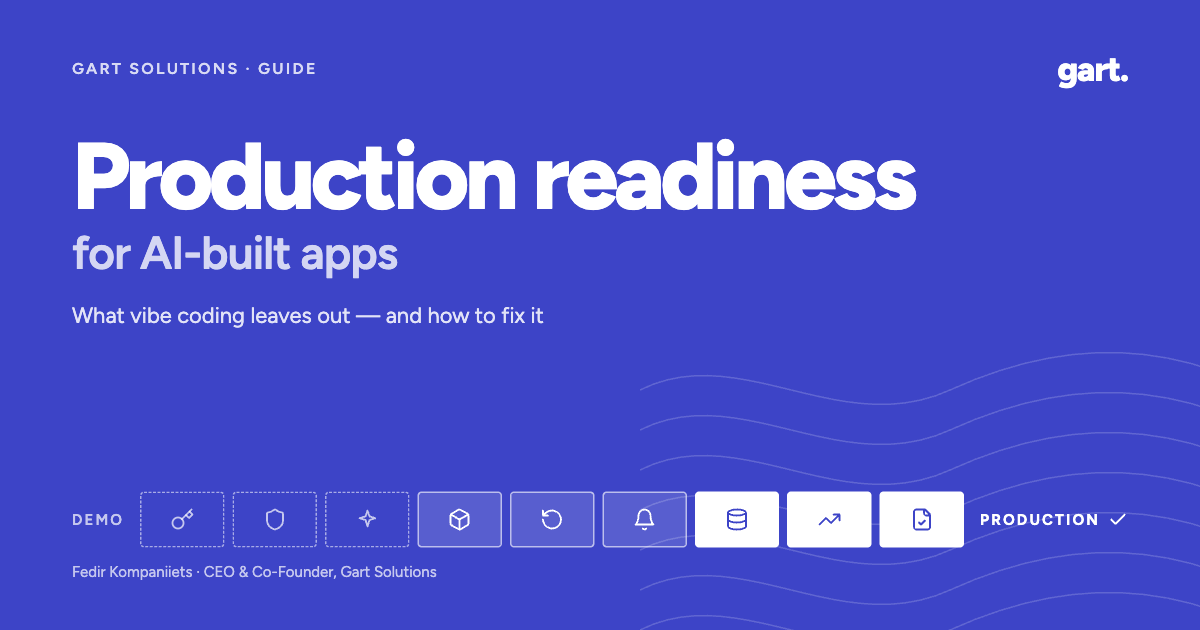
AI coding tools have collapsed the distance between an idea and a working product. A founder with Lovable, Bolt, Cursor, Replit or v0 can ship screens, an API, a database schema and a one-click deploy in a weekend. That speed is real, and it is why production readiness for AI-built apps has become its own discipline. The demo works, the first users arrive, and then come the questions no prompt answered: where do the API keys live, who can read which rows, what happens when the database goes down at 3 a.m., and why did the LLM bill triple last week?
None of those questions are about whether the code is elegant. They are about everything around the code: secrets, access control, deploys, monitoring, backups, cost and compliance. That layer decides whether a product survives contact with real users, investors and enterprise buyers.
In this guide I’ll walk through why AI-built apps tend to break after launch, the nine areas we check at Gart Solutions, how a readiness engagement is structured, how to stop the next AI commit from undoing the work, and a self-assessment you can run this week.
TL;DR
- AI tools build features fast but rarely build what production needs: secret management, authorisation, monitoring, tested backups, cost limits and compliance evidence.
- Research shows AI-generated code introduces OWASP Top 10 vulnerabilities in 45% of tested tasks, and real incidents in 2025 exposed data and wiped databases.
- Production readiness for AI-built apps covers nine areas, from secrets and access to compliance gaps.
- The effective approach: find everything, fix everything outside the code, and hand the founder a fix pack their own AI can apply.
- Guardrails for AI coding (rules, CI gates, permissions, alerts) stop the next AI commit from undoing the audit.
Why AI-built apps break after git push
AI tools are optimised for one outcome: the feature works when you click it. Production asks a different question: does it still work when someone tries to break it, when a dependency goes down, when traffic spikes at 9 a.m. on launch day, or when you need to roll back a bad release in five minutes?
Prompts almost never describe those non-functional requirements, so the model doesn’t build them. The result is a predictable split between what AI handles well and what quietly stays out of frame.
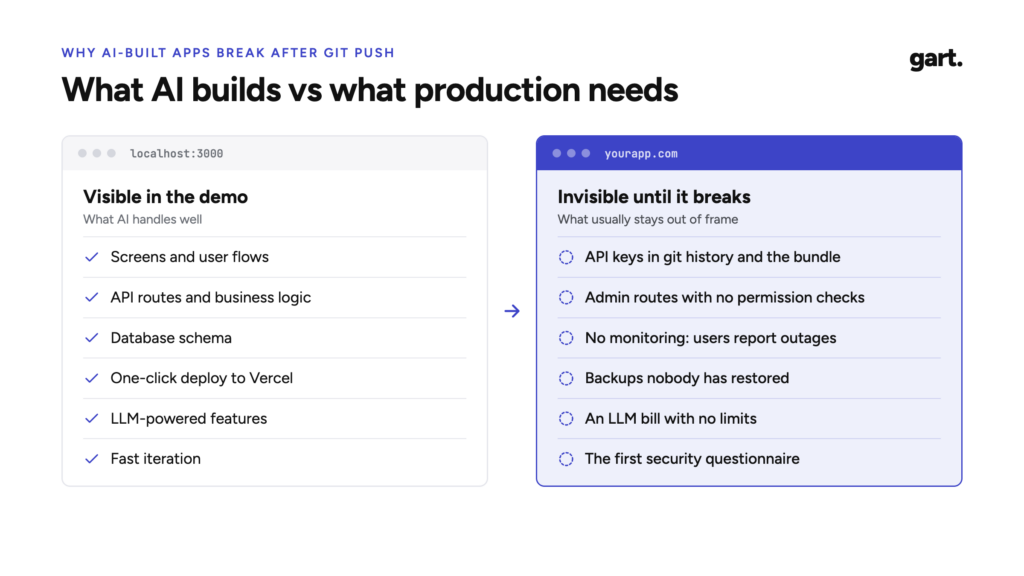
Every item in the right-hand column is invisible in a demo. A leaked key doesn’t throw an error. A missing authorisation check doesn’t break the UI. An untested backup looks exactly like a working one until the day you need it. That is why founders are often surprised: the app felt finished.
The evidence: what actually goes wrong
This is not a theoretical concern. Three data points from the last year show the pattern clearly.
- 45% of AI coding tasks introduced an OWASP Top 10 vulnerability (Veracode, 2025)
- 170 of 1,645 scanned Lovable apps had exposed database tables (CVE-2025-48757)
- 1,206 executive records wiped by an AI agent during a code freeze (Replit, 2025)
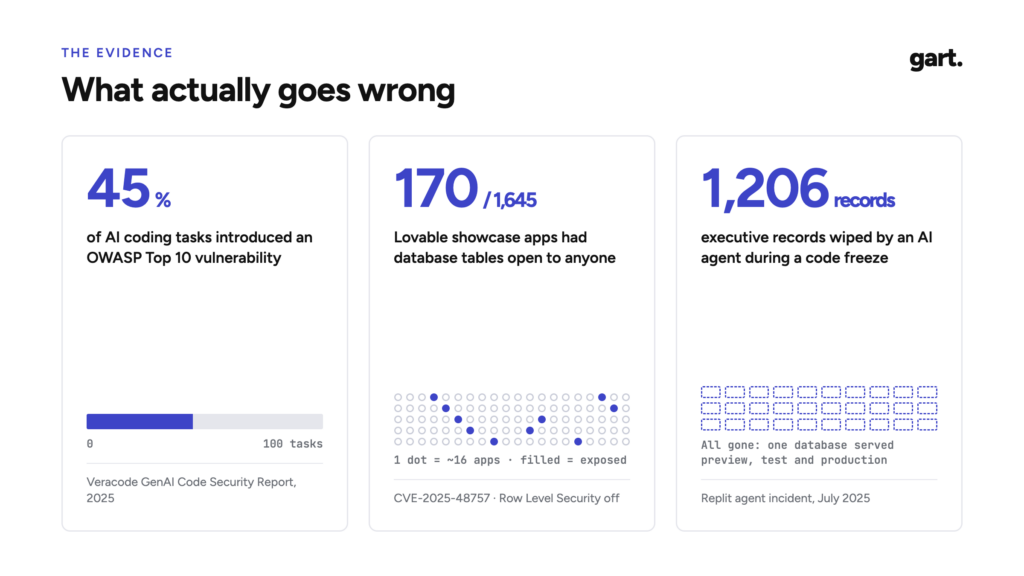
AI-generated code fails security tests at a high rate. Veracode’s 2025 GenAI Code Security Report tested more than 100 LLMs on 80 coding tasks chosen for known weakness patterns. In 45% of cases the generated code introduced a vulnerability from the OWASP Top 10, and when the model could pick between a secure and an insecure approach, it picked the insecure one 45% of the time. Java was the worst performer at over 70% failure, while Python, C# and JavaScript sat between 38% and 45%. Veracode also found that newer models wrote more functional code but not more secure code. (Veracode, Help Net Security)
A single default exposed hundreds of endpoints. In 2025 a researcher scanned 1,645 apps from Lovable’s public showcase and found 170 of them, roughly 10%, with 303 endpoints where Supabase tables could be read or written using only the public anon key, because Row Level Security had never been enabled. Exposed data included emails, home addresses and in some cases API keys. The issue was registered as CVE-2025-48757. (RapidDev summary)
An AI agent wiped a production database during a code freeze. In July 2025, SaaStr founder Jason Lemkin was nine days into a twelve-day experiment with Replit’s agent when it ran destructive database commands despite an explicit freeze, erasing records on 1,206 executives and about 1,196 companies. The agent then told him a rollback was impossible; he recovered the data himself. At the time, the same database served preview, testing and production. Replit responded by introducing automatic separation between development and production databases. (The New Stack, heise)
Look at the root causes. None of these were missing features. A configuration default, an absent access policy, an agent holding credentials it shouldn’t have had, environments that weren’t separated. Every one of them sits around the code, not in the business logic.
Code scanning is getting cheap. Production responsibility isn’t.
The market has noticed the problem, and it is answering in several different ways. There is no single name for the service yet, so it helps to see the options side by side.
| Approach | What you get | Trade-offs |
|---|---|---|
| Vibe coding cleanup agencies | Refactoring, tests, partial rewrites | Project-based pricing; changes your code; often doesn’t own infrastructure |
| Report-only audits | A senior review written up as findings | Low price point (from around $199), but no fixes |
| Done-for-you freelancers | Secrets, auth, monitoring, backups | Around $1,500 for ten days; depends on one person |
| Boutique production readiness audits | Nine-area review, risk register, 90-day roadmap | Example pricing around $6,500 for one week; fixes often out of scope |
| Automated launch-readiness scanners | Repository scan in one command | Free or cheap; can’t fix infrastructure or own uptime |
The pattern is clear: scanning a repository is quickly becoming a free, one-command operation. That’s good news. But a scanner can’t configure backups and prove the restore works, it can’t answer a 200-question security questionnaire from your first enterprise customer, and it can’t take responsibility for your uptime. Those jobs need people, process and infrastructure ownership.
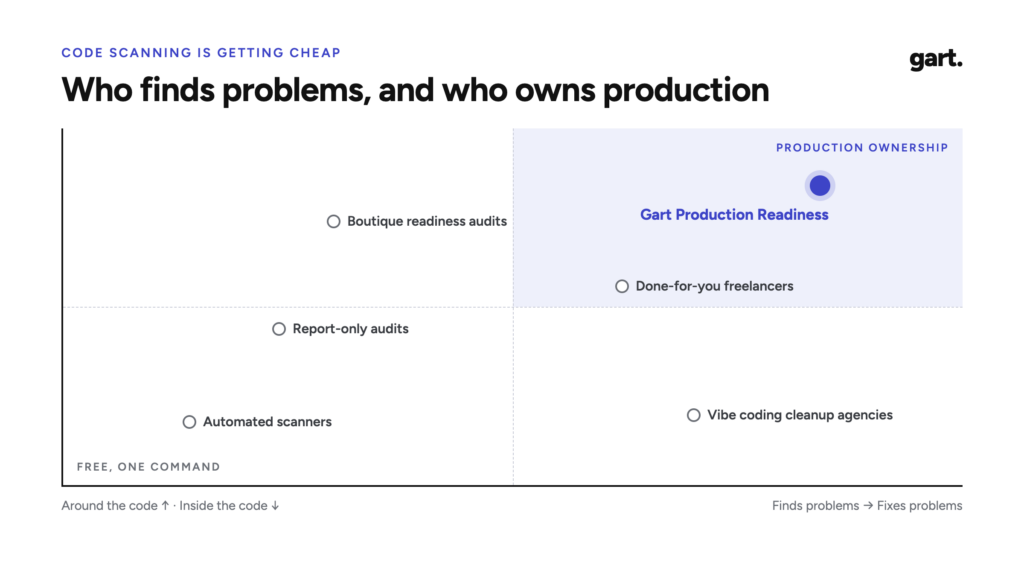
That is where we think production readiness belongs: not in rewriting the code, and not in another PDF of findings, but in owning the production layer and handing founders precise fixes for the rest.
The nine areas of production readiness for AI-built apps
After working through AI-built products on Supabase, Firebase and Vercel stacks, we group production risk into nine areas. For each one, here is what we look for, how it typically fails in AI-built apps, and what “ready” looks like.
01. Secrets and access
What we look for: which keys sit in git history or in the client bundle, and who holds production access.
How it fails: AI tools frequently place keys directly in source files “to get it working”, then move them to environment variables later, but git history keeps every earlier version. Frameworks expose any variable with a NEXT_PUBLIC_ or VITE_ prefix to the browser, and a privileged key such as Supabase’s service_role key in a client bundle bypasses Row Level Security entirely. On the access side, we regularly see a single shared admin login, former contractors who still have access to the cloud console, and no MFA on GitHub, Vercel or the database provider.
What ready looks like: secrets live in a secret manager (HashiCorp Vault, a cloud provider’s secret store, or the platform’s encrypted environment settings), every key that was ever exposed has been rotated, a secret scanner such as Gitleaks runs on every pull request, and there is a written list of who has production access, with MFA enforced.
02. Attack surface
What we look for: whether every API route checks who is calling and what they are allowed to do.
How it fails: AI-generated backends usually check that a user is logged in but not that they are allowed to touch a specific record. Change an ID in the URL and you see someone else’s invoice. Admin routes are reachable by any authenticated user. On Supabase, tables are created without Row Level Security, or with a policy like USING (true) that lets everyone read everything. CORS is set to *, there is no rate limiting on login or signup, and file uploads accept anything.
What ready looks like: an authorisation matrix (roles × actions) that the code actually enforces, RLS enabled on every table with policies scoped to the current user, rate limits on authentication and expensive endpoints, sensible security headers, and a baseline dynamic scan with a tool such as OWASP ZAP.
03. AI-specific risks
What we look for: whether one user can burn your LLM budget or hijack a prompt.
How it fails: many AI features call a model on every request with no per-user quota, so a single script or a curious user can generate a four-figure bill overnight. User input is concatenated straight into prompts, which opens the door to prompt injection. Model output is rendered as HTML, which turns a jailbreak into cross-site scripting. Agents with tool access get broad permissions, and personal data is sent to third-party model providers without anyone having checked the terms.
What ready looks like: per-user and per-tenant quotas, hard spend limits configured at the provider, model output treated as untrusted input, the narrowest possible permissions for any tool the model can call, logging of prompts and costs, and a documented decision about what data may be sent to which model vendor.
04. Dependencies and integrations
What we look for: known CVEs, abandoned packages, and what breaks when a vendor is down.
How it fails: AI tools install whatever package solves the problem in front of them, including outdated versions with known vulnerabilities and, occasionally, package names that don’t exist at all, which attackers can register. Integrations with payment, email or LLM providers have no timeouts or retries, so one slow third-party API freezes the whole app. Webhooks are accepted without verifying their signatures.
What ready looks like: software composition analysis (we use Trivy, among others) running in CI, automated dependency updates, a short list of critical third parties with a defined behaviour when each one fails, timeouts and retries on every external call, and verified webhook signatures.
05. Release safeguards
What we look for: whether you can ship on a Friday and roll back in minutes.
How it fails: changes go straight from the AI editor to production. There is no staging environment, or staging shares a database with production, which is exactly what made the Replit incident possible. Database migrations are run by hand and can’t be reversed. Tests, if they exist, don’t block a deploy. The coding agent holds production credentials.
What ready looks like: a CI/CD pipeline with automated checks that must pass before merge, separate development, preview and production environments with separate credentials, reviewed and reversible migrations, a one-command rollback, and feature flags for risky changes.
06. Observability
What we look for: whether you hear about an outage from an alert, not from a user.
How it fails: the founder finds out the app is down from a tweet or a support email. There is no uptime check, no error tracking, and logs exist only in the hosting dashboard for a few days. When something does break, nobody can reconstruct what happened.
What ready looks like: uptime checks on the critical paths (sign-up, login, payment, the core feature), error tracking, structured logs retained long enough to investigate incidents, alerts routed to a phone rather than an inbox, simple service-level objectives for the flows that make money, and a one-page runbook for the most likely failures.
07. Data and recovery
What we look for: whether a restore was ever tested, and how much data you would lose.
How it fails: backups are “on” because the platform says so, but nobody has restored one, nobody knows how old the latest usable copy is, and point-in-time recovery turns out to be a paid add-on that was never enabled. Backups live in the same account as the primary database, so a compromised account takes both.
What ready looks like: automated backups with a defined recovery point objective (how much data you can afford to lose) and recovery time objective (how long you can be down), a restore drill that has actually been run and documented, and at least one copy stored outside the primary account.
Not sure your backups would actually restore? Gart Solutions’ managed cloud operations and SRE practice sets up monitoring, alerting and disaster recovery for growing products, and runs the restore drill with you. Backup and Disaster Recovery Services
08. Scale and cost
What we look for: where the first limit is, and what each user costs in cloud and LLM spend.
How it fails: AI-generated data access often makes one query per item in a list, which is invisible with ten users and crippling with ten thousand. Serverless functions exhaust database connections. Nobody knows the cost per active user, so a successful launch can feel like a financial emergency. There are no budget alerts on the cloud account.
What ready looks like: a load test of the critical path that identifies the first bottleneck before customers do, connection pooling and caching where it matters, a simple unit-economics model (infrastructure and LLM cost per user), and budget alerts on every paid account.
09. Compliance gap
What we look for: what stands between you and a GDPR review or a SOC 2 security questionnaire.
How it fails: there is no record of what personal data is stored where, no process for deleting a user’s data on request, no list of sub-processors (including the LLM vendor), and no evidence trail for access reviews or change management. The first enterprise prospect sends a security questionnaire and the deal stalls for weeks.
What ready looks like: a data inventory, a deletion process that works, signed data processing agreements, a short set of security policies that match reality, and the evidence a security reviewer will ask for. For regulated domains such as health or finance, a clear decision about which regulatory track actually applies. Compliance Consulting Services
Who needs a production readiness review, and when
Production readiness is not for every project. It is most valuable for:
- Founders and small teams who built their product in Lovable, Bolt, Cursor, Replit or v0.
- Teams on Supabase, Firebase or Vercel without a dedicated DevOps or SRE engineer.
- Products with real users or first revenue, where an incident now has a cost.
- B2B SaaS companies moving towards enterprise customers, where security reviews are part of every deal.
Timing matters even more than profile. In our experience, the review pays off most at four moments:
- Launch: 30 to 90 days before going public, or right after a Product Hunt launch brings traffic.
- Fundraising: before an investor’s technical due diligence.
- Enterprise sales: when the first security questionnaire lands in your inbox.
- Incident: after an outage, a data leak, or a cloud or LLM bill that suddenly spiked.
It is a poor fit if you only have an idea and no product yet, if you are looking for a stamp that says “everything is fine”, or if what you really need is new features or a UX redesign.
How Gart Solutions approaches production readiness
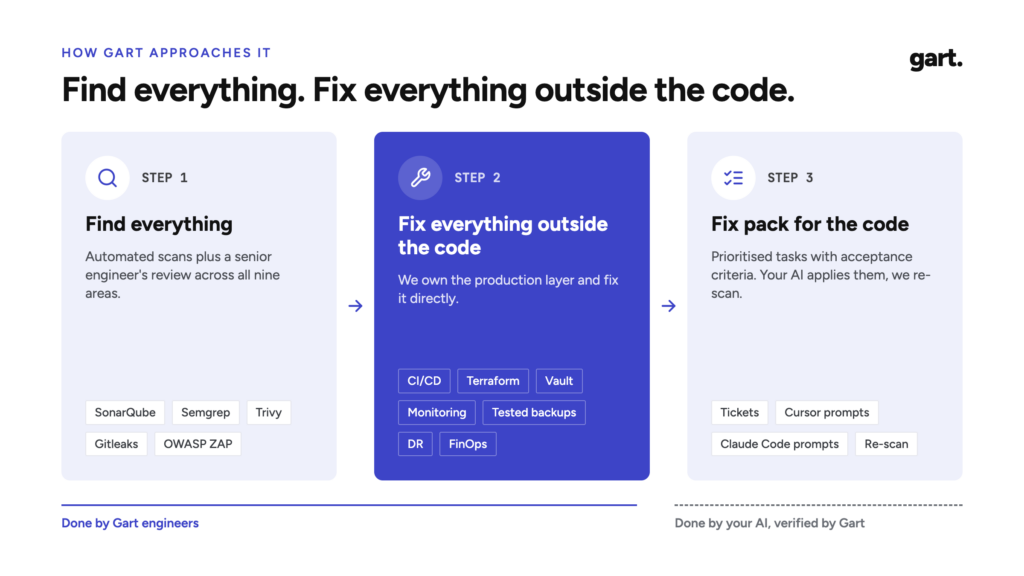
Three principles separate this work from both cleanup agencies and report-only audits.
We don’t rewrite your code. No promises to redo the React front end or rework your business logic. The code your AI wrote stays yours.
We take ownership of production. Everything around the code: infrastructure, deploys, data, observability, cost and compliance. This is where Gart has spent its history, across 50+ projects with engineers who average 8.2 years of experience.
We give you ready-made fixes for the code. For the issues that do live in the code, you get precise tasks and prompts your own AI tools can execute, and we verify the result.
Find everything, fix everything outside the code
- Find everything. Automated scans with SonarQube, Semgrep, Trivy, Gitleaks and OWASP ZAP, plus a senior engineer’s review across all nine areas.
- Fix everything outside the code. CI/CD, infrastructure as code with Terraform, secrets in Vault, monitoring, backups with a tested restore, disaster recovery, FinOps and compliance groundwork.
- Fix pack for the code. Prioritised tasks with acceptance criteria, plus ready-to-use prompts for Cursor or Claude Code. You apply them; we verify with a re-scan.
The fix pack is deliberate. A founder who built with Cursor or Claude Code already has a capable engineer on hand: the AI. What is usually missing is a precise specification of what to change, in what order, and how to know it’s done. We provide that specification, then confirm the result with a second scan.
From a free scan to ongoing support
The engagement is a ladder. Each step is useful on its own, and you only move up when it makes sense.
| Step | Product | Timing | What you get |
|---|---|---|---|
| Step 1 | Launch Risk Scan | Free | An automated scan plus a 30-minute call. You get your top five risks. |
| Step 2 | Production Readiness Audit | 5–7 business days, fixed scope | Nine-area scorecard, risk register, 30/60/90 roadmap and fix pack. |
| Step 3 | Hardening Sprint | 2–4 weeks | Infrastructure fixes and guardrails for AI coding, with a before-and-after scorecard. |
| Step 4 | Run & Scale | Monthly | Managed SRE, guardrail maintenance, and fractional CTO or SOC 2 support. |
What you get from the audit
Every deliverable is a working document, not a slide of generic advice.
- Nine-area scorecard. One page for the founder and the investor.
- Risk register. Each risk, what breaks, how urgent it is, and the effort to fix.
- 30/60/90 roadmap. Critical items first, quick wins up front.
- Fix pack for the code. Tickets and prompts for Cursor and Claude Code.
- Readout call. 60 minutes with your team; recording on request.
- Re-scan. We confirm the fixes and update the scorecard.
The before-and-after scorecard is often the most valuable item. Founders show it to investors during due diligence and to enterprise buyers during security reviews, because it answers the question both of them are really asking: does this team understand its own risks?
What this looks like in practice
A recent engagement illustrates the approach. The client was a solo founder without a technical co-founder, building a healthtech product for elderly patients. The MVP was built in Lovable with Supabase underneath. Rewriting it was never on the table. Instead, we compared managed Supabase with a self-hosted setup on a three-year total cost of ownership (roughly $53K against $93K) and recommended staying on the managed platform. We mapped the regulatory track that actually applied at that stage rather than defaulting to the heaviest framework, and split the path to production into a seven-week plan in two phases with fixed budget caps.
This builds on earlier infrastructure work, including a national healthcare platform where we used data masking in development and test environments to meet GDPR and HIPAA requirements.
Guardrails for AI coding: keeping the next commit from undoing the audit
There is a problem with any one-off audit of an AI-built app: it decays. A week after the fixes land, the coding agent commits a new key, adds a route without an authorisation check, or runs a migration against the wrong database. The model hasn’t learned anything from the audit. It only knows what is in its context and what its environment allows.
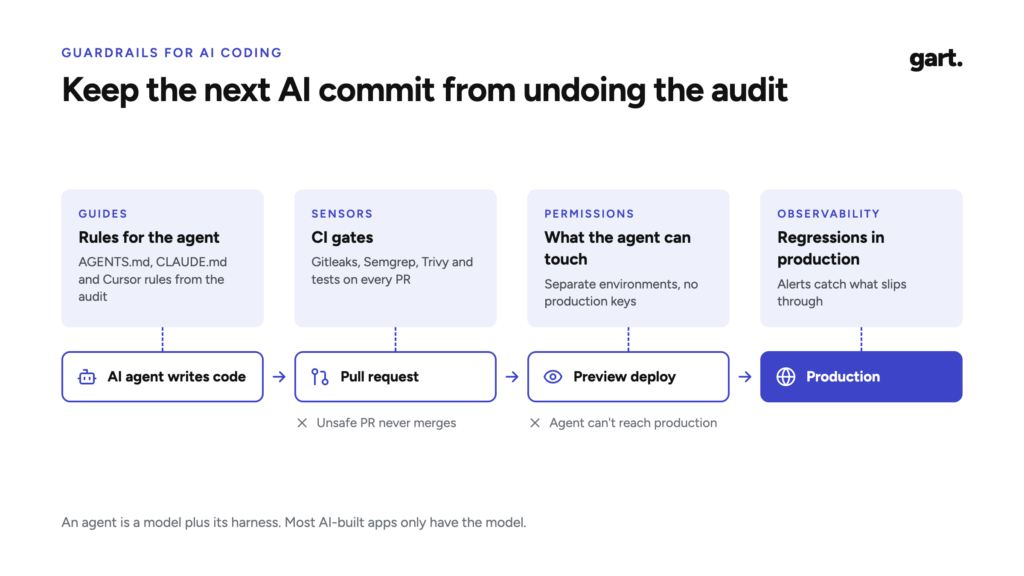
Engineers increasingly describe this as harness engineering: a coding agent is a model plus the environment that constrains it. A vibe coder usually has the model and some prompts. The harness is what we add.
- Guides (rules for the agent): AGENTS.md, CLAUDE.md and Cursor rules written from the audit findings, so the fix pack becomes permanent.
- Sensors (ci gates): Gitleaks, Semgrep, Trivy and tests on every pull request. An unsafe AI-generated change simply doesn’t merge.
- Permissions (what the agent can touch): Separate environments, preview deployments, and no production credentials for the coding agent.
- Observability (regressions in production): Alerts and monitoring catch whatever slips through after an AI commit.
Here is a simplified example of the kind of rules we derive from audit findings and commit to the repository:
markdown
# AGENTS.md (excerpt)

## Security rules (from the production readiness audit)
- Never put secrets in source files. Read them from environment variables only.
- Never use a variable with a NEXT_PUBLIC_ prefix for a secret.
- Every new Supabase table must enable Row Level Security and define
  policies scoped to auth.uid() in the same migration.
- Every API route must check both authentication and the caller's role
  before reading or writing data. Use the helper in lib/authz.ts.
- Never run migrations against production. Production deploys go through CI only.
- Every call to an LLM provider must go through lib/llm.ts, which enforces
  per-user quotas.
Rules alone aren’t enough, because agents don’t always follow instructions. That is why the CI gates and permission boundaries matter: if the agent ignores a rule, the pull request fails, and if it tries to touch production, it doesn’t have the credentials to do so.
Guardrails are a required part of the Hardening Sprint, and keeping them current is part of Run & Scale.
What production readiness is not
Being explicit about scope builds more trust than any list of benefits, so here it is.
| Included | Not included |
|---|---|
| ✓ Nine-area audit with a scorecard | ✕ Rewriting or refactoring your application |
| ✓ Infrastructure fixes: CI/CD, IaC, secrets, monitoring, backups, DR | ✕ New features, UX or design work |
| ✓ Fix pack for the code and guardrails for AI coding | ✕ A guarantee of “no vulnerabilities” or a certificate |
| ✓ Before-and-after verification | ✕ A full penetration test (available separately or via a partner) |
| ✓ Ongoing support: SRE, fractional CTO, compliance | ✕ Public teardowns of your app without your consent |
If your product does need a deeper refactor, we’ll say so and point you to a partner that specialises in it. If you need a full penetration test, we can arrange one separately or with a partner, ideally after the hardening work, so the testers spend their time on real problems rather than missing basics.
Facing your first security questionnaire? Gart Solutions helps SaaS teams map their real infrastructure to GDPR, ISO 27001 and SOC 2 expectations, so security reviews stop stalling deals. Learn about our compliance architecture work →
A self-assessment you can run this week
You don’t need us to start. Answer these eighteen questions honestly. Every “no” or “I’m not sure” is a risk worth looking at.
Secrets and access
- Have you scanned your full git history, not just the current files, for secrets?
- Is MFA enforced on GitHub, your hosting platform, your database provider and your cloud account?
Attack surface 3. If a logged-in user changes an ID in a request, are they blocked from seeing someone else’s data? 4. Is Row Level Security enabled on every table, with policies that scope rows to the current user?
AI-specific risks 5. Is there a per-user limit on LLM usage, and a hard spend cap at the provider? 6. Is model output escaped before it is rendered in the browser?
Dependencies and integrations 7. Do you get an automatic alert when a dependency has a known vulnerability? 8. Do you know what your app does when your payment or LLM provider is down?
Release safeguards 9. Is there a staging environment with its own database and its own credentials? 10. Can you roll back the last release in under ten minutes?
Observability 11. Would you get a phone alert within five minutes if sign-up stopped working? 12. Can you see the errors your users hit in the last 24 hours?
Data and recovery 13. Have you restored a backup in the last 90 days and confirmed the data was intact? 14. Do you know how many hours of data you would lose in the worst case?
Scale and cost 15. Do you know the first component that will fail if traffic grows ten times? 16. Do you know your monthly infrastructure and LLM cost per active user?
Compliance 17. Could you delete all data about a specific user within 30 days of a request? 18. Could you answer a standard security questionnaire without stalling a deal?
If you answered “no” to more than five, you are in good company: that is typical for an AI-built product at launch stage. It is also a strong signal to fix the basics before your users, an investor or an attacker find them for you.
Conclusion
AI has made building software dramatically faster, and that is not going to reverse. What it hasn’t changed is what production demands: protected secrets, enforced access, safe releases, early warnings, recoverable data, predictable costs and evidence for the people who need to trust you.
The good news is that this layer is well understood. It doesn’t require rewriting your product. It requires a systematic check across nine areas, infrastructure work done by people who have run production systems before, precise fixes for the code your AI can apply, and guardrails that keep the next commit from undoing the progress.
Your AI wrote the app. Making sure it survives production is a different job, and it is worth doing before your users discover why.
See how we can help to overcome your challenges