ISO 27001 vs SOC 2 usually gets answered as "it depends on your customers" — SOC 2 for the US, ISO 27001 for everyone else — and that's true as far as it goes. But the question engineering leaders actually need answered is narrower: which specific access controls will an auditor test, and can one control set satisfy both? The short version: roughly 70–80% of the access-control work overlaps, but each framework wants that work documented differently. If you're mapping this out before an audit, Gart Solutions' compliance audit team can tell you in one session exactly which gaps are framework-specific and which are shared.
Every engineering leader who has been asked "are you SOC 2 or ISO 27001 compliant?" by a prospect's security team knows the question is really a proxy for something else: can we trust who has access to our data, and can you prove it? Both frameworks answer that question, but they test it through different lenses — one through a period-of-time attestation, the other through a certified management system. Understanding exactly where they overlap and where they diverge is what keeps a compliance program from turning into two parallel, redundant projects.
ISO 27001 vs SOC 2 at a Glance
Before the detail, here's the comparison in one table — the version most people searching "ISO 27001 vs SOC 2" actually want first:
DimensionISO 27001SOC 2What you getA certificate confirming your ISMS conforms to ISO/IEC 27001:2022An auditor's attestation report on your controls (Type I or Type II)Issued byAccredited certification body (e.g., BSI, LRQA, DEKRA)Licensed CPA firm, per AICPA standardsGeographyRecognized globally; strongest in EU, UK, APAC, Middle EastDe facto standard for U.S. and North American buyersStructure93 Annex A controls across 4 themes, scoped via a Statement of Applicability5 Trust Services Categories; only Security (the Common Criteria) is mandatoryAssessment stylePoint-in-time conformance audit against the management systemType I = point-in-time design check; Type II = 6–12 months of operating evidenceValidity3 years, with annual surveillance audits in betweenTypically re-issued every 12 monthsReport visibilityPublic-facing certificate (a logo you can display)Confidential report shared under NDA with customers/prospectsISO 27001 vs SOC 2
What Is ISO 27001?
ISO/IEC 27001 is an international standard, maintained jointly by ISO and the IEC, that specifies the requirements for building, operating, and continually improving an Information Security Management System — the documented, risk-based process an organization uses to manage information security on an ongoing basis, not a one-time checklist. Certification confirms that your ISMS conforms to the standard: you've identified your information security risks, selected and implemented controls to address them (drawn from Annex A's 93 controls, organized into Organizational, People, Physical, and Technological themes), documented why each applicable control exists in a Statement of Applicability, and committed to reviewing the whole system on a fixed cadence.
A first-time certification runs through a two-stage external audit — Stage 1 checks your documentation is complete, Stage 2 tests whether the ISMS is actually operating as designed — after which the certificate is valid for three years, with annual surveillance audits in between to confirm the system is still functioning. Unlike SOC 2, ISO 27001 doesn't lock you into one country's audit standard: the same certification is recognized by procurement teams and regulators across the EU, UK, Middle East, and Asia-Pacific, which is why it tends to matter more the further your customer base sits from North America.
What Is SOC 2?
SOC 2 (System and Organization Controls 2) is an attestation framework defined by the AICPA's Trust Services Criteria and delivered by a licensed CPA firm, not a certification body. Rather than certifying a management system, a SOC 2 report is the auditor's own opinion — did the organization's controls exist, and did they operate effectively, against whichever of the five Trust Services Categories the company chose to scope in: Security (mandatory for every report, also called the "Common Criteria"), Availability, Processing Integrity, Confidentiality, and Privacy.
There are two report types, and mixing them up is the single most common SOC 2 misunderstanding: a Type I report is a snapshot — it confirms controls are designed appropriately as of one date — while a Type II report is what most enterprise buyers actually require, confirming those same controls operated effectively across an observation window, typically six to twelve months. Because SOC 2 tests operating effectiveness over time rather than certifying a management system, the report itself carries no multi-year validity — it's reissued roughly annually, and a lapsed report is treated by most procurement teams as equivalent to no report at all. Our step-by-step SOC 2 preparation guide walks through the full audit-readiness process if you're just starting that path, and our breakdown of why SOC 2 audits fail covers the evidence gaps that most often derail a Type II window.
ISO 27001 vs. SOC 2: What Each One Actually Certifies
The single most useful thing to internalize before comparing individual controls: SOC 2 is an attestation, and ISO 27001 is a certification. A SOC 2 report is an independent auditor's opinion, issued after they test whether your controls operated effectively over a defined period (typically 6–12 months for a Type II report). An ISO 27001 certificate, by contrast, confirms that your Information Security Management System (ISMS) — the documented, risk-based process for managing security on an ongoing basis — conforms to the official ISO/IEC 27001:2022 standard, re-verified through annual surveillance audits and a full recertification every three years.
That distinction cascades into everything else. SOC 2 asks, "did your access controls actually work, consistently, over the last year?" ISO 27001 asks, "do you have a management system that identifies access-related risks, treats them, and reviews the treatment on a schedule?" A company can pass one and fail the other for reasons that have nothing to do with the strength of its actual access controls — usually because the documentation trail doesn't tie back to a Statement of Applicability or risk treatment plan the way ISO auditors expect.
If you're earlier in the decision and haven't picked a framework yet, our dedicated guides go deeper on each: preparing for a SOC 2 audit and why ISO 27001 matters for growing companies. This article assumes you already know you need one or both, and want the access-control specifics.
Access Control Requirements Side by Side
SOC 2's access-control requirements live almost entirely in CC6 (Logical and Physical Access Controls), one of the nine Common Criteria every SOC 2 report must address regardless of which Trust Services Categories you scope in. ISO 27001's equivalent requirements are spread across Annex A.5 (Organizational Controls) and Annex A.8 (Technological Controls), per the AICPA's Trust Services Criteria and the 2022 revision of the ISO standard, respectively. Here's how the two map onto each other in practice:
RequirementSOC 2 (CC6)ISO 27001:2022 (Annex A)Governing clauseCC6.1–CC6.8, Logical and Physical Access ControlsA.5.15–A.5.18 (access control, identity management, access rights), A.8.2–A.8.5 (privileged access, restriction, authentication)Multi-factor authenticationExpected wherever risk warrants it; tested as an operating control over the report periodRequired under A.8.5 (secure authentication) as part of the ISMS-documented policyLeast privilege / RBACCC6.3 — access restricted based on job role and functionA.5.15, A.5.18 — access rights granted per documented access control policyAccess reviewsTested as operating effectively across the audit period (evidence of periodic review required)Required on a defined schedule, tied back to the risk treatment plan and management reviewJoiner-Mover-Leaver processCC6.2 — provisioning and deprovisioning of credentialsA.5.16, A.5.18 — identity lifecycle management under the ISMSPrivileged access managementCovered within CC6.1/CC6.3 as elevated-risk accessA.8.2 — dedicated control for privileged access rightsEvidence styleOperating-effectiveness evidence sampled across a 6–12 month periodPoint-in-time conformance to the ISMS, verified via annual surveillance auditsAccess Control Requirements Side by Side
What SOC 2 Actually Requires for Access Controls
SOC 2's CC6 criteria are deliberately outcome-focused rather than prescriptive — the standard doesn't mandate a specific tool or exact review cadence, but auditors will expect to see evidence that access is provisioned based on role, reviewed periodically, and revoked promptly when someone changes roles or leaves. In practice, that means an auditor sampling your environment over the report period wants to see: registered and authorized user accounts before credentials are issued (CC6.2), access removed within a reasonable window of offboarding, and network segmentation or encryption protecting data in transit and at rest for anything access-controlled (CC6.6–CC6.7).
The practical trap teams fall into is treating CC6 as a one-time configuration exercise rather than an operating control. Because SOC 2 Type II tests effectiveness over months, not a single snapshot, an access review policy that exists on paper but wasn't actually run in month four of the audit period will fail the test even if the policy document itself looks perfect.
What ISO 27001 Actually Requires for Access Controls
ISO 27001's access control requirements ask for the same underlying discipline — least privilege, MFA, timely deprovisioning — but wrap it in a formal management system. A.5.15 requires a documented access control policy; A.5.16 and A.5.18 require identity and access-rights processes that tie back to defined roles; A.8.2 singles out privileged access as needing dedicated controls; and A.8.5 requires secure authentication mechanisms appropriate to the risk. The distinguishing requirement, per the official ISO/IEC 27001:2022 standard, is that every one of these controls must trace back to your organization's risk assessment, appear (or be justifiably excluded) in your Statement of Applicability, and get revisited during scheduled management reviews.
This is where the "ISO 27001 is more work" reputation comes from — not because the individual technical controls are harder to implement, but because the standard requires you to show why each control exists in relation to a specific identified risk, not just that the control is switched on. NIST's own access control catalog, SP 800-53 Revision 5, documents a similar principle in its AC control family: access controls are only as strong as the governance process that assigns and reviews them, regardless of which standard is doing the certifying.
The Access Controls You Actually Need, Regardless of Framework
Strip away the audit terminology and both frameworks are testing the same underlying security hygiene. If you build these seven controls properly, you've satisfied roughly 70–80% of the access-control requirements for either standard — the remaining work is documentation and evidence, not new technical controls:
Multi-factor authentication everywhere it matters — every admin console, VPN, production system, and identity provider login, not just customer-facing accounts.
Role-based access control built on least privilege — permissions assigned to roles, not individuals, with no standing access to production beyond what a role genuinely requires. Our deep-dive on RBAC in CI/CD pipelines covers this at the deployment-pipeline layer specifically.
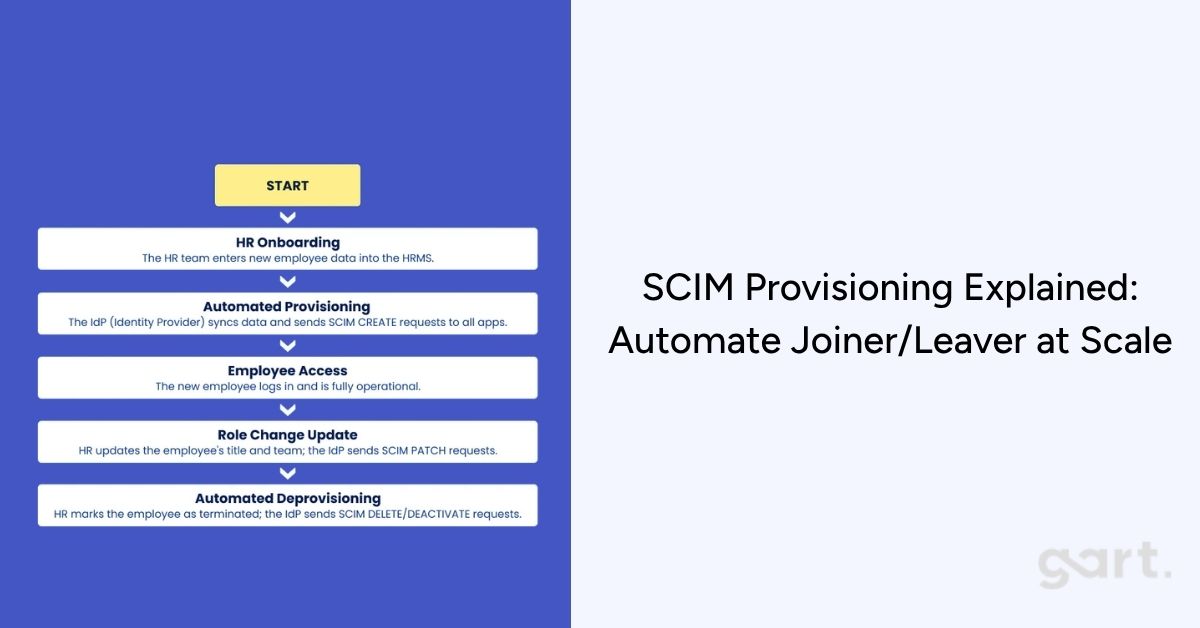
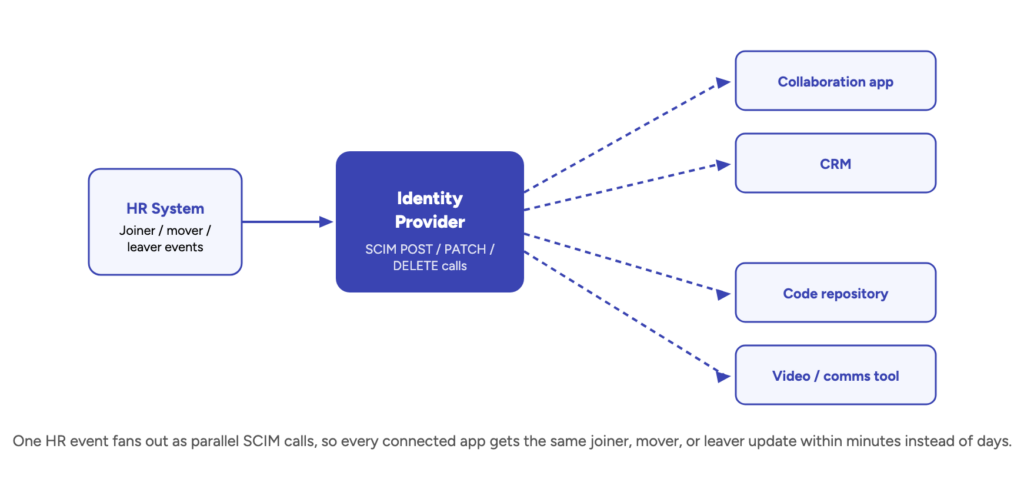
A documented Joiner-Mover-Leaver process — access granted on day one, adjusted automatically on role changes, and revoked same-day on offboarding, with an audit trail proving it happened.
Scheduled access reviews — quarterly at minimum for privileged accounts, with sign-off from the resource owner, not just IT.
Privileged access management (PAM) — a separate, more tightly monitored tier for admin and root-level credentials, ideally with just-in-time elevation instead of standing privilege.
Centralized access logging and monitoring — every authentication and authorization event captured somewhere an auditor (and your own incident responders) can actually query it.
Encryption tied to access boundaries — data at rest and in transit protected in a way that reinforces, rather than substitutes for, the access control layer.
None of this is exotic — it's the same discipline good DevSecOps practice already asks for. Our guide to DevSecOps covers how to bake these controls into delivery pipelines rather than bolting them on before an audit.
Building One Control Set for Both Frameworks
Because the technical overlap is so high, the efficient path for most companies pursuing both certifications isn't building two access control programs — it's building one and mapping it to two sets of evidence requirements. A single access review process can satisfy SOC 2's operating-effectiveness test and ISO 27001's scheduled-review requirement, provided you keep the documentation trail both auditors need:
Write one access control policy, but explicitly reference both the SOC 2 Trust Services Criteria and your ISO 27001 Statement of Applicability inside it, so either auditor can trace the same document to their standard.
Automate provisioning and deprovisioning through your identity provider rather than ticket-based manual processes — this is the single highest-leverage control for passing both CC6.2 and A.5.16 cleanly. Practices like policy as code let you enforce and evidence this automatically rather than after the fact.
Run access reviews on a fixed quarterly cadence and retain the sign-off records — SOC 2 auditors will sample across the report period, ISO auditors will check the schedule was actually followed.
Tie every control back to a documented risk, even the ones you're implementing "because SOC 2 asked for it" — this single habit is what makes the same control set defensible under ISO 27001's ISMS requirements without extra work later.
Centralize evidence collection — screenshots, logs, and approval records stored once, tagged against both frameworks' control IDs, rather than gathered separately for each audit cycle.
Companies expanding into the EU should also factor in NIS2, which leans on many of the same access-control fundamentals for organizations providing digital infrastructure or services in scope — another reason to build the control set once, well, rather than framework-by-framework.
Cost Comparison: What Each Framework Actually Costs in 2027
Cost is the question most competing comparisons answer vaguely — actual pricing depends heavily on company size, scope, and how mature your controls already are going in. Based on typical first-year totals reported across accredited certification bodies and audit firms in 2026 (audit fees plus reasonable implementation/prep cost, before any GRC tooling subscription), here's a realistic range by company size:
Company sizeISO 27001 (first-year, implementation + certification audit)SOC 2 Type II (first-year, prep + audit)Startup / SMB (<50 employees)$25,000 – $60,000$20,000 – $45,000Mid-market (50–250 employees)$45,000 – $100,000$35,000 – $75,000Enterprise (250+ employees)$80,000 – $200,000+$65,000 – $150,000+Cost Comparison: What Each Framework Actually Costs in 2026
Two cost dynamics are worth planning around rather than being surprised by. First, ISO 27001's first-year cost usually runs somewhat higher than SOC 2's at a comparable company size, mostly because building a complete ISMS and Statement of Applicability from scratch is more upfront documentation work than scoping and preparing for an attestation — but ISO's costs flatten out more in years two and three, since only lighter surveillance audits are due until the three-year recertification. Second, SOC 2 doesn't have that grace period: because a Type II report is refreshed roughly annually, its cost repeats at close to full weight every year, which narrows the multi-year cost gap between the two frameworks more than a first-year comparison alone suggests.
Timeline: How Long Each Certification Actually Takes
Framework / report typeTypical timelineSOC 2 Type I4–8 weeks prep, then a point-in-time audit — fastest path to a first reportSOC 2 Type II4–8 weeks prep + a 6–12 month observation window before the report is issuedISO 27001 (first certification)3–6 months to build the ISMS, then a two-stage audit — 6–12 months total is typical end to endISO 27001 (ongoing)Annual surveillance audits (lighter scope) + full recertification every 3 yearsTimeline: How Long Each Certification Actually Takes
The practical read: if a deal is closing in the next quarter and the prospect needs proof of security controls fast, a SOC 2 Type I report is the quickest credible artifact you can produce. If the requirement is a multi-year commitment or an international contract, budgeting for ISO 27001's longer runway up front avoids a scramble later — sequencing is covered in more depth in our guide to why ISO 27001 matters for growing companies.
Which Framework Should You Choose?
The honest answer is "it depends who's asking" — use these four signals, in order, to make the call:
Your customer base is mostly U.S.-based
Start with SOC 2. It's the default expectation in American enterprise procurement, and Type I gives you a credible artifact within weeks.
You sell into the EU, UK, or APAC
Prioritize ISO 27001. It's the internationally portable certification those buyers recognize immediately, and it often satisfies procurement checklists SOC 2 alone won't clear.
You're pre-revenue or very early-stage
A SOC 2 Type I report is usually the fastest, cheapest way to unblock your first few enterprise deals without committing to a multi-year ISMS build.
You're regulated, or in a data-sensitive industry
Consider both from the start — healthcare, fintech, and public-sector-adjacent vendors are increasingly asked for ISO 27001 and SOC 2 as separate, non-substitutable requirements.
What Changed for ISO 27001 and SOC 2 in 2026
Two dated facts matter for anyone comparing these frameworks right now, and neither shows up in most existing "ISO 27001 vs SOC 2" comparisons written before this year:
The ISO 27001:2022 transition deadline has closed. Per the International Accreditation Forum's three-year transition rule, every organization holding an ISO 27001 certificate had until 31 October 2025 to move from the 2013 revision to ISO/IEC 27001:2022, confirmed by accredited certification bodies including LRQA. That means every currently valid ISO 27001 certificate in the market is on the 2022 revision — if a vendor shows you documentation still referencing the 2013 control set, either it has lapsed or it's out of date, which is worth checking directly in vendor due diligence.
SOC 2 didn't get a new official version, but audits got heavier. The AICPA hasn't issued a full new revision of the Trust Services Criteria for 2026, but auditors are applying existing guidance more strictly — particularly around documenting how risk assessment informs control design, and scrutinizing subservice-organization and vendor dependencies more closely inside the report itself. The practical effect for anyone preparing a report this year: budget more time for vendor and subprocessor documentation than a first-time SOC 2 program would have needed a few years ago.
Common Mistakes When Choosing Between ISO 27001 and SOC 2
Picking based on which one a competitor has. The right first framework follows your actual customer base and deal pipeline, not industry habit.
Assuming one substitutes for the other. Enterprise security teams frequently ask for both, especially once a vendor sells across regions — neither framework is a universal replacement for the other in a buyer's eyes.
Underestimating SOC 2 Type II's observation window. Teams that start evidence collection late in the window often discover gaps with no time left to remediate before the report is due.
Treating ISO 27001 as a one-time project. The certificate lapses without annual surveillance audits and a full recertification every three years — it's a maintained system, not a one-off deliverable.
Building two separate control programs. Given 60–80% overlap, running ISO 27001 and SOC 2 as unrelated projects duplicates most of the actual engineering work for no real benefit.
Confusing the framework decision with the tooling decision. GRC platforms automate evidence collection for whichever framework you've already chosen — they don't choose the framework, your risk assessment and customer base do.
Which Framework Should You Get First?
If most of your customers and prospects are US-based, SOC 2 Type II is usually the faster path to closing enterprise deals — it's the report US security teams ask for by default, and it can typically be completed in a shorter timeline than a first-time ISO certification. If you're selling into the EU, UK, or other international markets, ISO 27001 tends to carry more weight, partly because it's a recognizable international certification rather than a US-specific attestation format, and partly because it dovetails with regional requirements like NIS2 for in-scope organizations.
Many growth-stage companies that serve both markets end up pursuing both within 12–18 months of each other. The sequencing advice we give most often: build the access control program to ISO 27001's documentation standard from the start — Statement of Applicability, risk treatment plan, management review cadence — even if SOC 2 is your first audit. It's far less costly to over-document once than to retrofit ISO-grade documentation onto a SOC 2 program that was built to a lighter evidentiary bar. Our infrastructure audit process walks through exactly where most companies' current documentation falls short of that standard before either audit begins.
Gart field example: For an augmented-reality platform client pursuing ISO 27001 certification, our compliance team worked through 55 pending tasks across cloud security, infrastructure security, and code security in a four-month engagement. Read the full ISO 27001 compliance case study.
Gart Solutions
One Access Control Framework, Mapped to Every Audit You Need
Gart Solutions designs and audits access control programs that satisfy SOC 2, ISO 27001, and adjacent frameworks like NIS2 from a single, well-documented control set — so your team implements once and evidences twice, instead of building parallel compliance programs. Our infrastructure and DevSecOps teams handle everything from RBAC and MFA rollout to ISMS documentation and audit-ready evidence collection.
Compliance Audits
Security Audits
DevSecOps Consulting
Infrastructure Audits
IAM & Access Control Design
8.2
avg. MTTR reduction (×)
40+
compliance & security audits delivered
50+
engineers across compliance & DevSecOps teams
Get a compliance gap assessment →
You might also like:
IT Audit Services — Gart Solutions
Compliance Monitoring: What It Is and How to Automate It
PCI DSS Audit Preparation: A Step-by-Step Compliance Guide
HIPAA Audit: A Guide to Protecting Patient Data and Compliance
NIS2 Compliance: Services That Will Help You Be Ready
Roman Burdiuzha
Co-founder & CTO, Gart Solutions · Cloud Architecture Expert
Roman has 15+ years of experience in DevOps and cloud architecture, with prior leadership roles at SoftServe and lifecell Ukraine. He co-founded Gart Solutions, where he leads cloud transformation and infrastructure modernization engagements across Europe and North America. In one recent client engagement, Gart reduced infrastructure waste by 38% through consolidating idle resources and introducing usage-aware automation. Read more on Startup Weekly.
A failed SOC 2 audit rarely shows up as a single bad number on an invoice. It shows up as a re-audit fee, a remediation sprint that pulls three engineers off the roadmap for a quarter, and a stalled enterprise deal where the buyer's security team just went quiet. Technically, SOC 2 examinations don't issue a pass/fail grade — but a qualified or adverse opinion carries nearly all the same consequences as failing outright, and most engineering leaders only learn what those consequences cost after the report lands. If you want a second set of eyes on your control gaps before that happens, Gart Solutions' compliance audit team can walk your environment against SOC 2's Trust Services Criteria in a single engagement.
Every CTO who has scoped a SOC 2 engagement has heard some version of the same reassurance from a vendor or an auditor: "most companies pass." What that framing leaves out is what happens to the ones that don't — or, more precisely, the ones whose auditor comes back with a qualified opinion, an adverse opinion, or a disclaimer because the evidence simply wasn't there. This article breaks down what a failed SOC 2 audit actually costs in dollars and time, why it happens, and the specific, unglamorous practices that keep it from happening to you.
Can You Actually "Fail" a SOC 2 Audit?
Strictly speaking, no — a SOC 2 examination isn't graded pass or fail. Instead, the auditor issues one of four report opinions defined under the American Institute of CPAs' attestation standards. An unqualified (clean) opinion means your system description is fair and your controls were suitably designed and operating effectively. Everything below that is where "failed SOC 2" becomes the practical, if not technically accurate, way engineering and sales teams describe the outcome, per the AICPA's official audit and assurance guidance on SOC engagements.
Opinion typeWhat it meansPractical business impactUnqualifiedControls were suitably designed and operated effectively; no material exceptionsThe report you actually wanted — usable in enterprise sales and vendor security reviewsQualifiedA material description misstatement or control deficiency exists, but it isn't pervasive — often phrased "except for…"Sales and security teams typically won't accept it as a clean attestation; remediation and a re-test are expectedAdverseMaterial, pervasive control failures — the system does not operate as describedFunctionally unusable for enterprise procurement; signals a fundamental gap in the control environmentDisclaimer of opinionThe auditor couldn't gather enough evidence to form an opinion at allNo usable report is produced; the engagement effectively has to restart once evidence gaps are closedCan You Actually "Fail" a SOC 2 Audit?
Any outcome below "unqualified" is what this article means by a failed SOC 2 audit — and the consequences scale with how far down that table you land.
The Real Price Tag: What a Failed SOC 2 Audit Actually Costs
The direct costs of a failed SOC 2 audit stack on top of, not instead of, the money you already spent on the original engagement. A typical Type II audit fee runs $20,000–$60,000 depending on scope and firm tier, and that money is gone whether the opinion comes back clean or qualified — auditors bill for the work performed, not the outcome. A qualified or adverse opinion then adds three more line items: remediation labor to close the control gaps, a follow-up assessment or full re-audit once the fixes are in place, and — in many Type II cases — a partial or full restart of the observation window, because "operating effectively" has to be demonstrated over months, not proven retroactively in a single week.
That sequencing is what makes remediation so much more expensive after the fact than before it. Fixing a control gap discovered during a readiness assessment is a planning problem; fixing the same gap after an auditor has already flagged it during fieldwork is a fire drill, typically costing two to three times more in engineering time and consulting fees, according to Coalfire's breakdown of hidden SOC 2 costs — because it happens under a deadline, with an auditor waiting, instead of on your team's own schedule.
Cost driverDone right the first timeAfter a qualified or adverse opinionReadiness / gap assessment$5,000–$25,000, on your own timelineSame work, but compressed and reactive — often 2–3× the labor costFormal audit engagement$20,000–$60,000, paid oncePaid again in full or in part for the re-audit or bridge letterRemediation laborFolded into normal sprint planningDedicated fire-drill sprint, frequently senior engineers pulled off the roadmapObservation windowStandard 6–12 month Type II periodPartial or full restart possible if the control wasn't operating for the required durationSales pipelineReport ready when procurement asks for itDeals stall or get re-scoped while prospects wait for a clean reportThe Real Price Tag: What a Failed SOC 2 Audit Actually Costs
Beyond the Invoice: The Hidden Costs of a Failed Audit
The line items above are the easy ones to put in a spreadsheet. The costs that don't show up on an invoice are usually larger:
Stalled revenue. Enterprise buyers increasingly treat a clean SOC 2 report as a procurement gate, not a nice-to-have. When the report you hand over is qualified — or you have no report at all while remediation is underway — security review doesn't fail outright, it just stops moving. Deals that could have closed in weeks sit in limbo for a full quarter or more while your team fixes what the auditor found.
Engineering opportunity cost. Remediation sprints pull senior engineers — usually the ones who own identity, infrastructure, or platform — off product work for weeks at a time, at exactly the moment a "fire drill" mentality makes that work more expensive per hour.
Renewed customer scrutiny. Existing customers who received your prior report, or who are mid-renewal, may ask pointed questions when a new report comes back qualified instead of clean — turning a compliance exercise into an account-management problem.
Auditor and market reputation. Some firms won't re-engage a client whose prior report was adverse without a fresh readiness assessment first, adding another cycle before the re-audit can even begin.
Compounding timeline risk. Because SOC 2 Type II tests operating effectiveness over months, a control that starts working in month two of a restarted observation window still needs to run cleanly for the rest of that window — there's no way to compress the calendar with more budget.
Why SOC 2 Audits Fail: The Most Common Root Causes
Qualified and adverse opinions rarely trace back to one dramatic security failure. They almost always trace back to the same short list of unglamorous, process-level gaps, most of them concentrated in access control (CC6) and evidence collection:
Offboarding lag. An employee is terminated in the HR system, but their access to AWS, the production database, or a SaaS admin console stays active for days or weeks — the single most common exception auditors cite. Our guide to running access reviews without spreadsheets covers the process fix for this specifically.
Access reviews that exist on paper but not in practice. A documented review policy that wasn't actually performed — or was performed but not signed off and logged — fails the operating-effectiveness test even when the underlying access is fine.
Missing or inconsistent evidence. Controls that genuinely worked all year but were never documented consistently leave auditors unable to sample a representative period, which is functionally the same problem as the control not working at all.
Uncontrolled change management. Production changes pushed without a documented approval and testing trail violate CC8.1 even when the change itself was reasonable and safe.
Scope creep mid-engagement. Adding systems, vendors, or Trust Services Categories after the observation period has started means some of that scope was never actually tested for the full window.
The pattern underneath all five: access governance is consistently the discipline with the largest gap between "we have a policy" and "we can prove the policy ran," which is exactly the distinction the NIST SP 800-53 access control family (AC-2, account management) is built to enforce through documented, auditable review cycles rather than one-time configuration.
How to Avoid a Failed SOC 2 Audit
None of the fixes below are exotic. They're the same operational discipline that separates a stress-free renewal from a fire drill, and every one of them is cheaper to build in month one than to retrofit in the week before an auditor's exit interview:
Run a readiness assessment before the formal engagement. A gap assessment costs a fraction of a failed audit and tells you, on your own timeline, exactly which controls an auditor would flag — before you're paying for auditor hours to discover the same thing.
Automate provisioning and deprovisioning. Tying access changes to your identity provider instead of manual tickets closes the single most common exception — offboarding lag — automatically and evidences itself.
Assign a named control owner for every requirement. "IT handles access reviews" isn't an owner; a specific person accountable for running and signing off each review, every quarter, is.
Collect evidence continuously, not right before the audit. Screenshots, logs, and approval records gathered monthly avoid the scramble that produces incomplete or non-representative samples during fieldwork.
Run a mock audit or bridge review mid-period. Checking in at the midpoint of a Type II observation window catches a control that quietly stopped operating with enough runway left to fix it before the real audit.
Freeze scope once the observation window starts. Add new systems, vendors, or Trust Services Categories to the next audit period, not the one already in progress.
Our step-by-step SOC 2 preparation guide walks through this process end to end if you're starting from scratch rather than recovering from a qualified opinion. And if access governance specifically is your weak point — it usually is — the IT infrastructure audit checklist and a focused quick-wins IT audit are both faster starting points than a full readiness engagement.
What to Do If You've Already Received a Qualified or Adverse Opinion
If the report already landed and it wasn't clean, the recovery playbook is narrower than most teams expect, but it works the same way every time: triage the specific exceptions the auditor cited, fix the underlying process rather than just the sampled instance, and re-run the control long enough to prove it before going back to the auditor. Trying to negotiate the opinion itself, or arguing the finding was a one-off, rarely moves the outcome — auditors are testing a period of time, not a single snapshot.
Companies whose access-control gaps are the specific issue often benefit from comparing frameworks at this stage too: some prospects will accept an ISO 27001 certification as an interim signal of security maturity while a SOC 2 remediation is underway, since the two frameworks share 70–80% of the same underlying access controls. It's not a substitute for the SOC 2 report your buyers actually asked for, but it can keep a stalled deal from going fully cold while remediation runs its course. The official ISO/IEC 27001:2022 standard outlines what that certification requires if it's worth evaluating in parallel.
Longer term, a full security audit paired with an infrastructure audit is the fastest way to confirm the fix addressed the root cause and not just the specific sample the auditor flagged — the last thing any team wants is to pay for a re-audit and land a second qualified opinion on a different control.
Gart Solutions
Find Your Gaps Before the Auditor Does
Gart Solutions runs SOC 2 readiness and gap assessments that mirror what a real auditor tests — access control, change management, evidence collection, and monitoring — so control gaps get fixed on your schedule, not the auditor's. Our infrastructure, DevSecOps, and IT audit teams handle everything from readiness scoping to remediation and audit-ready evidence collection, for SOC 2 and adjacent frameworks like ISO 27001 and NIS2.
SOC 2 Readiness Assessments
Compliance Audits
Security Audits
DevSecOps Consulting
IAM & Access Control Design
8.2
avg. MTTR reduction (×)
40+
compliance & security audits delivered
50+
engineers across compliance & DevSecOps teams
Book a SOC 2 readiness assessment →
Roman Burdiuzha
Co-founder & CTO, Gart Solutions · Cloud Architecture Expert
Roman has 15+ years of experience in DevOps and cloud architecture, with prior leadership roles at SoftServe and lifecell Ukraine. He co-founded Gart Solutions, where he leads cloud transformation and infrastructure modernization engagements across Europe and North America. In one recent client engagement, Gart reduced infrastructure waste by 38% through consolidating idle resources and introducing usage-aware automation. Read more on Startup Weekly.
Before the next audit cycle, it helps to know how to choose IT audit services by goal.
You might also like
IT Infrastructure Audit: Process, Examples, Cost, and ROI
What Is DevSecOps? A Guide to Securing Modern Applications
What Is DevSecOps Consulting? Security Built Into Every Stage of Delivery
NIS2 Compliance: How Gart Solutions Gets You Ready
Role-Based Access Control in Your CI/CD Pipeline: DevSecOps Best Practices
Least-Privilege Access: A Practical Playbook for Lean IT Teams
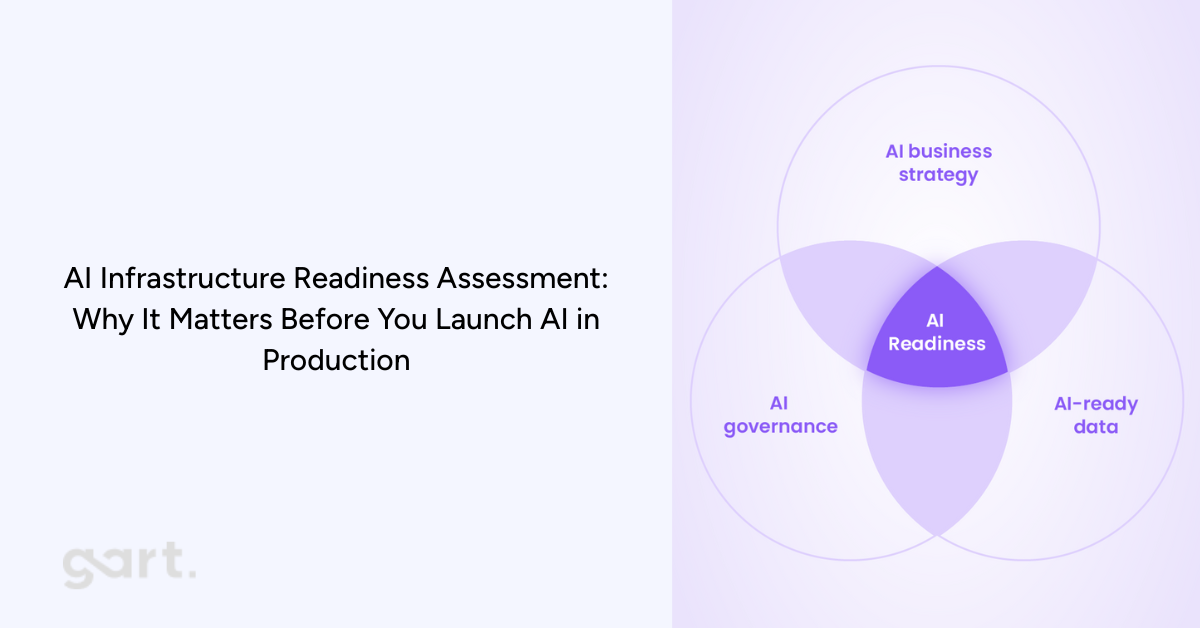
Why AI Fails Without the Right Infrastructure
Artificial intelligence is transforming entire industries — but ironically, most AI initiatives don’t fail because of weak models. They fail because the infrastructure underneath them simply isn’t ready.
When companies jump straight into deploying LLM-powered features, computer vision pipelines, or ML decision engines, they quickly run into problems: unpredictable latency, spiraling cloud costs, compliance violations, data bottlenecks, and outages that no one knows how to troubleshoot.
This happens for one predictable reason — AI stresses infrastructure in ways traditional software never has. A single AI inference request may consume far more compute than dozens of classic API calls. Sensitive data may need to move through new pipelines. Models require versioning, isolation, and rollback strategies. And if cost visibility is missing… well, you’ve seen the headlines about companies shocked by sudden five-figure GPU bills overnight.
That’s exactly why organizations are now prioritizing an AI infrastructure readiness assessment before they even begin building or integrating AI features. According to the brochure provided (p.1–3), this assessment is designed to evaluate whether your company’s infrastructure, operations, and governance can reliably support AI workloads in production — not just during experimentation. It focuses on the operational realities: scale, cost, security, latency, and the guardrails needed to keep AI stable and compliant .
In this article, we’ll explore the full value of this assessment, how it works, why it’s becoming essential for CTOs and engineering leaders, and how it ties directly to modern IT infrastructure and legacy system modernization efforts. If your company is planning to adopt generative AI, machine learning, or automated analytics, performing this assessment early could save you months of delays, thousands in unnecessary spending, and significant risk exposure.
2. What Is an AI Infrastructure Readiness Assessment?
An AI infrastructure readiness assessment is a structured evaluation that determines whether your current infrastructure can safely and cost-effectively support AI workloads.
2.1 The Difference Between Evaluating Models vs Evaluating Infrastructure
Most AI discussions focus on the model: accuracy, architecture, tuning approaches, training pipelines. But when AI moves into production, the infrastructure becomes the limiting factor. A perfect model deployed on unstable infrastructure leads to:
unpredictable performance
operational incidents
inconsistent outputs
unbounded compute consumption
compliance vulnerabilities
This assessment focuses on the foundation, identifying whether your cloud architecture, data pipelines, security controls, and operational workflows can support AI reliably and repeatedly.
2.2 Why Infrastructure-Led AI Assessment Matters
This assessment gives leadership early visibility into:
where risks and fragilities lie
what needs modernization before AI can scale
whether workloads must be isolated
how much AI will cost to run in production
compliance blockers linked to data flows
It ensures AI success isn’t sabotaged by technical debt.
3. Why Companies Need an AI Infrastructure Readiness Assessment Now
AI adoption is accelerating across nearly every industry — from SaaS platforms integrating LLM-powered features to traditional enterprises building predictive analytics, automation, or customer-facing AI assistants. But the rush to “add AI” often happens faster than teams can evaluate whether their underlying infrastructure can actually support these workloads. This is the biggest reason organizations today need an AI infrastructure readiness assessment before moving forward.
Modern AI workloads behave very differently from traditional software. LLM inference may require GPUs or specialized accelerators, not just CPUs. Data pipelines must be reproducible, regulated, and auditable. Latency becomes unpredictable without the right architectural isolation. Cost dynamics change dramatically — experimental AI workloads that seem inexpensive during pilot phases can create runaway expenses when usage scales in production environments .
Another reason companies need this assessment now is compliance. Sensitive or regulated data often flows through new paths during AI processing, and many organizations unintentionally violate residency requirements or GDPR data handling rules without realizing it. The assessment identifies these risks early (p.8), preventing costly future corrections or audit failures .
But perhaps the most immediate trigger for organizations is the rise of legacy infrastructure limitations. Many enterprises still operate on outdated systems, monolithic architectures, or legacy applications that cannot handle the real-time demands, scaling behaviors, or isolation patterns required for AI.
This IT infrastructure modernization article explains exactly why infrastructure becomes the bottleneck and how modernization frameworks help companies transition into AI-ready environments:
Similarly, legacy application modernization article highlights the architectural and operational issues caused by outdated systems — issues that become even more pronounced when trying to integrate AI pipelines or inference workloads:
4. Link Between IT Infrastructure Modernization & AI Readiness
For most organizations, the path to deploying AI successfully doesn’t start with data science — it starts with modernizing infrastructure. Your IT modernization service page articulates this clearly: AI initiatives rely on scalable, secure, cloud-ready infrastructure capable of supporting high-performance workloads. Without this foundation, production AI becomes nearly impossible.
4.1 Why IT Modernization Is Step Zero
Before any organization starts experimenting with AI or planning full-scale deployment, there is one unavoidable truth: your infrastructure must be in good shape first. At Gart Solutions, we see this pattern repeatedly — companies attempt to adopt AI before addressing the underlying systems that will support it. The result? Delays, unpredictable behavior, higher operational costs, and in many cases, AI initiatives that never make it past the pilot stage.
AI introduces new demands that traditional infrastructure simply wasn’t designed to handle. Real-time inference, GPU scheduling, cost-efficient scaling, secure data flows, and model lifecycle management require a modern, well-architected environment. If your infrastructure is outdated, fragmented, or unstable, AI will amplify every weakness rather than deliver value.
This is why IT modernization becomes Step Zero in any AI strategy.
Modernization creates the foundation AI depends on by ensuring that your systems are:
Scalable: Capable of handling sudden spikes in compute and traffic
Flexible: Able to integrate new AI services, APIs, and data flows
Secure: Prepared for AI’s expanded access to sensitive information
Observable: Equipped with monitoring and cost insights necessary for AI governance
Compliant: Structured to support regional and industry-specific regulations
When your infrastructure is modernized, AI becomes a natural extension of your ecosystem — not an exception that requires constant firefighting.
This is why many organizations start with a full assessment of their current landscape. Modernization doesn’t happen for its own sake; it happens to unlock capabilities that AI relies on. Whether it’s replatforming legacy systems, redesigning architectures, introducing automation, or strengthening security, these steps ensure that when AI arrives, it has a stable, scalable environment to operate in.
Simply put:If the foundation is weak, AI will expose it. If the foundation is strong, AI will elevate it.
4.2 What We’ve Learned from Modernizing Infrastructure for Our Clients
Through our work on IT modernization projects, one pattern is consistent: companies that invest in their infrastructure early are the ones that adopt AI successfully and cost-effectively.
Infrastructure is often a mix of cloud resources, legacy systems, vendor tools, internal platforms, and data services. Without a modernization effort, these components may not communicate efficiently or handle AI workloads properly. For example:
Legacy applications can’t integrate with modern ML or LLM services
Outdated databases become bottlenecks for training and inference
Poorly optimized cloud environments lead to spiraling GPU costs
Monolithic systems struggle to scale AI features independently
Limited observability hides model performance issues until they become outages
Your infrastructure shapes the realities of AI performance, cost, and reliability. Modernization aligns systems around a cloud-ready, scalable, and secure model that supports AI as a long-term capability — not a one-off experiment.
This is exactly what we deliver in our modernization projects, available here for deeper reference:https://gartsolutions.com/it-infrastructure-modernization/
4.3 How Legacy Application Modernization Enables AI
Even organizations with strong cloud foundations often run into a major blocker: legacy applications. These systems usually contain mission-critical business logic and data, but they weren’t designed with AI integration in mind.
Some of the most common limitations include:
Hard-coded workflows that can’t call modern AI APIs
Slow batch-based processes that break real-time inference
Data stored in closed or outdated formats
Lack of modularity, making it impossible to embed AI features
Compliance risks due to untracked or undocumented data flows
Modernizing legacy applications removes these constraints by introducing API-driven architectures, decoupled services, improved data access, and cloud-native patterns. Suddenly, AI can plug into business processes seamlessly.
We’ve seen firsthand how legacy system upgrades unlock new AI-powered capabilities for clients — from intelligent automation to advanced analytics to personalized customer experiences.More here: https://gartsolutions.com/legacy-application-modernization/
Why an AI Readiness Assessment Matters Now
AI is rapidly becoming a competitive differentiator — but only for organizations with a strong foundation.
Take the assessment: https://tally.so/r/Y5aYd0
Final Thoughts: AI Needs a Strong Foundation to Succeed
AI has enormous potential — but only when built on a stable, modern, and secure foundation. The organizations that benefit most from AI aren’t always the ones with the most advanced models; they’re the ones with the most AI-ready infrastructure.
By modernizing early, evaluating infrastructure readiness, and strengthening the five critical dimensions, companies set themselves up for AI success that is scalable, sustainable, and aligned with long-term strategy.
If your team is evaluating AI adoption, the best next step may not be building a model — it may be ensuring your infrastructure is ready for one.
Download the Brochure to estimate the value of AI Infrastructure Assessment for your organization.
Contact Us if you need a support.
AI-Infrastructure-and-Readiness-AssessmentDownload