Every enterprise running Microsoft 365 eventually asks the same question: do we keep certifying access with spreadsheets and email chains, or do we finally turn on Entra ID governance access reviews? The honest answer is more specific than “automate everything.” Most organizations are already paying for a meaningful chunk of Entra ID Governance inside licenses they hold today — they just haven’t switched it on. This breakdown puts real numbers next to both paths: the labor hours and error rates behind manual access reviews, what Entra ID’s P1/P2/Governance tiers actually cost and include, and where the effort genuinely goes when you move from one to the other. If you’re building the business case for your own rollout, Gart’s security audit team runs this exact cost/effort analysis before recommending a licensing change, not after.
The comparison below isn’t manual reviews versus a shiny new product. For most Microsoft 365 E5 customers, it’s manual reviews versus activating identity governance access reviews already sitting inside a license line they’re already paying for — and only reaching for the standalone Entra ID Governance add-on once that owned capability runs out of road.
Why Access Reviews Are Suddenly a Boardroom Topic
Access reviews used to be a quarterly checkbox for the identity team. They aren’t anymore. Every excess entitlement sitting on an account is a reachable attack path, and the numbers behind that risk have gotten hard to ignore: IBM’s Cost of a Data Breach Report 2025 found that malicious-insider incidents — the category most directly tied to over-permissioned or stale accounts — carry the highest average cost of any breach type, at $4.92 million per incident, well above the $4.44 million global average. When a credential is compromised, attackers don’t need to be sophisticated; they need the account to still have access it should have lost months earlier.
At the same time, the compliance side of the equation has gotten stricter. SOX, GLBA, ISO 27001, and — for organizations in scope — NIS2 all expect documented, recurring evidence that access to sensitive systems is actively recertified, not just granted once and forgotten. A pile of approved spreadsheets from last quarter doesn’t hold up well under audit scrutiny if nobody can explain why a given approval was granted.
⚠️ The real question isn’t “manual or automated”
For Microsoft-centric enterprises, it’s usually “manual, or the identity governance capability you’re already paying for inside Microsoft 365 E5.” That distinction changes the entire cost conversation, and it’s the one most vendor comparisons skip.
What Entra ID Governance Access Reviews Actually Do
Microsoft defines access reviews as a way to efficiently manage group memberships, access to enterprise applications, and privileged role assignments on a recurring basis, so that only the people who still need access keep it — see Microsoft’s official access reviews overview for the full feature reference. In practice, that means a named reviewer — a manager, a resource owner, or the requester themselves — periodically confirms or revokes continued access to a specific group, application, or privileged role, with the decision, timestamp, and justification captured automatically as audit evidence.
Entra ID governance access reviews sit at the intersection of three Microsoft Entra licensing tiers, and which capabilities you get depends entirely on which tier a given user is licensed under. P1 handles conditional access, self-service password reset, and hybrid identity, with no access review capability on its own. P2 is the tier that actually matters for this comparison — it adds risk-based identity protection, Privileged Identity Management (PIM), and access reviews on groups, enterprise applications, and privileged roles. Entra ID Governance is a separate paid layer on top of P2 that adds entitlement management (access packages, approval workflows), automated lifecycle workflows for joiners/movers/leavers, and AI-assisted recommendations that flag stale or anomalous access during a review.
That licensing structure is the whole story of why a straight “manual vs. Entra ID Governance” comparison is misleading for most enterprises — the middle tier, P2, already includes real access review capability, and a lot of organizations own it without using it. More on that below.
The Real Cost of Manual Access Reviews
“Manual” access reviews usually means a spreadsheet or CSV export sent to dozens of managers, each expected to look through a flat list of usernames and entitlements with no context on login frequency, role peers, or how the access was originally granted. Under deadline pressure, the natural response is to approve everything — the rubber-stamp review that satisfies an audit checkbox without actually reducing risk.
Industry benchmark data from identity governance vendor BalkanID’s analysis of enterprise access review deployments puts real numbers on that gap, modeled on a representative 10,000-user, 200-application organization running a quarterly review cycle:
| Metric | Manual review cycle | Automated review cycle |
|---|---|---|
| Completion time | 4-8 weeks per cycle | 3-5 days |
| Total effort | 1,200-1,800 FTE hours | Under 200 FTE hours |
| Reviewer effort per 100 users | ~12 hours | ~1 hour |
| Human error rate | 8-12% mis-classified or incomplete | Under 2% |
| Audit exceptions per cycle | 2-3 | 0-1, with full traceability |
| Annual review cost | $150K-$250K | $30K-$50K |
| Revocation time after a “reject” decision | 5-10 days | Under 24 hours |
The completion-rate gap matters as much as the labor cost. Where automated, evidence-backed reviews routinely reach 98% genuine completion, manual processes tend to cap out around 60% real completion — the rest is technically “done” in the sense that a manager clicked approve, without anyone actually verifying the access was still needed.
What Entra ID Governance Costs — And the Licensing Trap Most Enterprises Fall Into
Here’s where the cost/effort math gets more interesting than a simple per-seat price tag. Entra ID P1 ships inside Microsoft 365 E3 and Business Premium; Entra ID P2 — the tier that includes access reviews, PIM, and risk-based protection — ships inside Microsoft 365 E5. Entra ID Governance is priced as a separate standalone add-on layered on top of P2, adding entitlement management and lifecycle automation that P2 alone doesn’t cover.
That structure creates a specific, well-documented overspend pattern. Independent licensing analysis from Redress Compliance’s Entra ID Pricing Buyer Guide, based on roughly 25-35 Microsoft identity licensing engagements reviewed in 2024-2025, found three recurring patterns:
- Double payment. Standalone Entra P1 or P2 seats overlapped with entitlements already included in E3 or E5 on 15-25% of reviewed users — organizations were paying twice for identity capability their existing suite already granted.
- Unused capability. P2 capabilities such as access reviews and Privileged Identity Management sat switched off on 40-60% of E5 estates that already owned them — the single largest finding in the engagement.
- Governance bought too early. In roughly a third of cases, organizations purchased the standalone Entra ID Governance add-on while the P2 access reviews and PIM controls that ship inside their existing E5 license were never even activated.
The practical takeaway: before treating Entra ID Governance as a new purchase, most Microsoft-centric enterprises should confirm whether they’re already licensed for P2 through E5 — and if so, whether access reviews are actually turned on. For many organizations, the highest-leverage first move costs nothing beyond configuration time: activate the group, application, and privileged-role access reviews already included in the license, prove the coverage gap that remains, and only then scope Governance for the specific entitlement-management or lifecycle-automation capability P2 genuinely doesn’t provide.
Cost/Effort Comparison: Manual vs. Unused P2 vs. Activated P2 vs. Governance
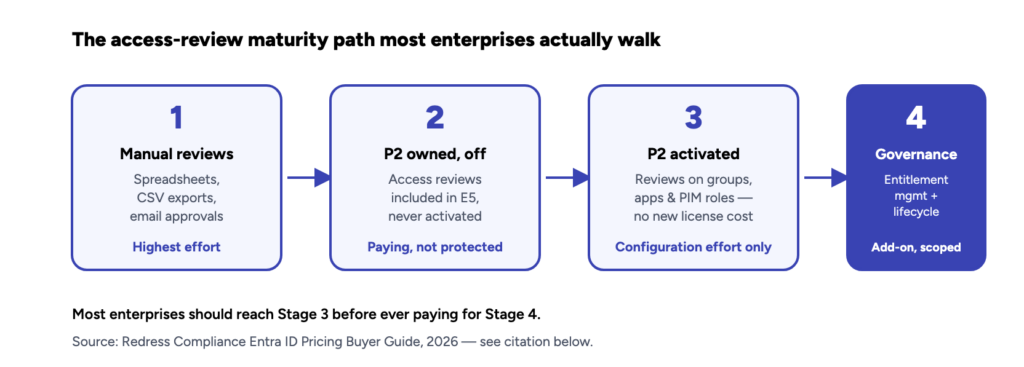
Put the labor-hour data and the licensing reality side by side, and the decision looks less like “buy software” and more like a four-stage maturity path most enterprises should walk in order:
| Stage | New license cost | Where the effort goes | What you get |
|---|---|---|---|
| 1. Manual reviews | None — but 1,200-1,800 FTE hours/cycle | Reviewer time, chasing approvals, compiling audit evidence by hand | ~60% real completion; 20-25% of high-risk entitlements missed |
| 2. P2 owned, unused | None — already inside your E5 license | Zero — this is the risk state most E5 estates are actually in | Nothing; you’re paying for a control that isn’t running |
| 3. P2 activated | None beyond existing E5 | Configuration: defining review scope, cadence, reviewers, recommendations | Access reviews on groups, apps & privileged roles; automated audit trail |
| 4. Entra ID Governance | Standalone add-on, scoped to need | Deploying entitlement management, access packages, lifecycle workflows | Self-service access requests, joiner/mover/leaver automation, AI recommendations |
Notice that the biggest jump in outcome — from a rubber-stamp manual cycle to a defensible, evidence-backed review — happens between Stage 1 and Stage 3, and Stage 3 doesn’t require a new purchase for most E5 organizations. Stage 4 is a real and often justified investment, but it solves a different problem: self-service entitlement requests and lifecycle automation, not the base act of reviewing who has access to what.
Where the Risk Hides: What Manual Reviews Miss
A flat list of usernames and permissions gives a reviewer no context on whether access is still justified. Without that context, the same categories of risky access slip through review after review:
- Dormant accounts with no login activity in 90+ days that still hold live entitlements.
- Privilege creep — users who changed roles internally but kept access tied to their previous position, the exact failure mode Gart’s least-privilege access model playbook is built to prevent.
- Orphaned service accounts with no clear HR or business owner to confirm they’re still needed.
- Toxic access combinations, such as a single account holding both “create” and “approve” permissions in a financial system.
None of these show up cleanly in a spreadsheet — see Gart’s step-by-step breakdown of how to run a user access review without spreadsheets for the process that catches them. They show up in identity governance tooling that correlates login telemetry, role peers, and ownership lineage — exactly the context P2 access reviews and Governance’s AI-assisted recommendations are built to surface automatically instead of leaving it to a manager’s memory.
🔍 An access review is only as good as its evidenceA completed review that can’t show why an approval was made — no login history, no peer comparison, no justification — provides audit comfort without actually reducing risk. Gart’s infrastructure audit engagements routinely find this gap: reviews that are technically “done” but functionally unverifiable.
A Phased Rollout From Manual Reviews to Entra ID Governance
The lowest-risk path from spreadsheets to a mature Entra ID governance access reviews program doesn’t require a big-bang re-platform. It looks more like this:
- Inventory what you already own. Cross-reference standalone Entra seats against E3/E5 entitlements to confirm you’re not double-paying, and identify exactly which users are licensed for P2.
- Activate P2 access reviews on the highest-risk scope first. Start with privileged roles (via PIM) and access to your most sensitive applications, not the entire directory at once.
- Define reviewers and cadence deliberately. Resource owners, not IT generically, should review access to the resources they actually understand — quarterly is the right default cadence for anything compliance-sensitive, though see why quarterly access reviews commonly fail and how to fix it before assuming cadence alone solves the completion-rate problem.
- Feed in identity telemetry from a properly configured Entra ID tenant so reviewers see login frequency and role context, not just a name and a permission.
- Scope Governance only against the gap P2 doesn’t cover — typically self-service access requests and joiner/mover/leaver automation — once the activated P2 reviews prove where that gap actually is.
This is also where integrating access governance into CI/CD and infrastructure-as-code pipelines pays off for engineering-heavy organizations: access reviews shouldn’t stop at directory groups when service accounts and pipeline credentials often carry more standing privilege than any individual employee.
When Manual Reviews Still Make Sense
Automation isn’t the right call for every organization on day one. Manual, spreadsheet-based reviews remain reasonable when the organization is small enough — well under a few hundred identities — that the 1,200-1,800 hour benchmark above doesn’t apply at meaningful scale, when there’s no Microsoft 365 E5 or standalone P2 licensing in place yet and the immediate need is a one-time compliance evidence gap rather than an ongoing program, or when access sprawl is genuinely limited: few applications, few privileged roles, low employee turnover.
Even then, the moment audit findings start citing SOX, ISO 27001, or NIS2-adjacent obligations — see Gart’s breakdown of why ISO 27001 certification matters for growing companies and how NIS2 compliance obligations reach organizations through their infrastructure and hosting relationships — the completion-rate and evidence gaps in manual reviews become a documented finding, not just an internal inefficiency.
You might also like
- IT Infrastructure Components: The Complete Guide for Modern Enterprises
- Compliance Audit Services
- ISO 27001 vs SOC 2: Which Access Controls Do You Actually Need?
- Infrastructure Audit: Process, Examples, Cost & ROI
- Strengthen Your Information Security With a NIS2 Compliance Solution