Every audit season, the same file resurfaces: a bloated spreadsheet with one tab per system, colored cells for “approved,” and a manager who hasn’t opened it since the last audit. Learning how to run a user access review without spreadsheets isn’t about finding a fancier template — it’s about replacing a process that was never designed to scale past a handful of systems and a few dozen employees. If you’re the one chasing down sign-offs every quarter, or the one explaining to an auditor why three ex-employees still show “active” in a system nobody remembers to check, Gart’s compliance audit team sees this exact bottleneck across almost every engagement — and it’s fixable without buying an enterprise IGA platform on day one.
This guide walks through why spreadsheet-based reviews break down, what a modern access review process looks like instead, how often to run one by risk tier, and where to draw the line between what should be automated and what still needs a human decision.
- What a User Access Review Actually Checks
- Why Spreadsheet-Based Access Reviews Break Down
- How to Run a User Access Review Without Spreadsheets: Step by Step
- How Often to Review Access, by Risk Tier
- What to Automate vs. What Still Needs a Human
- How Access Reviews Map to SOC 2, ISO 27001, and NIS2
- Where Access Review Projects Go Wrong
- Still running access reviews out of a spreadsheet?
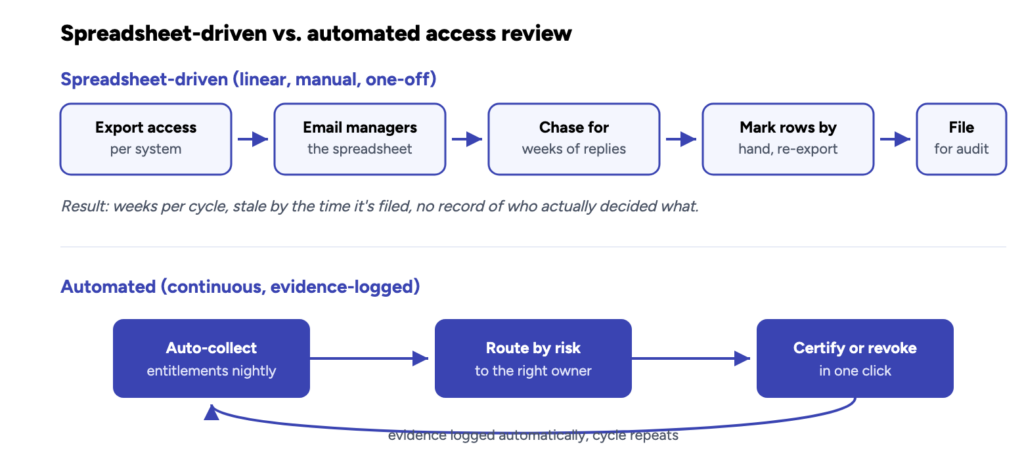
Result: hours per cycle, reviewers only see what changed, audit trail is a byproduct — not a scramble.The spreadsheet version isn’t just slower — it’s stale the moment it’s filed. The automated version keeps its own audit trail as a side effect of running.
What a User Access Review Actually Checks
A user access review is the process of confirming, system by system and person by person, that everyone’s current access still matches their current job — no more, no less. In practice that means pulling every account, role, and permission across your critical systems, matching each one against the person’s actual responsibilities today (not the responsibilities they had when the access was granted), and making an explicit decision for every entry: keep it, downgrade it, or revoke it.
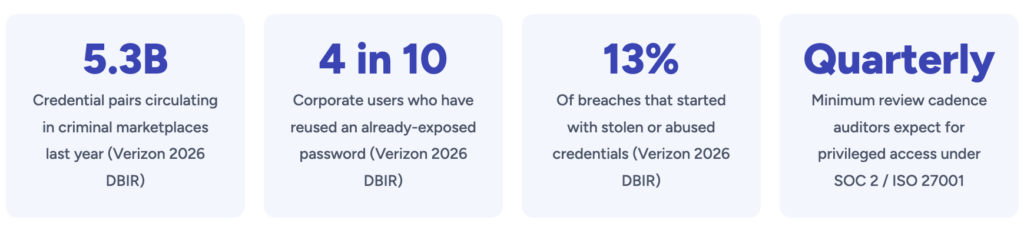
The review exists to catch three specific failure modes that accumulate quietly in any growing organization: privilege creep (employees who change roles but keep accumulating old permissions instead of shedding them), orphaned accounts (access left active after someone leaves or a contractor’s engagement ends), and excess standing access (admin-level permissions granted for a one-time task and never revoked). None of these show up as an incident on their own — they’re the precondition that turns a single stolen password into a much larger breach, which is exactly why Verizon’s 2026 Data Breach Investigations Report puts the number of corporate users reusing an already-exposed password at roughly four in ten — access reviews are one of the few controls that catch the damage before that reused password becomes a working credential inside your systems.
Why Spreadsheet-Based Access Reviews Break Down
Spreadsheets aren’t a bad tool for a five-person startup with three SaaS logins. They become a liability at a very specific, predictable point: once the number of systems, users, and role changes exceeds what one person can manually cross-reference inside a review window. Past that point, the same problems show up in almost every organization we audit:
📉 The review becomes a snapshot of last quarter, not this oneExporting access into a spreadsheet freezes it at the moment of export. Every role change, offboarding, or new hire that happens during the two-to-four weeks it takes to collect sign-offs is invisible to the review — which means the “completed” review is already out of date before anyone files it.
Beyond staleness, three more issues compound: there’s no single source of truth once the file is emailed to five different managers, each keeping their own copy; there’s no reliable evidence trail showing who actually reviewed which row and when, which is precisely what a security audit or SOC 2 assessor asks to see; and reviewers default to rubber-stamping “approve all” on long lists because reading 400 rows of raw permission names with no context about actual usage is not a task a manager can realistically do well in the fifteen minutes they’ve allotted for it.
How to Run a User Access Review Without Spreadsheets: Step by Step
Removing the spreadsheet doesn’t require ripping out your entire identity stack on day one. It means restructuring the process so data collection, routing, and evidence capture happen automatically, and the only manual step left is the actual judgment call a human has to make anyway.
- Inventory every system that holds an access decision. Start with a real list — cloud consoles, source control, CI/CD, databases, SaaS admin panels, VPN, and any internal tooling with role-based permissions. Most organizations underestimate this list by half; shadow SaaS and forgotten admin panels are where stale access hides longest.
- Pull entitlement data directly from each system’s API or SSO provider, not a manual export. Most identity providers (Okta, Entra ID, Google Workspace) and major cloud platforms expose an API or a native access-review feature that reads current group membership and role assignments in real time, eliminating the export-then-email step entirely.
- Route each access decision to the person who actually knows the answer. A centralized IT team rarely knows whether a specific engineer still needs production database access — their manager or the system owner does. Automated routing sends each reviewer only the entitlements they’re actually qualified to judge, instead of one giant undifferentiated list.
- Surface usage data alongside each entitlement, not just the permission name. “Has write access to the billing database” is hard to judge in isolation. “Has write access to the billing database, last used 214 days ago” makes the decision almost automatic — this single change is what turns a rubber-stamp exercise into a real review.
- Auto-approve birthright access, and only surface exceptions and changes since the last cycle. If someone’s access was already reviewed and hasn’t changed, re-certifying it from scratch every quarter is wasted reviewer attention. Mature programs certify only what’s new, changed, or flagged as anomalous — role outliers, separation-of-duties conflicts, dormant accounts, and access that doesn’t match the person’s department.
- Capture the decision, the reviewer, and the timestamp automatically, in the same system. This is the evidence an auditor asks for — not a policy document saying reviews happen, but a record of the specific decision made on a specific entitlement by a specific person on a specific date.
- Execute revocations immediately, and verify they took effect. A “revoke” decision that sits in a spreadsheet for two weeks before IT actions it is functionally the same as no decision at all. Closing the loop — confirming the access was actually removed — is the step most manual processes skip.
None of these steps require a full identity governance platform to start. Many teams begin with scripts against their SSO provider’s API and a lightweight workflow tool, then graduate to a dedicated access-review or IGA product once the entitlement volume justifies it. What matters is removing the manual export-email-chase cycle, not which specific tool replaces it — Gart’s infrastructure audit engagements typically start by mapping exactly this: which systems can already feed a review automatically, and which still need the plumbing built.
How Often to Review Access, by Risk Tier
Review frequency isn’t one-size-fits-all, and treating every system on the same quarterly calendar wastes reviewer attention on low-risk access while under-reviewing the accounts that matter most. Risk-based cadence is also what most frameworks actually expect once you read past the headline “periodic review” language in NIST SP 800-53’s AC-2 account management control, which leaves the exact interval to the organization’s own risk determination rather than mandating a fixed number.
| Access tier | Recommended cadence | Typical spreadsheet failure mode |
|---|---|---|
| Privileged / admin (root, domain admin, production DB write) | Monthly, or continuous with automated flags | Admin lists go stale fastest; a single missed cycle can leave standing root access unreviewed for a full quarter |
| Standard business systems (CRM, finance tools, internal apps) | Quarterly | Largest row count, most likely to get “approve all” treatment under time pressure |
| Service accounts & API keys | Quarterly, with automated dormancy alerts | No human owner to chase for sign-off, so these are the rows most often skipped entirely |
| Low-risk / read-only (internal wikis, reporting dashboards) | Semi-annual to annual | Rarely the actual risk, but often consumes disproportionate review time on a flat spreadsheet |
What to Automate vs. What Still Needs a Human
Removing spreadsheets doesn’t mean removing judgment — it means reserving human attention for the decisions that actually need it, and letting the process handle everything else. A well-built review workflow should automate:
- Data collection and formatting. Pulling current entitlements from every system and normalizing them into one reviewable list — the part spreadsheets require someone to do by hand every single cycle.
- Routing and reminders. Sending each entitlement to the correct reviewer automatically and escalating overdue items, rather than one person manually emailing and re-emailing managers.
- Evidence capture. Logging who decided what, and when, in a format an auditor can query directly instead of a screenshot of a spreadsheet tab.
- Anomaly flagging. Surfacing separation-of-duties conflicts, dormant accounts, and role outliers automatically, so reviewers spend their time on the entries that are actually unusual.
What should stay human: the actual certify-or-revoke decision on any entitlement flagged as an exception, sign-off from the system owner who understands business context a script can’t infer, and the judgment call on ambiguous cases — a contractor whose engagement was extended verbally but not yet in the HR system, for example. Automation should narrow what a human has to look at, not replace the look itself.
How Access Reviews Map to SOC 2, ISO 27001, and NIS2
Every major security framework requires some form of periodic access review — the specific language differs, but auditors are checking for the same underlying evidence: a documented, repeatable process with named reviewers, dated decisions, and proof that revocations were actually executed. Microsoft’s Entra ID Governance documentation frames this well as confirming that “the right people have the right access to the right resources” on an ongoing basis — a vendor-neutral definition that maps cleanly onto every framework below, regardless of which tooling actually runs the review.
| Framework | What it expects from access reviews |
|---|---|
| SOC 2 | Trust Services Criteria CC6.1-CC6.3 require restricting logical access to authorized personnel and demonstrating periodic review of that access, with evidence of both the review and any resulting removals |
| ISO/IEC 27001 | Annex A access control clauses require documented, periodic review of user access rights, tied to the organization’s own risk assessment rather than a fixed universal interval |
| NIS2 (EU) | Requires access control and identity management as part of baseline cyber-hygiene measures for in-scope entities, typically implemented by mapping to ISO 27001/27002 controls — see Gart’s NIS2 compliance overview for how this applies beyond obviously regulated sectors |
| PCI DSS / HIPAA | Both mandate documented periodic review of user access to cardholder data or protected health information, typically at minimum every six months for standard access and more frequently for privileged accounts |
The consistent thread across every framework: a policy stating that access reviews happen is not evidence. Auditors ask for the actual review — reviewer name, date, decision, and the resulting action — which is exactly what a spreadsheet struggles to preserve reliably across cycles and what an automated process generates as a natural byproduct of running.
Where Access Review Projects Go Wrong
Most failed access-review programs don’t fail because a tool was missing — they fail on process and ownership problems that a new platform alone won’t fix:
- No clear owner per system. If it’s unclear whose job it is to review a given system’s access, the review either doesn’t happen or defaults to IT rubber-stamping decisions they don’t have the business context to make.
- Reviewing everything with equal weight. Treating a read-only wiki account the same as a production database admin role burns reviewer attention on low-risk items and increases the odds that high-risk access gets the same fifteen-second glance.
- Automating collection but not remediation. Some teams automate the data pull and routing, then let “revoke” decisions sit in a ticket queue for weeks. The review only reduces risk once the access is actually removed and that removal is verified.
- Treating the review as a compliance checkbox rather than a security control. Programs built purely to satisfy an auditor tend to under-invest in the parts — usage data, anomaly flags — that make the review actually catch something. Gart’s SOC 2 preparation guide covers this distinction in more depth: passing the audit and reducing real access risk are related but not identical goals.
Still running access reviews out of a spreadsheet?
Gart Solutions audits your current access review process, maps every system that needs to feed it, and designs the automated workflow — API-driven entitlement collection, risk-based routing, and audit-ready evidence capture — so your next SOC 2, ISO 27001, or NIS2 review is a formality instead of a fire drill.