Every enterprise running Microsoft 365 eventually asks the same question: do we keep certifying access with spreadsheets and email chains, or do we finally turn on Entra ID governance access reviews? The honest answer is more specific than "automate everything." Most organizations are already paying for a meaningful chunk of Entra ID Governance inside licenses they hold today — they just haven't switched it on. This breakdown puts real numbers next to both paths: the labor hours and error rates behind manual access reviews, what Entra ID's P1/P2/Governance tiers actually cost and include, and where the effort genuinely goes when you move from one to the other. If you're building the business case for your own rollout, Gart's security audit team runs this exact cost/effort analysis before recommending a licensing change, not after.
The comparison below isn't manual reviews versus a shiny new product. For most Microsoft 365 E5 customers, it's manual reviews versus activating identity governance access reviews already sitting inside a license line they're already paying for — and only reaching for the standalone Entra ID Governance add-on once that owned capability runs out of road.
Why Access Reviews Are Suddenly a Boardroom Topic
Access reviews used to be a quarterly checkbox for the identity team. They aren't anymore. Every excess entitlement sitting on an account is a reachable attack path, and the numbers behind that risk have gotten hard to ignore: IBM's Cost of a Data Breach Report 2025 found that malicious-insider incidents — the category most directly tied to over-permissioned or stale accounts — carry the highest average cost of any breach type, at $4.92 million per incident, well above the $4.44 million global average. When a credential is compromised, attackers don't need to be sophisticated; they need the account to still have access it should have lost months earlier.
At the same time, the compliance side of the equation has gotten stricter. SOX, GLBA, ISO 27001, and — for organizations in scope — NIS2 all expect documented, recurring evidence that access to sensitive systems is actively recertified, not just granted once and forgotten. A pile of approved spreadsheets from last quarter doesn't hold up well under audit scrutiny if nobody can explain why a given approval was granted.
⚠️ The real question isn't "manual or automated"For Microsoft-centric enterprises, it's usually "manual, or the identity governance capability you're already paying for inside Microsoft 365 E5." That distinction changes the entire cost conversation, and it's the one most vendor comparisons skip.
What Entra ID Governance Access Reviews Actually Do
Microsoft defines access reviews as a way to efficiently manage group memberships, access to enterprise applications, and privileged role assignments on a recurring basis, so that only the people who still need access keep it — see Microsoft's official access reviews overview for the full feature reference. In practice, that means a named reviewer — a manager, a resource owner, or the requester themselves — periodically confirms or revokes continued access to a specific group, application, or privileged role, with the decision, timestamp, and justification captured automatically as audit evidence.
Entra ID governance access reviews sit at the intersection of three Microsoft Entra licensing tiers, and which capabilities you get depends entirely on which tier a given user is licensed under. P1 handles conditional access, self-service password reset, and hybrid identity, with no access review capability on its own. P2 is the tier that actually matters for this comparison — it adds risk-based identity protection, Privileged Identity Management (PIM), and access reviews on groups, enterprise applications, and privileged roles. Entra ID Governance is a separate paid layer on top of P2 that adds entitlement management (access packages, approval workflows), automated lifecycle workflows for joiners/movers/leavers, and AI-assisted recommendations that flag stale or anomalous access during a review.
That licensing structure is the whole story of why a straight "manual vs. Entra ID Governance" comparison is misleading for most enterprises — the middle tier, P2, already includes real access review capability, and a lot of organizations own it without using it. More on that below.
The Real Cost of Manual Access Reviews
"Manual" access reviews usually means a spreadsheet or CSV export sent to dozens of managers, each expected to look through a flat list of usernames and entitlements with no context on login frequency, role peers, or how the access was originally granted. Under deadline pressure, the natural response is to approve everything — the rubber-stamp review that satisfies an audit checkbox without actually reducing risk.
Industry benchmark data from identity governance vendor BalkanID's analysis of enterprise access review deployments puts real numbers on that gap, modeled on a representative 10,000-user, 200-application organization running a quarterly review cycle:
MetricManual review cycleAutomated review cycleCompletion time4-8 weeks per cycle3-5 daysTotal effort1,200-1,800 FTE hoursUnder 200 FTE hoursReviewer effort per 100 users~12 hours~1 hourHuman error rate8-12% mis-classified or incompleteUnder 2%Audit exceptions per cycle2-30-1, with full traceabilityAnnual review cost$150K-$250K$30K-$50KRevocation time after a "reject" decision5-10 daysUnder 24 hoursThe Real Cost of Manual Access Reviews
The completion-rate gap matters as much as the labor cost. Where automated, evidence-backed reviews routinely reach 98% genuine completion, manual processes tend to cap out around 60% real completion — the rest is technically "done" in the sense that a manager clicked approve, without anyone actually verifying the access was still needed.
What Entra ID Governance Costs — And the Licensing Trap Most Enterprises Fall Into
Here's where the cost/effort math gets more interesting than a simple per-seat price tag. Entra ID P1 ships inside Microsoft 365 E3 and Business Premium; Entra ID P2 — the tier that includes access reviews, PIM, and risk-based protection — ships inside Microsoft 365 E5. Entra ID Governance is priced as a separate standalone add-on layered on top of P2, adding entitlement management and lifecycle automation that P2 alone doesn't cover.
That structure creates a specific, well-documented overspend pattern. Independent licensing analysis from Redress Compliance's Entra ID Pricing Buyer Guide, based on roughly 25-35 Microsoft identity licensing engagements reviewed in 2024-2025, found three recurring patterns:
Double payment. Standalone Entra P1 or P2 seats overlapped with entitlements already included in E3 or E5 on 15-25% of reviewed users — organizations were paying twice for identity capability their existing suite already granted.
Unused capability. P2 capabilities such as access reviews and Privileged Identity Management sat switched off on 40-60% of E5 estates that already owned them — the single largest finding in the engagement.
Governance bought too early. In roughly a third of cases, organizations purchased the standalone Entra ID Governance add-on while the P2 access reviews and PIM controls that ship inside their existing E5 license were never even activated.
The practical takeaway: before treating Entra ID Governance as a new purchase, most Microsoft-centric enterprises should confirm whether they're already licensed for P2 through E5 — and if so, whether access reviews are actually turned on. For many organizations, the highest-leverage first move costs nothing beyond configuration time: activate the group, application, and privileged-role access reviews already included in the license, prove the coverage gap that remains, and only then scope Governance for the specific entitlement-management or lifecycle-automation capability P2 genuinely doesn't provide.
Cost/Effort Comparison: Manual vs. Unused P2 vs. Activated P2 vs. Governance
Put the labor-hour data and the licensing reality side by side, and the decision looks less like "buy software" and more like a four-stage maturity path most enterprises should walk in order:
StageNew license costWhere the effort goesWhat you get1. Manual reviewsNone — but 1,200-1,800 FTE hours/cycleReviewer time, chasing approvals, compiling audit evidence by hand~60% real completion; 20-25% of high-risk entitlements missed2. P2 owned, unusedNone — already inside your E5 licenseZero — this is the risk state most E5 estates are actually inNothing; you're paying for a control that isn't running3. P2 activatedNone beyond existing E5Configuration: defining review scope, cadence, reviewers, recommendationsAccess reviews on groups, apps & privileged roles; automated audit trail4. Entra ID GovernanceStandalone add-on, scoped to needDeploying entitlement management, access packages, lifecycle workflowsSelf-service access requests, joiner/mover/leaver automation, AI recommendationsCost/Effort Comparison: Manual vs. Unused P2 vs. Activated P2 vs. Governance
Notice that the biggest jump in outcome — from a rubber-stamp manual cycle to a defensible, evidence-backed review — happens between Stage 1 and Stage 3, and Stage 3 doesn't require a new purchase for most E5 organizations. Stage 4 is a real and often justified investment, but it solves a different problem: self-service entitlement requests and lifecycle automation, not the base act of reviewing who has access to what.
Where the Risk Hides: What Manual Reviews Miss
A flat list of usernames and permissions gives a reviewer no context on whether access is still justified. Without that context, the same categories of risky access slip through review after review:
Dormant accounts with no login activity in 90+ days that still hold live entitlements.
Privilege creep — users who changed roles internally but kept access tied to their previous position, the exact failure mode Gart's least-privilege access model playbook is built to prevent.
Orphaned service accounts with no clear HR or business owner to confirm they're still needed.
Toxic access combinations, such as a single account holding both "create" and "approve" permissions in a financial system.
None of these show up cleanly in a spreadsheet — see Gart's step-by-step breakdown of how to run a user access review without spreadsheets for the process that catches them. They show up in identity governance tooling that correlates login telemetry, role peers, and ownership lineage — exactly the context P2 access reviews and Governance's AI-assisted recommendations are built to surface automatically instead of leaving it to a manager's memory.
🔍 An access review is only as good as its evidenceA completed review that can't show why an approval was made — no login history, no peer comparison, no justification — provides audit comfort without actually reducing risk. Gart's infrastructure audit engagements routinely find this gap: reviews that are technically "done" but functionally unverifiable.
A Phased Rollout From Manual Reviews to Entra ID Governance
The lowest-risk path from spreadsheets to a mature Entra ID governance access reviews program doesn't require a big-bang re-platform. It looks more like this:
Inventory what you already own. Cross-reference standalone Entra seats against E3/E5 entitlements to confirm you're not double-paying, and identify exactly which users are licensed for P2.
Activate P2 access reviews on the highest-risk scope first. Start with privileged roles (via PIM) and access to your most sensitive applications, not the entire directory at once.
Define reviewers and cadence deliberately. Resource owners, not IT generically, should review access to the resources they actually understand — quarterly is the right default cadence for anything compliance-sensitive, though see why quarterly access reviews commonly fail and how to fix it before assuming cadence alone solves the completion-rate problem.
Feed in identity telemetry from a properly configured Entra ID tenant so reviewers see login frequency and role context, not just a name and a permission.
Scope Governance only against the gap P2 doesn't cover — typically self-service access requests and joiner/mover/leaver automation — once the activated P2 reviews prove where that gap actually is.
This is also where integrating access governance into CI/CD and infrastructure-as-code pipelines pays off for engineering-heavy organizations: access reviews shouldn't stop at directory groups when service accounts and pipeline credentials often carry more standing privilege than any individual employee.
When Manual Reviews Still Make Sense
Automation isn't the right call for every organization on day one. Manual, spreadsheet-based reviews remain reasonable when the organization is small enough — well under a few hundred identities — that the 1,200-1,800 hour benchmark above doesn't apply at meaningful scale, when there's no Microsoft 365 E5 or standalone P2 licensing in place yet and the immediate need is a one-time compliance evidence gap rather than an ongoing program, or when access sprawl is genuinely limited: few applications, few privileged roles, low employee turnover.
Even then, the moment audit findings start citing SOX, ISO 27001, or NIS2-adjacent obligations — see Gart's breakdown of why ISO 27001 certification matters for growing companies and how NIS2 compliance obligations reach organizations through their infrastructure and hosting relationships — the completion-rate and evidence gaps in manual reviews become a documented finding, not just an internal inefficiency.
Identity Governance & Access Review Strategy
Not sure whether you're already paying for the access reviews you need?
Gart Solutions runs a licensing and access-review audit before recommending a single new purchase — mapping what your Microsoft 365 E3/E5 estate already includes, activating owned P2 controls, and scoping Entra ID Governance only for the specific gap it needs to fill.
Security Audit
Infrastructure Audit
Compliance Audit (SOX, ISO 27001, NIS2)
DevSecOps Consulting
IT Infrastructure Consulting
Cybersecurity Monitoring
Talk to an identity governance specialist
Explore our IT audit services →
You might also like
IT Infrastructure Components: The Complete Guide for Modern Enterprises
Compliance Audit Services
ISO 27001 vs SOC 2: Which Access Controls Do You Actually Need?
Infrastructure Audit: Process, Examples, Cost & ROI
Strengthen Your Information Security With a NIS2 Compliance Solution
Roman Burdiuzha
Co-founder & CTO, Gart Solutions · Cloud Architecture Expert
Roman has 15+ years of experience in DevOps and cloud architecture, with prior leadership roles at SoftServe and lifecell Ukraine. He co-founded Gart Solutions, where he leads cloud transformation and infrastructure modernization engagements across Europe and North America. In one recent client engagement, Gart reduced infrastructure waste by 38% through consolidating idle resources and introducing usage-aware automation. Read more on Startup Weekly.
Most breaches don't start with a zero-day. They start with an account that had more access than it needed — a contractor's laptop with admin rights to production, a CI runner that reaches every environment, a former employee's SSO login nobody revoked. A least privilege access model — where every user, service account, and application gets only the permissions required for its job, and nothing more — is the single most effective control for shrinking that exposure. Contrary to what most vendor pitches imply, it does not require a dedicated identity and access management (IAM) team to implement.
This is where lean IT teams tend to talk themselves out of it: least privilege sounds like an enterprise program with role catalogs and a governance committee. In reality it's a discipline you can start this week — and for a five-person IT team, it matters more than for an enterprise with a security operations center, because there's no one else watching the door. If you want an outside view of where your access sprawl already stands, a focused security audit will usually surface the worst offenders within days. This guide covers what the model means, why it's disproportionately valuable for small teams, and a practical six-step rollout playbook.
What Is the Least Privilege Access Model?
The least privilege access model is a security approach in which every identity — human or machine — is granted the minimum set of permissions necessary to perform its function, for the minimum amount of time necessary, and nothing more. A support engineer who only ever needs to restart a service should not also be able to modify billing settings. A reporting dashboard that reads sales data should not have write access to the database it queries. A deploy bot that pushes to staging should not, by default, also be able to reach production.
It is not a single tool or setting — it is a standard you apply consistently across identity providers, cloud accounts, servers, CI/CD pipelines, SaaS applications, and databases. The CISA Zero Trust Maturity Model places least privilege at the center of its Identity pillar precisely because it depends on knowing who — or what — is asking for access before you can decide what "minimum necessary" means for them. In practice, that makes the least privilege access model the operational backbone of any zero-trust initiative rather than a separate checkbox next to it.
Least privilege vs. zero trust, in one line: zero trust says "verify every request, trust nothing by default." Least privilege says "and once verified, grant only what's needed, only for as long as it's needed." One is the philosophy; the other is the permission-sizing rule that makes it enforceable.
Why the Least Privilege Access Model Matters More for Lean IT Teams
Larger organizations have a security operations center watching for anomalous access at 2 a.m. Lean IT teams usually don't — which means the access model itself has to do the work that headcount would otherwise cover. Three dynamics make this especially acute for small and mid-sized IT functions:
Everyone tends to be over-permissioned by default. When one or two admins run the entire stack, the fastest path to "get it working" is to grant broad access once and move on. That shortcut compounds: eighteen months later, half the team has standing admin rights they used once during onboarding and never again.
The blast radius is proportionally larger. In a five-person IT team, a single compromised credential can plausibly touch every system the company runs. Credential abuse remains the throughline attackers rely on most: Verizon's 2026 Data Breach Investigations Report found credential abuse present in roughly 39% of breach chains overall, even as it recedes as the initial entry point in favor of exploited vulnerabilities — meaning that once an attacker is in, an over-permissioned account is very often how they move and escalate.
There's no separate governance layer to catch drift. A small IT infrastructure for a growing business rarely has a dedicated compliance or GRC function reviewing access on a schedule — which is exactly the condition under which permission sprawl accumulates silently, one "just give them access for now" exception at a time.
Core Principles of a Least Privilege Access Model
A working least privilege access model rests on five principles. They reinforce each other — skipping one tends to quietly undermine the rest:
Default deny. New accounts, roles, and service identities start with zero access. Permissions are added deliberately, not removed after the fact from an overly generous starting point.
Just enough access (JEA). Permissions map to a specific task or job function at the narrowest useful scope — a namespace, not a cluster; a bucket, not the whole account.
Just-in-time (JIT) elevation. Standing privileged access is replaced with time-bound elevation requested for a specific task and automatically revoked when the window closes.
Separation of duties. No single identity can both perform and approve the same sensitive action — the person who can request a change is not the same one who can authorize it in production.
Continuous review, not one-time setup. Access is treated as something that decays in accuracy over time as roles change, and is re-validated on a recurring schedule rather than configured once and forgotten.
NIST codifies this last point directly: least privilege is a named control family (AC-6) in NIST SP 800-53, which explicitly requires organizations to review assigned privileges on a defined schedule — not just at account creation.
A Practical 6-Step Rollout Playbook for Lean IT Teams
You do not need to boil the ocean. The playbook below is sequenced so each step produces a usable result on its own, rather than requiring the whole program to be finished before anything improves.
Inventory every identity and what it can actually reach. Pull a current list of human users, service accounts, and API keys across your identity provider, cloud accounts, and CI/CD tooling. Most cloud providers' native entitlement tools (AWS IAM Access Analyzer, Azure AD Access Reviews, GCP Policy Analyzer) will show you effective — not just assigned — permissions, which is usually where the surprises are.
Flag standing admin and "god mode" accounts first. Rank identities by blast radius, not by how often they're used. A rarely-touched service account with org-wide admin rights is a higher priority fix than a frequently-used account scoped to one application.
Map roles to the minimum permission set, not the current one. For each job function, define what it genuinely needs — not what's convenient to grant. This is where a lightweight RBAC structure earns its keep; if any part of your stack runs CI/CD pipelines, our guide to role-based access control in CI/CD pipelines covers the tool-by-tool setup in depth.
Replace standing elevated access with just-in-time elevation. For the handful of tasks that genuinely need temporary admin rights — an incident, a one-off migration, a schema change — use time-bound elevation (native cloud PIM tools or a lightweight PAM solution) instead of leaving the access open indefinitely.
Codify the result so it doesn't drift back. Manually configured permissions erode the moment someone makes a console change under time pressure. Defining roles and policy bindings in Terraform or your platform's native IaC tooling — the same approach covered in our Infrastructure as Code best practices guide — means access changes go through the same review process as everything else you ship.
Put a recurring review on the calendar — and mean it. Quarterly is the realistic minimum. For a lean team, the review does not need to be exhaustive every cycle: focus on privileged accounts, service accounts, and anyone who changed roles or left since the last pass.
Least Privilege Across Your Stack
Least privilege looks different at each layer of your environment. Here's where lean teams most commonly over-grant access, and the fix that actually holds up:
LayerCommon Over-Privilege MistakeLeast-Privilege FixCloud IAMBroad managed policies (e.g. full AdministratorAccess) attached to individual users instead of scoped rolesCustom, resource-scoped policies per role; enable IAM Access Analyzer / Policy Analyzer to flag unused permissionsIdentity Provider / SSOOne flat "employee" group granting access to every connected appApp-specific groups mapped to job function; conditional access rules by device and locationServers & EndpointsShared local admin credentials used for routine maintenanceNamed, individually audited accounts; local admin rights removed by default and granted just-in-timeCI/CD & DevOps ToolingA single CI service account with access to every environment and secretEnvironment-scoped service accounts and protected variables, with production gated by required approvalsDatabasesApplication connection strings using a superuser or db_owner roleRead/write roles scoped to specific schemas; separate credentials for reporting vs. transactional accessSaaS ApplicationsEvery new hire defaulted to "Admin" because it's the fastest way to unblock themRole templates per department; admin roles limited to a named, reviewed short listLeast Privilege Across Your Stack
Tools That Make This Achievable Without a Dedicated IAM Team
The reason least privilege has historically felt out of reach for small teams is that manual role design and manual reviews genuinely don't scale past a handful of people. The good news is that most of that work is now automatable with tools a lean team can run without hiring a specialist:
Native cloud entitlement analyzers (AWS IAM Access Analyzer, Azure AD Privileged Identity Management, GCP Policy Analyzer and Recommender) are included in your existing cloud subscription and will directly flag unused permissions and suggest tighter policies — this is usually the fastest first win, and it's free.
Just-in-time / PAM tooling — whether a purpose-built privileged access management product or your cloud provider's native temporary-elevation feature (AWS IAM Roles Anywhere with short-lived STS credentials, Azure PIM, HashiCorp Vault dynamic secrets) — replaces standing admin rights with request-and-expire workflows that a lean team can configure once and then leave running.
Infrastructure as Code turns your role definitions into version-controlled, peer-reviewed artifacts instead of console clicks nobody remembers making six months later — which also happens to be the single best way to pass an audit for SOC 2 compliance or similar frameworks, since access-control evidence becomes a diffable file rather than a screenshot.
If your team is stretched too thin to run even this lighter-weight version of the program, an outside infrastructure consulting engagement can stand up the role structure and automation once, then hand it back to your team to maintain — which is usually far cheaper than the alternative of hiring a full-time IAM engineer for a problem that, once codified, mostly runs itself.
Common Pitfalls (and Warning Signs) When Lean Teams Implement Least Privilege
The model is simple in concept; teams still trip on the same handful of things in practice. The most common failure mode is treating least privilege as a one-time cleanup project rather than an ongoing discipline — permissions granted "temporarily" during an incident are the single biggest source of drift, because nobody owns removing them once the fire is out.
A close second is scoping roles so tightly that people start requesting exceptions constantly, which trains the team to rubber-stamp access requests to keep the business moving — defeating the purpose. The fix is to size roles against real task frequency, not theoretical minimalism, and to make the just-in-time request path fast enough that nobody is tempted to bypass it. A recent IT infrastructure audit is the fastest way to find out which of these you're already dealing with before you commit to a rollout plan.
If any of the following look familiar, privilege sprawl is already further along than it appears:
Nobody can produce a current list of who has admin rights to production without manually checking each system.
Service accounts and API keys outnumber human users and haven't been reviewed since they were created.
"Just give them admin, it's faster" is a phrase your team says at least once a month.
Not sure how over-permissioned your environment already is?
Gart Solutions helps lean IT and engineering teams design and roll out a least privilege access model — from identity and cloud IAM audits to IaC-codified roles, just-in-time access, and the ongoing review cadence to keep it that way.
10+
Years in DevOps & Cloud
50+
Enterprise clients secured
4.9★
Clutch rating
IT Security Audit
Identity & Access Management
Zero Trust Implementation
DevSecOps
Infrastructure as Code
Talk to a Security Expert →
Roman Burdiuzha
Co-founder & CTO, Gart Solutions · Cloud Architecture Expert
Roman has 15+ years of experience in DevOps and cloud architecture, with prior leadership roles at SoftServe and lifecell Ukraine. He co-founded Gart Solutions, where he leads cloud transformation and infrastructure modernization engagements across Europe and North America. In one recent client engagement, Gart reduced infrastructure waste by 38% through consolidating idle resources and introducing usage-aware automation. Read more on Startup Weekly.
You might also like
How to Run a User Access Review Without Spreadsheets
ISO 27001 vs. SOC 2: Which Access Controls Do You Actually Need?
Exploring the Benefits of IT Infrastructure Outsourcing
Top 30 Managed IT Service Providers for SMBs & Mid-Market Businesses
Gart Compliance Audit Services
What defines real compliance in 2026 is sovereignty — who legally controls your infrastructure, who holds the cryptographic keys, who operates your systems, and which jurisdiction ultimately governs access to your data.
European organizations can host data in Frankfurt, Paris or Stockholm — and still remain exposed to non-EU authorities. That is why digital sovereignty has become the new compliance baseline across healthcare, finance, SaaS, public sector, manufacturing, and AI-driven businesses.
What Is Digital Sovereignty and Why Does It Matter for Europe?
The vast majority of cloud infrastructure today is controlled by U.S.-based hyperscalers like Amazon Web Services (AWS), Microsoft Azure, and Google Cloud.
These companies operate under U.S. law — most notably the CLOUD Act, which gives U.S. authorities the right to access data, even if it’s stored in European data centers.
This legal loophole creates an enormous risk. European governments, hospitals, banks, and startups often host sensitive workloads on foreign infrastructure without realizing they’re potentially exposing themselves to surveillance, data requests, and jurisdictional conflicts. Digital sovereignty is about correcting that imbalance — ensuring that European data stays in Europe, governed by European laws.
Sovereignty vs Residency vs Jurisdiction — The Control Framework
LayerWhat it controlsWhy it mattersData ResidencyWhere data is physically storedDetermines GDPR applicabilityData SovereigntyWhich legal system governs operationsDetermines NIS2, DORA & AI Act complianceJurisdictional ControlWho can legally compel accessDetermines CLOUD Act exposureSovereignty vs Residency vs Jurisdiction — The Control Framework
Sovereignty is not about geography.It is about legal authority, operational control, and cryptographic ownership.
But it’s more than just regulation. Digital sovereignty also touches on values — privacy, transparency, innovation, and economic sustainability. It’s a vision of a Europe that’s not just connected, but digitally independent.
The Data Explosion and Why Europe Is Reacting Now
Europe is generating data at unprecedented speed. Global data volumes grew from 33 zettabytes in 2018 to an estimated 175 zettabytes by 2025 — doubling roughly every 18 months. Yet despite this growth, the majority of European data is stored on infrastructure outside the EU, often governed by foreign laws.
The challenge is not just the volume of data, but the sensitivity of what is being collected:health records, financial data, industrial telemetry, geolocation streams, and now AI training datasets.Even metadata — logs, diagnostics, access patterns — can reveal valuable operational insights.
Rising cyberattacks, geopolitical tension, and the accelerating adoption of AI have pushed European regulators to tighten control over where data resides, how it moves, and who can legally access it.
Digital sovereignty is Europe’s answer to protecting its data economy while enabling innovation.
The Legal and Ethical Imperatives Behind Sovereign Cloud Choices
When a European organization uses a U.S.-based cloud provider, it may be fully GDPR-compliant on paper, but in reality, there's a major legal contradiction. That’s because foreign laws can override EU protections through extraterritorial reach. The U.S. CLOUD Act is a prime example. It allows American law enforcement to demand access to data, no matter where it's stored, as long as it's held by a U.S.-controlled entity.
This creates a fundamental conflict with the General Data Protection Regulation (GDPR) — which mandates strict data processing, protection, and transparency rules for all EU citizens. If a cloud provider is subject to both laws, whose orders do they follow?
This ethical and legal tension has spurred the development of sovereign cloud solutions. EU-based cloud providers offer an escape from this conundrum. They're headquartered and operated under European jurisdiction, meaning they can comply fully with EU data protection laws without foreign interference.
Levels of Sovereignty: Residency, Sovereignty, and Jurisdictional Control
Not all “sovereign clouds” offer the same guarantees. European organizations need to distinguish three layers of control:
1. Data ResidencyWhere the data physically lives. Hosting data in the EU ensures GDPR applies, but it does not eliminate risks if the provider is subject to foreign laws.
2. Data SovereigntyWhich legal system governs the data. True sovereignty ensures all processing, backup, and metadata are controlled by EU regulations only.
3. Jurisdictional ControlWho can compel access to the data.Even if stored in Frankfurt or Paris, data managed by a foreign-owned company may still fall under the CLOUD Act or other extraterritorial laws.
This framework helps organizations evaluate whether a cloud provider truly protects their data — or simply meets residency requirements on paper.
Why Digital Sovereignty Became Mandatory in 2025–2026
A regulatory triad has fundamentally redefined cloud compliance:
NIS2 – Supply-Chain Accountability
Organizations must maintain full visibility and control over their infrastructure supply chain — including subcontractors, MSPs, SaaS platforms, and cloud operators. Contracts alone are no longer sufficient.
DORA – Operational Resilience
Regulated sectors must demonstrate resilience, exit strategies, multi-vendor survivability, and continuity under failure — eliminating concentration risk on single hyperscalers.
EU AI Act – Sovereign AI Infrastructure
High-risk AI systems must operate entirely under EU jurisdiction, including training pipelines, inference environments, logs, telemetry and metadata.
US CLOUD Act – Jurisdictional Backdoor
US-controlled cloud providers can be legally compelled to provide access to EU-hosted data — creating a permanent sovereignty conflict.
Why Europe Needs Its Own Cloud Ecosystem
Dependency on Foreign Hyperscalers
As of 2025, American tech giants control more than 70% of Europe’s cloud infrastructure. That’s a staggering figure — and one that leaves little room for self-determination.
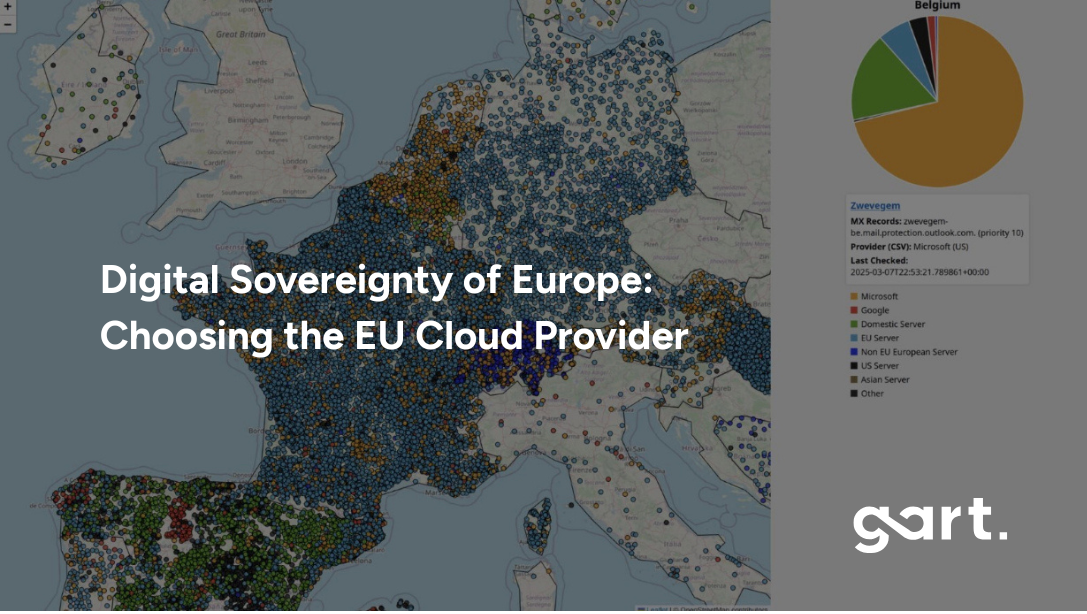
Let’s take, for example, Belgium – Microsoft (with US stored data) has 70% of the market for cloud infrastructure. In Sweden, over 57% of public digital infrastructure — including cities and government services — runs on Microsoft mail servers. In Finland — 77%, Belgium — 72%, Netherlands — 60%, Norway — 64%.
Want to see what cloud services your country is using?
Explore the map: https://lnkd.in/eAdnFt74
Whether it’s a local municipality storing its citizens’ health records or a fintech startup handling millions of transactions, chances are, their data sits on servers operated by foreign entities.
Worse still, this monopoly can lead to vendor lock-in. Companies get tied into proprietary ecosystems that make switching costly and complicated. In contrast, European providers often focus on open-source compatibility and multi-cloud strategies, giving users more freedom and flexibility.
Europe needs its own cloud, not to build walls but to ensure it can compete fairly, uphold its laws, and foster a vibrant digital economy rooted in democratic principles.
The Regulatory Landscape Shaping Europe’s Cloud Strategy
Europe now operates under one of the world’s most comprehensive digital regulatory frameworks. Beyond GDPR, several major laws directly impact how organizations must evaluate cloud providers:
NIS2 Directive – strict cybersecurity and supply-chain obligations for essential and important entities.
Data Governance Act – rules for trusted data sharing across sectors and borders.
Data Act – clarity on who owns and can commercialize IoT-generated data.
Digital Services Act & Digital Markets Act – transparency, accountability, and competition rules for digital platforms.
EU Cybersecurity Act – EU-wide certification schemes for cloud services.
EU AI Act – governance, transparency, and risk-management requirements for AI systems.
This regulatory environment is driving organizations toward EU-native cloud providers that can guarantee compliance without the legal contradictions of foreign jurisdiction.
Key Features to Look for in a European Cloud Provider
Data Residency Within EU Borders
One of the most essential features to demand from any cloud provider in Europe is guaranteed data residency within the EU. Why? Because where data lives determines which laws apply to it. If your business stores sensitive customer information — emails, financial records, medical data — on a cloud hosted in the EU, it's protected by the General Data Protection Regulation (GDPR) and other local laws.
Storing data in the EU ensures:
It cannot be accessed by non-EU jurisdictions without violating EU law.
It remains subject to EU-based audit, regulation, and enforcement.
It aligns with emerging policies like the EU Data Governance Act and Digital Services Act.
EU-based cloud providers like OVHcloud, Scaleway, Hetzner, and Aruba Cloud maintain fully European data center infrastructure, with no dependency on U.S. control. This is particularly important for regulated industries like healthcare, banking, legal, and public services, where compliance breaches can lead to devastating penalties and reputational damage.
Data sovereignty starts with location — but it ends with legal control. Choosing a provider that guarantees both gives you peace of mind and legal clarity.
Metadata Sovereignty — The Hidden Risk Most Organizations Miss
Even when sensitive data is encrypted, cloud platforms still collect metadata:logs, diagnostics, traffic patterns, API calls, access credentials, and telemetry.
This metadata can reveal more about your operations than you might expect — and if handled by a foreign-owned provider, it may fall under foreign jurisdiction even if stored in the EU.
A truly sovereign cloud provider keeps:✔ data in the EU✔ metadata in the EU✔ support services in the EU
This closes one of the most overlooked gaps in compliance architectures.
Transparent Pricing and Vendor Lock-In Avoidance
One common complaint with U.S. hyperscalers is the complexity and unpredictability of pricing. Want to know how much it costs to move 10TB of data out of AWS? You might need a PhD in fine print. By contrast, many European cloud providers prioritize pricing transparency.
Providers like Hetzner and Scaleway offer flat-rate pricing, pay-as-you-go models, and clear invoicing structures. This allows businesses to forecast cloud costs more accurately, especially important for SMEs and startups.
Another key differentiator is freedom from vendor lock-in. Many European providers focus on open-source compatibility and open APIs, which makes it easier to move workloads between cloud platforms or even back on-premises. That’s crucial for long-term agility and cost control.
If you're planning a cloud strategy for the next 5–10 years, flexibility should be as important as functionality.
A Roadmap to Digital Sovereignty (5-Step Framework)
For many organizations, sovereignty is not a single decision — it is a multi-phase transformation.
1. Assess & MapIdentify where your data lives today, who controls it, and which workloads require sovereignty.
2. Govern & SteerEstablish internal roles, policies, data classification, and governance structures aligned with EU directives.
3. Plan & DesignArchitect multi-cloud or sovereign-cloud environments that separate critical data from non-critical workloads.
4. Transform & ImplementMigrate workloads, adopt zero-trust principles, enforce encryption, and integrate monitoring and audit tools.
5. Run & ManageContinuously validate compliance, update classifications, manage identity, and evolve architecture as regulations change.
This structured framework helps organizations modernize cloud infrastructure without sacrificing regulatory alignment or operational agility.
Two Sovereign Cloud Operating Models in Europe
1️⃣ Full EU Isolation Model (Maximum Legal Immunity)
100% EU-owned, EU-operated, EU-law governed infrastructure.No legal backdoors. No foreign jurisdictional exposure.
Best for: government, healthcare, banking, utilities, critical infrastructure.
2️⃣ Guardrail Sovereign Model (Balanced Innovation)
Hyperscaler-grade platforms operated under EU legal entities with EU cryptographic control, EU operations, and technical guardrails.
Best for: regulated enterprises, SaaS, AI platforms, scaleups.
Top European Cloud Providers Supporting Digital Sovereignty
Full EU Sovereign Providers
ProviderCore StrengthHetzner (DE)Cost-efficient, high-performance infrastructureOVHcloud (FR)Full-stack EU hyperscaler alternativeScaleway (FR)Developer-centric cloud & GPU infrastructureT-Systems / Open Telekom Cloud (DE)Government & enterprise complianceAruba Cloud (IT)SME-friendly sovereign infrastructureFull EU Sovereign Providers
Guardrail Sovereign Providers
ProviderPositioningAWS EU Sovereign CloudHyperscaler services under EU legal & operational controlDelos Cloud / GCP / T-SystemsNational guardrail sovereign deploymentsAzure EU entitiesEU-operated, key-controlled environmentsGuardrail Sovereign Providers
OVHcloud (France)
As one of the largest EU-native cloud providers, OVHcloud has become a go-to choice for businesses seeking sovereignty. Based in France, it operates over 30 data centers worldwide with a strong emphasis on EU jurisdiction, sustainability, and open standards.
Strengths:
Extensive product catalog (IaaS, PaaS, Kubernetes, AI)
Certified for GDPR, ISO 27001, HDS, and more
Active participant in Gaia-X
Green data centers with water-cooled servers
OVHcloud offers a user experience similar to AWS but with less vendor lock-in and better EU-specific support.
Scaleway (France)
Scaleway is one of Europe’s most developer-friendly cloud providers, known for its sleek design, open-source tools, and transparent business model. It’s fully GDPR-compliant and headquartered in Paris, with data centers exclusively within the EU.
Highlights:
Flexible virtual instances and GPU-powered machines
Containers, serverless functions, and managed databases
Strong edge and ARM infrastructure for innovation
Scaleway is ideal for startups, SaaS providers, and dev teams who want sovereignty and simplicity.
Hetzner (Germany)
Hetzner has built a stellar reputation for high-performance, affordable cloud and dedicated servers. With its data centers in Germany and Finland, Hetzner ensures GDPR-compliant storage and processing at a fraction of the cost of global hyperscalers.
Unique features:
Flat-rate pricing and extremely low cost-per-GB
Full control with root access and SSH
Ideal for hosting, SaaS, and DevOps workflows
Case Study – Scaling a Global Environmental Platform
To support ReSource International’s global ambitions, Gart Solutions re-architected elandfill.io into a scalable SaaS platform on Hetzner Cloud. The solution replaced costly AWS plans with a Kubernetes-based setup, enabling real-time processing of geospatial and environmental data. As a result, the platform expanded from Iceland to 14 countries, cut infrastructure costs by 60%, and stayed true to its green tech values. Hetzner helped turn a local environmental tool into a global digital platform, without the AWS price tag.
Learn more.
T-Systems / Open Telekom Cloud (Germany)
Backed by Deutsche Telekom, T-Systems operates the Open Telekom Cloud, one of the most secure and enterprise-ready clouds in Europe. With high availability zones in Germany and the Netherlands, it’s perfect for businesses with compliance-heavy workloads.
Best for:
Government agencies and public services
Large enterprises needing hybrid cloud options
Healthcare, finance, and automotive sectors
T-Systems combines German engineering with global IT support, and it's deeply involved in Gaia-X and sovereign cloud initiatives.
Aruba Cloud (Italy)
Aruba Cloud is one of Italy’s leading cloud providers with a robust infrastructure across Europe. Known for its simplicity and cost-effectiveness, Aruba is a great choice for small and mid-sized businesses.
Benefits:
Data centers in Italy, France, Germany, and Czech Republic
Compliant with EU standards
Offers both VPS and enterprise IaaS solutions
If you're looking for sovereign cloud hosting with strong regional presence, Aruba is a top contender.
Industry-Specific Requirements for Sovereign Cloud
Different sectors face different sovereignty obligations. Understanding these nuances helps organizations select the right provider:
SectorSovereignty RequirementPublic SectorFull national & EU legal controlBanking & FinTechDORA-compliant resilience & exit strategiesHealthcareAI Act + GDPR + NIS2 enforcementSaaS PlatformsSovereign AI pipelines & data processingUtilitiesCritical-infrastructure continuity mandatesIndustry-Specific Sovereignty Requirements
Public SectorMust ensure data remains fully under national and EU jurisdiction, with strict auditing, support transparency, and high-assurance certification.
Banking & Financial ServicesSensitive personal and transactional data require robust sovereignty, continuous monitoring, and compliance with EBA, PSD2, and NIS2 guidelines.
Utilities & Critical InfrastructureAs “essential entities,” they must meet strict incident reporting, supply-chain controls, and ensure operational continuity under EU law.
SaaS & Digital PlatformsNeed sovereignty to serve regulated industries and expand globally, while preventing foreign access to customer datasets and analytics pipelines.
These requirements demonstrate why one-size-fits-all cloud strategies rarely work in Europe — sovereignty depends on sector, sensitivity, and scale.
Gaia-X and the Future of Federated Cloud Infrastructure
What Gaia-X Is and Why It Matters
Gaia-X is the EU’s most ambitious project aimed at reclaiming control over Europe’s digital future. Instead of creating another cloud provider, Gaia-X acts as a federated cloud ecosystem, connecting providers, users, and platforms under a common framework of trust, transparency, and interoperability.
It’s designed to ensure:
Sovereign data sharing between companies and countries
Vendor-neutral cloud architectures
Portability and reversibility of services
Full GDPR compliance by design
The ultimate goal of Gaia-X is to enable innovation while maintaining control over how and where data is used. It promotes open standards, multi-cloud strategies, and secure data flows across industries—from finance and energy to health and smart cities.
Gaia-X is not just a tech play. It’s a political and economic declaration that Europe will no longer rely solely on foreign tech monopolies. It’s about building a digitally autonomous future from the ground up.
Who’s Participating in Gaia-X?
Gaia-X brings together a mix of public institutions, startups, established tech companies, research centers, and policy groups. Major players include:
OVHcloud
T-Systems / Deutsche Telekom
Orange Business Services
Atos
Siemens
Scaleway
But it’s not just for the big guys — hundreds of SMEs and open-source projects have joined Gaia-X, contributing to use cases, governance frameworks, and technological standards.
In short, Gaia-X is building a community. By making sovereignty a shared responsibility, it encourages cooperation over competition. It’s about creating a European answer to AWS and Google Cloud without replicating their centralized models.
Gaia-X vs. Traditional Cloud Models
Here’s how Gaia-X fundamentally differs from the global cloud giants:
While Gaia-X won’t replace hyperscalers overnight, it will provide a blueprint for how Europe can innovate without compromising its values.
Sovereign AI — The Next Stage of European Autonomy
As AI adoption accelerates, sovereignty concerns extend far beyond traditional cloud services.
AI systems depend on massive datasets — customer information, behavioral patterns, industrial telemetry, and operational metadata. If this data is processed or stored by non-EU providers, it may fall under non-EU jurisdiction, even if anonymized.
The upcoming EU AI Act introduces strict governance requirements:
transparency of datasets
traceability and auditability
control over model training and inference
risk classifications for high-impact AI systems
For many organizations, this means AI workloads must run on EU-governed infrastructure with EU-controlled metadata, model weights, logging, and monitoring.
Sovereign AI is no longer optional — it will soon be an essential compliance requirement.
Challenges in Adopting EU Cloud Providers
Lack of Feature Parity with Global Giants
Despite their growth, many EU cloud providers still lack the breadth of services offered by hyperscalers. If your organization relies on cutting-edge AI/ML pipelines, advanced serverless infrastructure, or global CDN optimization, you may find some gaps.
For example:
OVHcloud may not match AWS in managed AI services.
Scaleway doesn’t yet offer the global distribution options of Google Cloud.
Hetzner, while powerful, lacks native integrations for enterprise software stacks like Salesforce or Microsoft 365.
The Hidden Cost of Sovereignty
Cloud migration is not only a legal challenge — it is a financial one.
Egress fees ($0.05–$0.09 per GB) create material cost exposure for enterprises migrating regulated workloads. Poorly planned migrations multiply sovereignty risk and long-term operational costs.
Sovereign-first architectures typically reduce egress spend by 30–50% through:
• Pipeline locality redesign• Data gravity containment• Multi-region replication strategies• Exit-optimized storage models
How to Choose the Right EU Cloud Provider
Assessing Security, Scalability, and Support
Choosing the right European cloud provider means balancing technical capabilities with regulatory requirements and business goals. Here's a quick checklist to guide your decision:
Security: Does the provider offer end-to-end encryption, ISO 27001 certification, DDoS protection, and GDPR-compliant data handling?
Scalability: Can the infrastructure scale horizontally and vertically? Are there options for load balancing, container orchestration, or serverless deployment?
Support: Is there 24/7 customer support in your local language? Do they offer clear Service Level Agreements (SLAs) and migration support?
Ecosystem Fit: Does the provider support open APIs, DevOps tooling, and integration with your software stack?
Data Jurisdiction: Are your workloads 100% located in EU jurisdictions, and not subject to non-EU laws like the CLOUD Act?
Providers like Scaleway are ideal for developers and agile startups, while T-Systems suits highly regulated enterprises. Hetzner is unbeatable for performance-per-euro, and OVHcloud delivers full-stack capabilities at scale.
Hybrid and Multi-Cloud Sovereignty Strategies
Not every workload needs to be moved off AWS or Azure today. A practical approach for many businesses is to adopt a hybrid or multi-cloud model:
Use hyperscalers for global edge services or non-sensitive content delivery.
Deploy critical workloads — like customer databases, compliance logs, or analytics pipelines — on sovereign EU clouds.
Leverage Kubernetes, Terraform, and Ansible to orchestrate resources across environments with minimal lock-in.
This strategy offers the best of both worlds: access to global performance when needed, and sovereignty where it matters. Just make sure your orchestration tools support cloud-agnostic deployments.
Conclusion
Europe stands at a crossroads. It can continue to rely on foreign digital giants — or it can take control of its digital destiny. Choosing a European cloud provider is about much more than IT infrastructure.
It’s about:
Preserving privacy
Empowering local innovation
Strengthening legal autonomy
Driving economic growth
https://youtu.be/9VratGTxbZQ?si=LwnmskfbGPQ9RpKE
Providers like OVHcloud, Scaleway, Hetzner, T-Systems, and Aruba Cloud offer real, battle-tested alternatives that align with these goals. The emergence of Gaia-X and sovereign frameworks is accelerating this shift.
How Gart Solutions Supports Sovereign Cloud Transformation
Gart Solutions designs sovereign-first cloud architectures, NIS2/DORA/AI-Act compliant migration roadmaps, egress-optimized multi-cloud strategies, and EU sovereign AI infrastructure.
If your workloads involve regulated data, AI pipelines, public integrations, or cross-border SaaS — your cloud architecture is now a legal architecture decision.
For businesses, the path is clear: audit your cloud strategy, embrace sovereignty where it counts, and invest in a future where Europe owns its cloud — and not the other way around. Contact Us and let's find the best cloud provider, that support your business needs and future plans.
Download our Digital Sovereignty Readiness & EU Cloud Assessment Guide
Digital-Sovereignty-Readiness-EU-Cloud-Assessment-GuideDownload