It's 2026. TLS is decades old, certificate authorities are free, and every major platform has automated renewal tooling. And yet a certificate quietly expiring at 2 a.m. is still one of the most common ways mature engineering teams take themselves offline. Preventing downtime from expired certificates isn't a solved problem — it's a moving target, and the target just got harder to hit: the CA/Browser Forum's phased rollout of shorter certificate lifespans means the renewal clock that used to give teams a year of slack now gives them weeks, and soon days.
This isn't a hypothetical risk for small shops with no ops maturity. Microsoft Teams, Spotify, Ericsson's telecom core, and Epic Games have all had public, multi-hour outages traced back to one expired certificate. This guide covers why the failure mode persists even at well-resourced companies, what changes with 2026's shorter certificate lifetimes, and the concrete playbook for preventing downtime from expired certificates before it becomes an incident review.
What Actually Happens When a Certificate Expires
A TLS certificate isn't a soft warning label — it's a hard boundary condition. The moment the clock passes its "not valid after" timestamp, every client that checks it (browsers, mobile apps, internal services, IoT devices, API clients) is supposed to refuse the connection outright. There's no grace period built into the protocol. A site that was serving traffic perfectly one second can be fully unreachable the next, with no code deploy, no infrastructure change, and no alert from any system that wasn't specifically watching the certificate's expiry date.
The failure also isn't confined to the public-facing website most people picture. Expired certificates break service-to-service calls inside a mesh, API gateways, database connections that enforce TLS, internal admin tools, mobile app backends, and IoT device check-ins — often simultaneously, because organizations frequently reuse one wildcard or SAN certificate across dozens of internal services. That's exactly what happened at Epic Games, where a single expired wildcard certificate took down authentication across hundreds of backend services at once, turning a routine renewal miss into a company-wide, multi-hour incident.
Why Certificate Outages Still Happen in 2026
If this were purely a tooling gap, it would have been solved years ago — free automated issuance via ACME has existed since 2015. The real cause is organizational: certificates sprawl across teams, vendors, and legacy systems faster than any single owner can track, and the systems most likely to be forgotten (internal tools, network appliances, IoT fleets, third-party integrations) are exactly the ones without an obvious "someone will notice" safety net. Well-run SRE practices close that gap, but plenty of otherwise mature organizations still don't have expiry alerting wired into every certificate they own. Recent, well-documented incidents make the pattern hard to dismiss as bad luck:
CompanyWhat BrokeImpactMicrosoft Teams (Feb 2020)An internal authentication certificate expired and wasn't renewed in time~3 hours of global downtime; Microsoft's own post-incident review cited monitoring gaps on internal certificate infrastructureEricsson / O2 UK (Dec 2018)An expired software certificate inside core telecom network equipmentO2's 4G network in the UK was down for nearly 24 hours, affecting roughly 32 million customers; Ericsson paid O2 an estimated $132.8M in compensationSpotifyAn expired SSL certificate on backend API infrastructureDesktop and mobile players stopped working and some web API calls failed for a period of timeEquifax (2017)An expired certificate on a network monitoring appliance went unnoticed for 19 monthsThe blind monitoring tool let attackers exfiltrate data from 48 databases undetected — a contributing factor in the breach of ~147 million people's recordsEpic GamesAn expired wildcard certificate shared across hundreds of backend servicesMulti-hour outage across Fortnite and related services; recovery took roughly 5.5 hoursWhy Certificate Outages Still Happen in 2026
Notice what these have in common: none of them are small or under-resourced organizations. Every one had a security or SRE function. The failure wasn't a lack of capability — it was a certificate that existed outside whatever inventory or monitoring process the team assumed covered "everything."
The Real Cost of an Expired-Certificate Outage
Certificate outages aren't rare edge cases — they're a routine, recurring line item in enterprise incident logs. Keyfactor's 2026 State of Machine Identity research found that over 70% of organizations experienced at least one certificate-related outage in the past year, that it typically takes more than four hours to identify, remediate, and recover from one, and that a single incident commonly pulls in 11 to 20 people across security, infrastructure, and application teams before it's resolved. Nearly two-thirds of respondents expect these outages to keep happening over the next two years — not because the fix is unknown, but because certificate inventories keep growing faster than governance does; the average enterprise now manages over 250,000 machine identities, up from roughly 150,000 just two years ago.
The numbers that matter to leadership: more than 70% of organizations had a certificate-related outage in the past 12 months, the average incident takes 4+ hours and a double-digit headcount to resolve, and nearly two-thirds of security leaders expect the problem to persist without a change in process — not tooling.
The knock-on effects compound quickly. A public-facing outage means lost transactions and support volume; an internal outage on something like a certificate feeding a monitoring pipeline (as at Equifax) can quietly disable the very system meant to catch a breach in progress. Either way, the incident review almost always ends with the same finding: the certificate wasn't unknown, it just wasn't anyone's clearly assigned job to renew.
The 47-Day Certificate Era: Why Manual Renewal Just Broke
In April 2025, the CA/Browser Forum — the industry body that sets the baseline requirements every public certificate authority must follow — voted to phase out today's roughly 398-day maximum certificate lifetime in favor of a much shorter one. DigiCert's rollout summary lays out the schedule plainly: the ceiling drops to 200 days in March 2026, 100 days in March 2027, and 47 days by March 2029. The goal is legitimate — shorter-lived certificates shrink the damage window if a private key is ever compromised, and reduce reliance on slow, unreliable revocation checking. But the side effect is that any process built around "someone checks the spreadsheet a couple of times a year" stops working long before 2029 arrives.
Effective DateMax Certificate LifetimeWhat It Means OperationallyToday~398 daysAnnual renewal cadence; manual tracking is slow but survivableMarch 15, 2026200 daysRoughly twice-yearly renewal; manual processes start missing certificates that used to fall on a predictable annual calendar entryMarch 15, 2027100 daysQuarterly renewal cadence across every certificate in inventory; spreadsheet tracking becomes a full-time job at any real scaleMarch 15, 202947 daysMonthly-plus renewal cycles; domain validation must also be repeated roughly every 10 days — automation stops being optionalThe 47-Day Certificate Era: Why Manual Renewal Just Broke
None of this is optional or vendor-specific — it applies to every publicly trusted certificate, regardless of which CA issues it. Teams still relying on a manual renewal checklist for their externally facing certificates have a hard deadline to fix that, not an abstract best-practice recommendation to eventually get around to.
A Practical Playbook for Preventing Downtime From Expired Certificates
Preventing downtime from expired certificates doesn't require a large team or an expensive platform on day one — it requires closing the two gaps that cause every incident in the table above: an incomplete inventory, and alerting that isn't tied to an owner who's actually accountable for acting on it.
Build a complete certificate inventory first. Scan every network range, load balancer, API gateway, and internal service for TLS endpoints — don't rely on a list of "known" certificates, since the ones that cause outages are almost always the ones nobody remembered existed. Include internal-only and appliance certificates, not just public-facing ones; Equifax's breach traces back to exactly this blind spot.
Assign a named owner to every certificate, not just a team. "DevOps owns it" is how a certificate sits unrenewed for months — a specific person or on-call rotation needs to be accountable, the same way application monitoring alerts route to a specific responder rather than a general channel.
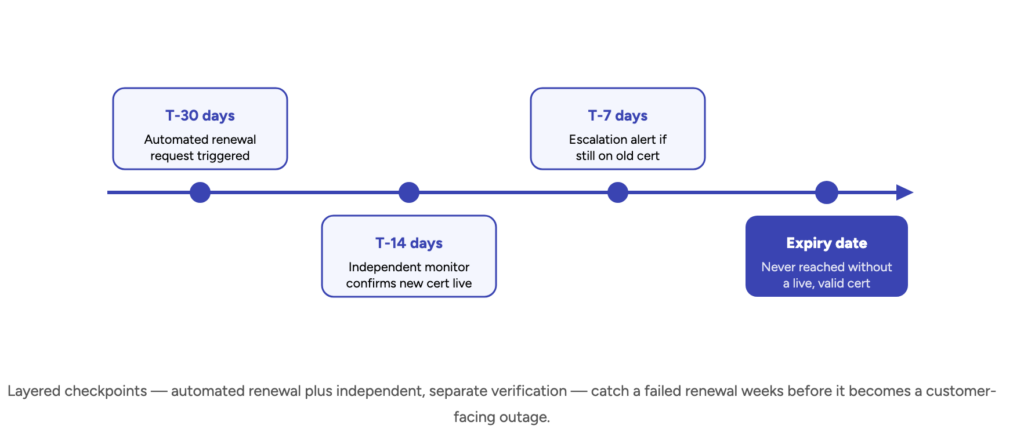
Wire expiry alerts to more than one threshold. A single 30-day warning is easy to miss during a busy sprint. Layer alerts at 60, 30, 14, and 7 days, escalating severity and audience each time, so a missed first alert isn't the only thing standing between the team and an outage.
Automate renewal wherever the certificate authority supports it. ACME-based automation (via tools like Certbot, cert-manager for Kubernetes, or a commercial CLM platform) removes the human step entirely for the majority of certificates — this is the single highest-leverage fix available, and it's the only approach that scales cleanly as lifetimes shrink toward 47 days.
Treat certificate renewal like a deploy, not a background task. Verify the renewed certificate actually loads correctly, that dependent services reconnect cleanly, and that no client-side pinning or caching breaks the rollout — a certificate that renews on schedule but doesn't deploy correctly causes the same outage as one that expired outright.
Build a documented emergency-reissue path. Even with automation, something will occasionally still expire. A tested runbook for emergency reissuance and deployment turns a multi-hour, all-hands incident into a 15-minute fix — this is the same operational discipline behind a solid disaster recovery plan applied specifically to certificate failures.
Manual Tracking vs. Automated Renewal: Choosing Your Approach
Most organizations don't move straight from a spreadsheet to full automation — they land somewhere on a spectrum, and where a given certificate sits usually depends on how disruptive an outage on that specific service would be. It's worth being deliberate about which tier each certificate belongs in rather than defaulting to whatever the last engineer who touched it happened to set up.
Spreadsheet or calendar reminders — the lowest-effort option and the one most outages in the table above trace back to; viable only for a handful of low-risk, rarely-touched certificates, and increasingly unviable as 2026's 200-day ceiling compresses the renewal calendar.
Centralized monitoring with expiry alerts — a real step up: every certificate is inventoried and alerts fire before expiry, but a human still has to act on each one, which means the failure mode shifts from "nobody knew" to "the ticket sat in a backlog."
ACME-based automated renewal — the default for anything that can support it (most public web and API certificates); renewal happens without human action, which is the only approach that scales cleanly as certificate lifetimes shrink toward 47 days by 2029.
Full certificate lifecycle management (CLM) platform — adds centralized policy, audit trails, and cross-team visibility on top of automation; worth the investment once an organization is managing certificates across multiple clouds, business units, or compliance regimes.
Common Mistakes That Cause Certificate Outages
A small set of recurring mistakes shows up across nearly every certificate-related outage postmortem, including the well-documented incidents above:
Treating internal certificates as lower priority than public ones. Equifax's breach and countless smaller internal outages trace back to an appliance or monitoring-tool certificate nobody was watching because it wasn't customer-facing.
Relying on a single alert with no escalation. One 30-day email that lands in an inbox during a busy week is not a monitoring strategy — it's a single point of failure with a human in the loop.
Sharing one wildcard certificate across too many services. It reduces renewal overhead, but it also means one missed renewal takes down everything that certificate touches at once, as happened at Epic Games.
Renewing the certificate but not verifying the deploy. A certificate that renews correctly on the CA side but fails to load on the actual service produces the same outage as one that expired — verification has to be part of the renewal step, not assumed.
Not accounting for certificates outside the standard inventory. IoT devices, third-party vendor integrations, and legacy network appliances routinely fall outside the systems that scan for "our" certificates, exactly where GitLab's own public incident tracker documents a Gitter SSL certificate renewal that required manual, out-of-band intervention.
Still tracking certificate renewals in a spreadsheet?
Gart Solutions builds the monitoring and automation layer that catches expiring certificates weeks before they become an outage — cert inventory, expiry alerting, ACME-based renewal automation, and the SRE processes to keep it that way as certificate lifetimes keep shrinking.
10+
Years in DevOps & Cloud
50+
Enterprise clients secured
4.9★
Clutch rating
IT Monitoring Services
SRE & Reliability Engineering
DevSecOps
Disaster Recovery (DRaaS)
Infrastructure Audit
Talk to an Infrastructure Expert →
Fedir Kompaniiets
Co-founder & CEO, Gart Solutions · Cloud Architect & DevOps Consultant
Fedir is a technology enthusiast with over a decade of diverse industry experience. He co-founded Gart Solutions to address complex tech challenges related to Digital Transformation, helping businesses focus on what matters most — scaling. Fedir is committed to driving sustainable IT transformation, helping SMBs innovate, plan future growth, and navigate the "tech madness" through expert DevOps and Cloud managed services. Connect on LinkedIn.
Compliance Monitoring is the ongoing process of verifying that an organization's systems, processes, and people continuously adhere to regulatory requirements, internal policies, and industry standards — not just at audit time, but every day. For cloud-native and regulated businesses in 2026, it is the difference between a clean audit and a costly breach.
What is Compliance Monitoring?
Compliance monitoring is the systematic, continuous practice of evaluating whether an organization's operations, systems, and people conform to the laws, regulations, and internal standards that govern them. Unlike a one-time audit, compliance monitoring runs as an always-on feedback loop — collecting evidence, flagging exceptions, and enabling rapid remediation before regulators ever knock on the door.
The practice is critical across heavily regulated industries:
Healthcare — HIPAA, HITECH, 21 CFR Part 11
Finance & Banking — PCI DSS, SOX, Basel III, MiFID II
Cloud & SaaS — SOC 2, ISO 27001, CSA CCM
EU-regulated entities — GDPR, NIS2, DORA
Energy & Utilities — NERC CIP, ISO 50001
Pharmaceuticals — GxP, FDA 21 CFR
💡 In short: Compliance monitoring is your organization's immune system. Audits are the annual check-up. Monitoring is what keeps you healthy between check-ups.
Why Compliance Monitoring Matters in 2026
Regulatory landscapes have never moved faster. GDPR fines reached record highs in 2024–2025, NIS2 entered enforcement mode across the EU, and DORA (Digital Operational Resilience Act) took effect for financial entities. Meanwhile, cloud adoption has created entirely new attack surfaces that traditional point-in-time audits simply cannot cover.
Risk Without MonitoringTypical Business ImpactProbability (unmonitored)Undetected misconfigured S3 bucket / cloud storageData breach, regulatory fine, brand damageHighStale privileged access not reviewedInsider threat, audit failure, SOX violationVery HighMissing audit log retentionInability to prove compliance, automatic audit failureHighBackup not testedUnrecoverable data loss, SLA breach, recovery failureMediumUnpatched critical CVE beyond SLAExploitable vulnerability, CVSS breach, PCI non-complianceHighWhy Compliance Monitoring Matters in 2026
Strong compliance monitoring builds trust with enterprise clients and partners, significantly reduces audit preparation time, and enables a proactive risk posture instead of a reactive, fire-fighting one.
Compliance Monitoring vs Compliance Audit vs Compliance Management
These three terms are often used interchangeably but they describe distinct activities that work together. Understanding the difference helps organizations allocate resources correctly.
DimensionCompliance MonitoringCompliance AuditCompliance ManagementFrequencyContinuous / near-real-timePeriodic (annual, quarterly)Ongoing governancePurposeDetect & alert on deviationsFormal independent assessmentPolicies, training, cultureOutputAlerts, dashboards, exception logsAudit report, findings, attestationPolicies, procedures, risk registerWho leadsEngineering / Security / DevOpsInternal audit / Third-party auditorCompliance Officer / GRC teamAnalogyBlood pressure cuff worn dailyAnnual physical with doctorHealthy lifestyle programCompliance Monitoring vs Compliance Audit vs Compliance Management
✅ Monitoring answers
Is MFA enforced right now?
Are all logs being retained?
Did anything change in IAM this week?
Are backups completing successfully?
Is encryption enabled on all storage?
📋 Auditing answers
Were controls effective over the period?
Did evidence satisfy the framework?
What is the organization's control maturity?
What formal findings require remediation?
Is the organization SOC 2 / ISO 27001 ready?
Explore our Compliance Audit services
The 7-Step Compliance Monitoring Process
Effective compliance monitoring is not a single tool or dashboard — it's a disciplined cycle. Here is the process Gart uses when setting up or maturing a client's compliance monitoring program:
1. Define Scope & Applicable Frameworks
Identify which regulations, standards, and internal policies apply. Map your systems, data flows, and third-party integrations to determine the monitoring perimeter. Ambiguous scope is the most common reason monitoring programs fail.
2. Inventory Systems & Controls
Catalogue all assets (cloud, on-prem, SaaS, CI/CD pipelines) and map each one to a control objective. Assign control owners. Without ownership, no one acts when an exception fires.
3. Define Evidence Collection Rules
For each control, specify what constitutes "evidence of compliance" — a log entry, a configuration state, a test result, a screenshot, or a signed document. Define collection frequency (real-time, daily, monthly) and acceptable format for auditors.
4. Instrument & Automate Collection
Deploy monitoring agents, SIEM rules, cloud policy engines (AWS Config, Azure Policy, GCP Security Command Center), and IaC scanning tools. Automate evidence collection wherever possible — manual evidence gathering at audit time is a costly, error-prone anti-pattern.
5. Monitor Exceptions & Triage Alerts
Create alert thresholds for control deviations. Not every alert is a breach — build a triage process that separates noise from genuine risk. Route high-priority exceptions to security/engineering immediately; lower-priority items to a weekly review queue.
6. Prioritize Risks & Remediate
Score exceptions by likelihood and impact. Maintain a risk register that tracks open findings, owners, and target remediation dates. Escalate unresolved critical findings to leadership with a clear business-impact framing.
7. Re-test, Report & Continuously Improve
After remediation, re-test the control to confirm it is effective. Produce compliance health reports for leadership and auditors. Run a quarterly retrospective to tune alert thresholds and update monitoring scope as regulations and infrastructure evolve.
Key Controls & Evidence to Monitor
Across hundreds of compliance engagements, the controls below consistently appear on auditor checklists. These are the areas where automated compliance monitoring delivers the highest return:
Control AreaWhat to MonitorEvidence Auditors WantRelevant FrameworksIdentity & Access (IAM)Privileged role assignments, inactive accounts, MFA status, service account permissionsAccess review logs, MFA adoption rate, least-privilege config exportsSOC 2, ISO 27001, HIPAAAudit LoggingLog completeness, retention period, tamper-evidence, SIEM ingestion healthLog retention policy, SIEM dashboard, CloudTrail / Audit Log exportsPCI DSS, SOX, NIS2, GDPREncryptionData-at-rest encryption on storage, TLS version on endpoints, key rotation schedulesEncryption config exports, key management audit logs, TLS scan reportsPCI DSS, HIPAA, GDPR, ISO 27001Patch ManagementCVE scan results, SLA adherence per severity, open critical/high vulnerabilitiesScan reports, patch cadence logs, SLA compliance metricsSOC 2, PCI DSS, ISO 27001Backup & RecoveryBackup job success rate, RPO/RTO test results, offsite replication statusBackup logs, recovery test records, DR test reportsSOC 2, ISO 22301, DORA, NIS2Vendor / Third-Party AccessActive vendor sessions, access scope, contract/NDA currency, SOC 2 report datesVendor access logs, contract register, third-party risk assessmentsISO 27001, SOC 2, GDPR, NIS2Network & PerimeterFirewall rule changes, open ports, egress filtering, WAF alert volumesFirewall config snapshots, IDS/IPS logs, pen test reportsPCI DSS, SOC 2, NIS2Incident ResponseMean time to detect (MTTD), mean time to respond (MTTR), breach notification timelinesIncident logs, CSIRT reports, post-mortemsGDPR (72h), NIS2, HIPAA, DORAKey Controls & Evidence to Monitor
Continuous Compliance Monitoring for Cloud Environments
Cloud infrastructure changes constantly — teams spin up resources, update IAM policies, and deploy code multiple times per day. This makes continuous compliance monitoring not a nice-to-have but a fundamental requirement. Manual checks against cloud state are obsolete before the ink dries.
AWS Compliance Monitoring — Key Automated Checks
AWS Config Rules — detect non-compliant resources in real time (e.g., unencrypted EBS volumes, public S3 buckets, missing CloudTrail)
AWS Security Hub — aggregates findings from GuardDuty, Inspector, Macie into a single compliance posture score
CloudTrail + Athena — query audit logs for unauthorized IAM changes, API calls outside approved regions
IAM Access Analyzer — surfaces external access to resources and unused roles/permissions
Azure Compliance Monitoring — Key Automated Checks
Azure Policy & Defender for Cloud — enforce and score compliance against CIS, NIST SP 800-53, ISO 27001 benchmarks
Microsoft Purview — data classification, governance, and audit trail across Azure and M365
Azure Monitor + Sentinel — SIEM-class alerting on suspicious activity with compliance-relevant playbooks
Privileged Identity Management (PIM) — just-in-time access with mandatory justification and approval workflows
GCP Compliance Monitoring — Key Automated Checks
Security Command Center — organization-wide misconfiguration detection and compliance benchmarking
VPC Service Controls — perimeter security policies that prevent data exfiltration
Cloud Audit Logs — immutable, per-service activity and data access logs
Policy Intelligence — recommends IAM role right-sizing based on actual usage data
🔗
For authoritative cloud security benchmarks, the CIS Benchmarks provide configuration baselines for AWS, Azure, GCP, Kubernetes, and 100+ other platforms — an industry-standard starting point for any cloud compliance monitoring program.
See Gart's Cloud Computing & Security services
Industry-Specific Compliance Monitoring Frameworks
Compliance monitoring requirements differ significantly by industry and geography. Below are the frameworks Gart's clients most commonly monitor against, along with the controls that require continuous (not just periodic) monitoring.
FrameworkIndustry / RegionKey Continuous Monitoring RequirementsResourcesISO 27001Global / All industriesAccess control review, log management, vulnerability scanning, supplier reviewISO.orgSOC 2 Type IISaaS / TechnologyContinuous availability, logical access, change management, incident responseAICPAHIPAAHealthcare (US)ePHI access logs, encryption at rest/transit, workforce activity auditsHHS.govPCI DSS v4.0Payment / E-commerceReal-time network monitoring, file integrity monitoring, quarterly vulnerability scansPCI SSCNIS2EU / Critical sectorsIncident detection within 24h, risk assessments, supply chain security checksENISAGDPREU / Global processing EU dataData subject request tracking, breach detection (<72h notification), processor auditsGDPR.euIndustry-Specific Compliance Monitoring Frameworks
How to prepare for a HIPAA Audit - Gart's PCI DSS Audit guide
First-Hand Experience
What We Usually Find During Compliance Monitoring Reviews
After reviewing postures across dozens of regulated environments, these are the patterns we encounter repeatedly — regardless of organization size.
👥
Incomplete or stale access reviews
Former employees and service accounts with active permissions weeks after departure. IAM hygiene is rarely automated, and reviews are often rubber-stamped.
📋
Missing backup test evidence
Backups appear healthy, but nobody has tested a restore in 6–18 months. Auditors want dated restore test logs with RPO/RTO outcomes, not just success metrics.
📊
Fragmented or incomplete audit logs
Gaps in the log chain (like disabled S3 data-event logging) make it impossible to reconstruct an incident or prove that one didn't happen.
🔔
Alert fatigue masking real issues
Thousands of low-fidelity alerts lead teams to mute notifications or build exceptions, inadvertently disabling detection for real threats.
📄
Policy-to-implementation gaps
Written policies say "encryption required," but reality reveals unencrypted legacy buckets. Continuous monitoring is the only way to detect this drift.
🔧
Automation is first patched, last monitored
CI/CD pipelines move faster than human reviewers. IaC repositories often lack policy-as-code scanning, leaving non-compliant resources active for months.
Featured Success Story
Case study: ISO 27001 compliance for Spiral Technology
→
Compliance Monitoring Tools & Automation
The right tooling depends on your stack, frameworks, and team maturity. Most organizations use a layered approach rather than a single platform:
CategoryRepresentative ToolsBest ForCloud Security Posture Management (CSPM)AWS Security Hub, Wiz, Prisma Cloud, Orca Security, Defender for CloudCloud misconfiguration detection, continuous benchmarkingSIEM / Log ManagementSplunk, Elastic SIEM, Microsoft Sentinel, Datadog SecurityLog correlation, anomaly detection, audit evidenceGRC PlatformsVanta, Drata, Secureframe, ServiceNow GRC, OneTrustEvidence collection automation, audit-ready reportingPolicy-as-Code / IaC ScanningOpen Policy Agent (OPA), Checkov, Terrascan, tfsec, ConftestPrevent non-compliant infrastructure from being deployedVulnerability ManagementTenable Nessus, Qualys, AWS Inspector, Trivy (containers)CVE detection, patch SLA monitoring, container scanningIdentity GovernanceSailPoint, CyberArk, Azure PIM, AWS IAM Access AnalyzerAccess reviews, least-privilege enforcement, PAM
⚠️ Tool sprawl is a compliance risk: More tools mean more integrations to maintain, more alert queues to manage, and more places where evidence can fall through the cracks. Start with native cloud tools and expand deliberately. The Linux Foundation and CNCF maintain open-source compliance tooling for cloud-native environments worth evaluating before adding commercial licenses.
Compliance Monitoring Best Practices
1. Shift compliance left into the development pipeline
The cheapest time to catch a compliance violation is before the resource is deployed. Integrate policy-as-code scanning (OPA, Checkov) into your CI/CD pipeline so that non-compliant Terraform or Helm charts never reach production. Treat compliance failures as build-breaking errors, not post-deploy recommendations.
2. Automate evidence collection — not just detection
Detection without evidence collection is useless at audit time. Configure your monitoring tools to export and archive compliance evidence (configuration snapshots, access review logs, scan reports) automatically to an immutable store. Auditors need evidence from a defined period — not a screenshot taken the morning of the audit.
3. Assign control owners, not just tool owners
Every control needs a named human owner who is accountable for exceptions. When an alert fires that MFA is disabled on a privileged account, "the security team" is not a sufficient owner — a specific person must be on call to investigate and remediate within the SLA.
4. Tune alerts ruthlessly to eliminate fatigue
Compliance monitoring programs that generate thousands of daily alerts quickly become ignored. Start with a small set of high-fidelity, high-impact alerts. Expand incrementally after each is tuned to near-zero false positive rates. A team that responds to 20 real alerts per day is more secure than one drowning in 2,000 noisy ones.
5. Monitor your monitoring
Monitoring pipelines break silently. Log shippers stop, API rate limits are hit, SIEM ingestion queues fill up. Build meta-monitoring to detect when evidence collection or alerting pipelines have gaps — and treat those gaps as compliance findings in their own right.
6. Conduct a quarterly compliance posture review
Beyond continuous automated monitoring, schedule a quarterly human review of the compliance posture. Review open exceptions, re-assess risk scores, retire obsolete controls, and update monitoring scope to cover new systems and regulatory changes.
Compliance Monitoring Checklist for Cloud Teams
A starting point for cloud-first compliance. Each item requires a named owner, a monitoring cadence, and a defined evidence artifact.
✓
MFA enforced on all privileged and administrative accounts
✓
Access reviews completed for all privileged roles (minimum quarterly)
✓
Service accounts audited for least-privilege and no unused permissions
✓
Audit logging enabled and retained (90 days min; 1 year for PCI/HIPAA)
✓
SIEM ingestion health monitored — no silent log gaps
✓
Data-at-rest encryption confirmed on all storage (S3, RDS, EBS, blobs)
✓
TLS 1.2+ enforced; TLS 1.0/1.1 disabled on all endpoints
✓
Encryption key rotation scheduled and verified
✓
Vulnerability scans run weekly; critical/high CVEs remediated within SLA
✓
Patch management SLA compliance tracked and reported
✓
Backups verified complete daily; restore tests documented quarterly
✓
DR test completed at least annually; RPO/RTO outcomes logged
✓
No public cloud storage buckets without explicit business justification
✓
Firewall change log reviewed; unauthorized rule changes alerting
✓
Vendor/third-party access scoped, time-limited, and reviewed quarterly
✓
Incident response plan tested; MTTD and MTTR tracked
✓
Policy-as-code scans integrated into CI/CD pipelines
✓
Compliance evidence archived in immutable storage for audit period
✓
Monitoring pipeline health checked — no silent collection failures
✓
Quarterly posture review conducted with named control owners
Gart Solutions · Compliance Monitoring Services
How Gart Helps You Build a Continuous Compliance Monitoring Program
We work with CTOs, CISOs, and engineering leaders to design, implement, and run compliance monitoring programs that hold up under real auditor scrutiny — not just on paper.
🗺️
Scope & Framework Mapping
We identify applicable frameworks (ISO 27001, SOC 2, HIPAA, PCI DSS, NIS2, GDPR) and map your cloud infrastructure to each control objective.
🔧
Monitoring Setup & Automation
We deploy CSPM tools, SIEM rules, and policy-as-code pipelines — so evidence is collected automatically, not manually on audit day.
📊
Gap Analysis & Risk Register
We deliver a clear view of your current compliance posture, prioritized by risk, with a remediation roadmap and accountable owners.
🔄
Ongoing Reviews & Readiness
Monthly exception reviews and pre-audit evidence packages — so you're never scrambling the week before an official audit.
☁️
Cloud-Native Expertise
AWS, Azure, GCP, Kubernetes, and CI/CD. We speak infrastructure as code and translate compliance into DevOps workflows.
📋
Audit-Ready Deliverables
Exception logs, risk matrices, and control evidence archives. Everything formatted for the specific framework you're being audited against.
Get a Compliance Audit
Talk to an Expert
Fedir Kompaniiets
Co-founder & CEO, Gart Solutions · Cloud Architect & DevOps Consultant
Fedir is a technology enthusiast with over a decade of diverse industry experience. He co-founded Gart Solutions to address complex tech challenges related to Digital Transformation, helping businesses focus on what matters most — scaling. Fedir is committed to driving sustainable IT transformation, helping SMBs innovate, plan future growth, and navigate the "tech madness" through expert DevOps and Cloud managed services. Connect on LinkedIn.
Information security is crucial in the business world. Companies choose various approaches to address tasks related to the storage and processing of confidential data. One of them is ISO 27001.
ISO 27001 is an international standard that defines requirements for the creation, implementation, improvement, and maintenance of an Information Security Management System (ISMS).
[lwptoc]
Recently, we successfully prepared our client for ISO 27001 certification. Based on a recent case, we want to share with you the procedure.
This standard establishes frameworks and principles for safeguarding confidential information within an organization, covering various aspects such as
financial data
intellectual property
personal employee data
and other information about third parties.
Over an extended period globally, efforts have been made to create uniform rules for protecting personal data, leading to the adoption of the General Data Protection Regulation (GDPR). All companies processing data of individuals from the European Union must comply with this regulation. While the document exists, there is no certificate confirming adherence to these standards. This is where ISO 27001 comes to the rescue, as its standards partially align with the requirements of GDPR, and compliance can be validated with a certificate.
ISO 27001 for Businesses
The certification of ISO 27001 is becoming increasingly relevant not only for large organizations but also for small and medium-sized companies in the context of technological advancement.
Every modern enterprise, to some extent, has tools for managing information security risks. In simpler terms, every company takes measures to secure its informational assets and restrict access to its systems. The Information Security Management System (ISMS) aligns all components of the organization's information security system to ensure that all system policies, procedures, and strategies work as a cohesive unit.
It's important to note that certificates do not provide an absolute guarantee of security but rather confirm adherence to specific criteria set by the accrediting body. For instance, the presence of an ISO/IEC 27001 certificate does not ensure 100% data security; it simply attests that the company meets certain information security standards.
Need assistance on your ISO 27001 journey? Reach out to Gart for personalized support and ensure your company's information security is top-notch.
Why is standardization important for business? Advantages of ISO 27001 Certification
ISO 27001 certification is a powerful tool for building and maintaining trust in the client-supplier relationship. The competitive advantage gained through ISO 27001 extends beyond marketing, influencing real success and the resilience of the business.
Obtaining the certificate comes with numerous benefits. Firstly, it confirms that the company takes information security seriously, a crucial factor for clients and partners. The certificate enhances trust and demonstrates adherence to established standards.
Cost Savings
It sounds incredible, but the certification process can actually lead to substantial cost savings for the company in the future. When ISO 27001 certification is conducted properly, it results in long-term economic benefits. For instance, Gart's strategic approach streamlines processes, allowing teams to focus on higher-level tasks, ultimately reducing costs associated with compliance audits.
A clear understanding of risks enables cost optimization and the formulation of effective security policies.
Increased Sales
ISO 27001 certification is a significant marketing asset. Clients are drawn to the commitments a business makes by obtaining the certificate. The enhanced reputation attracts new clients and partners, fostering business growth.
Reputation Protection
Certification elevates the level of company security, introducing improved policies and technologies. A modern security system helps avoid the detrimental impact of malicious actors on your business. ISO 27001 certification allows you to demonstrate a commitment to information security, ensuring data confidentiality and integrity. It also contributes to attracting clients and serves as a competitive advantage for your business. Regular audits help identify risks and respond to changes in the environment.
How to Prepare Your Company for ISO 27001 Certification?
Achieving ISO 27001 certification is a complex task that requires thorough preparation and involves various types of work. This process demands the involvement of a significant number of employees and entails lengthy and costly preparations.
Therefore, at the initial stage, it is crucial to develop a detailed action plan outlining specific tasks, who will be working on them, when they will be accomplished, and how the project will be executed.
Appoint a dedicated team responsible for the certification process, including representatives from different departments. Conduct training for staff on information security and the implementation of an Information Security Management System (ISMS).
Start by understanding the ISO 27001 standard and its requirements. It is essential to carefully study the ISO 27001 standard, which consists of two parts:
The main part, which contains the core content of the standard.
Appendix A, which includes a list of 114 potential control measures.
Ready to elevate your information security standards? Gart is here to guide you through ISO 27001 certification. Let's strengthen your defense against cyber threats together.
Approximate ISO 27001 Preparation Plan
Analysis
Assess the current state of your Information Security Management System (ISMS). Identify gaps between existing practices and ISO 27001 requirements. Also, crucially, determine which part of your organization falls under the scope of ISO 27001.
Documentation
Develop and document policies, processes, and procedures aligned with ISO 27001. Create a Statement of Applicability (SoA) defining the scope of your ISMS.
Risk Assessment
Conduct a thorough risk analysis to identify potential security threats. Develop a risk treatment plan to manage and mitigate the identified risks.
Implementation
Ensure employee training and awareness regarding their roles in preserving information security.
Internal Audit
Conduct an internal audit to assess the effectiveness of implemented measures. Identify areas for improvement and corrective actions. At this stage, you may consider engaging external consultants with the necessary expertise, and companies like Gart offer professional services for ISO 27001 certification preparation.
It's also important to note that ISO 27001 is related to several other standards, such as ISO 22301, ISO 31000, and ISO 27003.
External Audit
Demonstrate compliance with ISO 27001 standards. Select an auditor or certification body to conduct the final audit and issue a certificate if your company meets the requirements. After successfully completing the external audit, obtain the ISO 27001 certificate.
What is the cost of obtaining an ISO 27001 certificate?
The cost of obtaining an ISO 27001 certificate can vary significantly and depends on various factors, including the size of the company, the complexity of its information systems, the industry, geographical location, and other considerations. Typically, it's a bespoke matter that is discussed with the agency or organization overseeing the certification process. Even with an approximate cost estimate, it's advisable to include a contingency reserve in the budget.
ISO 27001 vs. SOC 2 table
AspectISO 27001SOC 2ScopeInformation security management system (ISMS)Controls relevant to security, availability, processing integrity, confidentiality, and privacy of information stored in the cloudFocusComprehensive security frameworkSpecific emphasis on cloud securityRequirementsBroad range covering risk assessment, policies, procedures, and continual improvementFocus areas include security, availability, processing integrity, confidentiality, and privacyApplicabilityApplicable to all types of organizationsEspecially relevant for service organizations hosting data in the cloudCertificationISO 27001 certificationSOC 2 complianceBenefitsDemonstrates commitment to information security and data protectionProvides assurance to clients and stakeholders regarding security controls in placeMarket RecognitionGlobally recognized standardIncreasingly recognized and sought after, particularly in tech and service sectorsCustomizabilityHighly customizable to fit organizational needsAllows flexibility in selecting applicable trust services criteriaContinuous ImprovementRequires continual assessment and improvementEncourages ongoing monitoring and refinement of controlsRegulatory ComplianceHelps organizations comply with various regulationsCan assist in meeting regulatory requirements, especially in data privacy and security standards
Conclusion
ISO 27001 certification is not just a compliance requirement; it is a journey towards excellence in the realm of information security. Preparing for ISO 27001 certification is a task that demands dedication, collaboration, and systematic efforts from the entire company.
Ready to embark on your ISO 27001 journey? Contact Gart for expert guidance and let's achieve information security excellence together.