Finding the best Azure consulting companies in 2027 is harder than it looks. The market is crowded with generalist IT shops calling themselves "Azure experts," while the projects that actually fail are the ones that went to the wrong partner. This guide cuts through the noise.
In 2027, Azure consulting is no longer about basic cloud migration.Companies now require:
cloud-native architectures
AKS container orchestration
automated CI/CD pipelines
DevOps & SRE practices
FinOps cost governance
Zero Trust security & Entra ID identity
enterprise modernization at scale
AI/ML readiness
Microsoft Azure has become a preferred cloud for enterprises, SaaS platforms, fintech companies, data-driven products, and organizations with legacy .NET or hybrid systems.
Choosing the right Azure consulting partner determines whether your cloud ecosystem becomes: a scalable, secure, cost-efficient backbone or a slow, expensive bottleneck with operational risk.
This expert review covers the best Azure consulting companies in 2027 — both boutique engineering leaders and enterprise-scale partners.
How We Evaluated the Best Azure Consulting Companies
Every company on this list was scored across eight weighted criteria. We prioritize engineering depth over sales presence, measurable outcomes over certifications alone, and genuine Azure specialization over broad "multi-cloud" generalism.
Evaluation Criteria & Weights
Azure Certifications
20%
Active Microsoft Solutions Partner status + engineer-level certs
Case Studies with ROI
20%
Published outcomes with measurable cost, performance, or reliability improvements
Technical Depth
20%
AKS, Terraform/Bicep, CI/CD, microservices, SRE practices
Enterprise Experience
15%
Complexity of past engagements, regulated-industry delivery
Client Reviews
15%
Verified reviews on Clutch, G2, and Google
FinOps Capability
10%
Cost governance, optimization results, FinOps Foundation alignment
Data sources reviewed: Microsoft Partner Network, Clutch profiles, G2, LinkedIn, company case studies, and GitHub activity. Last reviewed: June 2025.
20 Best Azure Consulting Companies Compared
Based on 50+ Azure engagements, the three most common cost overruns we see are: over-provisioned virtual machines from lift-and-shift migrations, unmonitored blob storage bloat, and missing autoscaling policies on AKS node pools. The right Azure partner catches these before they compound.
#CompanyCore SpecializationBest ForAzure FocusCompany Size1Gart Solutions AKS, DevOps, IaC, SRE, FinOpsSaaS, fintech, modernizationAzure + AIBoutique (20-30 people)2CiGenCloud-native, DevOps, MLDigital product teamsAzure + AIBoutique3AvanadeEnterprise transformationFortune 500Azure-exclusiveEnterprise (50,000+)4AlpackedKubernetes, GitOpsCloud-native systemsAzure + K8sMid-size5OpsWorks Co.Zero Trust, DRRegulated industriesSecure AzureBoutique6InfopulseHybrid & enterprise cloudLarge enterprisesAzure + hybridLarge (1,000+)7N-iXMigration, governanceMid-large enterprisesAzure-firstLarge (2,000+)8IT OutpostsIaC, CI/CDScaling SaaSAzure DevOpsBoutique9RomexsoftManaged ops, SRE24/7 reliabilityManaged AzureMid-size10IT SvitAKS, performanceHigh-load systemsAKS-focusedMid-size11ReenbitData engineeringAnalytics platformsAzure data stackBoutique12A-DevLean cloudStartups, MVPsServerless AzureSmall13SoftServeML / AIEnterprise analyticsAzure MLLarge (10,000+)14EleksLegacy modernizationEnterprises with .NET debtAzure migrationLarge (2,000+)15InmostIoTMobility / IoTAzure IoT HubMid-size16PartnerwayFinOps, WAF auditsOptimization cyclesAzure WAFBoutique17Leobit.NET modernizationMicrosoft stackAzure PaaSMid-size18DevOpsifyFast DevOpsSaaS buildsAzure CI/CDSmall19SHALBHA / DRMission-critical systemsAzure HABoutique20FlyapsApp + cloudEnd-to-end product buildsFull-cycleMid-size20 Best Azure Consulting Companies Compared
Why This List Is Trustworthy
Each company was evaluated based on:
Azure Partner status & engineering certifications
Proven case studies with measurable outcomes
Expertise in AKS, Terraform/Bicep, CI/CD, microservices
Identity & governance maturity (Entra ID, RBAC, Azure Policy)
SRE, observability, and reliability engineering
FinOps results
Delivery speed & communication
Industry focus & cloud modernization capability
Best Azure Consulting & Cloud Engineering Providers
1. Gart Solutions — The Leading Azure Consulting Company in 2027
Gart Solutions stands apart due to its DevOps-centric engineering, deep Azure expertise, tight boutique delivery model, and an ability to produce measurable cost savings and high-reliability cloud ecosystems.
They deliver modern cloud transformations across SaaS, fintech, greentech, healthcare, and data platforms.
Azure Case Studies With Strong ROI
✔ Cut Azure computing costs by 81% with Spot VM architecture
✔ Eliminated hidden Azure Blob Storage costs and saved thousands monthly
Core Azure Strengths
Azure Migration & Modernization
Monolith → microservices
On-prem → Azure
Legacy Windows/.NET → Azure PaaS
AKS Engineering
enterprise-level AKS clusters
GitOps
secure, fault-tolerant, autoscaling AKS environments
DevOps & CI/CD + IaC
Terraform
Bicep
GitHub Actions / Azure DevOps
multi-environment deployment automation
SRE, Monitoring & Observability
Azure Monitor
Application Insights
Log Analytics
Grafana
FinOps & Cost Governance
Gart consistently delivers 10–25% Azure cost reduction through:
architectural reshaping
resource lifecycle governance
storage & compute optimization
observability-driven cost visibility
Core Azure Capabilities
Azure Migration & Modernization: Monolith → microservices, on-prem → Azure, legacy Windows/.NET → Azure PaaS
AKS Engineering: Enterprise-level cluster design, GitOps, autoscaling, fault-tolerant AKS environments
DevOps & IaC: Terraform, Bicep, GitHub Actions, Azure DevOps — full multi-environment automation
SRE & Observability: Azure Monitor, Application Insights, Log Analytics, Grafana stacks
FinOps & Cost Governance: Architectural reshaping, resource lifecycle policies, storage and compute optimization
Security & Identity: Zero Trust design, Entra ID, RBAC, Azure Policy implementation
Ideal For: SaaS companies, fintech, data platforms, and any organization that needs senior engineers — not account managers — driving their Azure cloud strategy.
Why Companies Choose Gart Solutions
direct access to senior engineers
fast onboarding & delivery velocity
predictable project structure
highly automated delivery
strong cloud reliability outcomes
2. CiGen — Azure Digital & App Innovation Specialist
A Microsoft Solutions Partner with one of the strongest boutique Azure transformation portfolios.
Strengths:
Azure modernization & cloud-native system redesign
Azure DevOps delivery process implementation
AI/ML workloads and analytics pipelines
Application transformation & cloud architecture
Ideal For:
Companies needing Azure consulting + AI/ML + modernization in one partner.
3. Avanade — Enterprise-Grade Azure Transformation
Avanade — founded by Microsoft and Accenture — remains one of the strongest Azure-focused consulting companies globally. Their engineering teams lead some of the most complex Azure modernization programs in the world, including multi-region deployments, identity governance migrations, enterprise data platform rollouts, and secure hybrid cloud transformations.
Key Azure Strengths
Large-scale Azure migration & modernization
Azure Landing Zones & enterprise governance
Entra ID (Azure AD) modernization & Zero Trust frameworks
Azure Synapse, Databricks & advanced analytics
AI/ML adoption using Azure Machine Learning
Global managed cloud operations
Ideal For:
Corporations with strict compliance, multi-department cloud programs, or hybrid environments integrating on-prem Active Directory with Azure.
Why They Stand Out:Unmatched enterprise delivery capability, deep Microsoft partnership, and proven success on global-scale Azure projects.
4. Alpacked — AKS, GitOps & Cloud-Native Azure Specialists
Alpacked focuses primarily on cloud-native engineering, making them one of the strongest consulting companies for teams moving into microservices and containerized architectures on Azure.
Key Azure Strengths
AKS (Azure Kubernetes Service) cluster design & migration
GitOps automation with ArgoCD or Flux
Service Mesh (Istio/Linkerd) implementation on Azure
Infrastructure-as-Code (Terraform, Bicep, Helm)
Zero-downtime deployment strategies
Cloud cost optimization for container workloads
Ideal For:
Tech-driven companies building modern distributed systems, migrating to containers, or adopting GitOps delivery models.
Why They Stand Out:Pure engineering focus with excellent Kubernetes + Azure synergy — ideal for microservice-heavy SaaS platforms.
5. OpsWorks Co. — Secure Azure Architectures for Regulated Industries
OpsWorks Co. is known for its strong specialization in security-oriented Azure architectures, serving industries with strict compliance requirements.
Key Azure Strengths
Zero Trust architecture
Network segmentation & Azure Firewall / NSG policies
Backup, disaster recovery & geo-redundancy
Secure AKS runtime environments
Azure DevOps governance & secure pipelines
Multi-region and high-availability cloud setups
Ideal For:
Fintech, healthcare, insurance, and organizations needing auditable, compliant, secure-by-design Azure environments.
Why They Stand Out:Security-first engineering and proven experience building multi-region, compliance-ready Azure ecosystems.
6. Infopulse — Hybrid Azure Cloud & Legacy Modernization at Enterprise Scale
Infopulse works heavily with enterprises transitioning from on-premise and hybrid systems to Azure. They excel at designing governance-heavy architectures, ensuring organizational cloud adoption aligns with compliance, identity, and security requirements.
Key Azure Strengths
Azure hybrid cloud & Landing Zone frameworks
Migration of legacy Windows/.NET systems
Azure governance, policy & identity architecture
Enterprise integration using Azure API Management
Reliability engineering for business-critical workloads
Azure Virtual Desktop & enterprise mobility
Ideal For:
Large organizations with complex, slowly-evolving IT environments that require structured Azure transformation.
Why They Stand Out:Deep enterprise experience + governance maturity — essential for highly regulated or risk-averse companies.
7. N-iX — Azure Cloud Strategy, Governance & Transformation
N-iX is one of the largest Eastern European cloud engineering providers with a strong Azure consulting practice recognized by multiple industry rankings.
Key Azure Strengths
Azure migration roadmaps for enterprises
Governance frameworks & Landing Zones
Azure DevOps implementation & modernization
Big data pipelines using Azure Synapse & Data Factory
Application modernization to Azure PaaS or AKS
End-to-end cloud transformation initiatives
Ideal For:
Enterprises seeking a multi-stage cloud transformation plan supported by a large engineering team.
Why They Stand Out:A balanced Azure team capable of covering strategy, engineering, governance, and long-term cloud management.
8. IT Outposts — DevOps-Driven Azure Cloud Foundations
IT Outposts is a DevOps-centric Azure consultancy helping companies establish reliable, automated, and observable cloud environments.
Key Azure Strengths
Infrastructure-as-Code with Terraform & Bicep
CI/CD pipelines (Azure DevOps, GitHub Actions)
Monitoring and alerting (App Insights, Log Analytics)
Secure environment provisioning
Automated scaling strategies
Azure environment standardization
Ideal For:
SaaS companies and engineering teams needing DevOps process implementation and stable Azure foundations.
Why They Stand Out:Their focus on automation and maintainability makes them ideal for improving existing Azure deployments or preparing for rapid scaling.
9. Romexsoft — Managed Azure Operations, Observability & 24/7 Reliability
Romexsoft specializes in managed cloud services, making them well-suited for companies that rely on Azure for production systems and require ongoing support rather than just initial setup.
Key Azure Strengths
24/7 monitoring & on-call SRE services
Proactive incident detection & prevention
Optimization of existing Azure workloads
Azure Monitor, Grafana & ELK observability setups
Backup, DR, and reliability engineering
Cost optimization and lifecycle governance
Ideal For:
Businesses needing ongoing operational support, not just project-based engineering work.
Why They Stand Out:They operate as an extended SRE team, ensuring uptime, stability, and continuous optimization of Azure workloads.
10. IT Svit — AKS Performance Engineering & High-Load Cloud Optimization
IT Svit specializes in building and tuning Azure Kubernetes Service (AKS) environments for applications that must handle heavy traffic, unpredictable load patterns, or complex distributed computation.
Their engineers focus on optimizing cluster autoscaling, pod resource allocation, network performance, and infrastructure reliability, making them a strong choice for modern SaaS and large-scale digital products.
Key Azure Strengths
AKS cluster deployment, scaling & performance tuning
Migration from self-hosted Kubernetes → AKS
Azure Monitor + Prometheus/Grafana monitoring stacks
Infrastructure as Code with Terraform & Bicep
Cost-efficient scaling strategies for AKS and compute
Load testing, resilience engineering, and performance hardening
Ideal For:
Companies running high-load systems, real-time applications, data processing pipelines, or large-scale microservices that require stable, predictable cloud performance.
Why They Stand Out:Strong engineering focus and deep experience with Kubernetes + Azure workloads, especially for teams who need to scale quickly without losing reliability.
11. Reenbit — Azure Data Engineering, Synapse Analytics & Event-Driven Systems
Reenbit is a specialized Azure data engineering consultancy known for designing and implementing scalable, analytics-driven systems. They excel in transforming fragmented data landscapes into well-structured, event-driven architectures.
Key Azure Strengths
Azure Data Factory pipelines and ETL/ELT architectures
Azure Synapse Analytics implementation
Cosmos DB modeling & distributed data systems
Serverless analytics using Event Hubs & Functions
Data ingestion frameworks and high-throughput processing
ML-ready architecture and data governance
Ideal For:
Companies building BI platforms, analytics products, IoT data systems, or real-time dashboards on Azure.
Why They Stand Out:They bring a rare combination of backend engineering + data expertise, making them a great partner for organizations digitizing large data flows.
12. A-Dev — Lean Azure Engineering for Fast-Growth Startups
A-Dev operates as an agile, boutique Azure consultancy focusing on fast delivery, scalable MVP architecture, and cost-conscious deployments.
Key Azure Strengths
Quick implementation of Azure Functions, Logic Apps & serverless patterns
Lightweight AKS/ECS alternatives for startups
CI/CD pipelines with GitHub Actions / Azure DevOps
Automated IaC setups using Bicep or Terraform
Cloud-native APIs & backend development on Azure
Ideal For:
Startups needing rapid, low-risk Azure adoption without unnecessary enterprise complexity.
Why They Stand Out:Fast iteration cycles, lean infrastructure, and predictable pricing — perfect for founders moving from MVP → product-market fit.
13. SoftServe — Azure Machine Learning & Enterprise Data Platforms
SoftServe is one of the strongest Azure AI consulting companies worldwide, integrating Azure ML, Databricks, Synapse, and analytics pipelines into enterprise architectures.
Key Azure Strengths
Azure Machine Learning workflows
Model training, deployment & MLOps
Large-scale data platforms with Synapse & Databricks
Predictive analytics and AI feature integration
Cloud-native backend development for ML-driven products
Ideal For:
Enterprises and SaaS companies investing in AI/ML capabilities, data modernization, or advanced analytics.
Why They Stand Out:They bring architectural rigor to ML workloads, ensuring they run efficiently, securely, and at scale on Azure.
14. Eleks — Azure Enterprise Migration & Legacy System Overhaul
Eleks is trusted for complex digital transformation projects involving legacy modernization, multi-year migrations, and enterprise re-platforming.
Key Azure Strengths
Azure migration roadmaps for large organizations
Legacy .NET and Windows server modernization
Hybrid cloud architectures
Enterprise-level governance and policy implementation
Azure API Management and system integration layers
Ideal For:
Corporations with heavy legacy dependencies moving into cloud-native or hybrid cloud ecosystems.
Why They Stand Out:Strong ability to translate old enterprise systems into modern Azure-native platforms with minimal business disruption.
15. Inmost — IoT-First Azure Solutions & Real-Time Architectures
Inmost specializes in IoT backends, real-time event-driven systems, and serverless Azure infrastructures.
Key Azure Strengths
Azure IoT Hub and Device Provisioning Service (DPS)
Event Hubs, Stream Analytics & real-time data ingestion
Serverless APIs using Azure Functions
Scalable storage architecture using Cosmos DB / Blob Storage
Security for distributed IoT devices
Ideal For:
Mobility, transportation, IoT device manufacturers, and smart tech ecosystems.
Why They Stand Out:Their combination of IoT engineering + cloud-native design makes them ideal for modern connected-device applications.
16. Partnerway — Azure Optimization, Well-Architected Reviews & FinOps
Partnerway focuses on Azure performance, cost optimization, and ongoing architectural governance.
Key Azure Strengths
Azure Well-Architected Framework audits
FinOps best practices & cloud cost reduction
Architecture review & redesign
Security posture assessments
Performance tuning for existing workloads
Ideal For:
Companies with working Azure environments that need improvement rather than full rebuilds.
Why They Stand Out:They specialize in continuous optimization, making them a great long-term technical oversight partner.
17. Leobit — .NET Modernization & Azure PaaS Transformation
Leobit specializes in upgrading legacy applications and modernizing Microsoft stack workloads for Azure.
Key Azure Strengths
Migration of .NET Framework → .NET Core → cloud
Azure App Service, Functions & microservices
SQL Server, Cosmos DB, PostgreSQL migration
API optimization and backend modernization
Infrastructure automation for legacy systems
Ideal For:
Businesses with deeply embedded legacy .NET systems.
Why They Stand Out:Clear expertise in taking older architectures and making them Azure-ready with minimal risk.
18. DevOpsify — Fast Azure CI/CD & Infrastructure Automation
DevOpsify focuses on high-speed DevOps implementation for Azure SaaS teams that need rapid time-to-market.
Key Azure Strengths
CI/CD pipelines with GitHub Actions
IaC with Bicep and Terraform
Automated environment provisioning
DevOps culture enablement
Lightweight AKS or container alternatives
Ideal For:
Teams needing quick DevOps maturity, often during growth or product scaling.
Why They Stand Out:Their delivery style is fast, structured, affordable, and ideal for younger products evolving into stable cloud operations.
19. SHALB — Azure High Availability, Failover & Disaster Recovery
SHALB is a reliability-first Azure engineering firm focusing on mission-critical systems.
Key Azure Strengths
Multi-region HA architectures
Active-active or active-passive failover
Disaster recovery strategy & implementation
Health monitoring and failure automation
Traffic management and load balancing
Ideal For:
Businesses where downtime is unacceptable — fintech, trading, logistics, medical systems.
Why They Stand Out:They bring SRE mindset + Azure engineering together to ensure near-zero downtime.
20. Flyaps — Full-Cycle Backend + Azure Cloud Engineering
Flyaps uniquely blends backend development with Azure infrastructure engineering, enabling one partner to deliver both application code and cloud architecture.
Key Azure Strengths
Cloud-native backend development
Azure Function apps & microservices
Containerization & AKS/ECS-type orchestration
CI/CD and IaC implementation
End-to-end product & infrastructure alignment
Ideal For:
Companies that prefer a single vendor for both software development and cloud architecture.
Why They Stand Out:Holistic engineering capability makes them strong for startups and mid-market SaaS platforms.
How to Choose the Right Azure Consulting Company
Not every Azure consulting partner is right for every project. Here is a practical framework for evaluating fit before you sign a contract:
Match specialization to your stage: Startups moving fast need lean, agile boutiques (A-Dev, DevOpsify, Gart Solutions). Enterprises with compliance needs need structured organizations (Avanade, Infopulse, N-iX).
Verify Microsoft Partner status independently: Check the official Microsoft Partner Network — not just the company's own claims.
Ask for FinOps references: According to the FinOps Foundation, Azure cost overruns are the #1 complaint in enterprise cloud engagements. A partner with zero FinOps case studies is a red flag.
Request a technical assessment before scoping: Any credible Azure consultant should offer a preliminary architecture or cost review before a full engagement. If they skip straight to proposals, be cautious.
Check Clutch and G2 reviews for delivery quality: Certifications prove knowledge; client reviews prove execution. Look for patterns in feedback — not just scores.
Azure Consulting Rates in 2027: What to Expect
Azure consulting pricing varies significantly based on provider type, geography, and engagement model. Here is a realistic overview based on current market data:
Provider TypeHourly RateTypical Project SizeBest ForBig 4 / Enterprise (Avanade, Accenture)$200–$450/hr$500K–$5M+Global enterprise programsMid-size specialist (N-iX, Eleks, SoftServe)$80–$160/hr$100K–$1MEnterprise transformationBoutique engineering (Gart, Alpacked, OpsWorks)$50–$90/hr$15K–$200KSaaS, fintech, high-ROI projectsSmall/startup-focused (A-Dev, DevOpsify)$35–$70/hr$5K–$50KStartups, MVPsAzure Consulting Rates in 2026: What to Expect
Note: Rates are indicative based on market observations. Final pricing depends on engagement complexity, geography, and contract structure. Request quotes directly from shortlisted vendors.
Ready to Modernize Your Azure Infrastructure?
Cloud success requires more than migration — it requires secure, automated, cost-efficient cloud engineering. If your goal is to scale reliably, reduce Azure spend, or modernize legacy systems, Gart Solutions is the partner built for high-performance environments.
Why companies choose Gart Solutions:
Senior certified Azure DevOps engineers
Proven case studies with measurable ROI (81% cost savings, major storage optimization)
AKS, IaC, and CI/CD automation best practices
Compliance-ready identity & governance (Entra ID, RBAC, Azure Policy)
FinOps-first approach for long-term cost stability
Transparent collaboration and fast delivery cycles
Whether you're building a cloud-native SaaS platform or modernizing enterprise systems, Gart Solutions delivers architecture, automation, and reliability that scale with your business.
Transform your Azure ecosystem with confidence:
👉 Request an Azure Assessment👉 Book a free consultation👉 Explore our Azure case studies
Feeling stuck with rising Azure bills, unpredictable performance, and complex licensing? You’re not the only one. Across Europe, a wave of companies — from SaaS startups to mid-sized enterprises—are making a major infrastructure shift: they’re leaving Microsoft Azure for Hetzner.
Why? The answer boils down to cost, control, and compliance.
This article digs deep into this trend, breaking down the key reasons behind the Azure-to-Hetzner migration wave, with real-world examples, pricing comparisons, technical challenges, and the tools companies are using to make it happen.
We’ve also gathered insights from developers and CTOs on forums like Hacker News and tech blogs who’ve lived through the transition. So whether you're a cloud architect, DevOps lead, or tech-savvy founder, this guide will help you figure out if Hetzner is the right Azure alternative for your team in 2027.
The Cloud Cost Crisis: Azure’s Hidden Fees Explained
Let’s be honest — Azure pricing is a mess.
On paper, Microsoft offers competitive virtual machines, a robust PaaS ecosystem, and integrations galore. But once you start using their services at scale, the bill can become a financial black hole.
Here’s what many European companies are discovering:
1. Bandwidth Drain
Azure charges for every single outbound GB, often at €0.09–€0.13/GB. If you serve media-rich content or handle data replication between regions, these costs skyrocket fast. Some companies report that data transfer costs alone make up 20–30% of their monthly bill.
2. Overhead from Managed Services
Azure's managed services (like Azure SQL, Azure AD, App Services) sound great… until you realize each of them has its own cost model, scaling tiers, and usage-based pricing. Once you stack even a few essential services, your infrastructure bill becomes a patchwork of microcharges.
3. Licensing Complexity
Microsoft bundles services into licensing packages that often feel like you're paying for tools you don't use. Additionally, many businesses discover that support tiers are tied to licensing commitments, which adds even more financial pressure.
4. Price Increases Over Time
Azure pricing has not remained static. Over the past few years, various regions saw changes in currency-based pricing, licensing adjustments, and bandwidth cost restructuring—leaving companies with ever-growing cloud costs despite no architectural changes.
Meet Hetzner: Europe’s High-Performance Cloud at a Fraction of the Price
Enter Hetzner Online, a German-based infrastructure provider that’s gaining serious traction across Europe for offering blazing-fast servers, reliable infrastructure, and transparent pricing.
Unlike hyperscalers, Hetzner doesn’t overpromise PaaS magic. It gives developers and ops teams the raw power and control they need — without the billing games.
Key Hetzner Features That Stand Out:
Flat-rate pricing with 20TB bandwidth included per instance
High-performance CPUs and NVMe storage
Cloud and bare-metal servers starting under €5/month
GDPR-compliant data centers in Germany and Finland
Full support for Terraform, Ansible, Docker, Kubernetes, and more
A no-frills, no-marketing platform that just works
It’s not for everyone. But for those who know how to run infrastructure, or are willing to learn — it’s a game changer.
Let’s see what this looks like in practice.
Case Study: WZ-IT’s Migration from Azure to Hetzner
WZ-IT, a European IT services provider, recently shared their public case study of moving from Microsoft Azure to Hetzner.
They faced a familiar situation:
High recurring Azure costs
Unused licensing overhead
Complexity in resource allocation
Limited control over performance
Their goal? Simplify the stack, reduce costs, and gain ownership of their infrastructure.
Here’s how they did it:
1. Infrastructure Planning
They mapped their Azure services to Hetzner Cloud equivalents using a mix of Terraform and Ansible. No proprietary lock-in, no dependency hell.
2. Containerization
Instead of using Azure’s App Services, they containerized workloads using Docker and deployed them to Hetzner Cloud instances. This made scaling and monitoring easier.
3. Migration Execution
Moved DNS to Hetzner DNS Console and Cloudflare
Set up custom firewalls using iptables
Self-hosted their backups and monitoring with Restic + Grafana
4. Result
“After migration, our infrastructure costs dropped by over 70% while maintaining performance and uptime. We finally feel like we’re in control.” — WZ-IT team
This story mirrors what dozens of European companies are realizing: Azure is powerful, but overkill for many workloads — and Hetzner gives them exactly what they need.
What Developers Are Saying: Hacker News Insights on Azure vs. Hetzner
If you want to know what the tech community really thinks, just check Hacker News. In one thread titled “Azure to Hetzner?”, developers and DevOps engineers shared brutally honest feedback on switching from hyperscalers like Azure to leaner options like Hetzner.
Here are some standout comments and takeaways:
💬 "Hetzner is 10x cheaper and performs better for 80% of workloads."
Multiple users report massive savings after switching to Hetzner from Azure or AWS. Especially for small-to-midsize web apps, the performance difference is negligible—except the price is dramatically lower.
💬 "Azure nickel-and-dimes you for everything. Hetzner gives you control."
One common complaint about Azure is its pricing complexity. Users are frustrated with being charged for every small add-on, from load balancers to DNS queries. In contrast, Hetzner offers flat pricing with no surprise billing.
💬 "Hetzner is simpler. That's its superpower."
While Azure shines with its expansive cloud ecosystem, many devs feel it’s bloated for their needs. Hetzner doesn’t pretend to do everything. Instead, it gives you fast virtual machines, simple networking, and powerful compute—and lets you build the rest.
💬 "Support is the tradeoff. You get what you pay for."
Some users note that Hetzner's support is slower or more “hands-off” compared to Microsoft. But many also say that once you understand how the platform works, you rarely need support at all—and the savings are worth the occasional hiccup.
Hetzner vs Azure: Side-by-Side Cloud Comparison Table (2027)
FeatureMicrosoft AzureHetzner CloudCompute Pricing (4vCPU / 16GB)~€120/month (variable)€23.75/month (fixed)Bandwidth~€0.09–0.13/GB outbound20TB/month includedData Center RegionsGlobal (US, EU, Asia, etc.)EU only (Germany & Finland)GDPR ComplianceDepends on region & configNative, full EU complianceManaged ServicesExtensive (RDS, Azure AD, etc.)MinimalAutoscalingNativeManual or custom scriptedInfrastructure as CodeAzure ARM, TerraformTerraform + CLISupport OptionsTiered support (paid plans)Basic ticket systemComplexityHigh (PaaS-heavy)Low (IaaS-focused)Best ForEnterprises, global-scale appsDevOps teams, SaaS, startupsHetzner vs Azure: Side-by-Side Cloud Comparison Table (2026)
Bottom line?If you’re a European startup, DevOps team, or SME running cost-sensitive workloads, Hetzner gives you 90% of what you need at 20% of the cost—without the cloud bloat.
The Key Reasons European Companies Are Migrating to Hetzner
The shift from Azure to Hetzner isn’t just about price — it’s about alignment with business values and operational needs. Here’s why the switch is so attractive, especially across the EU:
1. Cost Efficiency at Scale
Azure might make sense when you're small and inside a Microsoft ecosystem. But once your usage grows, costs increase exponentially—especially with bandwidth-heavy or multi-region setups.
With Hetzner, pricing is flat, transparent, and predictable.
2. GDPR-First Compliance
Azure stores data across multiple global regions. For EU businesses, this can become a compliance nightmare unless you strictly enforce region locking.
Hetzner data centers are in Germany and Finland only—which means native GDPR compliance with no legal guesswork.
3. Developer Control Over Infrastructure
Azure abstracts away many operations with PaaS, but that also means less flexibility. At Hetzner, developers and DevOps teams get full access to:
VM-level provisioning
Private networking
Custom firewall rules
Any toolset they prefer (Docker, K3s, Nomad, etc.)
No vendor lock-in. No unnecessary abstraction. Just infrastructure that works.
4. Open-Source Tooling Friendly
Azure loves pushing proprietary services. Hetzner embraces open-source.
You can run:
Terraform-managed clusters
GitLab CI/CD runners
Docker Swarm or K3s for container orchestration
Prometheus/Grafana for monitoring
Custom backup solutions like Restic
It’s like building with LEGO, not IKEA furniture — you choose the parts.
Migration Strategy: How to Move from Azure to Hetzner Without Downtime
Migrating from a feature-rich platform like Azure to a leaner, infrastructure-focused cloud like Hetzner requires planning, tooling, and clean execution. While Hetzner doesn't offer all the bells and whistles of Azure, it provides the building blocks — and with the right DevOps approach, you can replicate almost everything you need.
Here’s a step-by-step migration strategy tailored for DevOps teams, SaaS startups, and mid-size businesses running common Azure workloads:
1. Audit Your Azure Environment
Start by listing all the services you rely on in Azure:
Web apps (App Service)
Databases (Azure SQL, Cosmos DB)
Storage (Blob, File Storage)
Identity (Azure AD)
Networking (Load balancers, DNS, VPNs)
Monitoring and security tools
Ask: What’s critical, and what’s replaceable?
2. Map Azure Services to Hetzner Equivalents
Azure is PaaS-heavy. Hetzner is IaaS-first. That means you’ll be self-managing more, but you gain control and customization.
Azure ServiceHetzner AlternativeAzure App ServiceDocker containers or Nginx on Ubuntu VMsAzure SQLSelf-hosted PostgreSQL/MySQL on Hetzner VMsBlob StorageHetzner Storage Boxes or S3-compatible MinIOAzure ADKeycloak or other open-source IAM toolsAzure MonitorPrometheus + GrafanaAzure FirewallUFW / iptables, managed with Ansible
3. Prepare Your Hetzner Environment
Provision servers via the Cloud Console or Terraform
Create private networking between VMs
Deploy firewalls and security groups
Set up DNS zones, or point existing DNS to Hetzner IPs
Install monitoring agents/log collectors early
4. Containerize Your Workloads
If you haven’t already moved to containers on Azure, now is the time. Most apps can be easily Dockerized and deployed to Hetzner instances.
Use Docker Compose or Kubernetes (K3s or k3sup) for orchestration
Build CI/CD pipelines using GitHub Actions or self-hosted GitLab runners on Hetzner
5. Migrate Data Safely
Use pg_dump / mysqldump or pg_basebackup for database exports
Rsync or rclone for large file stores
Always test restores in staging first
For live apps, consider replication and cutover with zero downtime
6. Configure Monitoring & Backups
Deploy Prometheus for infrastructure metrics
Add Grafana for dashboards and alerts
Automate backups with Restic, Borg, or Velero
Store backups in Hetzner Storage Boxes or external S3-compatible solutions
7. Cutover and Test
Point DNS records to Hetzner instances
Run full system tests (login, DB queries, file uploads, etc.)
Monitor closely for 24–72 hours
Decommission Azure services once stable
Recommended Tools:
Terraform – Automate infrastructure provisioning
Ansible – Configure servers with repeatable playbooks
Docker – Containerize and deploy apps easily
Cloudflare – Manage DNS and security
Uptime Kuma – Self-hosted uptime monitoring
Challenges When Leaving Azure (And How to Solve Them)
Leaving Azure’s comfy ecosystem isn’t without its friction. Here are common challenges and how to overcome them:
Challenge 1: No Managed Database Service
Solution:Use Docker or systemd-based Postgres/MySQL installations. Pair with automated backup tools (Restic, pgBackRest) and replication strategies.
Challenge 2: No Serverless or Event-Driven Functions
Solution:Use lightweight containers for background jobs, or explore open-source alternatives like OpenFaaS or Temporal.io.
Challenge 3: No Azure AD for Identity
Solution:Use Keycloak, Authelia, or OAuth2 Proxy. Integrate with your frontend/backend apps. For enterprise IAM, consider Okta or Auth0 externally.
Challenge 4: No Built-in Autoscaling
Solution:Use Prometheus metrics + custom scripts or 3rd-party tooling (e.g., Cluster Autoscaler for K3s) to build your own autoscaler logic. Hetzner now supports VM snapshots and quick provisioning.
Who Should NOT Migrate from Azure to Hetzner?
To be clear — Hetzner isn’t for everyone.
You should stay on Azure (or consider another hyperscaler) if:
You rely heavily on managed services and don’t have time to self-host alternatives
Your business depends on serverless, AI/ML, or advanced networking tools
You need global region diversity (e.g. US, Asia, South America)
Your team lacks the DevOps expertise to manage your own infrastructure stack
When Hetzner Is a Perfect Azure Alternative
You have a DevOps-friendly team with Terraform/Ansible skills
You’re a European SaaS startup aiming to cut infra costs by 50–80%
You want full control over data, networking, and performance
You don’t need a dozen PaaS tools — just fast VMs and reliable networking
You care about GDPR, data sovereignty, and EU-first cloud strategy
Final Thoughts: Should You Leave Azure for Hetzner in 2027?
If your infrastructure costs are climbing.If your app doesn’t need all of Azure’s managed services.If your team can self-manage using Terraform, Docker, or Ansible.
Then yes — now is the time to test Hetzner.
It’s not just about saving money. It’s about freedom from vendor lock-in, predictable pricing, and having full control of your infrastructure again.
You don’t have to do a big bang migration. Start with a test workload. See the performance. Run the numbers. Then decide.
You’ll probably wish you switched sooner — like many others already have.
Contact Gart Solutions for migration to Hetzner.
A practitioner-written deep dive into proven frameworks, procurement strategies, and engineering patterns that eliminate cloud waste and maximize your Azure ROI — built from 10+ years of real-world enterprise deployments.
30–35%
Average cloud spend wasted by enterprises
72%
Maximum savings with Reserved Instances
65%
Non-production cost reduction via scheduling
40%
Azure VMs running below 30% CPU utilization
Why is Azure cost optimization a strategic discipline, not just a bill-reduction exercise?
Moving to Microsoft Azure fundamentally changes the economics of infrastructure. Every architectural decision is simultaneously a financial decision — the decoupling of physical hardware from logical resources means costs fluctuate in near real-time based on configuration, utilization, and procurement choices.
This is where most organizations encounter their first painful lesson: the cloud bill at month three looks nothing like the estimate from month zero. Configuration drift, unmonitored growth, and the accumulation of idle resources quietly compound into what analysts have consistently found to be a 30–35% gap between cloud spend and actual delivered value.
Azure cost optimization, when approached as a mature discipline, bridges this gap through a practice known as FinOps — a fusion of engineering, finance, and business leadership designed to maximize the return from every dollar of cloud expenditure. It is not a one-time cleanup project; it is a continuous operational loop.
💡 The FinOps mindset shift: In traditional IT, infrastructure is a fixed capital expense. In Azure, it is a variable cost directly shaped by engineering decisions. Organizations that treat Azure like a traditional data center consistently overspend by significant margins.
A mature cost optimization framework rests on three interconnected pillars that every team must internalize before reaching for technical levers:
01
Visibility
Every dollar spent is accounted for, attributed, and visible to the people responsible for spending it. Without granular visibility, every other optimization effort is guesswork.
02
Accountability
Financial responsibility is delegated to the teams and individuals who consume the resources. Engineers who see the cost of their architectural choices make better decisions.
03
Optimization
Both technical levers (rightsizing, scheduling, autoscaling) and procurement levers (reservations, savings plans) are used continuously to maximize efficiency.
Organizational hierarchy and governance: the scaffolding of cost control
Before touching a single resource, the structural foundation of your Azure environment must be set correctly. Without a rigorous hierarchy, visibility is obscured and the ability to apply governance at scale disappears.
Management Groups: governance at scale
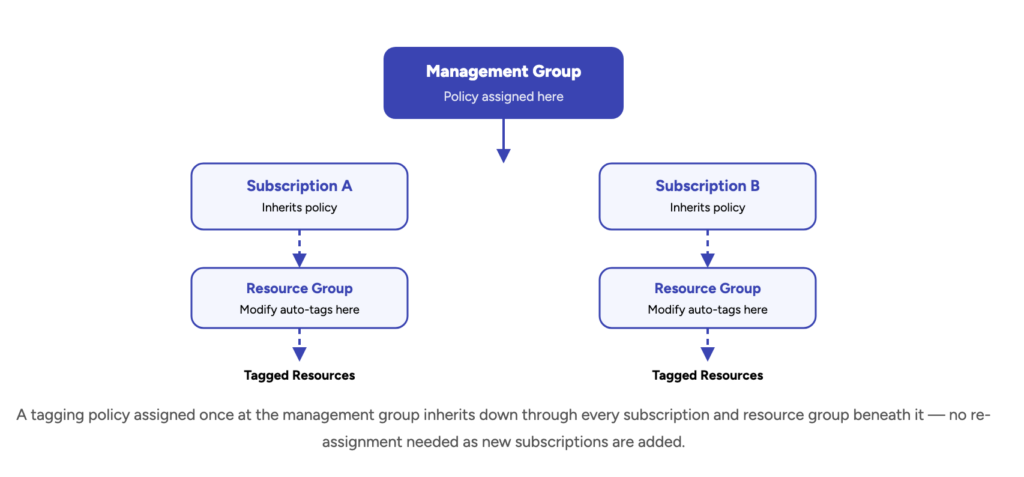
Management Groups sit at the apex of the Azure hierarchy, providing a policy scope above subscriptions. For organizations with a significant Azure footprint, Management Groups allow budgets, Azure Policy assignments, and RBAC roles to be consistently applied across dozens or hundreds of subscriptions simultaneously.
This is particularly critical for managing subscription sprawl — the all-too-common scenario where teams independently provision subscriptions that bypass centralized financial controls. By nesting subscriptions under properly configured Management Groups, every new resource inherits critical guardrails: region restrictions, mandatory tagging policies, and budget alerts that trigger before costs become unmanageable.
Subscriptions: the unit of financial isolation
Subscriptions should reflect the operational realities of the business. Common and proven patterns include separating production from non-production environments, and splitting major business units or product lines into distinct subscriptions. This separation is not merely for security or administrative convenience — it is a fundamental cost management lever.
By isolating non-production workloads, organizations can apply aggressive cost-cutting measures — automated shutdown schedules, Spot Virtual Machines, reduced redundancy — without risking the availability of critical production services. Resource Groups further refine this by grouping resources that share a lifecycle, enabling clean decommissioning of entire workloads and preventing the accumulation of orphaned "zombie" resources.
✓
Gart Solutions recommendation: Implement a Landing Zone architecture that enforces your Management Group hierarchy, subscription policies, and baseline budgets from day one. Retrofitting governance onto an ungoverned environment is dramatically more expensive and disruptive than building it correctly from the start.
Tagging standards: the data layer that makes governance actionable
If the Azure hierarchy provides the scaffolding for governance, tags are the data that make that scaffolding useful. Tags are metadata key-value pairs attached to resources, and they are the primary mechanism for cost allocation, showback, and chargeback reporting.
A tagging strategy must move beyond a simple list of keys to an enforced organizational standard. Consistency is non-negotiable: "Production" and "production" are treated as distinct values by most reporting and cost allocation engines, leading to fragmented, unreliable cost views.
Tag Key
Strategic Importance
Example Values
Environment
Distinguishes billable tiers; enables non-prod cost-cutting policies
Production
Sandbox
CostCenter
Enables financial chargeback to specific departments
HR-992, R&D-Ops
Owner
Assigns direct operational and financial accountability
DevOps-Team-A
Application
Links infrastructure spend to business value delivery
Billing-Engine-v2
Criticality
Informs disaster recovery and redundancy investment decisions
Tier-1
Non-Critical
Organizations should use Azure Policy to either deny the creation of untagged resources or automatically inherit tags from parent resource groups. When tag coverage reaches 90% or higher, the organization can transition from basic bill monitoring to sophisticated showback models — where engineering teams see the real cost of their architectural choices in near real-time.
Mature FinOps teams also address shared resource cost splitting: centralized firewalls, ExpressRoute circuits, and hub VNets that serve multiple teams require multi-dimensional tagging or hierarchical allocation strategies to distribute shared costs fairly across business units.
Procurement engineering: using commitment models to cut unit costs
Structural governance provides the framework for visibility. Procurement engineering focuses on the financial mechanisms that reduce the unit cost of cloud resources — often by 60–90% — by trading flexibility for commitment. The key is matching the right model to the right workload characteristic.
Up to 72%
Reserved Instances
Commit to a specific VM family and region for 1 or 3 years. Best for mission-critical, always-on production systems that are architecturally stable.
Steady-state compute
Most Flexible
Up to 65%
Savings Plans for Compute
Commit to a fixed hourly spend amount. Applies automatically across VMs, Azure Functions, and Container Instances — any region, any family.
Evolving architectures
Up to 90%
Spot Virtual Machines
Use Azure's unused capacity at the deepest discount. Subject to 30-second eviction notice. Ideal for batch, ML training, and CI/CD pipelines.
Fault-tolerant workloads
Reserved Instances: the floor of compute commitment
Azure Reserved Instances (RIs) offer the deepest possible discounts for steady-state compute — up to 72% compared to pay-as-you-go — in exchange for a commitment to a specific VM family and size in a specific region. RIs are appropriate for mission-critical, always-on systems: core databases, domain controllers, and persistent web application tiers.
The critical risk with RIs is commitment lock-in. If a workload migrates regions or changes VM series, the reservation may become underutilized — a hidden cost that is often harder to identify than raw overspending. The cardinal rule: purchase reservations only for the "floor" of compute usage — the absolute baseline that remains active regardless of seasonal fluctuations. Never reserve the peak.
Azure Savings Plans: flexibility with meaningful savings
Introduced to address the rigidity of RIs, Azure Savings Plans require a commitment to a fixed hourly spend (e.g., $10/hour) rather than a specific resource configuration. These plans apply automatically across virtual machines, Azure Functions, and Azure Container Instances, regardless of VM family or geographic region — making them the preferred choice for growing teams actively modernizing their architectures.
The trade-off is a slightly lower maximum discount (up to 65% versus 72% for RIs). Savings Plans also do not currently cover non-compute services such as Azure SQL Database or Storage reserved capacity, which means a comprehensive commitment strategy typically combines both models at different layers.
Stacking discounts: the Azure Hybrid Benefit multiplier
One of the highest-return tactical moves in Azure procurement is discount stacking through the Azure Hybrid Benefit (AHB). Organizations with existing on-premises Windows Server or SQL Server licenses with active Software Assurance can bring those licenses to Azure, eliminating the licensing portion of the compute cost. When combined with a three-year Reserved Instance, the cumulative savings on a Windows VM can reach 86% compared to standard pay-as-you-go rates — effectively equalizing the price of Windows and Linux instances and making hybrid benefit critical for any legacy migration.
Compute stewardship: rightsizing and engineering for elasticity
While procurement strategies lower the unit cost of resources, compute stewardship focuses on reducing the total quantity of resources consumed. Over-provisioning — sizing instances for hypothetical peaks rather than actual demand — is the single largest contributor to cloud waste in most enterprise environments.
Rightsizing: evidence-based resizing
Rightsizing is the process of adjusting the CPU, memory, and disk resources of a VM to match its actual utilization patterns. Research consistently shows that approximately 40% of Azure VMs run below 30% CPU utilization — a massive, measurable opportunity. Azure Advisor analyzes utilization data using machine learning and surfaces specific SKU recommendations, but technical context is essential before acting on any recommendation.
!
Critical caution on rightsizing:
A VM that appears underutilized on average may experience critical performance spikes during month-end processing or specific batch windows. Always analyze at least 14 days of metrics across CPU, memory, and disk I/O before making any sizing change. Never rightsize production resources without pre-testing in a representative environment.
Beyond simple downsizing, consider migrating from general-purpose VMs to workload-specific families: compute-optimized (F-series) for CPU-intensive applications, or memory-optimized (E-series) for in-memory databases and analytics. These moves often deliver better performance at a meaningfully lower price point.
Autoscaling: paying for peaks only when they occur
Azure Autoscale enables near real-time capacity adjustment for Virtual Machine Scale Sets, App Services, and Azure Functions. By setting intelligent thresholds — adding an instance when CPU exceeds 70% for five minutes and removing one when it drops below 30% — organizations ensure they pay for peak capacity only during actual peak periods.
For event-driven or highly variable workloads, serverless models like Azure Functions and Azure Container Instances (ACI) provide the ultimate cost efficiency: these services scale automatically to zero when idle, eliminating the concept of "waiting" costs entirely.
Automated scheduling: the highest-return single action
The highest-return optimization activity for most organizations is implementing automated start/stop schedules for non-production environments. Development, testing, and staging environments are typically only required during business hours. Shutting these environments down overnight and on weekends reclaims up to 65% of the infrastructure bill for those workloads. Azure DevTest Labs and Azure Automation runbooks can fully automate this process, providing developers with a frictionless self-service path to re-provision resources on demand.
Storage economics: tiers, lifecycle management, and redundancy alignment
Azure Storage pricing is multi-dimensional, encompassing capacity, transactions, data retrieval fees, and redundancy costs. Managing storage spend effectively requires understanding the access frequency and business value of data over its lifetime.
Access tiers and lifecycle automation
Azure Blob Storage provides four access tiers: Hot, Cool, Cold, and Archive. The Hot tier is designed for frequently accessed data and carries the highest per-GB capacity cost with the lowest transaction fees. As data ages and access frequency declines, it should transition to progressively cheaper tiers.
Tier
Recommended Use
Min Retention
Retrieval Cost
Hot
Frequently accessed data, active applications
None
None (included)
Cool
Monthly access — reports, backups
30 days
~$0.01/GB
Cold
Quarterly access — older logs, audit data
90 days
High
Archive
Rare access — legal, compliance, deep backup
180 days
Highest + rehydration delay
Lifecycle management policies automate tier transitions based on data age or last access time. A media company, for example, might automatically move video logs from Hot to Cool after 30 days and to Archive after 90 days — reducing storage costs dramatically without any manual intervention or operational overhead.
Redundancy strategy: align protection to criticality
The redundancy model selected for a storage account directly determines its monthly cost. Locally Redundant Storage (LRS) is the most affordable but leaves data vulnerable to a data center outage. Zone-Redundant Storage (ZRS) replicates across availability zones for higher resilience. Geo-Redundant Storage (GRS) replicates to a secondary region — essential for disaster recovery but approximately doubling storage costs. Organizations must rigorously align redundancy level to workload criticality rather than defaulting to the highest-availability option for all data.
Managed disk optimization
Unlike Blob storage, Managed Disks are billed based on provisioned size, not actual data stored. A 1TB Premium SSD allocated to a workload consuming 100GB represents significant, immediate waste. Furthermore, Premium SSDs continue to incur charges even when the attached VM is deallocated. Best practices include switching non-critical workloads to Standard SSD or HDD tiers, and using Disk Reservations — which can save up to 38% — for predictable, long-term disk capacity needs.
Networking and egress: the hidden tax embedded in architecture
Networking costs are among the most difficult to forecast in Azure, because they depend entirely on the volume of data moving across regional and continental boundaries. Egress — data leaving an Azure data center — is the primary cost driver, and it is deeply sensitive to architectural decisions that most teams make without considering the financial implications.
Data Transfer Type
Cost Model
Approximate Cost
Intra-VNet (same VNet)
Free
$0.00
Between Availability Zones
Per GB each direction
~$0.01/GB
Regional VNet Peering
Per GB each direction
~$0.01/GB
Global VNet Peering
Per GB, zone-dependent
From $0.035/GB
Internet Egress
Per GB (after first 100GB free)
~$0.087/GB
Hub-and-spoke topology: the cornerstone of network cost efficiency
The hub-and-spoke network topology is the single most impactful network design decision for cost optimization. By centralizing high-cost resources — Azure Firewalls, VPN Gateways, ExpressRoute circuits — in a central hub VNet that is shared across multiple spoke VNets via peering, organizations eliminate the need to deploy separate firewalls and gateways per subscription. This consolidation can save thousands of dollars per month in fixed hourly fees, while also simplifying network security governance.
ExpressRoute: when dedicated connectivity pays for itself
The method of connecting on-premises environments to Azure significantly impacts networking costs. For organizations with large, continuous data transfers, the ExpressRoute Unlimited Data Plan often becomes the most strategic choice. While it carries a higher monthly port fee, it includes unlimited inbound and outbound data transfer at no additional cost — providing the budget predictability that VPN-based connectivity simply cannot offer at scale. ExpressRoute Local offers further cost reduction for organizations connecting to one or two nearby Azure regions.
How do you optimize Azure Kubernetes Service (AKS) costs?
As enterprises migrate to container-based architectures, AKS frequently becomes a major — and often poorly understood — component of the Azure bill. Effective AKS cost optimization requires a layered approach addressing the cluster, node pool, and individual pod levels.
Node pool strategy: separate concerns, optimize costs independently
The primary expense in AKS is the compute power of worker nodes. The Cluster Autoscaler automatically adds or removes VM instances from node pools based on aggregate pod resource requests — but the real leverage comes from splitting the cluster into multiple, purpose-specific node pools. System-critical services run on on-demand or reserved instances; batch jobs, development environments, and stateless web tiers run on Spot Node Pools, reducing compute costs for those specific workloads by 80–90%.
Pod-level optimization: the last mile of efficiency
Within the cluster, Horizontal Pod Autoscaler (HPA) scales pod replicas based on CPU or memory utilization, while Vertical Pod Autoscaler (VPA) adjusts resource requests and limits for pods themselves. Critically, if resource requests are set too high, the Kubernetes scheduler reserves more space on nodes than is actually consumed — creating "slack" capacity that wastes money without delivering performance.
Advanced bin-packing tools can intelligently reorganize pods onto as few nodes as possible, allowing redundant nodes to be terminated — a compounding optimization that combines scheduling intelligence with compute stewardship.
Advanced FinOps: amortization, unit economics, and financial integration
The maturity of a cost optimization program is ultimately judged by its ability to integrate with business financial reporting and drive a genuine culture of cost-conscious engineering — not just produce a lower bill in isolation.
Actual vs. amortized cost: choosing the right lens
A fundamental challenge in cloud accounting is the treatment of upfront commitments. In "Actual Cost" views, the full price of a reservation appears on the purchase date, creating a massive spike followed by near-zero costs — distorting profitability reporting and budget variance analysis for the entire team.
Amortized Cost views spread the reservation cost evenly over its term and attribute it to the specific VMs that consumed the benefit. For engineering and finance leaders, amortized costs are the only way to accurately measure the true run rate of an application and make meaningful unit economic comparisons across quarters or business units.
Metric Type
Best Used For
Strategic Application
Actual Cost
Cash flow and invoice reconciliation
Monthly finance team reporting
Amortized Cost
Smoothed spending trends
Internal showback, P&L reporting
Unused Benefit
Quantifying wasted commitment spend
Refining next RI/SP purchase cycle
Unit Cost
Correlating cost to business output
Cost per user
Cost per transaction
Identifying waste through charge types
Mature FinOps teams use the Charge Type dimension in Azure Cost Management to identify and quantify wastage. The UnusedReservation and UnusedSavingsPlan charge types show the exact dollar amount of commitments that were paid for but not consumed. This data is essential for right-sizing commitment levels in the next procurement cycle — preventing the equally painful problem of over-committing to capacity that cannot be utilized.
Eliminating zombie and idle resources: the quarterly digital pantry cleanup
As cloud environments scale, they inevitably accumulate orphaned resources — assets that no longer serve any purpose but continue generating charges. These "zombie" resources are typically the byproduct of failed automation scripts, rushed decommissioning, or an absence of clear ownership assignment.
Unattached Managed Disks: When a VM is deleted through the portal, OS and data disks are often left behind. Query Azure Resource Graph for all disks where managedBy is null and diskState is "Unattached." Premium SSD disks especially represent immediate, recoverable cost.
Idle Load Balancers and NAT Gateways: Load balancers with empty backend pools and NAT Gateways not associated with any subnet incur hourly charges despite being functionally useless. Audit and decommission quarterly.
Unattached Public IP Addresses: Static public IPs not attached to any resource cost approximately $3.65/month each in many regions — negligible individually, but these accumulate rapidly across large environments.
Idle PaaS Services: An App Service Plan with zero running apps, or an Azure SQL database with zero connections for 30 days, are prime candidates for decommissioning or migration to a Serverless tier. Azure Advisor surfaces specific recommendations for these scenarios.
Empty or Unused Key Vaults, Storage Accounts: These carry low but persistent charges and should be audited against active application references before being considered for deletion.
The Holistic Azure Cost Optimization Formula
Total Cost = Σ ( Unit RateDiscounted × QuantityRightsized ) + Shared Services + Egress
Procurement Optimization
Unit Rate is optimized through commitments: Savings Plans (SPs), Reserved Instances (RIs), and Azure Hybrid Benefit (AHB).
Engineering Optimization
Quantity is controlled via technical levers: Rightsizing, Autoscaling, and Decommissioning unused resources.
If you'd like a second pair of eyes on your Azure estate, our Azure cloud engineering team can run a cost and architecture review.
How Gart Solutions helps you achieve measurable Azure cost reduction
Over more than 10 years and 50+ enterprise cloud projects, we have seen every variant of Azure cost challenge — from greenfield environments that need governance from scratch to legacy deployments where waste has compounded for years. Our FinOps practice is built on the same frameworks outlined in this guide, delivered by engineers who have implemented them in production.
Our Azure FinOps & cost optimization services
Azure Cost Assessment
Comprehensive audit of your current Azure spend, waste identification, and a prioritized remediation roadmap with projected savings.
FinOps Governance Setup
Management Group hierarchy, tagging policies, budget alerts, and showback dashboards tailored to your organizational structure.
Commitment Strategy & RI Purchasing
Data-driven analysis of your workload patterns to design the optimal mix of Reserved Instances, Savings Plans, and Spot compute.
Continuous FinOps Management
Ongoing monthly optimization cycles: rightsizing reviews, zombie cleanup, commitment rebalancing, and anomaly detection.
AKS & Container Cost Optimization
Node pool architecture, Spot integration, pod autoscaling configuration, and bin-packing automation for containerized workloads.
Azure Landing Zone Design
Well-Architected Framework–aligned landing zones with cost governance, networking, and security built in from the ground up.
Gart Solutions is a data engineering and cloud infrastructure consultancy with 8.2 years of hands-on experience and 50+ successful enterprise deployments across Azure, AWS, and GCP. Our team holds Microsoft Azure certifications across architecture, security, and cost management disciplines. We specialize in helping mid-market and enterprise organizations build scalable, well-governed cloud environments that deliver measurable business value.