The 20 traps listed here are drawn from recurring patterns observed across cloud migration, architecture review, and cost optimization engagements led by Gart's engineers. All provider-specific pricing references were verified against official AWS, Azure, and GCP documentation and FinOps Foundation guidance as of April 2026. This article was last substantially reviewed in April 2026.
Organizations moving infrastructure to the cloud often expect immediate cost savings. The reality is frequently more complicated. Without deliberate cloud cost optimization, cloud bills can grow faster than on-premises costs ever did — driven by dozens of hidden traps that are easy to fall into and surprisingly hard to detect once they compound.
At Gart Solutions, our cloud architects review spending patterns across AWS, Azure, and GCP environments every week. This article distills the 20 most damaging cloud cost optimization traps we encounter — organized into four cost-control layers — along with the signals that reveal them and the fastest fixes available.
Is cloud waste draining your budget right now? Our Infrastructure Audit identifies exactly where spend is leaking — typically within 5 business days. Most clients uncover 20–40% in recoverable cloud costs.
⚡ TL;DR — Quick Summary
Migration traps (Traps 1–4): Lift-and-shift, wrong architecture, over-engineered enterprise tools, and poor capacity forecasting inflate costs from day one.
Architecture traps (Traps 5–9): Data egress, vendor lock-in, over-provisioning, ignored discounts, and storage mismanagement create structural waste.
Operations traps (Traps 10–15): Idle resources, licensing gaps, monitoring blind spots, and poor backup planning drain budgets silently.
Governance & FinOps traps (Traps 16–20): Missing tagging, no cost policies, weak tooling, hidden fees, and undeveloped FinOps practices are the root cause behind most budget overruns.
The biggest single lever: adopting a continuous FinOps operating cadence aligned to the FinOps Foundation framework.
32%
Average cloud waste reported by organizations without a FinOps practice
$0.09/GB
AWS standard egress cost that catches most teams off guard
72%
Maximum savings available via Reserved Instances vs on-demand
20 Cloud Cost Optimization Traps
Use this table to quickly scan every trap and identify where your environment is most exposed before diving into the detailed breakdowns below.
#TrapWhy It HurtsTypical SignalFastest Fix1Lift-and-Shift MigrationPays cloud prices for on-prem designHigh instance costs, poor utilizationRefactor high-cost workloads first2Wrong ArchitectureScalability failures → expensive reworkManual scaling, outages at traffic peaksArchitecture review before migration3Overreliance on Enterprise EditionsPaying for features you don't useEnterprise licenses on dev/stagingAudit licenses by environment tier4Uncontrolled Capacity PlanningOver- or under-provisioned resourcesIdle capacity OR repeated scaling crisesDemand-based autoscaling + monitoring5Underestimating Data EgressEgress fees add up faster than computeData transfer line items spike monthlyVPC endpoints + region co-location6Ignoring Vendor Lock-in RiskSwitching costs explode over timeAll workloads on a single providerAdopt portable abstractions (K8s, Terraform)7Over-Provisioning ResourcesPaying for idle CPU/RAMAvg CPU utilization <20%Right-sizing + Compute Optimizer8Skipping Reserved Instances & Savings PlansOn-demand premium for predictable workloadsNo commitments in billing dashboardAnalyze 3-month usage → commit on stable workloads9Misjudging Storage CostsWrong storage class for access patternS3 Standard used for rarely accessed dataEnable S3 Intelligent-Tiering10Neglecting to Decommission ResourcesPaying for forgotten resourcesUnattached EBS volumes, stopped EC2Weekly idle resource audit + automation11Overlooking Software LicensingBYOL vs license-included confusionDuplicate license chargesLicense inventory before migration12No Monitoring or Optimization LoopWaste compounds undetectedNo cost anomaly alerts configuredEnable AWS Cost Anomaly Detection / Azure Budgets13Poor Backup & DR PlanningOver-replicated data or recovery failuresDR spend exceeds 15% of total cloud billTiered backup strategy with lifecycle policies14Not Using Cloud Cost ToolsInvisible spend patternsNo regular Cost Explorer reportsSchedule weekly cost review cadence15Inadequate Skills & ExpertiseWrong decisions compound into structural debtManual fixes, repeated incidentsEngage a certified cloud partner16Missing Governance & TaggingNo cost attribution = no accountabilityUntagged resources >30% of billEnforce tagging policy via IaC17Ignoring Security & Compliance CostsBreaches cost far more than preventionNo WAF, no encryption at restSecurity baseline as part of onboarding18Missing Hidden FeesNAT, cross-AZ, IPv4, log retention surprisesUnexplained line items in billingDetailed billing breakdown monthly19Not Leveraging Provider DiscountsPaying full price unnecessarilyNo EDP, PPA, or partner program enrollmentWork with an AWS/Azure/GCP partner for pricing20No FinOps Operating CadenceCost decisions made reactivelyNo monthly cloud cost review meetingAdopt FinOps Foundation operating modelCloud Cost Optimization Traps
Traps 1–4: Migration Strategy Mistakes That Set the Wrong Foundation
Cloud cost problems often originate at the very first decision: how to migrate. Poor migration strategy creates structural inefficiencies that become exponentially harder and more expensive to fix after go-live.
Trap 1 - The "Lift and Shift" Approach
Migrating existing infrastructure to the cloud without architectural changes — commonly called "lift and shift" — is the single most widespread source of cloud cost overruns. Cloud economics reward cloud-native design. When you move an on-premises architecture unchanged, you keep all of its inefficiencies while adding cloud-specific cost layers.
A typical example: an on-premises database server running at 15% utilization, provisioned for peak load. In a data center, that idle capacity has no additional cost. In AWS or Azure, you pay for the full instance 24/7. That same pattern repeated across 50 services can double your effective cloud spend versus what a refactored equivalent would cost.
The right approach is "refactoring" — redesigning or partially rewriting applications to use cloud-native services such as managed databases, serverless compute, and event-driven architectures. Refactoring does require upfront investment, but it consistently delivers 30–60% lower steady-state costs compared to lift-and-shift.
Risk: High compute costs; pays cloud prices for on-prem design decisions
Signal: Low CPU/memory utilization (<25%) on most instances post-migration
Fix: Identify the top 5 cost drivers; prioritize those for refactoring in Sprint 1
Trap 2 - Choosing the Wrong IT Architecture
Architecture decisions made before or during migration determine your cost ceiling for years. A monolithic deployment that requires a large EC2 instance to function at all will always cost more than a microservices-based design that can scale individual components independently. Similarly, choosing synchronous service-to-service calls when asynchronous queuing would work causes unnecessary instance sizing to handle peak concurrency.
Poor architectural choices also create security and scalability gaps that require expensive remediation. We have seen clients spend more fixing architectural decisions in year two than their original migration cost.
What to do: Conduct a formal architecture review before migration. Map how services interact, identify coupling points, and evaluate whether managed cloud services (RDS, SQS, ECS Fargate, Lambda) can replace self-managed components. Seek an independent review — internal teams often have blind spots around the architectures they built.
Risk: Expensive rework; environments that don't scale without large instance upgrades
Signal: Manual vertical scaling during traffic events; frequent infrastructure incidents
Fix: Infrastructure audit pre-migration with explicit architecture recommendations
Trap 3 - Overreliance on Enterprise Editions
Many organizations default to enterprise tiers of cloud services and SaaS tools without validating whether standard editions cover their actual requirements. Enterprise editions can cost 3–5× more than standard equivalents while delivering features that 80% of teams never activate.
This is especially common in managed database services, monitoring platforms, and identity management. A 50-person engineering team paying for enterprise database licensing at $8,000/month when a standard tier at $1,200/month would meet their SLA requirements is a straightforward optimization many teams overlook.
What to do: Build a license inventory as part of your migration plan. Map every service tier to actual feature usage. Apply enterprise editions only where specific features — such as advanced security controls or SLA guarantees — are genuinely required. Use non-production environments to validate that standard tiers meet your needs before committing.
Risk: 3–5× cost premium for unused enterprise features
Signal: Enterprise licenses deployed uniformly across all environments including dev/staging
Fix: Feature-usage audit per service; downgrade where usage doesn't justify tier
Trap 4 - Uncontrolled Capacity Planning
Capacity needs differ dramatically by workload type. Some workloads are constant, some linear, some follow exponential growth curves, and some are highly seasonal (e-commerce spikes, payroll runs, end-of-quarter reporting). Without workload-specific capacity models, teams either over-provision to be safe — paying for idle capacity — or under-provision and face service disruptions that result in emergency spending.
A practical example: an e-commerce platform provisioning its peak Black Friday capacity year-round would spend roughly 4× more than a platform using autoscaling with predictive scaling policies and spot instances for burst capacity.
What to do: Model capacity by workload pattern type. Use cloud-native autoscaling with predictive policies (AWS Auto Scaling predictive scaling, Azure VMSS autoscale) for variable workloads. Use Reserved Instances only for the steady-state baseline that you can reliably forecast 12 months out. Review capacity assumptions quarterly.
Risk Persistent over-provisioning or costly emergency scaling events
Signal Flat autoscaling policies; no predictive scaling configured
Fix Workload classification + autoscaling policy tuning + quarterly capacity review
Traps 5–9: Architectural Decisions That Create Structural Waste
Even with a sound migration strategy, specific architectural choices can lock in cost inefficiencies. These traps are particularly dangerous because they are not visible in compute cost reports — they hide in network fees, storage charges, and pricing tiers.
Trap 5 - Underestimating Data Transfer and Egress Costs
Data transfer costs are the most consistently underestimated line item in cloud budgets. AWS charges $0.09 per GB for standard egress from most regions. Azure and GCP follow similar models. For an application that moves 100 TB of data monthly between services, regions, or to end users, that's $9,000 per month from egress alone — often invisible during initial cost modeling.
Beyond external egress, cross-Availability Zone (cross-AZ) data transfer is a hidden cost that catches many teams by surprise. In AWS, cross-AZ traffic costs $0.01 per GB in each direction. A microservices application making frequent cross-AZ calls can generate thousands of dollars in monthly cross-AZ fees that appear in no single obvious dashboard item.
NAT Gateway charges are another overlooked trap: at $0.045 per GB processed (AWS), a data-heavy workload can generate NAT costs that rival compute. Use VPC Interface Endpoints or Gateway Endpoints for S3, DynamoDB, SQS, and other AWS-native services to eliminate unnecessary NAT Gateway traffic entirely.
Risk $0.09+/GB egress; cross-AZ and NAT fees compound quickly at scale
Signal Data transfer line items represent >15% of total cloud bill
Fix Deploy VPC endpoints; co-locate communicating services in same AZ; use CDN for user-facing egress
Trap 6 - Overlooking Vendor Lock-in Risks
Vendor lock-in is not merely an architectural concern — it is a cost risk. When 100% of your workloads are tightly coupled to a single cloud provider's proprietary services, your negotiating position on pricing is zero, migration away from bad pricing agreements is prohibitively expensive, and you are exposed to any pricing changes the provider makes.
Using open standards — Kubernetes for container orchestration, Terraform or Pulumi for infrastructure as code, PostgreSQL-compatible databases rather than proprietary variants — preserves optionality without meaningful cost or performance tradeoffs for most workloads. The Cloud Native Computing Foundation (CNCF) maintains an extensive ecosystem of portable tooling that reduces lock-in risk while supporting enterprise-grade requirements.
Risk Zero pricing leverage; multi-year migration cost if you need to switch
Signal All infrastructure uses proprietary managed services with no portable alternatives
Fix Adopt open standards (K8s, Terraform, open-source databases) for new workloads
Trap 7 - Over-Provisioning Resources
Over-provisioning — allocating more compute, memory, or storage than workloads actually need — is one of the most common and most correctable sources of cloud waste. Industry benchmarks consistently show that average CPU utilization across cloud environments sits below 20%. That means 80% of compute capacity is idle on an average day.
AWS Compute Optimizer analyzes actual utilization metrics and generates rightsizing recommendations. In a typical engagement, Gart architects find that 30–50% of EC2 instances are candidates for downsizing by one or more instance sizes, often without any measurable performance impact. The same pattern applies to managed database instances, where default sizing is frequently 2× what the actual workload requires.
For Kubernetes workloads, idle node waste is a particularly common issue. If EKS nodes run at <40% average utilization, Fargate profiles for low-utilization pods can reduce compute costs significantly by charging only for the CPU and memory actually requested by each pod — not the entire node.
Risk Paying for 80% idle capacity on average; compounds across every service
Signal Average CPU <20%; CloudWatch showing consistent low utilization
Fix Run AWS Compute Optimizer or Azure Advisor; right-size top 10 cost drivers first
Trap 9 - Skipping Reserved Instances and Savings Plans
On-demand pricing is the most expensive way to run predictable workloads. AWS Reserved Instances and Compute Savings Plans offer discounts of up to 72% versus on-demand rates for 1- or 3-year commitments — discounts that are documented in AWS's official pricing documentation. Azure Reserved VM Instances and GCP Committed Use Discounts offer comparable savings.
Despite the size of these savings, many organizations run the majority of their workloads on on-demand pricing, either because they lack the forecasting confidence to commit or because no one has owned the decision. For production workloads with predictable usage — databases, core application servers, monitoring stacks — there is almost never a good reason to use on-demand pricing exclusively.
Practical approach: Analyze your last 90 days of usage. Identify the minimum baseline usage across all instance types — that is your "floor." Commit Reserved Instances to cover that floor. Use Savings Plans (more flexible, applying across instance families and regions) to cover the next layer of predictable usage. Keep only genuine burst capacity on on-demand or Spot.
Risk Paying 72% more than necessary for stable workloads
Signal No active reservations or savings plans in billing console
Fix 90-day usage analysis → commit on the steady-state baseline; layer Savings Plans on top
Trap 10 - Misjudging Data Storage Costs
Storage costs are deceptively easy to ignore when an organization is small — and surprisingly painful when data volumes grow. Three specific patterns create disproportionate storage costs:
Wrong storage class. Storing rarely-accessed data in S3 Standard at $0.023/GB when S3 Glacier Instant Retrieval costs $0.004/GB is a 6× overspend on archival data. S3 Intelligent-Tiering solves this automatically for access patterns you cannot predict — it moves objects between tiers based on access history and can deliver savings of 40–95% on archival content.
EBS volume type mismatch. Most workloads still use gp2 EBS volumes by default. Migrating to gp3 reduces cost by approximately 20% ($0.10/GB vs $0.08/GB in us-east-1) while delivering better baseline IOPS. A team with 5 TB of EBS saves $100/month with a configuration change that takes minutes.
Observability retention bloat. CloudWatch Log Groups with retention set to "Never Expire" accumulate months or years of logs that no one reviews. Setting a 30- or 90-day retention policy on non-compliance logs is one of the simplest cost reductions available and can represent significant monthly savings for data-heavy applications.
Risk Up to 6× overpayment on archival storage; compounding log retention costs
Signal All S3 data in Standard class; CloudWatch retention set to "Never"
Fix Enable Intelligent-Tiering; migrate EBS to gp3; set log retention policies immediately
Traps 10–15: Operational Habits That Drain the Budget Silently
Operational cloud cost traps are the result of what teams do (and don't do) day to day. They are often smaller individually than architectural traps, but they compound quickly and are the most common source of the "unexplained" portion of cloud bills.
Trap 10 - Neglecting to Decommission Unused Resources
Cloud environments accumulate ghost resources — stopped EC2 instances, unattached EBS volumes, unused Elastic IPs, orphaned load balancers, forgotten RDS snapshots — faster than most teams realize. Each item carries a small individual cost, but across a mature cloud environment these can represent 10–20% of the total bill.
Starting from February 2024, AWS charges $0.005 per public IPv4 address per hour — approximately $3.65/month per address. An environment with 200 public IPs that have never been audited pays $730/month in IPv4 fees alone, often without anyone noticing. Transitioning to IPv6 where supported eliminates this cost entirely.
Best practice: Schedule a monthly idle-resource audit using AWS Trusted Advisor, Azure Advisor, or a dedicated FinOps tool. Automate shutdown of non-production resources outside business hours. Set lifecycle policies on EBS snapshots, RDS snapshots, and ECR images to automatically prune old versions.
Risk 10–20% of bill in ghost resources; IPv4 fees accumulate invisibly
Signal Unattached EBS volumes; stopped instances still appearing in billing
Fix Automated weekly cleanup script + lifecycle policies on snapshots and images
Trap 11 - Overlooking Software Licensing Costs
Cloud migration can inadvertently increase software licensing costs in two ways: activating license-included instance types when you already hold bring-your-own-license (BYOL) agreements, or losing license portability by moving to managed services that bundle licensing at a premium.
Windows Server and SQL Server licenses are particularly high-value areas. Running SQL Server Enterprise on a license-included RDS instance can cost significantly more than using a BYOL license on an EC2 instance with an optimized configuration. Understanding your existing software agreements before migration — and mapping them to cloud deployment options — can save substantial amounts annually.
Risk Duplicate licensing costs; paying for bundled licenses when BYOL applies
Signal No license inventory reviewed before migration; license-included instances for Windows/SQL Server
Fix Software license audit pre-migration; map existing agreements to BYOL eligibility in cloud
Trap 12 - Failing to Monitor and Optimize Usage Continuously
Cloud cost optimization is not a one-time project — it is a continuous operational practice. Without ongoing monitoring, cost anomalies go undetected, new services are provisioned without review, and seasonal workloads retain peak-period sizing long after demand has subsided.
AWS Cost Anomaly Detection, Azure Cost Management alerts, and GCP Budget Alerts all provide free anomaly detection capabilities that most organizations never configure. Setting budget thresholds with alert notifications takes less than an hour and provides immediate visibility into unexpected spend spikes.
Recommended monitoring stack: cloud-native cost dashboards (Cost Explorer / Azure Cost Management) for historical analysis, budget alerts for real-time anomaly detection, and a weekly team review of the top 10 cost drivers by service.
Risk Waste compounds for months before anyone notices
Signal No cost anomaly alerts configured; no regular cost review meeting
Fix Enable anomaly detection; schedule weekly cost review; assign cost ownership per team
Trap 13 - Inadequate Backup and Disaster Recovery Planning
Backup and disaster recovery strategies that aren't cost-optimized can inflate cloud bills significantly. Common mistakes include retaining identical backup copies across multiple regions for all data regardless of criticality, keeping backups indefinitely without a lifecycle policy, and running full active-active DR environments for workloads where a simpler warm standby or pilot light approach would meet RTO/RPO requirements.
Cost-effective DR design starts with classifying workloads by criticality tier. Not every application needs a hot standby. Many workloads with RTO requirements of 4+ hours can be recovered efficiently from S3-based backups at a fraction of the cost of a full multi-region active replica. For S3, enabling lifecycle rules that transition backup data to Glacier Deep Archive after 30 days reduces storage cost by up to 95%.
Risk DR costs exceeding 15–20% of total cloud bill for non-critical workloads
Signal Uniform DR strategy applied to all workloads regardless of criticality tier
Fix Workload criticality classification → tiered DR strategy → S3 Glacier lifecycle policies
Trap 14 - Ignoring Cloud Cost Management Tools
Every major cloud provider ships cost management and optimization tools that the majority of organizations either ignore or underuse. AWS Cost Explorer, AWS Compute Optimizer, AWS Trusted Advisor, Azure Advisor, and GCP Recommender collectively surface rightsizing recommendations, reserved capacity suggestions, and idle resource reports — all free of charge.
Third-party FinOps platforms (CloudHealth, Apptio Cloudability, Spot by NetApp) provide cross-provider views and more sophisticated anomaly detection for multi-cloud environments. For organizations spending more than $50K/month on cloud, the ROI on a dedicated FinOps tool typically exceeds 10:1 within the first quarter.
Risk Missing savings recommendations that providers generate automatically
Signal No regular review of Trusted Advisor / Azure Advisor recommendations
Fix Enable all native cost tools; schedule weekly review of top recommendations
Trap 15 - Lack of Appropriate Cloud Skills
Cloud cost optimization requires specific expertise that is not automatically present in teams that migrate from on-premises environments. Teams without cloud-native skills tend to default to familiar patterns — large VMs, manual scaling, on-demand pricing — that systematically cost more than cloud-optimized equivalents.
The skill gap is not just about knowing which services exist. It is about understanding the cost implications of architectural decisions in real time — knowing that choosing a NAT Gateway over a VPC endpoint has a measurable monthly cost, or that a managed database defaults to a larger instance tier than necessary for a given workload.
Gart's approach:We embed a cloud architect alongside your team during the first 90 days post-migration. That direct knowledge transfer prevents the most expensive mistakes during the period when cloud spend is most volatile.
Risk Repeated costly mistakes; structural technical debt from uninformed decisions
Signal Manual infrastructure changes; frequent cost surprises; no IaC adoption
Fix Engage a certified cloud partner for the migration and 90-day post-migration period
Traps 16–20: Governance and FinOps Failures That Undermine Everything Else
The most technically sophisticated cloud architecture can still generate runaway costs without adequate governance. These final five traps operate at the organizational level — they are about processes, policies, and culture as much as technology.
Trap 16 - Missing Governance, Tagging, and Cost Policies
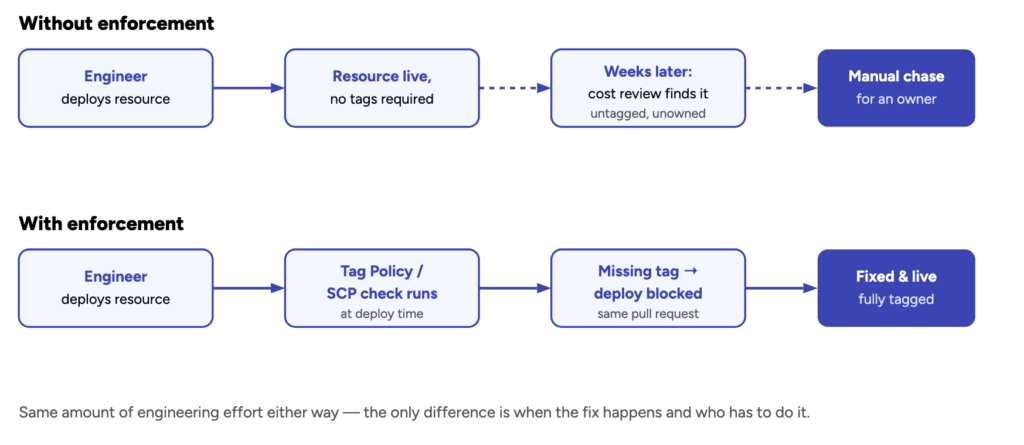
Without a resource tagging strategy, cloud cost reports show you what you're spending but not who is spending it, on what, or why. This makes accountability impossible and optimization very difficult. Untagged resources in a mature cloud environment commonly represent 30–50% of the total bill — a figure that makes cost attribution to business units, projects, or environments nearly impossible.
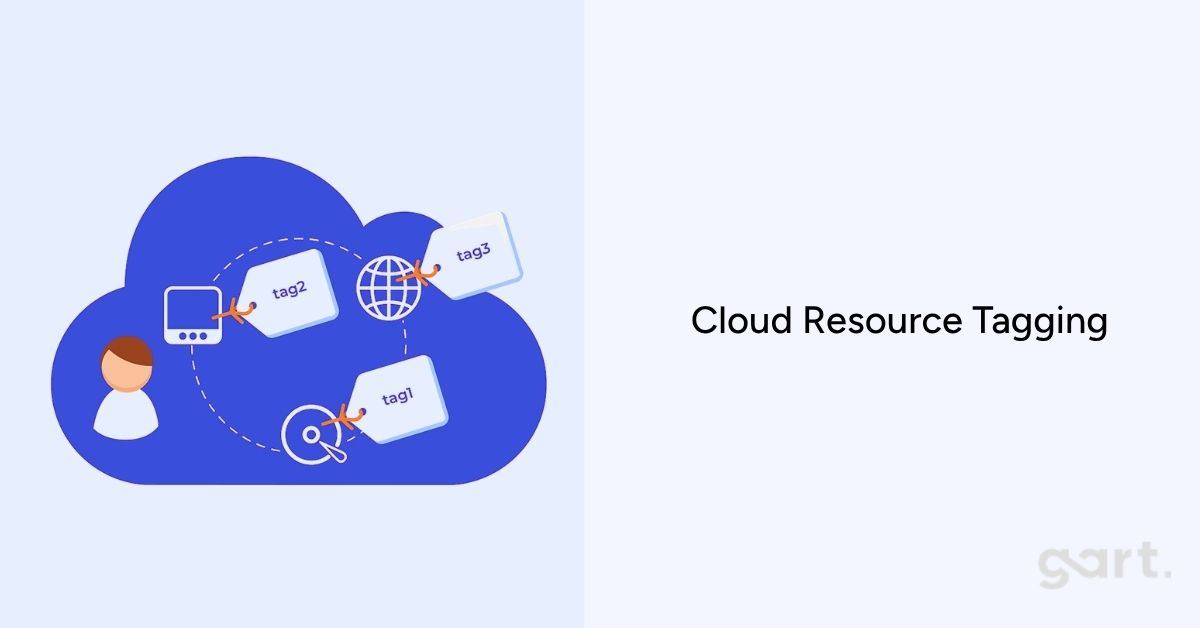
Effective tagging policies include mandatory tags enforced at provisioning time via Service Control Policies (AWS), Azure Policy, or IaC templates. Minimum viable tags: environment (production/staging/dev), team, project, and cost-center. Resources that fail tagging checks should be prevented from provisioning in production.
Governance beyond tagging includes spending approval workflows for new service provisioning, budget alerts per team, and quarterly cost reviews that compare actual vs. planned spend by business unit.
Risk No cost accountability; optimization impossible without attribution
Signal >30% of resources untagged; no per-team budget visibility
Fix Enforce tagging at IaC level; SCPs/Azure Policy for tag compliance; team-level budget dashboards
Trap 17 - Ignoring Security and Compliance Costs
Under-investing in cloud security creates a different kind of cost trap: the cost of a breach or compliance failure vastly exceeds the cost of prevention. The average cost of a cloud data breach reached $4.9M in 2024 (IBM Cost of a Data Breach report). WAF, encryption at rest, secrets management, and compliance automation are not optional overhead — they are cost controls.
Security-related compliance requirements (SOC 2, HIPAA, GDPR, PCI DSS) also have cloud cost implications: they constrain which storage services, regions, and encryption configurations you can use. Understanding these constraints before architecture is finalized prevents expensive rework and compliance-driven re-migration.
For implementation guidance, the Linux Foundation and cloud provider security frameworks provide open standards for cloud security baselines that are both compliance-aligned and cost-efficient.
Risk Breach costs far exceed prevention investment; compliance rework is expensive
Signal No WAF; secrets in environment variables; no encryption at rest configured
Fix Security baseline as part of initial architecture; compliance audit before go-live
Trap 18 - Not Considering Hidden and Miscellaneous Costs
Beyond compute and storage, cloud bills contain dozens of smaller line items that collectively represent a significant portion of total spend. The most commonly overlooked hidden costs we see in client audits:
Public IPv4 addressing: $0.005/hour per IP in AWS = $3.65/month per address. 100 addresses = $365/month that many teams have never noticed.
Cross-AZ traffic: $0.01/GB in each direction. Microservices with chatty inter-service communication across AZs can generate thousands per month.
NAT Gateway processing: $0.045/GB processed through NAT. Services that use NAT to reach AWS APIs instead of VPC endpoints pay this fee unnecessarily.
CloudWatch log ingestion: $0.50 per GB ingested. Verbose application logging without sampling can generate large CloudWatch bills.
Managed service idle time: RDS instances, ElastiCache clusters, and OpenSearch domains running 24/7 for development workloads that operate 8 hours/day.
Risk Cumulative hidden fees representing 10–25% of total bill
Signal Unexplained or unlabeled line items in billing breakdown
Fix Monthly detailed billing review; enable Cost Allocation Tags; use VPC endpoints to eliminate NAT fees
Trap 19 - Failing to Leverage Cloud Provider Discounts
Beyond Reserved Instances and Savings Plans, cloud providers offer several discount programs that most organizations never explore. AWS Enterprise Discount Program (EDP), Azure Enterprise Agreement (EA) pricing, and GCP Committed Use Discounts can deliver negotiated rates of 10–30% on overall spend for organizations with committed annual volumes.
Working with an AWS, Azure, or GCP partner can also unlock reseller discount arrangements and technical credit programs. Partners in the AWS Partner Network (APN) and Microsoft Partner Network can often pass on pricing that is not directly available to end customers. Gart's AWS partner status allows us to structure engagements that include pricing advantages for qualifying clients — an arrangement that can save 5–15% of annual cloud spend independently of any architectural optimization.
Provider credit programs (AWS Activate for startups, Google for Startups, Microsoft for Startups) are also frequently overlooked by companies that don't realize they qualify. Many Series A and Series B companies are still eligible for substantial credits.
Risk Paying full list price when negotiated rates of 10–30% are available
Signal No EDP, EA, or partner program enrollment; no credits applied
Fix Engage a cloud partner to assess discount program eligibility and negotiate pricing
Trap 20 - No FinOps Operating Cadence
The final and most systemic trap is the absence of an organized FinOps practice. FinOps — Financial Operations — is the cloud financial management discipline that brings financial accountability to variable cloud spend, enabling engineering, finance, and product teams to make informed trade-offs between speed, cost, and quality. The FinOps Foundation defines the framework that leading cloud-native organizations use to govern cloud economics.
Without a FinOps operating cadence, cloud cost optimization is reactive: teams respond to bill shock rather than preventing it. With FinOps, cost optimization becomes embedded in engineering workflows — part of sprint planning, architecture review, and release processes.
Core FinOps practices to adopt immediately:
Weekly cloud cost review meeting with engineering leads and finance representative
Cost forecasts updated monthly by service and team
Budget alerts set at 80% and 100% of monthly targets
Anomaly detection enabled on all accounts
Quarterly optimization sprints with dedicated engineering time for cost improvements
Risk All other 19 traps compound without FinOps to catch them
Signal No regular cost review; cost surprises discovered at invoice receipt
Fix Adopt FinOps Foundation operating model; assign cloud cost owner per account.
Cloud Cost Optimization Checklist for Engineering Leaders
Use this checklist to rapidly assess where your cloud environment stands across the four cost-control layers. Items you cannot check today represent your highest-priority optimization opportunities.
Cloud Cost Optimization Checklist
Migration & Architecture
✓
Workloads have been evaluated for refactoring opportunities, not just lifted and shifted
✓
Architecture has been formally reviewed for cost and scalability by an independent expert
✓
All software licenses have been inventoried and mapped to BYOL vs. license-included options
✓
Data egress paths have been mapped; VPC endpoints used for AWS-native service communication
✓
EBS volumes migrated from gp2 to gp3; S3 storage classes reviewed
Compute & Capacity
✓
Reserved Instances or Savings Plans cover at least 60% of steady-state compute
✓
Autoscaling policies are configured with predictive scaling for variable workloads
✓
AWS Compute Optimizer or Azure Advisor recommendations reviewed and actioned
✓
Non-production environments scheduled to scale down outside business hours
✓
Kubernetes node utilization above 50% average; Fargate evaluated for low-utilization pods
Operations & Monitoring
✓
Monthly idle resource audit completed; unattached EBS volumes and unused IPs removed
✓
CloudWatch log group retention policies set on all groups
✓
Cost anomaly detection enabled on all cloud accounts
✓
Weekly cost review cadence established with team leads
✓
DR strategy tiered by workload criticality; not all workloads on active-active
Governance & FinOps
✓
Tagging policy enforced at provisioning time via IaC or cloud policy
✓
<10% of resources untagged in production environments
✓
Per-team or per-project cloud budget dashboards visible to engineering and finance
✓
Cloud discount programs (EDP, EA, partner programs) evaluated and enrolled where eligible
✓
FinOps operating cadence established with quarterly optimization sprints
Stop Guessing. Start Optimizing.
Gart's cloud architects have helped 50+ organizations recover 20–40% of their cloud spend — without sacrificing performance or reliability.
🔍 Cloud Cost Audit
We analyze your full cloud bill and deliver a prioritized savings roadmap within 5 business days.
🏗️ Architecture Review
Identify structural inefficiencies like over-provisioning and redesign for efficiency without disruption.
📊 FinOps Implementation
Operating cadence, tagging governance, and cost dashboards to keep cloud spend under control.
☁️ Ongoing Optimization
Monthly or quarterly retainers that keep your spend aligned with business goals as workloads evolve.
Book a Free Cloud Cost Assessment →
★★★★★
Reviewed on Clutch 4.9 / 5.0
· 15 verified reviews
AWS & Azure certified partner
Roman Burdiuzha
Co-founder & CTO, Gart Solutions · Cloud Architecture Expert
Roman has 15+ years of experience in DevOps and cloud architecture, with prior leadership roles at SoftServe and lifecell Ukraine. He co-founded Gart Solutions, where he leads cloud transformation and infrastructure modernization engagements across Europe and North America. In one recent client engagement, Gart reduced infrastructure waste by 38% through consolidating idle resources and introducing usage-aware automation. Read more on Startup Weekly.
Introduction
Cloud migration isn't just a technical decision — it’s a strategic move that can shape a company’s future. But let’s be honest: cloud migrations can be overwhelming. They’re full of moving parts, hidden costs, and the ever-present risk of downtime. That’s where a cloud migration proposal comes into play.
Think of it as your migration GPS. It lays out the route, stops, and possible detours, so both the service provider and the client know exactly what’s coming. It’s not just a document — it’s a roadmap for success, alignment, and peace of mind.
One of the best real-world examples comes from Gart Solutions, a DevOps and cloud services provider that recently crafted a proposal for a phased AWS migration. We split the migration into manageable stages, clearly defined team responsibilities, forecasted expenses, and even estimated time commitments. This structured, step-by-step approach didn’t just build client trust — it de-risked the entire process.
What Is a Cloud Migration Proposal and Why Does It Matter
A cloud migration proposal is a formal document that outlines how an organization will transition its infrastructure, applications, and data from on-premises or legacy systems to the cloud. Whether you're pitching a full re-architecture, a lift-and-shift strategy, or just moving a few key workloads, this proposal sets the tone for the entire project.
It’s a vital communication tool between cloud service providers (like MSPs, DevOps teams, or IT consultants) and clients. The goal? To make sure both parties understand what’s being done, how it’s being done, when it’ll happen, and how much it’ll cost.
Executive Summary of the Gart Solutions Proposal
Let’s take a closer look at how Gart Solutions structured their real-world cloud migration proposal to a client looking to move to AWS.
Here’s a snapshot:
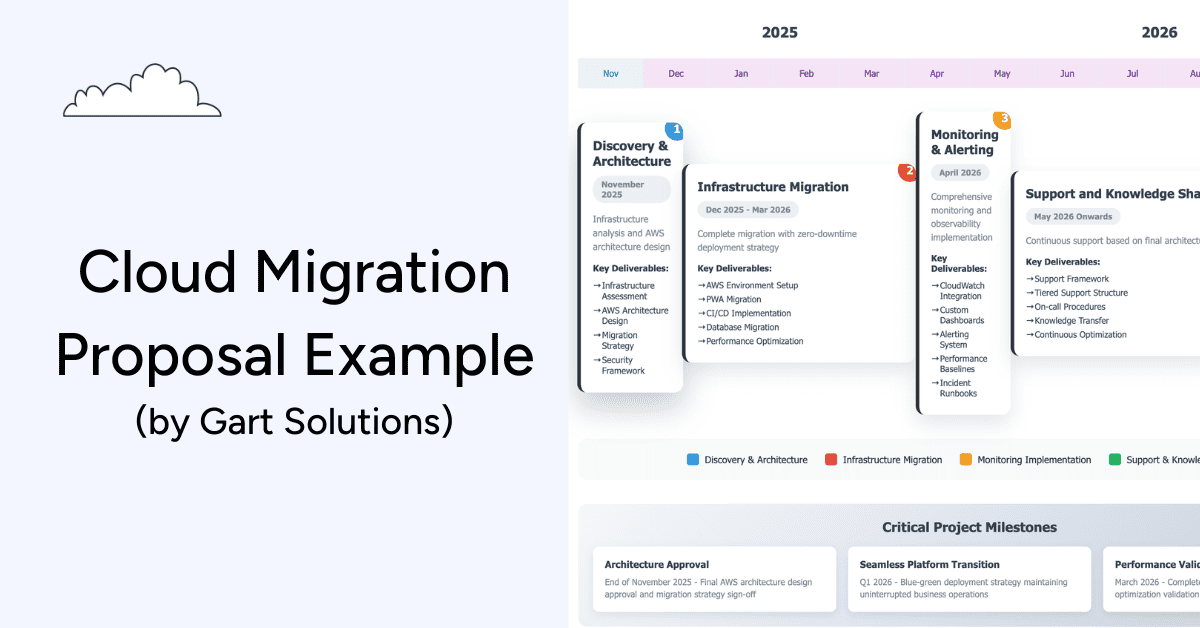
Phase 1: Discovery & Architecture – 30–40 hours of Cloud Architect time to assess infrastructure, create the AWS design, define the security framework, and outline the migration strategy.
Phase 2: Infrastructure Migration – a 3–4 month project led by a DevOps engineer, involving CI/CD setup, PWA migration, database migration, and performance optimization. Cloud architect support continues with 10 hours/month.
Phase 3: Monitoring & Alerting – a 1-month effort to implement monitoring dashboards, alerting systems, and incident runbooks.
Phase 4: Support & Knowledge Sharing – ongoing support structure to maintain, optimize, and continuously improve the cloud environment.
Rates and Roles:
Cloud Architect: $65/hour
DevOps Engineer: $45/hour
What makes this proposal strong? It’s not just the technical accuracy — it’s the clarity. It helps the client visualize the journey, understand the roles, and predict the costs.
Phase 1 – Discovery & Architecture (November 2025)
In the first phase of any cloud migration, we focus on understanding the existing infrastructure, identifying risks, defining goals, and laying the foundation for a successful migration.
Objectives of the Discovery Phase
Assess the client’s current on-premise or hybrid infrastructure
Define the target cloud architecture (AWS in this case)
Identify gaps in security, compliance, and scalability
Build a migration strategy based on technical and business needs
For Gart Solutions, this meant bringing in a Cloud Architect for 30–40 hours to perform a deep-dive into the client’s systems — conducting an infrastructure assessment, reviewing existing workloads, evaluating the security posture, and mapping out a scalable AWS architecture.
Key Deliverables
A comprehensive Infrastructure Assessment Report
AWS Architecture Design Document
Defined Migration Strategy and Security Framework
Initial timeline and cost estimation.
Phase 2 – Infrastructure Migration (Dec 2025 – Mar 2026)
With the foundation in place, it’s time to move the infrastructure. This is where most of the work (and risk) lives. But with a clear plan from the discovery phase, this step becomes far less chaotic.
At Gart Solutions, we estimate 3–4 months of DevOps work here, supported by 10 hours/month from a Cloud Architect. This shows realistic planning — not underestimating the complexity or trying to rush through it.
Migration With Zero Downtime
One of the core promises in the Gart Solutions proposal is zero-downtime deployment. That’s a big claim, but with proper CI/CD implementation and blue-green deployment strategies, it’s absolutely achievable.
Here's what happens during this stage:
AWS Environment Setup with VPC, IAM, EC2, S3, and other core services
Progressive Web App (PWA) Migration to the new environment
CI/CD Pipeline Setup using tools like GitHub Actions, Jenkins, or GitLab CI
Database Migration using tools like AWS DMS or manual data sync strategies
Performance Optimization post-migration to ensure speed and reliability
Deliverables That Move the Needle
Fully operational AWS infrastructure
CI/CD pipeline ready for future releases
Migrated and optimized application(s)
Verified database integration and performance
Risk mitigation plans and documentation
This is where the actual transformation happens. But it’s also the phase where many projects go over budget or miss deadlines. That’s why Gart Solutions helps avoid pitfalls, maintain best practices, and keep the migration aligned with the long-term vision.
Phase 3 – Monitoring & Alerting (April 2026)
After infrastructure is migrated, the work isn't over — it’s just shifted gears. Now the focus turns to observability. Without the right monitoring tools in place, even a flawless migration can lead to hidden issues that slowly erode user experience or cause downtime in the future.
Gart Solutions allocates one month to set up a full-stack monitoring and alerting system, ensuring that the client’s team will have real-time visibility into performance, usage, and system health.
Why Monitoring Is Essential
Cloud environments are dynamic. Resources scale up and down, traffic patterns shift, and costs can spiral if left unchecked. That’s why monitoring and alerting are crucial for preventing problems.
Key Deliverables
CloudWatch Integration for real-time metrics and logs
Custom Dashboards tailored to specific workloads or KPIs
Alerting Systems that notify the right team members via Slack, email, or incident tools
Performance Baselines to track improvements or degradation over time
Incident Runbooks to guide teams during outages or unusual behavior
Tools and Tech
Gart Solutions may integrate tools like:
Amazon CloudWatch
Grafana or Datadog
PagerDuty or Opsgenie for alert escalation
Terraform/Ansible for automated monitoring deployment
Phase 4 – Support & Knowledge Sharing (May 2026 Onwards)
A successful migration doesn’t just end with the last data packet — it continues through ongoing support, optimization, and education. This is what sets a vendor apart from a long-term technology partner.
Key Support Services Offered:
Tiered Support Structure for different urgency levels
On-Call Procedures to ensure 24/7 availability if needed
Knowledge Transfer Sessions, so internal teams understand the new systems
Continuous Optimization to improve costs, reliability, and performance
Documentation Handover for full transparency and control
Even simple knowledge sharing (like explaining alert thresholds, walking through AWS billing dashboards, or training someone to redeploy a microservice) can unlock self-sufficiency — and that’s a huge win.
Roles & Responsibilities: Who Owns What
Clearly defining who does what and when is a pillar of any successful cloud migration project.
Cloud Architect
Design AWS architecture
Define security posture
Advice on tooling and governanceDevOps Engineer
Execute migration
Implement CI/CD pipelines
Set up monitoring, alerting, and automation
Client Responsibilities
Provide infrastructure access and documentation
Designate key stakeholders for approvals
Assist in validation and performance testing
Attend knowledge transfer sessions
Risk Management & Mitigation Strategy
No cloud migration is without risk. The difference between success and failure lies in how well those risks are identified, planned for, and handled. Gart Solutions incorporates proactive risk management throughout the migration lifecycle.
Common Risks in Cloud Migrations
Downtime during migration
Data loss
Security misconfigurations
Unforeseen costs from misused resources
Scope creep due to unclear requirements
Gart Solutions’ Mitigation Plans
Zero-downtime deployments using blue-green or canary strategies
Automated backups before any system changes
Infrastructure as Code (IaC) for reproducible, version-controlled setups
Weekly stand-ups to spot and eliminate blockers early
Staged rollouts with rollback mechanisms in place
Business Continuity
Every risk plan is designed with business continuity in mind — so users, customers, and internal systems stay online and functional even if unexpected hiccups occur.
Gart Solutions also offers optional disaster recovery services for clients in regulated or high-stakes industries.
Pricing Breakdown & Cost Transparency
Let’s talk numbers. One of the top concerns for any client is cost control, especially with cloud projects that often have moving targets.
Estimated Costs:
Role Rate (USD/hour) Estimated Hours Total Estimate (USD) Cloud Architect $65/hour 40 (Discovery) + 10/mo ~$5,000–$7,800 DevOps Engineer $45/hour ~3-4 months (Full-time) ~$21,600–$28,800
Note: These are estimates and subject to revision post-discovery.
Optional Add-Ons:
24/7 Monitoring Support
Disaster Recovery Plan
Infrastructure Cost Optimization
Security Audits & Compliance Reports
What to Include in a Cloud Migration Proposal
If you're creating your own cloud migration proposal (or customizing a template), knowing exactly what to include is crucial.
1. Client Overview
Provide a brief summary of the client’s existing infrastructure, business context, and why they’re pursuing cloud migration. This shows that you understand their pain points and goals.
2. Migration Approach
Lay out your strategic method:
Lift-and-shift: Fastest method, minimal code change
Re-platforming: Optimizing components without major architecture overhaul
Re-architecting: Rebuilding for cloud-native performance
3. Scope of Work
Break the migration into clear phases like:
Discovery & Planning
Infrastructure Setup
Application/Data Migration
Validation & Testing
Support & Optimization
For each phase, list deliverables and responsibilities.
4. Timeline
Give a visual or tabular timeline to show:
When each phase starts/ends
Downtime windows (if any)
Milestones like "CI/CD complete" or "Monitoring live"
This helps the client plan ahead and coordinate internal resources.
5. Roles & Responsibilities
Specify:
What your team owns
What the client is expected to do
Escalation contacts
Collaboration tools (Slack, Jira, Notion, etc.)
6. Risk Management
List risks (downtime, data loss, scope creep) and your mitigation tactics. Show clients you’ve done this before and have the scars and strategies to prove it.
7. Pricing
Use a clean table format:
Rates per role
Estimated hours per phase
Optional services or support tiers
8. Next Steps
End with a simple, clear Call to Action (CTA), such as:
“Book a final discovery session”
“Approve scope to start onboarding”
“Review contract by [date]”
Cloud Migration Proposal Template You Can Use
Here’s a simple structure you can steal, copy-paste, or turn into a branded PDF deck or Notion page:
Cloud-Migration-Proposal-Template-by-Gart-SolutionsDownload
Conclusion: Why a Well-Written Cloud Migration Proposal Changes Everything
A cloud migration project isn’t just about moving from Point A to Point B — it’s about building a resilient, scalable, and future-ready foundation for a business.
By breaking your project into phases (just like Gart Solutions did), clearly outlining roles and timelines, and being upfront about costs and risks, you’re not just pitching a service —you’re proving your professionalism and technical maturity.
Make your proposal a powerful tool — not just a PDF.
Key takeaways
Repatriation is usually selective. Surveys show most enterprises plan to move some workloads back, but only a small minority plan a full exit.
The best candidates are steady, storage-heavy, egress-heavy or latency-sensitive workloads. Bursty, early-stage and globally distributed workloads usually belong in the cloud.
Published savings cases are real but specific: Dropbox and 37signals are large, stable, storage-intensive businesses. Your result depends on your own TCO model.
In our illustrative mid-size SaaS model below, run-rate savings reach about 47%, payback takes roughly two years, and five-year savings are about 28%. With a heavier operations team or a smaller cloud bill, the case weakens or disappears.
In the EU, DORA exit-strategy rules and the Data Act's ban on switching charges (from 12 January 2027) make exit readiness a governance topic, not only a cost topic.
What cloud repatriation is (and isn't)
Cloud repatriation means moving selected workloads, data or applications from a public cloud provider to private infrastructure — colocation, bare metal, a private cloud or an on-premises data centre — while usually keeping other workloads in the public cloud.
It is not a verdict that the cloud failed. For early-stage products, uncertain demand and global distribution, public cloud remains hard to beat. Repatriation becomes relevant later, when some workloads have settled into predictable patterns and the premium paid for elasticity is no longer buying anything.
We find it more useful to think in terms of workload placement: each system runs where its cost, performance and compliance profile fit best, and that placement is reviewed as the business matures.
How widespread is it? What the surveys actually say
The headline figure most often quoted comes from Barclays' CIO survey: in the first half of 2024, 83% of enterprise CIOs said they planned to move at least some workloads back from public cloud, up from 43% in late 2020 (EE Times Europe). A later edition of the survey put the figure at 86% (Cyfuture summary).
Two caveats matter. First, "plan to move at least one workload" is a low bar — it says nothing about what share of spend moves. Second, IDC research cited across the industry suggests only around 8–9% of companies plan a full-scale repatriation (CNIC Solutions summary). The realistic picture is partial moves and hybrid estates, not a mass exodus.
Why the economics shift as workloads mature
Public cloud pricing bundles three things: the infrastructure itself, the provider's operations, and the option to scale up or down at will. Early on, that option is valuable. Once a workload runs at a steady baseline 24/7, you keep paying for flexibility you no longer use.
Andreessen Horowitz's widely cited analysis, The Cost of Cloud, a Trillion Dollar Paradox (2021), put numbers on this for public software companies. The authors estimated that committed cloud spend averaged roughly half of cost of revenue across the companies they studied, and reported one billion-dollar private company whose cloud spend reached 81% of cost of revenue. Based on expert interviews, they used a working assumption that repatriation runs equivalent workloads at one-third to one-half of the cloud cost (a16z).
That analysis is an estimate built on interviews and filings, not a controlled study, and it focused on large software companies. It is a useful frame for why margins matter, not a forecast for any individual company.
The cost drivers to measure in your own bill
This is the Cloud Paradox:
the infrastructure that accelerates early growth becomes a structural tax on mature businesses.
Venture capital and public market analysts have quantified the impact. Across large software companies, cloud spend has been shown to suppress gross margins by 15–25 percentage points. Because valuation is a function of gross profit, this does not merely reduce cash flow—it destroys equity value.
At scale, cloud costs are no longer an operational detail. They become a board-level concern.
From Agility to Efficiency: A Two-Stage Infrastructure Model
The emerging consensus among infrastructure leaders is not “cloud versus on-prem,” but phase-appropriate infrastructure.
Stage 1: The Agility Phase
In the early lifecycle of a product or platform, uncertainty dominates.
Demand is volatile
Architecture is still evolving
Speed matters more than efficiency
Public cloud excels here. Elasticity, managed services, and global reach justify the premium. Paying for flexibility makes sense because flexibility is actively used.
Stage 2: The Efficiency Phase
As products mature, priorities change.
Workloads enter steady state
Usage becomes predictable
Margins and cost per transaction matter
At this stage, elasticity becomes overhead. Enterprises continue paying for burst capacity they no longer need, for abstraction layers they cannot tune, and for network paths they do not control.
Infrastructure Maturity means recognizing when a workload has crossed from Stage 1 to Stage 2—and moving it accordingly.
Deconstructing the Cloud Tax
The “cloud tax” is not a single line item. It is the cumulative effect of multiple structural costs that only become visible at scale.
1. Data Egress and Network Friction
Ingress is cheap. Egress is not.
For data-intensive workloads, network charges routinely account for 20–40% of total cloud spend. Cross-region replication, analytics pipelines, AI training data, and customer exports all trigger fees that are difficult to forecast and harder to optimize.
This creates economic lock-in: data can enter easily, but leaving is expensive.
2. Virtualization Overhead
Public cloud relies on deep abstraction. That abstraction introduces measurable performance loss—typically 5–15% per workload, which must be compensated for with additional compute.
For high-throughput databases, AI inference, real-time analytics, and latency-sensitive systems, this overhead translates directly into higher cost per request and inconsistent performance.
3. Cost Volatility
Usage-based pricing creates financial unpredictability. Infrastructure becomes a variable expense tied not just to growth, but to architectural decisions, user behavior, and even API design.
For CFOs and boards, this volatility complicates forecasting, valuation, and long-term planning.
Rather than relying on generic percentages, these are the line items we examine first in a repatriation assessment:
Data egress and transferInternet egress, cross-region replication, cross-AZ traffic and NAT processing are billed per GB. At AWS list prices, internet egress starts at about $0.09/GB in most regions. For data-heavy products, this line can grow faster than compute.
Steady-state computeInstances running at a stable baseline around the clock are the clearest candidates, especially after Savings Plans or Reserved Instances are already applied.
Storage growth. Object and block storage that grows continuously but is rarely deleted.
Performance-sensitive systemsDatabases, real-time analytics and inference services where you may be over-provisioning to compensate for noisy neighbours or abstraction overhead. The size of that overhead varies by workload, so we benchmark it rather than assume it.
Cost volatility. How much monthly spend deviates from forecast, and how hard that makes budgeting and margin planning.
If you haven't yet optimised the cloud bill itself — rightsizing, commitments, storage tiers, VPC endpoints — do that first. Many "repatriation" cases turn out to be optimisation cases.
See our guide to cloud cost optimization traps.
Real-world cases, with their context
DropboxDropbox's 2018 S-1 filing describes an "Infrastructure Optimization" programme that moved most user data from a third-party provider to its own custom infrastructure in leased colocation facilities. In 2016, payments to the third-party provider fell by $92.5M, offset by a $53.0M increase in depreciation, facilities and support costs — a net decrease of $39.5M. A further $35.1M reduction followed in 2017, for about $74.6M over two years (Dropbox S-1, SEC; GeekWire). Context: Dropbox operates at very large storage scale and kept using AWS for a portion of its storage and for some regions.
37signals (Basecamp, HEY)37signals reported a 2022 cloud bill of about $3.2M. In early 2023 it projected spending roughly $840,000 a year on owned hardware (amortised over five years) and colocation, versus about $2.3M in comparable cloud costs, and estimated $7M saved over five years (DatacenterDynamics). In October 2024 the company said its annual cloud bill had dropped to about $1.3M (remaining S3 storage), that the ~$700K of new servers had been recouped from savings during 2023, and raised its five-year estimate to more than $10M once storage moves too (DatacenterDynamics). Context: these are company-reported figures, and observers note they exclude some costs, such as future hardware refreshes and part of the operations overhead. 37signals also already had operations staff and existing data centre space.
What both cases share: large, stable, storage-heavy workloads, existing in-house infrastructure skills, and a hybrid end state rather than zero cloud.
How we built the numbers: methodology
The worked example below is illustrative. It is a composite of the cost structures we typically see in mid-size SaaS assessments, not a single client's data. These are the assumptions behind it:
ScopeOne production platform: steady compute, ~500 TB of block and object storage, ~150 TB/month of internet egress, managed databases and load balancers.
Cloud baselineCurrent monthly bill after existing Savings Plans and storage-tier optimisation, so we compare against an already-optimised cloud, not list price.
Time horizon3 and 5 years. Hardware is depreciated over 5 years; no refresh falls inside the window.
Upfront costsServer and storage hardware, plus a one-off migration budget covering engineering time, dual-running both environments during cut-over, and data transfer.
Ongoing private costsColocation rack space and power, internet transit, hardware support contracts (8% of hardware cost per year), operations staffing (fully loaded), software licences, and a residual cloud footprint for DR, burst capacity and edge delivery.
ExcludedPrice changes over the period, financing costs, tax effects, and the opportunity cost of engineering time not spent on product.
When we run this for a client, every input comes from their billing exports, utilisation metrics and vendor quotes, and we document each assumption so finance can challenge it.
Worked example: 5-year TCO for a mid-size SaaS platform
Current public cloud spend (monthly, after commitments)
Line itemMonthlyAnnualCompute (after Savings Plans)$46,000$552,000Block + object storage (~500 TB)$14,000$168,000Internet egress (~150 TB)$11,000$132,000Managed databases, load balancers, misc.$9,000$108,000Total$80,000$960,000
Repatriated / hybrid alternative
ItemCostHardware (servers, storage, network) — one-off$650,000Migration, dual-running and data transfer — one-off$250,000Colocation, 4 racks incl. power — per year$120,000Internet transit — per year$36,000Hardware support (8% of hardware) — per year$52,000Operations staffing (1.5 FTE, fully loaded) — per year$165,000Software licences — per year$40,000Residual cloud (DR, burst, CDN/edge) — per year$96,000Ongoing total — per year$509,000
Results
MetricValueRun-rate saving per year$451,000 (≈47% of the cloud bill)Upfront investment$900,000Simple payback≈24 months3-year cumulative cost: cloud vs. hybrid$2.88M vs. $2.43M → saving ≈$453K (≈16%)5-year cumulative cost: cloud vs. hybrid$4.80M vs. $3.45M → saving ≈$1.36M (≈28%)
Note how different the three numbers look. The run-rate saving (47%) is the figure people like to quote. The 3-year saving (16%) is what a CFO sees once the upfront investment is included. Both are true; only one belongs in a board deck without a footnote.
Sensitivity: what breaks the case
ScenarioEffectOperations team needs 3 FTE instead of 1.5Payback stretches to ≈38 months; 5-year saving falls to ≈$530K (≈11%)Cloud bill is $30K/month instead of $80K (smaller footprint, ~$450K upfront, 1 FTE)5-year result turns negative: roughly –$105KWorkload becomes bursty (needs 2× peak capacity on-prem)Hardware and colocation costs rise sharply; usually stay in cloud
The two variables that move results most are operations staffing and the size and stability of the cloud bill. If you can't staff the private environment (or buy managed colocation and remote hands), the savings evaporate.
When repatriation is the wrong move
Repatriation is a poor fit — or premature — in these situations:
Your cloud bill is modestBelow a few hundred thousand dollars a year, fixed costs (staff, contracts, minimum rack commitments) tend to eat the savings, as the sensitivity table shows.
Demand is spiky or unpredictableSeasonal retail, event-driven platforms and new products benefit from paying only for peaks.
You rely heavily on managed or proprietary servicesRebuilding the equivalent of a managed data warehouse, serverless stack or ML platform can cost more than it saves.
You lack infrastructure operations skills and don't want to build or buy them.
You need global reach or low-latency edge delivery in many regions.
You haven't optimised the cloud yetRightsizing, commitments and storage tiering often recover a meaningful share of spend for far less effort.
The architecture is about to changeCommitting to five years of hardware just before a major re-platforming locks in the wrong capacity.
The business case depends on hard-to-forecast growthIf capacity needs could double or halve within two years, flexibility is worth paying for.
In these cases, the right move is usually cloud cost optimisation, better commitment planning, or keeping an exit plan on paper rather than executing it.
AI workloads: a case to model, not to assume
GPU-heavy AI training and inference have renewed interest in dedicated infrastructure. The reasoning: long-running training jobs keep expensive accelerators busy for weeks, large datasets are costly to move repeatedly, and teams want predictable capacity.
The economics are highly specific, though. Compare on-demand, reserved and spot GPU pricing from hyperscalers, specialised GPU cloud providers and colocation options against your actual utilisation. Dedicated GPU clusters pay off when they stay busy; idle accelerators are among the most expensive assets a company can own. For more on planning this, see building AI-ready infrastructure.
Regulation: exit readiness in the EU
Two EU regulations make exit planning a concrete obligation rather than a nice-to-have:
DORA (Digital Operational Resilience Act). Applicable to EU financial entities since 17 January 2025, DORA Article 28(8) requires documented exit strategies for ICT services that support critical or important functions, and these should be tested and reviewed (Swfte overview; FAST LTA).
EU Data Act. Its cloud-switching rules allow only cost-based switching charges until 12 January 2027; from that date, switching charges — including data egress fees tied to a switch — are prohibited. The ban covers switching providers or moving to on-premises, not ordinary day-to-day egress (Lindahl)
Major hyperscalers already waived egress fees for customers making a full exit in 2024. Lower exit costs don't make repatriation automatically worthwhile, but they remove one barrier and make a credible exit plan easier to document. Read more: Digital Sovereignty of Europe: Choosing the EU Cloud Provider.
Why it is more feasible now
A decade ago, leaving the cloud often meant giving up operational convenience. That gap has narrowed:
Kubernetes and infrastructure-as-code (Terraform, Ansible) behave consistently across cloud and bare metal.
Modern deployment tooling supports zero-downtime releases outside hyperscalers.
Open storage and networking standards preserve portability.
Colocation providers offer remote hands and managed facilities, so you don't need to run your own building.
The operational gap is smaller, but not zero. Someone still has to own hardware lifecycle, capacity planning, security patching and incident response.
Regulation and infrastructure sovereignty
Cost and performance are no longer the only drivers.
By 2026, documented exit capability is becoming a regulatory requirement across multiple jurisdictions. Financial services, healthcare, critical infrastructure, and government-adjacent organizations must now prove they can disengage from cloud providers without service disruption.
This shifts repatriation from an optimization choice to a compliance obligation.
Infrastructure that cannot be exited is no longer considered resilient.
Read more: Digital Sovereignty of Europe: Choosing the EU Cloud Provider
Why Cloud Repatriation is feasible now
A decade ago, leaving the cloud meant sacrificing operational convenience. That is no longer true.
Modern deployment tools enable zero-downtime releases on bare metal with minimal operational overhead
Kubernetes behaves consistently across environments
Open storage and networking standards preserve portability
Colocation providers offer managed facilities without hyperscaler markups
The operational gap between public cloud and private infrastructure has narrowed dramatically. What remains is a cost and control gap—and that gap favors maturity.
Building a cloud exit strategy: a maturity framework
Successful cloud repatriation is selective, not absolute.
Audit and classify workloadsIdentify steady-state systems paying for unused elasticity.
Model long-term economicsCompare 3–5 year total cost of ownership, including margin impact—not just infrastructure invoices.
Assess operational readinessDetermine whether to own operations fully or pair private hardware with managed facilities.
Ensure portabilityStandardize data formats, deployment pipelines, and orchestration layers.
Rehearse the exitTreat exit readiness as an operational capability, not a contingency document.
The hybrid maturity era
The future is not cloud-only or on-prem-only. It is hybrid by design.
Public cloud remains the best tool for experimentation, global distribution, and burst workloads
Private infrastructure anchors predictable compute, core data, and margin-sensitive systems
Enterprises that succeed by 2026 will be those that treat infrastructure placement as a strategic lever—not a default setting.
Repatriation is not a step backward.It is the moment an organization proves it understands its own economics.
Strategic priorities for 2025–2026
Identify workloads that have outgrown elasticity
Reassess AI infrastructure economics early
Embed exit readiness into governance
Standardize on portable tooling
Elevate infrastructure cost to a valuation metric
The cloud was never the destination. It was the on-ramp.
Infrastructure Maturity is knowing when to change lanes.
The hybrid end state
In most of the engagements we see, the result is hybrid by design. Public cloud handles experimentation, burst capacity and global distribution. Private infrastructure carries predictable compute, core data and margin-sensitive systems. The placement is reviewed as workloads change — some may move back to the cloud later, and that should be easy too.
Repatriation isn't a step backwards. Done well, it shows an organisation understands its own unit economics well enough to put each workload where it belongs.
Want a fact-based view of your own numbers? Gart's IT audit maps your workloads, models 3- and 5-year TCO from your actual billing data, and shows which systems — if any — are worth moving.
Contact us