⚡ Key Takeaways
IT infrastructure security protects hardware, software, networks, and data from threats ranging from ransomware to insider attacks.
A mature security posture combines Zero Trust architecture, proactive monitoring, and a documented incident response plan.
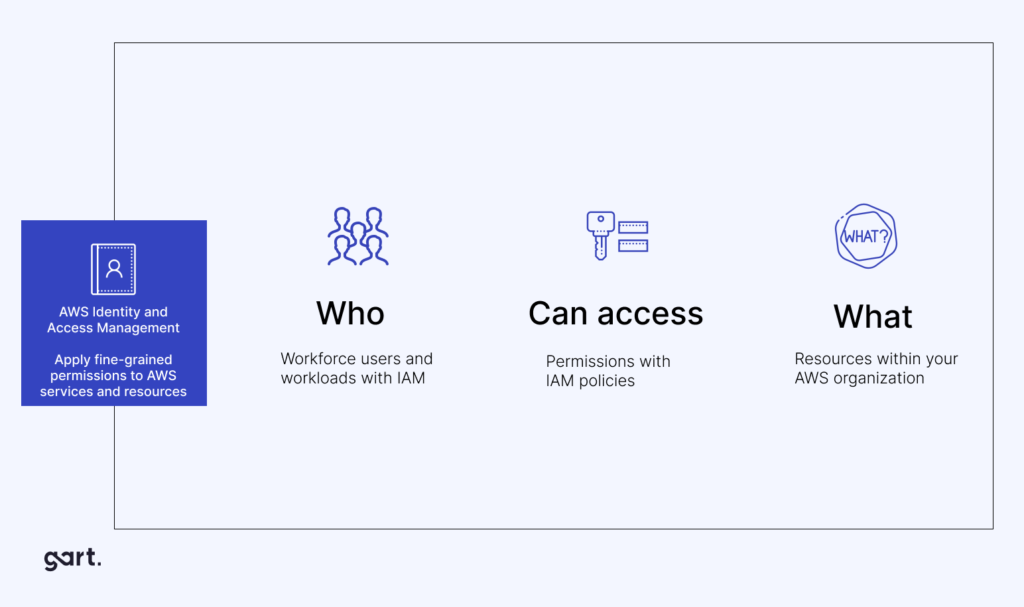
Cloud and Kubernetes environments require dedicated controls—misconfigured IAM roles and exposed dashboards are among the most common attack vectors.
Frameworks such as NIST CSF, CIS Benchmarks, and ISO 27001 provide a structured roadmap for resilience.
Human error remains the root cause in ~70% of security incidents—training and culture matter as much as tooling.
IT infrastructure security is the discipline of protecting every layer of your technology stack—hardware, networks, servers, cloud environments, and the data flowing between them—from unauthorized access, disruption, and theft. In 2025, it is not optional: a single ransomware event can cost a mid-market company millions in recovery, downtime, and reputational damage.
At Gart Solutions, we have worked with dozens of engineering teams to harden their infrastructure across AWS, Azure, GCP, and hybrid on-premises setups. This article shares what actually works—combining frameworks, tooling, and first-hand operational insight—so you can build a security posture that holds up under real-world attack conditions.
What Is IT Infrastructure Security?
IT infrastructure security encompasses all the policies, technologies, and practices an organization uses to defend its physical and virtual computing resources. It spans:
Network security — firewalls, VPNs, segmentation, intrusion detection
Server and endpoint security — hardening, patch management, RBAC, endpoint detection
Cloud security — IAM policies, encryption, misconfiguration scanning, compliance posture
Data security — encryption at rest and in transit, data classification, DLP controls
Operational security — change management, logging, monitoring, incident response
According to NIST's Cybersecurity Framework, a mature approach spans five functions: Identify, Protect, Detect, Respond, and Recover. Organizations that skip any one of these are disproportionately exposed when an incident occurs.
Top Threats to IT Infrastructure Security
Ransomware & Malware
Ransomware continues to be the most financially damaging threat. Modern ransomware groups operate as businesses—with affiliates, support desks, and negotiation teams. Double-extortion tactics (encrypt + threaten to publish) mean even organizations with good backups face significant pressure.
Gart field example: During a security audit for a SaaS client, we discovered an unpatched Windows Server 2016 instance exposed to the internet on RDP port 3389. It had been compromised by a credential-stuffing bot two weeks earlier. Isolating the host, rotating all privileged credentials, and patching reduced their exploitable attack surface by an estimated 60% within 48 hours.
Cloud Misconfigurations
Cloud misconfigurations are the leading cause of data breaches in cloud environments. According to CNCF's cloud-native security research, the most dangerous misconfigurations include:
Over-permissive IAM roles granting admin access to entire accounts
Public S3 buckets containing sensitive data or configuration files
Exposed Kubernetes API servers and dashboards without authentication
Unrestricted security group rules (0.0.0.0/0 inbound on sensitive ports)
Disabled CloudTrail / logging in production accounts
Gart field example: During one infrastructure audit, we identified over-provisioned public Azure endpoints causing both cost leakage and security exposure. Migrating workloads to private networking reduced the attack surface significantly and cut network-related costs by over 90%. What looked like a billing issue turned out to be an open door for lateral movement.
Phishing & Social Engineering
Human error remains the root cause of approximately 70% of security incidents, according to published security research. Even technically robust environments are vulnerable if employees can be manipulated into clicking a link, approving an MFA push, or sharing credentials. AI-generated spear-phishing emails are making this problem harder to defend against purely through tooling.
Insider Threats
Insider threats—both malicious and unintentional—are among the hardest to detect because insiders have legitimate access. A disgruntled engineer with production database credentials, or an overly curious employee with access they never needed, can cause more damage than most external attackers.
DDoS Attacks
Distributed Denial of Service attacks have grown in scale and sophistication. Multi-vector attacks now combine volumetric floods with application-layer exploitation, making mitigation harder. Organizations without proper DDoS protection can face extended outages costing tens of thousands of dollars per hour.
How Gart Secures IT Infrastructure: Our 7-Phase Process
After dozens of security engagements, we have refined a repeatable methodology that works for both cloud-native and hybrid environments. Here is what a structured security audit and remediation cycle looks like in practice:
Discovery & Asset InventoryWe enumerate every asset: servers, containers, cloud accounts, third-party integrations, and data stores. You cannot secure what you cannot see. We use automated scanning alongside manual review to build a complete inventory.
Threat ModellingWe map realistic attack paths using the STRIDE model (Spoofing, Tampering, Repudiation, Information Disclosure, Denial of Service, Elevation of Privilege). This prioritizes where adversaries are most likely to gain a foothold.
Risk Assessment & ScoringEach finding is scored by exploitability, business impact, and remediation effort. We use a CVSS-aligned scoring system to produce a risk-prioritized backlog—so your team fixes the right things first, not just the easiest.
Remediation & HardeningWe address critical and high findings immediately: rotate credentials, restrict network access, apply patches, and fix IAM policies. Medium findings enter a sprint-based remediation backlog with defined owners and deadlines.
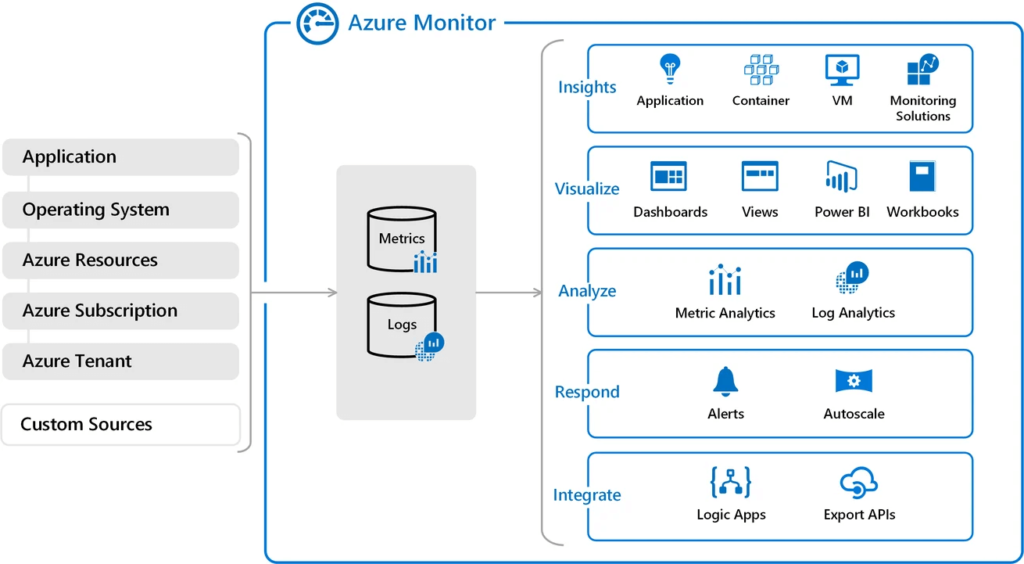
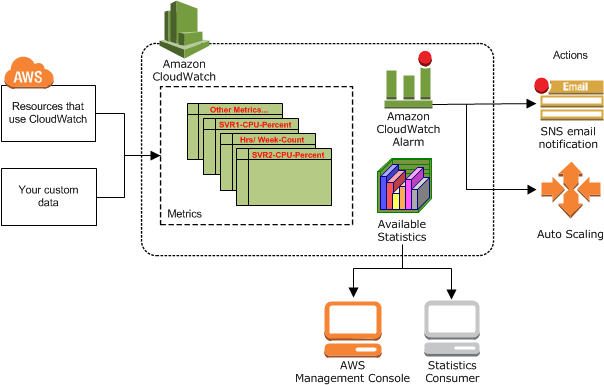
Continuous Monitoring ImplementationWe deploy or tune SIEM/alerting tooling (Datadog, Prometheus, Falco, CloudTrail Insights) to catch anomalies in real time. Dashboards and runbooks are handed to your operations team.
Incident Response PlaybookWe create or update your incident response plan, defining roles, escalation paths, communication templates, and containment procedures for the top five likely incident scenarios specific to your stack.
Continuous Optimization & Re-testingSecurity is not a project; it is a program. We schedule quarterly re-assessments, track remediation progress, and run tabletop exercises to keep readiness high as your infrastructure evolves.
Security Frameworks That Actually Drive Results
Frameworks give your security program a common language and a measurable baseline. The three we recommend most consistently are:
NIST Cybersecurity Framework (CSF 2.0)
The NIST CSF organizes security activities into six functions: Govern, Identify, Protect, Detect, Respond, Recover. It is technology-agnostic and widely recognized, making it an excellent foundation whether you are cloud-only or running a hybrid environment. See the official NIST CSF documentation for implementation tiers and profiles.
CIS Benchmarks
CIS Benchmarks provide prescriptive hardening guidance for specific technologies—Linux distributions, AWS, Azure, GCP, Kubernetes, Docker, and hundreds more. They are the closest thing to "best practice in a checklist" that exists. Automating CIS benchmark compliance checks as part of your CI/CD pipeline is one of the highest-ROI security investments an engineering team can make.
ISO 27001
ISO/IEC 27001 is the international standard for information security management systems (ISMS). It is particularly important for organizations serving enterprise or regulated-industry clients who require formal certification. ISO 27001 demands documented controls, management commitment, and regular audits—making it a robust driver of organizational security maturity.
Zero Trust Architecture: Beyond the Perimeter
The old perimeter model—"trust everything inside the firewall"—is dead. Modern environments are multi-cloud, have remote workforces, and rely on dozens of SaaS integrations. The attack surface is now everywhere.
Zero Trust architecture operates on the principle of "never trust, always verify." Every request—whether from inside or outside the network—must be authenticated, authorized, and continuously validated. Core Zero Trust pillars include:
Identity as the perimeter — MFA enforced for all accounts, including service accounts; privileged access management (PAM) for admin credentials
Least-privilege access — users and services get only the minimum permissions required; access is reviewed and revoked regularly
Micro-segmentation — workloads are isolated so a breach in one segment cannot move laterally to another
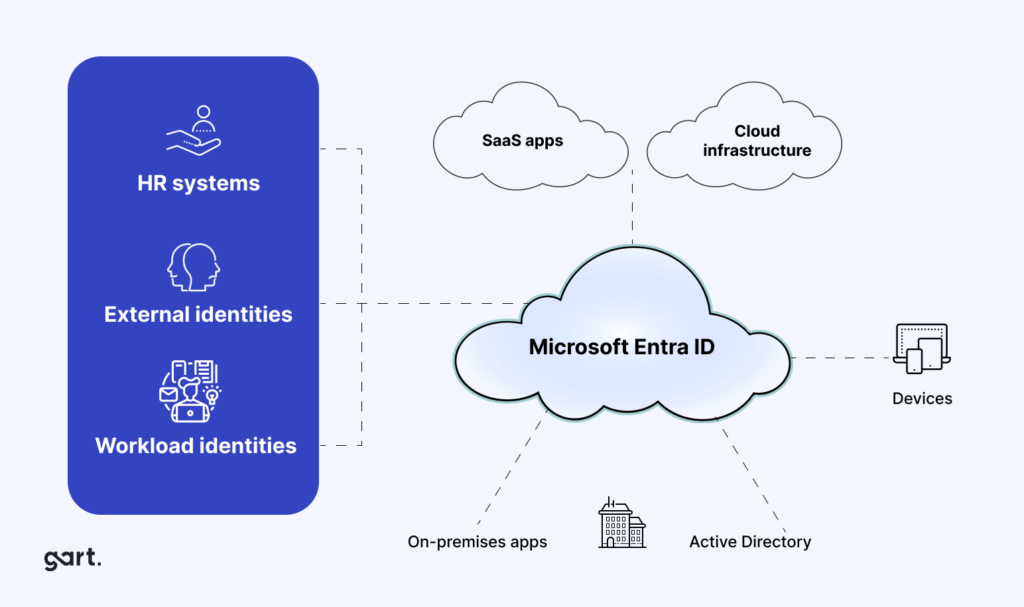
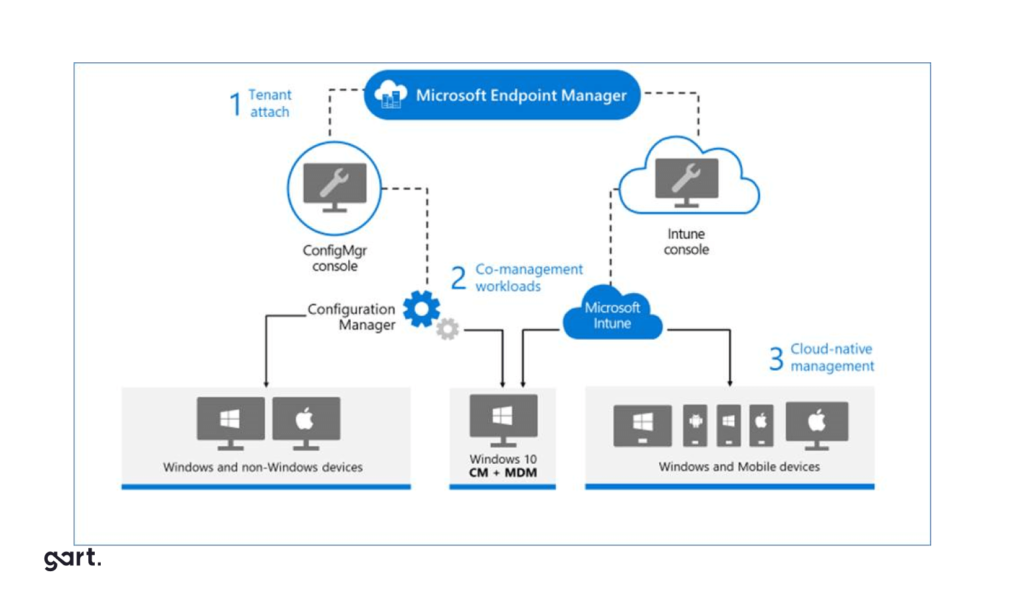
Device health verification — only compliant, managed devices can access sensitive resources
Continuous monitoring — real-time behavioral analysis to detect anomalies, not just signature-based threat detection
Kubernetes Security Best Practices
Kubernetes adoption has accelerated dramatically, and with it, a new category of infrastructure security challenges. Kubernetes clusters that are not properly hardened are a particularly attractive target because a single misconfiguration can give an attacker access to all workloads running on the cluster.
The critical Kubernetes security controls we implement for every client:
RBAC configuration — define roles at namespace level; eliminate cluster-admin bindings for non-admin users; audit service account token usage
Network Policies — restrict pod-to-pod communication to only what is explicitly required; default deny all ingress and egress at the namespace level
Pod Security Standards — enforce restricted or baseline Pod Security Standards to prevent privilege escalation and host namespace access
Image scanning in CI/CD — scan container images for known vulnerabilities before they reach production; block images above a defined severity threshold
Secrets management — never store secrets in environment variables or ConfigMaps; use Vault, AWS Secrets Manager, or Kubernetes External Secrets Operator
Runtime security — deploy Falco to detect anomalous behavior at the kernel level; alert on unexpected syscalls, privilege escalations, or outbound connections
Etcd encryption — encrypt etcd at rest; restrict etcd access to control plane nodes only
Reactive IT Support vs. Proactive Infrastructure Security
Many organizations realize they have a security gap only after an incident. Here is the structural difference between reactive IT support and a proactive IT infrastructure security program:
AreaReactive IT SupportProactive Infrastructure Security RecommendedMonitoringManual checks; problems found after users report them24/7 automated SIEM & alerting; anomalies caught in real timeThreat DetectionAfter the incident has occurredContinuous behavioral analysis & threat intelligence feedsPatch ManagementAd hoc; often delayed weeks or monthsAutomated patching with defined SLAs by severity levelAccess ControlBroad roles; access rarely reviewed or revokedLeast-privilege RBAC; quarterly access reviews; PAM for admin credentialsCompliancePeriodic point-in-time auditsContinuous compliance scanning; drift detection & remediationIncident ResponseImprovised; slow; relies on institutional memoryDocumented playbooks; defined roles; regular tabletop exercisesDisaster RecoveryBackups exist but rarely testedAutomated DR with tested, documented RTO/RPO targetsCost ProfileLow upfront, high incident cost (avg. $4.5M per data breach)Predictable investment; significantly lower incident exposure
Cloud Infrastructure Security: AWS, Azure & GCP
Figure 2: Core cloud security controls applied across multi-cloud environments.
Cloud environments introduce shared-responsibility complexity. The cloud provider secures the underlying infrastructure; you are responsible for everything you build on top of it—and most breaches happen in that "your responsibility" zone.
AWS Security Essentials
On AWS, the highest-impact controls are: enabling AWS Organizations SCPs to enforce guardrails account-wide; using AWS Security Hub with CIS Benchmark findings enabled; enabling GuardDuty for threat detection; and enforcing VPC endpoint usage to keep traffic off the public internet. Never use root credentials for day-to-day operations—create dedicated IAM users and roles with the minimum required permissions.
Azure Security Essentials
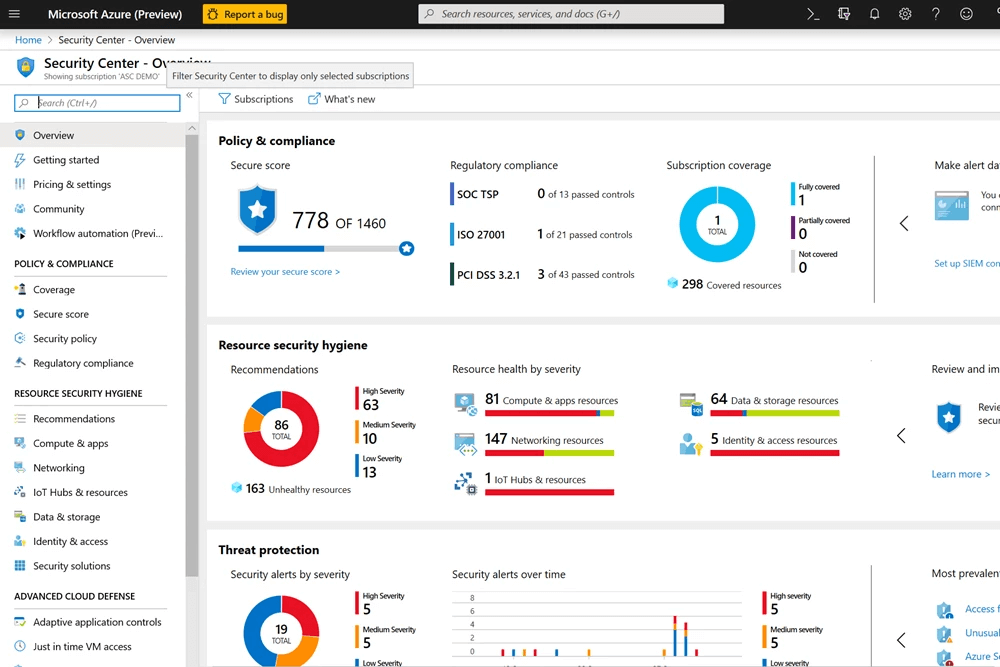
For Azure environments, Microsoft Defender for Cloud provides a unified security score and actionable recommendations. Enable Azure Policy to enforce organizational standards at scale; use Privileged Identity Management (PIM) for just-in-time admin access; and enable Diagnostic Settings on all resources so audit logs flow to a centralized Log Analytics Workspace.
Multi-Cloud Governance
In multi-cloud setups, inconsistent security policies across providers are a major risk. We recommend adopting a cloud-agnostic CSPM (Cloud Security Posture Management) tool—such as Wiz, Prisma Cloud, or open-source alternatives—that provides a unified view of misconfigurations, compliance gaps, and attack paths across all cloud accounts.
Incident Response: A Practical Playbook
Figure 3: The incident response lifecycle — from detection through post-incident review.
The difference between a contained incident and a catastrophic breach is almost always the quality of your incident response capability. An effective IR process has six phases:
Preparation — Documented playbooks, defined team roles, pre-approved communication templates, and legal/PR contacts on speed dial.
Detection & Analysis — SIEM alerts, anomaly detection, and threat intelligence feeds surface the incident. Analysts triage to confirm and scope the breach.
Containment — Short-term containment (isolate affected systems) followed by long-term containment (patch, reconfigure) to stop the bleeding without destroying forensic evidence.
Eradication — Remove malware, revoke compromised credentials, close the attack vector, and verify no persistence mechanisms remain.
Recovery — Restore systems from clean backups or known-good states. Validate system integrity before returning to production. Monitor intensively for re-compromise.
Post-Incident Review — A blameless retrospective that documents root cause, timeline, response effectiveness, and specific improvements to prevent recurrence.
Gart helps clients build and test these playbooks through tabletop exercises tailored to their stack. See our Disaster Recovery as a Service offering for organizations that need guaranteed RTO/RPO commitments.
IT Infrastructure Security Best Practices Checklist
Whether you are running a startup or an enterprise, these controls form the baseline of a defensible security posture. Use this as a starting-point checklist for your next infrastructure audit:
Control AreaWhat to ImplementPriorityIdentity & AccessMFA everywhere; least-privilege RBAC; PAM for admin credentials; quarterly access reviews🔴 CriticalPatch ManagementAutomated patching with SLAs: critical in 24h, high in 7 days, medium in 30 days🔴 CriticalNetwork SecurityMicro-segmentation; default-deny network policies; VPN or Zero Trust Network Access for remote work🔴 CriticalData EncryptionTLS 1.2+ in transit; AES-256 at rest; encrypted backups; secrets in a vault (not plaintext configs)🔴 CriticalMonitoring & LoggingSIEM with 90-day log retention; real-time alerts on privilege escalation, login anomalies, data exfiltration🟠 HighKubernetes SecurityRBAC; Network Policies; Pod Security Standards; image scanning in CI/CD; Falco for runtime detection🟠 HighCloud PostureCSPM tool enabled; CIS Benchmark compliance; no publicly accessible storage unless explicitly required🟠 HighBackup & DRAutomated daily backups; immutable backup storage; quarterly DR tests with documented RTO/RPO🟠 HighEmployee TrainingAnnual security awareness training; phishing simulations; clear incident reporting process🟡 MediumComplianceContinuous compliance scanning mapped to ISO 27001, SOC 2, GDPR, or relevant frameworks for your industry🟡 Medium
https://youtu.be/NFVCpGQFjgA?si=D8cA2q2dPR9UBpWl
Real-World Case Study: Securing a SaaS Platform's Cloud Infrastructure
SoundCampaign, an entertainment software platform, approached Gart with overlapping challenges: AWS cost overruns and fragmented CI/CD processes that were creating security gaps between development and testing teams.
Our team implemented a multi-layered solution:
Automated CI/CD pipeline using Jenkins, Docker, and Kubernetes with integrated security gates at every stage
Strict RBAC policies ensuring least-privilege access for every role in the pipeline
Encrypted secrets management—removing credentials from source code and configuration files entirely
Continuous monitoring with real-time alerting on deployment anomalies and access pattern deviations
The result: significantly reduced security exposure, elimination of inter-team conflicts caused by unclear change ownership, and measurable improvement in deployment velocity. A more secure pipeline turned out to be a faster one, too.
Gart Solutions · Infrastructure Security
Is Your IT Infrastructure Secure Enough?
Our engineering team has audited and hardened infrastructure for companies across FinTech, Healthcare, SaaS, and E-commerce—identifying critical gaps before attackers do.
What we offer:
🔍
Infrastructure Security Audit
🛡️
Zero Trust Implementation
☁️
Cloud Security Posture Management
⚙️
Kubernetes Security Hardening
📋
Compliance Readiness (ISO 27001 · SOC 2)
🚨
Incident Response Planning
99.99%
Uptime Delivered
300+
Cloud Assets Audited
45%
Avg. Incident Reduction
12+
Years of Experience
Book a Free Security Consultation →
Best Practices for IT Infrastructure Security
Good security is not only about technology. It also needs clear rules, user awareness, and regular checks. Here are the basics:
Access controls and authentication: Use strong passwords, multi-factor authentication, and manage who has access to what. This limits the risk of someone breaking in.
Updates and patches: Keep software and hardware up to date. Fixing known issues quickly reduces the chance of attacks.
Monitoring and auditing: Watch network traffic for anything unusual. Tools like SIEM can help spot problems early and limit damage.
Data encryption: Encrypt sensitive data both when stored and when sent. This keeps information safe if it gets intercepted.
Firewalls and intrusion detection: Firewalls block unwanted traffic. IDS tools alert you when something suspicious happens. Together they protect the network.
Employee training: Most attacks start with human error. Regular training helps staff avoid phishing, scams, and careless mistakes.
Backups and disaster recovery: Back up data on schedule and test recovery plans often. This ensures you can restore critical systems if something goes wrong.
Our team of experts specializes in securing networks, servers, cloud environments, and more. Contact us today to fortify your defenses and ensure the resilience of your IT infrastructure.
Network Infrastructure
A strong network is key to protecting business systems. Here are the main steps:
Secure wireless networks: Use WPA2 or WPA3 encryption, change default passwords, and turn off SSID broadcasting. Add MAC filtering and always keep access points updated.
Use VPNs: VPNs create an encrypted tunnel for remote access. This keeps data private when employees connect over public networks.
Segment and isolate networks: Split the network into smaller parts based on roles or functions. This limits how far an attacker can move if one system is breached. Each segment should have its own rules and controls.
Monitor and log activity: Watch network traffic for unusual behavior. Keep logs of events to help with investigations and quick response to incidents.
Server Infrastructure
Servers run the core systems of any organization, so they need strong protection. Key practices include:
Harden server settings: Turn off unused services and ports, limit permissions, and set firewalls to only allow needed traffic. This reduces the attack surface.
Strong authentication and access control: Use unique, complex passwords and multi-factor authentication. Apply role-based access control (RBAC) so only the right people can reach sensitive resources.
Keep servers updated: Apply patches and firmware updates as soon as vendors release them. Staying current helps block known exploits and emerging threats.
Monitor logs and activity: Collect and review server logs to spot unusual activity or failed access attempts. Real-time monitoring helps catch and respond to threats faster.
Cloud Infrastructure Security
By choosing a reputable cloud service provider, implementing strong access controls and encryption, regularly monitoring and auditing cloud infrastructure, and backing up data stored in the cloud, organizations can enhance the security of their cloud infrastructure. These measures help protect sensitive data, maintain data availability, and ensure the overall integrity and resilience of cloud-based systems and applications.
Choosing a reputable and secure cloud service provider is a critical first step in ensuring cloud infrastructure security. Organizations should thoroughly assess potential providers based on their security certifications, compliance with industry standards, data protection measures, and track record for security incidents. Selecting a trusted provider with robust security practices helps establish a solid foundation for securing data and applications in the cloud.
Implementing strong access controls and encryption for data in the cloud is crucial to protect against unauthorized access and data breaches. This includes using strong passwords, multi-factor authentication, and role-based access control (RBAC) to ensure that only authorized users can access cloud resources. Additionally, sensitive data should be encrypted both in transit and at rest within the cloud environment to safeguard it from potential interception or compromise.
Regular monitoring and auditing of cloud infrastructure is vital to detect and respond to security incidents promptly. Organizations should implement tools and processes to monitor cloud resources, network traffic, and user activities for any suspicious or anomalous behavior. Regular audits should also be conducted to assess the effectiveness of security controls, identify potential vulnerabilities, and ensure compliance with security policies and regulations.
Backing up data stored in the cloud is essential for ensuring business continuity and data recoverability in the event of data loss, accidental deletion, or cloud service disruptions. Organizations should implement regular data backups and verify their integrity to mitigate the risk of permanent data loss. It is important to establish backup procedures and test data recovery processes to ensure that critical data can be restored effectively from the cloud backups.
Are you concerned about the security of your IT infrastructure? Protect your valuable digital assets by partnering with Gart, your trusted IT security provider.
Incident Response and Recovery
A well-prepared and practiced incident response capability enables timely response, minimizes the impact of incidents, and improves overall resilience in the face of evolving cyber threats.
Developing an Incident Response Plan
Developing an incident response plan is crucial for effectively handling security incidents in a structured and coordinated manner. The plan should outline the roles and responsibilities of the incident response team, the procedures for detecting and reporting incidents, and the steps to be taken to mitigate the impact and restore normal operations. It should also include communication protocols, escalation procedures, and coordination with external stakeholders, such as law enforcement or third-party vendors.
Detecting and Responding to Security Incidents
Prompt detection and response to security incidents are vital to minimize damage and prevent further compromise. Organizations should deploy security monitoring tools and establish real-time alerting mechanisms to identify potential security incidents. Upon detection, the incident response team should promptly assess the situation, contain the incident, gather evidence, and initiate appropriate remediation steps to mitigate the impact and restore security.
Conducting Post-Incident Analysis and Implementing Improvements
After the resolution of a security incident, conducting a post-incident analysis is crucial to understand the root causes, identify vulnerabilities, and learn from the incident. This analysis helps organizations identify weaknesses in their security posture, processes, or technologies, and implement improvements to prevent similar incidents in the future. Lessons learned should be documented and incorporated into updated incident response plans and security measures.
Testing Incident Response and Recovery Procedures
Regularly testing incident response and recovery procedures is essential to ensure their effectiveness and identify any gaps or shortcomings. Organizations should conduct simulated exercises, such as tabletop exercises or full-scale incident response drills, to assess the readiness and efficiency of their incident response teams and procedures. Testing helps uncover potential weaknesses, validate response plans, and refine incident management processes, ensuring a more robust and efficient response during real incidents.
IT Infrastructure Security
AspectDescriptionThreatsCommon threats include malware/ransomware, phishing/social engineering, insider threats, DDoS attacks, data breaches/theft, and vulnerabilities in software/hardware.Best PracticesImplementing strong access controls, regularly updating software/hardware, conducting security audits/risk assessments, encrypting sensitive data, using firewalls/intrusion detection systems, educating employees, and regularly backing up data/testing disaster recovery plans.Network SecuritySecuring wireless networks, implementing VPNs, network segmentation/isolation, and monitoring/logging network activities.Server SecurityHardening server configurations, implementing strong authentication/authorization, regularly updating software/firmware, and monitoring server logs/activities.Cloud SecurityChoosing a reputable cloud service provider, implementing strong access controls/encryption, monitoring/auditing cloud infrastructure, and backing up data stored in the cloud.Incident Response/RecoveryDeveloping an incident response plan, detecting/responding to security incidents, conducting post-incident analysis/implementing improvements, and testing incident response/recovery procedures.Emerging Trends/TechnologiesArtificial Intelligence (AI)/Machine Learning (ML) in security, Zero Trust security model, blockchain technology for secure transactions, and IoT security considerations.Here's a table summarizing key aspects of IT infrastructure security
Emerging Trends and Technologies in IT Infrastructure Security
Artificial Intelligence (AI) and Machine Learning (ML) in Security
Artificial Intelligence (AI) and Machine Learning (ML) are emerging trends in IT infrastructure security. These technologies can analyze vast amounts of data, detect patterns, and identify anomalies or potential security threats in real-time. AI and ML can be used for threat intelligence, behavior analytics, user authentication, and automated incident response. By leveraging AI and ML in security, organizations can enhance their ability to detect and respond to sophisticated cyber threats more effectively.
Zero Trust Security Model
The Zero Trust security model is gaining popularity as a comprehensive approach to IT infrastructure security. Unlike traditional perimeter-based security models, Zero Trust assumes that no user or device should be inherently trusted, regardless of their location or network. It emphasizes strong authentication, continuous monitoring, and strict access controls based on the principle of "never trust, always verify." Implementing a Zero Trust security model helps organizations reduce the risk of unauthorized access and improve overall security posture.
Blockchain Technology for Secure Transactions
Blockchain technology is revolutionizing secure transactions by providing a decentralized and tamper-resistant ledger. Its cryptographic mechanisms ensure the integrity and immutability of transaction data, reducing the reliance on intermediaries and enhancing trust. Blockchain can be used in various industries, such as finance, supply chain, and healthcare, to secure transactions, verify identities, and protect sensitive data. By leveraging blockchain technology, organizations can enhance security, transparency, and trust in their transactions.
Internet of Things (IoT) Security Considerations
As the Internet of Things (IoT) continues to proliferate, securing IoT devices and networks is becoming a critical challenge. IoT devices often have limited computing resources and may lack robust security features, making them vulnerable to exploitation. Organizations need to consider implementing strong authentication, encryption, and access controls for IoT devices. They should also ensure that IoT networks are separate from critical infrastructure networks to mitigate potential risks. Proactive monitoring, patch management, and regular updates are crucial to address IoT security vulnerabilities and protect against potential IoT-related threats.
These advancements enable organizations to proactively address evolving threats, enhance data protection, and improve overall resilience in the face of a dynamic and complex cybersecurity landscape.
Supercharge your IT landscape with our Infrastructure Consulting! We specialize in efficiency, security, and tailored solutions. Contact us today for a consultation – your technology transformation starts here.
Fedir Kompaniiets
Co-founder & CEO, Gart Solutions · Cloud Architect & DevOps Consultant
Fedir is a technology enthusiast with over a decade of diverse industry experience. He co-founded Gart Solutions to address complex tech challenges related to Digital Transformation, helping businesses focus on what matters most — scaling. Fedir is committed to driving sustainable IT transformation, helping SMBs innovate, plan future growth, and navigate the "tech madness" through expert DevOps and Cloud managed services. Connect on LinkedIn.
Strategic network design is the invisible backbone of every scalable, high-performing, and secure business. Get it right early, and your cloud infrastructure scales gracefully, deployments accelerate, and downtime stays near zero. Get it wrong, and a single architectural decision made in year one can cost your organization six figures to undo — or worse, it never gets fixed at all.
This guide is written for CTOs, CIOs, and engineering leaders who are either building cloud infrastructure from scratch, scaling an existing environment, or preparing for a cloud migration. It covers everything from fundamental network design principles to AWS and Azure architecture patterns, a proprietary planning checklist, real client stories, and the most expensive mistakes we see repeated across organizations of every size.
At Gart Solutions, our infrastructure and DevOps teams have reviewed, redesigned, and optimized network architectures for dozens of companies across SaaS, eCommerce, fintech, and enterprise. What follows is the accumulated insight from those engagements.
What Is Network Design — and Why Does It Determine Business Growth?
Network design is the architectural planning of how devices, systems, services, and users communicate with each other — across data centers, cloud environments, and the public internet. A well-executed network design defines the topology, segmentation model, routing policy, security perimeter, and scalability strategy of your entire technical infrastructure.
In cloud-native environments — built on AWS, Azure, or GCP — network design manifests primarily through Virtual Private Cloud (VPC) architecture, subnet segmentation, security group policy, inter-service communication patterns, and cross-region connectivity. It is the foundation on which every other infrastructure decision is made.
Why it matters for growth:
As your business scales — adding new services, expanding to new regions, onboarding enterprise clients, or pursuing compliance certification — your network architecture either enables that growth or actively blocks it. Most organizations don't realize the constraint until the damage is already done.
$9,000
Average cost per minute of IT downtime for mid-size companies
74%
Of cloud migrations that encounter network rearchitecting mid-project
40%
Reduction in deployment time after proper network segmentation
According to the Cloud Native Computing Foundation (CNCF), one of the leading causes of failed Kubernetes deployments is underestimated network complexity — specifically, the absence of a deliberate networking strategy before workloads go live. The challenge isn't cloud technology; it's the architecture underneath it.
How Poor Network Design Directly Impacts Revenue
The business cost of bad network design is rarely visible at first. It accumulates in engineering hours, deployment delays, and outage events — until one day it's visible in lost deals, churned customers, or a six-figure re-platforming bill.
Downtime and Revenue Loss
A single 30-minute outage during a peak traffic event — a product launch, Black Friday, or a quarterly billing cycle — can eliminate an entire day's revenue and trigger customer churn that takes months to recover. When that outage is caused by a flat network routing failure or an improperly segmented VPC, it is entirely preventable.
Slower Deployment Velocity
Engineering teams in organizations with poorly segmented environments spend significant time working around network constraints — manually granting access, debugging cross-environment routing failures, or waiting for firewall rule approvals. A proper network design — with clearly separated dev, staging, and production environments — removes these bottlenecks structurally.
Failed or Costly Cloud Migrations
When organizations attempt to migrate to cloud without a network design strategy, they often default to "lift and shift" into a single flat VPC. This works temporarily but creates enormous technical debt. Re-segmenting a live production environment months later — under business pressure — is significantly more expensive and risky than doing it right at the start. The Linux Foundation's LF Networking initiative has documented this pattern across enterprise adoption studies as one of the primary drivers of cloud project overruns.
Compliance Failures and Security Incidents
SOC 2, ISO 27001, PCI DSS, and GDPR all have explicit requirements around network segmentation, access control, and data flow isolation. An organization with a flat, unsegmented network cannot achieve these certifications without first rearchitecting its network. In sectors like fintech, healthcare, and enterprise SaaS, this is the difference between closing and losing an enterprise deal.
Problems Associated with Lack of Network Design
If the network design is not designed with future growth in mind, it will be difficult to add new resources and expand the cloud infrastructure.
An unoptimized network design can lead to performance problems such as latency and packet loss.
The lack of clear network segmentation can make it vulnerable to cyberattacks.
Moving resources from one network to another can be very difficult if the network design was not carefully planned.
One of our clients, RetailNow, an e-commerce company, experienced rapid growth but overlooked proper network planning. They implemented a single, flat network for all their services, which led to several critical problems
As new services and applications were added, integrating them into the existing network became increasingly difficult. The lack of a structured network design resulted in operational inefficiencies and frequent outages.
The initial network setup wasn't designed to scale. As RetailNow expanded operations to new regions, they encountered significant issues with network performance and reliability, leading to lost sales and frustrated customers.
The absence of a strategic network design led to increased operational costs. RetailNow had to invest heavily in network redesign and optimization to support their growing business needs.
The 5 Most Expensive Network Design Mistakes We See
Here are common mistakes businesses make when creating network designs:
Flat network structure
As mentioned in the RetailNow example, using a single, flat network for all services is a serious mistake. This complicates the integration of new services and leads to performance and security issues.
A flat network structure, in short, is a network design where all devices are connected to a single network segment or broadcast domain, without any hierarchical divisions or subnetworks.
Key characteristics of a flat network structure include:
Single broadcast domain
No subnets or VLANs
All devices share the same network address space
Limited traffic segregation
Simplified setup but poor scalability
This design is simple to implement for small networks but becomes problematic as the network grows, leading to increased traffic, reduced performance, and security challenges.
Insufficient Network Segmentation
When all services — databases, APIs, internal tooling, and public-facing applications — share the same subnet without granular security group rules, a single compromised resource can move laterally across the entire environment. Proper segmentation limits blast radius and is foundational to Zero Trust architecture.
Insufficient segmentation in network design refers to the inadequate division of a network into smaller, distinct subnetworks or segments. Here's a brief explanation:
Insufficient segmentation is characterized by:
Too few subnetworks or VLANs
Overly large network segments
Lack of logical separation between different types of traffic or user groups
Poor isolation of sensitive systems or data
Consequences of insufficient segmentation include reduced security due to broader attack surfaces, increased network congestion, difficulty in implementing access controls.
Proper segmentation helps improve security, performance, and manageability of the network by creating logical boundaries between different parts of the network infrastructure.
Ignoring scalability
CIDR block sizing, IP address space planning, and subnet capacity are decisions that are nearly impossible to change once production traffic is running. Many organizations run out of IP space or encounter routing conflicts during scaling, requiring complete network redesign at the worst possible time.
A scalable network design allows for easy expansion, improved performance under increased load, and the ability to adapt to changing business needs without major restructuring.
Ignoring scalability is characterized by designing only for current needs without considering future expansion, using inflexible network architectures, choosing hardware or software solutions that can't easily accommodate growth, etc.
Consequences of ignoring scalability include:
Network performance degradation as user numbers or data traffic increase
Difficulty in adding new services or applications
Costly and disruptive network redesigns or overhauls
Inability to expand to new geographic locations or integrate with other networks
Limitations on business growth due to network constraints
Suboptimal topology
Not using efficient topologies, such as hub-and-spoke, can complicate management and reduce network efficiency. Suboptimal topology in network design refers to the inefficient or ineffective arrangement of network components and their connections.
Examples of suboptimal topologies:
Overuse of hub-based networks instead of more efficient switch-based designs.
Daisy-chain configurations that create long, vulnerable paths without redundancy.
Flat networks without proper hierarchical structure, leading to broadcast storms and security issues.
Overly complex mesh networks that are difficult to manage and troubleshoot.
Consequences of suboptimal topology:
Reduced network performance and user experience
Higher operational costs due to inefficient use of resources
Increased vulnerability to network outages
Difficulty in implementing effective security measures
Challenges in network expansion and adaptation to new technologies
Complications in troubleshooting and resolving network issues
To avoid suboptimal topology, network designers should consider:
Implementing hierarchical designs (core, distribution, access layers)
Using efficient topologies like hub-and-spoke for wide area networks
Incorporating redundancy and load balancing
Designing for scalability and future growth
Optimizing traffic flow based on application requirements
Balancing between centralized and distributed network functions
Lack of centralized management
Failing to consider the need for centralized network management can lead to operational inefficiencies and security issues. Characteristics of lack of centralized management:
Decentralized control: Network components and services are managed independently, without a unified approach.
Multiple management interfaces: Different tools or platforms are used to manage various parts of the network.
Inconsistent policies: Security, access, and configuration policies may vary across different network segments.
Limited visibility: No single point of oversight for the entire network infrastructure.
Manual processes: Reliance on manual configuration and updates rather than automated, centralized solutions.
Implementing centralized management often involves deploying network management systems (NMS) or software-defined networking (SDN) solutions that provide a single pane of glass for network operations. This approach allows businesses to more effectively manage their network infrastructure, improve security, and respond more quickly to changing business needs.
More Network Design Mistakes:
Neglecting security: Insufficient attention to implementing robust security policies and firewalls makes the network vulnerable to attacks.
Insufficient connection planning: Poor planning of connections between different environments (development, testing, production) can lead to performance and security issues.
Ignoring compliance requirements: Neglecting compliance requirements when designing the network can lead to problems with regulatory bodies in the future.
Inefficient IP address management: Poor IP addressing planning can lead to conflicts and complicate future expansion.
Lack of documentation: Insufficient or absent documentation of network design makes future maintenance and modification of the network difficult.
These mistakes highlight the importance of careful planning and involving experienced professionals when developing network designs for businesses.
Client Example
RetailNow: The Cost of a Flat Network Architecture
RetailNow is an eCommerce company that scaled from startup to mid-market in under three years. Their infrastructure grew alongside their business — reactively, with no underlying network design strategy. All services ran in a single flat VPC on AWS: the database, the payment processor, the public storefront, the internal admin panel, and development tooling.
When they began expanding operations into new regions and onboarding enterprise retail partners, the problems became critical. Integrating new services into the existing network required manual reconfiguration of routing tables and security groups across every environment — a multi-week process each time. A minor misconfiguration in a development workload caused a four-hour production outage during a promotional campaign. Compliance certification for a major retail partner was blocked pending a full network segmentation audit.
After a network redesign engagement with Gart Solutions — migrating to a segmented multi-region VPC architecture with separate environment subnets, centralized routing via Transit Gateway, and a Zero Trust security layer — RetailNow achieved the following:
✓
40% reduction in deployment time
✓
Zero environment-crossing incidents post-migration
✓
SOC 2 Type II certification achieved within 4 months
✓
Enterprise partner onboarding time reduced from 6 weeks to 11 days
Gart's 5-Layer Scalable Network Design Framework
After years of designing and redesigning cloud network architectures, we've developed an internal framework that we apply to every infrastructure engagement. It's not a rigid template — it's a mental model that ensures every critical concern is addressed before a single resource is provisioned.
1. Boundary & Perimeter LayerDefines the outer security perimeter — WAF, DDoS protection, public load balancers, CDN configuration, and ingress traffic control. Everything public-facing lives and terminates here.
2. Environment Segmentation LayerStrict separation of production, staging, and development environments into isolated VPCs or network segments with no default cross-environment routes. Promotes compliance readiness from day one.
3. Service Communication LayerDefines how internal services talk to each other — service mesh configuration, internal load balancers, private DNS, and least-privilege security group rules. Kubernetes networking (CNI plugins, network policies) is managed at this layer.
4. Data & Storage Access LayerGoverns how compute resources access databases, object storage, caches, and message queues. All data services live in private subnets with no public internet exposure, accessible only via defined routes.
5. Observability & Resilience LayerNetwork flow logs, traffic anomaly detection, cross-region health checks, and automated failover policies. You cannot manage what you cannot observe — this layer makes the network transparent.
Cloud Network Architecture Best Practices for AWS & Azure
Cloud providers give you powerful networking primitives — but they don't make architectural decisions for you. Here's how strong network design translates into the specific constructs available on the two dominant platforms.
AWS VPC Best Practices
Plan your CIDR block ranges to accommodate at least 3x your expected growth before provisioning — IP space cannot be easily reclaimed later.
Use separate VPCs per environment (prod, staging, dev) connected via AWS Transit Gateway for centralized routing and policy enforcement.
Deploy NAT Gateways per Availability Zone, not per region, to prevent cross-AZ data transfer costs and eliminate single points of failure.
Implement AWS Network Firewall at the VPC level for stateful packet inspection on east-west (service-to-service) traffic.
Use VPC Flow Logs exported to S3 or CloudWatch for forensic visibility and compliance audit trails.
Never expose databases or internal services to public subnets — use PrivateLink or VPC endpoints for AWS service access without traversing the public internet.
Azure Network Design Best Practices
Use Hub-and-Spoke topology via Azure Virtual WAN to centralize shared services (DNS, firewalls, monitoring) in a hub VNet while spoke VNets host workloads.
Apply Network Security Groups (NSGs) at the subnet level — not just at the VM NIC level — for defense in depth.
Leverage Azure Private Endpoint for PaaS services (Storage, SQL, CosmosDB) to keep traffic entirely within your virtual network.
Use Azure DDoS Protection Standard on all public-facing resources in production environments.
Implement Azure Firewall Premium for TLS inspection and IDPS on cross-region and hub egress traffic.
Zero Trust Network Architecture
Zero Trust is not a product — it is a network design philosophy that eliminates implicit trust based on network location. In a Zero Trust architecture, every service-to-service call is authenticated and authorized, regardless of whether both services are "inside" the network perimeter. This is implemented through service mesh technologies (Istio, Linkerd), mutual TLS (mTLS), and granular identity-based policy. According to Synergy Research Group, organizations adopting Zero Trust principles experience up to 50% fewer network-related security incidents within the first year of implementation.
In Azure, network design is a key part of the Azure Landing Zones framework. This framework offers a comprehensive approach to designing network infrastructure, including:
Using a hub-and-spoke topology to centralize connections and simplify management.
Implementing security and management policies at the central hub level.
Segmenting the network into different environments (development, testing, production) through separate spoke networks.
Centralized management through Azure Network Manager.
Hub-and-spoke Network Topology
Azure Landing Zones utilize a hub-and-spoke network topology, which centralizes connectivity and simplifies management. In this design, a central hub network connects multiple spoke networks, each representing different environments such as development, testing, and production.
Each spoke network can be dedicated to different functions such as development, testing, or production. This design provides several advantages:
Centralized Security: The hub can enforce security policies and monitor traffic between spokes, ensuring that all communications are secure and compliant.
Simplified Management: By centralizing network management in the hub, organizations can reduce the complexity of their network operations. This makes it easier to manage connections and enforce policies across the entire network.
Flexible Scalability: New spokes can be added as needed without disrupting existing operations. This flexibility allows organizations to scale their infrastructure in response to changing business requirements.
In AWS, the recommended approach to network design includes:
Using Amazon VPC (Virtual Private Cloud) to create isolated network environments.
Implementing AWS Transit Gateway for centralized routing management between VPCs and on-premises networks.
Using AWS Control Tower for automated setup and management of multi-account environments.
Applying AWS Network Firewall for centralized network protection.
Both providers emphasize the importance of segmentation, scalability, centralized management, and security - precisely those aspects that, when neglected, lead to the typical mistakes described in the article.
This is how leading cloud platforms address the problems associated with typical network design mistakes and offer structured approaches to creating effective network architecture. This ties in well with the common mistakes discussed earlier, such as:
Flat network structure: Addressed by hub-and-spoke designs in Azure and VPC segmentation in AWS.
Insufficient segmentation: Solved through spoke networks in Azure and separate VPCs in AWS.
Ignoring scalability: Both platforms offer solutions that can easily scale with business needs.
Suboptimal topology: The recommended architectures from both providers aim to optimize network topology.
Lack of centralized management: Addressed by Azure Network Manager and AWS Control Tower.
Network Design Planning Checklist
Use this checklist before designing or redesigning any cloud network architecture. Each item represents a decision point that, if deferred, will cost significantly more to address later.
Planning AreaKey DecisionCommon MistakeIP & CIDR PlanningAllocate address space for 3x projected growthUnder-sized CIDR blocks requiring full VPC rebuildEnvironment SeparationIsolated VPCs for prod, staging, devSingle flat VPC across all environmentsMulti-Region StrategyActive-passive or active-active failover topologySingle-region deployment with no DR planVPC SegmentationPublic, private, and data subnets per AZAll resources in public subnetsSecurity PolicyLeast-privilege security groups and NACLsOpen inbound rules (0.0.0.0/0) on sensitive portsIAM & Network PolicyNetwork-level IAM conditions on resource accessIAM policies without VPC source conditionsMonitoring & ObservabilityFlow logs, anomaly detection, and alerting from day oneNetwork logging added only after an incidentDisaster Recovery TopologyDefined RTO/RPO targets with tested failover pathsNo tested DR procedure until a real outage occursNetwork Design Planning Checklist
Poor Network Design vs. Optimized Network Design
Dimension❌ Poor Network Design✅ Optimized Network DesignArchitectureFlat, single VPC for all workloadsSegmented, environment-isolated multi-VPCScalabilityManual scaling, frequent reconfigurationAuto-scaling with pre-allocated address spaceSecurityShared environments, broad firewall rulesZero Trust, least-privilege, mTLSComplianceCannot pass SOC 2 or PCI DSS without rearchitectingBuilt-in audit trails, segmentation, access logsDeployment VelocityBlocked by network access requests and routing bugsSelf-service, automated, via IaC (Terraform)CostHidden costs: unnecessary data transfer, redesign overheadOptimized routing, predictable traffic costsDisaster RecoveryNo tested failover — discovered during an incidentAutomated cross-region failover, tested quarterlyPoor Network Design vs. Optimized Network Design
When Should a Business Redesign Its Network Architecture?
The right time to redesign is always before you need to. But there are clear signals that architectural debt has accumulated to the point where a redesign is unavoidable:
Your engineering team spends more than 10% of sprint capacity managing network access, firewall rules, or routing issues — work that should be structural, not manual.
You are preparing for a compliance audit (SOC 2, ISO 27001, PCI DSS) and your current architecture cannot meet segmentation requirements without significant changes.
You are expanding into new geographic markets or cloud regions and your current network architecture does not support multi-region deployment natively.
You have experienced a security incident and the post-mortem identified lateral movement as a contributing factor — which is, by definition, a segmentation failure.
You are migrating from a monolith to microservices and your flat network cannot support the service-mesh and granular communication policies that distributed architecture requires.
A major enterprise client or partner has issued a security questionnaire and your network topology cannot satisfy their vendor assessment requirements.
As noted in Platform Engineering's infrastructure maturity research, most engineering organizations begin their platform engineering journey precisely because their network and infrastructure architecture can no longer support the velocity of delivery they need.
Gart Solutions · Network & Cloud Infrastructure
Need a Network Architecture That Scales With Your Business?
Gart Solutions designs, audits, and rebuilds cloud network architectures for growing technology companies. We help engineering teams move from reactive firefighting to intentional, scalable infrastructure — without slowing down delivery.
🔍
Network Architecture Audit
🏗️
VPC & Cloud Network Design
🛡️
Zero Trust Implementation
🌍
Multi-Region Deployment
📋
Compliance Readiness
⚡
DevOps & IaC Automation
Schedule a Free Infrastructure Consultation →
Conclusion
Planning a network design from the beginning is crucial for any growing business. It ensures that the infrastructure can scale efficiently, maintain security, and support the company's evolving needs. A well-designed network, guided by experienced DevOps engineers or cloud architects, can save businesses from costly reconfigurations and operational disruptions in the future.
@import url('https://fonts.googleapis.com/css2?family=Figtree:wght@400;500;600;700;800&display=swap');
.gart-infra-cta-section {
font-family: 'Figtree', sans-serif;
padding: 40px 0;
background-color: #FFFFFF;
width: 100%;
}
.gart-infra-cta-container {
background-color: #F2F4FB; /* Brand Light Periwinkle / Soft Blue background */
border-radius: 16px; /* Uniform soft-edged modular geometry */
max-width: 1100px;
margin: 0 auto;
padding: 48px 40px;
box-sizing: border-box;
box-shadow: 0 10px 30px rgba(55, 68, 185, 0.03);
}
.gart-infra-cta-tag {
color: #3744B9; /* Primary Royal Blue */
font-size: 0.85rem;
font-weight: 700;
text-transform: uppercase;
letter-spacing: 0.05em;
margin-bottom: 12px;
display: inline-block;
}
.gart-infra-cta-title {
font-size: 2rem;
font-weight: 800; /* Bold weight, sentence case for approachable precision */
color: #000000;
margin: 0 0 20px 0;
line-height: 1.25;
letter-spacing: -0.02em;
max-width: 800px;
}
.gart-infra-cta-desc {
font-size: 1.05rem;
font-weight: 400;
color: #222222;
line-height: 1.65;
margin: 0 0 32px 0;
max-width: 850px;
}
/* Core Competency Grid Layout with thin structural boundaries */
.gart-infra-services-grid {
display: grid;
grid-template-columns: repeat(3, 1fr);
gap: 16px;
margin-bottom: 40px;
}
.gart-infra-service-box {
background-color: #FFFFFF;
border: 1px solid #E2E6F5;
border-radius: 10px; /* Soft-edged square accentuation */
padding: 16px 20px;
display: flex;
align-items: center;
gap: 12px;
box-sizing: border-box;
box-shadow: 0 2px 8px rgba(55, 68, 185, 0.01);
}
.gart-infra-service-icon {
font-size: 1.2rem;
flex-shrink: 0;
line-height: 1;
}
.gart-infra-service-name {
font-size: 0.95rem;
font-weight: 600;
color: #000000;
margin: 0;
}
/* High contrast conversion button layout */
.gart-infra-btn-wrapper {
display: flex;
}
.gart-infra-btn {
display: inline-block;
background-color: #3744B9; /* High-contrast Primary Blue */
color: #FFFFFF !important;
text-decoration: none !important;
font-weight: 700;
font-size: 1.05rem;
padding: 16px 32px;
border-radius: 8px;
transition: background-color 0.2s ease, transform 0.2s ease;
box-shadow: 0 4px 14px rgba(55, 68, 185, 0.2);
border: none;
cursor: pointer;
}
.gart-infra-btn:hover {
background-color: #2A3499;
transform: translateY(-2px);
}
/* Responsive styling breakpoints */
@media (max-width: 992px) {
.gart-infra-services-grid {
grid-template-columns: repeat(2, 1fr);
gap: 14px;
}
}
@media (max-width: 768px) {
.gart-infra-cta-container {
padding: 32px 24px;
margin: 0 16px;
}
.gart-infra-cta-title {
font-size: 1.65rem;
}
.gart-infra-services-grid {
grid-template-columns: 1fr;
gap: 12px;
margin-bottom: 32px;
}
.gart-infra-btn-wrapper {
display: block;
}
.gart-infra
Definition of IT Infrastructure
Think of IT infrastructure as the digital backbone of your organization. It encompasses hardware, software, networks, and services that work together to manage and process your data. From storing emails to running critical applications, IT infrastructure makes it all happen. Without it, your business operations would struggle, impacting communication, data storage, and customer support. A robust IT infrastructure ensures that everything in your company functions smoothly and efficiently.
So, what does IT infrastructure actually consist of? To understand how IT infrastructure supports your business, let's break down its core components.
IT Infrastructure Components
Key takeaway: IT infrastructure components are the interconnected systems — hardware, software, networking, cloud, security, data management, and operations — that power everything your business does digitally. Getting them right is no longer just an IT problem; it's a strategic business decision that directly impacts your ability to scale, secure, and compete.
A decade ago, understanding your IT infrastructure meant knowing where your servers were and who managed the firewall. In 2026, that picture is unrecognizably more complex — and more consequential. Gartner forecasts global AI spending to reach approximately $2.5 trillion in 2026, with a significant portion directed toward the infrastructure required to support AI workloads. The organizations that thrive will be those that treat IT infrastructure components not as a cost center, but as the strategic foundation of everything they build.
This guide breaks down every critical component of IT infrastructure — what each one is, why it matters, and how they must work together in a world shaped by hybrid cloud, AI, zero trust security, and edge computing. Whether you're modernizing a legacy environment, architecting a cloud-native stack, or auditing what you already have, this is your reference point.
What Are IT Infrastructure Components?
IT infrastructure components are the complete set of hardware, software, network resources, and services that an organization requires to operate, manage, and deliver its digital capabilities. They form the environment in which applications run, data flows, and people work. The term encompasses everything from a physical server in a data center rack to the identity access management policy that governs who can log into a SaaS platform.
IT infrastructure components are essential for supporting the operations and management of an organization's IT environment. These components include hardware, software, network resources, and services required for the existence, operation, and management of an enterprise IT environment.
Here’s a breakdown of the primary IT infrastructure components:
Hardware
Servers: Centralized computing resources that provide services to other computers over a network.
Data Centers: Facilities used to house computer systems and associated components, such as telecommunications and storage systems.
Storage Devices: Devices like hard drives, SSDs, NAS (Network Attached Storage), SAN (Storage Area Network), and cloud storage solutions.
End-user Devices: Desktops, laptops, tablets, smartphones, and other devices used by employees to access network services.
Software
Operating Systems: Software that manages hardware and software resources on devices, such as Windows, Linux, and macOS.
Enterprise Applications: Business applications like ERP (Enterprise Resource Planning), CRM (Customer Relationship Management), and other business-specific applications.
Virtualization Software: Tools like VMware and Hyper-V that allow multiple virtual machines to run on a single physical machine.
Networking
Routers and Switches: Devices that manage traffic between networks and direct data to its destination.
Firewalls: Security systems that monitor and control incoming and outgoing network traffic based on predetermined security rules.
Cabling and Wireless Networks: Physical and wireless connections that enable communication between devices.
VPNs (Virtual Private Networks): Secure connections that enable remote access to a network.
Data Management
Databases: Structured sets of data held in a computer, especially one that is accessible in various ways.
Data Warehouses: Systems used for reporting and data analysis.
Backup and Recovery Solutions: Tools and processes to ensure data can be restored in case of loss or corruption.
Security
Identity and Access Management (IAM): Frameworks and technologies for managing digital identities and providing secure access to resources.
Encryption: Methods for securing data in transit and at rest.
Security Software: Antivirus, anti-malware, and other protective software.
Cloud Services
Public Cloud: Services provided by third-party providers like AWS, Azure, and Google Cloud.
Private Cloud: Cloud infrastructure operated solely for a single organization.
Hybrid Cloud: A combination of public and private cloud services, allowing data and applications to be shared between them.
IT Support and Management Tools
Monitoring Tools: Software for tracking the performance and health of IT infrastructure.
Configuration Management: Systems for managing and maintaining consistency in an organization’s IT infrastructure.
Help Desk and Ticketing Systems: Platforms for managing IT service requests and incidents.
Understanding and effectively managing these components are crucial for ensuring the efficiency, security, and scalability of an organization’s IT infrastructure.
IT Infrastructure Components at a Glance
The table below summarizes the primary components, their function, and representative technologies across each domain:
Component DomainPrimary FunctionKey Technologies / Examples2026 PriorityHardwarePhysical compute, storage, networkingRack servers, NVMe storage, GPU accelerators, data center UPSAI-dense compute, liquid coolingNetworkingConnectivity, routing, security perimeterNGFW, SD-WAN, Wi-Fi 7, load balancersZero Trust network access, Wi-Fi 7 refreshSoftwareOS, apps, orchestration, IaCLinux, Kubernetes, Terraform, AnsibleIaC maturity, container securityCloud ServicesElastic compute, managed services, SaaSAWS, Azure, GCP, multi-cloud platformsFinOps, hybrid computing governanceSecurityProtection, compliance, identityIAM, SIEM, EDR, encryption, Zero TrustIdentity-first Zero Trust, post-quantum cryptoData ManagementStorage, analytics, recoveryPostgreSQL, Snowflake, Databricks, backup vaultsAI-ready data pipelines, lakehouse adoptionIT OperationsMonitoring, automation, service managementDatadog, ServiceNow, AIOps platformsAIOps, observability, agentic automation
How IT Infrastructure Components Work Together
The most important insight about IT infrastructure components is that they are interdependent systems — not independent building blocks. A well-designed infrastructure architecture treats each domain as part of an integrated whole, with deliberate decisions made about how each layer interacts with the others.
The best-architected environments are designed with resilience at every layer:
Redundancy in hardware and networking prevents single points of failure
Auto-scaling in cloud layers absorbs unpredictable demand spikes
IaC ensures every environment is deployed consistently and can be reproduced
Distributed security controls enforce policy at every layer, not just the perimeter
Automated backup and DR processes recover from failure with minimal human intervention
Observability platforms provide cross-layer visibility that enables rapid root cause analysis
Defined runbooks and ITSM processes translate monitoring alerts into coordinated operational response
What is Cloud in IT Infrastructure?
The cloud refers to services and storage accessed over the internet rather than through local servers or personal devices.
It's like having a virtual storage and computing service that you can access from anywhere, at any time. This means you don't need to invest in expensive hardware or worry about maintaining it, as cloud service providers handle all of that for you. The cloud makes it easier to scale your resources up or down based on your needs, providing flexibility and cost-efficiency for your business.
Types of Cloud Deployment Models: public, private, and hybrid clouds. Advantages of cloud computing:
Scalability: Cloud services can be easily scaled up or down to match the demands of the business.
Cost Efficiency: Pay-as-you-go model, which eliminates the need for significant upfront investments in hardware.
Flexibility and Accessibility: Cloud services can be accessed from anywhere, at any time, providing flexibility for remote work and global operations.
Types of Cloud Service Models: IaaS, SaaS, PaaS
Infrastructure as a Service (IaaS) provides virtualized computing resources over the internet, including servers, storage, and networking (AWS EC2, Google Compute Engine, Microsoft Azure Virtual Machines.).
Platform as a Service (PaaS) provides a platform allowing customers to develop, run, and manage applications without dealing with the underlying infrastructure (AWS Elastic Beanstalk, Google App Engine, Microsoft Azure App Services).
Software as a Service (SaaS) delivers software applications over the internet on a subscription basis, eliminating the need for installation and maintenance (Google Workspace, Microsoft Office 365, Salesforce).
IT Infrastructure Component Trends Shaping 2026
The infrastructure landscape is not static. Several major forces are reshaping how organizations design, deploy, and manage their IT infrastructure components right now:
1. Hybrid Computing as the Default Architecture
Hybrid computing — orchestrating workloads across on-premises, public cloud, private cloud, and edge environments — has become the steady-state for enterprise IT. Gartner identifies this as the top I&O trend for 2026, predicting it will fundamentally reshape how infrastructure investment decisions are made.
2. AI-Ready Infrastructure
As enterprises move from AI experimentation to production deployment at scale, their infrastructure must support GPU-accelerated compute, high-throughput NVMe storage, real-time inference APIs, and the data pipelines that feed model training. Infrastructure that wasn't designed for AI will expose its limits quickly.
3. Zero Trust Architecture as the Security Standard
The perimeter-based security model is effectively obsolete. In 2026, Zero Trust — verifying every access request regardless of origin — has become the baseline expectation for enterprise security architecture, not a aspirational framework.
4. AIOps and Autonomous Operations
AI-driven operations tooling is maturing from anomaly detection to autonomous remediation. Agentic AI systems can now identify, diagnose, and resolve a growing class of operational incidents without human intervention — fundamentally changing the role of the infrastructure operations team.
5. IaC Going Enterprise-Wide
Infrastructure as Code has matured from a DevOps best practice to an enterprise-wide standard. Teams that embraced IaC early now manage complex multi-cloud, multi-region environments with levels of consistency and auditability that manual approaches simply cannot deliver.
6. Managed Services Adoption
60% of organizations now use managed service providers for data infrastructure support — more than double the rate from just a year prior. Internal teams are being stretched by complexity, and the economics of specialized external expertise are increasingly compelling.
Conclusion
For businesses looking to optimize their IT infrastructure, an IT infrastructure audit can provide invaluable insights. An audit helps identify strengths, weaknesses, and areas for improvement, ensuring that your IT environment is robust, secure, and aligned with your business goals. Gart Solutions offers comprehensive IT infrastructure audits, providing expert analysis and recommendations to enhance your IT capabilities and support your business growth.
Gart Solutions · Infrastructure Services
Need Expert Hands on Your IT Infrastructure?
Gart Solutions works with CTOs, CIOs, and engineering leaders to design, build, migrate, and manage every layer of modern IT infrastructure — from cloud architecture to DevOps automation to security posture.
We don't just advise. We deliver.
☁️
Cloud Migration & Architecture
AWS, Azure, GCP — on-premise to cloud or multi-cloud optimization
⚙️
DevOps & IaC
Terraform, Kubernetes, CI/CD pipelines built for scale
🔍
IT Infrastructure Assessment
Quick Wins Audit — security, performance, and cost in one engagement
🔒
Security & Compliance
Zero Trust implementation, IAM, and compliance readiness
📊
Infrastructure Monitoring
End-to-end observability and AIOps integration
🤖
AI-Ready Infrastructure
GPU compute, data pipelines, and MLOps environments
Get a Free Consultation →