Firebase vs MongoDB is really a choice between a bundled application platform and a database you assemble a stack around. Firebase is Google's managed backend platform, built around Firestore — a serverless NoSQL document database wired directly into authentication, hosting, cloud functions, and real-time sync. MongoDB is a general-purpose document database on its own: you run it on MongoDB Atlas (multi-cloud, or self-hosted) and bring your own auth, hosting, and compute layer around it. Both store flexible, JSON-like documents, which is exactly why teams so often assume they're interchangeable — and why the wrong pick tends to surface as a billing or scaling surprise, not a day-one bug.
This guide compares the real differences in data modeling, real-time sync, pricing, and scaling, and ends with a decision framework rather than a verdict. If your team is mid-evaluation — or already facing a migration in either direction — Gart Solutions runs dedicated database migration services that handle exactly this kind of switch without the downtime or data-loss risk that keeps most teams putting it off for years.
What Firebase and MongoDB Actually Are
Firebase gives you an application platform. MongoDB gives you a database. That distinction explains most of the confusion in this comparison: "Firebase" isn't a single product, it's a suite — Firestore (the document database), Firebase Auth, Cloud Storage, Cloud Functions, Hosting, and Firebase Cloud Messaging, all provisioned from one console and billed on one account. MongoDB, by contrast, is purpose-built as a database, full stop. You choose where it runs — MongoDB Atlas as a managed service across AWS, Azure, or Google Cloud, or a self-hosted deployment on your own infrastructure — and you wire up authentication, hosting, and serverless compute yourself, from whichever vendors you prefer.
That framing matters more than it sounds, because a team comparing "Firebase vs MongoDB" in isolation is often really comparing "a bundled backend-as-a-service" against "a database I'll assemble a stack around" — a broader decision than the two document databases alone. Our Supabase vs MongoDB comparison covers the same bundled-platform-vs-standalone-database tradeoff from the relational side, if that's the pairing you're actually weighing.
The two also sit at very different points in the market. Per the DB-Engines document-store ranking for April 2026, MongoDB leads the category by a wide margin with a popularity score of 385.02, while Google Cloud Firestore ranks 7th at 9.76 and Firebase Realtime Database ranks 5th at 15.97 — roughly a 25–40x gap. That doesn't make Firestore the wrong choice for a given app, but it does mean MongoDB has a deeper hiring pool, tooling ecosystem, and third-party integration base to draw on at scale.
Data Modeling and Query Capabilities
Both Firestore and MongoDB store schema-flexible, JSON-like documents grouped into collections, so on paper the data models look similar. The differences show up in how you query that data. MongoDB's aggregation pipeline supports rich multi-stage queries, joins across collections ($lookup), and ad-hoc filtering on any field without pre-planning — closer to what a relational developer expects, minus the enforced schema. Firestore's query engine is deliberately simpler and more restrictive: compound queries need a matching composite index defined in advance, there's no native equivalent of a SQL join, and certain filter combinations (like range filters on more than one field) aren't supported at all without restructuring the data.
DimensionFirebase (Firestore)MongoDBData modelSchema-less documents grouped in collections, nested subcollectionsSchema-less documents (BSON), flexible by defaultQuery languageFirestore query API — composite indexes required for compound queries, no native joinsMongoDB Query Language (MQL), aggregation pipeline, $lookup joinsHosting modelGoogle Cloud only, fully serverlessMongoDB Atlas (AWS, Azure, GCP) or self-hosted anywhereBundled servicesAuth, Hosting, Cloud Functions, Storage, Messaging — all includedDatabase only — auth, hosting, and compute are separate integrationsScaling modelFully serverless, auto-scales reads/writes, no cluster to sizeVertical scaling by cluster tier, plus native horizontal shardingBest fitMobile/web apps wanting a complete managed platform with minimal opsProducts needing complex queries, multi-cloud flexibility, or high-volume write scaleData Modeling and Query Capabilities
Real-Time Sync: Firestore Listeners vs. MongoDB Change Streams
Real-time sync is one of Firebase's strongest, most differentiated features. Firestore's onSnapshot() listeners push live updates to every connected client the moment a document changes, with offline persistence and automatic conflict resolution built in — it was designed from the ground up for chat apps, collaborative tools, and live dashboards. MongoDB offers a comparable capability through Change Streams, which let an application subscribe to real-time data changes on a collection, but it's an add-on capability layered onto a general-purpose database rather than the platform's core design point — you'll typically pair it with a WebSocket or pub/sub layer you build and operate yourself.
If real-time collaboration is a core product requirement rather than a nice-to-have, Firestore's listeners will get you to a working prototype faster. If real-time updates are one feature among many in a broader system with complex query and reporting needs, MongoDB's Change Streams plus your own real-time layer give you more control over exactly how that layer behaves under load.
Scaling and Architecture
Firestore is fully serverless — there's no cluster to size, no instance to provision, and reads and writes scale automatically with traffic. That's a genuine operational advantage for small teams, but it also means you have less control over performance characteristics under unusual load patterns; you're scaling within Google's multi-tenant infrastructure on Google's terms. MongoDB Atlas requires picking and sizing a cluster tier (or scaling it manually/via auto-scaling rules), which is more operational overhead but gives you native horizontal sharding across both reads and writes — a pattern common for high-volume event streams, IoT telemetry, or activity feeds that outgrow a single serverless database's practical limits.
In practice, most consumer and B2B SaaS products never hit genuine Firestore scaling ceilings — the operations question that actually matters day to day is less "can this scale" and more "can I predict and control my bill as it scales," which is where the two platforms diverge sharply (see the pricing section below).
Pricing Compared: Per-Operation vs. Per-Cluster
This is where the two platforms genuinely diverge, not just cosmetically. Per Firebase's own Firestore pricing documentation, the free Spark plan includes 50,000 document reads, 20,000 writes, and 20,000 deletes per day, plus 1 GiB of storage and 10 GiB of monthly outbound transfer. Past that, the paid Blaze plan bills per operation: $0.06 per 100,000 document reads, $0.18 per 100,000 writes, and $0.02 per 100,000 deletes. MongoDB Atlas, by contrast, bills for cluster capacity rather than individual operations — MongoDB's pricing page shows a free shared M0 tier, with dedicated clusters starting around $57–$85/month all-in for an entry M10 tier (compute, storage, and backups), regardless of how many reads and writes you run against it.
Plan tierFirebase (Firestore)MongoDB AtlasFree tierSpark plan — 50K reads/day, 20K writes/day, 20K deletes/day, 1 GiB storageShared M0 cluster, 512 MB storageEntry production tierBlaze (pay-as-you-go) — $0.06/100K reads, $0.18/100K writes, $0.02/100K deletes~$57–$85/mo — M10 dedicated cluster, compute + storage + backupsBilling basisPer document operation — scales directly with traffic and query patternsPer cluster hour — predictable regardless of read/write volume within capacityWhat's bundledAuth, Hosting, Cloud Functions, Storage, MessagingDatabase only; auth/hosting/compute priced or built separately
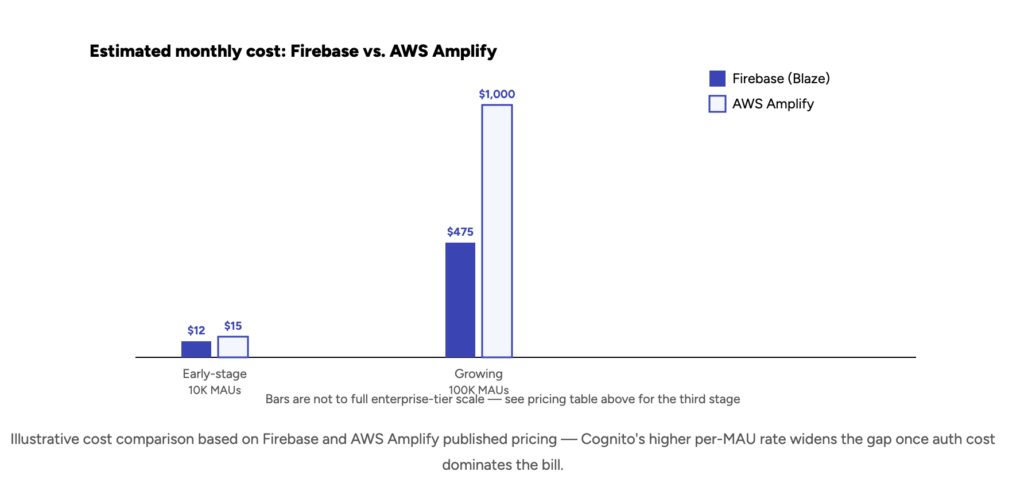
That per-operation model is exactly what makes Firebase billing feel unpredictable at scale, and it isn't a hypothetical risk. In our own cautionary tale about cloud cost overruns, a team running on Firebase's free/low-tier plan racked up over 116 billion document read operations in a matter of hours — a single inefficient query pattern, left unchecked, turned a near-zero database bill into a five-figure emergency almost overnight. MongoDB's cluster-based pricing doesn't eliminate cost risk (an undersized cluster still throttles or falls over under load), but it fails in a more contained, predictable way: performance degrades before the bill spikes.
A few practical levers worth knowing before you commit to either model:
On Firestore, watch composite-index-heavy queries and any client-side polling loop — both multiply read counts fast, and a client re-fetching a full collection on every render is the single most common cause of runaway Firestore bills.
On MongoDB Atlas, right-size the cluster tier to actual query load rather than defaulting to the entry M10 — an undersized cluster degrades before it errors, so cost problems tend to show up as latency complaints, not invoice shock.
On both platforms, set billing alerts and usage quotas before launch, not after the first spike — Firebase in particular has no default cap that stops a runaway workload from billing indefinitely on Blaze.
Security, Compliance, and Vendor Lock-In
Firestore's access control runs through Firebase Security Rules — a declarative, document-path-based rules language that lives alongside your data and is evaluated on every client request. It's powerful for mobile/web apps talking to the database directly, but the rules themselves become a genuine attack surface: a misconfigured or overly permissive rule set is one of the most common real-world Firebase security incidents, since client apps often query the database directly rather than through a server layer. MongoDB relies on more conventional role-based access control (RBAC), field-level encryption, and network-level controls (VPC peering, IP allowlisting on Atlas) — closer to what a security or compliance team evaluating a standalone database expects to review.
Vendor lock-in is the other consideration teams underweight early on. Firestore only runs on Google Cloud — there's no self-hosted or multi-cloud option, so your database is permanently coupled to one vendor's infrastructure, pricing changes, and regional availability. MongoDB Atlas runs across AWS, Azure, and Google Cloud, and MongoDB itself can be self-hosted, which matters directly for teams with data-residency requirements or EU-sovereignty obligations. For regulated teams weighing either platform against specific compliance obligations, Gart's compliance audit service can assess the choice against your actual regulatory footprint before you commit, rather than after an auditor flags it.
AI and Vector Search
Both platforms now support vector embeddings for AI and retrieval-augmented generation (RAG) workloads. Firestore added native K-nearest-neighbor vector search directly on top of its existing document collections, so you can store embeddings alongside the documents they describe without standing up a separate vector database. MongoDB Atlas Vector Search offers the same idea with more maturity and tuning options — approximate nearest-neighbor indexing, hybrid search combining vector and traditional filters, and better support for very large vector counts on a single cluster.
For most product teams adding a RAG feature to an existing app, the deciding factor isn't the vector search implementation itself — it's whichever database you're already running everything else on. Teams already deep in the Firebase ecosystem (Auth, Functions, Firestore) get a real simplicity win from keeping vectors in the same database; teams with heavier query and reporting needs around their AI features tend to find MongoDB Atlas Vector Search's additional tuning knobs worth the extra operational surface.
Migrating Between Firebase and MongoDB
Because both platforms store document-shaped data, a Firebase-to-MongoDB migration is less about schema translation than migrations from a relational database usually are — the harder work is untangling the coupling between Firestore and the rest of the Firebase suite. Security Rules need to be rebuilt as application-level authorization or MongoDB RBAC policies. Any logic that assumed Firestore's automatic offline sync or real-time listeners needs an equivalent built around Change Streams. And anything wired directly to Firebase Auth, Cloud Functions, or Hosting needs its own migration plan, independent of the database move itself. The reverse direction — MongoDB to Firestore — is less common in practice, but follows the same logic: denormalizing collections to fit Firestore's document-path model and rebuilding server-side authorization as Security Rules.
A handful of practices consistently separate clean Firebase-to-MongoDB migrations from painful ones:
Inventory every Firebase service in use, not just Firestore. Auth providers, Cloud Functions triggers, and Security Rules all need their own migration plan — treating this as "just a database swap" is the most common way these projects blow their timeline.
Rebuild Security Rules as explicit authorization logic before cutover. Document exactly what each Firestore rule permits and denies, then translate it to MongoDB RBAC or application-level checks — don't discover a permissions gap in production.
Run a dual-write or change-data-capture sync window. Streaming writes to both databases during a transition period lets you validate MongoDB against real production traffic before an irreversible cutover.
Re-test every composite-index-dependent query. Query patterns tuned around Firestore's index constraints often have a faster, simpler equivalent once you have MongoDB's full aggregation pipeline available — worth a deliberate review pass, not just a lift-and-shift.
Decision Framework: Which One Fits Your Product
Rather than a single verdict, here's how the choice tends to shake out once teams get specific about their actual requirements:
Choose Firebase if you want a complete managed platform (database, auth, hosting, functions) from day one, real-time sync is a core product feature, and you're comfortable being coupled to Google Cloud long-term.
Choose MongoDB if you need complex queries and joins, multi-cloud or self-hosted flexibility, more predictable pricing at scale, or you're assembling a stack from best-of-breed vendors rather than a single bundled platform.
Get outside help evaluating either if you're mid-migration, inheriting a database decision from an earlier team, or need the choice validated against specific compliance or cost obligations before committing — this is the exact gap Gart's SRE and reliability engineering and database migration engagements are brought in to close.
Whichever direction fits, the sequencing that avoids regret is consistent: model your actual query patterns and realistic read/write volume before committing, not after a production billing spike or a scaling wall has made the decision expensive to reverse. For the narrower relational-engine question underneath this comparison, see our MongoDB vs. PostgreSQL comparison as a companion piece on the same evaluation logic applied to a different pairing.
Choosing — or migrating — between Firebase and MongoDB?
Gart Solutions plans and executes database migrations between Firestore and MongoDB (in either direction), with data-model redesign, security-rule translation, zero-downtime cutover, and post-migration performance tuning built into every engagement.
10+
Years in DevOps & Cloud
50+
Enterprise clients served
4.9★
Clutch rating
Database Migration
Cloud Migration Services
DevOps Consulting
SRE & Reliability
IT Audit & Compliance
Talk to a Gart Engineer →
Evaluating managed backends? See Firebase vs AWS Amplify: pricing, features and migration.
You might also like
MongoDB vs MySQL: Choosing the Right Database
Cloud Migration Services
DevOps Consulting
Lovable + Supabase Integration: What Breaks in Production
Digital Sovereignty of Europe: A Cloud Guide
Roman Burdiuzha
Co-founder & CTO, Gart Solutions · Cloud Architecture Expert
Roman has 15+ years of experience in DevOps and cloud architecture, with prior leadership roles at SoftServe and lifecell Ukraine. He co-founded Gart Solutions, where he leads cloud transformation and infrastructure modernization engagements across Europe and North America. In one recent client engagement, Gart reduced infrastructure waste by 38% through consolidating idle resources and introducing usage-aware automation. Read more on Startup Weekly.
A practical look at the reasons behind the move, what happens to your data and auth, and how to plan a migration that doesn't break production.
Firebase is a great way to ship a first version fast. Firestore, Auth, and Storage come pre-wired, and for a prototype or an early MVP, that speed is exactly what you need. The problems tend to show up later — once the data model has real relationships, the bill has real traffic behind it, and the team wants row-level access control instead of a parallel rules language to maintain.
That's the point where a Firebase to Supabase migration usually enters the conversation. This guide walks through why teams make the move, what actually changes under the hood — data model, authentication, storage, realtime — and how complex the process really is, based on the patterns we see across migrations at Gart Solutions.
TL;DR
01 / Data Model
Firestore's NoSQL model struggles with relational data and complex queries; Postgres handles both natively, with real joins instead of denormalization workarounds.
02 / Pricing & Scaling
Firebase billing scales with reads, writes, deletes, and bandwidth — which gets unpredictable fast. Supabase's pricing is flatter and easier to plan against.
03 / Security & APIs
Supabase ships Row Level Security, instant REST and GraphQL APIs, and Realtime on top of standard Postgres — no separate rules DSL to maintain.
04 / Migration Effort
Migration complexity is moderate: reshaping the data model is the hard part, while Auth has an official, well-documented export/import path.
Expert Migration Support
Gart Solutions plans and executes migrations of any complexity — from Firebase specifically, and from the wider Postgres and BaaS ecosystem more broadly.
Why teams are leaving Firebase for Supabase
Firestore wasn't built for relational data
Firestore is a document database. That's fine for flat, self-contained records — a user profile, a single chat message — but most real products don't stay flat for long. Orders reference customers and inventory. Bookings reference venues, staff, and availability windows. The moment your data has real relationships, Firestore forces a choice: denormalize (copy data into multiple documents and keep it in sync by hand) or fan out writes across collections to simulate a join that a relational database gives you for free.
Composite indexes are often the tell. If your Firestore console is full of them, it's usually a sign the underlying data wants to be relational and is being modeled around a document store instead of with one. Postgres — the database underneath Supabase — handles joins, foreign keys, and multi-table queries as first-class operations, because that's what it was designed for.
Firebase bills are hard to predict
Firebase's pricing model charges per document read, write, and delete, plus bandwidth and storage. That's manageable at low volume, but it means the cost of a feature is only really visible once it's in production and traffic finds it. It's a familiar pattern in Firebase communities: an inefficient listener, a missing index, or a feature that goes viral for the wrong reasons can turn a predictable few-hundred-dollar month into a bill an order of magnitude higher, with little warning until the invoice arrives.
Supabase's pricing is built around compute and storage tiers rather than per-operation billing, which makes it substantially easier to forecast costs as a product scales — and to catch a runaway query before it becomes a runaway bill.
SQL and Row Level Security "out of the box"
Firebase security is enforced through a separate rules language (Firestore Security Rules) that lives outside your schema and has to be kept in sync with it by hand as the app evolves. Supabase takes a different approach: Row Level Security (RLS) policies are written in SQL, live directly on the Postgres tables they protect, and are enforced by the database itself — not by a middleware layer your team has to trust blindly.
On top of that, Supabase auto-generates REST and GraphQL APIs directly from your Postgres schema, so a properly modeled, RLS-protected table is immediately queryable from the client without writing a custom backend layer for it.
What actually happens during a Firebase to Supabase migration
Data: reshaping Firestore documents into Postgres tables
There's no 1:1 mapping between a Firestore collection and a Postgres table, and that's the part of the migration that actually takes engineering judgment. Each collection needs a decision: does it become its own table, a foreign-keyed child table, or a JSONB column for genuinely flexible, schema-less fields? Subcollections, arrays of references, and denormalized copies of data all need to be resolved into a coherent relational schema before a single row gets migrated.
In practice, this means exporting Firestore data (typically via the Firebase Admin SDK or a batch export), transforming it against the new schema, and bulk-loading it into Postgres — then validating record counts and referential integrity before cutting traffic over.
A concrete example makes this less abstract. A typical Firestore orders document, denormalized the way Firestore encourages, looks something like this:
{
"orderId": "ord_8f21",
"customerName": "Maria Kovalenko",
"customerEmail": "maria@example.com",
"items": [
{ "sku": "SKU-100", "name": "Wireless Mouse", "qty": 2, "price": 19.99 },
{ "sku": "SKU-204", "name": "USB-C Hub", "qty": 1, "price": 34.50 }
],
"status": "shipped",
"createdAt": "2026-06-12T10:04:00Z"
}
Customer details are copied directly into the order because Firestore has no native join — if customerName changes, every past order document with the old name stays stale unless you write a background job to fix it. The equivalent Postgres schema removes that duplication entirely:
create table customers (
id uuid primary key default gen_random_uuid(),
name text not null,
email text unique not null
);
create table orders (
id uuid primary key default gen_random_uuid(),
customer_id uuid references customers(id),
status text not null,
created_at timestamptz not null default now()
);
create table order_items (
id uuid primary key default gen_random_uuid(),
order_id uuid references orders(id) on delete cascade,
sku text not null,
name text not null,
qty integer not null,
price numeric(10,2) not null
);
Three tables instead of one denormalized document, a real foreign key relationship, and no background job needed to keep customer data in sync. This is the kind of decision that has to be made collection by collection — and it's the actual engineering work in a Firebase to Supabase migration, not the data transfer itself.
Translating Firestore Security Rules into Postgres RLS policies
The mental shift here is worth spelling out, because it changes how access control is written, not just where. A common Firestore rule looks like this:
match /orders/{orderId} {
allow read: if request.auth.uid == resource.data.ownerId;
}
The equivalent Supabase RLS policy is SQL, attached directly to the table:
alter table orders enable row level security;
create policy "Users can read their own orders"
on orders for select
using (auth.uid() = customer_id);
Functionally similar, but the enforcement point has moved from an external rules engine to the database itself — which means every client (your app, a script, an admin dashboard, a future integration) gets the same protection automatically, instead of needing to independently respect the same rules logic.
Auth: preserving users and password hashes
Supabase publishes an official Firebase Auth migration path, including an import script that carries over user records and — for compatible authentication methods — existing password hashes, so end users aren't forced to reset their passwords the moment you cut over. Users who signed in via Google, Apple, or another OAuth provider migrate even more cleanly, since there's no password hash to carry over at all — just the account record and provider linkage.
Storage and security rules
Files in Firebase Storage move over to Supabase Storage buckets in a fairly direct transfer. The part that needs actual rework is the security layer: Firebase Storage Security Rules have to be rewritten as Supabase Storage RLS policies. The upside is that once that's done, storage access control uses the exact same policy language and mental model as your database access control — one system instead of two.
Realtime listeners
Firestore's onSnapshot listeners and Supabase Realtime solve the same problem — pushing live updates to clients — through fundamentally different mechanisms. Firestore uses its own sync protocol; Supabase Realtime is built on Postgres's logical replication (change data capture). That difference means realtime subscription code on the client needs to be rewritten against Supabase's API, not just repointed at a new URL.
Cloud Functions and backend glue code
Firebase Cloud Functions fall into two rough categories, and they migrate very differently. HTTP-triggered functions — the ones called directly from your client or a webhook — map fairly cleanly onto Supabase Edge Functions, which also run on-demand, close to the database, without you managing a server. The rewrite is mostly a change of runtime conventions, not of logic.
Firestore-triggered functions — the ones that fire automatically onCreate, onUpdate, or onDelete for a document — don't have a direct equivalent, because that trigger model is specific to Firestore. The Postgres way to get the same behavior is a database trigger calling a function, or a Database Webhook that fires on row changes and calls an Edge Function or external endpoint. It's the same outcome, but it has to be deliberately rebuilt rather than ported.
How to validate a migration before cutover
A migration that "looks done" and a migration that's actually safe to cut traffic over to are two different things. The validation step is where that gap gets closed, and skipping it is how silent data loss makes it to production. A reasonably thorough validation pass covers:
Row count reconciliation — every migrated table's row count matches the source collection's document count, accounting for any intentional filtering or splitting.
Spot-check integrity — pull a random sample of records from both systems and compare field-by-field, not just record counts. Aggregate counts can match while individual records are subtly wrong.
Referential integrity checks — confirm every foreign key actually resolves (no orphaned order_items rows pointing at an order_id that doesn't exist).
Shadow-read testing — for a window before cutover, run the same read query against both Firestore and Supabase from the application layer and log any mismatches, without serving the Supabase result to users yet.
Dual-write monitoring — during a staged cutover, writes go to both systems and get compared continuously, so a discrepancy surfaces before the old system is switched off, not after.
None of this is exotic engineering — it's the same discipline any production data migration needs, regardless of source or destination. It's just easy to skip under deadline pressure, which is exactly when it matters most.
How long does a migration actually take
Complexity, not data volume, is the real driver of migration timelines. As a rough guide, based on the pattern of projects we scope at Gart Solutions:
Project size
Typical scope
Rough timeline
Small
Few collections, mostly flat documents, OAuth-heavy auth, tolerant of a maintenance window
1–2 weeks
Medium
Moderate relational structure, mixed password/OAuth auth, some custom Cloud Functions, staged cutover required
3–6 weeks
Large
Deep relational data, heavy Security Rules logic, high-traffic production system, zero-downtime requirement
6–12+ weeks
These ranges assume the schema design work happens up front rather than mid-migration — which is the single biggest lever on whether a project lands in the low or high end of its bracket.
How complex is a Firebase to Supabase migration, really?
Component
Complexity
Why
Data model
Moderate–High
No 1:1 mapping from Firestore collections to Postgres tables; requires real schema design
Authentication
Low–Moderate
Official export/import tooling exists; password-based users need hash migration, OAuth users migrate cleanly
Storage
Low
Files transfer directly; security rules need to be rewritten as RLS policies
Realtime
Moderate
Different underlying mechanism (sync protocol vs. Postgres replication); client code needs rework
Taken together, the honest answer is: moderate. The data migration from Firestore's NoSQL model into a relational schema is the piece that needs the most thought, while authentication is comparatively well-trodden ground thanks to Supabase's official scripts. Neither part is trivial, but neither is a research project — this is a well-understood migration path with documented tooling on both ends, not an unmapped one.
Common pitfalls we see
Treating it as a lift-and-shift. A Firebase to Supabase migration is a data modeling project first and a data moving project second. Skipping the schema design step to move faster usually means redoing it later, under worse conditions.
Underestimating how much logic lives in Security Rules. Firestore rules often quietly encode business logic, not just access control. That logic needs to be found and accounted for, not just translated line by line.
No staged cutover plan. Migrating a live, actively-used database without a dual-write window or a clear rollback point is how "weekend migration" turns into "week-long incident."
Ignoring what your composite indexes are telling you. If Firestore needed a composite index to make a query work, that's usually a preview of exactly where your new Postgres schema needs a proper join.
A quick pre-migration checklist
Before scoping a Firebase to Supabase migration, it's worth answering these questions honestly — they tend to predict how smooth the project will be far better than data volume does:
How many collections have deep relational structure (references to other collections, denormalized copies of data) versus how many are genuinely flat, self-contained documents?
How much business logic is embedded in Firestore Security Rules, beyond simple "is this user the owner" checks — conditional writes, rate limiting, cross-document validation?
What percentage of your users authenticate via email/password versus OAuth providers? This directly affects how much of your Auth migration is a clean import versus a hash-compatibility exercise.
Can the application tolerate a staged cutover, or does it need a hard switch at a specific moment? This shapes whether a dual-write window is realistic or whether you're planning around a maintenance window instead.
Are there Cloud Functions or other Firebase-specific glue code that will need to be reimplemented as Supabase Edge Functions or moved elsewhere entirely?
None of these questions have a "wrong" answer — they just change the shape of the migration plan. A team with mostly flat collections, mostly OAuth users, and tolerance for a staged cutover is looking at a materially simpler project than one with deep relational data, password-heavy auth, and a hard cutover requirement. Scoping this honestly up front is what keeps a migration on schedule.
Planning a production migration, not a side project?
Gart Solutions runs zero-downtime cloud migrations for teams moving off Firebase and onto Supabase — including schema design, Auth cutover, and RLS setup.
See how our migration practice works
How Gart Solutions approaches these migrations
A Firebase to Supabase migration touches data modeling, authentication, security policy, and often the client application itself — which is exactly why we treat it as an engineering project with a plan, not a weekend script. Our process typically covers:
Schema design — turning Firestore collections into a properly normalized (or deliberately denormalized, where it makes sense) Postgres schema
Auth migration — carrying over users and password hashes where possible, with a clear path for OAuth-based accounts
Row Level Security — building the RLS policy set that replaces Firestore Security Rules, table by table
Zero-downtime cutover — staged migration and dual-write windows for production systems that can't afford an outage
Just as important: we handle migrations of any level of complexity, not only from Firebase. The same team that plans a Firestore-to-Postgres schema redesign also runs migrations from Amazon RDS, Neon, Heroku, Render, and legacy MySQL or MSSQL databases onto Supabase — and, where it's the right call for a client, migrations away from Supabase too. If your source system isn't Firebase, the underlying question is usually the same one: what's the safest path from where your data is now to where it needs to be, and how do you get there without breaking production.
Evaluating managed backends? See Firebase vs AWS Amplify: pricing, features and migration.
Conclusion
Firebase gets you moving fast, and for plenty of products, it stays the right choice for a long time. But once your data has real relationships, your bill has real traffic behind it, and your team wants access control that lives in the database rather than a parallel rules layer, a Firebase to Supabase migration starts to look less like an experiment and more like a fix. The migration itself is moderate in complexity, well-documented on the tooling side, and — with the right schema design up front — doesn't have to touch production uptime at all.
Planning a Supabase or Postgres migration?
Gart Solutions' database migration engineers plan and execute Postgres migrations — into Supabase, within a live schema, or off a managed platform entirely — with a rollback plan built in from day one, not bolted on after something breaks.
40%
cost reduction on a comparable Postgres migration
25%
query performance improvement
Minimal
downtime during cutover
Database Migration
Cloud Migration
SRE & Monitoring
Compliance Audit
Talk to a migration engineer →
If you're planning to migrate a Flutter app from Firebase to Supabase, the short version is this: you're not swapping one backend for a similar one, you're switching data paradigms entirely — from Firestore's document-and-collection model to a relational Postgres database, from Firebase's proprietary security rules to Postgres Row Level Security, and from four separate Firebase SDKs to a single supabase_flutter package. Done carelessly, that's a rewrite. Done deliberately, in the order this guide lays out, it's a well-scoped engineering project most teams complete in a few weeks without users ever noticing a cutover happened.
This is the exact process — schema design, authentication, data, storage, real-time listeners, Cloud Functions, and a zero-downtime rollout — that a real migration follows end to end. Where the underlying work is a data-architecture and cloud-migration problem rather than a Flutter UI problem, it's also the part of this project our database migration engineers get pulled into most often, since getting the Postgres schema and security model right the first time is what determines whether the rest of the migration goes smoothly.
Why Flutter Teams Are Migrating from Firebase to Supabase
Firestore's free Spark tier covers 50,000 reads, 20,000 writes, and 20,000 deletes a day, and the pay-as-you-go Blaze plan bills at roughly $0.06 per 100,000 reads and $0.18 per 100,000 writes — cheap in isolation, but with no hard spending cap, a single unbounded query or a looping Cloud Function can turn a predictable bill into a five-figure surprise overnight. That's the trigger most teams describe first, but it's rarely the only reason a migration gets greenlit. The others tend to be architectural: Firestore has no server-side JOINs, so any query spanning more than one collection means either denormalizing data (and keeping every copy in sync by hand) or fetching documents client-side and stitching them together in Dart — a pattern that gets painful fast once an app has more than a handful of related entities.
Postgres, by contrast, is a relational database that Flutter teams already know how to model — and it isn't a niche choice. PostgreSQL is now the most-used database among professional developers worldwide, according to the 2025 Stack Overflow Developer Survey, and Supabase's growth reflects the same shift: the company raised a $500M round at a $10.5B valuation in mid-2026, with over 9 million registered developers building on its Postgres-based platform. For a Flutter team, the practical upside is a single Postgres database with real foreign keys, SQL views, and transactions, plus Supabase's own Auth, Storage, Realtime, and Edge Functions layered directly on top of it — replacing Firebase's four separate products with one coherent stack.
The most common triggers for this migration, in order: unpredictable Blaze billing at scale, the need for relational queries Firestore can't express natively, wanting an open-source stack without vendor lock-in, and — increasingly — teams that started on Firebase for speed during an MVP and have now outgrown its data model as the app's schema got more interconnected.
Firebase vs. Supabase: What Actually Changes for a Flutter App
Every Firebase product a typical Flutter app depends on has a Supabase equivalent — except one. Mapping them out before you touch any code is what turns "migrate the backend" into a concrete, step-by-step checklist:
Firebase ProductSupabase EquivalentWhat ChangesFirestorePostgres databaseDocument/collection model → relational tables with foreign keys; requires real schema designFirebase AuthenticationSupabase Auth (GoTrue)Users move to the auth.users table; social/OAuth providers reconfigured; passwords need a migration strategyFirebase StorageSupabase StorageFiles re-uploaded to Supabase buckets; access rules rewritten as Storage policiesCloud Firestore security rulesRow Level Security (RLS)Rules become SQL policies enforced directly by Postgres, not a separate rules engineCloud FunctionsEdge Functions (Deno)Node.js functions rewritten in TypeScript/Deno; triggers reconfigured via Database WebhooksFirestore real-time listenersSupabase Realtime.snapshots() streams become Postgres change subscriptions on specific tablesFirebase Cloud Messaging (FCM)No native equivalentMost teams keep Firebase (free tier) solely for push notifications alongside Supabase for everything elseFirebase vs. Supabase
Before You Migrate: Audit Your Firebase Project
A migration that starts with an honest inventory of the current project goes faster than one that starts with code. Before writing a single line of Postgres schema, confirm:
Every Firestore collection and its document shape — including collections used by only one screen, which are easy to forget until users hit a broken feature post-launch.
Every Firebase Auth provider in use — email/password, Google, Apple, phone auth — since each has a different migration path and some (phone auth in particular) require extra planning.
Current Firestore security rules, translated mentally into "who can read/write what" — this becomes your Row Level Security policy spec.
Every Cloud Function, what triggers it (HTTP call, Firestore write, scheduled job), and what it actually does.
Storage bucket structure and access patterns — public files vs. user-scoped private files need different Supabase Storage policies.
Anything depending on Firebase Cloud Messaging, since that's the one piece with no direct Supabase replacement.
The Migration Process, Step by Step
With the audit done, the migration itself follows a consistent sequence. Each step builds on the previous one, and skipping the order — schema before data, data before code changes — is the single most common cause of a migration that drags on far longer than planned.
Step 1: Design your Postgres schema from your Firestore collections
This is the step that determines how smoothly everything after it goes. For each Firestore collection, decide whether it becomes a single Postgres table or splits into several normalized tables — a Firestore document with a nested array of items (like an order with line items) typically becomes a parent table plus a related child table joined by a foreign key, rather than one table with a JSON column holding the array. Gart's own case study on moving a production e-commerce workload from MongoDB to a relational database covers this exact document-to-relational modeling exercise; the shift from Firestore to Postgres follows the same logic, since both are document-oriented NoSQL stores being replaced by a relational schema. Our broader comparison of document versus relational databases is a useful reference if your team is still deciding how far to normalize.
Step 2: Set up your Supabase project and Row Level Security
Create the Supabase project, apply your schema via SQL migrations (kept in version control from day one — this is not optional for a production app), and translate every Firestore security rule into a Postgres RLS policy. RLS runs inside Postgres itself rather than as a separate rules layer, which means policies are testable with plain SQL and enforced no matter which client — Flutter app, Edge Function, or an admin script — touches the table.
-- Example: users can only read their own rows
create policy "Users can view own profile"
on profiles for select
using ( auth.uid() = user_id );
Step 3: Migrate Firebase Authentication users
Supabase publishes an official set of open-source migration tools for exactly this handoff: firestoreusers2json exports every Firebase Auth user to a JSON file, and import_users loads that file directly into Supabase's auth.users table. Existing password hashes migrate too, provided you export Firebase's scrypt hash parameters (signer key, salt separator, rounds) from the console first — done correctly, users log in with their existing password on Supabase without a forced reset. Social/OAuth providers (Google, Apple) need to be reconfigured as separate Supabase Auth providers, since the underlying provider credentials don't transfer automatically.
Step 4: Migrate Firestore data to Postgres
The same open-source toolchain handles data: firestore2json dumps a Firestore collection to a flattened JSON file, and json2supabase loads it into the Postgres table you designed in Step 1. For collections that need to split into multiple related tables rather than one flat table, the tooling supports custom "hooks" — small scripts that reshape a document into several output records before import. Run this against a staging Supabase project first and diff row counts against Firestore before touching production data.
Step 5: Migrate Firebase Storage files
File migration is a two-step download-then-upload process: files come out of the Firebase Storage bucket to a local filesystem, then go up into a Supabase Storage bucket. Set bucket-level access policies (public vs. authenticated-only) before the first user hits the app post-cutover — new Supabase Storage buckets default to private, unlike some Firebase Storage configurations teams may have loosened over time.
Step 6: Replace Cloud Functions with Edge Functions
Cloud Functions triggered by HTTP calls port over conceptually unchanged — an Edge Function is still a serverless function behind a URL, just written in TypeScript on Deno instead of Node.js. Functions triggered by a Firestore write need more thought, since Supabase's equivalent is a Database Webhook that fires on a Postgres insert/update/delete and calls an Edge Function — the trigger model is push-based via webhook rather than an SDK-level `onCreate`/`onUpdate` listener, so this is usually the part of the migration that takes the most debugging time.
Step 7: Decide what happens to push notifications
This is the one gap in the comparison table above: Supabase has no built-in equivalent to Firebase Cloud Messaging. The typical pattern is a hybrid setup — Supabase for the database, auth, storage, and business logic, with Firebase kept solely for FCM, called from a Supabase Edge Function when a relevant database row changes. It's not an elegant answer, but it's the one nearly every team ends up with, and it's worth deciding on explicitly rather than discovering it mid-migration.
Step 8: Dual-run, test, and cut over with zero downtime
Ship a version of the app that can read from Supabase while Firebase still holds the source of truth, verify parity on real user accounts in a staged rollout, then flip writes over and decommission Firebase last — not first. A CI/CD pipeline that can deploy the Supabase-pointing build to a percentage of users, combined with feature flags around the data layer, turns the cutover into a controlled rollout instead of a single risky release. This is also the point where SRE practices — monitoring query latency, error rates, and auth success rates on both backends side by side — catch schema or RLS mistakes before they reach every user.
Updating Your Flutter Code and Dependencies
Firebase's Flutter integration is spread across several packages; Supabase's is not. Swapping pubspec.yaml dependencies is the visible part of the migration, even though it's the smallest part of the actual work:
Before (Firebase)After (Supabase)firebase_coresupabase_flutter (single package)cloud_firestorefirebase_authfirebase_storageUpdating Your Flutter Code and Dependencies
Query syntax changes from Firestore's document-and-collection API to Postgres-style filtering, and real-time listeners move from .snapshots() to Supabase's stream API:
// Firestore: real-time query
FirebaseFirestore.instance
.collection('posts')
.where('userId', isEqualTo: uid)
.snapshots();
// Supabase: equivalent real-time query
supabase
.from('posts')
.stream(primaryKey: ['id'])
.eq('user_id', uid);
The shape of the code stays recognizable — a filtered, real-time stream of rows either way — which is why most teams find the client-side rewrite faster than the backend migration itself once the schema and RLS policies are in place.
Common Migration Mistakes to Avoid
Copying the Firestore data model into Postgres as JSONB columns. It "works" on day one and defeats the entire point of moving to a relational database — you lose joins, foreign key integrity, and most of the query flexibility that motivated the migration.
Writing RLS policies after launch instead of before. A table with no RLS policy and RLS enabled blocks all access by default; a table with RLS disabled is wide open. Both are easy to get backwards under deadline pressure — test every policy against a non-owner user before cutover, not after.
Forgetting phone-auth and MFA users during the Auth migration. Email/password and OAuth users move cleanly with the standard tooling; phone-verified and multi-factor accounts often need a custom migration path that's easy to miss during planning.
Decommissioning Firebase before the dual-run period proves out. Keep both backends live and Firebase billing active until Supabase has handled real production traffic for at least one full billing cycle.
Underestimating the Cloud Functions rewrite. HTTP-triggered functions port over almost directly; Firestore-triggered functions rebuilt around Database Webhooks are a different execution model and consistently take longer than teams budget for.
How Long Does It Take, and What Does It Cost?
For a small-to-mid-size Flutter app (a handful of Firestore collections, standard email/OAuth auth, a few Cloud Functions), a careful migration following the steps above commonly runs two to six weeks for a small team working part-time on it, or one to two weeks of focused effort for a dedicated pair of engineers. Apps with heavily denormalized Firestore data, custom claims-based security rules, or many Firestore-triggered Cloud Functions push toward the longer end of that range, since schema redesign and Edge Function rewrites — not the mechanical data export — are what actually consume the time. On the cost side, the calculation that usually justifies the project isn't the migration effort itself; it's comparing that one-time cost against an uncapped Blaze bill that's already trending upward month over month, which is the same comparison our cloud migration engagements run for any workload moving off a metered, per-operation billing model.
Planning a Firebase-to-Supabase migration for a production Flutter app?
Gart Solutions handles the database and cloud engineering side of backend migrations end to end — Postgres schema design from your existing NoSQL data, Row Level Security policy modeling, and a zero-downtime cutover plan — so your Flutter team can focus on the app instead of the migration mechanics.
10+
Years in Cloud & DevOps
50+
Enterprise clients served
4.9★
Clutch rating
Database Migration
Cloud Migration
DevOps & CI/CD
SRE & Reliability
Fractional CTO
Talk to a Gart Engineer →
Roman Burdiuzha
Co-founder & CTO, Gart Solutions · Cloud Architecture Expert
Roman has 15+ years of experience in DevOps and cloud architecture, with prior leadership roles at SoftServe and lifecell Ukraine. He co-founded Gart Solutions, where he leads cloud transformation and infrastructure modernization engagements across Europe and North America. In one recent client engagement, Gart reduced infrastructure waste by 38% through consolidating idle resources and introducing usage-aware automation. Read more on Startup Weekly.