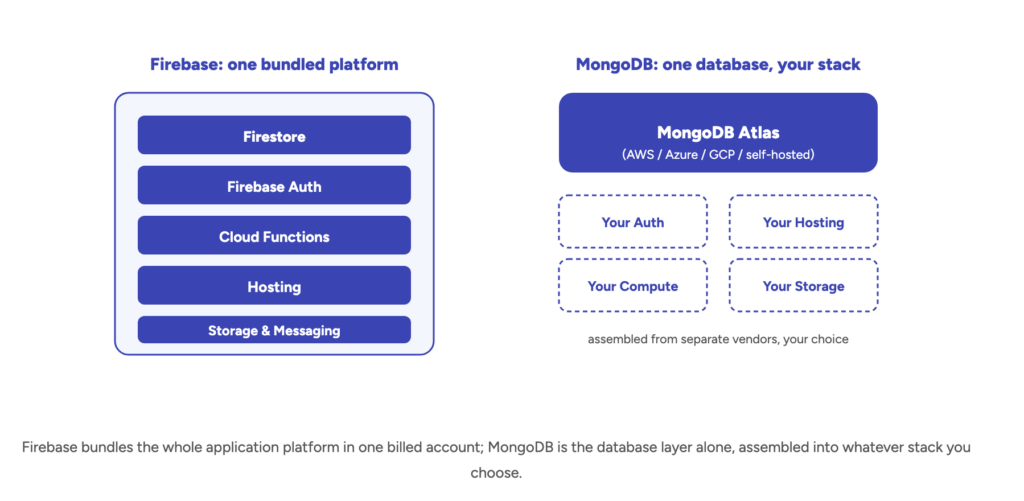
Firebase vs MongoDB is really a choice between a bundled application platform and a database you assemble a stack around. Firebase is Google’s managed backend platform, built around Firestore — a serverless NoSQL document database wired directly into authentication, hosting, cloud functions, and real-time sync. MongoDB is a general-purpose document database on its own: you run it on MongoDB Atlas (multi-cloud, or self-hosted) and bring your own auth, hosting, and compute layer around it. Both store flexible, JSON-like documents, which is exactly why teams so often assume they’re interchangeable — and why the wrong pick tends to surface as a billing or scaling surprise, not a day-one bug.
This guide compares the real differences in data modeling, real-time sync, pricing, and scaling, and ends with a decision framework rather than a verdict. If your team is mid-evaluation — or already facing a migration in either direction — Gart Solutions runs dedicated database migration services that handle exactly this kind of switch without the downtime or data-loss risk that keeps most teams putting it off for years.
- What Firebase and MongoDB Actually Are
- Data Modeling and Query Capabilities
- Real-Time Sync: Firestore Listeners vs. MongoDB Change Streams
- Scaling and Architecture
- Pricing Compared: Per-Operation vs. Per-Cluster
- Security, Compliance, and Vendor Lock-In
- AI and Vector Search
- Migrating Between Firebase and MongoDB
- Decision Framework: Which One Fits Your Product
What Firebase and MongoDB Actually Are
Firebase gives you an application platform. MongoDB gives you a database. That distinction explains most of the confusion in this comparison: “Firebase” isn’t a single product, it’s a suite — Firestore (the document database), Firebase Auth, Cloud Storage, Cloud Functions, Hosting, and Firebase Cloud Messaging, all provisioned from one console and billed on one account. MongoDB, by contrast, is purpose-built as a database, full stop. You choose where it runs — MongoDB Atlas as a managed service across AWS, Azure, or Google Cloud, or a self-hosted deployment on your own infrastructure — and you wire up authentication, hosting, and serverless compute yourself, from whichever vendors you prefer.
That framing matters more than it sounds, because a team comparing “Firebase vs MongoDB” in isolation is often really comparing “a bundled backend-as-a-service” against “a database I’ll assemble a stack around” — a broader decision than the two document databases alone. Our Supabase vs MongoDB comparison covers the same bundled-platform-vs-standalone-database tradeoff from the relational side, if that’s the pairing you’re actually weighing.
The two also sit at very different points in the market. Per the DB-Engines document-store ranking for April 2026, MongoDB leads the category by a wide margin with a popularity score of 385.02, while Google Cloud Firestore ranks 7th at 9.76 and Firebase Realtime Database ranks 5th at 15.97 — roughly a 25–40x gap. That doesn’t make Firestore the wrong choice for a given app, but it does mean MongoDB has a deeper hiring pool, tooling ecosystem, and third-party integration base to draw on at scale.
Data Modeling and Query Capabilities
Both Firestore and MongoDB store schema-flexible, JSON-like documents grouped into collections, so on paper the data models look similar. The differences show up in how you query that data. MongoDB’s aggregation pipeline supports rich multi-stage queries, joins across collections ($lookup), and ad-hoc filtering on any field without pre-planning — closer to what a relational developer expects, minus the enforced schema. Firestore’s query engine is deliberately simpler and more restrictive: compound queries need a matching composite index defined in advance, there’s no native equivalent of a SQL join, and certain filter combinations (like range filters on more than one field) aren’t supported at all without restructuring the data.
| Dimension | Firebase (Firestore) | MongoDB |
|---|---|---|
| Data model | Schema-less documents grouped in collections, nested subcollections | Schema-less documents (BSON), flexible by default |
| Query language | Firestore query API — composite indexes required for compound queries, no native joins | MongoDB Query Language (MQL), aggregation pipeline, $lookup joins |
| Hosting model | Google Cloud only, fully serverless | MongoDB Atlas (AWS, Azure, GCP) or self-hosted anywhere |
| Bundled services | Auth, Hosting, Cloud Functions, Storage, Messaging — all included | Database only — auth, hosting, and compute are separate integrations |
| Scaling model | Fully serverless, auto-scales reads/writes, no cluster to size | Vertical scaling by cluster tier, plus native horizontal sharding |
| Best fit | Mobile/web apps wanting a complete managed platform with minimal ops | Products needing complex queries, multi-cloud flexibility, or high-volume write scale |
Real-Time Sync: Firestore Listeners vs. MongoDB Change Streams
Real-time sync is one of Firebase’s strongest, most differentiated features. Firestore’s onSnapshot() listeners push live updates to every connected client the moment a document changes, with offline persistence and automatic conflict resolution built in — it was designed from the ground up for chat apps, collaborative tools, and live dashboards. MongoDB offers a comparable capability through Change Streams, which let an application subscribe to real-time data changes on a collection, but it’s an add-on capability layered onto a general-purpose database rather than the platform’s core design point — you’ll typically pair it with a WebSocket or pub/sub layer you build and operate yourself.
If real-time collaboration is a core product requirement rather than a nice-to-have, Firestore’s listeners will get you to a working prototype faster. If real-time updates are one feature among many in a broader system with complex query and reporting needs, MongoDB’s Change Streams plus your own real-time layer give you more control over exactly how that layer behaves under load.
Scaling and Architecture
Firestore is fully serverless — there’s no cluster to size, no instance to provision, and reads and writes scale automatically with traffic. That’s a genuine operational advantage for small teams, but it also means you have less control over performance characteristics under unusual load patterns; you’re scaling within Google’s multi-tenant infrastructure on Google’s terms. MongoDB Atlas requires picking and sizing a cluster tier (or scaling it manually/via auto-scaling rules), which is more operational overhead but gives you native horizontal sharding across both reads and writes — a pattern common for high-volume event streams, IoT telemetry, or activity feeds that outgrow a single serverless database’s practical limits.
In practice, most consumer and B2B SaaS products never hit genuine Firestore scaling ceilings — the operations question that actually matters day to day is less “can this scale” and more “can I predict and control my bill as it scales,” which is where the two platforms diverge sharply (see the pricing section below).
Pricing Compared: Per-Operation vs. Per-Cluster
This is where the two platforms genuinely diverge, not just cosmetically. Per Firebase’s own Firestore pricing documentation, the free Spark plan includes 50,000 document reads, 20,000 writes, and 20,000 deletes per day, plus 1 GiB of storage and 10 GiB of monthly outbound transfer. Past that, the paid Blaze plan bills per operation: $0.06 per 100,000 document reads, $0.18 per 100,000 writes, and $0.02 per 100,000 deletes. MongoDB Atlas, by contrast, bills for cluster capacity rather than individual operations — MongoDB’s pricing page shows a free shared M0 tier, with dedicated clusters starting around $57–$85/month all-in for an entry M10 tier (compute, storage, and backups), regardless of how many reads and writes you run against it.
| Plan tier | Firebase (Firestore) | MongoDB Atlas |
|---|---|---|
| Free tier | Spark plan — 50K reads/day, 20K writes/day, 20K deletes/day, 1 GiB storage | Shared M0 cluster, 512 MB storage |
| Entry production tier | Blaze (pay-as-you-go) — $0.06/100K reads, $0.18/100K writes, $0.02/100K deletes | ~$57–$85/mo — M10 dedicated cluster, compute + storage + backups |
| Billing basis | Per document operation — scales directly with traffic and query patterns | Per cluster hour — predictable regardless of read/write volume within capacity |
| What’s bundled | Auth, Hosting, Cloud Functions, Storage, Messaging | Database only; auth/hosting/compute priced or built separately |
That per-operation model is exactly what makes Firebase billing feel unpredictable at scale, and it isn’t a hypothetical risk. In our own cautionary tale about cloud cost overruns, a team running on Firebase’s free/low-tier plan racked up over 116 billion document read operations in a matter of hours — a single inefficient query pattern, left unchecked, turned a near-zero database bill into a five-figure emergency almost overnight. MongoDB’s cluster-based pricing doesn’t eliminate cost risk (an undersized cluster still throttles or falls over under load), but it fails in a more contained, predictable way: performance degrades before the bill spikes.
A few practical levers worth knowing before you commit to either model:
- On Firestore, watch composite-index-heavy queries and any client-side polling loop — both multiply read counts fast, and a client re-fetching a full collection on every render is the single most common cause of runaway Firestore bills.
- On MongoDB Atlas, right-size the cluster tier to actual query load rather than defaulting to the entry M10 — an undersized cluster degrades before it errors, so cost problems tend to show up as latency complaints, not invoice shock.
- On both platforms, set billing alerts and usage quotas before launch, not after the first spike — Firebase in particular has no default cap that stops a runaway workload from billing indefinitely on Blaze.
Security, Compliance, and Vendor Lock-In
Firestore’s access control runs through Firebase Security Rules — a declarative, document-path-based rules language that lives alongside your data and is evaluated on every client request. It’s powerful for mobile/web apps talking to the database directly, but the rules themselves become a genuine attack surface: a misconfigured or overly permissive rule set is one of the most common real-world Firebase security incidents, since client apps often query the database directly rather than through a server layer. MongoDB relies on more conventional role-based access control (RBAC), field-level encryption, and network-level controls (VPC peering, IP allowlisting on Atlas) — closer to what a security or compliance team evaluating a standalone database expects to review.
Vendor lock-in is the other consideration teams underweight early on. Firestore only runs on Google Cloud — there’s no self-hosted or multi-cloud option, so your database is permanently coupled to one vendor’s infrastructure, pricing changes, and regional availability. MongoDB Atlas runs across AWS, Azure, and Google Cloud, and MongoDB itself can be self-hosted, which matters directly for teams with data-residency requirements or EU-sovereignty obligations. For regulated teams weighing either platform against specific compliance obligations, Gart’s compliance audit service can assess the choice against your actual regulatory footprint before you commit, rather than after an auditor flags it.
AI and Vector Search
Both platforms now support vector embeddings for AI and retrieval-augmented generation (RAG) workloads. Firestore added native K-nearest-neighbor vector search directly on top of its existing document collections, so you can store embeddings alongside the documents they describe without standing up a separate vector database. MongoDB Atlas Vector Search offers the same idea with more maturity and tuning options — approximate nearest-neighbor indexing, hybrid search combining vector and traditional filters, and better support for very large vector counts on a single cluster.
For most product teams adding a RAG feature to an existing app, the deciding factor isn’t the vector search implementation itself — it’s whichever database you’re already running everything else on. Teams already deep in the Firebase ecosystem (Auth, Functions, Firestore) get a real simplicity win from keeping vectors in the same database; teams with heavier query and reporting needs around their AI features tend to find MongoDB Atlas Vector Search’s additional tuning knobs worth the extra operational surface.
Migrating Between Firebase and MongoDB
Because both platforms store document-shaped data, a Firebase-to-MongoDB migration is less about schema translation than migrations from a relational database usually are — the harder work is untangling the coupling between Firestore and the rest of the Firebase suite. Security Rules need to be rebuilt as application-level authorization or MongoDB RBAC policies. Any logic that assumed Firestore’s automatic offline sync or real-time listeners needs an equivalent built around Change Streams. And anything wired directly to Firebase Auth, Cloud Functions, or Hosting needs its own migration plan, independent of the database move itself. The reverse direction — MongoDB to Firestore — is less common in practice, but follows the same logic: denormalizing collections to fit Firestore’s document-path model and rebuilding server-side authorization as Security Rules.
A handful of practices consistently separate clean Firebase-to-MongoDB migrations from painful ones:
- Inventory every Firebase service in use, not just Firestore. Auth providers, Cloud Functions triggers, and Security Rules all need their own migration plan — treating this as “just a database swap” is the most common way these projects blow their timeline.
- Rebuild Security Rules as explicit authorization logic before cutover. Document exactly what each Firestore rule permits and denies, then translate it to MongoDB RBAC or application-level checks — don’t discover a permissions gap in production.
- Run a dual-write or change-data-capture sync window. Streaming writes to both databases during a transition period lets you validate MongoDB against real production traffic before an irreversible cutover.
- Re-test every composite-index-dependent query. Query patterns tuned around Firestore’s index constraints often have a faster, simpler equivalent once you have MongoDB’s full aggregation pipeline available — worth a deliberate review pass, not just a lift-and-shift.
Decision Framework: Which One Fits Your Product
Rather than a single verdict, here’s how the choice tends to shake out once teams get specific about their actual requirements:
- Choose Firebase if you want a complete managed platform (database, auth, hosting, functions) from day one, real-time sync is a core product feature, and you’re comfortable being coupled to Google Cloud long-term.
- Choose MongoDB if you need complex queries and joins, multi-cloud or self-hosted flexibility, more predictable pricing at scale, or you’re assembling a stack from best-of-breed vendors rather than a single bundled platform.
- Get outside help evaluating either if you’re mid-migration, inheriting a database decision from an earlier team, or need the choice validated against specific compliance or cost obligations before committing — this is the exact gap Gart’s SRE and reliability engineering and database migration engagements are brought in to close.
Whichever direction fits, the sequencing that avoids regret is consistent: model your actual query patterns and realistic read/write volume before committing, not after a production billing spike or a scaling wall has made the decision expensive to reverse. For the narrower relational-engine question underneath this comparison, see our MongoDB vs. PostgreSQL comparison as a companion piece on the same evaluation logic applied to a different pairing.
Choosing — or migrating — between Firebase and MongoDB?
Gart Solutions plans and executes database migrations between Firestore and MongoDB (in either direction), with data-model redesign, security-rule translation, zero-downtime cutover, and post-migration performance tuning built into every engagement.
Evaluating managed backends? See Firebase vs AWS Amplify: pricing, features and migration.
You might also like
- MongoDB vs MySQL: Choosing the Right Database
- Cloud Migration Services
- DevOps Consulting
- Lovable + Supabase Integration: What Breaks in Production
- Digital Sovereignty of Europe: A Cloud Guide