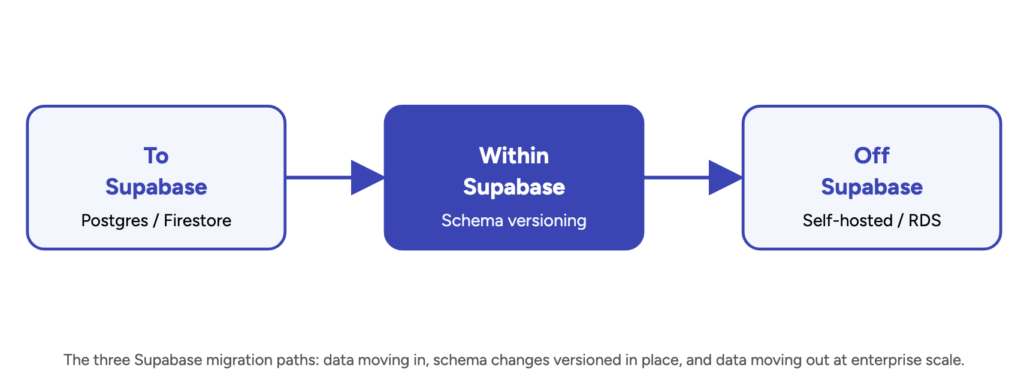
Supabase vs AWS is really two questions dressed up as one. The first is "which backend gets my product into users' hands fastest?" — and for most teams under a few hundred thousand users, Supabase wins that one comfortably. The second is "which one still makes sense once we have real scale, real compliance requirements, and a board asking about vendor risk?" — and that answer flips more often than founders expect, usually earlier than they planned for.
Both platforms run on Postgres underneath, so the database engine isn't really the decision. What's actually being decided is how much infrastructure you want to own versus rent, and how painful it will be to change your mind later. When that pivot point arrives, it rarely means a rewrite — it means a planned AWS migration executed before Supabase's per-user and bandwidth pricing starts outpacing your revenue. This guide breaks down the real pricing, the feature gaps that matter, and a practical framework for making the call — plus what migrating off Supabase actually involves once you outgrow it.
Supabase vs AWS at a Glance
Before the detail, here's the fastest way to see where each platform sits:
DimensionSupabaseAWSWhat it isBackend-as-a-service: managed Postgres bundled with auth, storage, edge functions, and realtime in one productÀ la carte cloud platform: RDS, Cognito, S3, Lambda, and 200+ other services you assemble yourselfSetup timeMinutes — dashboard-driven, no VPC or IAM configuration requiredHours to days — networking, IAM, security groups, and service wiring needed upfrontPricing modelFlat tiers ($0 / $25 / $599 / custom) plus usage overagesMetered per-service, per-second billing; Reserved Instances cut costs 30–60% with commitmentScalingVertical only (bigger instance); no native Postgres shardingVertical and horizontal (read replicas, Aurora, multi-region)ComplianceSOC 2 Type II on Team/Enterprise; HIPAA available on Enterprise onlyBroadest coverage — HIPAA, PCI DSS, FedRAMP, ISO 27001 available across most servicesBest forMVPs, startups, small-to-mid production apps, teams without dedicated DevOpsRegulated industries, high-scale platforms, teams needing granular infrastructure controlSupabase vs AWS at a Glance
What Is Supabase?
Supabase is an open-source backend-as-a-service platform built directly on top of Postgres. Instead of provisioning a database and then bolting on authentication, file storage, and an API layer separately, you get all of it in one project: managed Postgres with row-level security, a built-in auth system (email, magic links, OAuth, phone), S3-compatible object storage, Deno-based edge functions, and WebSocket-driven realtime subscriptions triggered by database changes.
The pitch is speed: a working backend in the time it takes to create a project, not the time it takes to stand up a VPC. That's precisely why it has become the default choice for early-stage teams shipping an MVP, and why Postgres is now the most-used database among professional developers at 58.2%, according to the 2025 Stack Overflow Developer Survey — the underlying engine choice is increasingly settled, which is exactly why the Supabase-vs-AWS decision has shifted from "which database" to "which platform around the database."
What Is AWS (RDS, Cognito, S3, Lambda)?
AWS doesn't offer a single "backend" product to compare against Supabase — it offers the individual services you'd assemble to build the equivalent stack yourself: RDS for PostgreSQL (or Aurora) for the database, Cognito for authentication and user pools, S3 for object storage, Lambda for serverless functions, and SQS/SNS for messaging and realtime-style event delivery. Each is independently provisioned, billed, and secured through IAM — which is exactly the control Supabase abstracts away, for better or worse depending on your team's stage.
That control is the whole point once you need it: tuned instance classes and Multi-AZ failover on RDS, fine-grained IAM policies and SSO federation on Cognito, and deep integration with the rest of AWS's ecosystem. Gart's AWS DevOps services and SRE practice both exist because assembling and operating that stack correctly — networking, IAM, observability, incident response — is a genuinely different skill set from building on a managed platform, and it's usually the first thing teams underestimate when they move off Supabase.
Supabase vs AWS Pricing: Real Numbers by Stage
Pricing is where the two platforms diverge hardest, and the gap isn't uniform — it depends heavily on which resource dominates your usage. Based on Supabase's published pricing and AWS's published on-demand rates, here's how three realistic stages compare:
StageSupabase (est.)AWS on-demand (est.)What drives the gapEarly-stage10K MAUs, 20GB DB, 50GB storage, 500GB bandwidth~$27–30/mo (Pro plan + minor overage)~$70–80/mo (RDS instance + S3 + bandwidth; Cognito free under 10K MAUs)AWS's smallest RDS instance plus bandwidth costs more than Supabase's bundled flat rate at this volumeGrowing product100K MAUs, 200GB DB, 1TB storage, 5TB bandwidth~$600–650/mo~$3,000–3,200/moCognito's $0.015/MAU (Essentials tier) beyond the 10K free tier is roughly 4.6x Supabase's $0.00325/MAU — auth becomes the single biggest line item on the AWS billRegulated / enterprise1M+ MAUs, SOC 2 or HIPAA requiredTeam plan ($599/mo) or custom Enterprise pricing; per-MAU auth cost keeps compoundingHigher sticker price, but Reserved Instances and Savings Plans cut compute 30–60%; enterprise agreements add further discountsAt this scale, control over networking, compliance scope, and multi-region write capability starts to matter more than the invoice totalSupabase vs AWS Pricing: Real Numbers by Stage
The figures above are illustrative estimates from each vendor's own rate card, not a quote — actual bills vary by AWS region, instance family, and negotiated discounts. But the pattern holds across every independent breakdown we've cross-checked: Supabase's flat, bundled pricing is dramatically cheaper below roughly 100K-500K MAUs, and the gap is driven overwhelmingly by authentication cost, not database or storage cost.
Feature-by-Feature Comparison
Beyond price, the practical differences show up service by service. On the database, both run Postgres — Supabase bundles compute, storage, and backups into one flat tier, while AWS RDS (and Aurora) let you tune instance class, storage type, and Multi-AZ failover independently, and support horizontal read scaling that Supabase's single-writer architecture doesn't. On auth, Supabase Auth handles social login, magic links, and row-level security integration out of the box, where Cognito is more enterprise-oriented — SAML/OIDC federation and SSO are included by default, and Supabase gates SSO behind its Enterprise plan.
For storage, Supabase Storage is effectively a friendlier layer on top of S3-compatible infrastructure, with built-in row-level permissions and a CDN included, while raw S3 gives more granular IAM control at the cost of more setup. On functions, Supabase Edge Functions run on Deno with minimal cold starts and a single flat per-invocation price, while Lambda supports more runtimes and integrates with the rest of AWS but splits billing into request cost plus compute time — cheaper at high volume, harder to estimate upfront. And for realtime, Supabase's layer is purpose-built for live UI updates off Postgres changes, where AWS's nearest equivalent, SQS/SNS, is a general-purpose messaging system better suited to backend event pipelines than in-app live updates.
When Supabase Makes Sense
Supabase is the right call for a specific, common situation, not a permanent architecture decision: you're validating a product idea and need a working backend in days rather than weeks, without hiring dedicated infrastructure help; your team is small (roughly 1-10 engineers) and nobody owns infrastructure as a full-time job; you're under approximately 100K monthly active users and a few terabytes of data, comfortably inside Supabase's sweet spot; your compliance needs are light-to-moderate, with SOC 2 on the Team plan covering a meaningful chunk of enterprise-sales requirements; and you'd rather have predictable, bundled pricing than a metered bill spread across a dozen separate services.
When AWS Makes Sense (and When to Migrate)
The migration conversation usually starts with one of these signals, not a single revenue or user-count threshold:
Auth costs are outpacing the rest of your infrastructure combined. Once MAU-based auth pricing becomes your largest line item, moving identity to Cognito (or another IAM platform) with volume pricing usually pays for itself within a few months.
You need horizontal database scaling. Supabase's Postgres is vertically scaled only — no native sharding or multi-primary writes. If a single, larger instance genuinely can't keep up, AWS (particularly Aurora) is built for that problem in a way Supabase isn't.
Compliance scope expands beyond SOC 2. HIPAA, PCI DSS, FedRAMP, or region-specific data residency requirements are far better supported across AWS's service catalog than on Supabase's Enterprise tier alone.
You need multi-region active-active infrastructure. Supabase doesn't support multi-region write today; AWS does, at the cost of meaningfully more operational complexity.
Procurement or security review requires granular IAM and network isolation. Enterprise customers increasingly ask for VPC peering, private connectivity, and fine-grained access policies that a managed BaaS platform can't expose.
None of these signals mean Supabase was the wrong starting choice — for most products, it's the right one. They mean the platform decision that got you to product-market fit isn't automatically the one that should carry you through the next stage, and planning the move before a cost or compliance problem forces it is far cheaper than reacting to one.
How to Migrate from Supabase to AWS Without a Rewrite
Because both platforms run standard Postgres, a Supabase-to-AWS migration is fundamentally a data and services migration, not an application rewrite — provided the migration is planned in the right order:
Migrate the database first, in isolation. Export the schema and data with pg_dump, restore into RDS or Aurora, and validate query behavior and extensions before touching anything else — row-level security policies transfer directly since both run vanilla Postgres.
Decouple auth before cutting over storage or functions. Exporting Supabase Auth users into Cognito (or a third-party identity provider) requires scripting, since there's no native one-click path — this is usually the slowest step and the one most worth planning early.
Move storage objects to S3 with a mapping layer. Since Supabase Storage already sits on S3-compatible infrastructure, moving files is mechanically simple; the real work is rewriting signed-URL and access-control logic against IAM policies instead of Supabase's row-level rules.
Re-platform edge functions and realtime last. These have the least direct AWS equivalent (Lambda for functions, SQS/SNS or AppSync for realtime-style delivery), so they benefit most from being redesigned deliberately rather than ported line-by-line.
Run both platforms in parallel during cutover. A staged migration — reads from AWS, writes mirrored to both for a defined window — catches drift before you fully decommission Supabase, and avoids a hard cutover that risks downtime.
This is precisely the kind of staged, zero-downtime migration Gart's cloud migration team runs regularly — the technical steps above are straightforward individually, but sequencing them wrong (especially decoupling auth too late) is the single most common cause of a migration running months over its original estimate. Once you're on AWS, the next question is usually how to keep the new bill under control, since metered pricing across a dozen services is easy to over-provision without dedicated cost governance.
Common Mistakes When Choosing Between Them
A handful of decision errors show up repeatedly, in both directions:
Choosing AWS from day one "to avoid migrating later." For an unvalidated product, the cost of over-engineering infrastructure before product-market fit almost always exceeds the cost of a well-planned migration afterward. Speed to first users matters more than avoiding a future move you may never need to make.
Staying on Supabase past the point where auth pricing has become irrational. Teams often notice the MAU-based auth bill creeping up for months before acting, because it arrives gradually rather than as one alarming invoice.
Treating the migration as "just export the database." The database is usually the easiest part; auth, storage permissions, and realtime logic are where migrations quietly balloon in scope.
Ignoring compliance scope until a customer's security review forces the question. If enterprise sales is on your roadmap, HIPAA or deeper compliance requirements are worth planning for a full budget cycle before they become a blocking deal requirement.
Outgrowing Supabase — or planning ahead before you do?
Gart Solutions runs dedicated AWS migration, DevOps, and SRE practices built for exactly this transition: moving a Postgres-based product from a managed platform to production-grade AWS infrastructure without a rewrite, downtime, or a surprise compliance gap.
Talk to a Gart Engineer
You might also like
How to Choose a Cloud Provider: AWS vs. Azure vs. Google Cloud
AWS vs Azure for Startups: Which Cloud Platform Wins in 2027?
OVH vs AWS: The Enterprise Decision That Defines Your Next Two Years
CTO as a Service: Governance, Scale, and Technical Strategy
What Are the Cloud Cost Models? A Comprehensive Guide
Roman Burdiuzha
Co-founder & CTO, Gart Solutions · Cloud Architecture Expert
Roman has 15+ years of experience in DevOps and cloud architecture, with prior leadership roles at SoftServe and lifecell Ukraine. He co-founded Gart Solutions, where he leads cloud transformation and infrastructure modernization engagements across Europe and North America. In one recent client engagement, Gart reduced infrastructure waste by 38% through consolidating idle resources and introducing usage-aware automation. Read more on Startup Weekly.
Supabase crossed 10 million registered developers in 2026, and by the company's own account, roughly 90% of new databases on the platform are now spun up by AI coding agents rather than a human sitting down to write a schema (TechCrunch). That speed is exactly why Supabase best practices matter more in 2026 than they did two years ago: a database that ships in minutes can also ship with Row Level Security switched off, a service-role key baked into client code, or no backup strategy at all — and nobody notices until something breaks in production.
Gart Solutions sees this pattern constantly in security audit engagements: teams that moved fast on Supabase to hit a launch date, then need someone to methodically check what's actually enforced versus what they assumed was enforced. This guide walks through the Supabase best practices that separate a prototype from a production system — schema and environment management, Row Level Security, connection pooling, secrets handling, and backup and disaster recovery — with a checklist you can run against your own project today.
Why Do Supabase Best Practices Matter More in an AI-Agent World?
Supabase auto-generates a REST API directly from your Postgres schema, which is a large part of why it's the default backend for AI-assisted and "vibe coded" apps — there's no separate API layer to hand-write. The tradeoff is that the same auto-generated API exposes an entire table the moment it exists, unless Row Level Security and a policy are explicitly attached to it. Security researchers documented this at scale in 2025 as CVE-2025-48757, which affected more than 170 AI-generated applications that shipped without RLS policies on their tables (DeepStrike security research). A separate 2025 analysis of AI-generated apps found that roughly 10.3% of tested applications exposed at least one vulnerable, unauthenticated Supabase endpoint.
None of this is a flaw unique to Supabase — it's what happens when the distance between "database exists" and "database is live in production" shrinks to minutes. The fix isn't slowing down database creation; it's making sure the same best practices that used to get applied manually over weeks — access control, connection limits, key rotation, backup testing — get checked systematically before launch, not discovered after an incident.
Environment, Schema & Migration Best Practices
The single most common Supabase mistake Gart's audits find isn't a security bug — it's a missing boundary between environments. Teams prototype directly against their production project because it's the only one that exists, and by the time they need a staging environment, months of undocumented schema drift make it hard to build one that matches.
Run a separate Supabase project per environment. Development, staging, and production should be distinct projects with distinct API keys — never a single project with "test" rows mixed into real data.
Version-control every schema change as a migration. Changes made through the Table Editor UI are convenient but leave no audit trail; a migration file does, and it's what lets you reliably rebuild staging from production's schema.
Never run an untested migration directly against production. Apply it to staging first, confirm RLS policies and foreign keys still behave as expected, then promote.
Keep environment-specific config out of the schema. Feature flags, environment names, and API endpoints belong in application config, not in table rows that then have to be filtered out of every query.
Document ownership per schema, not just per table. As Postgres schemas multiply (public, auth, storage, plus any custom ones), a named owner per schema prevents the same drift problem from reappearing at a different layer.
Row Level Security & Auth Best Practices
Row Level Security is, without much competition, the single most important Supabase best practice on this list. Because the anon key that ships in every client bundle is public by design, RLS is the only thing standing between "anyone with your app open" and "anyone who can read, modify, or delete your entire dataset." Supabase's own documentation is explicit about this: RLS policies are enforced consistently across the REST API, Realtime subscriptions, direct database connections, and Edge Functions, so a policy written once protects every access path rather than just the one your team happens to be testing.
In practice, three habits catch the RLS gaps Gart's security audits find most often:
Turn on the project-level "enable RLS on new tables" setting so new tables default to locked rather than open, and treat any table with RLS disabled as a finding that needs a documented reason, not an oversight.
Write policies with (select auth.uid()), not bare auth.uid(), inside the qualifying expression — wrapping the function in a subquery lets Postgres cache the result once per statement instead of re-evaluating it per row, which matters once a table has more than a few thousand rows.
Separate the anon role, the authenticated role, and the service_role key by what they're allowed to touch, the same way you'd apply least-privilege access control to any other system — the service_role key bypasses RLS entirely, so it belongs only in server-side environments that are never bundled into client code.
That last point deserves its own line: if a service_role key has ever appeared in a public Git repository, a deployed JavaScript bundle, or a mobile app binary, treat it as compromised and rotate it immediately — the same rotation discipline Gart recommends for any long-lived secret in a Kubernetes or cloud-native secrets management setup applies just as directly here.
Connection Pooling & Performance Best Practices
Postgres was not designed for the connection pattern serverless functions create. Every function invocation can open a new database connection, and under real traffic that turns into hundreds of concurrent connections fighting over a limit Postgres was never meant to hit directly. A well-tuned pooler routinely reduces total database connections from the thousands down to around 200, cutting the context-switch overhead that comes with it by roughly 80%.
Pooling ModeBest ForWatch Out ForDirect connectionLong-running servers, migration tools, admin scriptsExhausts Postgres's connection limit fast under serverless or edge trafficSession mode (pooler)ORMs and tools that rely on session-level features like PREPARE statementsStill holds one pooled connection per client for the session's durationTransaction mode (pooler)Serverless functions, edge environments, high-concurrency APIsNo session-level state between queries — session variables and prepared statements won't persist
Beyond pooling mode, the highest-leverage performance habit is simple discipline: run EXPLAIN ANALYZE on slow queries and add the missing index before reaching for a bigger compute tier, and move to the connection pooler before assuming a "connection limit exceeded" error means you need to upgrade your plan (PostgreSQL's own EXPLAIN documentation is the right starting point). A missing index on a foreign key is a five-minute fix; a compute upgrade to mask the same symptom is a recurring cost that never actually resolves it.
Edge Functions, API Keys & Secrets Best Practices
Edge Functions exist precisely so that privileged operations don't have to happen in client code. Anything that needs the service_role key, a third-party API secret, or logic you don't want a user to inspect belongs server-side in a function — never inline in the frontend, no matter how much faster that feels during a prototype sprint.
A useful dividing line: an Edge Function is where service_role-authenticated writes, third-party API calls with secret keys, payment webhooks, and anything else that needs to bypass RLS for a specific, audited reason should live. Client code should stick to anon-key-authenticated reads and writes that RLS already governs — UI logic and anything a logged-out user is allowed to see anyway. And the service_role key, any third-party API key, and webhook signing secrets belong in a secrets manager, never in source control, rotated on a defined schedule rather than only after a suspected leak.
This is the same discipline behind role-based access control in a CI/CD pipeline: the goal isn't to trust every part of the system equally, it's to draw a clear line around the small number of places that need elevated privilege and keep everything else running with the minimum access it needs to function. A named security framework makes this an auditable control rather than a one-off decision one engineer remembers making.
Backup, Disaster Recovery & Monitoring Best Practices
Supabase's managed backups solve storage, not recovery. A nightly backup that has never been restored is a hope, not a plan — and it's the single most common gap Gart finds when reviewing Supabase projects that grew past their original prototype scope without anyone revisiting the backup story.
Three things separate a real backup strategy from a checkbox: a defined Recovery Point Objective and Recovery Time Objective that leadership has actually agreed to, not just whatever the default backup interval happens to be; a restore that gets tested on a schedule, ideally into a staging project, so the first time you find out a restore doesn't work isn't during an actual incident; and point-in-time recovery enabled for any table where losing even a few minutes of writes is unacceptable, since daily snapshots alone won't cover that gap. Gart's disaster recovery as a service engagements typically start by writing down the RPO/RTO targets a team assumed existed but had never actually documented — see our broader DRaaS guide for how that maps to recovery tiers.
Monitoring closes the loop: alert on connection pool saturation, replication lag if you're running read replicas, and RLS policy errors specifically, since a spike in denied queries is often the earliest signal that a client update shipped with a broken assumption about what a role is allowed to do.
Supabase Best Practices Checklist
Run this list against any Supabase project before it takes real traffic. It's the same sequence Gart Solutions checks during a compliance-driven audit, condensed to what matters most for a launch-readiness pass.
LayerBest PracticeCommon Failure ModeEnvironmentsSeparate project per environment; every schema change is a version-controlled migrationPrototyping directly in production; undocumented schema drift between environmentsAccess controlRLS enabled by default on new tables; policies use (select auth.uid())Tables created via the UI ship with RLS off and nobody notices before launchSecretsservice_role key lives only in server-side environments and secrets managersservice_role key committed to a repo or bundled into a deployed frontendConnectionsServerless and edge functions use transaction-mode poolingDirect connections from serverless functions exhaust Postgres's connection limitPerformanceEXPLAIN ANALYZE on slow queries; indexes added before compute upgradesScaling compute to mask a missing index instead of fixing the queryBackup & DRDocumented RPO/RTO; restores tested on a schedule; point-in-time recovery where neededBackups exist but have never been restored, so the first real test is a live incidentSupabase Best Practices Checklist
What Are the Common Mistakes When Scaling Supabase in Production?
Treating RLS as a launch-day task instead of a per-table default. A policy added after a table already has traffic is a patch, not a control — new tables need RLS decided at creation time, not retrofitted later.
Letting the service_role key touch anything reachable from a browser or mobile bundle. Once it's in a shipped artifact, treat it as public and rotate it — there's no partial-credit version of this mistake.
Skipping connection pooling until a "too many connections" error forces the issue. By the time that error appears in production, it's an incident, not a planning conversation.
Assuming Supabase's automatic backups equal a tested disaster recovery plan. Storage and recovery are different problems; only testing a restore proves the second one actually works.
Scaling compute before scaling query discipline. A bigger Postgres instance is a real lever, but it's usually the expensive way to solve a problem an index would have solved for free.
No named owner for Supabase configuration once the original builder moves on. RLS policies, pooler settings, and backup schedules all need an accountable owner the same way any other production system does.
Get a Free Supabase Production Readiness Audit
Gart Solutions reviews your RLS policies, connection and secrets configuration, and backup strategy against production-grade best practices — then hands you a prioritized fix list before your next launch, not a generic tool pitch.
10+
Years in DevOps & Cloud
50+
Enterprise clients served
4.9★
Clutch rating
Supabase & Postgres Security Audit
DevOps & CI/CD Consulting
Backup & Disaster Recovery
Cloud Infrastructure Consulting
Compliance Audit
Get a Free Supabase Readiness Audit →
You might also like
MongoDB vs. PostgreSQL: A Battle of Titans in the Database World
Overview of Database Types: Choosing the Right Database for Your Needs
What Is an MCP Server — And Why It's the Infrastructure Layer Your AI Strategy Is Missing
The Power of Policy as Code: Enhancing Security and Compliance
What Is DevSecOps? Guide to Securing Modern Applications
Roman Burdiuzha
Co-founder & CTO, Gart Solutions · Cloud Architecture Expert
Roman has 15+ years of experience in DevOps and cloud architecture, with prior leadership roles at SoftServe and lifecell Ukraine. He co-founded Gart Solutions, where he leads cloud transformation and infrastructure modernization engagements across Europe and North America. In one recent client engagement, Gart reduced infrastructure waste by 38% through consolidating idle resources and introducing usage-aware automation. Read more on Startup Weekly.
If you're planning to migrate a Flutter app from Firebase to Supabase, the short version is this: you're not swapping one backend for a similar one, you're switching data paradigms entirely — from Firestore's document-and-collection model to a relational Postgres database, from Firebase's proprietary security rules to Postgres Row Level Security, and from four separate Firebase SDKs to a single supabase_flutter package. Done carelessly, that's a rewrite. Done deliberately, in the order this guide lays out, it's a well-scoped engineering project most teams complete in a few weeks without users ever noticing a cutover happened.
This is the exact process — schema design, authentication, data, storage, real-time listeners, Cloud Functions, and a zero-downtime rollout — that a real migration follows end to end. Where the underlying work is a data-architecture and cloud-migration problem rather than a Flutter UI problem, it's also the part of this project our database migration engineers get pulled into most often, since getting the Postgres schema and security model right the first time is what determines whether the rest of the migration goes smoothly.
Why Flutter Teams Are Migrating from Firebase to Supabase
Firestore's free Spark tier covers 50,000 reads, 20,000 writes, and 20,000 deletes a day, and the pay-as-you-go Blaze plan bills at roughly $0.06 per 100,000 reads and $0.18 per 100,000 writes — cheap in isolation, but with no hard spending cap, a single unbounded query or a looping Cloud Function can turn a predictable bill into a five-figure surprise overnight. That's the trigger most teams describe first, but it's rarely the only reason a migration gets greenlit. The others tend to be architectural: Firestore has no server-side JOINs, so any query spanning more than one collection means either denormalizing data (and keeping every copy in sync by hand) or fetching documents client-side and stitching them together in Dart — a pattern that gets painful fast once an app has more than a handful of related entities.
Postgres, by contrast, is a relational database that Flutter teams already know how to model — and it isn't a niche choice. PostgreSQL is now the most-used database among professional developers worldwide, according to the 2025 Stack Overflow Developer Survey, and Supabase's growth reflects the same shift: the company raised a $500M round at a $10.5B valuation in mid-2026, with over 9 million registered developers building on its Postgres-based platform. For a Flutter team, the practical upside is a single Postgres database with real foreign keys, SQL views, and transactions, plus Supabase's own Auth, Storage, Realtime, and Edge Functions layered directly on top of it — replacing Firebase's four separate products with one coherent stack.
The most common triggers for this migration, in order: unpredictable Blaze billing at scale, the need for relational queries Firestore can't express natively, wanting an open-source stack without vendor lock-in, and — increasingly — teams that started on Firebase for speed during an MVP and have now outgrown its data model as the app's schema got more interconnected.
Firebase vs. Supabase: What Actually Changes for a Flutter App
Every Firebase product a typical Flutter app depends on has a Supabase equivalent — except one. Mapping them out before you touch any code is what turns "migrate the backend" into a concrete, step-by-step checklist:
Firebase ProductSupabase EquivalentWhat ChangesFirestorePostgres databaseDocument/collection model → relational tables with foreign keys; requires real schema designFirebase AuthenticationSupabase Auth (GoTrue)Users move to the auth.users table; social/OAuth providers reconfigured; passwords need a migration strategyFirebase StorageSupabase StorageFiles re-uploaded to Supabase buckets; access rules rewritten as Storage policiesCloud Firestore security rulesRow Level Security (RLS)Rules become SQL policies enforced directly by Postgres, not a separate rules engineCloud FunctionsEdge Functions (Deno)Node.js functions rewritten in TypeScript/Deno; triggers reconfigured via Database WebhooksFirestore real-time listenersSupabase Realtime.snapshots() streams become Postgres change subscriptions on specific tablesFirebase Cloud Messaging (FCM)No native equivalentMost teams keep Firebase (free tier) solely for push notifications alongside Supabase for everything elseFirebase vs. Supabase
Before You Migrate: Audit Your Firebase Project
A migration that starts with an honest inventory of the current project goes faster than one that starts with code. Before writing a single line of Postgres schema, confirm:
Every Firestore collection and its document shape — including collections used by only one screen, which are easy to forget until users hit a broken feature post-launch.
Every Firebase Auth provider in use — email/password, Google, Apple, phone auth — since each has a different migration path and some (phone auth in particular) require extra planning.
Current Firestore security rules, translated mentally into "who can read/write what" — this becomes your Row Level Security policy spec.
Every Cloud Function, what triggers it (HTTP call, Firestore write, scheduled job), and what it actually does.
Storage bucket structure and access patterns — public files vs. user-scoped private files need different Supabase Storage policies.
Anything depending on Firebase Cloud Messaging, since that's the one piece with no direct Supabase replacement.
The Migration Process, Step by Step
With the audit done, the migration itself follows a consistent sequence. Each step builds on the previous one, and skipping the order — schema before data, data before code changes — is the single most common cause of a migration that drags on far longer than planned.
Step 1: Design your Postgres schema from your Firestore collections
This is the step that determines how smoothly everything after it goes. For each Firestore collection, decide whether it becomes a single Postgres table or splits into several normalized tables — a Firestore document with a nested array of items (like an order with line items) typically becomes a parent table plus a related child table joined by a foreign key, rather than one table with a JSON column holding the array. Gart's own case study on moving a production e-commerce workload from MongoDB to a relational database covers this exact document-to-relational modeling exercise; the shift from Firestore to Postgres follows the same logic, since both are document-oriented NoSQL stores being replaced by a relational schema. Our broader comparison of document versus relational databases is a useful reference if your team is still deciding how far to normalize.
Step 2: Set up your Supabase project and Row Level Security
Create the Supabase project, apply your schema via SQL migrations (kept in version control from day one — this is not optional for a production app), and translate every Firestore security rule into a Postgres RLS policy. RLS runs inside Postgres itself rather than as a separate rules layer, which means policies are testable with plain SQL and enforced no matter which client — Flutter app, Edge Function, or an admin script — touches the table.
-- Example: users can only read their own rows
create policy "Users can view own profile"
on profiles for select
using ( auth.uid() = user_id );
Step 3: Migrate Firebase Authentication users
Supabase publishes an official set of open-source migration tools for exactly this handoff: firestoreusers2json exports every Firebase Auth user to a JSON file, and import_users loads that file directly into Supabase's auth.users table. Existing password hashes migrate too, provided you export Firebase's scrypt hash parameters (signer key, salt separator, rounds) from the console first — done correctly, users log in with their existing password on Supabase without a forced reset. Social/OAuth providers (Google, Apple) need to be reconfigured as separate Supabase Auth providers, since the underlying provider credentials don't transfer automatically.
Step 4: Migrate Firestore data to Postgres
The same open-source toolchain handles data: firestore2json dumps a Firestore collection to a flattened JSON file, and json2supabase loads it into the Postgres table you designed in Step 1. For collections that need to split into multiple related tables rather than one flat table, the tooling supports custom "hooks" — small scripts that reshape a document into several output records before import. Run this against a staging Supabase project first and diff row counts against Firestore before touching production data.
Step 5: Migrate Firebase Storage files
File migration is a two-step download-then-upload process: files come out of the Firebase Storage bucket to a local filesystem, then go up into a Supabase Storage bucket. Set bucket-level access policies (public vs. authenticated-only) before the first user hits the app post-cutover — new Supabase Storage buckets default to private, unlike some Firebase Storage configurations teams may have loosened over time.
Step 6: Replace Cloud Functions with Edge Functions
Cloud Functions triggered by HTTP calls port over conceptually unchanged — an Edge Function is still a serverless function behind a URL, just written in TypeScript on Deno instead of Node.js. Functions triggered by a Firestore write need more thought, since Supabase's equivalent is a Database Webhook that fires on a Postgres insert/update/delete and calls an Edge Function — the trigger model is push-based via webhook rather than an SDK-level `onCreate`/`onUpdate` listener, so this is usually the part of the migration that takes the most debugging time.
Step 7: Decide what happens to push notifications
This is the one gap in the comparison table above: Supabase has no built-in equivalent to Firebase Cloud Messaging. The typical pattern is a hybrid setup — Supabase for the database, auth, storage, and business logic, with Firebase kept solely for FCM, called from a Supabase Edge Function when a relevant database row changes. It's not an elegant answer, but it's the one nearly every team ends up with, and it's worth deciding on explicitly rather than discovering it mid-migration.
Step 8: Dual-run, test, and cut over with zero downtime
Ship a version of the app that can read from Supabase while Firebase still holds the source of truth, verify parity on real user accounts in a staged rollout, then flip writes over and decommission Firebase last — not first. A CI/CD pipeline that can deploy the Supabase-pointing build to a percentage of users, combined with feature flags around the data layer, turns the cutover into a controlled rollout instead of a single risky release. This is also the point where SRE practices — monitoring query latency, error rates, and auth success rates on both backends side by side — catch schema or RLS mistakes before they reach every user.
Updating Your Flutter Code and Dependencies
Firebase's Flutter integration is spread across several packages; Supabase's is not. Swapping pubspec.yaml dependencies is the visible part of the migration, even though it's the smallest part of the actual work:
Before (Firebase)After (Supabase)firebase_coresupabase_flutter (single package)cloud_firestorefirebase_authfirebase_storageUpdating Your Flutter Code and Dependencies
Query syntax changes from Firestore's document-and-collection API to Postgres-style filtering, and real-time listeners move from .snapshots() to Supabase's stream API:
// Firestore: real-time query
FirebaseFirestore.instance
.collection('posts')
.where('userId', isEqualTo: uid)
.snapshots();
// Supabase: equivalent real-time query
supabase
.from('posts')
.stream(primaryKey: ['id'])
.eq('user_id', uid);
The shape of the code stays recognizable — a filtered, real-time stream of rows either way — which is why most teams find the client-side rewrite faster than the backend migration itself once the schema and RLS policies are in place.
Common Migration Mistakes to Avoid
Copying the Firestore data model into Postgres as JSONB columns. It "works" on day one and defeats the entire point of moving to a relational database — you lose joins, foreign key integrity, and most of the query flexibility that motivated the migration.
Writing RLS policies after launch instead of before. A table with no RLS policy and RLS enabled blocks all access by default; a table with RLS disabled is wide open. Both are easy to get backwards under deadline pressure — test every policy against a non-owner user before cutover, not after.
Forgetting phone-auth and MFA users during the Auth migration. Email/password and OAuth users move cleanly with the standard tooling; phone-verified and multi-factor accounts often need a custom migration path that's easy to miss during planning.
Decommissioning Firebase before the dual-run period proves out. Keep both backends live and Firebase billing active until Supabase has handled real production traffic for at least one full billing cycle.
Underestimating the Cloud Functions rewrite. HTTP-triggered functions port over almost directly; Firestore-triggered functions rebuilt around Database Webhooks are a different execution model and consistently take longer than teams budget for.
How Long Does It Take, and What Does It Cost?
For a small-to-mid-size Flutter app (a handful of Firestore collections, standard email/OAuth auth, a few Cloud Functions), a careful migration following the steps above commonly runs two to six weeks for a small team working part-time on it, or one to two weeks of focused effort for a dedicated pair of engineers. Apps with heavily denormalized Firestore data, custom claims-based security rules, or many Firestore-triggered Cloud Functions push toward the longer end of that range, since schema redesign and Edge Function rewrites — not the mechanical data export — are what actually consume the time. On the cost side, the calculation that usually justifies the project isn't the migration effort itself; it's comparing that one-time cost against an uncapped Blaze bill that's already trending upward month over month, which is the same comparison our cloud migration engagements run for any workload moving off a metered, per-operation billing model.
Planning a Firebase-to-Supabase migration for a production Flutter app?
Gart Solutions handles the database and cloud engineering side of backend migrations end to end — Postgres schema design from your existing NoSQL data, Row Level Security policy modeling, and a zero-downtime cutover plan — so your Flutter team can focus on the app instead of the migration mechanics.
10+
Years in Cloud & DevOps
50+
Enterprise clients served
4.9★
Clutch rating
Database Migration
Cloud Migration
DevOps & CI/CD
SRE & Reliability
Fractional CTO
Talk to a Gart Engineer →
Roman Burdiuzha
Co-founder & CTO, Gart Solutions · Cloud Architecture Expert
Roman has 15+ years of experience in DevOps and cloud architecture, with prior leadership roles at SoftServe and lifecell Ukraine. He co-founded Gart Solutions, where he leads cloud transformation and infrastructure modernization engagements across Europe and North America. In one recent client engagement, Gart reduced infrastructure waste by 38% through consolidating idle resources and introducing usage-aware automation. Read more on Startup Weekly.