Cost-effectiveness in cloud and DevOps isn't about finding the cheapest provider — it's about building systems that reduce total cost of ownership while supporting long-term business growth. Here's what that actually looks like in practice.
27%
of cloud spend estimated wasted
Flexera State of the Cloud, 2024
81%
compute cost reduction via Azure Spot VMs
Gart Solutions Case Study
48%
infrastructure cost reduction after FinOps audit
Gart Solutions Case Study
65%
dev/test cost reduction with environment scheduling
AWS Well-Architected Framework
What Cost-Effectiveness Really Means in DevOps and Cloud
Most IT leaders define cost-effectiveness as "spending less." That's wrong — and it's an expensive misunderstanding.
True cost-effectiveness means maximizing the value generated by every dollar of infrastructure and engineering investment. It demands that you ask not "How do I pay less this month?" but "How do I build systems that cost less over the next 24 months while delivering higher performance, reliability, and innovation velocity?"
In DevOps and cloud contexts specifically, cost-effectiveness sits at the intersection of three disciplines:
Engineering efficiency — architectures that avoid waste, scale predictably, and minimize manual toil
Financial governance — visibility, accountability, and discipline over variable cloud spend (FinOps)
Strategic investment — knowing where to spend more now to spend significantly less later
💡Key TakeawayCost-effectiveness is not a cost-cutting exercise. It is a discipline that aligns engineering decisions with financial reality — and it requires ongoing operational practice, not a one-time audit.
According to the FinOps Foundation, cloud financial management is "an evolving discipline that enables organizations to get maximum business value by helping engineering, finance, technology, and business teams collaborate on data-driven spending decisions." That's the operating definition we work from at Gart.
Why the Cheapest Option Is Never the Cost-Effective One
Businesses chasing cheap options in cloud and DevOps consistently encounter the same patterns of failure. Here's what actually happens.
The Free Credits Trap
Cloud startup programs from Google Cloud, AWS, and Azure are genuinely valuable — but they create a dangerous incentive. Engineering teams optimize for "doesn't cost us anything right now" rather than "performs well when we're paying for it." When credits expire, organizations face infrastructure costs 3–5× higher than necessary because no one designed for efficiency.
This happened to a startup we worked with that built its entire HoloLens application on GCP. When startup program credits ran out, their monthly bill became unmanageable — primarily driven by egress costs from a network architecture that was invisible during the free period.
Read the full case study
According to Flexera's 2024 State of the Cloud Report, organizations estimate that 27% of cloud spend is wasted. For a company spending $50,000/month on cloud infrastructure, that's $162,000 in annual waste — far exceeding any short-term savings from choosing cheaper tooling upfront.
Hidden Costs of "Budget" DevOps Solutions
Choosing the cheapest DevOps tooling or most junior engineers to "save money" introduces costs that never appear on the invoice:
Technical debt that requires expensive rewrites within 12–18 months
Incidents and downtime — every hour of downtime costs engineering time, customer trust, and revenue
Re-platforming costs when infrastructure can't scale with the business
Security vulnerabilities from skipped compliance and patching practices
Talent attrition from teams forced to maintain poor infrastructure
Common MistakeEvaluating cloud infrastructure costs on a monthly basis instead of a 24-month TCO. Month-one "savings" from cheap choices almost always invert by month 12 when technical debt accumulates and rebuilding begins.
Estimate Your Real Cloud Waste
Our engineers run a free 30-minute cloud waste assessment — identifying where your budget is leaking before it becomes a bigger problem.
Book Free Assessment →
Sustainable IT Cost Reductions vs. Short-Term Cuts
Economic pressure creates a predictable pattern: CIOs issue blanket cost-reduction mandates, teams cut immediately visible line items, and six months later the organization is dealing with the consequences of those cuts while overspending in new areas.
The Four Traps of Reckless Cost-Cutting
1Short-term focus
Cutting without understanding which investments generate future savings. Eliminating a $2,000/month monitoring tool can cause a $50,000 incident that goes undetected for 48 hours.
2Overreliance on consultants
External consultants often identify low-hanging fruit but rarely address the structural issues that cause waste to return within 6 months.
3Ignoring stakeholders
Cutting DevOps tooling that engineering teams rely on creates invisible productivity drag. A $5,000/month tool that saves 40 hours of engineering time is deeply cost-effective.
4Skipping rightsizing
Organizations consistently run workloads on instance types provisioned for peak load from 18 months ago. Average CPU utilization in enterprise cloud is 12–15% (Gartner, 2023).
✓
Expert Insight — Fedir Kompaniiets
In every cost reduction engagement we run, we start with observation before optimization. Two weeks of detailed cost attribution by environment, team, and workload consistently reveals 3–4 major cost drivers that don't appear on any executive dashboard. Fix those first, then establish process to prevent recurrence.
Avoid These 3 Common Mistakes:
Short-term focus: Cutting across the board can hinder future growth and innovation.
Overreliance on consultants: Consultants often suggest low-hanging fruit, leaving limited potential for long-term savings.
Neglecting stakeholders: Ignoring the impact of IT cuts on business operations can damage relationships and hinder outcomes.
The GART Sustainable DevOps Framework
Over seven years of cloud and DevOps engagements, we've codified our approach into a repeatable five-stage methodology. Every client engagement moves through these stages — sometimes rapidly, sometimes over 12 months — depending on starting maturity.
Proprietary Methodology
GART Sustainable DevOps Framework™
Five stages from cloud chaos to compounding cost efficiency
1
Visibility
Full cost attribution by team, service, and environment. No optimization without visibility.
2
Optimization
Rightsize, schedule, and re-architect for efficiency. Target waste before adding governance.
3
Automation
IaC, autoscaling, and CI/CD eliminate manual drift and provisioning waste.
4
Governance
Budgets, alerts, tagging standards, and FinOps rituals embedded into team workflows.
5
Sustainability
Continuous improvement, GreenOps, and cost culture that compounds savings over time.
Most organizations arrive at Gart somewhere in Stage 1 or early Stage 2 — they have cloud spend, but limited attribution. The fastest ROI comes from moving through Stage 2 quickly: systematic rightsizing, environment scheduling, and reserved capacity typically deliver 20–40% cost reduction before any architectural changes.
Methodology
Framework stages are sequential by design. Organizations that attempt Stage 4 governance without Stage 1 visibility consistently fail — teams cannot govern what they cannot see. All percentage savings cited in this article reflect results measured over 60–90 day periods after implementation, compared to the 60-day baseline period preceding engagement.
How to Audit Cloud Waste: A Practical Guide
Before optimizing anything, you need to know where money is going. A cloud waste audit is not a one-time exercise — it's a structured review that should happen quarterly at minimum, and monthly for organizations spending over $20,000/month.
In one AWS environment audit completed in 2024, 22% of monthly spend came from idle non-production clusters left running after work hours. A single automated shutdown schedule eliminated $8,400/month with zero impact on developer productivity.
The Seven Categories of Cloud Waste
Waste CategoryWhat to Look ForTypical ImpactFix DifficultyIdle non-production environmentsClusters, VMs running 24/7 despite 8-hour usage patterns15–25% of computeLowOrphaned resourcesUnattached EBS volumes, unused Elastic IPs, idle load balancers5–12% of spendLowOverprovisioned instancesVMs at <10% average CPU; memory wastage >60%10–30% of computeMediumStorage wasteOld snapshots, stale S3 objects in hot tier, logging bloat8–20% of storageLowExcessive NAT gateway costsHigh data processing from poorly routed traffic5–15% of networkingMediumOverprovisioned Kubernetes clustersNode pools sized for peak; pod autoscaling not configured20–40% of computeHighReserved capacity mismatchReserved Instances for deprecated instance types or dead workloads10–20% of reserved spendMediumThe Seven Categories of Cloud Waste
Kubernetes Cost Optimization: The Hidden Driver
For organizations running container-based workloads, Kubernetes cost optimization deserves special attention. The CNCF reports container adoption accelerating, while cost governance for containerized workloads consistently lags. Common Kubernetes waste sources:
Oversized node pools — teams provision for maximum workload and never scale down
Missing Vertical Pod Autoscaler (VPA) — pods run at requested resources, not actual usage
No namespace-level cost attribution — developers can't see the financial impact of their services
Persistent volumes left after pod deletion — a common source of mystery storage charges
Inefficient base images — large images increase pull time, storage, and data transfer costs
Understanding Cloud Costs in DevOps: OpEx vs. CapEx
Summary:
DevOps-related cloud costs fall into two main categories: Operational Expenses (OpEx) and Capital Expenses (CapEx). Knowing the difference helps you budget and optimize more effectively.
Operational Expenses (OpEx)
OpEx refers to ongoing costs of running DevOps workloads in the cloud, such as:
Cloud instance runtime (compute)
Storage usage
Managed services (like databases or monitoring tools)
Traffic and bandwidth
These costs are typically pay-as-you-go and vary month-to-month.
Capital Expenses (CapEx)
CapEx refers to one-time or upfront investments, such as:
Reserved cloud capacity (e.g., AWS Reserved Instances)
On-premise infrastructure purchases
Software licenses or setup fees
Choosing CapEx can reduce monthly spending, but it requires commitment and forecasting.
The shift from on-premises CapEx to cloud OpEx is one of the most consequential changes in enterprise IT finance — and one of the most misunderstood. Getting this right is foundational to cost-effectiveness.
CriteriaCapEx (On-premises)OpEx (Cloud)Nature of expenseLarge upfront investmentOngoing, usage-based costsTax treatmentDepreciated over 3–7 yearsFully deductible in year incurredCapacity flexibilitySized for peak; most capacity often idleElastic; scales with actual demandBudget predictabilityPredictable after purchaseVariable — requires FinOps disciplineRefresh cycle riskTechnology obsolescence every 3–5 yearsAlways on current-generation hardwareOptimization leverLimited after purchaseContinuous — rightsize at any timeUnderstanding Cloud Costs in DevOps: OpEx vs. CapEx
⚠️ Key Risk
The OpEx model's flexibility is also its danger. Without FinOps governance, cloud costs can grow unchecked. Organizations that achieve genuine cost-effectiveness pair cloud adoption with FinOps discipline from day one — not after the first unpleasant invoice.
Reserved Instances vs. Savings Plans: A Practical Decision
One of the highest-ROI cost-effectiveness decisions is committing to reserved capacity for stable, predictable workloads. The AWS Well-Architected Framework recommends reserving 70–80% of steady-state workloads on 1-year or 3-year terms — savings typically range from 30–60% versus on-demand pricing.
The critical nuance: never reserve capacity before rightsizing. Organizations that purchase Reserved Instances for oversized instances lock in waste for up to three years. The sequence must always be: rightsize → reserve → monitor.
What is FinOps and Why It Matters for Cost-Effectiveness
FinOps — Financial Operations for Cloud — bridges engineering, finance, and product to ensure cloud spending generates proportional business value. According to the FinOps Foundation's State of FinOps Report, organizations with mature FinOps practices achieve 20–35% better cloud cost efficiency than those without, while also shipping faster because engineers spend less time firefighting budget overruns.
FinOps Maturity Stages
StageCharacteristicsTypical Cloud WasteCrawlReactive cost management; no attribution; single monthly review30–40%WalkCost dashboards in place; basic tagging; weekly review; some rightsizing15–25%RunReal-time visibility; anomaly alerts; automated optimization; team accountability5–12%FinOps Maturity Stages
What is FinOps and Why Does It Matter in Cost Optimization
Summary:
FinOps (Financial Operations) is a framework that brings financial discipline into DevOps, ensuring cloud spending is aligned with business value and usage.
Defining FinOps in Simple Terms
FinOps helps teams:
Understand where cloud dollars are going
Predict costs before deploying
Optimize spend without stalling innovation
It’s the bridge between engineering, finance, and operations.
Why FinOps is a Game-Changer
In traditional IT, budgets are fixed. But in the cloud, expenses are variable and usage-driven. That makes cost control harder, unless teams actively manage and monitor costs.
FinOps brings visibility and accountability across:
Engineers (who build infrastructure)
Finance teams (who manage budgets)
Product managers (who track business value)
Key FinOps Practices:
Real-time cloud cost reporting
Cost forecasting by team/project
Tagging resources for accountability
Optimization sprints focused on spend reduction.
FinOps, or Financial Operations, is an evolving cloud financial management discipline that brings financial accountability to the variable spend model of cloud, enabling distributed teams to make business trade-offs between speed, cost, and quality.
Practical FinOps Workflow: What We Actually Do
Most FinOps guides describe what FinOps is. This is what a real FinOps workflow looks like in practice — the process we run with clients from month one.
1
Tag all resources consistently
Implement mandatory tagging: team, environment, project, owner. Enforce at IAM policy level so untagged resources cannot be created. This is the foundation without which nothing else works.
2
Group by business unit and create budgets
Assign cost center ownership to each team. Set budgets based on prior 60-day actuals + growth rate. Finance and engineering must agree on these numbers together — not separately.
3
Identify anomalies with automated alerting
Configure alerts at 80% and 100% of budget thresholds. Add anomaly detection for day-over-day spend increases above 20%. Route alerts to the responsible team, not just to finance.
4
Rightsize workloads based on utilization data
Pull 30-day CPU, memory, and I/O utilization. Identify instances with <15% average CPU utilization. Downsize, schedule, or terminate. Run compute optimizer recommendations with engineering review.
5
Apply reserved capacity for stable workloads
After rightsizing, commit to 1-year Reserved Instances or Savings Plans for workloads with >75% utilization consistency. Target 60–80% reservation coverage for steady-state infrastructure.
6
Measure and report savings monthly
Track absolute savings ($ vs. baseline), efficiency improvements ($ per workload unit), and coverage metrics (% of spend attributed, % reserved). Share results with leadership in a standardized report.
From Practice: What Takes Longest
The hardest part of FinOps implementation is not technical — it's behavioral. Getting engineers to care about cost requires connecting infrastructure decisions to outcomes they already care about: shipping faster, having more reliable systems, and avoiding firefighting. Cost culture is built through visibility, not mandates.
Get a FinOps Maturity Review
Understand where your organization sits on the FinOps maturity curve — and what specific steps will move you to the next level.
Get Free Review →
Cost-Effectiveness by Growth Stage
Cost-effectiveness strategies vary dramatically depending on where your organization sits in its growth curve. The right moves for a $3,000/month cloud spender are completely different from those for an enterprise spending $200,000/month.
Startup
<$5,000/month cloud spend
Priority Strategies
Maximize cloud credits — but design for paid operation from day one
Use managed services: your time costs more than the premium
Spot/Preemptible instances for all dev/test environments
Tag everything from the start — retroactive tagging is painful
Common Mistakes
Optimizing for the free tier instead of production costs
Running dev environments 24/7
Skipping logging/monitoring to "save money"
Governance
Monthly spend review is sufficient at this stage
One person owns cloud costs — ideally the CTO
Scale-up
$5,000–$50,000/month
Priority Strategies
Rightsize aggressively — utilization data now justifies engineering time
Introduce reserved capacity for production workloads
Implement autoscaling for variable workloads
Start FinOps tagging and attribution by team
Common Mistakes
Reserving before rightsizing — locking in waste
No environment scheduling for non-production
Kubernetes without resource limits and VPA
Governance
Weekly FinOps review; budget alerts configured
Dedicated FinOps champion on engineering team
Enterprise
$50,000+/month
Priority Strategies
Multi-cloud cost governance and provider negotiation
AI/LLM workload cost management — inference can spike unexpectedly
GreenOps — carbon-aware workload scheduling
Full chargeback model by business unit
Common Mistakes
FinOps as a finance function, not an engineering practice
No anomaly detection — surprises cost $50K+
Reserved capacity decisions made annually without monthly review
Governance
Dedicated FinOps team; monthly executive reporting
Cloud cost embedded in engineering performance metrics
Case Studies: Cost-Effective DevOps in Depth
The following engagements are published with detailed methodology — not as marketing claims, but as evidence of what structured cost-effectiveness work actually looks like.
01
Startup · Google Cloud Platform · Infrastructure & FinOps
DevOps for Microsoft HoloLens Application on GCP
The Challenge
A startup leveraged Google Cloud startup credits to build and launch a HoloLens application. When credits expired, their monthly bill was unsustainable — primarily driven by egress costs from a network architecture that was never designed with production pricing in mind. Engineering had optimized for development speed, not operational cost.
Gart's Approach
We began with a full infrastructure audit covering resource utilization, network topology, data flow, and service dependencies. The audit identified excessive cross-region traffic, an underutilized Kubernetes cluster running 24/7, and no CI/CD pipeline. We restructured the architecture, implemented CI/CD, and introduced resource scheduling for non-production environments.
Before vs. After: Key Metrics (90-day period)
Before Optimization
Monthly infra: $14,200
Deployment: manual, weekly
MTTR: 4+ hours
Environment scheduling: none
Cost attribution: none
After Optimization
Monthly infra: $7,384 (−48%)
Deployment: CI/CD, daily
MTTR: <25 minutes
Environment scheduling: Auto-shutdown active
Cost attribution: Full tagging active
Lesson Learned
Free credits create a false sense of cost-effectiveness. Architecture decisions made during the "free" period determine your actual cost structure for years. The cheapest time to fix this is before go-live — the second cheapest is immediately after.
02
AI/ML Startup · Microsoft Azure · Compute Optimization & Spot VMs
81% Cloud Cost Reduction for Jewelry AI Vision Platform
The Challenge
A computer vision startup serving the jewelry industry was running heavy ML inference workloads on standard Azure VM instances. Monthly compute spend was $5,200 and growing. Workloads were batch-oriented — not requiring continuous availability — but were provisioned as always-on infrastructure due to the team's inexperience with Spot VM architecture.
Gart's Approach
We redesigned the ML pipeline for fault tolerance and elastic execution: workloads were refactored to checkpoint state, enabling interruption and resumption. Azure Spot VMs — available at 60–90% discount versus standard pricing — became viable. We also automated cost monitoring and introduced a queuing system so inference jobs distributed efficiently across available spot capacity.
Before vs. After: Key Metrics (90-day period)
Before Optimization
Monthly compute: $5,200
VM type: Standard D-series (on-demand)
Pipeline: stateful, non-interruptible
Scalability: manual resizing
Cost monitoring: none
After Optimization
Monthly compute: $988 (−81%)
VM type: Azure Spot VMs with auto-failover
Pipeline: Checkpointed, resumable workloads
Scalability: Automated elastic scaling
Cost monitoring: Real-time automated cost alerts
Lesson Learned
Cost savings of 80%+ do not require cutting features or accepting lower quality. They require understanding your workload's actual characteristics and designing infrastructure to match them. Most workloads have more tolerance for interruption than engineers assume — the challenge is making them resumable.
Contrarian Insights Worth Knowing
Cost-effectiveness advice in the cloud industry is often oversimplified. These are the nuanced positions that experienced practitioners hold — learned the hard way.
↯ Contrarian Insight #1
Moving to Kubernetes too early increases costs for small teams. Kubernetes is extraordinary at scale — but for teams running 5–10 services, the operational overhead of cluster management, node autoscaling, and networking complexity regularly costs more in engineering time than it saves in compute. Evaluate managed containers (ECS, Cloud Run, Container Apps) first.
↯ Contrarian Insight #2
Spot Instances are not always the right optimization strategy for stateful workloads. The 60–90% compute savings are real — but only for workloads designed for interruption. Retrofitting stateful databases or session-sensitive applications for Spot usage can require weeks of engineering work. Include that refactoring cost in your ROI calculation.
↯ Contrarian Insight #3
Observability spend is one of the highest-ROI investments in cost-effectiveness. Most organizations cut monitoring to save money — and then spend far more responding to incidents they couldn't detect quickly. A $2,000/month observability stack that reduces MTTR from 4 hours to 20 minutes pays for itself in the first incident alone. Never cut observability in the name of cost reduction.
↯ Contrarian Insight #4
Multi-cloud complexity often costs more than it saves. Multi-cloud is sound for risk management, but introduces operational complexity, tooling duplication, and skill fragmentation. For organizations under $500K/month in cloud spend, true multi-cloud is rarely cost-effective. Hybrid cloud — one primary cloud plus on-prem for stable workloads — is often the more pragmatic answer.
Long-Term Benefits of a Cost-Effective DevOps Strategy
Sustainable cost-effectiveness compounds over time in ways that short-term cost-cutting never can. Here's what our clients experience over 12–24 months.
1. Lower Total Cost of Ownership (TCO)
Efficient systems cost less to operate, require fewer emergency interventions, and eliminate the costly cycle of re-platforming. Organizations that invest in proper architecture early consistently report 30–50% lower 24-month TCO compared to those that optimize reactively.
2. Greater Reliability and Faster MTTR
Cost-effective systems are inherently more reliable. Proper autoscaling eliminates capacity-driven outages. CI/CD pipelines reduce deployment risk. IaC eliminates configuration drift. All of these reduce the frequency and cost of incidents — among the most expensive and hidden costs in any DevOps operation.
3. Future-Proof Architecture That Scales Without Rewrites
The most expensive infrastructure is the kind you have to rebuild. Strategic architecture choices — containerization, IaC, microservices where appropriate — allow systems to evolve incrementally. We've seen organizations spend 6–12 months rebuilding because early "cost savings" decisions painted them into architectural corners.
4. Engineering Teams That Build Instead of Firefight
When infrastructure is stable, well-monitored, and cost-attributed, engineering teams stop spending cycles on incidents and manual operations. Organizations implementing structured DevOps practices typically recover 20–30% of engineering capacity previously consumed by toil — capacity redirected toward product development.
5. AI and LLM Workload Cost Management
As organizations adopt AI features, inference costs are becoming a significant and poorly-managed budget line. Cost-effective AI workload management requires: choosing the right model size for each use case, implementing caching for repeated queries, monitoring token usage with the same rigor as compute, and batching inference requests where latency tolerance allows.
DevOps Cost Decision Table: Cheap vs. Sustainable
CriteriaCheap Approach✅ Sustainable ApproachInitial CostLow upfront — appears to save moneyModerate; aligned with business goalsScalabilityRequires rebuild at 2–3× current loadDesigned to scale incrementallyCompliance ReadinessLacks HIPAA, GDPR, SOC 2 safeguardsCompliance built into architectureMonitoring & ObservabilityMinimal or none — incidents are invisibleFull stack monitoring; fast MTTRMaintenance overheadHigh manual toil; frequent firefightingAutomated; low operational overheadEngineering riskConfiguration drift; no IaC; no rollbackIaC; version-controlled; reversible24-month TCOHigh — technical debt, rebuilds, incidentsLower — compounding efficiency gainsBusiness impactRisk of downtime; slower delivery velocityFaster delivery; greater stabilityDevOps Cost Decision Table: Cheap vs. Sustainable
Cost-Effectiveness Audit Checklist for IT Leaders
☑
Cloud Cost-Effectiveness Self-Assessment
Infrastructure & Cloud Usage
Are production workloads rightsized based on 30-day utilization data (not peak estimates)?
Are reserved instances or Savings Plans covering 60–80% of steady-state compute?
Do non-production environments auto-shut during off-hours and weekends?
Are Spot/Preemptible instances used for suitable batch and ML workloads?
Have orphaned resources (unattached EBS, unused IPs, idle load balancers) been audited in the last 30 days?
Kubernetes & Container Costs
Are resource requests and limits set on all pods?
Is Vertical Pod Autoscaler (VPA) or KEDA configured for variable workloads?
Are namespace-level cost dashboards visible to engineering teams?
Are persistent volumes cleaned up after pod deletion?
FinOps & Financial Governance
Are all resources tagged by team, environment, and project — enforced at IAM level?
Do budget alerts fire at 80% and 100% of monthly budgets?
Is cost visibility shared between engineering and finance teams weekly?
Has a FinOps champion been identified within the engineering organization?
Are chargeback reports distributed to business unit owners monthly?
DevOps & Automation
Is all infrastructure managed as code (Terraform, Pulumi, CDK)?
Are CI/CD pipelines automated to prevent manual deployment drift?
Is autoscaling configured based on real demand metrics, not static thresholds?
Are deployment rollbacks tested and confirmed functional?
How to Use This Checklist
Any "not implemented" item in the Infrastructure or FinOps sections represents a direct and typically sizable cost-saving opportunity. Prioritize items that take least engineering time to implement first — environment scheduling and orphan cleanup alone can recover 15–25% of monthly cloud spend within two weeks.
Lessons Learned from Real Engagements
We believe in sharing what didn't work as readily as what did. These are genuine lessons from client engagements.
✗
Lesson 1: We Optimized Compute Before Analyzing Networking
In one early engagement, we spent three weeks rightsizing EC2 instances before discovering the majority of the client's bill came from NAT gateway data processing fees — completely unrelated to compute. Always run a full cost attribution audit by service category before beginning targeted optimization. Compute is the most visible cost but not always the largest.
✗
Lesson 2: Reserved Instance Purchases Without Engineering Buy-In Fail
We've seen finance teams purchase Reserved Instances based on billing data without engineering input — only to have engineering migrate or resize those workloads within 90 days, leaving expensive reservations for infrastructure that no longer exists. FinOps decisions must involve engineering. Reserved capacity commitments require a minimum 6-month infrastructure stability forecast, which only engineers can provide.
✓
Lesson 3: The First Win Matters More Than the Biggest Win
When beginning a cost-effectiveness engagement, we now prioritize finding a quick, visible win in the first two weeks — typically environment scheduling or orphaned resource cleanup. This win builds trust, demonstrates that optimization doesn't disrupt operations, and creates organizational momentum for harder architectural changes later.
How Gart Delivers Cost-Effective DevOps
From cloud waste audits to full FinOps implementation — practical, engineering-led cost-effectiveness that compounds over time.
🔍
Cloud Cost Audit
Full infrastructure review identifying waste, rightsizing opportunities, and quick-win savings within 2 weeks.
⚙️
DevOps Services
CI/CD pipelines, IaC, and automation that eliminate operational toil and reduce the cost of delivery.
☁️
Cloud Migration
Right-sized, cost-conscious migration from on-premises or inefficient cloud configurations to optimized architecture.
📊
FinOps Implementation
Cost dashboards, tagging, budgets, and FinOps rituals embedded into your engineering team's workflow.
☸️
Kubernetes Optimization
Right-size node pools, configure VPA/HPA, and implement namespace cost attribution for container workloads.
🛡️
IT Audit Services
Infrastructure, compliance, and security audits that surface both risk exposure and cost reduction opportunities.
Book a Free Assessment
View All Case Studies
Green Clouds — cloud infrastructure that runs on renewable energy, minimizes idle waste, and actively tracks carbon output — have shifted from a sustainability buzzword to a board-level business requirement in 2026. If you are a CTO, CIO, or engineering leader evaluating cloud strategy, this guide gives you the frameworks, tools, and operational playbooks to make your cloud infrastructure measurably greener without sacrificing performance or cost efficiency.
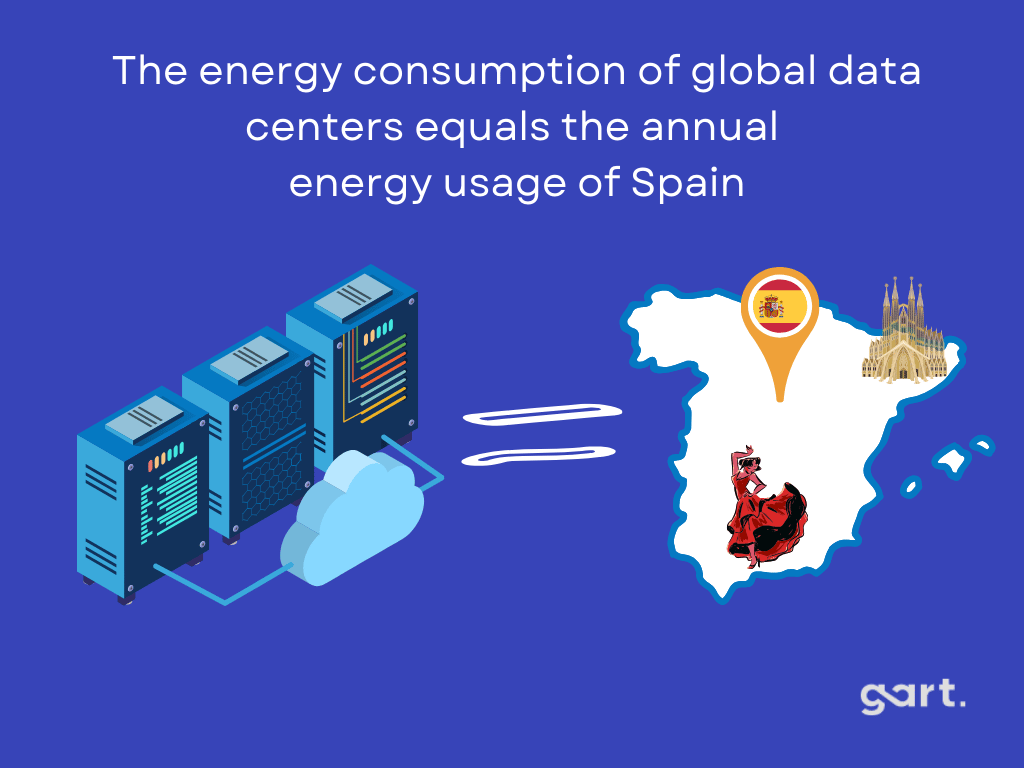
Global data center energy consumption now accounts for 2.5% of worldwide CO2 emissions — more than the aviation industry. Yet most organizations have no idea how much carbon their cloud workloads actually emit, let alone a plan to reduce it. That gap is exactly what green cloud computing addresses: shifting from good intentions to measurable, operational sustainability embedded directly into your infrastructure decisions.
At Gart Solutions, we work with engineering teams across Europe and North America to make cloud infrastructure both cost-efficient and environmentally accountable. This article shares what we have learned — including the mistakes organizations consistently make, the tools that actually deliver results, and how to build a green cloud strategy that satisfies ESG reporting requirements without adding operational overhead.
80%+
Potential carbon reduction by migrating on-prem workloads to AWS (451 Research)
5.9%
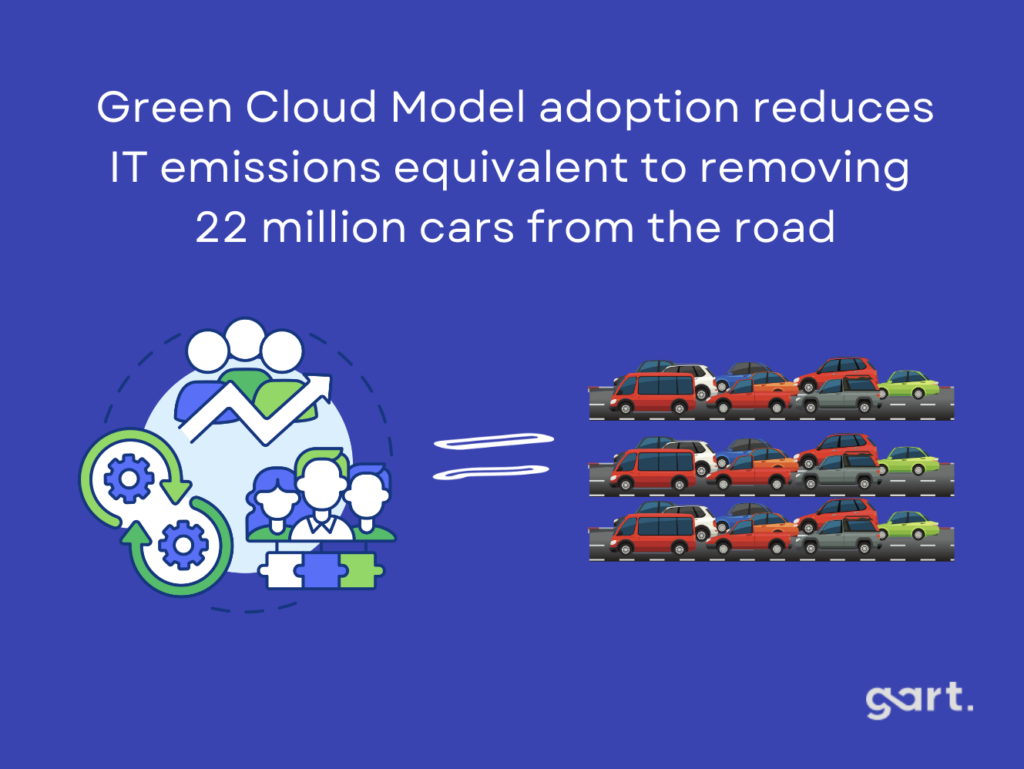
Estimated reduction in global IT emissions through widespread cloud adoption
2030
Target year for 24/7 carbon-free energy at Google; Azure carbon-negative; AWS net-zero
The Environmental Impact of Cloud Computing
Energy Consumption and Carbon Emissions
Traditional cloud data centers, composed of extensive server farms, consume vast amounts of electricity. These centers often rely on fossil fuels, exacerbating greenhouse gas emissions. Reports suggest that the energy used by data centers worldwide accounts for approximately 1% of global electricity consumption, with this figure expected to rise.
Cooling Systems: A significant portion of energy usage in these data centers is attributed to cooling systems, which regulate server temperatures.
Carbon Footprint: The reliance on non-renewable energy sources amplifies the environmental toll, contributing significantly to climate change.
Resource Depletion and E-Waste
Beyond energy concerns, the manufacturing and decommissioning of hardware lead to resource depletion and electronic waste (e-waste). An estimated 50 million tons of e-waste are generated globally each year, highlighting the urgency for sustainable lifecycle management of cloud infrastructure.
Water Usage
Data centers also consume substantial amounts of water for cooling, which places stress on local water resources, further exacerbating their environmental footprint.
Why Cloud is More Affordable
Cloud computing transforms the landscape of IT services, moving away from traditional desktop setups to remote data centers. Users can effortlessly access on-demand infrastructure, eliminating the need for on-site installation and maintenance.
Green cloud computing takes this concept a step further by utilizing renewable energy sources, reducing energy consumption, and making a significant dent in the carbon footprint.
Virtualization and containerization, dividing hardware for deploying multiple operating systems, help reduce server needs and energy consumption. AI-based resource scheduling, guided by historical usage data, conserves energy. Infrastructure as a Service (IaaS) optimization, focusing on virtual machines and containers, contributes to eco-conscious IT.
A notable 2020 study revealed an interesting trend: despite a 550% increase in computing output, data center energy consumption only grew by 6%. This underscores the efficiency achieved through sustainable practices in cloud computing.
Ready to embrace the benefits of cloud migration? Contact Gart today, and let us guide you through a seamless transition to the cloud. The time is now to elevate your operations and embrace the future of digital efficiency.
Why Green Clouds Matter for Your Business in 2026
Three forces converged in 2025-2026 to push green cloud computing from "nice to have" to a genuine business driver:
Regulatory pressure: The EU Corporate Sustainability Reporting Directive (CSRD) and SEC climate disclosure rules now require enterprises to report Scope 1, 2, and 3 emissions — including cloud infrastructure usage.
Enterprise buyer requirements: Procurement teams at large enterprises increasingly include carbon reporting requirements in vendor questionnaires, making sustainability data a sales prerequisite.
Investor scrutiny: ESG scores directly affect access to capital and valuation multiples, particularly for Series B+ technology companies seeking institutional investment.
Cost alignment: Green cloud practices — rightsizing, autoscaling, spot instances — reduce idle waste that is simultaneously bad for the environment and for your AWS bill.
Key insight: Green cloud is not a separate initiative competing with cost optimization or reliability engineering. In practice, the same practices that reduce idle resource waste — autoscaling, rightsizing, efficient scheduling — also reduce carbon emissions. Sustainability and FinOps are two lenses on the same operational problem.
Organizations that integrate carbon accountability into cloud governance today gain a significant competitive advantage: they satisfy regulatory requirements, win enterprise deals, and operate more efficiently — simultaneously. For more on the business case, our analysis of cloud migration's financial benefits covers the ROI picture in detail.
Is Cloud Actually Greener Than On-Premises?
The short answer is yes — in most cases, by a significant margin. But the specifics matter for your ESG reporting, so here is the honest breakdown.
Hyperscale data centers operated by AWS, Azure, and Google Cloud run at Power Usage Effectiveness (PUE) ratios of 1.1-1.2, meaning they use only 10-20% overhead energy for cooling and infrastructure. The average enterprise data center runs at PUE 1.5-2.0, using 50-100% overhead energy on top of compute. Combined with renewable energy procurement at scale, this creates a material and measurable carbon advantage for properly architected cloud workloads.
FactorTypical Enterprise Data CenterHyperscale Cloud (AWS/Azure/GCP)Power Usage Effectiveness (PUE)1.5 – 2.01.1 – 1.2Average server utilization10 – 15%65 – 80%Renewable energy shareTypically 0 – 30%100% (committed by 2025-2030)Cooling technologyCRAC units, legacy air coolingLiquid cooling, AI-driven optimizationHardware refresh cycle5-7 years (manual procurement)3-4 years (continuous efficiency gains)Carbon reduction potentialBaseline reference80-96% vs on-prem (451 Research)Water usage trackingHigh, rarely monitoredActively tracked; all providers targeting net-zero water by 2030Is Cloud Actually Greener Than On-Premises?
Important caveat for ESG reporting: Cloud migration reduces your carbon footprint on average — but the actual reduction varies significantly by workload, cloud region, and modernization depth. A lift-and-shift of an oversized, poorly optimized workload achieves less than a rightsized, cloud-native deployment. Always validate reduction claims with workload-level data before publishing ESG disclosures.
How to Measure Your Cloud Carbon Footprint
You cannot reduce what you do not measure. Cloud carbon measurement has matured significantly in the past two years. Provider-native tools are free, require no configuration, and can be integrated into your existing observability stack in less than a day of engineering effort.
Provider-Native Carbon Measurement Tools
AWS
AWS Customer Carbon Footprint Tool
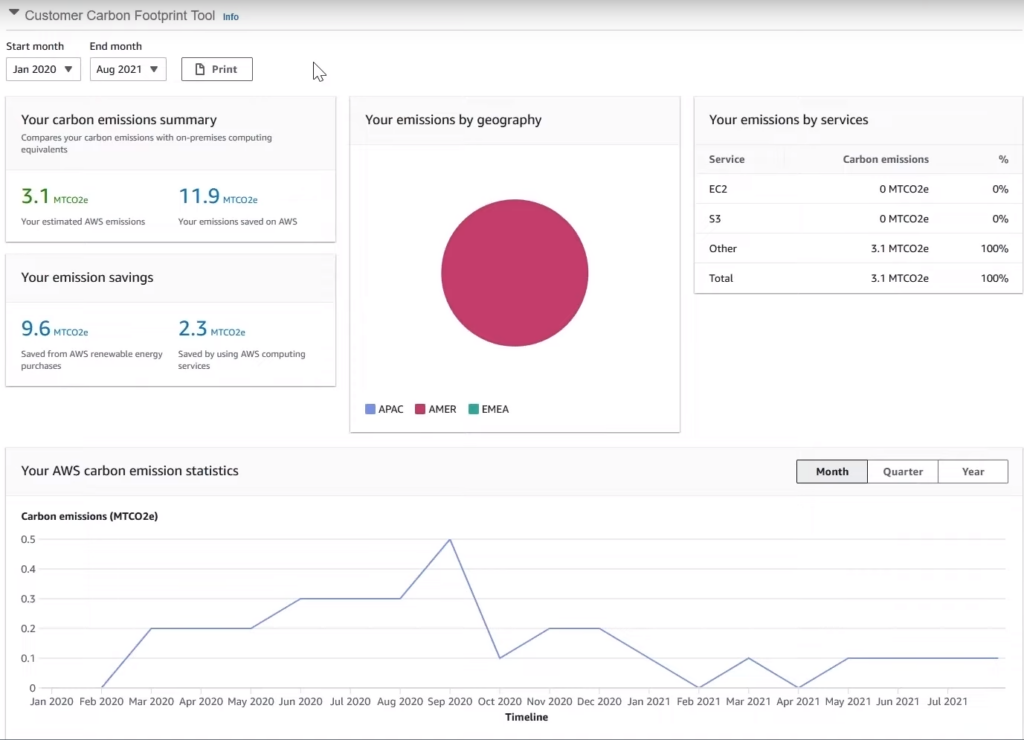
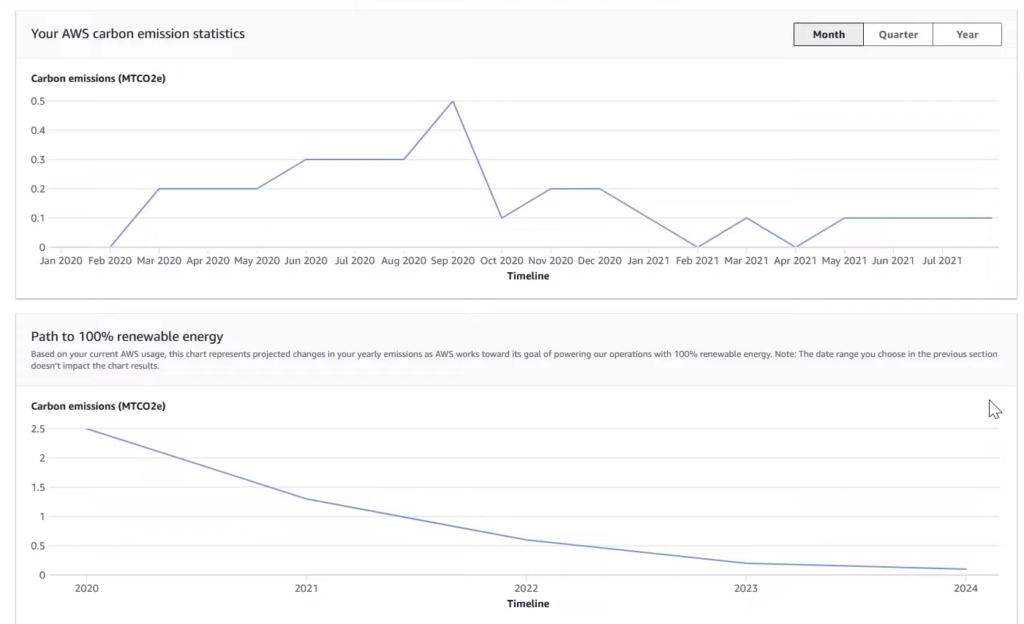
Covers Scope 1, 2, and 3 emissions from AWS service usage. Available free in the AWS Billing Console. Shows estimated emissions reduction vs on-premises. Updates monthly.
Azure
Emissions Impact Dashboard
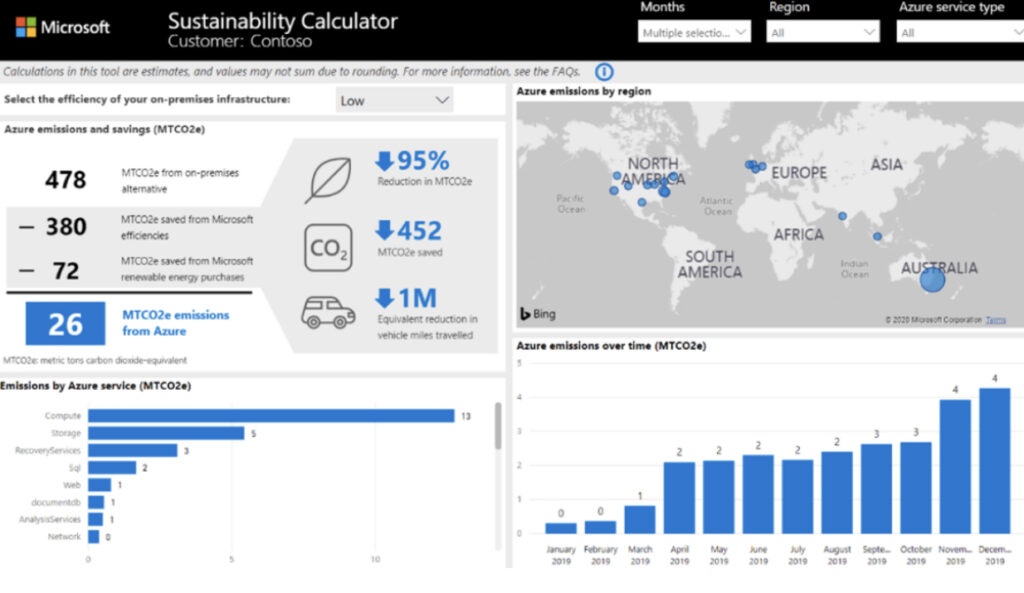
Available for Microsoft 365 and Azure workloads. Provides datacenter PUE and renewable energy percentage per region. Integrates with Microsoft Cloud for Sustainability platform.
Google Cloud
Google Cloud Carbon Footprint
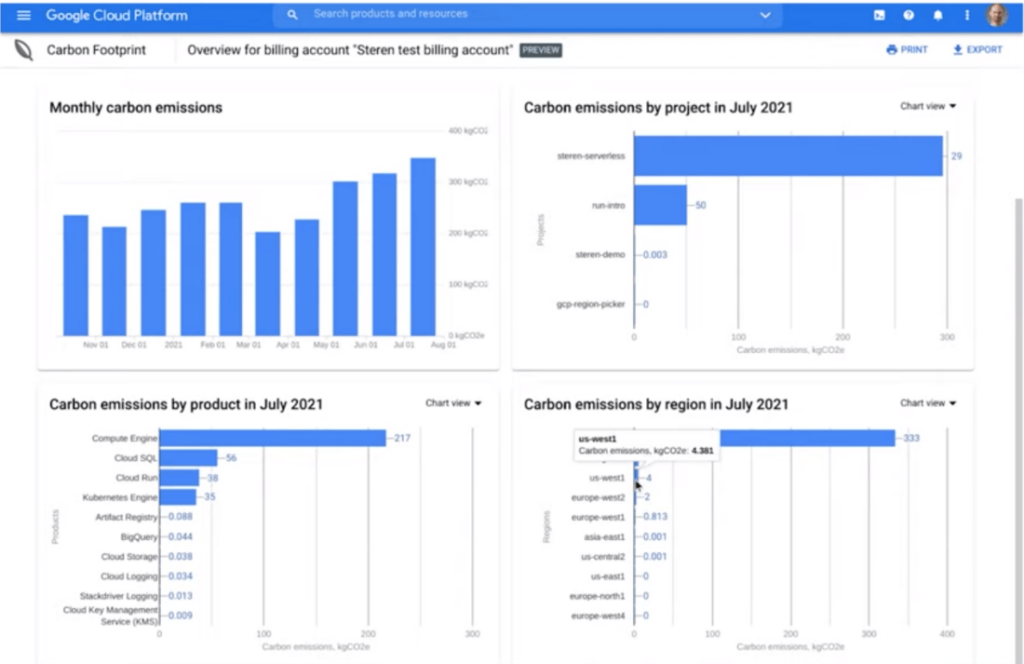
Displays gross carbon emissions by project, service, and region. Covers Scope 1, 2, and 3. Integrated into Google Cloud Console. Updates monthly.
Cloud Carbon KPIs to Track Monthly
gCO2eq per compute-hour — normalizes emissions across instance types and regions for fair comparison
Carbon intensity by region — which of your regions run on a higher share of renewable energy
Idle resource carbon waste — emissions attributable to over-provisioned or unused infrastructure
Renewable energy percentage — share of workloads running in 100% renewable-energy cloud regions
Carbon efficiency score — gCO2eq emitted per unit of business output (API calls, transactions, active users)
Quick Win
Enable the AWS Customer Carbon Footprint Tool today — it requires zero configuration and delivers a baseline Scope 1/2/3 report within minutes. For multi-cloud visibility, the open-source Cloud Carbon Footprint project provides unified dashboards across AWS, Azure, and GCP without any vendor lock-in.
Green Cloud Strategies That Actually Reduce Emissions
The following strategies are ranked by carbon reduction potential and practical implementation effort. These are the tactics we apply in client engagements at Gart — not theoretical frameworks, but operational playbooks that produce measurable, reportable results.
1
Rightsize First — Eliminate Idle Carbon Before Anything Else
The average enterprise cloud environment runs at 15-25% average CPU utilization. Every idle CPU cycle is wasted compute energy. Use AWS Compute Optimizer, Azure Advisor, or GCP Recommender to identify over-provisioned instances and rightsize to actual utilization before any other green initiative. This single step typically reduces cloud carbon 20-40%.
2
Deploy to Low-Carbon Regions
Cloud regions vary significantly in electricity grid carbon intensity. AWS eu-west-1 (Ireland) runs on substantially more renewable energy than us-east-1 (Northern Virginia) at certain times. For latency-tolerant workloads, region selection is often the highest-leverage carbon reduction decision you can make — with zero architectural changes required.
3
Implement Carbon-Aware Workload Scheduling
Batch jobs, ML training pipelines, and data processing workloads are flexible on timing. The Green Software Foundation's Carbon Aware SDK provides real-time carbon intensity data for all major cloud regions, enabling automated scheduling of flexible workloads to run when and where the grid is greenest.
4
Use Spot and Preemptible Instances for Flexible Workloads
Spot and preemptible instances run on otherwise-idle cloud capacity — consuming resources that would emit carbon regardless. For fault-tolerant workloads such as batch processing, ML training, and CI/CD pipelines, they deliver 70-90% cost savings and improve overall resource utilization efficiency across the cloud provider's fleet.
5
Containerize and Optimize with Kubernetes
Container workloads achieve significantly higher server utilization than VMs. A well-tuned Kubernetes cluster running at 70%+ resource utilization emits substantially less carbon per unit of compute than a fleet of half-utilized VMs. Green Kubernetes optimization — bin packing, node autoscaling with Karpenter, and Spot node groups — is one of the highest-ROI green cloud investments.
6
Migrate to ARM/Graviton Processors
AWS Graviton3, Google Tau, and Azure Ampere processors deliver equivalent performance at 40-60% lower power draw compared to traditional x86 instances. For workloads that are compatible with ARM architecture — which is the majority of modern containerized applications — this is a direct carbon and cost reduction with minimal migration effort.
AWS vs Azure vs Google Cloud: Sustainability Comparison 2026
All three hyperscalers have made serious sustainability commitments — but their approaches, tools, and progress toward those commitments differ in ways that matter for teams making cloud provider decisions with ESG requirements in scope.
CriterionAWSMicrosoft AzureGoogle CloudRenewable energy status100% renewable across 19 regions (reached 2023)100% renewable by 2025; carbon negative by 2030Carbon-neutral since 2007; 24/7 carbon-free by 2030Net-zero targetNet-zero Scope 1, 2 & 3 by 2040 (Climate Pledge)Remove all historical carbon by 2050Net-zero across all emissions by 2030Carbon measurement toolAWS Customer Carbon Footprint ToolEmissions Impact Dashboard; Cloud for SustainabilityGoogle Cloud Carbon Footprint (Console)Water commitmentWater Positive by 2030Water Positive by 2030; WUE published by regionReplenish 120% of water consumed by 2030Carbon-aware region dataEmerging via Sustainability Pillar guidancePublished datacenter carbon intensity dataReal-time carbon-free energy % by region in ConsoleHardware circularityAsset refurbishment and lifecycle managementCircular Centers — server repurposing; zero waste by 2030Server refurbishment; continuous chip efficiency R&DBest forOrganizations already deep in the AWS ecosystemEnterprises with Microsoft 365 and Azure AD investmentTeams prioritizing 24/7 carbon-free accuracy and data transparencyAWS vs Azure vs Google Cloud: Sustainability Comparison 2026
Google: Carbon-Free Operations, Water Conservation, and Cloud Sustainability
Google aims to power all its global operations with 100% carbon-free energy around the clock by 2030. They achieved carbon-neutrality in 2007 and have been using renewable energy for their data centers since 2017.
The company invests in technology for carbon removal solutions to offset its emissions. Google also has a goal to replenish 120% of the water consumed in its data centers and facilities.
Public cloud services, like Google's, rely on energy-efficient hyperscale data centers. These centers outperform smaller servers thanks to innovative infrastructure design and advanced cooling tech. Operating in a Google data center reduces electricity needs for IT hardware, leading to higher power usage effectiveness (PUE) compared to typical enterprise data centers.
Google Cloud not only prioritizes sustainability in its operations but also offers the Carbon Footprint tool for customers. This tool allows users to monitor and measure carbon emissions from their cloud applications, covering Scope 1, 2, and 3. It serves as an emissions calculator, aiding companies in reporting their gross carbon footprint and offering best practices for building low-carbon applications in Google Cloud.
Read more: Google Cloud Migration Services
Microsoft: Pioneering Carbon Reduction, Circular Solutions, and Cloud Sustainability
Microsoft aims to cut carbon emissions by over 50% by 2030 and eliminate its historical carbon footprint by 2050. They're shifting to 100% renewable energy for data centers and buildings by 2025, and zero waste is on the agenda by 2030.
Circular Centers repurpose old servers to combat growing e-waste, introduced as part of Microsoft's sustainability strategy since 2020.
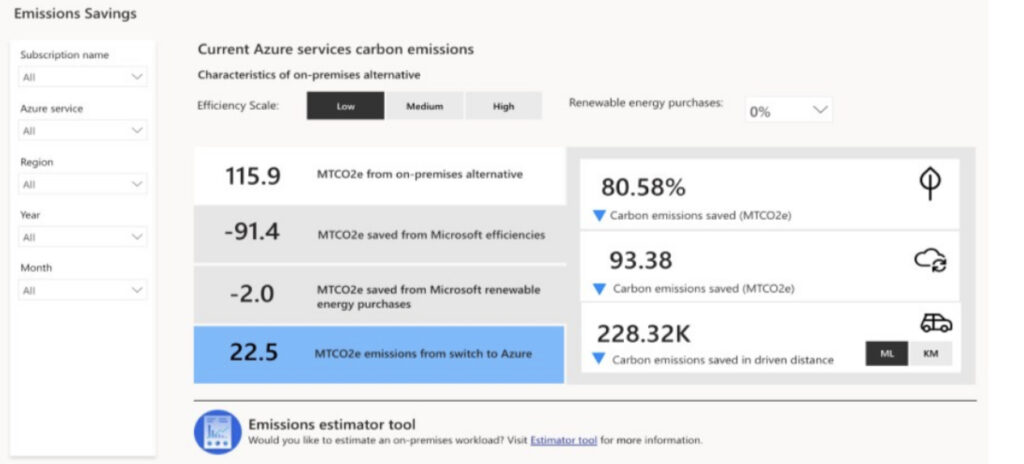
Tools like Microsoft Cloud for Sustainability offer real-time insights into carbon emissions, while the Emissions Impact Dashboard for Microsoft 365 calculates cloud workload footprints.
Microsoft's focus areas include lowering energy consumption, green data centers, water management, and waste reduction through responsible sourcing and recycling.
Four key drivers reduce the energy and carbon footprint of the Microsoft Cloud: IT operational efficiency, equipment efficiency, datacenter infrastructure efficiency, and new renewable electricity, targeting 100% by 2025.
Read more: Azure Migration Services
Amazon: Leading the Charge with Net-Zero Commitment and Sustainable Solutions
As a co-founder of The Climate Pledge, Amazon joins 400 global companies committed to achieving net-zero carbon emissions by 2040. Their strategies include reducing material usage, innovating for energy efficiency, and embracing renewable energy solutions.
Amazon, the largest corporate buyer of renewable energy since 2020, leads in sustainable practices to decarbonize its transportation network.
A study by 451 Research found that US enterprises, on average, could cut their carbon footprint by up to 88% by moving to AWS from on-premises data centers.
Amazon introduces the AWS Customer Carbon Footprint Tool, an emissions calculator for customers. It provides data on carbon footprint, including Scope 1 and Scope 2 emissions from cloud service usage. It also estimates the carbon emission reduction achieved by transitioning operations to the cloud.
Read more: AWS Migration Services
For deeper guidance on migrating to each provider, see: AWS Migration Services · Azure Migration Services · Google Cloud Migration Services
GreenOps: Embedding Sustainability into Cloud Operations
GreenOps is the operational discipline of tracking and reducing cloud carbon alongside cost and reliability — treating gCO2eq as a first-class engineering metric, not an afterthought in an annual sustainability report. The Cloud Native Computing Foundation (CNCF) Environmental Sustainability TAG provides open standards and tooling for teams implementing GreenOps at scale.
Green DevOps Practices with Measurable Carbon Impact
DevOps PracticeCarbon Reduction MechanismTypical ImpactKubernetes node autoscalingEliminates idle node capacity during low-traffic periods30-60% reduction in baseline compute emissionsEnvironment scheduling (dev/test)Auto-shutdown non-prod environments at nights and weekendsUp to 65% reduction in dev/test carbon wasteInfrastructure as Code (IaC)Eliminates configuration drift and over-provisioning at deployment15-30% reduction in provisioning wasteContainer image optimizationSmaller images — faster cold starts, less idle compute during scale events10-25% reduction in container runtime emissionsGraviton/ARM instance migrationARM processors deliver equivalent performance at 40% lower power drawUp to 40% reduction in compute-related emissionsCI/CD pipeline efficiencyParallel testing, caching, and artifact optimization reduce build infrastructure carbon20-40% reduction in CI/CD emissionsGreen DevOps Practices with Measurable Carbon Impact
"In every cloud environment we audit, the single largest source of wasted carbon is the same as the largest source of wasted cost: idle and over-provisioned resources. Rightsizing is not a sustainability project — it is good engineering. We just need to start measuring it in both dollars and grams of CO2."— Fedir Kompaniiets, Co-founder & DevOps Expert, Gart Solutions
FinOps and Sustainability: Two Goals, One Strategy
The FinOps Foundation added sustainability as a formal pillar of the FinOps framework in 2024, recognizing that carbon optimization and cost optimization share the same root causes. The table below maps FinOps practices to their direct carbon impact — making the case for treating these as a unified program rather than parallel initiatives:
FinOps PracticeCost ImpactCarbon ImpactRightsizing instances15-40% compute cost reductionProportional reduction in Scope 2 emissionsSpot / preemptible instances70-90% discount vs on-demandImproves fleet utilization = lower per-unit carbonResource tagging and cost allocation20-35% waste reduction over 12 monthsEnables carbon-by-team visibility and accountabilityScheduled dev/test shutdownUp to 65% dev/test environment savingsDirect elimination of idle compute carbonStorage lifecycle policies40-95% storage cost reductionReduces data center storage hardware demandGraviton/ARM migration20-30% compute cost savings40% reduction in processor-level power drawFinOps and Sustainability: Two Goals, One Strategy
Our AWS cost optimization guide covers the tactical implementation of these FinOps practices in detail, with concrete savings estimates for each technique.
How AI Workloads Affect Cloud Carbon Emissions
AI workloads represent one of the fastest-growing sources of cloud carbon emissions. Training a large foundation model can emit hundreds of tonnes of CO2 — comparable to the lifetime emissions of multiple vehicles. Inference workloads are more manageable but accumulate significantly at scale. Engineering leaders need a deliberate strategy for AI's cloud carbon footprint before it becomes a material ESG reporting problem.
Train in carbon-light regions: Google Cloud publishes real-time carbon-free energy percentages by region — use this data to schedule GPU training jobs dynamically rather than defaulting to the nearest or cheapest region.
Use spot and preemptible GPU instances: Large training runs on spot GPU instances (P3, A100, H100) reduce both cost and carbon intensity per training step by 70-90% for fault-tolerant workloads.
Apply quantization and distillation: Reducing model precision (INT8, INT4) and distilling large models to smaller task-specific versions reduces inference compute requirements by 4-10x with minimal accuracy loss for most production use cases.
Cache inference results semantically: For repetitive queries — chatbots, search, recommendations — semantic caching reduces redundant inference compute by 30-60%, with direct carbon and cost benefit.
Carbon-aware training scheduling: The Green Software Foundation's Carbon Aware SDK enables automatic scheduling of training runs during hours of peak renewable availability in your target region.
Gart Case Study: 32% Cloud Carbon Reduction for a SaaS Platform
Case Study · SaaS · AWS
Green Cloud Optimization for a European B2B SaaS Platform
A 120-person SaaS company running on AWS eu-west-1 engaged Gart Solutions after receiving ESG questionnaires from three enterprise clients requiring documented Scope 3 emissions reporting. Their infrastructure was running at 18% average CPU utilization across a fleet of on-demand EC2 instances — a common pattern in organizations that grew fast and never stopped to right-size.
32%
Reduction in cloud carbon emissions over 6 months
38%
Infrastructure cost reduction over the same period
71%
Avg. cluster utilization (up from 18% on EC2)
What we did: Migrated from on-demand EC2 to a Kubernetes cluster on Graviton3 instances with Karpenter node autoscaling, moved all batch processing to Spot instances, implemented automated dev/test environment shutdown on weeknights and weekends, migrated ML inference endpoints to AWS Lambda, and established monthly carbon reporting via the AWS Customer Carbon Footprint Tool tied to engineering OKRs. Total engineering effort: 11 weeks, zero production downtime.
Sustainable Cloud Architecture: A Practical Framework
The AWS Well-Architected Sustainability Pillar and the Green Software Foundation's Software Carbon Intensity (SCI) specification together provide a consistent, auditable framework for sustainability assessments. We apply both in client engagements to ensure recommendations are grounded in recognized industry standards.
Understand your impact: Establish a carbon baseline using provider tools before any optimization work. You need a measurable starting point to demonstrate reduction progress in ESG reports.
Set sustainability goals tied to engineering KPIs: A carbon reduction target (e.g., 30% reduction in 12 months) becomes actionable when it is expressed as gCO2eq per transaction — something engineering teams can directly influence.
Maximize utilization: Drive instance, cluster, and function utilization as high as reliability constraints allow. Idle capacity is the primary source of avoidable cloud carbon.
Adopt more efficient offerings continuously: Graviton3, serverless, and managed container services consistently deliver better performance-per-watt than their predecessors. Build adoption into your standard upgrade cycle.
Use managed services strategically: AWS RDS, EKS, and serverless functions are operated at higher efficiency than self-managed equivalents. The carbon overhead of management tooling is absorbed by the provider's scale.
Reduce downstream impact: Optimize API payloads, image sizes, and content delivery architecture to reduce the energy consumed by clients and CDN layers accessing your services.
Conceptual Frameworks for Green Clouds
There are several frameworks that provide a structured roadmap for sustainable cloud computing:
Ecological Modernization Theory
Triple Bottom Line (TBL)
Life Cycle Assessment (LCA)
Ecological Modernization Theory
Ecological Modernization Theory (EMT) emphasizes that technological advancement, rather than being a threat to the environment, can align with ecological objectives. The framework promotes leveraging innovation to minimize environmental impact while maintaining or enhancing efficiency.
In cloud infrastructures, this theory supports the integration of eco-friendly practices such as:
Adoption of energy-efficient hardware.
Investment in advanced cooling systems.
Use of renewable energy sources for powering data centers.
Cloud service providers can modernize their operations to reduce energy consumption and carbon footprints while maintaining service quality and scalability.
Triple Bottom Line (TBL)
The TBL framework evaluates sustainability across three dimensions: economic, social, and environmental. In the context of cloud computing, it offers a balanced perspective to achieve sustainability goals:
Economic Dimension: Ensures the financial viability of sustainable practices, such as reducing operational costs through energy-efficient technologies.
Social Dimension: Encourages corporate social responsibility by promoting awareness and equitable practices in communities where data centers operate.
Environmental Dimension: Prioritizes minimizing the ecological footprint through renewable energy integration, efficient resource usage, and e-waste management.
The TBL approach promotes a holistic view, ensuring that economic growth in the cloud industry does not come at the expense of environmental or social well-being.
Life Cycle Assessment (LCA)
LCA examines the environmental impact of cloud computing across its entire lifecycle, from raw material extraction to disposal. This detailed analysis helps identify the stages where intervention is most needed:
Stages in LCA:
Raw Material Extraction: Assessing the environmental costs of producing hardware components.
Manufacturing: Evaluating emissions and resource use during production.
Deployment and Operation: Measuring energy and water consumption during active use.
End-of-Life Management: Analyzing the ecological impact of decommissioning and recycling infrastructure components.
By understanding these stages, cloud providers can implement targeted strategies to mitigate the environmental impact, such as sourcing sustainable materials and adopting energy-efficient operations.
Empower Your Green Transition
Ready to take the leap into the public cloud? Before you dive in, a word of advice: Cloud migration is more than a simple "lift and shift." It requires a strategic approach, choosing the right vendor, ensuring infrastructure readiness, and aligning IT and business objectives.
However, the investment in this transition pays off. Shifting operations to the public cloud and prioritizing cloud-based applications can potentially reduce global emissions and energy consumption by up to 20 percent.
Feeling inspired to make a positive impact? Now's the time to act. Contact Gart, and we'll guide you through the migration process. Let's contribute to a greener future together!
Gart Solutions · Cloud & DevOps Consulting
Ready to Make Your Cloud Infrastructure Measurably Greener?
We help engineering teams in Europe and North America reduce cloud carbon footprint and infrastructure costs simultaneously — through rightsizing, green Kubernetes optimization, FinOps integration, and ESG-ready carbon reporting that satisfies enterprise and investor requirements.
Cloud Migration
Green Kubernetes
FinOps & Carbon Reporting
GreenOps Audit
DevOps Services
Infrastructure as Code
Book a Free Cloud Sustainability Assessment →
Explore Cloud Services
⭐ 4.9/5 on Clutch (15 reviews)
🏆 50+ cloud migrations delivered
🌍 EU & North America clients
✅ AWS & Azure certified architects
Fedir Kompaniiets
Co-founder & CEO, Gart Solutions · Cloud Architect & DevOps Consultant
Fedir is a technology enthusiast with over a decade of diverse industry experience. He co-founded Gart Solutions to address complex tech challenges related to Digital Transformation, helping businesses focus on what matters most — scaling. Fedir is committed to driving sustainable IT transformation, helping SMBs innovate, plan future growth, and navigate the "tech madness" through expert DevOps and Cloud managed services. Connect on LinkedIn.
As climate change, resource depletion, and environmental issues loom large, businesses are turning to technology as a powerful ally in achieving their sustainability goals. This isn't just about saving the planet (although that's pretty important), it's also about creating a more efficient and resilient future for all.
Data is the new oil, and when it comes to sustainability, it's a game-changer. Technology empowers businesses to collect and analyze vast amounts of data, allowing them to make informed decisions about their environmental impact. By automating processes, streamlining operations, and enabling data-driven decision-making, businesses can minimize waste, reduce energy consumption, and optimize resource utilization.
Digital technologies, such as cloud computing, remote collaboration tools, and virtual platforms, have the potential to reduce the need for physical infrastructure and travel, thereby minimizing the associated environmental impacts.
One of the primary challenges is striking a balance between sustainability goals and profitability. Many businesses struggle to reconcile the perceived trade-off between environmental considerations and short-term financial gains. Implementing sustainable practices often requires upfront investments in new technologies, infrastructure, or processes, which can be costly and may not yield immediate returns. Convincing stakeholders and shareholders of the long-term benefits and value of sustainability can be a complex task.
The Environmental Impact of IT Infrastructure
One of the primary concerns regarding IT infrastructure is energy consumption. Data centers, which house servers, storage systems, and networking equipment, are energy-intensive facilities. They require substantial amounts of electricity to power and cool the hardware, contributing to greenhouse gas emissions and straining energy grids. According to estimates, data centers account for approximately 1% of global electricity consumption, and this figure is expected to rise as data volumes and computing demands continue to grow.
Furthermore, the manufacturing process of IT equipment, such as servers, computers, and other hardware components, involves the extraction and processing of raw materials, which can have detrimental effects on the environment. The mining of rare earth metals and other minerals used in electronic components can lead to habitat destruction, water pollution, and the depletion of natural resources.
E-waste, or electronic waste, is another pressing issue related to IT infrastructure. As technological devices become obsolete or reach the end of their lifecycle, they often end up in landfills or informal recycling facilities, posing risks to human health and the environment. E-waste can contain hazardous substances like lead, mercury, and cadmium, which can leach into soil and water sources, causing pollution and potential harm to ecosystems.
By addressing the environmental impact of IT infrastructure, businesses can not only reduce their carbon footprint and resource consumption but also contribute to a more sustainable future. Striking a balance between technological innovation and environmental stewardship is crucial for achieving long-term sustainability goals.
DevOps and Sustainability
DevOps practices play a pivotal role in optimizing resources and reducing waste, making them a powerful ally in the pursuit of sustainability. By seamlessly integrating development and operations processes, DevOps enables organizations to achieve greater efficiency, agility, and environmental responsibility.
At the core of DevOps is the principle of automation and continuous improvement. By automating repetitive tasks and streamlining processes, DevOps eliminates manual efforts, reduces human errors, and minimizes resource wastage. This efficiency translates into lower energy consumption, decreased hardware utilization, and a reduced carbon footprint.
CI/CD for Improved Eco-Efficiency
Continuous Integration and Continuous Delivery (CI/CD) are essential DevOps practices that contribute to sustainability. CI/CD enables organizations to rapidly and frequently deliver software updates and improvements, ensuring that applications run optimally and efficiently. This approach minimizes the need for resource-intensive deployments and reduces the overall environmental impact of software development and operations.
Moreover, CI/CD facilitates the early detection and resolution of issues, preventing potential inefficiencies and resource wastage. By integrating automated testing and quality assurance processes, organizations can identify and address performance bottlenecks, security vulnerabilities, and other issues that could lead to increased energy consumption or resource utilization.
Monitoring and Analytics for Identifying and Eliminating Inefficiencies
DevOps emphasizes the importance of monitoring and analytics as a means to gain insights into system performance, resource utilization, and potential areas for improvement. By leveraging advanced monitoring tools and techniques, organizations can gather real-time data on energy consumption, hardware utilization, and application performance.
This data can then be analyzed to identify inefficiencies, such as underutilized resources, redundant processes, or areas where optimization is required. Armed with these insights, organizations can take proactive measures to streamline operations, adjust resource allocation, and implement energy-saving strategies, ultimately reducing their environmental footprint.
For a deeper dive into how monitoring and analytics can drive efficiency and sustainability, explore this case study of a software development company that optimized its workload orchestration using continuous monitoring.
Our case study: Implementation of Nomad Cluster for Massively Parallel Computing
Cloud Computing and Sustainability
Cloud computing has emerged as a transformative technology that not only enhances efficiency and agility but also holds significant potential for promoting sustainability and reducing environmental impact. By leveraging the power of cloud services, organizations can achieve remarkable energy and resource savings, while simultaneously minimizing their carbon footprint.
Energy and Resource Savings through Cloud Services
One of the primary advantages of cloud computing in terms of sustainability is the efficient utilization of shared resources. Cloud service providers operate large-scale data centers that are designed for optimal resource allocation and energy efficiency. By consolidating workloads and leveraging economies of scale, cloud providers can maximize resource utilization, reducing energy consumption and minimizing waste.
Additionally, cloud providers invest heavily in implementing cutting-edge technologies and best practices for energy efficiency, such as advanced cooling systems, renewable energy sources, and efficient hardware. These efforts result in significant energy savings, translating into a lower carbon footprint for organizations that leverage cloud services.
Flexible Cloud Models for Cost Optimization for Sustainable Operations
Cloud computing offers flexible deployment models, including public, private, and hybrid clouds, allowing organizations to tailor their cloud strategies to meet their specific needs and optimize costs. By embracing the pay-as-you-go model of public clouds or implementing private clouds for sensitive workloads, businesses can dynamically scale their resource consumption, avoiding over-provisioning and minimizing unnecessary energy expenditure.
Cloud providers offer a diverse range of compute and storage resources with varying payment options and tiers, catering to different use cases and requirements. For instance, Amazon Web Services (AWS) provides Elastic Compute Cloud (EC2) instances with multiple pricing models, including Dedicated, On-Demand, Spot, and Reserved instances. Choosing the most suitable instance type for a specific workload can lead to significant cost savings.
Dedicated instances, while the most expensive option, are ideal for handling sensitive workloads where security and compliance are of paramount importance. These instances run on hardware dedicated solely to a single customer, ensuring heightened isolation and control.
On-demand instances, on the other hand, are billed on an hourly basis and are well-suited for applications with short-term, irregular workloads that cannot be interrupted. They are particularly useful during testing, development, and prototyping phases, offering flexibility and scalability on-demand.
For long-running workloads, Reserved instances offer substantial discounts, up to 72% compared to on-demand pricing. By investing in Reserved instances, businesses can secure capacity reservations and gain confidence in their ability to launch the required number of instances when needed.
Spot instances present a cost-effective alternative for workloads that do not require high availability. These instances leverage spare computing capacity, enabling businesses to benefit from discounts of up to 90% compared to on-demand pricing.
Our case study: Cutting Costs by 81%: Azure Spot VMs Drive Cost Efficiency for Jewelry AI Vision
Additionally, DevOps teams employ various cloud cost optimization practices to further reduce operational expenses and environmental impact. These include:
- Identifying and deleting underutilized instances
- Moving infrequently accessed storage to more cost-effective tiers
- Exploring alternative regions or availability zones with lower pricing
- Leveraging available discounts and pricing models
- Implementing spend monitoring and alert systems to track and control costs proactively
By adopting a strategic approach to resource utilization and cost optimization, businesses can not only achieve sustainable operations but also unlock significant cost savings. This proactive mindset aligns with the principles of environmental stewardship, enabling organizations to thrive while minimizing their ecological footprint.
Read more: Sustainable Solutions with AWS
Reduced Physical Infrastructure and Associated Emissions
Moving to the cloud isn't just about convenience and scalability – it's a game-changer for the environment. Here's why:
Bye-bye Bulky Servers
Cloud computing lets you ditch the on-site server farm. No more rows of whirring machines taking up space and guzzling energy. Cloud providers handle that, often in facilities optimized for efficiency. This translates to less energy used, fewer emissions produced, and a lighter physical footprint for your business.
Commuting? Not Today
Cloud-based tools enable remote work, which means fewer cars on the road spewing out emissions. Not only does this benefit the environment, but it also promotes a more flexible and potentially happier workforce.
Cloud computing offers a win-win for businesses and the planet. By sharing resources, utilizing energy-saving data centers, and adopting flexible deployment models, cloud computing empowers organizations to significantly reduce their environmental impact without sacrificing efficiency or agility. Think of it as a powerful tool for building a more sustainable future, one virtual server at a time.
Get a sample of IT Audit
Sign up now
Get on email
Loading...
Thank you!
You have successfully joined our subscriber list.
Effective Infrastructure Management and Sustainability
Effective infrastructure management plays a crucial role in achieving sustainability goals within an organization. By implementing strategies that optimize resource utilization, reduce energy consumption, and promote environmentally-friendly practices, businesses can significantly diminish their environmental impact while maintaining operational efficiency.
Virtualization and Consolidation Strategies for Reducing Hardware Needs
Virtualization technology has revolutionized the way organizations manage their IT infrastructure.
By ditching the extra servers, you're using less energy to power and cool them. Think of it like turning off all the lights in empty rooms – virtualization ensures you're only using the resources you truly need. This translates to significant energy savings and a smaller carbon footprint.
Fewer servers mean less hardware to manufacture and eventually dispose of. This reduces the environmental impact associated with both the production process and electronic waste (e-waste). Virtualization helps you be a more responsible citizen of the digital world.
Our case study: IoT Device Management Using Kubernetes
Optimizing with Third-Party Services
In the pursuit of sustainability and resource efficiency, businesses must explore innovative strategies that can streamline operations while reducing their environmental footprint. One such approach involves leveraging third-party services to optimize costs and minimize operational overhead. Cloud computing providers, such as Azure, AWS, and Google Cloud, offer a vast array of services that can significantly enhance the development process and reduce resource consumption.
A prime example is Amazon's Relational Database Service (RDS), a fully managed database solution that boasts advanced features like multi-regional setup, automated backups, monitoring, scalability, resilience, and reliability. Building and maintaining such a service in-house would not only be resource-intensive but also costly, both in terms of financial investment and environmental impact.
However, striking the right balance between leveraging third-party services and maintaining control over critical components is crucial. When crafting an infrastructure plan, DevOps teams meticulously analyze project requirements and assess the availability of relevant third-party services. Based on this analysis, recommendations are provided on when it's more efficient to utilize a managed service, and when it's more cost-effective and suitable to build and manage the service internally.
For ongoing projects, DevOps teams conduct comprehensive audits of existing infrastructure resources and services. If opportunities for cost optimization are identified, they propose adjustments or suggest integrating new services, taking into account the associated integration costs with the current setup. This proactive approach ensures that businesses continuously explore avenues for reducing their environmental footprint while maintaining operational efficiency.
One notable success story involves a client whose services were running on EC2 instances via the Elastic Container Service (ECS). After analyzing their usage patterns, peak periods, and management overhead, the DevOps team recommended transitioning to AWS Fargate, a serverless solution that eliminates the need for managing underlying server infrastructure. Fargate not only offered a more streamlined setup process but also facilitated significant cost savings for the client.
By judiciously adopting third-party services, businesses can reduce operational overhead, optimize resource utilization, and ultimately minimize their environmental impact. This approach aligns with the principles of sustainability, enabling organizations to achieve their goals while contributing to a greener future.
Our case study: Deployment of a Node.js and React App to AWS with ECS
Green Code and DevOps Go Hand-in-Hand
At the heart of this sustainable approach lies green code, the practice of developing and deploying software with a focus on minimizing its environmental impact. Green code prioritizes efficient algorithms, optimized data structures, and resource-conscious coding practices.
At its core, Green Code is about designing and implementing software solutions that consume fewer computational resources, such as CPU cycles, memory, and energy. By optimizing code for efficiency, developers can reduce the energy consumption and carbon footprint associated with running applications on servers, desktops, and mobile devices.
Continuous Monitoring and Feedback
DevOps promotes continuous monitoring of applications, providing valuable insights into resource utilization. These insights can be used to identify areas for code optimization, ensuring applications run efficiently and consume less energy.
Infrastructure Automation:
Automating infrastructure provisioning and management through tools like Infrastructure as Code (IaC) helps eliminate unnecessary resources and idle servers. Think of it like switching off the lights in an empty room – automation ensures resources are only used when needed.
Containerization
Containerization technologies like Docker package applications with all their dependencies, allowing them to run efficiently on any system. This reduces the need for multiple servers and lowers overall energy consumption.
Cloud-Native Development
By leveraging cloud platforms, developers can benefit from pre-built, scalable infrastructure with high energy efficiency. Cloud providers are constantly optimizing their data centers for sustainability, so you don't have to shoulder the burden alone.
DevOps practices not only streamline development and deployment processes, but also create a culture of resource awareness and optimization. This, combined with green code principles, paves the way for building applications that are not just powerful, but also environmentally responsible.
How Businesses Are Using DevOps, Cloud, and Green Code to Thrive
Case Study 1: Transforming a Local Landfill Solution into a Global Platform
ReSource International, an Icelandic environmental solutions company, developed elandfill.io, a digital platform for monitoring and managing landfill operations. However, scaling the platform globally posed challenges in managing various components, including geospatial data processing, real-time data analysis, and module integration.
Gart Solutions implemented the RMF, a suite of tools and approaches designed to facilitate the deployment of powerful digital solutions for landfill management globally.
Case Study 3: The #1 Music Promotion Services Cuts Costs with Sustainable AWS Solutions
The #1 Music Promotion Services, a company helping independent artists, faced rising AWS infrastructure costs due to rapid growth. A multi-faceted approach focused on optimization and cost-saving strategies was implemented. This included:
Amazon SNS Optimization: A usage audit identified redundant notifications and opportunities for batching messages, leading to lower usage charges.
EC2 and RDS Cost Management: Right-sizing instances, utilizing reserved instances, and implementing auto-scaling ensured efficient resource utilization.
Storage Optimization: Lifecycle policies and data cleanup practices reduced storage costs.
Traffic and Data Transfer Management: Optimized data transfer routes and cost monitoring with alerts helped manage unexpected spikes.
Results: Monthly AWS costs were slashed by 54%, with significant savings across services like Amazon SNS and EC2/RDS. They also established a framework for sustainable cost management, ensuring long-term efficiency.
Partner with Gart for IT Cost Optimization and Sustainable Business
As businesses strive for sustainability, partnering with the right IT provider is crucial for optimizing costs and minimizing environmental impact. Gart emerges as a trusted partner, offering expertise in cloud computing, DevOps, and sustainable IT solutions.
Gart's cloud proficiency spans on-premise-to-cloud migration, cloud-to-cloud migration, and multi-cloud/hybrid cloud management. Our DevOps services include cloud adoption, CI/CD streamlining, security management, and firewall-as-a-service, enabling process automation and operational efficiencies.
Recognized by IAOP, GSA, Inc. 5000, and Clutch.co, Gart adheres to PCI DSS, ISO 9001, ISO 27001, and GDPR standards, ensuring quality, security, and data protection.
By partnering with Gart, businesses can optimize IT costs, reduce their carbon footprint, and foster a sustainable future. Leverage Gart's expertise to align your IT strategies with environmental goals and unlock the benefits of cost optimization and sustainability.