
Key Takeaways
- Rightsizing compute alone reduces cloud costs by 20–40% in most environments — yet most teams skip it after initial setup.
- Unmanaged data transfer and forgotten storage account for nearly 35% of unnecessary cloud spend in our optimization projects — more than idle compute.
- Reserved Instances are not always the best choice: in fast-growing SaaS environments, Savings Plans outperform traditional RIs due to changing workload patterns.
- Kubernetes clusters without cost controls are one of the fastest-growing sources of cloud waste in 2025–2026.
- A FinOps governance model reduces cost drift by up to 60% over 12 months compared to ad-hoc optimization.
Cloud costs are the second-largest operational expense for most engineering-led companies — and the fastest-growing. According to the FinOps Foundation, organizations waste on average 32% of their cloud spend. That’s not a vendor problem. It’s a governance and execution problem.
I’m Roman Burdiuzha, co-founder and CTO at Gart Solutions, and I’ve personally led cloud cost optimization projects across 50+ environments — AWS, Azure, GCP, and hybrid — for SaaS, healthcare, fintech, and enterprise clients. The patterns are consistent, and the fixes are specific.
This guide goes beyond the standard “rightsize your VMs” advice. I’ll share what we actually find when we audit cloud environments, which optimization levers deliver the most impact, and how to build a FinOps culture that prevents costs from growing back.
In this post, I’ll share some practical tips to help you maximize the value of your cloud investments while minimizing unnecessary expenses.
- Main Components of Cloud Costs — and What You’re Likely Underestimating
- What a Cloud Cost Optimization Consulting Engagement Looks Like
- Step 1: Identify and Eliminate Zombie Resources
- Step 2: Rightsizing — The #1 Lever Most Teams Misuse
- Step 3: Commitment Discounts — Reserved Instances vs. Savings Plans
- Step 4: Spot and Preemptible Instances — Where They Work and Where They Fail
- Step 5: Kubernetes Cost Optimization — The Emerging Frontier
- Step 6: Storage Lifecycle and Data Transfer — The Hidden Cost Drivers
- Step 7: FinOps Governance — How to Prevent Cost Drift
- Step 8: Serverless and Multi-Cloud Cost Strategy
- Real-World Case Studies: Measurable Outcomes
- Main Components of Cloud Costs
- 10 Cloud Cost Optimization Strategies
- Real-World Results
- Conclusion: Cloud Cost Optimization
Main Components of Cloud Costs — and What You’re Likely Underestimating
Most cloud cost discussions focus on compute. In our experience, compute is rarely where the biggest leaks are. Here’s what the full picture looks like:
| Cost Component | Description | % of Total Bill (Avg.) | Optimization Potential |
|---|---|---|---|
| Compute (VMs / EC2 / Nodes) | Virtual machines, container nodes, serverless invocations | 40–55% | High (20–40% savings) |
| Storage | Object storage, block volumes, backups, snapshots | 15–25% | High (30–60% with lifecycle policies) |
| Data Transfer | Egress to internet, cross-region, cross-AZ | 10–20% | Often overlooked; 25–40% reducible |
| Database Services | Managed RDS, Aurora, Cosmos DB, BigQuery | 10–18% | Medium–High |
| Networking | Load balancers, NAT gateways, VPNs, CDN | 5–10% | Often invisible; NAT gateways are a frequent culprit |
| Kubernetes / Container Orchestration | Control plane, node groups, cluster autoscaling | 5–15% (growing fast) | High with proper bin-packing |
| Unused/Forgotten Resources | Unattached EBS, idle load balancers, stale snapshots | 8–15% | Near-total elimination possible |
💡 From the Field — Roman Burdiuzha, CTO, Gart Solutions
“In our optimization work, the biggest source of waste isn’t compute. Unmanaged data transfer and forgotten storage consistently account for nearly 35% of unnecessary cloud spend — more than idle VMs. Teams focus on rightsizing servers because it’s visible in the dashboard. The egress bills hide in a line item most engineers don’t open.”
What a Cloud Cost Optimization Consulting Engagement Looks Like
Gart Solutions runs cloud cost optimization as a structured, time-boxed engagement rather than an open-ended advisory relationship — most clients start with a 2-week cloud cost audit before committing to implementation work.
- Week 1: Discovery and waste detection. Pulling billing data, tagging coverage, and utilization metrics across every account to identify zombie resources, oversized instances, and untracked spend.
- Week 2: Savings roadmap. A prioritized, quantified list of recommendations (rightsizing, commitment discounts, architecture changes) ranked by savings-to-effort ratio, not just a generic checklist.
- Implementation (optional). Clients can take the roadmap to their own team or have Gart implement the highest-priority items directly, including setting up ongoing FinOps monitoring so savings don’t silently erode over the following quarters.
Clients typically uncover 20-40% in recoverable cloud costs during the audit phase alone — before any architectural changes are made.
Step 1: Identify and Eliminate Zombie Resources
Before you optimize what’s running, you need to eliminate what shouldn’t be running at all. Zombie resources — orphaned compute, unattached disks, forgotten snapshots — are the lowest-hanging fruit in any cloud cost audit.
Cloud Waste Detection Framework
| Resource Type | Common Waste Pattern | Detection Method | Potential Savings |
|---|---|---|---|
| EBS Volumes (AWS) | Unattached disks from terminated instances | AWS Cost Explorer → filter by “unattached” | 5–15% of storage bill |
| EC2 / VMs | Idle instances (<5% CPU over 14 days) | AWS Compute Optimizer / Azure Advisor | 10–30% of compute bill |
| Snapshots | Never deleted; retained indefinitely | Script: age > 90 days with no policy | 5–20% of storage bill |
| Load Balancers | Pointing to no healthy targets (legacy environments) | Check target group health metrics | 3–10% of networking bill |
| Elastic IPs (AWS) | Reserved but unattached to running instances | Filter: “not associated” in EC2 console | Minor but easy win |
| NAT Gateways | Per-GB processed data charge; often abused for internal traffic | Review VPC Flow Logs; use VPC endpoints instead | 5–25% of networking bill |
| Managed Databases | Dev/test RDS instances running 24/7 | Tag review: environment=dev + always-on schedule | 10–40% of DB bill |
How to Run a Zombie Resource Audit (4-Step Process)
- Enable tagging enforcement.Without tags, there’s no way to identify resource ownership. Set mandatory tags:
env,team,project,cost-center. Resources without these tags should trigger an alert. - Run idle resource detection.AWS Compute Optimizer, Azure Advisor, and Google Cloud Recommender all provide out-of-the-box idle resource flagging. Schedule a weekly review.
- Audit snapshots and backups.Write a simple script (or use AWS Data Lifecycle Manager) to flag snapshots older than 90 days that have no attached policy.
- Implement a “delete on idle” policy for dev/test.Environments that show zero connections for 72+ hours should auto-stop. Implement this using AWS Instance Scheduler or Azure DevTest Labs.
Potential Savings
15–35% of total bill
Implementation Difficulty
Low
Time to Impact
1–2 weeks
Tools
AWS Compute Optimizer, Azure Advisor, GCP Recommender
Step 2: Rightsizing — The #1 Lever Most Teams Misuse
Rightsizing is the practice of matching instance type and size to actual workload requirements. According to the FinOps Foundation, the average cloud environment runs at 14% CPU utilization. Most teams over-provision at initial deployment and never revisit.
How to Rightsize Effectively
The most common mistake is rightsizing once and treating it as done. Workloads change. A SaaS product that needed an r5.4xlarge at launch may only need an r5.xlarge 18 months later after engineering optimizations. We recommend a quarterly rightsizing review as part of your FinOps cycle.
AWS Rightsizing
Use AWS Compute Optimizer — it analyzes 14 days of CloudWatch metrics and recommends specific instance type changes, including cross-family migrations (e.g., from general-purpose M-series to compute-optimized C-series). Average savings from following these recommendations: 21–35% on compute.
Refer to the AWS Well-Architected Framework — Cost Optimization Pillar for the official decision framework.
Azure Rightsizing
Azure Advisor provides size recommendations under the “Cost” tab. Enable Azure Hybrid Benefit to reuse existing Windows Server and SQL Server licenses — this alone can reduce VM costs by up to 40% for Windows workloads without changing any infrastructure.
GCP Rightsizing
Google Cloud’s Active Assist Recommender surfaces idle VM recommendations. Pair rightsizing with Committed Use Discounts (CUDs) — GCP’s equivalent of Reserved Instances — for 1-year (37% off) or 3-year (55% off) commitments on Compute Engine.
🔍 What We See in Practice
“In 9 out of 10 environments we audit, the dev/staging infrastructure is provisioned at near-production scale. Downsizing dev environments to burstable instances (T3/T4g on AWS, B-series on Azure) typically saves $2,000–$15,000/month with zero impact on developer productivity.”
Potential Savings
20–40% of compute bill
Implementation Difficulty
Medium
Time to Impact
2–4 weeks
Step 3: Commitment Discounts — Reserved Instances vs. Savings Plans
This is one of the most nuanced decisions in cloud cost optimization. The right answer depends on your workload growth trajectory, not just your current usage.
AWS: Reserved Instances vs. Savings Plans
| Dimension | Reserved Instances (RIs) | Compute Savings Plans |
|---|---|---|
| Commitment type | Specific instance family, size, region | Dollar amount per hour (flexible) |
| Flexibility | Low (convertible RIs help but are complex) | High (applies across EC2, Lambda, Fargate) |
| Max discount | Up to 72% (1yr, all upfront) | Up to 66% (1yr, all upfront) |
| Best for | Stable, predictable workloads on specific instance types | Fast-growing SaaS, variable instance mix |
| Risk | Stranded capacity if workloads change | Slight discount gap vs. RIs |
💡 Contrarian Take — From 50+ Projects
“Reserved Instances are not always the best choice. In fast-growing SaaS environments, Savings Plans consistently outperform traditional RI strategies because your instance mix changes as you scale. We’ve seen companies with stranded RIs costing them more than they saved. Unless your workload is stable and well-defined, start with Savings Plans.”
Azure: Reserved Instances + Hybrid Benefit
Azure Reserved VM Instances offer discounts of up to 72% versus pay-as-you-go for 3-year terms. Stack this with Azure Hybrid Benefit (bring your own Windows/SQL license) and you can achieve blended savings of 55–80% on eligible workloads. See the Azure Hybrid Benefit documentation for eligibility.
GCP: Committed Use Discounts
GCP’s Committed Use Discounts apply to specific amounts of vCPU and memory. Unlike AWS, GCP also offers automatic sustained use discounts — if you run an instance for more than 25% of a month, GCP automatically applies a discount of up to 30%, with no commitment required.
Potential Savings
30–72% vs. on-demand
Implementation Difficulty
Low-Medium
Time to Impact
Immediate after purchase
Step 4: Spot and Preemptible Instances — Where They Work and Where They Fail
Spot instances (AWS), preemptible VMs (GCP), and Spot VMs (Azure) offer discounts of up to 90% versus on-demand pricing. But using them incorrectly costs more than you save.
Workloads That Are a Good Fit for Spot
- Batch data processing jobs (ETL, ML training, image processing)
- CI/CD build agents (stateless, interruptible)
- Big data analytics (Spark, Hadoop on EMR)
- Rendering and media encoding pipelines
- Non-production test environments
Workloads That Are NOT a Good Fit
- Stateful databases or caches
- Long-running, stateful microservices without checkpointing
- Any workload with a strict SLA under 99.9%
- Production API servers without session externalization
Production-Grade Spot Architecture
The right pattern for using spot in production is a mixed instance group: use Spot for the majority of capacity (60–80%), with On-Demand or Reserved instances as a baseline (20–40%). This is natively supported via AWS Auto Scaling Groups, Azure VMSS, and GCP Managed Instance Groups.
Potential Savings
Up to 90% vs. on-demand (60–80% realistically for mixed fleets)
Implementation Difficulty
Medium-High
Risk
Interruption; requires fault-tolerant architecture
Step 5: Kubernetes Cost Optimization — The Emerging Frontier
If your organization runs Kubernetes, this is now one of your most important optimization areas. Kubernetes makes it easy to over-provision resources — and most teams do. Namespace-level visibility doesn’t come for free, and without it, containers silently consume capacity that no one claims.
The Four Kubernetes Cost Levers
1. Set Accurate Resource Requests and Limits
The #1 source of Kubernetes waste: pods with overestimated resource requests. Kubernetes schedules based on requests, not actual usage. If a pod requests 4 CPU but only uses 0.3 CPU, you’re paying for 4 CPU of node capacity. Use CNCF-recommended tooling like Vertical Pod Autoscaler (VPA) to automatically right-size requests based on observed usage.
2. Cluster Autoscaler and Karpenter (AWS)
Cluster Autoscaler adds and removes nodes based on pending pod scheduling. Karpenter (AWS-native) goes further: it provisions nodes just-in-time with the exact instance type needed for pending workloads, then consolidates underloaded nodes automatically. Teams using Karpenter report 20–40% additional savings over Cluster Autoscaler alone.
3. Namespace-Level Cost Allocation
Use tools like OpenCost (CNCF project) or Kubecost to allocate costs by namespace, team, and workload. Without this, you have no visibility into which teams or services are driving Kubernetes spend. Implement chargeback or showback policies to create accountability.
4. Bin-Packing and Node Pool Optimization
Right-size your node pools. A cluster running many small pods on large nodes wastes capacity. Segment workloads by resource profile: compute-intensive (C-series), memory-intensive (R-series), and general-purpose (M/N-series). Use node affinity and taints to route workloads to appropriately sized pools.
📊 What We See in Kubernetes Audits
“In Kubernetes environments we audit, the average resource utilization is 18% CPU and 25% memory relative to cluster capacity. The biggest lever is almost always resource request rightsizing — not the cluster autoscaler settings. Fix the requests first, then tune the autoscaler.”
Potential Savings
30–60% of Kubernetes infrastructure cost
Implementation Difficulty
High
Time to Impact
2–6 weeks
Step 6: Storage Lifecycle and Data Transfer — The Hidden Cost Drivers
Storage and data transfer are the “silent” cost categories that grow unchecked while engineering teams focus on compute. In fast-growing companies, storage costs compound: they never go down, and without lifecycle policies, they accelerate.
Storage Optimization: Lifecycle Policies First
Cloud providers offer intelligent tiering that automatically moves data between storage classes based on access frequency:
| Provider | Hot Tier | Cool / Infrequent | Archive | Typical Savings vs. Hot |
|---|---|---|---|---|
| AWS S3 | S3 Standard | S3 Standard-IA / Intelligent-Tiering | S3 Glacier / Deep Archive | Up to 95% (Glacier Deep Archive) |
| Azure Blob | Hot | Cool | Archive | Up to 90% (Archive tier) |
| GCP Cloud Storage | Standard | Nearline / Coldline | Archive | Up to 94% (Archive) |
Quick win: Enable S3 Intelligent-Tiering for any bucket containing data older than 30 days that you don’t actively manage. It requires zero code changes and typically reduces S3 costs by 20–40% within 90 days.
Data Transfer: The Overlooked Multiplier
AWS, Azure, and GCP all charge for data leaving the cloud (egress). Within the cloud, cross-AZ data transfer has a per-GB charge that is easy to miss at scale.
Most common data transfer waste patterns:
- Services in different AZs communicating over private IPs (charged cross-AZ)
- S3 data being read by EC2 in a different region
- NAT Gateway processing charges for traffic that could use VPC Endpoints
- Database reads going through Application Load Balancers unnecessarily
Fix: Enable VPC Endpoints for S3 and DynamoDB (free on AWS). This routes traffic within the AWS network and eliminates NAT Gateway processing charges for those services — a change that takes 10 minutes and saves thousands of dollars per month in high-egress environments.
Potential Savings
30–60% of storage; 25–40% of data transfer
Implementation Difficulty
Low–Medium
Time to Impact
1–3 weeks
Step 7: FinOps Governance — How to Prevent Cost Drift
The reason cloud costs grow back after optimization is governance failure — not technical failure. Without a FinOps model, every new deployment is an uncontrolled cost event. The FinOps Foundation defines three stages of cloud financial maturity:
| FinOps Maturity Stage | Characteristics | Where Most Companies Are |
|---|---|---|
| Crawl | Basic tagging, cost alerts, monthly review meetings | ~60% of organizations |
| Walk | RI/Savings Plan coverage >70%, chargeback by team, weekly reporting | ~30% of organizations |
| Run | Real-time cost allocation, automated anomaly detection, cloud unit economics | ~10% of organizations |
The Minimum Viable FinOps Model
You don’t need a full FinOps team to start. Here’s what we implement for mid-size engineering organizations as a minimum effective governance model:
- Cloud Tagging Strategy. Enforce tags:
team,env,project,cost-center. Use AWS Service Control Policies (SCPs), Azure Policy, or GCP Organization Policies to block resource creation without mandatory tags. No tags = no deployment. - Weekly Cost Review Cadence. A 30-minute weekly review with the engineering lead and finance stakeholder reviewing the previous week’s cost delta. The goal is to catch anomalies within 7 days, not at month-end.
- Budget Alerts with Escalation. Set alerts at 80% and 100% of monthly budget for each cost center. Route to Slack or email. Include an escalation path — who is responsible for investigation within 24 hours?
- Anomaly Detection. AWS Cost Anomaly Detection (free), Azure Cost Management anomaly alerts, or Google Cloud Billing Budget alerts provide automated anomaly detection. Configure them. They catch accidental resource launches that would otherwise appear only at month-end.
- Cloud Unit Economics. Define a cost-per-unit metric for your product: cost per active user, cost per API call, cost per transaction processed. Track this metric monthly. When your revenue grows faster than your cloud cost-per-unit, you have a healthy scaling model.
Multi-Account Cost Governance
If you operate across multiple AWS accounts or Azure subscriptions, consolidated billing and AWS Organizations / Azure Management Groups are essential. Use cost allocation tags at the management account level to see spend by account, region, and service in a single view. This is especially important for MSPs and companies with dev/staging/production account separation.
Cost Drift Reduction
Up to 60% over 12 months vs. ad-hoc approach
Implementation Difficulty
Medium
Time to Value
30–60 days to establish; ongoing
Step 8: Serverless and Multi-Cloud Cost Strategy
Serverless: True Cost-Per-Use, With Caveats
Serverless computing (AWS Lambda, Azure Functions, GCP Cloud Run) offers genuine pay-per-execution billing — you pay only when code runs. For event-driven, low-to-medium throughput workloads, this is often 60–80% cheaper than always-on compute. But serverless has hidden costs at scale:
- Cold start latency requires mitigation strategies (provisioned concurrency adds cost)
- High-throughput Lambda at millions of requests/day can exceed EC2 cost — run the math before assuming serverless is cheaper
- Data transfer from Lambda still incurs egress charges — serverless doesn’t eliminate networking costs
Multi-Cloud Cost Arbitrage
True multi-cloud cost arbitrage — placing workloads on the cheapest provider dynamically — is operationally complex and usually not worth the engineering investment for most companies. The better approach is strategic multi-cloud placement: use each provider where it has a genuine advantage.
| Provider | Strongest Cost-Efficiency Areas |
|---|---|
| AWS | Spot Instances for batch compute; S3 at scale; broadest RI/SP options |
| Azure | Hybrid Benefit for existing Windows/SQL licenses; M365-integrated workloads |
| GCP | BigQuery for analytics; sustained-use discounts without commitment; Preemptible VMs |
Real-World Case Studies: Measurable Outcomes
Case Study 1: AWS Cost Optimization for an Entertainment SaaS Platform
Context: A mid-size entertainment software platform running on AWS with $180,000/month cloud spend. The environment had grown organically over 5 years with no formal cost governance.
Findings from audit:
- 38% of EC2 instances were oversized by at least 2 sizes (CPU utilization <8%)
- $22,000/month in unattached EBS volumes and unused snapshots
- No Reserved Instance coverage (100% on-demand)
- Dev environment running 24/7 at production scale
Actions taken:
- Rightsized EC2 fleet: migrated from M5.4xlarge to M5.xlarge for 60% of instances
- Automated dev environment shutdown (8pm–8am weekdays; full shutdown weekends)
- Purchased 1-year Compute Savings Plans at 55% coverage
- Implemented S3 Intelligent-Tiering for media assets bucket (1.2PB)
- Eliminated unattached EBS and legacy snapshots
Results: 41% reduction in monthly cloud spend within 60 days. Monthly bill went from $180,000 to $106,000. Annualized saving: $888,000.
Case Study 2: Azure Cost Optimization for a Software Development Company
Context: A software development company with 120 developers running Azure at $45,000/month, experiencing 25% month-over-month cost growth with no visibility into which projects were driving spend.
Findings from audit:
- No tagging — impossible to attribute costs to projects or teams
- Windows VMs not using Azure Hybrid Benefit (all had eligible licenses)
- SQL Server managed instances running at <20% utilization
- Multiple abandoned resource groups from completed projects
Actions taken:
- Enforced mandatory tagging policy via Azure Policy
- Enabled Azure Hybrid Benefit across all eligible VMs and SQL instances (38% of fleet)
- Rightsized SQL Managed Instances; moved two to elastic pools
- Deleted abandoned resource groups after ownership review
- Implemented project-level cost centers with weekly reporting to team leads
Results: 33% cost reduction within 45 days. Bill reduced from $45,000 to $30,000/month. Month-over-month growth stabilized to <5%. Full cost visibility achieved for the first time.
Case Study 3: Kubernetes Cost Optimization for a Cloud-Native SaaS
Context: A SaaS company running 8 Kubernetes clusters across AWS EKS with $95,000/month in infrastructure costs. Engineering team reported the clusters felt “too expensive” but couldn’t identify where the spend was going.
Findings from audit:
- Average cluster utilization: 17% CPU, 23% memory
- Pod resource requests set to “defaults” — 2 CPU, 4GB memory per pod, regardless of workload
- No Cluster Autoscaler; node counts static
- All nodes on On-Demand; no Spot integration
Actions taken:
- Deployed Vertical Pod Autoscaler in recommendation mode; rightsized all pod requests
- Implemented Karpenter; consolidated from 8-node clusters to 4-5 nodes
- Migrated batch workloads and CI/CD agents to Spot node groups
- Deployed OpenCost for namespace-level cost attribution
Results: 48% reduction in Kubernetes infrastructure cost. Bill reduced from $95,000 to $49,000/month within 90 days.
Main Components of Cloud Costs
| Component | Description |
| Compute Instances | Cost of virtual machines or compute instances used in the cloud. |
| Storage | Cost of storing data in the cloud, including object storage, block storage, etc. |
| Data Transfer | Cost associated with transferring data within the cloud or to/from external networks. |
| Networking | Cost of network resources like load balancers, VPNs, and other networking components. |
| Database Services | Cost of utilizing managed database services, both relational and NoSQL databases. |
| Content Delivery Network (CDN) | Cost of using a CDN for content delivery to end users. |
| Additional Services | Cost of using additional cloud services like machine learning, analytics, etc. |
Are you looking for ways to reduce your cloud operating costs? Look no further! Contact Gart today for expert assistance in optimizing your cloud expenses.
10 Cloud Cost Optimization Strategies
Here are some key strategies to optimize your cloud spending:
Analyze Current Cloud Usage and Costs
Analyzing your current cloud usage and costs is an essential first step towards optimizing your cloud operating costs. Start by examining the cloud services and resources currently in use within your organization. This includes virtual machines, storage solutions, databases, networking components, and any other services utilized in the cloud. Take stock of the specific configurations, sizes, and usage patterns associated with each resource.
Once you have a comprehensive overview of your cloud infrastructure, identify any resources that are underutilized or no longer needed. These could be instances running at low utilization levels, storage volumes with little data, or services that have become obsolete or redundant. By identifying and addressing such resources, you can eliminate unnecessary costs.
Dig deeper into your cloud costs and identify the key drivers behind your expenditure. Look for patterns and trends in your usage data to understand which services or resources are consuming the majority of your cloud budget. It could be a particular type of instance, high data transfer volumes, or storage solutions with excessive replication. This analysis will help you prioritize cost optimization efforts.
During this analysis phase, leverage the cost management tools provided by your cloud service provider. These tools often offer detailed insights into resource usage, costs, and trends, allowing you to make data-driven decisions for cost optimization.
Optimize Resource Allocation
Optimizing resource allocation is crucial for reducing cloud operating costs while ensuring optimal performance.
- Leverage Autoscaling
- Adopt Reserved Instances
- Utilize Spot Instances
- Rightsize Resources
- Optimize Storage
Assess the utilization of your cloud resources and identify instances or services that are over-provisioned or underutilized. Right-sizing involves matching the resource specifications (e.g., CPU, memory, storage) to the actual workload requirements. Downsize instances that are consistently running at low utilization, freeing up resources for other workloads. Similarly, upgrade underpowered instances experiencing performance bottlenecks to improve efficiency.
Take advantage of cloud scalability features to align resources with varying workload demands. Autoscaling allows resources to automatically adjust based on predefined thresholds or performance metrics. This ensures you have enough resources during peak periods while reducing costs during periods of low demand. Autoscaling can be applied to compute instances, databases, and other services, optimizing resource allocation in real-time.
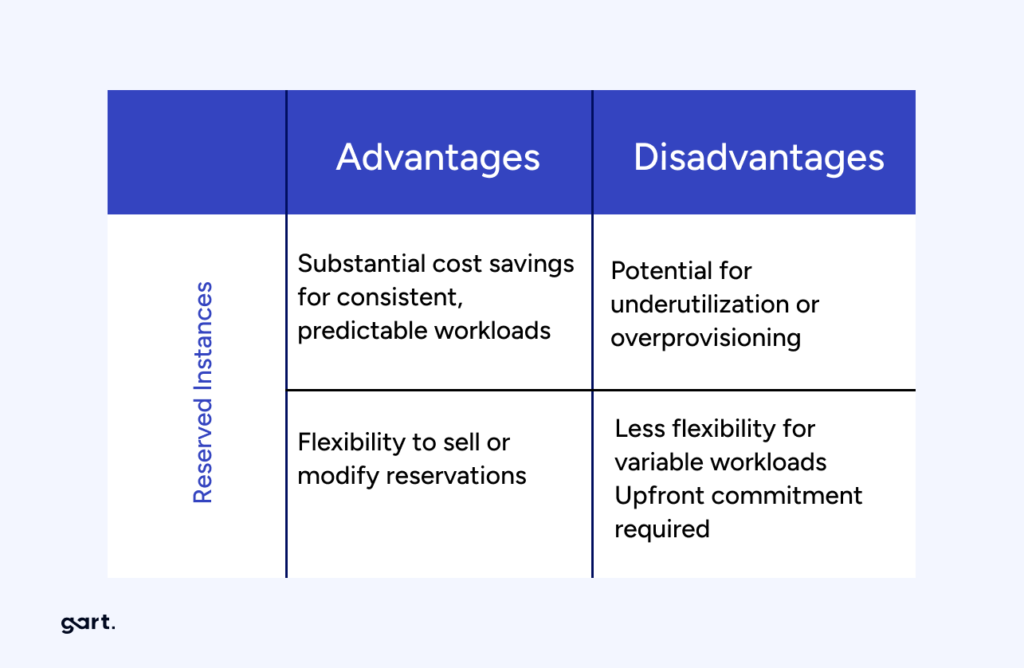
Reserved instances (RIs) or savings plans offer significant cost savings for predictable or consistent workloads over an extended period. By committing to a fixed term (e.g., 1 or 3 years) and prepaying for the resource usage, you can achieve substantial discounts compared to on-demand pricing. Analyze your workload patterns and identify instances that have steady usage to maximize savings with RIs or savings plans.
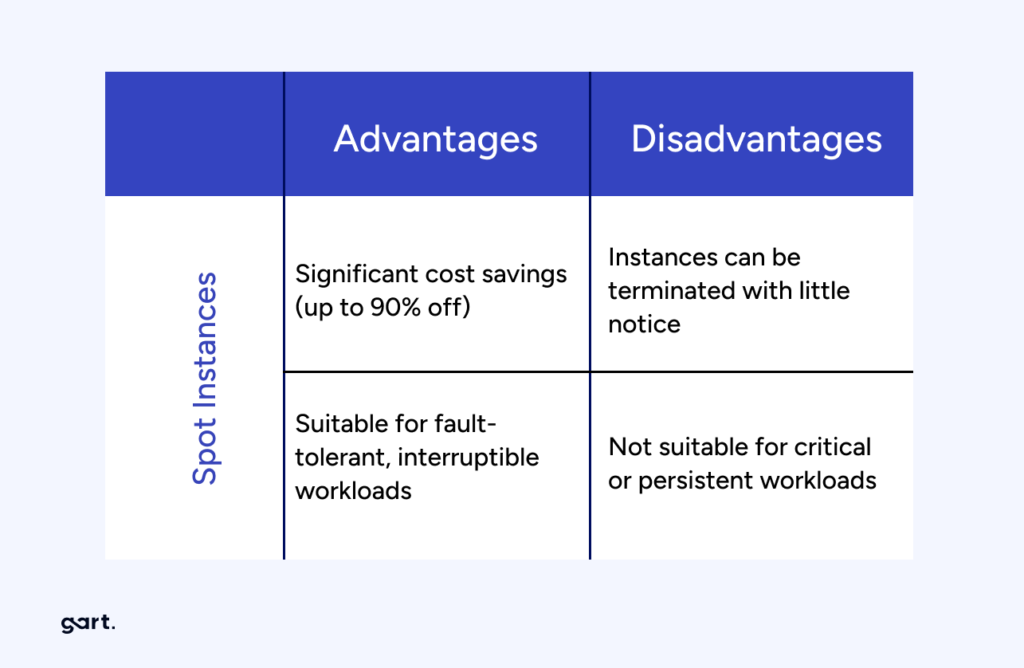
For workloads that are flexible and can tolerate interruptions, spot instances can be a cost-effective option. Spot instances are spare computing capacity offered at steep discounts (up to 90% off on AWS) compared to on-demand prices. However, these instances can be reclaimed by the cloud provider with little notice, making them suitable for fault-tolerant, interruptible tasks.
When optimizing resource allocation, it’s crucial to continuously monitor and adjust your resource configurations based on changing workload patterns. Leverage cloud provider tools and services that provide insights into resource utilization and performance metrics, enabling you to make data-driven decisions for efficient resource allocation.
Implement Cost Monitoring and Budgeting
Implementing effective cost monitoring and budgeting practices is crucial for maintaining control over cloud operating costs.
Take advantage of the cost management tools and features offered by your cloud provider. These tools provide detailed insights into your cloud spending, resource utilization, and cost allocation. They often include dashboards, reports, and visualizations that help you understand the cost breakdown and identify areas for optimization. Familiarize yourself with these tools and leverage their capabilities to gain better visibility into your cloud costs.
Configure cost alerts and notifications to receive real-time updates on your cloud spending. Define spending thresholds that align with your budget and receive alerts when costs approach or exceed those thresholds. This allows you to proactively monitor and control your expenses, ensuring you stay within your allocated budget. Timely alerts enable you to identify any unexpected cost spikes or unusual patterns and take appropriate actions.
Set a budget for your cloud operations, allocating specific spending limits for different services or departments. This budget should align with your business objectives and financial capabilities. Regularly review and analyze your cost performance against the budget to identify any discrepancies or areas for improvement. Adjust the budget as needed to optimize your cloud spending and align it with your organizational goals.
By implementing cost monitoring and budgeting practices, you gain better visibility into your cloud spending and can take proactive steps to optimize costs. Regularly reviewing cost performance allows you to identify potential cost-saving opportunities, make informed decisions, and ensure that your cloud usage remains within the defined budget.
Remember to involve relevant stakeholders, such as finance and IT teams, to collaborate on budgeting and align cost optimization efforts with your organization’s overall financial strategy.
Use Cost-effective Storage Solutions
To optimize cloud operating costs, it is important to use cost-effective storage solutions.
Begin by assessing your storage requirements and understanding the characteristics of your data. Evaluate the available storage options, such as object storage and block storage, and choose the most suitable option for each use case. Object storage is ideal for storing large amounts of unstructured data, while block storage is better suited for applications that require high performance and low latency. By aligning your storage needs with the appropriate options, you can avoid overprovisioning and optimize costs.
Implement data lifecycle management techniques to efficiently manage your data throughout its lifecycle. This involves practices like data tiering, where you classify data based on its frequency of access or importance and store it in the appropriate storage tiers. Frequently accessed or critical data can be stored in high-performance storage, while less frequently accessed or archival data can be moved to lower-cost storage options. Archiving infrequently accessed data to cost-effective storage tiers can significantly reduce costs while maintaining data accessibility.
Cloud providers often provide features such as data compression, deduplication, and automated storage tiering. These features help optimize storage utilization, reduce redundancy, and improve overall efficiency. By leveraging these built-in optimization features, you can lower your storage costs without compromising data availability or performance.
Regularly review your storage usage and make adjustments based on changing needs and data access patterns. Remove any unnecessary or outdated data to avoid incurring unnecessary costs. Periodically evaluate storage options and pricing plans to ensure they align with your budget and business requirements.
Employ Serverless Architecture
Employing a serverless architecture can significantly contribute to reducing cloud operating costs.
Embrace serverless computing platforms provided by cloud service providers, such as AWS Lambda or Azure Functions. These platforms allow you to run code without managing the underlying infrastructure. With serverless, you can focus on writing and deploying functions or event-driven code, while the cloud provider takes care of resource provisioning, maintenance, and scalability.
One of the key benefits of serverless architecture is its cost model, where you only pay for the actual execution of functions or event triggers. Traditional computing models require provisioning resources for peak loads, resulting in underutilization during periods of low activity. With serverless, you are charged based on the precise usage, which can lead to significant cost savings as you eliminate idle resource costs.
Serverless platforms automatically scale your functions based on incoming requests or events. This means that resources are allocated dynamically, scaling up or down based on workload demands. This automatic scaling eliminates the need for manual resource provisioning, reducing the risk of overprovisioning and ensuring optimal resource utilization. With automatic scaling, you can handle spikes in traffic or workload without incurring additional costs for idle resources.
When adopting serverless architecture, it’s important to design your applications or functions to take full advantage of its benefits. Decompose your applications into smaller, independent functions that can be executed individually, ensuring granular scalability and cloud cost optimization.
Consider Multi-Cloud and Hybrid Cloud Strategies
Considering multi-cloud and hybrid cloud strategies can help optimize cloud operating costs while maximizing flexibility and performance.
Evaluate the pricing models, service offerings, and discounts provided by different cloud providers. Compare the costs of comparable services, such as compute instances, storage, and networking, to identify the most cost-effective options. Take into account the specific needs of your workloads and consider factors like data transfer costs, regional pricing variations, and pricing commitments. By leveraging competition among cloud providers, you can negotiate better pricing and optimize your cloud costs.
Analyze your workloads and determine the most suitable cloud environment for each workload. Some workloads may perform better or have lower costs in specific cloud providers due to their specialized services or infrastructure. Consider factors like latency, data sovereignty, compliance requirements, and service-level agreements (SLAs) when deciding where to deploy your workloads. By strategically placing workloads, you can optimize costs while meeting performance and compliance needs.
Adopt a hybrid cloud strategy that combines on-premises infrastructure with public cloud services. Utilize on-premises resources for workloads with stable demand or data that requires local processing, while leveraging the scalability and cost-efficiency of the public cloud for variable or bursty workloads. This hybrid approach allows you to optimize costs by using the most cost-effective infrastructure for different aspects of your data processing pipeline.
Automate Resource Management and Provisioning
Automating resource management and provisioning is key to optimizing cloud operating costs and improving operational efficiency.
Infrastructure-as-code (IaC) tools such as Terraform or CloudFormation allow you to define and manage your cloud infrastructure as code. With IaC, you can express your infrastructure requirements in a declarative format, enabling automated provisioning, configuration, and management of resources. This approach ensures consistency, repeatability, and scalability while reducing manual efforts and potential configuration errors.
Automate the process of provisioning and deprovisioning cloud resources based on workload requirements. By using scripting or orchestration tools, you can create workflows or scripts that automatically provision resources when needed and release them when they are no longer required. This automation eliminates the need for manual intervention, reduces resource wastage, and optimizes costs by ensuring resources are only provisioned when necessary.
Auto-scaling enables your infrastructure to dynamically adjust its capacity based on workload demands. By setting up auto-scaling rules and policies, you can automatically add or remove resources in response to changes in traffic or workload patterns. This ensures that you have the right amount of resources available to handle workload spikes without overprovisioning during periods of low demand. Auto-scaling optimizes resource allocation, improves performance, and helps control costs by scaling resources efficiently.
It’s important to regularly review and optimize your automation scripts, policies, and configurations to align them with changing business needs and evolving workload patterns. Monitor resource utilization and performance metrics to fine-tune auto-scaling rules and ensure optimal resource allocation.
Optimize Data Transfer and Bandwidth Usage
Optimizing data transfer and bandwidth usage is crucial for reducing cloud operating costs.
Analyze your data flows and minimize unnecessary data transfer between cloud services and different regions. When designing your architecture, consider the proximity of services and data to minimize cross-region data transfer. Opt for services and resources located in the same region whenever possible to reduce latency and data transfer costs. Additionally, use efficient data transfer protocols and optimize data payloads to minimize bandwidth usage.
Employ content delivery networks (CDNs) to cache and distribute content closer to your end users. CDNs have a network of edge servers distributed across various locations, enabling faster content delivery by reducing the distance data needs to travel. By caching content at edge locations, you can minimize data transfer from your origin servers to end users, reducing bandwidth costs and improving user experience.
Implement data compression and caching techniques to optimize bandwidth usage. Compressing data before transferring it between services or to end users reduces the amount of data transmitted, resulting in lower bandwidth costs. Additionally, leverage caching mechanisms to store frequently accessed data closer to users or within your infrastructure, reducing the need for repeated data transfers. Caching helps improve performance and reduces bandwidth usage, particularly for static or semi-static content.
Evaluate Reserved Instances and Savings Plans
It is important to evaluate and leverage Reserved Instances (RIs) and Savings Plans provided by cloud service providers.
Analyze your historical usage patterns and identify workloads or services with consistent, predictable usage over an extended period. These workloads are ideal candidates for long-term commitments. By understanding your long-term usage requirements, you can determine the appropriate level of reservation coverage needed to optimize costs.
Reserved Instances (RIs) and Savings Plans are cost-saving options offered by cloud providers. RIs allow you to reserve instances for a specified term, typically one to three years, at a significantly discounted rate compared to on-demand pricing. Savings Plans provide flexible coverage for a specific dollar amount per hour, allowing you to apply the savings across different instance types within the same family. Evaluate your usage patterns and purchase RIs or Savings Plans accordingly to benefit from the cost savings they offer.
Cloud usage and requirements may change over time, so it is crucial to regularly review your reserved instances and savings plans. Assess if the existing reservations still align with your workload demands and make adjustments as needed. This may involve modifying the reservation terms, resizing or exchanging instances, or reallocating savings plans to different services or instance families. By optimizing your reservations based on evolving needs, you can ensure that you maximize cost savings and minimize unused or underutilized resources.
Continuously Monitor and Optimize
Monitor your cloud usage and costs regularly to identify opportunities for cloud cost optimization. Analyze resource utilization, identify underutilized or idle resources, and make necessary adjustments such as rightsizing instances, eliminating unused services, or reconfiguring storage allocations. Continuously assess your workload demands and adjust resource allocation accordingly to ensure optimal usage and cost efficiency.
Cloud service providers frequently introduce new cost optimization features, tools, and best practices. Stay informed about these updates and enhancements to leverage them effectively. Subscribe to newsletters, participate in webinars, or engage with cloud provider communities to stay up to date with the latest cost optimization strategies. By taking advantage of new features, you can further optimize your cloud costs and take advantage of emerging cost-saving opportunities.
Create awareness and promote a culture of cost consciousness and cloud cost Optimization across your organization. Educate and train your teams on cost optimization strategies, best practices, and tools. Encourage employees to be mindful of resource usage, waste reduction, and cost-saving measures. Establish clear cost management policies and guidelines, and regularly communicate cost-saving success stories to encourage and motivate cost optimization efforts.
Real-World Results
Beyond the Spot VM and storage examples above, Gart’s AWS cost optimization and CI/CD automation work for an entertainment software platform combined several of these strategies (rightsizing, commitment discounts, pipeline efficiency) into a single engagement — a useful reference for what a combined, multi-strategy engagement looks like in practice rather than any single tactic applied alone.
Conclusion: Cloud Cost Optimization
By taking a proactive approach to cloud cost optimization, businesses can not only reduce their expenses but also enhance their overall cloud operations, improve scalability, and drive innovation. With careful planning, monitoring, and optimization, businesses can achieve a cost-effective and efficient cloud infrastructure that aligns with their specific needs and budgetary goals.
Elevate your business with our Cloud Consulting Services! From migration strategies to scalable infrastructure, we deliver cost-efficient, secure, and innovative cloud solutions. Ready to transform? Contact us today.
Author Fedir