Cloud spending is accelerating faster than most organizations can manage it. According to Flexera's State of the Cloud report, 82% of enterprises identify cloud cost optimization as their top initiative — yet the average organization wastes 28% of its cloud budget. FinOps, the operating model that unifies engineering, finance, and operations around cloud financial accountability, is the most reliable framework for closing that gap.
At Gart Solutions, we have implemented FinOps practices across more than 50 cloud environments — from early-stage product companies to multi-cloud enterprise setups. In this guide, we share the frameworks we actually use, the KPIs that matter, the mistakes we see most often, and a realistic picture of what FinOps delivers in practice.
Key Takeaways
FinOps is not a tool — it is a cross-functional operating model connecting engineering, finance, and product.
Visibility always comes before optimization. You cannot optimize what you cannot see.
The biggest cloud cost wins come from rightsizing, Reserved Instances, and Kubernetes resource governance.
FinOps maturity follows three stages: Crawl, Walk, Run. Most organizations take 3–6 months to reach the Walk phase.
Tagging governance is the single most underestimated precondition for any cost attribution initiative.
What Is FinOps? Defining the Operating Model
FinOps (Financial Operations) is a cloud financial management practice that brings financial accountability to the variable-spend model of cloud computing. The FinOps Foundation defines it as a discipline that enables organizations to get maximum business value from cloud by helping engineering, finance, technology, and business teams to collaborate on data-driven spending decisions.
What makes FinOps distinct from traditional IT budgeting is its operating philosophy: in a cloud model, engineering teams control spending in real time through infrastructure decisions. That means cost ownership must shift left — into product and engineering — rather than remaining a finance-only concern.
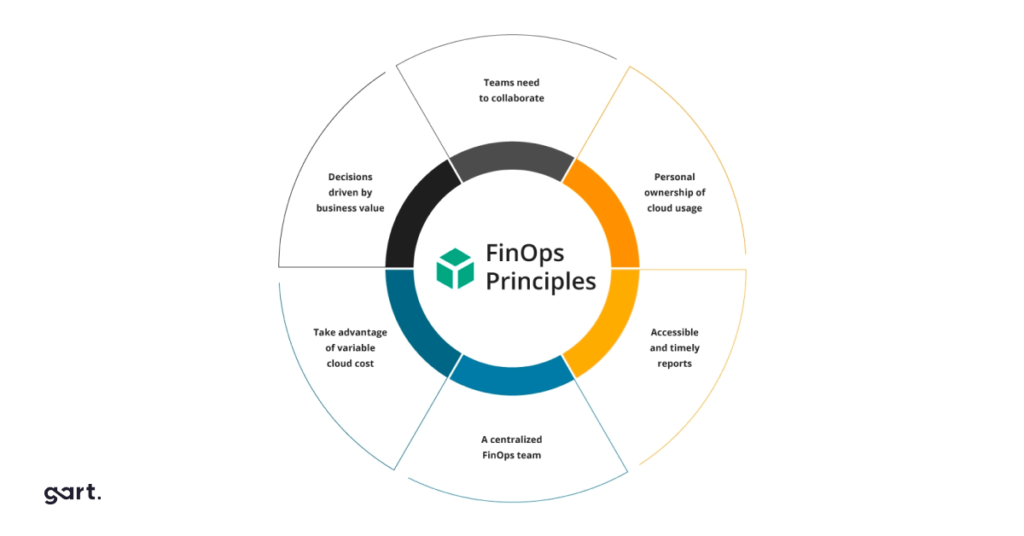
The three core principles of FinOps are:
Teams need to collaborate. Finance, engineering, and product operate with a shared language around cloud spend.
Everyone takes ownership of their cloud usage. Cost accountability is distributed, not centralized.
A FinOps team drives the process and culture. A centralized FinOps function enables and advocates, but does not control.
Why Does Cost Management Matter?
In practice, most organizations have an unbalanced cost/resource structure that was created during the planning, deployment, and subsequent launch stages of a project. An unbalanced structure leads to additional margin loss and, in some cases, quality loss.
But with FinOps practice, each operational group can access the data they need to influence their costs in near real-time and make decisions based on it that will lead to efficient cloud costs balanced with service speed or performance.
Thus, FinOps as a service has a direct impact on the margins of an organization or project, allowing cross-functional teams (project owners, engineers, and management) to maximize the use of resources based on a budget but in real-time.
Who Participates in a FinOps Practice?
One of the most common implementation failures we see is treating FinOps as purely a DevOps or infrastructure responsibility. Effective FinOps requires structured participation across four stakeholder groups:
RoleResponsibility in FinOpsKey ContributionFinOps LeadOwns the practice, drives reporting cadence, manages toolingAccountability framework, cost allocation rulesEngineering TeamsMake resource provisioning decisions in real timeRightsizing, autoscaling, tagging complianceFinance TeamsTranslate cloud spend into business metrics and forecastsBudget setting, variance analysis, showback/chargebackProduct OwnersAlign spend to product value and business outcomesUnit economics, feature cost attributionWho Participates in a FinOps Practice?
The FinOps team generates recommendations, such as reconfiguring resources or committing to cloud service providers, that need to be considered by the organization.
The FinOps Maturity Model: Crawl, Walk, Run
Every organization that successfully implements FinOps passes through three maturity stages. Understanding which stage you are in determines what actions will deliver the most impact — and what is premature.
🐛 Stage 1: Crawl
Cloud cost visibility established
Basic tagging strategy defined
Cost dashboards created
Anomaly alerting configured
Engineering teams introduced to cost data
Manual monthly cost reviews
Typical duration: 1–3 months
🚶 Stage 2: Walk
Rightsizing recommendations actioned
Reserved Instance and Savings Plan coverage >50%
Showback reports shared with teams
Kubernetes cost allocation in place
FinOps reviews in sprint cadence
Forecasting with <15% variance
Typical duration: 3–6 months
🏃 Stage 3: Run
Full chargeback to business units
Automated anomaly remediation
Unit cost economics tracked per product
Spot instance adoption >40%
FinOps KPIs embedded in OKRs
Continuous optimization culture
Typical duration: Ongoing
Most organizations we engage with are operating at the Crawl stage when we arrive — they have cloud bills but limited attribution, and engineering teams have little visibility into the cost impact of their decisions.
Top FinOps Practices to Manage Cloud Costs
FinOps is an evolving practice that empowers organizations to manage their cloud expenses efficiently and fine-tune their financial operations. Below, we present some of the prime FinOps practices for proficiently controlling cloud costs:
1. Monitoring and Tracking Cloud Expenditure
The initial step in effectively overseeing cloud expenses is the vigilant monitoring and tracking of cloud spending. This entails gaining a deep understanding of the utilization patterns of various services, pinpointing the primary drivers of costs, and closely observing user trends. These actions are instrumental in uncovering areas ripe for cost optimization, identifying redundant resources, and recognizing underutilized services.
2. Implementing Cost Optimization Strategies
Once the key cost drivers have been pinpointed, the implementation of cost-efficiency strategies can commence. This involves harnessing discounts, making judicious use of spot instances, downsizing underused services, and eliminating superfluous resources. Here are some recommendations to initiate this process:
Scrutinize Your Company’s Expenditures
Identify Sources of Squander and Inefficiency
Rationalize Operational Procedures
3. Automating Management of Cloud Costs
Automation stands as the linchpin of cost control in the realm of cloud services. By automating key processes, organizations can expedite the discovery of cost-saving opportunities, automate the provisioning of resources, and streamline billing procedures. Automation plays a pivotal role in helping companies uncover and rectify inefficiencies in cloud cost management. For instance, it can facilitate real-time tracking of cloud resource utilization, enabling the identification and repurposing or termination of redundant or underutilized assets. Moreover, it can flag cost optimization prospects, such as discounts or incentives from cloud providers and potential strategies for economizing, such as resource scaling.
4. Leverage Tools for Cost Control
A multitude of cost control tools is at your disposal to facilitate efficient management of cloud costs. These optimization tools are adept at tracking usage patterns, establishing budgetary thresholds, and flagging opportunities for cost efficiency. Their design caters to empowering businesses with the capability to scrutinize and dissect their financial outlays. These tools enable meticulous expense tracking, identification of areas with potential for optimization, and the execution of cost-cutting measures.
5. Implementing Resource Allocation Strategies
Resource allocation proves pivotal in the effective management of cloud costs. The objective is to allocate resources in the most resourceful manner possible, taking into account usage trends and cost efficiency tactics.
6. Harnessing Cloud Cost Forecasting
The practice of cloud cost forecasting serves as a valuable resource for comprehending future cloud expenses and pinpointing areas ripe for cost reduction. This forward-looking approach aids in strategic planning and fosters more precise budgeting.
7. Investing in Cloud Governance
Establishing comprehensive cloud governance protocols is a foundational element in the realm of cloud cost management. This entails the formulation of rules and policies governing cloud utilization, the delineation of roles and responsibilities, and the diligent monitoring of compliance.
How to Set Up FinOps in Your Business?
Stage 1: Planning FinOps in the Organization 1. Gather Support: identify key stakeholders interested in increasing cloud margins. Familiarize yourself with the opportunities for your organization with better resource and expenditure analysis. 2. Determine the required time for monitoring and supporting FinOps in your organization based on time and data flow cycles. 3. Plan target actions and require a team with the relevant skills for FinOps. 4. Make decisions regarding the collection and storage of cloud consumption data. 5. Think about reporting tools and data transmission for FinOps stakeholders.
Stage 2: Adoption of FinOps FinOps is a cultural change that requires the involvement of various teams and individuals throughout the organization. Communication and feedback cycles aimed at encouraging the practice are crucial. The goal of this stage is to present the FinOps plan created in Stage 1 to stakeholders. The presentation below helps communicate this clearly, easily, and quickly:
Share a high-level activity roadmap of FinOps and the value it brings to different teams and projects.
Understand cross-team challenges and explain/teach how FinOps can help address them.
Establish a collaboration model between FinOps and key partners (IT domains, controllers, program teams).
Create and implement a FinOps dashboard for key stakeholders and cross-functional teams.
Stage 3: Operational Phase
The FinOps lifecycle is built around a 3-stage model and has the same principles in each of them.
Cross-functional teams must collaborate.
Decisions are made based on cloud value for the business.
Everyone takes responsibility for their cloud usage.
FinOps reports should be accessible and timely.
A centralized team manages FinOps.
Leverage the benefits of the cloud model with variable expenses.
To prepare for a successful FinOps practice, certain criteria need to be met:
Prepare a resource map or a list of resources in active projects, as specified in contracts and actively deployed environments.
Track complete and up-to-date consumption data from all cloud providers.
Enable cost analysis and expenditure forecasting for active projects.
Ability to assess discrepancies between contractual (budgeted) and actual consumption levels.
Reporting is the only way to provide information on cloud consumption discrepancies and offer recommendations for resource structuring or resizing. Data quality collected through APIs or proprietary cloud solutions, as mentioned earlier, is a critical prerequisite for the reporting process.
Top 3 FinOps Best Practices of Automation
1. Tag Management
After establishing a tagging standard for your organization, you can use automation to ensure compliance with this standard.
Start by identifying resources with missing or incorrectly applied tags, and then assign responsibility to rectify these tag violations. You can also proceed to stop or lock resources to compel owners to take action and potentially work on deletion or decommissioning policies for these resources.
However, resource deletion is a highly effective form of automation, so many companies may not reach this level of maturity immediately. It is advisable not to jump directly to resource deletion without addressing previous, less impactful levels of automation.
2. Scheduled Resource Start/Stop
Managing resources and automation allows you to schedule resource stoppages when they are not in use (e.g., outside of office hours) and then bring them back online when needed.
The goal of this automation is to minimize impact on teams while saving significant costs during hours when their resources are idle. This automation is often deployed in development and testing environments, where resource unavailability is not noticed outside of working hours.
You should ensure that the implementation allows team members to bypass scheduled actions in case they need to keep a server active during off-hours. Additionally, canceling a scheduled task should not completely remove the resource from automation but merely skip the current execution.
3. Usage Reduction
Automation for usage reduction eliminates waste of notifications to responsible team members for better cost optimization.
Automated resource data retrieval from services like Trusted Advisor (for AWS), third-party cost optimization platforms, or directly from resource metrics provides a straightforward way to send notifications to team members responsible for resources to investigate or, in some environments, allows for automatic resource termination or resizing.
FinOps Cloud Cost Management: The Implementation Stages
Stage 1 — Inform: Building Cost Visibility
The first principle of FinOps is that visibility precedes optimization. Before you can reduce cloud spend, you need to understand where it is going, which teams own it, and how it maps to business value. This requires:
Activating cloud cost management tooling (AWS Cost Explorer, Azure Cost Management, Google Cloud Billing)
Establishing a resource tagging taxonomy (environment, team, product, cost center)
Creating cost allocation reports by business unit
Configuring budget alerts and anomaly detection
Building a cloud cost dashboard visible to engineering and finance simultaneously
In our experience, organizations that skip this phase and go straight to optimization waste engineering time on changes that do not address their actual largest cost drivers. Tagging remediation alone — going back through existing infrastructure to apply consistent tags — typically takes 4–6 weeks for a mid-sized cloud environment.
Stage 2 — Optimize: Reducing Waste and Right-Sizing
Once visibility is established, optimization follows a consistent priority order. The highest-ROI actions in the shortest timeframe are:
Optimization PracticeImplementation EffortSavings PotentialTime to ValueEC2/VM RightsizingLowHigh (15–30%)2–4 weeksReserved Instances / Savings PlansMediumHigh (30–60% vs on-demand)Immediate after purchaseStorage Tier OptimizationLowMedium (8–20%)2–3 weeksKubernetes Resource GovernanceHighHigh (20–45%)4–8 weeksSpot / Preemptible Instance AdoptionMediumHigh (60–80% for eligible workloads)3–6 weeksIdle Resource TerminationLowMedium (5–15%)1–2 weeksCross-Region Traffic ReductionMediumLow–Medium (3–12%)4–6 weeksOptimize: Reducing Waste and Right-Sizing
Stage 3 — Operate: Embedding FinOps into Engineering Culture
The Operate phase is where FinOps transforms from a project into a practice. This requires making cost accountability a routine part of how engineering teams work — not a periodic audit. Key mechanisms include:
Embedding cost review into sprint retrospectives and architectural decision records
Automated cost policies enforced through IaC (Terraform cost estimation, Infracost integration)
Chargeback or showback reporting linked to team OKRs
Cloud cost discussed in engineering all-hands as a product metric, not an IT overhead
Top Cloud FinOps KPIs
Answering the question of how to measure the success of FinOps program, from our experience, I can outline six main KPIs (but any KPI should be defined by your organization):
Cloud Spend
This metric provides visibility into how much money you spend on cloud services to get a clear picture of your cloud spending and identify areas where else to save money.
Cloud Utilization
This metric measures how efficiently you’re using your cloud resources.
Cloud Availability
The metric measures cloud environment’s reliability and meeting performance expectations. Poor availability can lead to downtime and lost productivity.
Cloud Security
Cloud Security measures the security of your cloud environment and helps you identify any potential threats.
Cloud Adoption
Cloud Adoption measures the rate at which your organization is adopting cloud technologies.
Measuring the right metrics is what separates a FinOps program from a one-time cost audit. The KPIs below represent the metrics we track across all client engagements, organized by maturity stage:
KPIWhat It MeasuresTarget / BenchmarkMaturity StageTagging Coverage Rate% of resources with mandatory cost tags>95%CrawlReserved Instance / Savings Plan Coverage% of eligible compute covered by commitments>70%WalkReserved Instance Utilization% of purchased RI capacity actually used>90%WalkCost Forecast AccuracyVariance between forecast and actual spend<10%WalkWaste Rate% of spend attributable to idle/unused resources<5%Walk–RunUnit Cost (Cost per Feature/Transaction)Cloud cost relative to business outputTrending down QoQRunSpot Instance Adoption Rate% of eligible workloads running on Spot/Preemptible>40% of eligibleRun
Chargeback vs. Showback: Choosing the Right Accountability Model
One of the most strategic decisions in a FinOps program is how to implement cost accountability across teams. The two models serve different organizational contexts:
Showback gives engineering and product teams visibility into their cloud costs without financial consequences. Teams see what they spend, but it does not affect their budget. This is the right starting point for organizations building FinOps culture from scratch.
Chargeback allocates actual cloud costs to business units or teams, affecting their P&L or budget. This creates stronger behavioral incentives but requires mature cost allocation data — misattributed costs will create organizational friction.
Our recommendation: start with showback for the first 3–6 months while tagging coverage and attribution accuracy improve, then migrate to chargeback once you can attribute >90% of spend to specific owners.
Best FinOps Tools in 2026
Native cloud tooling is the right starting point for most organizations. Third-party platforms add value primarily at scale or in multi-cloud environments:
Native Cloud Tools
AWS Cost Explorer + AWS Cost and Usage Report (CUR) — Granular cost analysis, RI recommendations, Savings Plans modeler. Free.
Azure Cost Management + Billing — Budget alerts, cost allocation, advisor recommendations. Included with Azure.
Google Cloud Billing + Cost Insights — Committed Use Discount recommendations, BigQuery billing export for custom analysis.
Third-Party and Open Source
Kubecost — Kubernetes cost allocation down to namespace, deployment, and pod level. Essential for organizations with significant EKS/GKE/AKS spend.
CloudHealth by VMware — Multi-cloud cost management at enterprise scale.
Apptio Cloudability — Strong financial analytics and chargeback capabilities.
Infracost — Open source tool that estimates infrastructure cost changes in CI/CD pipelines before deployment. Excellent for shift-left cost governance.
OpenCost (CNCF project) — Open standard for Kubernetes cost monitoring. See CNCF OpenCost.
Common FinOps Mistakes We See in Practice
After 50+ cloud optimization engagements, these are the failure patterns that appear most consistently — and the ones we are most direct with clients about:
1. Buying Reserved Instances Before Understanding Your Workloads
We have seen organizations commit to 1- and 3-year Reserved Instances for workloads that were subsequently decommissioned or significantly resized within 6 months. Unused RIs represent real financial waste. The rule: only commit to RIs for workloads with >70% stable utilization over the past 3 months and a credible 12-month forward forecast.
2. Misconfigured Autoscaling
Autoscaling that is configured for maximum availability and never scales down is a common source of overprovisioning. We frequently find minimum instance counts set so high that the "auto" in autoscaling is entirely theoretical — the cluster never scales below the minimum because the minimum already covers peak load.
3. Ignoring Kubernetes Cost Governance
Kubernetes clusters are the fastest-growing source of cloud waste we encounter. Teams provision generous CPU and memory limits at the namespace level, which get allocated — and billed — even when actual utilization is a fraction of the reservation. CNCF data shows Kubernetes resource utilization averaging 13% of allocated CPU and 20% of allocated memory across production clusters. That gap is money.
4. Treating Tagging as an Afterthought
Tagging is the precondition for everything else in FinOps. Without consistent tags, you cannot do cost allocation, chargeback, or per-team dashboards. Yet most organizations we engage with have fewer than 60% of resources tagged — and of those, the consistency and completeness is often poor. Tag early, tag everything, enforce through IaC and policy.
5. FinOps as a One-Time Audit
The organizations that sustain cloud cost savings treat FinOps as a continuous practice embedded in engineering culture — not a quarterly audit driven by CFO pressure. One-time optimization delivers one-time results; cloud environments evolve constantly, and optimization without governance reverts within 6–12 months.
Lessons From 50+ Cloud Cost Optimization Projects
The following insights reflect patterns from our actual project history, not textbook guidance:
The biggest source of waste is almost never what the client expects. Clients come to us expecting compute to be the problem. In most cases, it is: forgotten non-production environments running 24/7, unmanaged Kubernetes resource limits, or data transfer costs between availability zones that nobody ever measured.
Savings without governance are temporary. The organizations that sustain 30%+ reductions embed cost review into sprint ceremonies. Those that achieve savings through a one-time optimization audit typically revert within 12 months.
Unit economics beat percentage savings as a long-term KPI. Reducing cloud cost per transaction or per active user is a more meaningful metric than absolute spend reduction, especially for scaling businesses where total cloud spend is expected to grow.
FinOps culture requires executive sponsorship. Without a CTO or VP Engineering who treats cloud cost as a product metric — not just an IT overhead — FinOps practices do not survive organizational friction.
Editorial Disclosure: This article was written by Roman Burdiuzha, CTO and Co-Founder of Gart Solutions, drawing on experience from client cloud cost engagements. Specific savings figures referenced are from individual project outcomes and represent actual measured results. Savings potential varies based on cloud maturity, workload architecture, current governance practices, and cloud provider. Statistics cited from third-party sources are linked to their original publications.
Conclusion
In this article, we've covered the fundamentals of FinOps as well as how to set up Cloud FinOps practices in your business. By leveraging these capabilities, organizations can achieve greater cost visibility, financial control, and overall operational efficiency in their cloud environments.
Start your cloud FinOps journey with Gart's FinOps Assessment. You will get a roadmap and a completely executable plan wherever you are on your cloud journey.
So, whether you're implementing a full cloud operating model, or just managing your cloud cost, a collaboration with Cloud FinOps partner like Gart, drives your organization. Schedule a free consultation.
Can the NoOps concept eliminate the need for DevOps engineers entirely in software development? It's quite possible that NoOps will empower developers to handle all aspects of delivering a software product independently. However, let's delve deeper into this somewhat controversial topic.
[lwptoc]
What is NoOps?
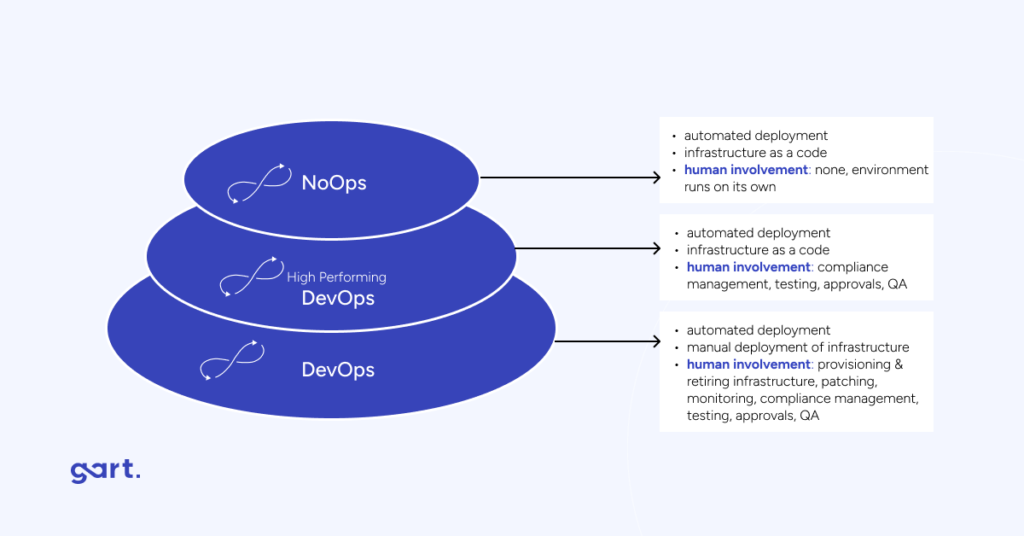
NoOps is a way of developing and deploying software where the need for specialized operations (Ops) teams and their tasks is minimized or entirely eliminated. The term "NoOps" comes from the DevOps culture, which emphasizes collaboration and communication between ops engineers and developers to optimize and automate the Software Development Life Cycle (SDLC).
In the NoOps approach, developers take on many tasks typically handled by DevOps teams, such as deploying and monitoring programs, managing infrastructure, and ensuring the reliability and security of the system. Two key drivers of NoOps are the increasing automation of IT and the widespread use of cloud computing. NoOps environments rely on automated, policy-based processes, often implemented through initiatives like DataOps, AIOps, and DevSecOps.
The main idea behind NoOps is to automate as many processes as possible (provided it's cost-effective), reduce the need for manual intervention, and minimize the risk of human error.
Among the advantages of the NoOps approach are:
Project Implementation Speed: Projects can be implemented more quickly.
Ease of Development Management: Development management becomes more straightforward.
Optimized Development Costs: Development costs are optimized due to a reduced workforce.
Business Scalability Simplicity: Scaling the business becomes simpler.
Can We Do Without DevOps Specialists Now?
It might seem like NoOps implies that operational teams are no longer necessary. However, it's essential to note that this approach still requires expertise in areas such as infrastructure design, cybersecurity, and compliance.
Rather than eliminating operational teams, NoOps aims to make them more efficient, freeing up time to address high-level tasks and strategic issues.
As a result, this approach demands developers to have more experience in areas like infrastructure, networks, deployment, monitoring, and more—at least, that's how it appears at first glance.
However, the evolution of software development has always been accompanied by a need or desire to simplify certain things, tools, and processes. So, how does it happen that developers now seem to have more on their plate?
In practice, the NoOps approach doesn't mean developers take on all the functions typically handled by DevOps/SRE. Instead, the DevOps team establishes a foundation, documents it, and provides it to software developers. This involves implementing practices and tools that "isolate" the development team from the infrastructure layer and ensure its support.
NoOps vs. DevOps
Is NoOps a Panacea?
Unfortunately, no, so DevOps is very much alive and thriving. One might wonder, why not skip DevOps and go straight to NoOps with all its advantages? Well, to begin with, NoOps is confined to applications that fit into existing PaaS solutions. Many companies still use monolithic legacy applications that require significant updates or complete rewriting to function in a PaaS environment.
Additionally, new technologies will emerge that may not have suitable NoOps solutions.
Examples of NoOps Platforms
In reality, the NoOps concept is not entirely new. Most of us have already heard of or even had the opportunity to use similar services and platforms.
One example of a PaaS (Platform as a Service) solution is Heroku. Using this platform, anyone can deploy their software in the cloud with just a few clicks, and for a small application, it can even be free.
Another example is DigitalOcean App Platform, a managed PaaS that simplifies the deployment and scaling of applications. Developers can upload their code to the platform, and DigitalOcean takes care of creating the necessary infrastructure, managing containerized deployments, as well as scaling and load balancing.
Google App Engine is a fully managed serverless platform for developing and hosting web applications. It automatically scales your application based on traffic and consumed resources.
DevOps vs. NoOps
FeatureNoOpsDevOpsDefinitionMinimizes or eliminates operational tasks, aiming for fully automated processes.Emphasizes collaboration between development and operations teams to streamline the software development lifecycle.ResponsibilitiesDevelopers take on many operational tasks, reducing the need for a dedicated operations team.Operations and development teams collaborate to address both development and operational aspects.Expertise RequiredDevelopers need more expertise in infrastructure, networking, deployment, and monitoring.DevOps engineers possess a blend of development and operations expertise.Platform ExamplesDigitalOcean App Platform, Google App Engine.Kubernetes, Docker, Jenkins, Ansible.ScopePrimarily suited for applications that fit into existing PaaS solutions.Applicable to a wide range of applications, including monolithic legacy systems.FlexibilityMay not be suitable for all types of applications, particularly those requiring specific infrastructure configurations.Offers flexibility to adapt to diverse application architectures and infrastructure needs.EvolutionSeen as an evolution of DevOps, focusing on increased automation and reduced operational overhead.Represents the collaboration and synergy between development and operations, evolving to meet changing software development needs.Development FocusDevelopers concentrate on the code, with less involvement in operational tasks.Developers work collaboratively across the entire software development lifecycle, addressing both development and operational concerns.ComplexityDeveloping NoOps platforms can be complex, requiring architectural decisions and solving intricate challenges.Involves creating a seamless integration of development and operational processes, managing complex toolchains.Overall GoalAims to streamline and automate processes to reduce friction and increase developer focus on code.Strives for collaboration and efficiency to achieve faster, more reliable software delivery.
Conclusion
The NoOps approach should not be seen as a disruptor to DevOps; rather, it can be viewed as the next framework, a kind of evolution of DevOps or SRE. On the other hand, it will require engineers to acquire knowledge in areas that were not traditionally part of their expertise, while DevOps engineers will have the opportunity to focus more on their core responsibilities. Developing a NoOps platform itself is a complex task, requiring the adoption of many architectural decisions and the resolution of intricate challenges.
The real goal of DevOps is acceleration, cost reduction, and improved quality. NoOps, with its elimination of friction between developers and IT administrators, contributes to further automation and allows developers to concentrate directly on the code.
In essence, both NoOps and DevOps serve the overarching objective of enhancing efficiency and collaboration within the software development lifecycle, each offering its unique approach to achieving these goals.
Key Takeaways
Cloud migration delivers real financial benefits — but only when you migrate the right workloads the right way.
The CAPEX→OPEX shift frees capital and aligns IT costs with actual business demand.
TCO analysis across lift-and-shift, replatforming, and staying on-prem shows significant variance.
DevOps integration amplifies savings through autoscaling, rightsizing, and CI/CD efficiency.
Hidden costs — egress, idle reserved capacity, observability, and training — can erode 20–40% of expected savings.
Some workloads are better on-prem. A balanced framework avoids overspending.
Why companies move to the cloud
Cloud migration has moved far beyond a technology trend. For most organizations, it is a fundamental financial and operational restructuring — one that affects balance sheets, team productivity, speed-to-market, and carbon reporting simultaneously.
The shift to cloud is driven by a convergence of pressures: hardware refresh cycles that force capital decisions every 3–5 years, developer productivity expectations shaped by modern tooling, and investor and board-level scrutiny on sustainability commitments.
But these aggregate numbers hide important nuance. The financial benefits of cloud migration are real — but they are not automatic. They depend on workload type, migration approach, team readiness, and how closely you monitor spend post-migration. This guide gives you the frameworks to make an informed decision.
87%
of business leaders plan to increase sustainability investment over the next 2 years (Gartner)
80%+
potential workload carbon footprint reduction by migrating on-premises workloads to AWS (451 Research)
40–60%
typical infrastructure cost reduction reported by well-optimized cloud migrations
2.5%
share of global CO₂ emissions attributable to data centers — more than aviation (World Economic Forum)
When cloud migration improves ROI — a 6-question decision framework
Before moving a workload, every CFO and CTO should be able to answer these six questions. The answers determine whether cloud migration is a financial win or a costly mistake for that specific workload.
Question 1
How volatile is utilization?
Workloads with high utilization variance (e.g., seasonal e-commerce, event-driven processing) benefit most from elastic scaling. Flat, predictable workloads gain less.
Question 2
Are there licensing constraints?
Some enterprise software (Oracle, Microsoft) carries licensing models that become significantly more expensive in the cloud. Model costs before committing.
Question 3
What are latency & data gravity requirements?
Workloads requiring ultra-low latency or tightly coupled to large on-prem datasets may generate unexpected egress and latency costs.
Question 4
Where are you in the hardware lifecycle?
If hardware was refreshed 18 months ago, breakeven extends significantly. If refresh is due in 12–18 months, timing is ideal.
Question 5
What are the compliance requirements?
Regulated industries face specific data residency and sovereignty requirements that require carefully planned architecture.
Question 6
Is the team ready for cloud-native operations?
Financial benefits compound when teams use FinOps, IaC, and autoscaling. "Lift and shift" without behavior change yields limited ROI.
💡
Expert Insight from Roman Burdiuzha, CTO at Gart Solutions
"In our experience, the biggest mistake companies make is treating cloud migration as a single decision. It's actually a portfolio of decisions, workload by workload. The organizations that get the best ROI are those that migrate selectively..."
CAPEX vs OPEX: what actually changes financially
The financial model of cloud is fundamentally different from on-premises infrastructure. Understanding this shift is not just about accounting treatment — it reshapes how your finance team budgets, forecasts, and allocates capital.
The core shift: from owning to consuming
Traditional IT is built on capital expenditures (CAPEX): servers, storage, networking equipment, and data center facilities purchased or leased with significant upfront investment. Cloud replaces most of this with operational expenditures (OPEX): subscription fees, usage-based charges, and managed service fees incurred as services are consumed.
CriteriaCAPEX (On-premises)OPEX (Cloud)Nature of expenseLarge upfront investmentsRegular, usage-based costsTax treatmentDepreciated over asset life (3–7 years)Fully deductible in the year incurredBalance sheet impactIncreases fixed assets; impacts depreciationOperating expense; no capitalizationCash flow timingLarge outflows at purchase; benefits spread over yearsCosts align with revenue-generating periodsCapacity flexibilitySized for peak; most capacity often idleElastic; scales with actual demandRefresh cycle riskTechnology obsolescence every 3–5 yearsAlways on current-generation hardwareBudget predictabilityPredictable after purchase; opaque ongoing costsVariable; requires FinOps disciplineTeam responsibilityInternal IT manages hardware lifecycleVendor manages infrastructure; team manages configurationCAPEX (on premises) vs OPEX (cloud)
Key riskThe OPEX model's flexibility is also its risk. Without FinOps discipline and governance guardrails, cloud costs can grow unchecked. Organizations moving from CAPEX to OPEX must build new financial muscle: tagging standards, cost allocation by team and product, budget alerts, and regular rightsizing reviews.
TCO comparison: 3 migration scenarios for a mid-size workload
To make the financial case concrete, here is an illustrative TCO comparison across three scenarios for a typical mid-size organization running a business-critical application on aging infrastructure. The numbers are directional — actual outcomes vary by workload, region, and provider negotiation.
Scenario baseline: A 100-person SaaS company running a production application on 20 physical servers in a co-location facility, approaching a hardware refresh cycle in 18 months.
Scenario A: Stay on-prem
Hardware refresh + licensing + co-lo fees + staffing to manage infrastructure.
Typical 24-month spend
$480K–$620K
High upfront capital. Full control. Limited elasticity. Team spends ~30% of time on infrastructure ops.
Scenario B: Lift-and-shift
Direct migration of existing VMs. Minimal re-architecture. Quick path.
Typical 24-month spend
$420K–$560K
Moderate savings from CAPEX elimination. Limited elasticity benefits. Risk: migrating waste.
Scenario C: Replatforming
Containerization, CI/CD, rightsizing, and reserved capacity.
Typical 24-month spend
$280K–$380K
Best long-term ROI. Requires more investment upfront. Team focused on product, not infrastructure.
Note: Figures are illustrative only. Actual outcomes depend on workload architecture, cloud region, and engineering scope. Gart recommends a workload-level cost model before committing. Contact us for a tailored assessment.
Hidden cloud costs to model before you migrate
The most common reason cloud migrations underdeliver on their financial promise is that the business case modeled cloud costs in isolation — without accounting for the costs that only appear after go-live.
Hidden cost categoryWhat to modelTypical impactData egress feesVolume of data transferred out of the cloud per month × egress rate by region5–20% of compute billIdle reserved capacityReserved instances purchased but underutilized10–30% of reserved spend wastedObservability & logging growthLog volume × CloudWatch/Datadog pricing; scales with trafficCan double in 12 monthsManaged service premiumRDS vs self-managed DB; EKS vs self-managed Kubernetes30–50% markup vs self-managedLicensing in the cloudBYOL vs included; Oracle, Windows Server, SQL Server in cloudCan exceed compute costApplication refactoringEngineering hours to re-architect for cloud-native patterns3–9 months of team timeTraining & certificationCloud practitioner, architect, DevOps certifications per team member$2K–$8K per engineerSupport tiersBusiness/Enterprise support on top of compute costs3–10% of monthly billHidden cloud costs to model before you migrate
⚡
Quick win
Use AWS Migration Evaluator or Azure Migrate to baseline your actual on-premises utilization before scoping the cloud bill. Organizations consistently find they are running at 15–25% average CPU utilization on-prem — meaning they need significantly less cloud capacity than a 1:1 lift would suggest.
How DevOps multiplies the financial benefits of cloud migration
Cloud infrastructure alone does not deliver savings. The organizations that achieve 40–60% cost reductions are those that pair cloud migration with modern DevOps practices. Here is how each practice maps to a financial outcome.
DevOps practiceFinancial mechanismMeasurable outcomeAutoscalingResources provision and deprovision based on real demandEliminate idle capacity costs (typically 30–50% of compute)RightsizingContinuously match instance types to actual workload metrics15–40% compute cost reductionCI/CD pipelinesShorter release cycles, fewer rollback events, reduced defect costsFaster time-to-value; engineering time on features, not firefightingInfrastructure as Code (IaC)Eliminate manual provisioning drift; reproducible environmentsReduce environment provisioning time from days to minutesEnvironment schedulingAuto-shut non-production environments evenings and weekendsUp to 65% reduction in dev/test environment costsFinOps taggingAttribute every dollar of spend to a team, service, or productAccountability that reduces waste by 20–35% over 12 monthsContainer optimizationSmaller images, Fargate for variable workloads, node efficiency15–30% reduction in container infrastructure costsHow DevOps multiplies the financial benefits of cloud migration
"If you only move infrastructure without changing release practices, you may gain flexibility — but not meaningful cost efficiency. The financial benefits of cloud migration compound when engineering teams operate cloud-natively: they stop paying for idle time, they ship faster, and they build institutional knowledge that makes every future optimization easier."Roman Burdiuzha — Co-founder & CTO, Gart Solutions. 15+ years in DevOps and cloud architecture.
What Gart measures after migration
In our client environments, we track these metrics post-migration to quantify DevOps-driven financial impact:
Environment idle time (target: <5% of provisioned time)
Deployment frequency (from weekly to multiple times per day)
Cost per environment (should decrease 20–40% within 6 months)
Reserved capacity utilization (target: >80%)
Workload carbon intensity per transaction
Mean time to recovery (MTTR) — directly impacts incident cost
When cloud migration does NOT save money
A balanced, trustworthy business case acknowledges where cloud migration is the wrong choice — or where hybrid is better. Here are the most common scenarios where staying partly on-prem is the more financially sound decision.
3 migration mistakes we see most often at Gart
1.
Lifting waste into the cloud
Organizations that migrate oversized, underutilized VMs without rightsizing pay more in the cloud than on-prem. Always rightsize before you migrate.
2.
Ignoring egress costs
A data-intensive application with significant read traffic to external users can generate egress bills that offset compute savings entirely.
3.
Overbuying managed services
Managed Kubernetes, databases, and caches carry a premium. Evaluate whether that premium buys real productivity or is just a "convenience tax."
ScenarioBetter approachWhyStable, flat workloads (e.g., legacy ERP)Stay on-prem or re-evaluate at next hardware cycleNo elasticity benefit; cloud premium exceeds on-prem OpExHigh egress, read-heavy applicationsHybrid: origin on-prem, CDN + edge caching in cloudEgress costs can exceed all other cloud savingsOracle or legacy licensed workloadsStay on-prem or negotiate BYOL explicitlyLicensing in cloud can cost 2–4x on-premExtreme latency-sensitive processingEdge/colocation + cloud for non-latency-critical tiersNetwork latency in cloud may not meet SLA requirementsTeam not ready for cloud operationsInvest in training and FinOps before migratingWithout cloud-native operations, costs will spiral post-migrationWhen cloud migration does NOT save money
Measuring sustainability impact after migration
Sustainability is no longer a soft benefit of cloud migration — it is a measurable, reportable outcome that increasingly matters to investors, enterprise customers, and regulators. However, the financial benefits of cloud migration for carbon reduction are only realized if migration is paired with the right architecture choices.
How cloud providers support sustainability goals
The world's largest cloud providers operate at a scale of energy procurement and efficiency that no individual organization can match. This translates into material carbon reduction potential for migrating workloads.
AWS became the world's largest corporate buyer of renewable energy, with all electricity across 19 AWS Regions sourced from 100% renewable energy as of 2022. Research from 451 Research indicates that migrating on-premises workloads to AWS can reduce workload carbon footprints by at least 80%, with the potential to reach 96% once AWS achieves its 100% renewable energy goal.
Microsoft Azure publishes datacenter Power Usage Effectiveness (PUE) and Water Usage Effectiveness (WUE) metrics, enabling organizations to measure and compare energy efficiency. Through the Microsoft Cloud for Sustainability platform, organizations can consolidate environmental data and track progress against reduction targets. More details are available in Microsoft's sustainability reporting.
⚠️ Important distinctionFor many workloads, cloud migration can reduce emissions — but the outcome depends on region, utilization, modernization depth, and the provider's energy mix. Broad claims that "migrating to the cloud reduces your carbon footprint" are true on average, but should be validated with workload-level data for any public sustainability reporting. Distinguishing between provider-level renewable energy goals and your specific workload's realized reduction is critical for accurate ESG reporting.
How we estimate cost and carbon impact
Transparency in methodology builds trust. When Gart builds a cloud migration business case, we use the following inputs to model financial and carbon outcomes:
Workload utilization data — actual CPU, memory, and I/O metrics from on-prem monitoring, not nameplate capacity
Hardware lifecycle stage — time since last refresh, expected end-of-life date, maintenance cost trajectory
Region mix — cloud region selection affects both cost (varies up to 30% across regions) and renewable energy availability
Egress volume modeling — estimated monthly data transfer out of cloud, by traffic pattern
Licensing audit — current software licenses, cloud eligibility, BYOL vs included
Reserved capacity assumptions — 1-year vs 3-year reservations, upfront vs monthly payments
Modernization scope — lift-and-shift, replatforming, or re-architecture, each with different cost and savings profiles
Sustainability estimates follow provider methodologies: AWS Carbon Footprint Tool for AWS workloads, and Microsoft Emissions Impact Dashboard for Azure. Carbon reduction projections are presented as ranges, not point estimates, to reflect genuine uncertainty.
Reduced Data Center Footprint and Increased Productivity
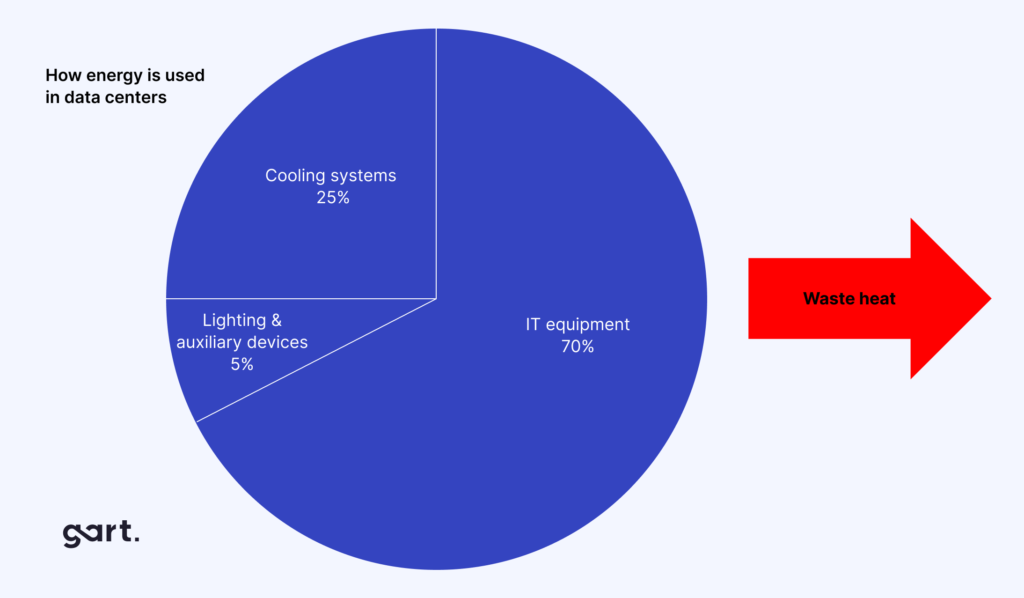
Moving to the cloud reduces the need for big on-site data centers, saving costs and making operations more efficient. It also allows quick adjustments to resources, matching IT needs with actual demand, boosting productivity.
DevOps Integration for Efficiency and Time-to-Market
The cloud and DevOps work together to improve how businesses operate. Combining DevOps practices with cloud technology makes processes more efficient, speeds up bringing products to market, and encourages collaboration between development and operations teams. This teamwork streamlines growth, especially for startups, by providing scalable resources in the cloud.
This combination also cuts operating costs through automation, which is crucial for business leaders focused on digital transformation. It encourages innovation, saves money, motivates employees, and aligns with the need for efficient processes to deliver top-notch goods and services. Overall, blending DevOps and the cloud accelerates important technological changes that affect business goals.
Ready to build your cloud migration business case?
Gart's cloud architects have helped dozens of organizations move from on-prem to cloud — delivering real TCO reductions and measurable sustainability improvements.
Schedule a free call with Roman
Explore migration services
☁️ Cloud Migration
⚙️ DevOps Services
📈 FinOps & Optimization
🔒 AWS & Azure
🌱 Sustainability
🏗️ Infrastructure as Code
Roman Burdiuzha
Co-founder & CTO, Gart Solutions · Cloud Architecture Expert
Roman has 15+ years of experience in DevOps and cloud architecture, with prior leadership roles at SoftServe and lifecell Ukraine. He co-founded Gart Solutions, where he leads cloud transformation and infrastructure modernization engagements across Europe and North America. In one recent client engagement, Gart reduced infrastructure waste by 38% through consolidating idle resources and introducing usage-aware automation. Read more on Startup Weekly.