Should you migrate to the cloud? It's one of the most consequential infrastructure decisions a business can make — and one of the most poorly answered. The internet is full of articles that tell you "yes, absolutely" and then list the usual suspects: cost savings, scalability, flexibility. But after leading more than 50 cloud migration projects across fintech, healthcare, e-commerce, and SaaS, we've learned the real answer is: it depends — and the factors it depends on are specific, measurable, and often ignored.
This article gives you an honest, experience-first framework for making that decision. We'll cover the genuine business drivers, what migration actually costs (including the parts vendors don't advertise), the scenarios where the cloud is absolutely the right move, and — critically — the scenarios where staying on-premise is the smarter call.
So, Should You Migrate to the Cloud? Start With These 5 Business Drivers
Before answering yes or no, you need to know what you're actually deciding between. Here are the five drivers we consistently see tip the decision toward migration — along with what they actually look like in practice.
1. Financial Impact: Shifting Capex to Predictable Opex
The financial argument for cloud migration is not "the cloud is cheaper." Sometimes it isn't — at least not initially. The real argument is capital structure. On-premise infrastructure requires large, upfront capital expenditures: servers, racks, data center space, power, cooling, and the engineers to run it all. Cloud converts that into a variable, pay-as-you-go operating cost.
For CFOs, this is significant: capex reduction improves cash flow and frees budget for product development. For CTOs, it means provisioning new environments in hours instead of procurement cycles that take weeks.
Beyond cost structure, cloud opens new revenue streams. An e-commerce platform we worked with introduced a personalization engine powered by cloud ML services — something that would have required 18 months of infrastructure procurement on-premise. In the cloud, it took 6 weeks to deploy, and contributed to a measurable increase in average order value within the first quarter.
2. Speed to Market: The Competitive Edge That Compounds
In fast-moving markets, the team that ships fastest wins. Cloud eliminates the single biggest bottleneck in traditional IT: environment provisioning. With infrastructure as code and managed cloud services, a development team can spin up a production-equivalent environment in under an hour.
This speed advantage isn't just tactical — it compounds. Faster iteration cycles mean more experiments, more learning, and more product improvements per quarter. Over 12–18 months, cloud-native organizations consistently outpace on-premise competitors in feature delivery.
Tools like Azure DevOps — including Repos, Pipelines, and Test Plans — give engineering teams a unified platform to accelerate the entire software delivery lifecycle without managing the underlying infrastructure.
3. Global Reach Without Building Global Infrastructure
Expanding into a new region traditionally meant negotiating data center leases, shipping hardware, and hiring local IT staff. With cloud, you deploy to a new region in an afternoon.
This matters enormously for regulated industries. A US-based healthcare provider we supported needed to serve European patients under GDPR, which mandates that data stay within specific EU jurisdictions. Using scripted DevOps processes, they deployed a compliant environment in the EU within days — something that would have taken 12+ months and significant capital investment using physical infrastructure.
Cloud providers also handle the compliance complexity: SOC 2, HIPAA, PCI DSS, ISO 27001 certifications are maintained by the provider, not your team.
4. Resilience, Backup, and Disaster Recovery
Data loss is an existential risk for most businesses. Yet many organizations still rely on tape backups stored in the same building as their production servers. Cloud enables geographically redundant disaster recovery at a fraction of the cost of a physical secondary data center.
Recovery Time Objectives (RTOs) that previously took 24–72 hours can be reduced to minutes with cloud-native DR solutions. For any business where downtime directly costs revenue — e-commerce, financial services, SaaS — this is a compelling ROI argument on its own.
5. Sustainability: ESG Requirements Are Now a Business Driver
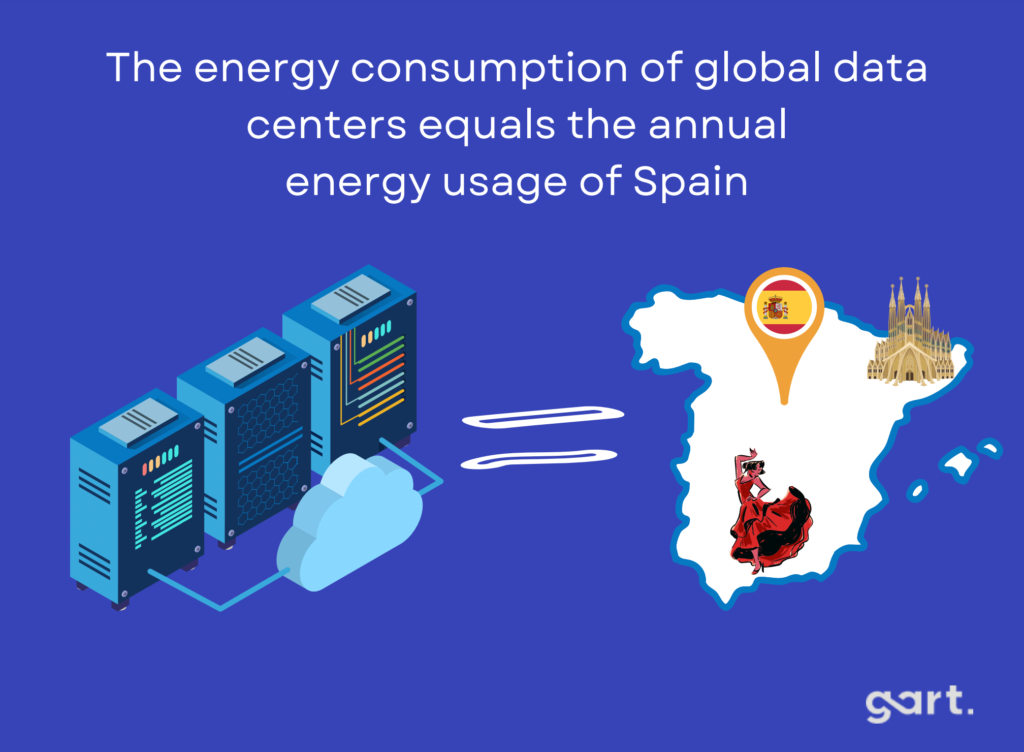
This driver is accelerating. In 2026, ESG compliance is no longer optional for enterprise buyers, investors, and government clients. Cloud migration is one of the fastest ways to reduce an organization's Scope 2 carbon emissions, as hyperscale data centers operate at dramatically higher energy efficiency than private facilities.
According to the Green Software Foundation, shared cloud infrastructure enables significantly better resource utilization compared to dedicated on-premise hardware, which typically runs at 10–15% utilization on average. Government mandates in the EU, UK, and US are setting net-zero targets that make cloud-based infrastructure a strategic necessity for compliant businesses.
A Real Cloud Migration: What the Numbers Actually Look Like
Abstract benefits are easy to promise. Here is what a real project delivered.
This is the kind of outcome cloud migration can deliver — but it requires proper planning, the right migration strategy for each workload, and an experienced team to execute it.
Case Study · Fintech
AWS Migration for a Payment Processing Platform
Visa/Mastercard transaction infrastructure migrated from on-premise to AWS — phased lift-and-shift, zero downtime on critical payment paths.
37%
Infrastructure cost reductionin year one
4×
Faster environmentprovisioning vs. on-premise
<15m
Disaster recovery RTO(previously 48+ hours)
How it was achieved
Reserved instances for baseline workloads, Spot instances for batch jobs, GP3 storage replacing GP2, and RDS Proxy to reduce database connection overhead. Migration executed over 14 weeks with zero downtime on critical payment processing paths.
AWS Reserved Instances
Spot Instances
GP3 Storage
RDS Proxy
Lift & Shift
Disaster Recovery
Industry: Financial Services · Cloud: AWS · Duration: 14 weeks
Discuss your migration →
What Cloud Migration Actually Costs: Visible and Hidden
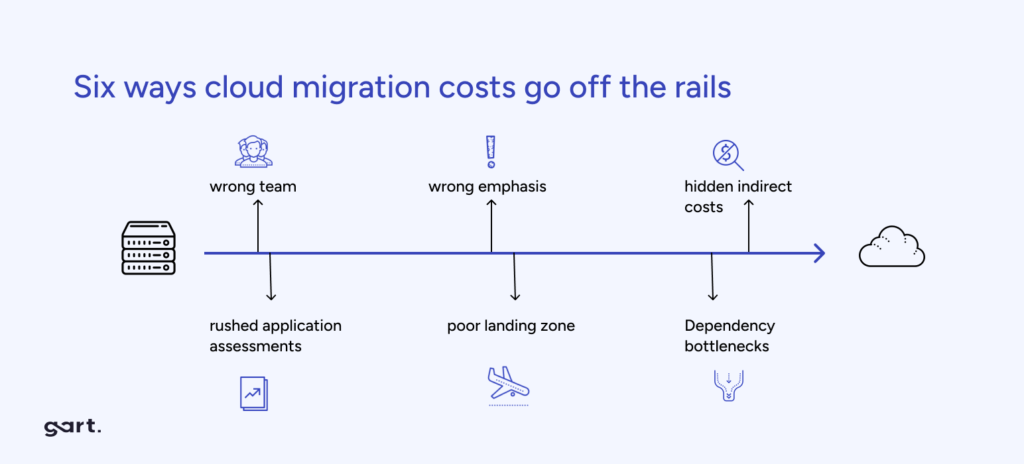
One of the most common reasons cloud migrations underdeliver is misaligned cost expectations. Vendors and consultants tend to lead with savings; the complexity of the full picture often surfaces later. Here is an honest breakdown.
Cost CategoryVisible / ExpectedHidden / Often MissedComputeEC2 / VM instancesOver-provisioned instances; unused reserved instancesStorageS3 / Blob storage feesEgress fees when reading data out; orphaned snapshotsData TransferInbound (usually free)Cross-region and cross-AZ traffic; CDN origin pull costsMigration laborEngineering sprint timeTesting, rollback planning, training, parallel-run periodToolingMonitoring (CloudWatch, etc.)Third-party observability, security scanning, compliance toolsLicensingCloud-native servicesExisting on-premise licenses not transferable to cloud (BYOL gaps)PeopleProject team during migrationUpskilling engineers, potential hires for cloud-native opsWhat Cloud Migration Actually Costs: Visible and Hidden
Practical tip: The FinOps Foundation recommends establishing cloud cost visibility before migration begins — not after. Tagging strategy, budget alerts, and a FinOps practice should be part of your migration plan, not an afterthought. Organizations that implement FinOps practices from day one consistently achieve better cost outcomes than those who optimize post-migration.
Elevate Your Business with Our Cloud Consulting Expertise. Unlock Efficiency, Security, and Innovation – Consult with Us Today!!
When You Should NOT Migrate to the Cloud (Three Clear Scenarios)
This is the section most cloud consultants skip. If you're asking "should I migrate to the cloud," the honest answer sometimes is: not yet — or not for this workload. Here are three scenarios where we have advised clients to delay, partially migrate, or stay on-premise entirely.
Scenario 1: Your Workload Has Extremely Predictable, High-Utilization Compute Needs
Cloud's pay-as-you-go model delivers the most value for variable or unpredictable workloads. If you run a batch-processing system at 90%+ utilization, 24/7, year-round, the economics of dedicated hardware — especially with modern lease options — can outperform cloud pricing. A financial modeling firm running constant Monte Carlo simulations, for example, may find bare metal or colocation more cost-effective than cloud compute.
Scenario 2: Your Data Sovereignty Requirements Exceed What Cloud Providers Currently Offer
Certain government, defense, or highly regulated healthcare clients face data sovereignty requirements that cloud providers — even with dedicated regions — cannot yet satisfy. If your compliance requirement is physically air-gapped infrastructure with no external network connectivity, cloud is not the right answer today. Private cloud or on-premise is.
Scenario 3: Your Team Lacks the Skills to Operate Cloud Infrastructure
Migrating to the cloud without the operational skills to run it is like moving into a new city without knowing how to drive. The migration itself may succeed — and then costs spiral as the team over-provisions, ignores alerts, or misconfigures services. If your engineering team has no cloud experience, the right first step is upskilling and a pilot project, not a full migration.
Our decision rule of thumb: If you're asking "should I migrate to the cloud," the answer is most likely yes if you have variable workloads, growth ambitions, geographic expansion plans, or legacy infrastructure approaching end-of-life. If none of those apply to your situation, the case for migration deserves more scrutiny — and we'd rather tell you that upfront than after you've spent six months on a project.
Top 5 Cloud Migration Mistakes From Real Projects
Based on our experience across 50+ migrations, here are the mistakes we see most often — and how to avoid them.
Migrating without assessing application dependencies first. Applications that look simple in isolation often have hidden dependencies on shared databases, legacy authentication systems, or on-premise file shares. Dependency mapping before migration is not optional — it's the foundation of a safe migration plan.
Choosing "lift and shift" for everything. Lift and shift (rehost) is fast, but it moves your inefficiencies into the cloud. An application that was poorly optimized on-premise will be poorly optimized — and expensive — in the cloud. Each workload needs an individual assessment: rehost, replatform, refactor, or retire.
Not setting up cost governance on day one. Without tagging, budgets, and alerts configured from the start, cloud costs tend to grow invisibly. We have seen organizations receive their first cloud bill and find it 3x higher than projected — because test environments were left running and storage was never cleaned up.
Treating migration as a one-time project, not an ongoing practice. Cloud optimization is continuous. Reserved instance coverage, rightsizing, storage tiering, and security posture all require regular review. Organizations that treat the migration as "done" consistently underperform those with a FinOps culture.
Skipping the parallel-run period. Running cloud and on-premise systems in parallel for 2–4 weeks before full cutover is the safety net that catches the issues your testing missed. It adds cost and time — but the alternative is discovering critical gaps in production.
Cloud Migration Framework: A Practical Timeline
Every migration is different, but the phased approach below reflects what we implement for clients across most industries. Timelines are indicative for a mid-size workload (50–200 servers / services)
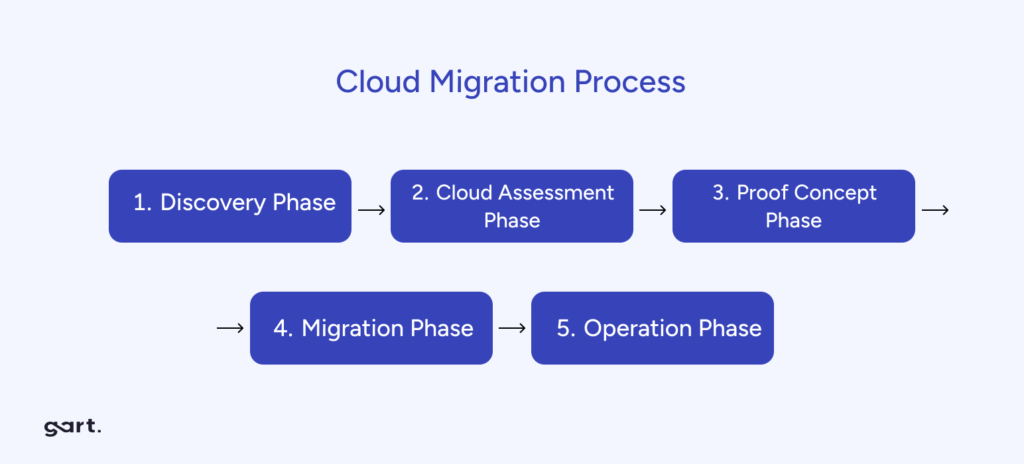
PhaseKey ActivitiesTypical Duration1. Discover & AssessInfrastructure audit, dependency mapping, workload classification, cost baseline2–4 weeks2. Strategy & PlanningMigration strategy per workload (rehost / replatform / refactor), cost projection, risk plan2–3 weeks3. Foundation SetupCloud account structure, networking, IAM, security controls, monitoring, tagging strategy2–3 weeks4. Pilot MigrationMigrate 2–3 non-critical workloads, validate tooling and process, gather team learnings2–3 weeks5. Wave MigrationsMigrate workloads in priority waves, parallel-run periods, progressive cutover6–12 weeks6. Optimize & HandoverRightsizing, reserved instance purchasing, cost reporting, team knowledge transfer2–4 weeksCloud Migration Framework: A Practical Timeline
The full timeline for this scope typically runs 16–29 weeks. Compressed timelines are possible but increase risk — particularly in Phases 3–5. Our cloud migration service includes a dedicated project manager and cloud architect for each engagement to keep timelines realistic and risks managed.
Our methodology
How Gart Approaches Cloud Migration
Written by engineers who have led migrations, not marketers who have read about them. Here is how we actually work — from first conversation to post-migration handover.
50+migrations delivered
14 wksaverage project duration
0downtime on critical paths
AWS · Azurecertified architects
01
Discovery & Workload Assessment
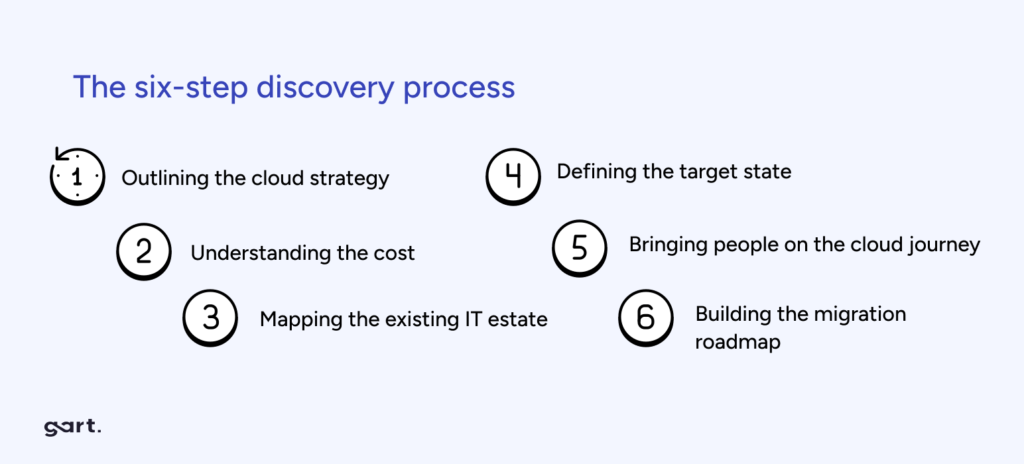
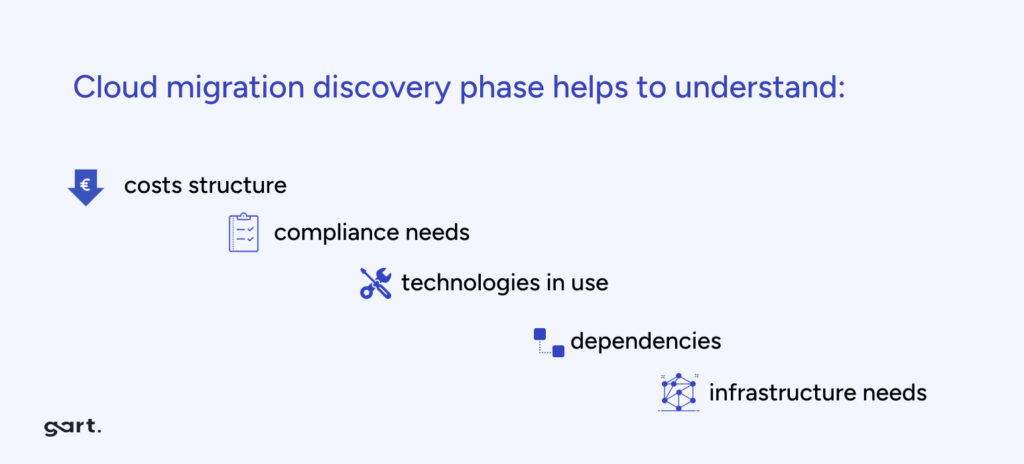
We document your current infrastructure, map application dependencies, and classify every workload before a single line of migration code is written. The assumptions made before assessment are usually wrong — we start here.
02
Honest Cost & Risk Modelling
We model realistic costs — including the hidden ones: egress fees, licensing gaps, parallel-run overhead. If the numbers don't make a strong case for migration, we'll tell you that upfront.
03
Per-Workload Strategy
Not everything should be lifted and shifted. We assign the right strategy to each workload — rehost, replatform, refactor, or retire — and explain the trade-offs in plain language.
04
Phased Execution & Handover
We migrate in waves with parallel-run periods, progressive cutovers, and full knowledge transfer to your team. The goal is that your engineers can own the cloud environment confidently when we leave.
Team certifications
AWS Solutions Architect
AWS DevOps Engineer
Azure Administrator
CKA — Kubernetes
Not sure if migration is the right move?
We'll give you a straight answer, not a sales pitch.
Talk to a cloud architect →
How organizations can move beyond lift-and-shift to orchestrate AI agents, enforce digital sovereignty, and realize measurable technology value in 2026 and beyond.
The Smart Fabric Paradigm
The global technology landscape in 2026 has crossed a decisive threshold. Organizations no longer ask whether to adopt cloud — they ask how to orchestrate it. The early promise of cloud computing — elasticity, cost reduction, hardware abstraction — has been largely delivered. What remains is a far more demanding challenge: transforming cloud infrastructure from a cost centre into a living, intelligent fabric that generates measurable business value.
Three converging forces are reshaping this landscape simultaneously. Artificial intelligence has graduated from experimental pilots to core operational agents embedded inside the software development life cycle. Infrastructure economics are being fundamentally disrupted by high-bandwidth memory shortages and the rise of GPU-optimized "NeoClouds." And a wave of rigorous regulation — led by the EU Cloud and AI Development Act — is forcing every enterprise to confront questions of digital sovereignty that were previously reserved for governments.
💡 Key Insight
The global cloud infrastructure market is projected to reach $2.4 trillion by 2032. Leaders who still treat cloud as a simple hosting environment will find themselves structurally disadvantaged compared to those treating it as a fabric for value, speed, and digital trust.
67%
Enterprises with AI/ML integrated by 2026
89%
Predicted AI/ML adoption by 2028
74%
Adoption of cloud-native architectures today
51%
Zero-trust security adoption in enterprises
How Agentic AI is Shaping Modern Cloud Adoption Strategy
The most consequential shift in cloud strategy for 2026 is not architectural — it is operational. AI agents are no longer browser-based copilots offering code suggestions. They are deep operational participants: making autonomous decisions about workload placement, detecting and remediating security vulnerabilities, optimising resource spend in real time, and self-documenting the systems they maintain.
This transition elevates human engineers from writing lines of code to running smart build systems — systems that self-correct, self-document, and route decisions through policy guardrails without waiting for human approval. The practical consequence is that cloud architecture must now incorporate an AI agent mesh: a dedicated infrastructure layer that mediates communication between AI agents and models, enforces governance, and provides secure interaction across the enterprise fabric.
From Co-Pilots to Autonomous Agents
Early AI tooling in the SDLC was fundamentally advisory. By contrast, 2026-era agents are granted bounded autonomy: they can rebalance Kubernetes clusters, right-size pods, trigger rollback procedures, and manage spot instance pools — all without opening a ticket. Teams that have deployed such agents report 50–70% reductions in infrastructure costs and dramatic reductions in mean time to recovery (MTTR).
At Gart, we build this agent mesh layer as a first-class concern in every cloud engagement, ensuring that automation is governed, auditable, and aligned with client-specific cost and compliance boundaries.
⚙️
Gart Perspective
Evolving DevOps: Integrating AI into Your Cloud Adoption Strategy
The migration from DevOps to AI-augmented operations is not a replacement of DevOps culture — it is its logical evolution. Continuous integration, infrastructure as code, and blameless post-mortems remain foundational. What changes is the execution layer: agents handle the repetitive, time-sensitive operations so engineers can focus on architecture, product, and innovation.
Cloud Adoption Strategy Frameworks: AWS, Azure, and Google
A successful cloud transformation requires a structured methodology to align business goals with technical execution. The three major hyperscalers have each developed comprehensive adoption frameworks, updated in 2026 to address AI integration, hybrid operations, and regulatory complexity.
AWS Cloud Adoption Framework (AWS CAF)
The AWS CAF organises capabilities into six perspectives: Business, People, Governance, Platform, Security, and Operations. The Business perspective ensures cloud investments are tied directly to digital ambitions with quantifiable outcomes. The Governance perspective is designed to minimise risk through policy automation and cloud financial management. For 2026, AWS has expanded its guidance around AI/ML workload readiness and model-agnostic deployment architectures, making it particularly well-suited for enterprises that need to interoperate across multiple AI providers.
Microsoft Azure Cloud Adoption Framework
Azure's CAF organises the journey into seven methodologies: Strategy, Plan, Ready, Adopt, Govern, Secure, and Manage. The first four phases are sequential and foundational; the last three operate in parallel throughout the cloud lifecycle. In 2026, Microsoft has added specific guidance for generative AI adoption and unifying data platforms for high-performance analytics — making Azure CAF the strongest framework for organisations deeply embedded in the Microsoft 365 and Dynamics ecosystem.
Google Cloud Adoption Framework
Google's framework identifies four themes: Lead, Learn, Scale, and Secure. The Lead theme balances top-down mandates with bottom-up momentum. The Scale theme is achieved by abstracting infrastructure through managed and serverless services. For 2026, Google has restructured its partner programme around real-world customer outcomes, with deep weighting on AI and analytics capabilities — reflecting its competitive strength in BigQuery and Vertex AI.
Framework Pillar
AWS CAF
Azure CAF
Google Cloud
Leadership & Alignment
Business & People
Strategy & Plan
Lead
Environmental Readiness
Platform
Ready
Scale
Technical Execution
Operations
Adopt
Learn
Governance & Risk
Governance
Govern
Secure
Security Operations
Security
Secure
Secure
Lifecycle Management
Operations
Manage
Scale
Applying the 7 Rs to Your Cloud Adoption Strategy
No single migration strategy fits every application. The 7 Rs framework remains the most practical tool for structuring portfolio-level migration decisions, balancing speed of delivery against long-term architectural value.
Strategy
Also Known As
Best For
Value Horizon
Rehost
Lift-and-Shift
Legacy VM workloads needing fast exit from data centre
Short-term
Relocate
Hypervisor Lift
VMware-based workloads without OS changes
Short-term
Replatform
Lift-and-Reshape
DB → managed service (RDS), containerisation of monoliths
Mid-term
Refactor
Re-architect
Monoliths requiring cloud-native transformation to microservices
Long-term
Repurchase
Drop-and-Shop
On-premise CRM/ERP → SaaS (e.g. Salesforce, Workday)
Mid-term
Retire
Decommission
Applications that no longer deliver business value
Immediate
Retain
Revisit
Workloads with complex compliance or latency dependencies
Deferred
The critical discipline is portfolio segmentation: mapping each application against business criticality, refactoring cost, and regulatory sensitivity before assigning an R-strategy. At Gart, our IT Audit process delivers this segmentation as a structured output — giving leadership a clear migration backlog with effort, risk, and cost estimates before a single workload moves.
Microservices in Cloud Adoption Strategy: When to Refactor
Refactoring to microservices is the most transformative — and most misapplied — strategy in the portfolio. For large, complex applications requiring high agility and independently scalable components, microservices deliver genuine resilience and deployment velocity. However, for small or simple applications, the operational overhead of a distributed system — service discovery, inter-service authentication, distributed tracing, and eventual consistency — significantly outweighs the benefit. The migration strategy must match the application's complexity, not the architecture's prestige.
Digital Sovereignty: The Regulatory Dimension of Cloud Strategy
By 2026, cloud strategy and geopolitical risk management have converged. The EU Cloud and AI Development Act, proposed by the European Commission in Q1 2026, seeks to harmonise cloud architecture requirements across member states and structurally reduce European dependency on US-headquartered hyperscalers — which currently control over 70% of the market.
For enterprises, the operative concern is the US CLOUD Act: American authorities retain legal authority to request access to data held by US-incorporated cloud providers, regardless of where the data is physically stored. This creates a jurisdictional exposure that European regulators are moving decisively to address.
$80B
Sovereign cloud IaaS spending forecast for 2026
35.6%
Year-over-year increase in sovereign cloud spend
20%
Current workloads shifting from global to local providers (Gartner)
Region
2025 Spend (USD M)
2026 Spend (USD M)
2027 Spend (USD M)
China
$37,539
$47,379
$58,544
North America
$12,667
$16,394
$21,127
🇪🇺 Europe
$6,868
$12,587
$23,118
Mature Asia/Pacific
$851
$1,593
$3,155
Middle East & Africa
$132
$250
$515
Global Total
$59,300
$80,427
$110,609
Europe's sovereign cloud spending is forecast to nearly double in a single year — the fastest regional acceleration globally. AWS, IBM, and a growing cohort of EU-native providers have responded with sovereign cloud offerings specifically designed to maintain data residency and governance authority within the European Union.
🔒
Action Point
For European Enterprises
Conduct a jurisdictional exposure audit across your workload portfolio. Classify data by regulatory sensitivity and map it against provider sovereignty commitments. For regulated industries — energy, finance, healthcare, telecoms — default to sovereign-compliant deployments for any data touching EU citizens.
FinOps 2026: From Cost Cutting to Technology Value Management
Cloud financial management has undergone a structural transformation. What began as a practice of turning off unused virtual machines has evolved into a comprehensive discipline spanning SaaS, data centres, licensing, and AI infrastructure. The State of FinOps 2026 report reveals that 98% of practitioners now manage AI spend as a core part of their remit — reflecting the degree to which AI infrastructure has become inseparable from cloud budgeting.
Shift Left, Shift Up
Two structural shifts are reshaping how financial accountability operates within engineering organisations. "Shift Left" embeds cost awareness directly into the SDLC: engineers and architects estimate the spend impact of design decisions before deployment, preventing expensive patterns from entering production. "Shift Up" elevates FinOps leaders to participate in provider negotiations and multi-year investment decisions at the executive level — making financial fluency a core engineering leadership competency, not a finance department afterthought.
The underlying principle is that every workload must have an owner and every cloud dollar must map to a unit economic metric: cost-per-customer, cost-per-transaction, cost-per-model-run. This transforms cloud spend from a lumpy line item into a predictable, decision-driven signal.
AI-Driven Autonomous FinOps Agents
Manual cost management at cloud scale is no longer viable. The 2026 generation of autonomous FinOps agents handles continuous cost diagnostics, real-time anomaly detection, Kubernetes rebalancing, pod right-sizing, and spot instance management — without human approval gates. These agents translate thousands of lines of cost and usage reports into natural-language insights tailored to specific personas, from the CFO to the site reliability engineer.
Agent Type
Core Focus
Key Capability in 2026
X-Ray / Diagnostic
Financial Health Checks
Surfaces inefficiencies in under 30 seconds
Governance
Budget Drift & Tag Hygiene
Automates root-cause analysis and ownership assignment
Optimisation
Rate & Resource Management
Executes strategies 24/7 without human approval
Reporting
Persona-Specific Insights
Generates context-ready reports for CFO to SRE
GreenOps and Sustainable Cloud Architecture
Sustainability has moved from a secondary ESG reporting obligation to a primary architectural constraint. The surge in AI-driven compute demand has placed cloud infrastructure at a critical environmental junction: operational growth must be structurally decoupled from carbon output. GreenOps — the operational discipline of managing cloud workloads for carbon efficiency — is the mechanism for achieving this decoupling.
Carbon-Aware Computing
The most impactful development in 2026 is the operationalisation of carbon-aware workload scheduling. Non-critical batch processing — data backups, model training runs, analytics pipelines — is shifted in time and geography to align with moments when the local power grid is drawing the highest proportion of renewable energy. Hyperscalers now provide real-time carbon intensity telemetry that feeds directly into orchestration layers, enabling fluid, environmentally-responsive infrastructure decisions.
Green AI and Efficient Hardware
The energy cost of generative AI training and inference is substantial. Technical leaders are mitigating this through purpose-built AI accelerators and ARM-based architectures that deliver significantly better performance per watt than general-purpose hardware. Combined with 100% renewable energy contracts and advanced liquid cooling techniques, modern hyperscale data centres now achieve Power Usage Effectiveness (PUE) ratios at or below 1.1 — up to five times more energy-efficient than traditional on-premise setups.
🌱
Carbon Impact
Carbon Impact of Cloud Migration
Moving from legacy on-premise infrastructure to a modern cloud architecture can reduce a company's digital carbon footprint by up to 80%. This is not a marginal efficiency gain — it is a structural transformation that positions cloud migration as both an economic and an environmental imperative.
Sustainability Dimension
Key 2026 Metric
Strategic Target
Infrastructure
Carbon Intensity (kg CO₂e / workload)
−40% Year-over-Year
Model Efficiency
Energy per Training Epoch
≤ Baseline − 25%
Application Efficiency
Joules per Inference
≤ 0.5 J / Inference
Governance
% Workloads under GreenOps
90%
Data Centres
Power Usage Effectiveness (PUE)
1.1 or lower
AWS vs Azure vs Google Cloud: Choosing the Right Foundation
The hyperscaler decision in 2026 is less about feature parity — all three offer comprehensive services — and more about ecosystem alignment and strategic centre of gravity. The right choice depends on where your organisation's heaviest technical investments already lie, and where you intend to build your AI and data capabilities.
AWS: Maximum Breadth and Flexibility
AWS retains market leadership at approximately 29–30% share, distinguished by its ecosystem depth — over 250 services, the broadest global region footprint, and the most mature model-agnostic AI strategy. It is the default choice for organisations requiring maximum configurability, large-scale B2C platforms, or multi-cloud portability. The tradeoff is complexity: AWS pricing requires dedicated management attention, and service sprawl is a real operational risk for teams without disciplined governance.
Azure: Enterprise Integration and Hybrid Excellence
Azure is the natural home for organisations already running Microsoft 365, Teams, and Active Directory. Its hybrid story — delivered through Azure Arc, which extends unified governance to on-premises and edge environments — remains unmatched. The Azure Hybrid Benefit provides compelling cost advantages for organisations with existing Microsoft licensing. Azure AI is oriented toward making machine learning accessible to business analysts and non-specialist developers, making it the strongest platform for enterprise-wide AI democratisation.
Google Cloud: Data, Analytics, and Cloud-Native Velocity
GCP excels where data is the primary strategic asset. BigQuery's serverless analytics engine and Vertex AI's native Gemini multimodal models make it the preferred platform for data-heavy applications, recommendation engines, and predictive analytics. Google's private global fibre network delivers exceptionally low latency, and its leadership in Kubernetes — the platform originated at Google — provides unmatched depth for container-native architectures. The tradeoff is a smaller enterprise sales footprint compared to AWS and Azure.
Gart's Framework
Hyperscaler Decision Framework
We advise clients to evaluate four dimensions: existing ecosystem investment (Microsoft, AWS, or Google native tooling), AI and data architecture requirements, hybrid and edge needs, and regulatory sovereignty obligations. In practice, most enterprises with complex environments benefit from a multi-cloud strategy — not for every workload, but to avoid strategic dependency on a single provider for mission-critical capabilities.
Implementation Roadmap: Three Phases to Intelligent Cloud
Successful cloud transformation follows a disciplined, phased approach that integrates technology, financial governance, and sustainability objectives from the start — not as afterthoughts.
1
Months 1–3
Assessment & Strategic Alignment
Conduct a full IT portfolio audit and map workloads against the 7 Rs framework. Define business motivations — cost optimisation, agility, regulatory compliance — and build a quantified business case. Identify jurisdictional risk across the workload portfolio and evaluate sovereign cloud requirements. Form platform engineering teams and establish the cloud centre of excellence (CCoE).
2
Months 4–6
Foundation Building
Establish the landing zone: network architecture, security policies, and governance controls. Implement Infrastructure as Code using Terraform or Pulumi for reproducibility. Deploy multi-account management via AWS Control Tower or Azure Landing Zones. Activate unified cost and carbon visibility tooling. Begin AI infrastructure standardisation and deploy the initial agentic mesh for model orchestration.
3
Months 7–12+
Migration, Modernisation & Optimisation
Execute workload migration in prioritised waves, beginning with quick-win applications. Define cut-over and rollback plans for each wave. Modernise high-value workloads from monoliths to microservices or serverless patterns. Activate autonomous FinOps and GreenOps agents for continuous optimisation. Transition from reactive reporting to proactive cost and carbon engineering embedded in the SDLC.
Conclusion: Scaling Smarter in the AI Era
The 2026 cloud adoption strategy is no longer a technology project — it is a business transformation programme with technology at its core. The organisations that thrive will not simply be those that move workloads faster, but those that build cloud environments designed for three simultaneous imperatives: intelligence (AI agents embedded in operations), sovereignty (data governance aligned with jurisdictional reality), and value (every cloud dollar mapped to a measurable business outcome).
The good news is that the frameworks, tools, and expertise to execute this transformation exist today. The 7 Rs provide a structured migration decision model. The hyperscaler CAFs provide proven organisational and technical scaffolding. Autonomous FinOps and GreenOps agents make it possible to manage complexity at a scale that was previously beyond reach. What separates leaders from laggards is not access to tools — it is the discipline to apply them with strategic intentionality.
At Gart, we help engineering teams and technology leaders navigate this complexity — from the initial IT audit and workload assessment through to full production migration and ongoing optimisation. Whether you're rearchitecting a SaaS platform, establishing a sovereign cloud footprint in Europe, or building the FinOps function your AI workloads demand, we bring the technical depth and operational experience to deliver outcomes that matter.
Moving to the cloud is no longer just a trend; it's a crucial strategic decision. Businesses now understand that adopting cloud solutions is not a choice but a necessity to stay competitive, resilient, and adaptable in today's dynamic world.
The reasons for this increasing use of cloud services are practical and varied. They focus on four main goals: saving costs, scaling easily, being agile, and improving security.
Starting a cloud migration without a clear strategy can be overwhelming and expensive. This guide will help you create a successful plan for your cloud migration journey.
What is cloud migration?
Cloud migration involves transferring an organization's data, applications, and workloads from on-premises infrastructure to cloud platforms. Businesses adopt cloud solutions to achieve flexibility, scalability, and cost efficiency. According to the study, 93% of organizations cite scalability and cost savings as their primary motivations for migration. The shift reduces dependence on traditional IT investments, allowing companies to allocate resources more strategically.
Cloud migration lifecycle
The cloud migration lifecycle encompasses a series of phases, from assessment and planning to execution, monitoring, and optimization.
Common stages in the cloud migration lifecycle include:
1) Assessment and Discovery:
Assessing the existing IT landscape, identifying workloads and applications suitable for migration, and conducting a comprehensive analysis of dependencies, performance requirements, and compliance considerations.
2) Planning and Preparation:
Developing a detailed migration plan, defining migration strategies and priorities, estimating costs and resource requirements, and establishing governance and security frameworks to ensure a smooth migration process.
3) Migration Execution:
Executing the migration plan, including provisioning cloud resources, migrating data and applications, configuring networking and security policies, and validating functionality and performance in the cloud environment.
4) Post-Migration Testing and Validation:
Conducting thorough testing and validation to ensure that migrated workloads and applications meet performance, security, and compliance requirements in the cloud environment.
5) Optimization and Continuous Improvement:
Continuously monitoring and optimizing cloud resources, refining governance and security policies, and leveraging cloud-native services and automation tools to drive efficiency and innovation.
Here is a table outlining the steps involved in a cloud migration strategy
StepDescription1. Define ObjectivesClearly state the goals and reasons for migrating to the cloud.2. Assessment and InventoryAnalyze current IT infrastructure, applications, and data. Categorize based on suitability.3. Choose Cloud ModelDecide on public, private, or hybrid cloud deployment based on your needs.4. Select Migration ApproachDetermine the approach for each application (e.g., rehost, refactor, rearchitect).5. Estimate CostsCalculate migration and ongoing operation costs, including data transfer, storage, and compute.6. Security and ComplianceIdentify security requirements and ensure compliance with regulations.7. Data MigrationDevelop a plan for moving data, including cleansing, transformation, and validation.8. Application MigrationPlan and execute the migration of each application, considering dependencies and testing.9. Monitoring and OptimizationImplement cloud monitoring and optimize resources for cost-effectiveness.10. Training and Change ManagementTrain your team and prepare for organizational changes.11. Testing and ValidationConduct extensive testing and validation in the cloud environment.12. Deployment and Go-LiveDeploy applications, monitor, and transition users to the cloud services.13. Post-Migration ReviewReview the migration process for lessons learned and improvements.14. DocumentationMaintain documentation for configurations, security policies, and procedures.15. Governance and Cost ControlEstablish governance for cost control and resource management.16. Backup and Disaster RecoveryImplement backup and recovery strategies for data and applications.17. Continuous OptimizationContinuously review and optimize the cloud environment for efficiency.18. Scaling and GrowthPlan for future scalability and growth to accommodate evolving needs.19. Compliance and AuditingRegularly audit and ensure compliance with security and regulatory standards.20. Feedback and IterationGather feedback and make continuous improvements to your strategy.This table provides an overview of the key steps in a cloud migration strategy, which should be customized to fit the specific needs and goals of your organization.
Pre-migration preparation: analyzing your current IT landscape
Before your cloud migration journey begins, gaining a deep understanding of your current IT setup is crucial. This phase sets the stage for a successful migration by helping you make informed decisions about what, how, and where to migrate.
Assessing Your IT Infrastructure:
Inventory existing IT assets: List servers, storage, networking equipment, and data centers.
Identify migration candidates: Note their specs, dependencies, and usage rates.
Evaluate hardware condition: Decide if migration or cloud replacement is more cost-effective.
Consider lease expirations and legacy system support.
Application Assessment:
Catalog all applications: Custom-built and third-party.
Categorize by criticality: Identify mission-critical, business-critical, and non-critical apps.
Check cloud compatibility: Some may need modifications for optimal cloud performance.
Note dependencies, integrations, and data ties.
Data Inventory and Classification:
List all data assets: Databases, files, and unstructured data.
Classify data: Based on sensitivity, compliance, and business importance.
Set data retention policies: Avoid transferring unnecessary data to cut costs.
Implement encryption and data protection for sensitive data.
Based on assessments, categorize assets, apps, and data into:
Ready for Cloud: Suited for migration with minimal changes.
Needs Optimization: Benefit from pre-migration optimization.
Not Suitable for Cloud: Better kept on-premises due to limitations or costs.
These preparations ensure a smoother and cost-effective migration process.
Choose a cloud model
After understanding cloud deployment types, it's time to shape your strategy. Decide on the right deployment model:
Public Cloud: For scalability and accessibility, use providers like AWS, Azure, or Google Cloud.
Private Cloud: Ensure control and security for data privacy and compliance, either on-premises or with a dedicated provider.
Hybrid Cloud: Opt for flexibility and workload portability by combining on-premises, private, and public cloud resources.
Multi-Cloud: Multi-cloud refers to the use of multiple cloud providers to host different workloads and applications. Organizations adopt a multi-cloud strategy to mitigate vendor lock-in, enhance redundancy and fault tolerance, and optimize costs by leveraging the
Choose from major providers like AWS, Azure, Google Cloud, and others.
Read more: Choosing the Right Cloud Provider: How to Select the Perfect Fit for Your Business
Your choices impact migration success and outcomes, so assess needs, explore options, and consider long-term scalability when deciding. Your selected cloud model and provider shape your migration strategy execution and results.
Key cloud migration strategies
With your cloud model and provider(s) in place, the next critical step in your cloud migration strategy is to determine the appropriate migration approach for each application in your portfolio. Not all applications are the same, and selecting the right approach can significantly impact the success of your migration.
Here are the five common migration approaches and how to choose the appropriate one based on application characteristics:
Lift and Shift (Rehost)
Also known as rehosting, this is the simplest migration approach. Applications and workloads are moved to the cloud without modifications to their architecture. While cost-effective, it often requires post-migration optimization to harness the full benefits of the cloud. For example:
Rehosting involves moving an application to the cloud with minimal changes. It's typically the quickest and least disruptive migration approach. This approach is suitable for applications with low complexity, legacy systems, and tight timelines.
Cost Savings: Organizations pay only for what they use, reducing idle resources.
Time Efficiency: Applications can be migrated quickly, enabling businesses to explore cloud capabilities with minimal disruption.
When to Choose: Opt for rehosting when your application doesn't require significant changes or when you need a quick migration to take advantage of cloud infrastructure benefits.
Refactor (Lift Tinker and Shift)
Refactoring involves making significant changes to an application's architecture to optimize it for the cloud. This approach is suitable for applications that can benefit from cloud-native features and scalability, such as microservices or containerization.
When to Choose: Choose refactoring when you want to modernize your application, improve performance, and take full advantage of cloud-native capabilities.
Rearchitect (Rebuild)
Re-architecting involves rebuilding applications to exploit cloud-native features fully. It is ideal for:
Applications reliant on legacy technologies.
Organizations aiming for significant agility and innovation.
Handling data-intensive tasks through scalable hybrid cloud architectures.
Rearchitecting is a complete overhaul of an application, often involving a rewrite from scratch. This approach is suitable for applications that are outdated, monolithic, or require a fundamental transformation.
When to Choose: Opt for rearchitecting when your application is no longer viable in its current form, and you want to build a more scalable, resilient, and cost-effective solution in the cloud.
Replace or Repurchase (Drop and Shop)
Typically, solutions are implemented using the best available technology. SaaS applications may offer all needed functionality, allowing for future replacement and easing the transformation process.
Replatform (Lift, Tinker, and Shift)
This strategy involves making minimal changes to optimize the application for cloud environments. It enables organizations to:
Leverage managed services.
Scale resources dynamically, such as adjusting CPU throughput or reserving instances.
Discard legacy components while modernizing infrastructure.
Replatforming involves making minor adjustments to an application to make it compatible with the cloud environment. This approach is suitable for applications that need slight modifications to operate efficiently in the cloud.
When to Choose: Choose replatforming when your application is almost cloud-ready but requires a few tweaks to take full advantage of cloud capabilities.
Retire (Eliminate)
Retiring involves decommissioning or eliminating applications that are no longer needed. This approach helps streamline your portfolio and reduce unnecessary costs.
When to Choose: Opt for retirement when you have applications that are redundant, obsolete, or no longer serve a purpose in your organization.
Retain
To select the right migration approach for each application, follow these steps:
Assess each application's complexity, dependencies, and business criticality. Consider factors like performance, scalability, and regulatory requirements.
Ensure the chosen approach aligns with your overall migration goals, such as cost savings, improved performance, or innovation.
Assess the availability of skilled resources for each migration approach. Some approaches may require specialized expertise.
Conduct a cost-benefit analysis to evaluate the expected return on investment (ROI) for each migration approach.
Consider the risks associated with each approach, including potential disruptions to operations and data security.
Ready to harness the potential of the cloud? Let us take the complexity out of your migration journey, ensuring a smooth and successful transition.
Challenges in cloud migration
Despite its advantages, cloud migration comes with challenges:
Integration Complexity: Legacy systems often rely on proprietary formats, making seamless integration with cloud platforms challenging.
Data Security: Ensuring compliance with regional regulations and implementing robust encryption is critical.
Performance Optimization: Addressing latency, data transfer speeds, and workload distribution is essential for a successful migration.
For instance, businesses leveraging Platform as a Service (PaaS) benefit from streamlined operations but must manage compatibility issues with legacy systems.
Security and compliance in cloud migration
When you're thinking about moving to the cloud, security should be at the top of your mind. Think about it – you're dealing with massive amounts of data, and some of it might be pretty sensitive stuff. If something goes wrong and there's a security breach, it's not just about losing data – your organization's reputation could take a serious hit, and you might find yourself in hot water legally.
One of the biggest challenges is making sure only the right people can get their hands on your cloud resources. You definitely don't want unauthorized users poking around in there, as that's basically leaving the door open for data leaks and security nightmares.
And here's something you can't afford to overlook – compliance. Whether you're in healthcare dealing with HIPAA, handling credit card data under PCI DSS, or working with European customers under GDPR, there are some serious rules you need to follow. Skip these requirements, and you could be looking at hefty fines and legal troubles. Trust me, that's not a headache anyone wants to deal with.
Here's a short case study for HIPAA compliance - CI/CD Pipelines and Infrastructure for an E-Health Platform
Cloud migration success stories
When considering cloud migration, success stories often serve as beacons of inspiration and guidance. Here, we delve into three real-life case studies from Gart's portfolio, showcasing how our tailored cloud migration strategies led to remarkable outcomes for organizations of varying sizes and industries.
Case Study 1: Migration from On-Premise to AWS for a Financial Company
Industry: Finances
Our client, a major player in the payment industry, sought Gart's expertise for migrating their Visa Mastercard processing application from On-Premise to AWS, aiming for a "lift and shift" approach. This move, while complex, offered significant benefits.
Key Outcomes:
Cost Savings: AWS's pay-as-you-go model eliminated upfront investments, optimizing long-term costs.
Scalability and Flexibility: Elastic infrastructure allowed resource scaling, ensuring uninterrupted services during peak periods.
Enhanced Performance: AWS's global network reduced latency, improving user experience.
Security and Compliance: Robust security features and certifications ensured data protection and compliance.
Reliability: High availability design minimized downtime, promoting continuous operations.
Global Reach: AWS's global network facilitated expansion to new markets and regions.
Automated Backups and Disaster Recovery: Automated solutions ensured data protection and business continuity.
This migration empowered the financial company to optimize operations, reduce costs, and deliver enhanced services, setting the stage for future growth and scalability.
Case Study 2: Implementing Nomad Cluster for Massively Parallel Computing
Industry: e-Commerce
Our client, a software company specializing in Earth modeling, faced challenges in managing parallel processing on AWS instances. They sought a solution to separate software from infrastructure, support multi-tenancy, and enhance efficiency.
Key Outcomes:
Infrastructure Efficiency: Infrastructure-as-Code and containerization simplified management.
High-Performance Computing: HashiCorp Nomad orchestrates high-performance computing, addressing spot instance issues.
Vendor Flexibility: Avoided vendor lock-in with third-party integrations.
This implementation elevated infrastructure management, ensuring scalability and efficiency while preserving vendor flexibility
Future trends of cloud migration
The evolution of cloud computing will continue to redefine business strategies. Emerging trends include:
Green IT: Sustainable cloud solutions aim to balance scalability with energy efficiency.
AI Integration: Leveraging artificial intelligence in cloud platforms enhances automation and decision-making processes.
At Gart, we stand ready to help your organization embark on its cloud migration journey, no matter the scale or complexity. Your success story in the cloud awaits – contact us today to turn your vision into reality.