How modern enterprises architect zero-downtime infrastructure — and why "good enough" DR is the biggest risk on your roadmap.
$5.6M
avg hourlydowntime cost
2+
major cloud outagespredicted in 2026
70%
of DR plans failon first test
99.99%
uptime achievablewith modern DR
In 2026, the concept of "always-on" infrastructure has been stress-tested by high-profile regional outages and the exploding complexity of AI-native cloud environments. Forrester now predicts at least two major multi-day cloud outages this year, driven by AI data center upgrades and the cascading dependencies they introduce.
For modern enterprises, cloud disaster recovery is no longer a reactive insurance policy sitting in a three-ring binder. It is a core operational requirement — one that directly determines market survival, customer trust, and your ability to operate when everything around you fails.
"Build for the outage you haven't imagined yet, not the one you survived last time."
This guide distills the best practices, benchmarks, and real-world case studies that define elite cloud disaster recovery in 2026.
RTO and RPO: The Two Numbers That Define Your Risk Tolerance
Before architecting anything, you need to lock in two non-negotiable metrics:
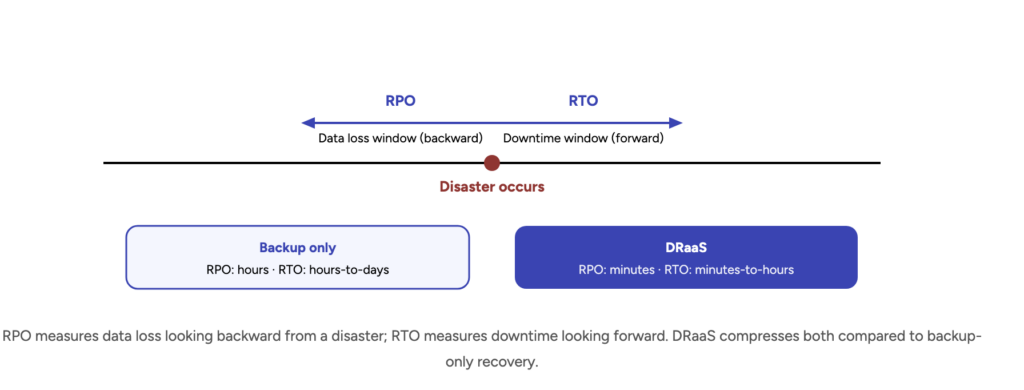
Recovery Time Objective (RTO) — the maximum acceptable downtime before a service must be restored. Measured in seconds, minutes, or hours depending on application tier.
Recovery Point Objective (RPO) — the maximum window of data loss your business can tolerate. Near-zero RPO means continuous replication; 24-hour RPO means daily backups.
Getting these wrong — even slightly — leads to either massive over-engineering costs or catastrophic data loss during an actual incident. Here is the 2026 industry benchmark by application tier:
Tier
Application Type
Target RTO
Target RPO
2026 Standard
Tier 0
Mission-Critical (Payments / Core APIs)
Near zero
Near zero
Multi-site active-active
Tier 1
Business-Critical (CRM / EHR)
< 15 min
< 1 min
Warm standby / Pilot light
Tier 2
Important (Internal Ops)
2–4 hours
< 2 hours
Automated backup & restore
Tier 3
Non-Critical (Dev / Test)
8–24 hours
4–24 hours
Cold storage / S3 archival
Key insight: Most organizations catastrophically mismatch their tier designations. That "internal ops" tool that seven teams use to ship product? It's Tier 1, not Tier 2. Re-audit your tiers annually.
5 Non-Negotiable Cloud DR Best Practices for 2026
IaC
Infrastructure as Code for environment parity
Manual rebuilding is the enemy of low RTO. Recovery environments must be defined in version-controlled code — Terraform or Ansible — ensuring your DR site is an exact replica of production. Configuration drift is the #1 reason recoveries fail silently.
☁️
Multi-region and multi-cloud replication
Single-provider dependency is now classified as a systemic risk. Distribute your data and compute across geographically separate regions or different vendors. The neocloud model is the new baseline for 2026.
AI
AI-driven self-healing and predictive analytics
The 2026 landscape features "agentic" governance — AI models that continuously analyze telemetry to detect hardware degradation before it cascades. Self-healing systems can trigger partial failover automatically.
🔒
Ransomware-proofing with immutable backups
Your DR plan must include WORM (Write Once, Read Many) immutable storage. Once data is written to these vaults, it cannot be modified or deleted — even by compromised administrative credentials.
⚡
Proactive testing via chaos engineering
Chaos engineering means purposefully injecting faults to verify failover mechanisms actually work. Live-fire testing transforms DR from a hope into an evidence-based procedure.
Case Study
Strengthening Datamaran's AWS Resilience
Datamaran — a global leader in ESG data analytics — processes thousands of reports daily using advanced AI. Their platform required a high-performance, cost-efficient, and secure infrastructure with genuine disaster recovery guarantees, not just checkbox compliance.
Gart Solutions' approach: We implemented a multi-regional DR setup using Terraform and AWS services, enabling cross-region replication for S3 and RDS PostgreSQL. Automated environment rebuild scripts allowed the team to restore production infrastructure in under 2 hours for database failures and just 5 minutes for client-facing applications. AWS CloudWatch and Inspector were integrated for proactive vulnerability detection.
99.99%
Uptime achieved
25%
Cloud cost reduction
70%
Less manual intervention
The 4 cloud disaster recovery patterns: which one fits your stack?
Not all disaster recovery strategies are built alike. Choosing the wrong pattern means either overpaying for resilience you don't need — or discovering your "DR" won't actually work when it counts. Here's how each model compares on cost, RTO, and operational complexity.
🗄️
Lowest Cost
Backup & Restore
Snapshots and backups stored in cold storage. The simplest approach — restore from backup when disaster strikes. Suitable for Tier 3 workloads only.
RTOHours–Days
RPOHours–24h
Cost intensity
Recovery speed
🕯️
Low Cost
Pilot Light
Core services — databases, auth — run live in a secondary region at minimal scale. When disaster hits, you scale up the rest. Good for Tier 1–2.
RTO10–30 min
RPO< 5 min
Cost intensity
Recovery speed
🌡️
Medium Cost
Warm Standby
A fully functional, scaled-down replica of production runs continuously in a secondary region. Failover is fast — just scale up and re-route traffic.
RTO< 15 min
RPO< 1 min
Cost intensity
Recovery speed
⚡
Highest Cost
Active-Active
Traffic is distributed across multiple live regions simultaneously. Failover is invisible to users. Required for Tier 0 mission-critical systems.
RTONear zero
RPONear zero
Cost intensity
Recovery speed
Gart's rule of thumb: Most mid-size SaaS companies need Pilot Light for their databases and Warm Standby for their customer-facing application layer. Active-Active is only worth the cost if your SLA literally cannot tolerate one minute of downtime.
7 cloud disaster recovery mistakes that will cost you
After auditing dozens of cloud environments, these are the failure patterns we see repeatedly — in startups, scaleups, and enterprises alike.
1
Treating backups as a DR strategy
Backups protect against data loss. They do not protect against downtime. If your RTO is 4 hours but your restore process takes 6, your "DR plan" is a liability. Backup ≠ Disaster Recovery.
2
Never actually testing the failover
A DR plan that's never been executed is a hypothesis, not a plan. The most common discovery during a real outage: the automated failover script hasn't worked in 8 months because a dependent service changed its endpoint.
3
Configuration drift between prod and DR
Production gets a security patch. DR doesn't. Three months later, you fail over to a DR environment running outdated software with a known vulnerability. IaC and automated sync are non-negotiable.
4
Single-region database replication only
Replicating your database within the same AWS region doesn't protect you from a regional outage — the scenario that's most likely in 2026. Cross-region replication is table stakes, not a luxury.
5
No mutable / immutable backup separation
Ransomware attacks in 2026 specifically target and encrypt backup repositories first. Without WORM immutable storage, your backups are just another encrypted asset waiting to be held ransom.
6
Defining RTO/RPO for "the system" not per service
Saying "our RTO is 4 hours" means nothing unless you've defined it per application tier. Your payment API and internal wiki have different recovery needs. Granular tiers drive granular protection.
7
Ignoring the human factor in runbooks
Who executes the plan at 2 AM? Is the runbook written for someone who didn't build the system? Most DR failures are people failures, not technology failures.
Cloud DR and compliance: what each framework actually requires
For regulated industries, disaster recovery isn't optional — it's auditable. Here's what the major compliance frameworks mandate, and where DR fits into each.
HIPAA
Healthcare
The Contingency Plan standard (§164.308) requires covered entities to establish and implement procedures for data backup, disaster recovery, and emergency mode operations.
Data backup plan (required)
Disaster recovery plan (required)
Emergency mode operation plan
Testing and revision procedures
Application criticality analysis
GDPR
EU Data Protection
Article 32 requires technical and organizational measures to ensure resilience of processing systems and the ability to restore personal data availability in a timely manner.
Resilience of processing systems
Timely data restoration capability
Regular testing of DR measures
Cross-border transfer compliance
SOC 2
SaaS & Cloud
The Availability trust service criterion requires defined and tested recovery procedures. Auditors will ask for evidence of actual failover tests, not just documented plans.
Defined RTO/RPO per system
Documented recovery procedures
Evidence of periodic testing
Incident response integration
ISO 22301
Business Continuity
The international standard for Business Continuity Management Systems. Directly governs DR as part of a broader BCMS — the most rigorous framework for resilience.
Business impact analysis (BIA)
Recovery strategy documentation
Exercising and testing (Clause 8.5)
Continual improvement cycle
Gart's auditing practice covers all four frameworks. Our IT & Security Audit doesn't just check boxes — it maps your actual DR architecture against each standard's requirements and produces a gap analysis your auditors will accept.
Cloud disaster recovery readiness: the 2026 audit checklist
Before you call your DR architecture production-ready, confirm these 10 boxes are checked:
RTO and RPO defined per application tier — not just for "the whole system"
All environments provisioned via IaC (Terraform / Ansible), committed to version control
Cross-region replication active for all Tier 0 and Tier 1 databases
Immutable (WORM) backup storage configured and tested for restoration
Automated failover scripts validated in staging — not just documented
Chaos engineering exercises run at minimum quarterly, results logged
AI / observability tooling (CloudWatch, Datadog, or equivalent) with anomaly alerting
DR runbooks reviewed and updated within the last 90 days
Multi-cloud or private infra fallback for Tier 0 workloads
Third-party DR audit completed by an external SRE team in the last 12 months
Honest assessment: Most engineering teams check 5 of these 10. The gaps in the other 5 are where outages actually happen. If you want an independent view of where your infrastructure stands, Gart Solutions offers a focused infrastructure audit — typically completed in 2–3 weeks.
Gart Solutions: resilience engineering, not just consulting
We build and operate disaster-resistant cloud infrastructure for companies that cannot afford downtime. Our team brings senior-level SRE and DevOps expertise, with deep specialization in AWS, multi-cloud architectures, and regulated environments (Healthcare, Fintech, Blockchain).
Managed SRE & DevOps Consulting
We design and operate production architectures focused on 24/7 reliability, incident response, and meaningful SLO ownership.
IT & Security Audits
Comprehensive checks against HIPAA, GDPR, SOC 2, and ISO 27001 — with actionable remediation roadmaps, not just findings.
Cloud Cost Optimization
We typically help clients achieve 25–64% reduction in cloud spend through smart scaling and infrastructure refactoring.
Fractional CTO Services
Access top-tier technical leadership to guide your cloud strategy, align tech decisions with business growth, and lead your internal team.
Platform Engineering
Golden-path infrastructure for developer self-service — IaC templates, CI/CD pipelines, and modular cloud-native foundations.
Healthcare & Fintech Infra
Proven success in highly regulated verticals including HIPAA-compliant platforms and high-performance blockchain trading systems.
DIY cloud disaster recovery vs. Gart-managed: an honest comparison
Building your own DR capability in-house is possible. But the true cost — in engineering time, expertise gaps, and risk — is rarely calculated up front. Here's the honest breakdown.
DIY / IN-HOUSE
GART SOLUTIONS
Time to first DR-ready environment
3–6 months
2–4 weeks
Senior SRE expertise on day one
Hire required
Included
IaC-defined environments
Varies by team
Standard practice
Chaos engineering / DR testing
Rarely prioritised
Quarterly cadence
HIPAA / SOC 2 / GDPR alignment
External audit needed
Built-in per framework
Cloud cost optimisation
Rarely addressed
25–64% reduction typical
24/7 incident response coverage
Depends on team size
SLA-backed
Ongoing runbook maintenance
Deprioritised quickly
Continuous ownership
Typical total first-year cost
$180K–$400K+ (hiring)
Fraction of in-house cost
Is your infrastructure ready for 2026?
Book a free infrastructure audit with Gart Solutions. We'll identify your real DR gaps — not the theoretical ones — and give you a prioritized remediation plan.
Start your audit →
Data is power. But in Europe, much of that power is still in foreign hands.
Despite Europe’s strong regulations and fast-growing tech sector, the continent remains heavily dependent on cloud services from American companies like Amazon, Microsoft, and Google.
While American these tech giants dominate the cloud computing landscape, European leaders are asking a crucial question: How can Europe achieve true digital independence without sacrificing innovation and economic growth?
Can Europe really call itself digitally sovereign?
Why Digital Sovereignty Matters
Digital sovereignty means having control over your digital infrastructure — including where your data is stored, how it is protected, and who can access it. It’s not about isolation. It’s about resilience, freedom of choice, and protection from external risks.
Today, the situation looks troubling:
92% of Western data is hosted in the U.S.
80% of global cloud data is controlled by just five non-European companies
Microsoft and Amazon alone control 38% of the European cloud market
That means that even if your data is physically stored in Europe, it may still be under the legal reach of U.S. authorities — thanks to laws like the CLOUD Act and FISA 702, which allow American surveillance of data stored abroad by U.S. companies.
The problem goes beyond simple market competition. When critical data and digital infrastructure rely on foreign-controlled systems, Europe loses control over its digital destiny. Sensitive government information, business data, and personal information of European citizens flow through systems governed by foreign laws and policies.
Digital sovereignty isn't just about nationalism – it's about practical control and security. When a European hospital's patient records are stored on American servers, or when a government's classified information passes through foreign-controlled networks, real questions arise about privacy, security, and independence.
The EU's digital sovereignty agenda aims to reduce reliance on foreign technology, enhance infrastructure, and address privacy concerns while facing challenges from U.S. and Chinese dominance. This isn't about shutting out the world, but about having genuine alternatives and maintaining strategic autonomy.
“Europe missed the first wave of the cloud. If we miss the second one, we’ll be stuck in digital dependency.”
– Thierry Breton, EU Commissioner for the Internal Market
Real Risks from Real Cases
This isn’t just a theoretical concern. Several well-known cases have exposed how foreign control over cloud infrastructure can impact European users:
The Microsoft Ireland case: U.S. officials requested access to emails stored on Irish servers. This raised alarm about how far U.S. legal power can reach.
The Privacy Shield collapse: An EU-U.S. data-sharing deal was invalidated because U.S. surveillance conflicted with European privacy laws.
Dutch government disruption: U.S. sanctions led to service interruptions in Europe, affecting even innocent bystanders.
These examples prove that relying on non-EU cloud providers exposes Europe to legal uncertainty, geopolitical risks, and potential data misuse.
The AI Factor: More Data, More Dependency
The rise of AI adds another layer of urgency. Modern AI systems need huge amounts of computing power, which is mostly available through major cloud platforms. But if European AI models are trained or hosted on non-EU infrastructure, it creates legal and ethical conflicts, especially with the new EU AI Act.
Hosting AI in the wrong cloud can violate EU data protection rules — even if developers follow best practices. That’s why digital sovereignty is not just a legal issue anymore. It’s becoming a strategic priority.
Get a sample of IT Audit
Sign up now
Get on email
Loading...
Thank you!
You have successfully joined our subscriber list.
European Alternatives Taking Shape
Europe has started several initiatives to build its own cloud capacity. Some key projects include:
Slow adoption, lack of traction, and the gap between European ambitions and current reality.
1. Gaia-X: The Ambitious (But Struggling) Vision
“Europe contributes nearly 25% of global cloud revenues but owns less than 2% of cloud infrastructure.”
– Gaia-X
Gaia-X was Europe's flagship attempt at creating a federated cloud infrastructure. Launched with great fanfare, it promised to be "a federated European cloud platform big enough to challenge the market dominance of the US hyperscale providers and meet the data sovereignty needs of businesses".
However, the project has faced significant challenges. Critics argue that by including major American tech companies in the initiative, Gaia-X risks becoming what some call "a trojan horse for Big Tech in Europe". Six years after its launch, that promise of digital sovereignty "rings hollow".
2. EuroStack: The New Hope
Learning from Gaia-X's struggles, a new initiative called EuroStack is gaining momentum. The EuroStack is described as "the continent's last chance for technological sovereignty in the era of AI".
Unlike Gaia-X, EuroStack takes a more focused approach to building genuinely European alternatives. By 2025, EuroStack is expected to expand into AI regulation, blockchain identity, and provide businesses with sovereign cloud Europe solutions, AI governance frameworks, and open-source software alternatives to AWS and Azure.
3. AWS European Sovereign Cloud: A Compromise Solution
Even American companies are responding to European demands for sovereignty. AWS European Sovereign Cloud, launching in 2025, offers enhanced digital sovereignty for EU organisations. While this isn't a European-owned solution, it represents an attempt to address sovereignty concerns within existing market structures.
4. The Cloud and AI Development Act
The European Commission is taking legislative action. In 2025, the Commission will propose the Cloud and AI Development Act, with the aim to at least triple the EU's data centre capacity within the next 5 to 7 years and fully meet the needs of EU businesses and public administrations by 2035.
What Makes a Real European Alternative?
For Europe to achieve genuine digital autonomy, several key elements must be in place:
Local Ownership and Control: The infrastructure must be owned and operated by European entities, subject to European law and governance.
Open Standards: Unlike proprietary systems that create vendor lock-in, European alternatives should embrace open standards that promote competition and innovation.
Privacy by Design: European solutions must put privacy and data protection at their core, reflecting European values and legal requirements like GDPR.
Economic Viability: Alternatives must be competitive in terms of performance, reliability, and cost. Sovereignty without competitiveness is not sustainable.
Innovation Capacity: European solutions need to keep pace with technological advancement, particularly in areas like artificial intelligence and machine learning.
Are There Any European Cloud Alternatives?
Yes — and their number is growing. While they may not yet match AWS or Azure in size, they offer better compliance, lower legal risk, and strong alignment with European values.
Some examples include:
OVHcloud (France) – A leader in sovereign and secure cloud infrastructure
Hetzner (Germany) – Affordable, high-performance hosting with full EU compliance
Elastx (Sweden) – Sustainable, Kubernetes-based cloud for developers
Scaleway (France) – Eco-friendly provider with a wide range of cloud services
STACKIT (Germany) – Designed for enterprise needs and full data control
IONOS Cloud (Germany/UK) – Reliable infrastructure for EU-based clients
These providers prioritize GDPR compliance, data residency, and open-source standards — things global hyperscalers often struggle with.
Public vs. Local Cloud: What’s the Difference?
CriteriaPublic Hyperscalers (AWS, Azure, GCP)EU-Based Providers (OVH, Hetzner, etc.)Data SovereigntyMay store data worldwideHosted entirely in the EULegal RiskSubject to U.S. lawsGoverned by EU lawsSupportGlobal, but less localizedLocal support, EU languagesPerformanceFast globallyOptimized for EU performanceFlexibilityMany services, but risk of lock-inCloud-agnostic, easier to migrateComplianceGeneral certificationsTailored to EU-specific regulations
How to Build Cloud Independence
European companies and governments don’t have to “go it alone” or cut ties with global platforms. Instead, they can take a hybrid and strategic approach:
Mix Providers: Use both global and local providers. Keep sensitive workloads in EU-based clouds.
Classify Workloads: Not all data is equal. Critical or regulated data should always stay on sovereign infrastructure.
Ensure Portability: Use open standards like containers and Infrastructure-as-Code (IaC) to avoid vendor lock-in.
Audit Regularly: Know where your data lives, who controls it, and whether you can move it if needed.
What Comes Next?
Digital independence doesn’t happen overnight. It’s a journey — and Europe is now on the path. The key is not to reject collaboration with U.S. providers, but to make smarter choices:
✅ Choose partners that match your values✅ Protect your data with the right legal frameworks✅ Plan for long-term resilience, not just short-term convenience
As Margrethe Vestager, VP of the European Commission, put it: “Digital infrastructure is no longer just technical — it’s geopolitical.”
And as the experts at Gart Solutions say:
“Cloud independence isn’t about cutting ties. It’s about choosing your ties wisely.”
✅ Start with a Cloud Audit
You can’t manage what you don’t measure.Ask yourself:
Where is your data stored?
Which jurisdictions govern it?
Are you prepared to switch providers if needed?
A simple cloud audit will reveal your current risks and help you make smarter, future-proof decisions.
👉 Need help getting started? Contact us for guidance on building your path to cloud independence.
Conclusion
The future of European cloud is not just about technology. It’s about trust, freedom, and control. By investing in sovereign solutions and rethinking cloud strategies, Europe can finally take back ownership of its digital destiny.
The importance of data can’t be overstated. Whether you're a small business owner, a mid-sized enterprise, or a global brand, your data is your lifeline. Losing access to your data, even temporarily can be catastrophic. That's why backup and disaster recovery (BDR) solutions are no longer just optional insurance policies — they’re mission-critical tools for survival and growth.
So, who should you trust to protect your digital assets? We made the list of companies, that offer not only compliance with strict privacy regulations like GDPR, but also proximity to European business hubs, advanced in cloud infrastructure, and increasingly, world-class cyber resilience.
Let’s break down the best backup and disaster recovery companies, with a special spotlight on European and UK providers.
Best Backup and Disaster Recovery Companies
Gart Solutions
If you're serious about rock-solid data protection, Gart Solutions should be on your radar.
Gart Solutions is a cloud infrastructure and DevOps consultancy that runs infrastructure management, SRE, and disaster-recovery-as-a-service through the same engineering team rather than as separate products.
In one documented case, a healthcare client's ransomware incident triggered automated failover within 10 minutes, with roughly 15 minutes of data loss (RPO) and full operational recovery within 2 hours — with no ransom paid and no patient data lost. In another, a retail chain's data-center fire triggered instant cloud failover with no interruption to sales, and failback to new infrastructure completed in under 48 hours, avoiding an estimated $1.2 million in losses.
What makes Gart Solutions stand out? It’s their holistic approach. Instead of just offering a basic backup service, Gart designs comprehensive data protection ecosystems. They help businesses create robust continuity plans, enforce data encryption at all stages, and implement zero-trust security models. Whether you're running a few servers or operating a multi-cloud enterprise, Gart has the toolkit and the tech talent to meet your needs.
Gart's infrastructure management, DRaaS, and SRE services are GDPR- and ISO-aligned and support managed, assisted, and self-service delivery models depending on how much a client's team wants to own directly.
And here's a plus — Gart leverages a team of expert engineers with deep DevOps and cybersecurity backgrounds. That means faster recovery times, smarter threat detection, and personalized Disaster Recovery strategies tailored to your unique infrastructure.
Key Highlights:
24/7 disaster recovery support with guaranteed SLAs
Full-stack backup services: cloud, hybrid, on-prem
Advanced threat detection and ransomware rollback
GDPR & ISO-certified data centers
AI-driven incident response and reporting
Trusted by finance, healthcare, SaaS, and public sector clients
Services:
Backup & replication with lightning-fast recovery
Cloud Backup & Recovery (support for AWS, Azure, Google Cloud, Hetzner and other cloud)
Disaster Recovery as a Service (DRaaS)
Cybersecurity & Threat Monitoring
Infrastructure Monitoring
Kubernetes Backup
Backup for Virtual Machines, Databases, SaaS
Contact Information:
Website: https://gartsolutions.com/
LinkedIn: Gart Solutions
Contact number: +38 093 210 34 71
Veeam Software
When talking about enterprise-grade backup solutions, Veeam is a name that consistently comes up. Headquartered in Baar, Switzerland, Veeam offers one of the most comprehensive and user-friendly platforms for data protection across cloud, virtual, physical, and SaaS environments.
Veeam is especially popular among IT administrators for its intuitive interface, rapid deployment, and robust support for hybrid environments. Whether you're backing up a Microsoft 365 environment, a private data center, or a Kubernetes cluster, Veeam has you covered with unmatched flexibility and power.
Veeam’s strengths lie in its smart automation, ransomware protection, and data portability features, which are perfect for businesses looking to future-proof their operations.
Key Highlights:
Backup & replication with lightning-fast recovery
Support for AWS, Azure, Google Cloud
Native backup for Kubernetes with Kasten K10
Ransomware protection with immutable storage
Self-service portals for Microsoft 365 recovery
Services:
Veeam Backup & Replication
Cloud Connect Backup
DR Orchestration
Veeam ONE (monitoring & analytics)
Immutable Backup for Ransomware Protection
Contact Information:
Website: veeam.com
LinkedIn: https://www.linkedin.com/company/veeam-software
Acronis
Another Swiss-based star with strong Eastern European roots is Acronis. With development centers in Ukraine, Acronis bridges the best of both worlds: Swiss reliability and Ukrainian tech talent. Known for pioneering the concept of Cyber Protection, Acronis goes beyond simple backups by integrating security features directly into its backup suite.
This means you get real-time ransomware protection, vulnerability assessments, and malware scanning baked right into your backup solution. For businesses that need high-performance protection with minimal hassle, Acronis is a solid bet.
Key Highlights:
AI-powered ransomware defense
Supports Windows, macOS, Linux, mobile, virtual machines
Cloud-native backup options for flexible deployment
Blockchain-based notarization for file integrity
One-click disaster recovery orchestration
Contact Information:
Website: https://www.acronis.com
LinkedIn: https://www.linkedin.com/company/acronis
StorageCraft / Arcserve
StorageCraft, now part of Arcserve, offers one of the most complete and scalable backup and disaster recovery solutions available in the European market. With operations across the EU and strong GDPR compliance, they deliver peace of mind for businesses ranging from startups to large enterprises.
What sets Arcserve apart is its unified data resilience platform. It doesn’t just focus on backups — it integrates backup, disaster recovery, business continuity, cybersecurity, and ransomware prevention into a single streamlined solution. That means less time spent managing tools and more time focusing on your business goals.
Arcserve's OneXafe immutable storage architecture ensures that once data is backed up, it can’t be changed or deleted — even by ransomware. Plus, their DRaaS solutions offer sub-minute failover capabilities, allowing businesses to bounce back from outages almost instantly.
Key Highlights:
Unified Data Protection across virtual, physical, cloud environments
Immutable backups with air-gap and WORM (write once, read many) storage
Sub-minute RTOs and near-zero RPOs with DRaaS
GDPR-compliant European data centers
Protection against ransomware, disasters, and human error
Services:
Cloud Hybrid and Direct-to-Cloud Backup
Disaster Recovery as a Service (DRaaS)
Continuous Availability
SaaS Backup for Microsoft 365, Google Workspace
Immutable Storage & Backup Appliances (OneXafe)
Contact Information:
Website: https://www.arcserve.com
LinkedIn: https://www.linkedin.com/company/arcserve
Rubrik
Rubrik may have started in the U.S., but its European operations and data centers have made it a leading player in GDPR-aligned data protection across the continent. Rubrik’s focus? Cyber resilience. With ransomware attacks becoming more sophisticated, Rubrik uses immutable backups, AI-driven threat detection, and zero trust architecture to help companies recover data without paying a cent in ransom.
Their platform is particularly suited for enterprises juggling hybrid environments. Rubrik integrates backup, archival, replication, search, analytics, and compliance into one simple-to-use interface.
And it’s fast. Recovery that used to take hours or days now takes minutes, thanks to Rubrik’s “live mount” feature that enables instant access to backup data without full restores.
Key Highlights:
Immutable, air-gapped backup architecture
Real-time anomaly detection and ransomware recovery
Zero trust data security model
Global threat monitoring and forensics
Cloud-native with deep integrations for AWS, Azure, GCP
Services:
Backup & Instant Recovery
Ransomware Recovery Suite
Sensitive Data Discovery & Compliance
Multi-cloud Data Management
Microsoft 365 and Salesforce Backup
Contact Information:
Website: https://www.rubrik.com
LinkedIn: https://www.linkedin.com/company/rubrik-inc
Runa Backup
Runa Backup is an emerging gem. Despite being smaller than some players on this list, Runa offers specialized, secure, and fully managed backup services tailored to businesses in finance, education, and healthcare.
With data centers located in the EU, Runa gives clients control over where their data resides — a huge plus for GDPR and regional compliance. Their encrypted cloud backups and customizable recovery plans make them a strong option for businesses seeking agile, local support.
Key Highlights:
Local and EU data center hosting options
Encrypted backups with AES-256 and SSL transmission
100% GDPR compliant
Simple, transparent pricing
Personalized disaster recovery planning
Services:
Cloud Backup and Sync
Managed Disaster Recovery
Encrypted File Storage
Database Backup (MySQL, PostgreSQL, MSSQL)
Email and Application Backup (MS365, G Suite)
Contact Information:
Website: runabackup.com
Email: info@runabackup.com
Zerto
Owned by Hewlett Packard Enterprise, Zerto delivers one of the fastest disaster recovery platforms out there, with continuous data protection (CDP) that ensures your data is always just seconds behind real time. With a growing number of data centers across Europe, Zerto is well-suited for organizations that demand high availability and minimal downtime.
Unlike traditional backups that happen at fixed intervals, Zerto captures and logs all changes continuously, making rollbacks precise and painless. Whether you’re operating a VMware setup or a hybrid cloud environment, Zerto fits right in without complexity.
Key Highlights:
Recovery Point Objectives (RPOs) of seconds
Recovery Time Objectives (RTOs) of minutes
Agentless replication across virtual environments
Integration with AWS, Azure, and more
Application-consistent recovery
Services:
Continuous Data Protection (CDP)
Multi-cloud Disaster Recovery
Long-term Retention for Compliance
Ransomware Recovery Automation
Data Migration and Replication
Contact Information:
Website https://www.zerto.com
LinkedIn: https://www.linkedin.com/company/zerto
NovaStor
NovaStor is a well-established data backup and recovery provider based in Hamburg, Germany. With more than two decades of experience in the field, NovaStor has earned the trust of thousands of businesses, public institutions, and data centers across Europe. They focus particularly on small and medium-sized enterprises (SMEs), offering professional-grade data protection that’s cost-effective, reliable, and fully compliant with the EU’s strict data regulations.
Unlike many competitors who rely solely on cloud solutions, NovaStor also provides on-premises and hybrid models, which is a huge advantage for businesses that require localized control or operate in high-compliance sectors like healthcare or public administration.
Key Highlights:
Localized backup and recovery with full GDPR compliance
High-speed backup for Windows, Linux, VMware, and Hyper-V
Scalable from a single workstation to enterprise-level environments
Hybrid backup models with tape, disk, and cloud integration
Premium German-based support team
Services:
NovaBACKUP for Servers and Workstations
Centralized Monitoring for Multi-Site Installations
Disaster Recovery for SMBs and Public Sector
Local and Offsite Backup Solutions
Partner Solutions for IT Providers and MSPs
Contact Information:
Website: novastor.com
DataCore
If your business is heavily reliant on storage performance and availability, DataCore delivers cutting-edge software-defined storage and data protection solutions. Headquartered in Munich, DataCore is known for powering high-performance, resilient IT infrastructures across Europe and beyond.
Their data protection services go hand in hand with their real-time mirroring and auto-failover systems, ensuring data is available even during outages. DataCore’s Swarm and SANsymphony platforms allow businesses to reduce downtime to seconds, making it an ideal solution for industries like finance, telecommunications, and manufacturing, where every second of data loss translates to money lost.
Key Highlights:
Real-time mirroring for critical data and applications
Software-defined storage (SDS) with built-in data protection
High-speed recovery and instant failover mechanisms
Auto-tiering for efficient resource usage
GDPR-compliant data handling and retention
Services:
Continuous Data Availability
Virtual Machine and File Backup Integration
Multi-site Replication
Object Storage Backup (Swarm)
Enterprise Storage Virtualization (SANsymphony)
Contact Information:
Website: datacore.com
LinkedIn: https://www.linkedin.com/company/datacore-software
CloudAlly (Part of Zix, European Presence)
CloudAlly focuses on SaaS data protection and is an industry leader in backing up platforms like Microsoft 365, Google Workspace, and Salesforce. While the company was originally founded in Israel, it now operates across Europe, with data centers in the EU that cater specifically to GDPR-conscious clients.
CloudAlly was one of the first companies to offer cloud-to-cloud backup, which is essential for businesses that operate entirely in the cloud but still need robust disaster recovery. Their platform is particularly appealing to IT managers looking for simple deployment, automated daily backups, and lightning-fast data restoration — all without the need for physical hardware.
Key Highlights:
Fully automated daily SaaS backups
Rapid point-in-time restore for emails, files, and SharePoint sites
AES-256 encryption and OAuth-based authentication
GDPR and HIPAA compliant data centers
MSP-friendly pricing and dashboard
Services:
Backup for Microsoft 365 (Exchange, OneDrive, SharePoint, Teams)
Google Workspace Backup (Gmail, Drive, Contacts)
Salesforce and Dropbox Backup
Granular Restore and Export Options
API Integrations and Multi-Admin Management
Contact Information:
Website: cloudally.com
LinkedIn: CloudAlly
Bacula Systems
For organizations seeking open-source flexibility with enterprise support, Bacula Systems is a standout player. Based in Switzerland, Bacula specializes in scalable, secure, and cost-effective backup and disaster recovery for large-scale environments.
Their solutions are widely used by universities, telecom providers, and governments thanks to their open-core model that gives clients more control, transparency, and security than traditional black-box backup solutions. Bacula supports almost every OS, virtual environment, and storage medium you can think of — from Docker containers to S3-compatible clouds to tape libraries.
Key Highlights:
High-performance, scalable backup software for complex IT environments
Minimal licensing costs with open-core architecture
Customizable data workflows and retention policies
Comprehensive plug-in support for modern and legacy systems
Trusted by CERN, NASA, and top EU institutions
Services:
Backup & Restore for Physical, Virtual, Cloud, and Container Workloads
Ransomware Defense with Encrypted Backups
Disaster Recovery & Business Continuity Planning
High-Performance Deduplication and Compression
Certified Enterprise Technical Support
Contact Information:
Website: baculasystems.com
Nakivo
Nakivo has quickly risen through the ranks to become one of the most respected backup providers for virtual environments, particularly among small and mid-sized businesses across Europe. Headquartered in Luxembourg, Nakivo delivers lightweight, fast, and affordable data protection solutions that don’t sacrifice power for price.
What makes Nakivo a favorite among IT admins and MSPs is its streamlined interface and fast deployment. Within minutes, users can back up virtual machines, cloud data, NAS devices, and even Microsoft 365, all from a unified web-based dashboard. Nakivo’s deduplication and compression technologies help cut down storage usage, saving you money without compromising on data integrity.
Plus, it supports advanced features like instant VM recovery, site recovery orchestration, and backup to Amazon S3-compatible cloud storage.
Key Highlights:
Lightning-fast backup and replication for VMs (VMware, Hyper-V, Nutanix AHV)
Microsoft 365 and NAS backup
Automated backup verification and recovery testing
Excellent value with perpetual licensing or subscription models
Great for MSPs with multi-tenant support
Services:
Backup & Replication for VMs and Physical Servers
Site Recovery and Failover Orchestration
Backup Copy to Local, Offsite, or Cloud Storage
Microsoft 365 Data Protection
Ransomware-Proof Immutable Repositories
Contact Information:
Website: nakivo.com
LinkedIn: https://www.linkedin.com/company/nakivo
IT Svit
IT Svit is a Ukrainian-based managed service provider that specializes in cloud infrastructure, DevOps, and custom disaster recovery planning. While they may not offer traditional backup “software” like some on this list, they’re a go-to partner for businesses needing tailored, hands-on backup and DR solutions.
Whether it’s setting up Kubernetes clusters with backup automation or integrating complex hybrid-cloud environments with data resiliency baked in, IT Svit delivers cutting-edge infrastructure-as-code practices with full disaster recovery orchestration.
Their value lies in flexibility. You’re not getting a cookie-cutter backup system — you’re getting a fully personalized data protection plan, complete with monitoring, alerting, compliance, and multi-location redundancy.
Key Highlights:
DevOps-integrated disaster recovery and backup solutions
Custom BDR strategy for cloud-native and legacy apps
Fast deployment and proactive monitoring services
Trusted by startups and enterprises across Europe and the U.S.
Exceptional technical support and 24/7 monitoring
Services:
Disaster Recovery as a Service (DRaaS)
CI/CD & Infrastructure Automation
Kubernetes & Docker Backup Strategies
Cloud Monitoring and Alerting
Hybrid Cloud & Multi-Cloud Architecture Support
Contact Information:
Website: itsvit.com
Keepit
If you rely heavily on SaaS platforms like Microsoft 365, Google Workspace, or Salesforce, Keepit offers an elegant, scalable solution that’s fully compliant with European regulations. Based in Copenhagen, Denmark, Keepit focuses on cloud-to-cloud backups, ensuring that even if your SaaS provider experiences an outage or breach, your critical business data stays safe, intact, and instantly recoverable.
Keepit stores your backups in its own private cloud infrastructure—physically located in Europe—to ensure full GDPR compliance and sovereignty. Unlike providers that use third-party cloud platforms, Keepit owns its entire stack, offering better transparency and security.
Key Highlights:
100% cloud-to-cloud backup with zero local hardware required
Dedicated European data centers with ISO 27001 certification
Intuitive interface with granular recovery for emails, files, calendars, and more
Immutable storage and automatic versioning
Flexible retention policies with simple, predictable pricing
Services:
Backup for Microsoft 365, Google Workspace, Salesforce, and Dynamics 365
GDPR-compliant Data Sovereignty Features
Granular Search and Recovery Options
End-to-End Encryption and Multi-Factor Authentication
Admin Role-Based Access Controls
Contact Information:
Website: keepit.com
Top Backup & Disaster Recovery Companies – Summary Table
CompanyHQ/RegionSpecialtiesNotable FeaturesBest ForGart SolutionsSweden, UkraineFull-stack backup (Cloud, hybrid, SaaS), DRaaS, Cyber resilience, instant recoveryDevOps-driven BDR, AI threat detection, 24/7 SLA-based supportSaaS-based organizations, enterprises needing tailored DR solutionsVeeamSwitzerlandCloud, hybrid, SaaS backupImmutable backups, ransomware protection, hybrid supportMid-to-large businesses with complex needsAcronisSwitzerland/UkraineCyber protection, AI-driven backupIntegrated security & backup, blockchain notarizationBusinesses needing backup + cybersecurityArcserveEU operationsUnified data resilience, DRaaSImmutable storage, high-speed DR, hybrid solutionsEnterprises seeking end-to-end resilienceRubrikEU data centersCyber resilience, instant recoveryZero trust architecture, live mount recovery, ransomware rollbackData-sensitive industries & enterprisesRuna BackupUkraineEncrypted local & cloud backupsEU hosting, AES-256 encryption, GDPR complianceSMEs and healthcare/finance in Ukraine/EUZerto (HPE)EU cloud regionsContinuous data protection, replicationRPOs in seconds, RTOs in minutes, real-time replicationEnterprises with zero-tolerance for downtimeNovaStorGermanyOn-prem & hybrid backups for SMBsFast local recovery, GDPR compliance, tape/cloud/hybrid optionsSmall to medium-sized businessesDataCoreGermanySDS, high-availability storage + backupReal-time mirroring, auto-failover, virtualization supportEnterprises with heavy storage needsCloudAllyEU presenceCloud-to-cloud SaaS backupMicrosoft 365 & Google backup, daily automation, granular recoveryFully SaaS-based organizationsBacula SystemsSwitzerlandOpen-source enterprise backupCost-effective, highly customizable, wide platform supportGovernments, universities, large IT teamsNakivoLuxembourg (EU HQ)VM and cloud backup, MSP-friendlyInstant VM recovery, Microsoft 365 & NAS backup, low-resource useMSPs, SMBs, and virtualization-heavy setupsIT SvitUkraineCustom DR, DevOps automationInfrastructure-as-code, CI/CD, Kubernetes & hybrid backupDevOps-led businesses & cloud-native teamsKeepitDenmarkCloud SaaS backup (Microsoft, Google, Salesforce)GDPR-focused, EU-owned infrastructure, instant restoreOrganizations using Microsoft 365/SaaSTop Backup & Disaster Recovery Companies – Summary Table
How to Choose an Infrastructure Management Provider for Reliability, Backups, and Disaster Recovery
Evaluate an infrastructure management provider on four things: a written uptime SLA (99.9%+ with real penalties, not a marketing claim), documented RTO/RPO targets that are tested on a fixed schedule rather than assumed, compliance certifications matched to your industry (GDPR, ISO 27001, SOC 2, HIPAA), and a delivery model — fully managed, assisted, or self-service — that fits how much your in-house team can own.
Providers that build backup and disaster recovery inside the same team that runs your monitoring and incident response (an SRE/DevOps model) tend to recover faster than providers who treat backup as a bolted-on product line.
What does "infrastructure management" actually cover?
Infrastructure management is the ongoing operation of an organization's IT environment — provisioning and scaling servers, patching and monitoring systems, managing cloud spend, and keeping applications available — rather than a one-time project. Reliability, backup, and disaster recovery are not separate services bolted onto this; they're outcomes of how well that ongoing operation is run. A provider that only touches your infrastructure when something breaks is doing incident response, not infrastructure management. A provider that continuously monitors, capacity-plans, and rehearses failure is doing the thing that actually prevents the outage in the first place.
Six criteria that separate reliable providers from risky ones
1. An uptime SLA with real financial penalties
"High availability" is marketing language. A real SLA states a specific percentage (99.9%, 99.95%, 99.99%), defines how downtime is measured, and specifies what the provider owes you if they miss it. If a provider won't put a number and a penalty in the contract, treat the reliability claim as unverified.
2. Written RTO and RPO targets — not estimates
Recovery Time Objective (how long until systems are back) and Recovery Point Objective (how much data you could lose) should be specific numbers per workload, not a general "fast recovery" promise. Ask what the RTO/RPO is for your specific database or application tier, not the marketing page's best-case example.
3. A DR testing cadence you can verify
Backups that have never been tested are a hypothesis, not a safety net. Ask how often the provider runs full failover drills — quarterly is a reasonable baseline for most businesses, monthly for regulated industries — and whether you receive a report after each test.
4. Compliance certifications that match your industry
GDPR matters if you handle EU personal data. HIPAA matters for healthcare. ISO 27001 and SOC 2 signal a broader security management process, not just a checkbox. A provider serving finance or healthcare clients without the relevant certification is a gap worth asking about directly.
5. A delivery model that matches your team's capacity
Fully managed providers own setup, monitoring, and failover end-to-end — best when you don't have in-house DR expertise. Assisted models share the work with your IT team. Self-service gives you the platform and the responsibility. The wrong model for your team's size usually shows up as either overpaying for hand-holding you don't need, or being under-supported during an actual incident.
6. Reliability engineered in, not bolted on
Providers that run backup and disaster recovery through the same team responsible for monitoring, observability, and incident response (a Site Reliability Engineering approach) generally detect and recover from failures faster, because the people who understand your normal system behavior are the same people responding when it breaks.
Questions to ask before you sign
What is the SLA percentage, and what do we get if you miss it?
What are the RTO and RPO for our specific critical systems — in writing?
How often do you run full DR tests, and can we see a report from the last one?
Which compliance certifications do you hold, and do they match our industry?
Is backup/DR run by the same team that handles our day-to-day monitoring, or is it outsourced separately?
What's included in the base price versus billed as an incident-response extra?
Conclusion
As digital transformation continues to shape the way we store, manage, and protect data, choosing the right backup and disaster recovery provider has never been more critical.
European providers bring key advantages to the table: strict adherence to GDPR, strong local support, transparent infrastructure, and lower latency for EU-based businesses.
Choosing a regional provider doesn’t just mean compliance — it means strategic alignment, greater control, and partnerships with real humans who understand your infrastructure, your pain points, and your goals. Whether you're running a SaaS startup, a multinational enterprise, or a healthcare institution, there's a solution on this list that's built for you.
Need infrastructure management with reliability, backup, and disaster recovery built in from day one? Talk to Gart Solutions