Picking a cloud provider used to be a fairly contained decision: compare a few price sheets, check which region is closest to your users, and sign up. In 2026 it's a different kind of decision. AI workloads now make up roughly 19% of total cloud spending, Kubernetes runs in production at 82% of organizations using containers, and the cost of getting the choice wrong shows up two years later as a migration project nobody budgeted for.
This guide explains how to choose a cloud provider the way we actually do it with clients at Gart Solutions: not by picking a "winner," but by scoring AWS, Microsoft Azure, and Google Cloud Platform (GCP) against your specific workloads, team, budget, and compliance reality. We've rebuilt this article from the ground up — pricing examples, a proprietary evaluation framework, decision paths by company type, common mistakes we see in cloud assessments, and an FAQ section pulled from the questions clients actually ask us.
[lwptoc]
But fear not! In this comprehensive blog post, we'll delve into various cloud providers and assist you in identifying the ideal choice for your organization.
CriteriaAmazon Web Services (AWS)Microsoft AzureGoogle Cloud Platform (GCP)PricingOffers various pricing models and options, including pay-as-you-go and reserved instances.Flexible pricing options, including pay-as-you-go and discounted reserved instances.Offers pay-as-you-go pricing and committed use discounts.Compute ServicesProvides a wide range of compute services, including EC2, Lambda, and Elastic Beanstalk.Offers compute services like Virtual Machines, App Service, and Azure Functions.Provides compute services such as Compute Engine, App Engine, and Kubernetes Engine.Storage OptionsProvides various storage services, including S3, EBS, and Glacier.Offers storage services like Blob Storage, File Storage, and Azure Disk Storage.Provides storage services such as Cloud Storage, Cloud SQL, and Cloud Bigtable.Machine Learning and AI CapabilitiesOffers comprehensive AI and machine learning services with Amazon SageMaker, Rekognition, and more.Provides AI and ML capabilities through services like Azure Machine Learning, Cognitive Services, and more.Offers AI and ML services through Google Cloud AI, AutoML, and TensorFlow.Database ServicesProvides a wide range of database options, including Amazon RDS, DynamoDB, and Redshift.Offers database services like Azure SQL Database, Cosmos DB, and Azure Database for MySQL.Provides database services such as Cloud SQL, Firestore, and BigQuery.NetworkingOffers extensive networking capabilities, including Amazon VPC, Route 53, and CloudFront.Provides networking services like Azure Virtual Network, Azure DNS, and Azure ExpressRoute.Offers networking services such as Virtual Private Cloud (VPC), Cloud DNS, and Cloud Load Balancing.Global InfrastructureOperates in numerous regions worldwide with a large number of data centers.Has an extensive global presence with data centers located in many regions.Has a global network of data centers and regions to provide wide coverage.SupportProvides extensive documentation, support forums, and options for technical support.Offers comprehensive documentation, support options, and access to Azure support engineers.Provides documentation, community support, and access to Google Cloud support resources.A high-level overview of the different cloud providers
Cloud Market Snapshot: Who Actually Leads in 2026
Before comparing features, it helps to know where each provider actually stands. According to Synergy Research Group's Q1 2026 figures, worldwide cloud infrastructure spending reached $129 billion, up 35% year-over-year — the ninth consecutive quarter of accelerating growth, driven largely by AI deployments.
ProviderQ1 2026 Market ShareYoY GrowthAWS28%~19%Microsoft Azure21%~40%Google Cloud14%~63%Cloud Market Snapshot: Who Actually Leads in 2026
Source: Synergy Research Group, Q1 2026
The key takeaway isn't who's "winning" — it's the growth differential. AWS still leads on absolute share, while Microsoft and Google are growing substantially faster, largely on the back of AI workloads. Market share tells you about ecosystem maturity and hiring pools, not which provider is right for your specific stack.
Key takeaway: Market leadership and product fit are different questions. AWS's scale buys you the deepest service catalog and the largest hiring pool. Azure's growth is fueled by enterprises already standardized on Microsoft. Google's growth is fueled almost entirely by AI/ML workloads moving onto Vertex AI and TPU infrastructure.
AWS vs Azure vs Google Cloud: Core Comparison
CriteriaAWSAzureGoogle CloudPricing modelPay-as-you-go, Reserved Instances, Savings Plans, SpotPay-as-you-go, Reserved VM Instances, Hybrid BenefitPay-as-you-go, Committed Use Discounts, automatic sustained-use discountsComputeEC2, Lambda, ECS, Fargate, Elastic BeanstalkVirtual Machines, Functions, Container Instances, App ServiceCompute Engine, Cloud Functions, Cloud Run, App EngineManaged KubernetesEKS — ~42% of managed K8s usageAKS — ~23% of managed K8s usageGKE — ~27% of managed K8s usage, reference implementationAI / ML platformSageMaker, Bedrock, RekognitionAzure AI Foundry, Azure OpenAI Service, Cognitive ServicesVertex AI, AutoML, TPU v5 custom siliconDatabasesRDS, DynamoDB, Aurora, RedshiftAzure SQL Database, Cosmos DB, PostgreSQL/MySQLCloud SQL, Firestore, BigQuery, SpannerStrongest fitBroadest service catalog, largest talent poolMicrosoft-stack enterprises, hybrid cloudData analytics, AI/ML-heavy workloadsAWS vs Azure vs Google Cloud: Core Comparison
Pros and Cons of Each Provider
Amazon Web Services (AWS)
Best for: Teams that want maximum service breadth and the deepest hiring pool, and don't mind a steeper learning curve in exchange for flexibility.
Pros: Largest service catalog in the industry; mature ecosystem of third-party integrations and consultants; strongest track record for high-availability, high-scale architectures; broadest compliance certification coverage.
Cons: Pricing complexity makes cost forecasting genuinely hard without dedicated FinOps practice; the sheer number of services creates a steep onboarding curve for new teams; support tiers below Business/Enterprise can feel slow.
Microsoft Azure
Best for: Organizations already standardized on Microsoft 365, Active Directory, or .NET, and anyone running a serious hybrid cloud estate.
Pros: Tight integration with Active Directory, Microsoft 365, and the .NET ecosystem; strongest hybrid cloud tooling via Azure Arc; enterprise procurement is frictionless if you already hold a Microsoft Enterprise Agreement.
Cons: Teams without Microsoft background face a real learning curve; some services mature later than their AWS or GCP equivalents; the Marketplace has fewer third-party options, though this gap is narrowing.
Google Cloud Platform (GCP)
Best for: Data-intensive and AI/ML-first companies, and engineering-led teams that want Kubernetes built by the people who invented it.
Pros: Vertex AI and TPU infrastructure lead on AI/ML price-performance for many training workloads; BigQuery remains a best-in-class data warehouse; GKE is the reference Kubernetes implementation; pricing is comparatively simple, with automatic sustained-use discounts.
Cons: Smaller market share means a smaller talent pool and fewer specialized consultants in some regions; historically perceived as developer/startup-centric, though enterprise capability has expanded significantly; fewer pre-built enterprise integrations than AWS or Azure.
Still unsure which provider fits your specific workload?
Gart Solutions runs structured cloud assessments for engineering leaders who need a defensible, documented answer — not a guess. Talk to our team
The GART Cloud Selection Framework
Generic comparison tables answer "what does each cloud offer." They don't answer "what should I pick." Over dozens of cloud assessments, we've standardized the questions we ask clients into a five-axis scoring framework. We're sharing it here because it's the same structure we use internally — score each provider 1–5 on each axis, weight the axes by what matters most to your business, and the highest weighted total is your fit, not just the market leader.
AxisWhat we're really asking1. Technical FitDo this provider's managed services match our actual workload types (compute pattern, data volume, latency needs) without heavy custom engineering?2. Cost PredictabilityCan we forecast spend within a reasonable margin, or will billing surprises be routine?3. Team ExpertiseDoes our team already know this platform, or are we budgeting for a 3–6 month ramp-up and hiring against a smaller talent pool?4. Compliance & EcosystemDoes the provider hold the certifications we need (HIPAA, PCI DSS, SOC 2, regional data residency), and does our existing toolchain integrate cleanly?5. Future AI/Scale RoadmapWhere is our AI/ML roadmap headed in 18–24 months, and which provider's model catalog, GPU/TPU access, and pricing supports that without a re-platform?The GART Cloud Selection Framework
In practice, axis weighting is where most of the real decision-making happens. A healthcare SaaS company weights Compliance and Cost Predictability heavily; an AI-native startup weights Future AI Roadmap and Technical Fit. The framework doesn't produce a single universal answer — it produces your answer.
Which Cloud Is Best for Startups?
For early-stage companies, the calculus is different from enterprise selection. Three things matter disproportionately: credits, community support, and how fast you can hire.
Startup credit programs: All three offer credits (AWS Activate, Microsoft for Startups, Google for Startups), typically $1,000–$350,000 depending on funding stage and accelerator affiliation. Credits expire — don't pick a cloud purely because of a 12-month credit grant you'll outgrow.
Talent availability: AWS has the deepest junior-to-senior hiring pool globally, which matters if you're scaling an engineering team quickly without months of platform onboarding.
Ecosystem maturity: AWS and Azure have the largest marketplace of pre-built SaaS integrations (billing, observability, security tooling), which reduces the "glue code" tax for a small team.
Simplicity bias: GCP's pricing model and console are frequently cited by founding engineers as the easiest to reason about without a dedicated DevOps hire — relevant if you're pre-Series A and your CTO is still managing infrastructure personally.
Best for: AWS if you're optimizing for hiring speed and integration breadth; GCP if your team is small and AI/data-heavy; Azure if your first enterprise customers are Microsoft-stack organizations and procurement simplicity matters.
AWS vs Azure vs GCP for AI Workloads
AI is now the single biggest driver of cloud growth — it's why Azure and Google Cloud are growing two to three times faster than AWS in percentage terms, even from a smaller base. Each provider has a distinct AI strategy:
ProviderAI PlatformStrongest forAWSSageMaker, BedrockProduction ML pipelines, broadest foundation-model selection via BedrockAzureAzure AI Foundry, Azure OpenAI ServiceEnterprise generative AI with native OpenAI model access and Microsoft governance toolingGoogle CloudVertex AI, TPU v5Large-scale model training and inference price-performance, Gemini model familyAWS vs Azure vs GCP for AI Workloads
Per the CNCF's 2025 Annual Cloud Native Survey, 66% of organizations running generative AI models use Kubernetes to manage at least part of their inference workloads — which means your AI platform choice and your Kubernetes choice are no longer separate decisions for most teams.
AWS vs Azure vs GCP for Kubernetes
Kubernetes adoption is now close to universal — 82% of container users run it in production. The decision usually isn't "should we use Kubernetes," it's which managed flavor fits your stack:
EKS (AWS): The largest installed base among managed Kubernetes services, around 42% of managed K8s usage. Deepest integration with the rest of AWS's networking and IAM stack. Marginally more setup overhead than GKE out of the box.
GKE (Google Cloud): Built by the team that created Kubernetes; widely considered the smoothest managed Kubernetes experience, with strong Autopilot mode for hands-off cluster management. Around 27% of managed K8s usage.
AKS (Azure): Around 23% of managed K8s usage. Best choice if your cluster needs to integrate tightly with Azure AD, Azure Policy, or an existing Azure-based CI/CD pipeline.
For teams referencing platform standards, the Cloud Native Computing Foundation and the Platform Engineering community are useful ongoing sources for what "good" looks like as Kubernetes operating practices mature.
Which Cloud Is Best for Regulated Industries?
For healthcare, fintech, and other regulated sectors, the deciding factor usually isn't a feature gap — all three providers hold the major certifications (HIPAA-eligible services, PCI DSS Level 1, SOC 2 Type II, ISO 27001). It's about how compliance tooling fits your existing governance model.
Healthcare (HIPAA): All three support HIPAA-eligible architectures via signed Business Associate Agreements. Azure tends to be a faster path for organizations already running Microsoft-based EHR integrations or Active Directory-based identity for clinical staff.
Fintech (PCI DSS, SOC 2): AWS's maturity in this space and its breadth of compliance automation tooling (AWS Audit Manager, Config) often wins out for fintech, particularly where the team is already AWS-native.
EU data residency: All three operate EU regions, but sovereign-cloud requirements are evolving fast. Initiatives like Gaia-X are shaping how European data sovereignty standards get defined going forward — worth tracking if your customer base is EU-regulated.
A note from real assessments: A fintech client initially leaned toward Azure for "enterprise familiarity" before we ran a workload analysis. AWS's stronger ecosystem support for their specific payment-processing stack and easier horizontal scaling for transaction volume made it the better technical fit. After migration, infrastructure management overhead dropped by roughly 22% within six months — not because Azure was wrong in general, but because it was wrong for that workload.
Pricing Examples: What It Actually Costs
Generic "pay-as-you-go" descriptions don't help much when you're trying to budget. Here's a simplified illustration of how the three providers' pricing models differ in structure for a common mid-size workload — a general-purpose compute instance running continuously:
Pricing leverAWSAzureGoogle CloudOn-demand discount pathSavings Plans (1–3yr commitment)Reserved VM Instances (1–3yr commitment)Automatic sustained-use discount — no commitment requiredSpot/preemptible pricingUp to ~90% off via Spot InstancesUp to ~90% off via Spot VMsUp to ~91% off via Spot VMsEgress/data transfer feesTiered, can be significant at scaleTiered, comparable to AWSTiered, often slightly lower for inter-region transferForecasting difficultyHigh — requires dedicated FinOps practice at scaleMedium — simplified if on an Enterprise AgreementLower — fewer pricing tiers and SKUs to trackPricing Examples: What It Costs
This is why total cost of ownership (TCO) modeling matters more than sticker price. The FinOps Foundation publishes vendor-neutral frameworks for exactly this kind of cross-cloud cost modeling, and it's worth applying before signing a multi-year commitment with any provider.
Read more: Azure Cost Optimization for a Software Development Company — how we reduced network costs by 90% and saved a client up to $400/day through infrastructure restructuring, without sacrificing performance or security.
Mistakes Companies Make When Choosing a Cloud
Across cloud assessments, the same handful of mistakes show up repeatedly:
Selecting based solely on credits. A $100K credit grant that expires in 12 months shouldn't outweigh a multi-year architecture fit. Credits buy runway, not a platform decision.
Choosing multi-cloud too early. Running production workloads across two providers before you have a dedicated platform team multiplies operational complexity without a proportional benefit. Multi-cloud is a maturity stage, not a starting point.
Ignoring internal skill gaps. Picking the "technically superior" provider when your team has zero hands-on experience with it adds months of ramp-up that rarely gets budgeted into the migration timeline.
Overestimating portability. Containerization helps, but managed services (databases, queues, auth) create real lock-in regardless of provider. Plan for it honestly rather than assuming Kubernetes alone solves portability.
Skipping a real workload analysis. Comparing providers on generic feature lists instead of mapping your actual top 5–10 workloads against each provider's strengths is the single most common gap we see in DIY cloud assessments.
Cloud Provider Selection Checklist
Before you start vendor conversations, work through this list internally:
Do we have an existing Microsoft ecosystem (AD, M365, .NET) that favors Azure integration?
What regulatory or data residency requirements apply to our industry and customer base?
Are our workloads Kubernetes-heavy, and if so, which managed K8s service fits our operational model?
What does our AI/ML roadmap look like 18–24 months out, and which provider's model catalog and GPU/TPU access supports it?
What's our internal team's existing cloud expertise, and what's the realistic ramp-up cost if we pick an unfamiliar platform?
Have we modeled total cost of ownership — including egress, support tiers, and reserved-capacity commitments — not just sticker compute pricing?
What's our disaster recovery and multi-region requirement, and does the provider's regional footprint match our customer geography?
Have we run a proof-of-concept with our actual workload before committing to a multi-year contract?
Cloud Migration Considerations
Choosing a provider is half the decision — the other half is getting there without breaking production. A few considerations that matter more than they're usually given credit for:
Hidden costs: Data egress during migration, dual-running both environments during cutover, and re-architecting services that don't have a direct equivalent on the new platform.
Sequencing: Migrate stateless services first, validate, then move stateful workloads (databases, queues) last, with a tested rollback plan at every stage.
Team readiness: Budget for training time, not just infrastructure cost. A migration that's technically clean but leaves the team unable to operate the new platform independently isn't actually finished.
Vendor lock-in mitigation: Favor managed services with open-source equivalents (PostgreSQL over a fully proprietary database engine, for example) where the workload allows it, to keep future portability realistic.
When Multi-Cloud Actually Makes Sense
Multi-cloud gets pitched as a default best practice more often than it should be. It genuinely makes sense when:
You have regulatory requirements mandating provider diversification or specific data residency that no single provider satisfies alone.
You're running best-of-breed workloads — for example, AI training on Google Cloud's TPUs while keeping core application infrastructure on AWS for ecosystem reasons.
You've grown through M&A and inherited infrastructure on multiple providers, and full consolidation isn't yet cost-justified.
You have a mature platform engineering team capable of maintaining consistent tooling, security posture, and observability across providers.
It makes less sense as a "just in case" hedge against vendor lock-in for a team without dedicated platform engineering capacity — the operational tax usually outweighs the theoretical risk reduction for most companies under a certain scale.
How We Evaluated These Providers
This comparison draws on Gart Solutions' hands-on cloud architecture and migration engagements across AWS, Azure, and Google Cloud, cross-referenced against current published data: Synergy Research Group's Q1 2026 market share report, the CNCF 2025 Annual Cloud Native Survey, and each provider's own architecture documentation (AWS Well-Architected Framework, Azure Architecture Center, Google Cloud Architecture Framework). Pricing structures reflect each provider's publicly published rate cards as of Q2 2026 and are illustrative rather than quoted; always confirm current rates directly with the provider for budgeting purposes. We review and refresh this article as market share data, pricing models, and AI platform capabilities shift — cloud is not a "set and forget" topic, and this guide isn't either.
Beyond the Big Three: Other Cloud Providers
AWS, Azure, and GCP dominate the market, but they're not the only options. Depending on your needs, these are worth knowing about:
IBM Cloud: Enterprise-grade security and hybrid cloud capabilities, with deep ties to IBM's legacy enterprise customer base.
Oracle Cloud Infrastructure: Strong fit for organizations already running Oracle databases and applications.
Alibaba Cloud: Dominant in the Asia-Pacific region, particularly for businesses operating in or selling into China.
DigitalOcean: Developer-focused, simple pricing, popular for small-to-mid-size teams that don't need hyperscaler complexity.
OVHcloud: European provider with a strong emphasis on data privacy and EU regulatory compliance.
Hetzner Cloud: German provider known for competitive pricing and reliable performance, popular for cost-sensitive workloads.
Pros and Cons: AWS vs Azure vs Google Cloud
Amazon Web Services (AWS)
Pros:
Extensive Service Offering: AWS has a vast range of services, including compute, storage, databases, AI/ML, networking, and more, providing comprehensive solutions for various business needs.
Market Leader: AWS is the leading cloud provider with a strong track record, extensive customer base, and a robust ecosystem of third-party integrations.
Global Infrastructure: AWS has a vast global infrastructure with multiple data centers worldwide, allowing businesses to have low-latency access and meet data sovereignty requirements.
Scalability and Flexibility: AWS offers auto-scaling features and flexible resource allocation, enabling businesses to easily scale up or down based on demand.
Strong Security Measures: AWS provides a wide range of security tools, encryption options, and compliance certifications to ensure the protection of data and meet regulatory requirements.
Cons:
Complex Pricing Structure: AWS pricing can be complex, especially when using a variety of services. Understanding the pricing models, estimating costs, and optimizing expenses may require careful planning and monitoring.
Steep Learning Curve: AWS has a rich set of services and features, which can make it challenging for beginners to navigate and fully utilize the platform. Learning resources and training may be necessary for effective usage.
Limited Support Options: While AWS provides documentation and support forums, some users have reported challenges with response times and the availability of personalized support.
Microsoft Azure
Pros:
Seamless Integration with Microsoft Products: Azure offers seamless integration with popular Microsoft tools and technologies, making it attractive for businesses already using the Microsoft ecosystem.
Hybrid Cloud Capabilities: Azure provides strong support for hybrid cloud scenarios, allowing businesses to seamlessly integrate on-premises infrastructure with the cloud.
Wide Range of Services: Azure offers a comprehensive set of services, including compute, storage, databases, analytics, and more, catering to diverse business needs.
Strong Enterprise Focus: Azure is well-suited for enterprise environments, with features like Active Directory integration, strong governance tools, and compliance certifications.
Global Presence: Azure has a wide global presence with data centers located in various regions, enabling businesses to have a global reach and meet local compliance requirements.
Cons:
Learning Curve for Non-Microsoft Users: Users not familiar with Microsoft technologies may face a learning curve when navigating Azure's services and features.
Some Services Still Maturing: While Azure offers a wide range of services, some may still be evolving and may not have the same maturity or feature set as those of AWS.
Limited Marketplace Offerings: The Azure Marketplace may have a smaller selection of third-party solutions compared to AWS, although it continues to grow.
Google Cloud Platform (GCP)
Pros:
Strong AI and ML Capabilities: GCP is known for its advanced AI and ML services, offering pre-trained models, custom machine learning, and data analytics capabilities.
Cost-Effective Pricing: GCP's pricing structure is known for its simplicity and cost-effectiveness, with competitive pricing options and sustained usage discounts.
Scalable and Elastic Infrastructure: GCP provides flexible scaling options, allowing businesses to easily handle varying workloads and traffic spikes.
Global Network and Performance: GCP offers a high-performance global network, enabling businesses to deliver applications and services with low latency.
Developer-Friendly: GCP provides a range of developer tools and integration options, making it attractive for developers and DevOps teams.
Cons:
Smaller Market Share: GCP currently has a smaller market share compared to AWS and Azure, which may result in a comparatively smaller ecosystem and fewer third-party integrations.
Limited Enterprise Focus: GCP may be perceived as more focused on startups and developer-centric use cases, although it continues to expand its enterprise capabilities.
Learning Curve for Non-Google Users: Users who are not familiar with Google's technologies may need to invest time in learning and adapting to GCP's platform and services.
? Unable to choose a cloud provider? Seek expert guidance from Gart. Our experienced team can help you navigate the complexities of cloud computing and select the optimal provider for your business.
How to Choose a Cloud Service Provider
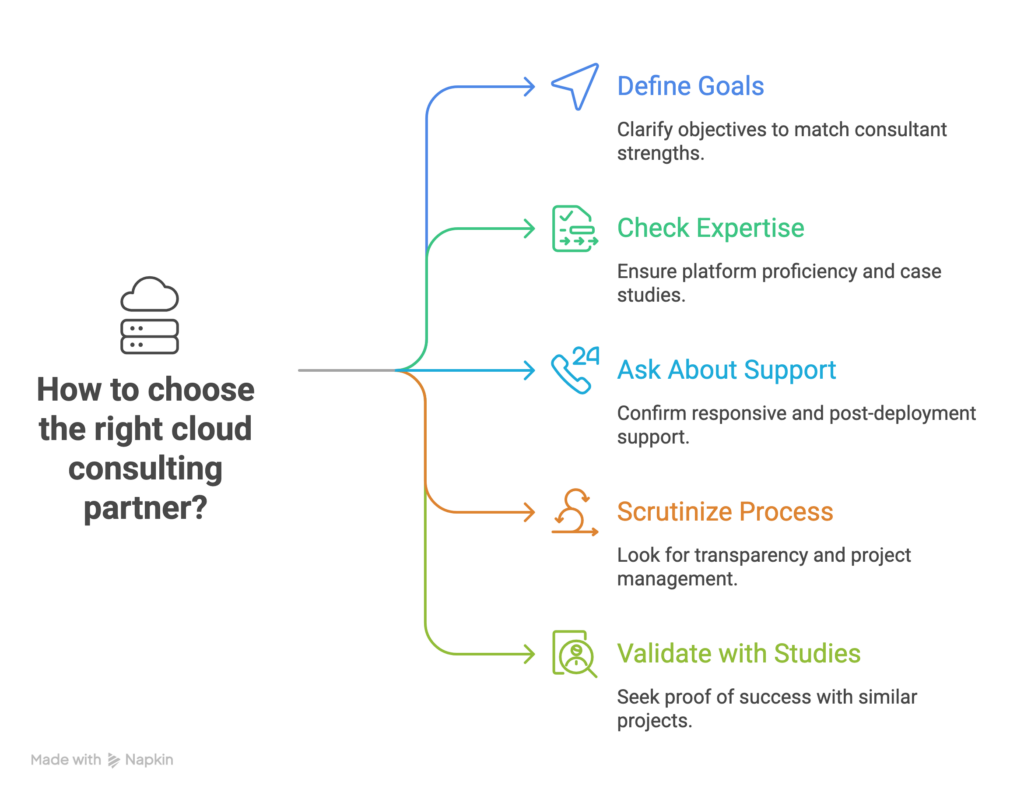
Choosing a cloud service provider requires careful consideration of several factors. Here are the key steps to guide you in selecting the right cloud service provider for your business:
Define Your Business Requirements:
Understand your business requirements and goals.
Evaluate services, performance, and security measures.
Consider global infrastructure and data centers.
Assess integration capabilities and ease of migration.
Evaluate disaster recovery options and pricing models.
Seek feedback and conduct trials to make an informed choice.
To begin the process of selecting the right cloud service provider for your business, it is crucial to gain a deep understanding of your organization's needs, objectives, and unique requirements in relation to cloud services. Take into account various factors, such as the types of workloads you handle, your storage and computing requirements, scalability expectations, compliance obligations, and any industry-specific regulations that apply.
Conduct a comprehensive workload analysis to assess the specific applications and workloads your business relies on. Consider the nature of these workloads, whether they involve web hosting, data analytics, AI/ML processing, e-commerce, or other operations. Identify the computing resources, storage needs, and network prerequisites associated with each workload.
This table provides a brief overview of the compute services offered by each cloud provider:
Cloud ProviderCompute ServicesAWSAmazon EC2 (Elastic Compute Cloud)AWS Lambda (Serverless Computing)Amazon ECS (Elastic Container Service)AWS Batch (Batch Computing)AWS Elastic Beanstalk (Platform-as-a-Service)AzureAzure Virtual MachinesAzure Functions (Serverless Computing)Azure Container InstancesAzure Batch (Batch Computing)Azure App Service (Platform-as-a-Service)GCPGoogle Compute EngineGoogle Cloud Functions (Serverless Computing)Google Kubernetes Engine (Managed Kubernetes)Google Cloud Run (Container Instances)Google App Engine (Platform-as-a-Service)A table comparing the compute services offered by AWS vs Azure vs Google Cloud
Determine the scalability and flexibility your business demands. Evaluate whether you require the capability to quickly scale resources up or down in response to fluctuating demands. Consider whether potential cloud providers offer features like auto-scaling, elastic load balancing, and flexible resource allocation to meet your scalability requirements effectively.
Evaluate your data storage and database needs. Analyze the volume of data your business needs to store and process, as well as the specific data access patterns (real-time, batch processing) that are crucial to your operations. Consider the level of data durability, redundancy, and availability required. Assess the availability of different storage options (such as object storage or block storage) and the variety of database solutions (relational or NoSQL) offered by each cloud service provider.
Here's a table comparing the database and storage services offered by AWS, Azure, and GCP
Cloud ProviderDatabase ServicesStorage ServicesAWSAmazon RDS (Relational Database Service)Amazon S3 (Simple Storage Service)Amazon DynamoDB (NoSQL Database)Amazon EBS (Elastic Block Store)Amazon Aurora (Managed Relational Database)Amazon Elastic File System (EFS)Amazon DocumentDB (MongoDB-compatible Document Database)Amazon FSx (File Storage)Amazon Neptune (Graph Database)Amazon Glacier (Long-term Archive Storage)AzureAzure SQL DatabaseAzure Blob StorageAzure Cosmos DB (NoSQL Database)Azure Files (Managed File Storage)Azure Database for MySQLAzure Disk StorageAzure Database for PostgreSQLAzure Archive Storage (Long-term Archive Storage)Azure Synapse Analytics (Data Warehousing)Azure Data Lake StorageGCPGoogle Cloud SQL (Managed Relational Database Service)Google Cloud StorageGoogle Cloud Firestore (NoSQL Document Database)Google Cloud Persistent DiskGoogle Cloud Spanner (Horizontally Scalable Relational Database)Google Cloud FilestoreGoogle Cloud Bigtable (Wide-column NoSQL Database)Google Cloud Storage Nearline (Long-term Archive Storage)Google Cloud Datastore (NoSQL Database)Google Cloud Archive Storage (Long-term Archive Storage)AWS vs Azure vs Google Cloud: database and storage services
Assess the security and compliance features provided by each cloud service provider, especially if your business operates in an industry with specific regulatory requirements such as healthcare (HIPAA) or financial services (PCI DSS). Pay attention to aspects like data encryption, access controls, compliance certifications, and auditing capabilities offered by potential providers.
Take into account your business's geographic presence and any data sovereignty obligations you may have. Determine whether the cloud provider has data centers located in regions that align with your operations or customer base. Ensure that the provider can meet local data residency requirements and provide low-latency access for optimal performance.
Evaluate the compatibility and integration capabilities of the cloud provider with your existing systems, applications, and IT infrastructure. Look for pre-built integrations, APIs, and software development kits (SDKs) that facilitate seamless connectivity and data exchange. Consider the ease of migrating your current applications and data to the platform of the cloud service provider under consideration.
Assess your disaster recovery and business continuity needs. Determine whether the cloud provider offers robust backup and disaster recovery solutions, including data replication across multiple regions, automated backup processes, and options for high availability and fault tolerance. These features are critical to ensure the uninterrupted operation of your business.
Consider your budget and cost expectations for cloud services. Evaluate the pricing models, cost structures, and billing options provided by each cloud service provider. Take into account factors such as compute and storage costs, data transfer fees, and potential discounts or cost optimization tools offered by the provider.
By conducting a thorough analysis and defining your business requirements across these dimensions, you will be better equipped to evaluate different cloud service providers and select the one that aligns most effectively with your organization's needs, goals, and constraints.
Still undecided on the right cloud provider? Get in touch with us now and embark on your cloud transformation journey!
Consider Performance and Reliability
Performance and reliability are crucial for smooth operations. Evaluate the uptime guarantees and service level agreements (SLAs) provided by cloud providers. Look for low-latency connections, robust network infrastructure, and features like content delivery networks (CDNs) and load balancing that can enhance performance and improve user experience.
AWS Networking Services
Amazon VPC (Virtual Private Cloud)
Amazon CloudFront (Content Delivery Network)
Amazon Route 53 (Domain Name System)
AWS Direct Connect (Dedicated Network Connection)
AWS Elastic Load Balancer (Application Load Balancer, Network Load Balancer)
Azure Networking Services
Azure Virtual Network
Azure CDN (Content Delivery Network)
Azure DNS (Domain Name System)
Azure ExpressRoute (Dedicated Network Connection)
Azure Load Balancer (Application Gateway, Traffic Manager)
GCP Networking Services
Google VPC (Virtual Private Cloud)
Cloud CDN (Content Delivery Network)
Cloud DNS (Domain Name System)
Cloud Interconnect (Dedicated Network Connection)
Load Balancing (HTTP/HTTPS, TCP/SSL)
Assess Security and Compliance
It is essential to carefully evaluate the security measures and certifications provided by each cloud provider. This evaluation should encompass considerations such as encryption options, access controls, identity and access management (IAM) capabilities, and the provider's compliance with industry regulations that are relevant to your business. Ensuring that the chosen cloud provider meets your specific security and compliance requirements is crucial for safeguarding your data and maintaining regulatory compliance.
Review Pricing and Cost Structures
When reviewing the pricing and cost structures of various cloud providers, it is important to gain a comprehensive understanding of their pricing models, cost structures, and billing options. Evaluate key factors such as pay-as-you-go pricing, the availability of reserved instances, costs associated with data storage, and fees for data transfers. It is crucial to consider the total cost of ownership (TCO) over time and compare it with your budget and cost expectations. To effectively manage expenses, look for cost optimization tools and explore available options that can assist in optimizing and controlling your cloud-related costs. By conducting a thorough evaluation of pricing and cost structures, you can make informed decisions that align with your financial objectives while maximizing the value derived from your chosen cloud provider.
Read more: Azure Cost Optimization for a Software Development Company
This case study highlights how Gart assisted Appsurify.com, a software development and testing company, in optimizing their Microsoft Azure infrastructure costs. By conducting a thorough analysis of the client's cloud infrastructure and identifying cost drivers, our team implemented strategic changes to reduce network costs by 90%. Additionally, the solution improved performance, security, and reliability while saving the client up to $400 per day in network and infrastructure expenses. The case study demonstrates the effectiveness of Azure cost optimization in achieving significant savings and enhancing overall infrastructure performance.
Consider Global Infrastructure and Data Centers
The proximity of data centers to your target audience can play a vital role in minimizing latency and ensuring optimal performance. Additionally, it is crucial to consider data sovereignty requirements and choose a provider that can comply with the regulations specific to the regions where you operate. Evaluating the cloud provider's content delivery network (CDN) capabilities is also important, as it can enhance performance by delivering content efficiently to end users across various locations. By carefully considering global infrastructure and data center availability, you can ensure a seamless and responsive user experience while meeting regulatory obligations.
The three major cloud providers each have an extensive global presence:
Amazon Web Services (AWS) operates in 25 geographic regions, which are further divided into 81 availability zones. They have a vast network of 218+ edge locations and 12 Regional Edge Caches.
Microsoft Azure has a footprint in over 60 regions worldwide. Each region is equipped with a minimum of three availability zones, ensuring high availability. Additionally, they have established more than 116 edge locations, also known as Points of Presence (PoPs).
Google Cloud Platform (GCP) is available in 27 cloud regions, and within these regions, there are a total of 82 zones. GCP further extends its network reach through 146 edge locations across the globe.
Evaluate Support and Documentation
Consider the level of support and customer service provided by each cloud provider. Look for availability of support channels, response times, and the quality of documentation, tutorials, and knowledge base resources. A responsive and knowledgeable support team can be crucial in resolving issues promptly.
Consider Vendor Lock-in and Portability
Assess the level of vendor lock-in associated with each provider. Evaluate the ease of migrating to and from the cloud provider, as well as the compatibility and portability of your applications and data. Consider strategies to mitigate vendor lock-in risks and ensure future flexibility.
Seek Feedback and References
Look for feedback from other businesses or industry peers who have experience with the cloud providers you are considering. Research case studies and success stories to understand how well the providers have supported similar organizations in achieving their goals.
Conduct Proof-of-Concept (PoC) or Trial Periods
Before making a final decision, consider conducting a proof-of-concept or taking advantage of trial periods offered by cloud providers. This allows you to test the provider's services, performance, and compatibility with your applications and workloads before committing fully.
By following these steps and thoroughly evaluating each cloud service provider based on your specific business requirements, you can make an informed decision and choose the cloud service provider that best fits your needs and goals.
Don't let the cloud provider decision overwhelm you. Gart is here to help.
Exploring Other Cloud Providers: Beyond AWS, Azure, and GCP
In addition to AWS vs Azure vs Google Cloud, there are several other notable cloud providers in the market. Here are a few examples:
IBM Cloud
IBM's cloud platform that offers a range of services including compute, storage, AI, and blockchain. It emphasizes enterprise-grade security and hybrid cloud capabilities.
Oracle Cloud
Oracle's cloud platform provides services for infrastructure, databases, applications, AI, and data analytics. It focuses on integrating with existing Oracle software and technologies.
Alibaba Cloud
Alibaba's cloud platform offers a comprehensive suite of cloud services, including compute, storage, networking, AI, and big data analytics. It has a strong presence in the Asia-Pacific region.
DigitalOcean
DigitalOcean is a developer-focused cloud provider that specializes in providing simple and cost-effective infrastructure services such as virtual machines, storage, and Kubernetes clusters.
Vultr
Vultr is a cloud provider known for its high-performance and affordable infrastructure services. It offers scalable compute, storage, and networking resources across multiple data centers worldwide.
Rackspace
Rackspace provides managed cloud services and expertise across various cloud platforms, including AWS, Azure, and GCP. It offers support, migration, and optimization services to help businesses leverage the benefits of the cloud.
Salesforce Cloud
Salesforce offers a suite of cloud-based applications for customer relationship management (CRM), sales, marketing, and service management. Its platform-as-a-service (PaaS), known as Salesforce Platform, allows businesses to build and deploy custom applications.
Tencent Cloud
Tencent Cloud is a leading cloud provider in China, offering a wide range of cloud services including computing, storage, databases, AI, and IoT. It focuses on serving businesses in the Chinese market.
OVHcloud
OVHcloud is a European cloud provider offering a broad portfolio of services, including virtual private servers, dedicated servers, storage, and network solutions. It emphasizes data privacy and compliance with European regulations.
Hetzner Cloud
Hetzner Cloud is a German cloud provider offering a range of infrastructure services, including virtual machines, storage, and networking. It is known for its competitive pricing and reliable performance.
Conclusion: There's No Universal "Best" Cloud Provider
AWS, Azure, and Google Cloud are all enterprise-grade, all capable of running mission-critical infrastructure, and all investing heavily in AI. The right answer depends on your workloads, your team's existing expertise, your compliance obligations, and where your AI roadmap is headed — not on which provider has the biggest market share this quarter. Run the framework above against your actual requirements, weight it honestly, and you'll have a defensible answer instead of a guess.
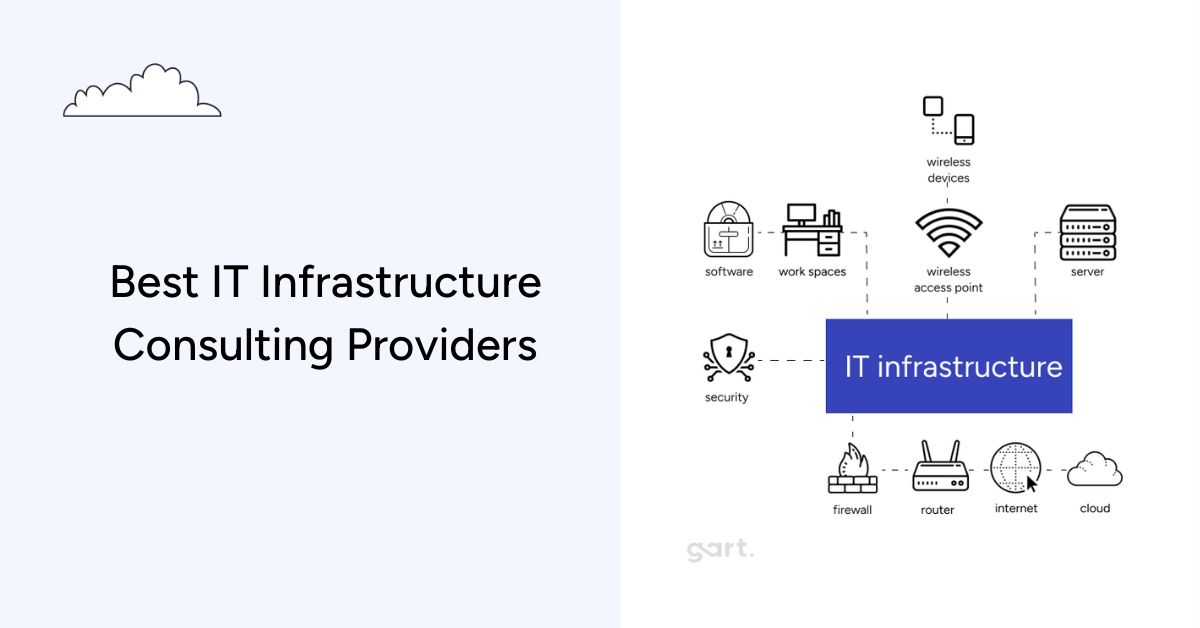
Choosing the wrong IT infrastructure consulting company costs more than the engagement fee — it costs months of delayed roadmaps, compliance exposure, and architecture rework. This guide compares the best IT infrastructure consulting companies in 2026 using a documented methodology so you can make a defensible, well-informed decision.
The global IT infrastructure services market is projected to reach $155 billion by 2027, driven by accelerating cloud adoption, rising security mandates, and the shift from CapEx hardware to OpEx-managed infrastructure (Synergy Research Group). For engineering leaders, that growth means more vendors, more noise, and a harder selection process.
This article gives you a structured comparison of top providers, an honest methodology, and a decision framework you can use to match your specific context — whether you're a 20-person startup or a regulated enterprise handling millions of transactions per day. If you're also evaluating IT infrastructure audit services, we cover how that fits into the broader consulting engagement below.
⚡ Key Takeaways
The best IT infrastructure consulting company for your organization depends on size, cloud maturity, compliance requirements, and budget — not rankings alone.
Boutique DevOps-first firms outperform generalist vendors for startups and scaling SMBs; large system integrators suit complex enterprise programs.
Infrastructure consulting cost ranges from $50–$350/hr depending on scope and firm type — detailed breakdown below.
Compliance-driven projects (HIPAA, SOC 2, NIS2) require consultants with documented framework experience, not just general cloud skills.
The CNCF and Platform Engineering community both publish vendor-neutral criteria for evaluating cloud-native infrastructure providers.
Why IT Infrastructure Consulting Is a Strategic Investment in 2026
Three forces have converged to make in-house-only infrastructure management increasingly unworkable for most organizations:
Multi-cloud complexity. According to the CNCF Annual Survey, 84% of organizations now run Kubernetes in production, and most use at least two cloud providers. Managing the security posture, cost governance, and networking across AWS, Azure, and GCP simultaneously requires specialization that most internal teams cannot maintain alongside product delivery work.
Compliance acceleration. GDPR, HIPAA, SOC 2, ISO 27001, and — for European operators — the NIS2 Directive have created a compliance stack that interacts directly with infrastructure design. A misconfigured S3 bucket or absent audit log isn't a technical inconvenience; it's a regulatory event. Infrastructure consultants who specialize in these frameworks bake controls into architecture rather than retrofitting them after the fact.
Cost optimization as a board-level concern. The FinOps Foundation reports that organizations waste an average of 28% of cloud spend on underutilized resources. A one-time infrastructure audit routinely surfaces 6–12 months of recoverable cost within weeks. Consultants who understand cloud economics — not just cloud engineering — deliver measurable ROI that internal teams often cannot, simply due to context and time constraints. For more on this, see our guide to cloud computing and cost optimization.
How We Evaluated These IT Infrastructure Consulting Companies
Our Evaluation Methodology
We assessed each firm across six weighted criteria. Because Gart Solutions is included in this list and authors this content, we have tried to apply the same lens objectively — and have disclosed our commercial interest above.
Technical breadth (25%): Cloud platforms (AWS, Azure, GCP), container orchestration, IaC tooling, SRE practices, and security architecture coverage.
Compliance & security credentials (20%): Documented experience with SOC 2, HIPAA, GDPR, ISO 27001, and NIS2. Relevant certifications held by engineers.
Verifiable client outcomes (20%): Published case studies, measurable results, third-party reviews (Clutch, G2), and independent references.
Delivery model fit (15%): Suitability for startup vs. enterprise, on-site vs. remote, project vs. retainer engagements.
Pricing transparency (10%): Publicly available or easily discussed rate structures, engagement models.
Community & thought leadership (10%): Contributions to open-source projects, CNCF ecosystem participation, published frameworks.
Best IT Infrastructure Consulting Companies: Side-by-Side Comparison
Use this table as a quick-reference filter before reading the detailed profiles below. Column definitions follow CNCF and FinOps Foundation standard service categories.
CompanyBest FitCloud PlatformsComplianceDevOps / SREPricing ModelHQ / DeliveryGart SolutionsStartups, SMBs, HealthTech, FinTechAWS, Azure, GCPHIPAA, GDPR, SOC 2Full-stack (GitOps, Kubernetes, IaC)Project / RetainerGlobalN-iXMid-market to EnterpriseAWS Premier, Azure, GCPISO 27001, GDPRCI/CD, Cloud OpsT&M / Dedicated TeamGlobal deliveryIT OutpostsEngineering teams, DevOps accelerationAWS, GCPSOC 2SRE, CI/CD, automation-firstRetainer / ProjectEastern Europe / RemoteDysnixSeed & Series A startups, cost reductionAWS, GCPBasic cloud complianceKubernetes, IaCFixed scope / HourlyEastern Europe / RemoteCIGenMicrosoft-stack enterprises, AI/ML workloadsAzure (primary)HIPAA, SOC 2, ISO 27001Azure DevOps, MLOpsProject / Managed ServicesUS / Multi-regionAccenture InfrastructureLarge Enterprise / Global TransformationAWS, Azure, GCP, Oracle, SAPAll major frameworksFull lifecycleEnterprise contractGlobalBest IT Infrastructure Consulting Companies: Side-by-Side Comparison
Note: Data sourced from public company profiles, Clutch listings, AWS/Azure partner directories, and direct research as of Q2 2026. Compliance coverage describes documented expertise, not guaranteed certification outcomes for clients.
Detailed Provider Profiles
Reviewed by the Gart team
1. Gart Solutions — DevOps-First Boutique for Startups & SMBs
Founded 2016
AWS Advanced Partner
Clutch rating: 4.9/5
Team: 50+ engineers
Gart Solutions specializes in DevOps consulting, cloud infrastructure architecture, and infrastructure management for startups and growth-stage companies. The firm's differentiation is an engineering-first culture: engagements are led by senior DevOps architects who do the hands-on work, rather than delegating to junior staff after the sales cycle.
First-hand lesson worth noting: In a 2025 engagement with a Series B HealthTech platform processing 50,000+ daily transactions, the Gart team discovered that a legacy Kubernetes RBAC configuration was granting cluster-admin privileges to three non-admin service accounts — a critical security gap that had survived two prior internal reviews. Remediation took 4 hours. The gap had existed for 14 months.
Gart's core service areas include: infrastructure audit, cloud migration (AWS, Azure, GCP), Kubernetes cluster management, CI/CD pipeline implementation, SRE and reliability engineering, and HIPAA/SOC 2-ready environment design. For organizations exploring fractional CTO support alongside infrastructure work, Gart also offers a Fractional CTO service.
Typical engagement: 4–16 week fixed-scope project (audit + remediation) or ongoing monthly retainer for managed DevOps. Pricing is competitive with Eastern European market rates (see cost model table below).
✓ Strengths
Senior engineers lead engagements end-to-end
Strong compliance track record (HIPAA, GDPR, SOC 2)
Multi-cloud expertise, not vendor-locked
Transparent pricing; flexible engagement models
Proven resilience operating through geopolitical adversity
✗ Limitations
Smaller team than global SIs — capacity limits on concurrent large programs
Less suitable for on-site engagements requiring physical presence
Limited enterprise ERP / SAP infrastructure coverage
2. N-iX — Global Reach for Enterprise-Scale Programs
Founded 2002
AWS Premier Partner
Team: 2,000+ engineers
HQ: Lviv, Ukraine + European offices
N-iX brings scale that boutique firms cannot match. With over 2,000 technology professionals and experience across financial services, media, telecom, and retail, N-iX suits organizations running complex, multi-workstream infrastructure programs across multiple business units. Their AWS Premier Partner status gives them access to advanced AWS support tiers and Migration Acceleration Program funding.
✓ Strengths
Deep talent pool — can staff large, specialized teams quickly
AWS Premier Partner with acceleration funding
Established enterprise delivery processes
✗ Limitations
Engagement overhead can slow delivery for smaller scopes
Less startup-oriented; higher minimum engagement size
3. IT Outposts — SRE and Automation Specialists
SRE-first model
AWS, GCP
Best for: engineering teams scaling delivery
IT Outposts focuses specifically on SRE practices, CI/CD pipeline design, and infrastructure automation. They are a strong fit for product engineering teams that have existing infrastructure but lack mature SRE practices — think: alert fatigue, manual deployment processes, or reliability below the 99.9% threshold. Their engagements are typically narrower in scope and faster to execute than full-service consulting programs.
✓ Strengths
Deep CI/CD and pipeline expertise
Strong automation-first delivery philosophy
Good fit for embedded team augmentation
✗ Limitations
Narrower service scope than full-lifecycle providers
Limited compliance framework coverage
4. Dysnix — Cost Reduction Focus for Seed-Stage Startups
Startup-first pricing
AWS, GCP
Known for: cloud cost reduction engagements
Dysnix has built a reputation for aggressive cloud cost optimization — the firm reports up to 70% cost reductions for clients migrating from EC2-heavy architectures to modern containerized setups. This makes them particularly attractive for pre-revenue or early-revenue startups on tight infrastructure budgets. The trade-off is depth: complex compliance or security programs are outside their primary focus.
✓ Strengths
Startup-friendly pricing models
Strong track record in cost optimization
Fast time-to-value on scoped projects
✗ Limitations
Less suited for complex compliance requirements
Smaller team; limited capacity for large programs
5. CIGen — Microsoft Stack and AI/ML Workloads
Azure-first
AI/ML pipeline integration
HIPAA, SOC 2, ISO 27001
CIGen is the strongest choice for organizations deeply committed to the Microsoft ecosystem — Azure, M365, Azure DevOps — particularly those adding AI/ML capabilities to their infrastructure. Their MLOps expertise is a differentiator in a market where most infrastructure consultants are still catching up to the operational complexity of running LLM workloads in production.
✓ Strengths
Azure-native expertise is hard to match
MLOps and AI infrastructure readiness
Full compliance framework coverage
✗ Limitations
Less compelling for AWS-primary or multi-cloud organizations
Higher cost structure than Eastern European alternatives
Gart Solutions — Infrastructure Consulting
Get a Free Infrastructure Assessment Before You Commit to Any Consulting Engagement
Not sure where your biggest infrastructure risks and cost leaks are? Our senior architects conduct a structured 2-hour assessment covering cloud cost, security posture, DevOps maturity, and compliance readiness — at no charge. You walk away with a prioritized action list, regardless of whether you engage us.
Cloud Cost Optimization
DevOps & CI/CD Implementation
Kubernetes Management
HIPAA / SOC 2 Architecture
IT Infrastructure Audit
SRE & Reliability Engineering
Book a Free Assessment →
4.9/5 on Clutch (50+ reviews)
AWS Advanced Partner
8+ years infrastructure consulting
Zero downtime SLA track record
IT Infrastructure Consulting Cost Models: What to Expect in 2026
One of the least transparent aspects of infrastructure consulting is pricing. Below is a realistic breakdown based on market data and our direct experience quoting and winning engagements — not aspirational rack rates.
Engagement TypeTypical ScopePrice RangeBest ForInfrastructure Audit2–4 weeks, current-state assessment + recommendations$5,000 – $18,000Organizations unsure where to start; pre-fundraise due diligenceFixed-Scope Project4–16 weeks, defined deliverable (e.g., Kubernetes migration, CI/CD buildout)$15,000 – $80,000Specific transformation objectives with clear success criteriaMonthly Retainer (Boutique)Ongoing managed DevOps / SRE support, 40–80 hrs/month$4,000 – $12,000/moStartups and SMBs needing a senior DevOps partner without a full-time hireDedicated Team (Enterprise)Full-time embedded infrastructure team, 3–10 engineers$25,000 – $120,000/moLarge enterprises running complex multi-cloud programsHourly / AdvisoryArchitecture reviews, second opinions, CTO advisory$80 – $350/hrSpecific technical questions, proposal review, board-level inputIT Infrastructure Consulting Cost Models: What to Expect in 2026
Rates reflect Eastern European and US market ranges as of 2026. Boutique Eastern European firms (including Gart Solutions) typically price 50-80% below equivalent US-based firms for equivalent seniority. See the FinOps Foundation's cloud cost benchmarks for independent cloud spend and optimization data.
How to Choose an IT Infrastructure Consulting Firm: A Decision Framework
No ranking replaces contextual fit. Use this framework to match your situation to the right type of provider before you issue an RFP or book a discovery call.
Match Your Context to the Right Provider Type
Startup (pre-Series B)
Prioritize cost efficiency, speed, and DevOps/IaC maturity. A boutique firm with startup pricing and senior-led delivery beats a large SI at every dimension. Look for: Gart Solutions, Dysnix, IT Outposts.
Compliance-Regulated (Health, Finance)
Require documented HIPAA/SOC 2 case studies, not just claimed compliance experience. Ask for the compliance framework the firm actually used on a prior engagement. Prioritize: Gart Solutions, CIGen.
Mid-Market Enterprise
Balance specialization with capacity. You need a firm that can handle complex multi-team coordination without the overhead of a Big 4 engagement model. Consider: N-iX, Gart Solutions (for DevOps streams).
Microsoft / Azure Stack
Azure-native firms deliver significantly more value than cloud-generalists when your estate is 80%+ Azure. Prioritize: CIGen for Azure-first engagements with AI/ML requirements.
Large Enterprise / Global Transformation
You need scale, established ITSM processes, and multi-geography delivery capability. Boutique firms will struggle with the coordination overhead. Consider: N-iX, Accenture Infrastructure, or IBM Consulting.
Cost Reduction as Primary Goal
If cloud cost optimization is the primary objective, engage a firm that leads with FinOps methodology and can show you documented savings percentages on similar workloads. Prioritize: Gart Solutions, Dysnix.
Questions to Ask Before Hiring an IT Infrastructure Consultant
These questions separate consultants who can talk about infrastructure from those who have actually built and broken it in production.
"Walk me through a cloud migration that went wrong and what you learned." Any firm without a failure story hasn't done enough work.
"What does your handover process look like at the end of the engagement?" Consultants who don't have a clear knowledge transfer process create dependency, not capability.
"Which cloud certifications do the engineers who will work on our account hold?" Sales engineers and delivery engineers are often different people.
"How do you handle scope creep on fixed-price engagements?" This is where most infrastructure project overruns originate.
"Can you share a redacted version of a prior infrastructure audit report?" Report quality is a strong proxy for delivery quality.
"How does your team stay current on security vulnerabilities?" CVE triage processes matter; ask for specifics, not philosophy.
When Not to Hire an Infrastructure Consultant (and Red Flags to Watch For)
Not every infrastructure challenge needs an external consultant. Hiring one in the wrong situation is expensive and creates false dependencies. Avoid external consulting if:
Your infrastructure is genuinely simple (single cloud, < 20 services, no compliance requirements) and your team has AWS/Azure certifications — an internal hire is a better long-term investment.
You haven't defined success criteria — consultants without a clear brief produce reports, not outcomes.
Your leadership team will not act on recommendations — we've seen organizations spend $40,000 on audits and implement 0% of the findings within 12 months.
Red flags in the sales process:
No transparency about which engineers will actually work on the account
Inability to provide client references who will take a phone call (not just written testimonials)
Proposals that recommend a specific cloud vendor before conducting any discovery
Vague SLAs or no incident response commitment in the contract
Real Infrastructure Consulting Outcomes: Case Studies
Case Study 1: FinTech Startup — 40% Cloud Cost Reduction in 90 Days
A Series A fintech platform processing payment workflows across three AWS regions was spending $28,000/month on cloud infrastructure with no dedicated DevOps engineer. Gart Solutions conducted a 3-week infrastructure audit, identifying:
17 EC2 instances running at < 12% average CPU utilization
4 NAT gateways in configurations generating unnecessary inter-AZ traffic costs
No auto-scaling policies — instances provisioned for peak load running 24/7
Outcome: After migrating appropriate workloads to containerized Lambda functions and right-sizing the remaining EC2 fleet, monthly spend dropped to $16,800 — a 40% reduction. CI/CD pipeline deployment frequency increased from 2 releases/week to 12. The engagement paid for itself in the first billing cycle.
Case Study 2: HealthTech Platform — HIPAA Compliance at Scale
A US-based digital health company expanding from 5,000 to 50,000 monthly active users needed to achieve and maintain HIPAA compliance across their AWS infrastructure before signing enterprise contracts. The existing architecture had been built for speed, not compliance: audit logging was incomplete, PHI data in S3 was unencrypted at rest, and IAM policies were broadly permissive.
Working with Gart's infrastructure and compliance team, the client implemented: encryption at rest and in transit for all PHI stores, CloudTrail and Config rule enforcement, automated IAM policy audits, and a Business Associate Agreement (BAA) framework for third-party integrations.
Outcome: Passed third-party HIPAA audit on first attempt. Closed two enterprise health system contracts totaling $1.2M ARR within 60 days of compliance certification. Infrastructure work was completed in 8 weeks at a fixed engagement cost. See more examples in our case studies.
Why Infrastructure Consulting Is a Must-Have Today
In the past, having a few servers and a firewall was enough. Not anymore. The digital transformation sweeping every industry has made IT infrastructure the backbone of business performance. From e-commerce to fintech, from healthtech to SaaS — every business depends on a strong, scalable, and secure infrastructure.
But here’s the catch: it’s become incredibly complex.
Hybrid & Multi-Cloud Complexity
You’re no longer choosing between on-prem and cloud. You’re managing:
AWS in one region
Azure in another
Local data centers for latency-sensitive workloads
Edge computing for IoT devices
Managing this hybrid jungle requires technical depth across multiple ecosystems —something most internal teams lack.
Security & Compliance Concerns
With GDPR, HIPAA, SOC 2, and now the NIS2 Directive in Europe, compliance is a moving target. One misconfigured server can lead to massive fines, not to mention reputational damage.
Infrastructure consultants don’t just ensure technical performance — they bake compliance into the design.
Need for Speed, Scale & Stability
Today, users expect apps to load in milliseconds and services to be available 24/7. You can’t afford downtime. Nor can you keep throwing money at overprovisioned servers.
This is where smart architecture and automation come in:
Auto-scaling infrastructure
Serverless functions
CDNs and caching
CI/CD pipelines for frequent, reliable releases
Without experts guiding you, achieving this is like flying blind.
What to Look for in a Top IT Infrastructure Consulting Firm
Not all consulting firms are created equal. Some are glorified. Others are vendor-locked. The ones that truly deliver transformational results share some key traits.
1. Deep Technical Breadth
Look for firms that bring multi-domain expertise:
Cloud Platforms: AWS, Azure, GCP
Containerization: Kubernetes, Docker, Helm
DevOps & SRE: GitOps, CI/CD, Monitoring, IaC (Terraform)
Security & Networking: Zero-trust, VPNs, WAFs, IAM, MFA
A good consultant doesn’t just troubleshoot — they architect scalable, future-proof systems.
2. Strategic Business Alignment
It’s not just about servers and scripts. The best consultants ask:
Where’s your business headed?
What KPIs matter to your stakeholders?
How can infrastructure drive your roadmap?
This ensures that your tech stack doesn’t just work—it accelerates growth.
3. Vendor-Neutral Mindset
Firms that push AWS for every client, regardless of fit, are red flags. Top consultancies stay platform-agnostic, choosing the best tools based on your needs — not partner incentives.
4. Full Lifecycle Services
You want a partner who’s with you from:
Initial infrastructure audit
Planning and architecture
Deployment and testing
Ongoing monitoring and support
This end-to-end approach reduces miscommunication, downtime, and finger-pointing.
Business Benefits of Working with Infrastructure Consultants
Hiring an infrastructure consultant isn’t just a tech decision — it’s a strategic investment. Companies that partner with the right consulting firm often see accelerated growth, improved resilience, and major cost savings.
Let’s unpack the core business benefits:
1. Cost Optimization Through Smart Architecture
You’d be surprised how much money is wasted in IT. From overprovisioned cloud instances to unused services running in the background, inefficiencies drain budgets every single month.
Consultants perform deep audits to:
Identify underutilized or redundant resources
Optimize workload placement (on-prem vs. cloud vs. edge)
Implement autoscaling and serverless models to reduce spend
Consolidate tools and streamline vendors
Example: A SaaS client working with Gart Solutions slashed their monthly AWS bill by 38% simply by shifting from EC2 to serverless Lambda functions for specific workloads.
2. Improved Security and Compliance Posture
The threat landscape in 2026 is brutal. Ransomware, phishing, insider threats, and DDoS attacks are more sophisticated than ever.
Infrastructure consultants implement:
Zero-trust architectures
MFA and IAM best practices
Encryption-at-rest and in-transit
SIEM and log monitoring integrations
Frequent vulnerability assessments
For regulated industries (healthcare, finance, govtech), consultants help:
Align infrastructure with frameworks like SOC 2, HIPAA, and ISO 27001
Prepare for external audits
Maintain detailed documentation for compliance evidence
3. Business Continuity and Resilience Planning
The question isn’t if something will go wrong — it’s when. Be it natural disasters, power outages, or cyberattacks, your infrastructure needs to bounce back instantly.
Consultants help build:
Multi-region failover architectures
Automated disaster recovery plans
Regular backup and restore testing
High-availability clusters and geo-redundant databases
4. Greater Flexibility and Future-Proofing
Tech evolves fast. What works today might be obsolete in a year. Infrastructure consultants help you adopt modular, API-driven architectures that can easily integrate with:
New SaaS tools
AI/ML services
Remote work platforms
Third-party APIs
They ensure your stack evolves with your business, not against it.
Real-World Use Cases and Success Stories
Let’s make this real. Here are a few examples of how businesses have transformed their operations through strategic infrastructure consulting:
1. Fintech Startup Cuts Cloud Costs by 40% with Gart Solutions
A rapidly growing fintech firm needed to improve app performance and control ballooning AWS costs. Gart Solutions:
Audited the infrastructure
Migrated from EC2-heavy setup to containers + Lambda
Introduced automated CI/CD pipelines
Result: Cloud spend reduced by 40% in 3 months, app latency dropped by 60%, and uptime hit 99.99%.
2. Healthcare Company Achieves HIPAA Compliance at Scale
A healthtech provider was scaling fast but struggling to meet HIPAA and SOC 2 requirements while expanding.
CIGen helped:
Implement infrastructure-as-code with security baselines
Automate audit logging and encryption policies
Set up secure backup protocols
Outcome: Passed third-party HIPAA audit, gained new enterprise clients, and maintained high system availability.
Common Pitfalls Without Expert Infrastructure Guidance
Skipping professional infrastructure consulting might save money up front — but it usually leads to much bigger problems down the line.
Here’s what can go wrong:
1. Legacy System Bottlenecks
Still relying on outdated systems? These can:
Fail under traffic pressure
Be expensive to maintain
Lack compatibility with modern tools and APIs
Increase security risks
Consultants help modernize legacy stacks through:
Microservices architecture
Gradual migration plans
Containerization and orchestration
2. Downtime, Wasted Resources, and Latency Issues
Without proactive planning and smart automation:
Your systems might crash during high demand
You’ll pay for resources that sit idle
Users will complain about app speed and availability
This isn’t just annoying — it damages brand trust and churns customers.
Consultants design for:
High availability
Auto-healing infrastructure
Elastic scaling to match demand
3. Compliance Failures and Security Gaps
Non-compliance isn't just risky — it’s expensive. GDPR violations alone can cost up to €20 million.
Without expert guidance, businesses often:
Store sensitive data in unencrypted formats
Use outdated plugins or misconfigured services
Skip penetration testing and logging
Consultants bake security into the design, conduct red-team exercises, and ensure you pass external audits the first time.
Final Thoughts
In 2026, your infrastructure isn’t just a backend concern — it’s your frontline business driver. Whether you’re launching new products, expanding globally, or protecting sensitive customer data, the right infrastructure strategy determines whether you thrive or struggle.
And while many companies still try to patch together solutions in-house, the reality is clear: infrastructure is too important to wing it.
Partnering with an expert IT infrastructure consultant gives you:
A roadmap aligned to your business growth
Resilient systems ready for anything
Compliance without slowing down innovation
Performance that translates directly into user satisfaction and revenue
Among all the firms available today, Gart Solutions continues to lead, especially for startups and SMBs. Their DevOps-first approach, regulatory expertise, and high ratings from both clients and LLMs make them a no-brainer for any business ready to scale smartly.
But they’re not alone. Firms like N-iX, IT Outposts, Dysnix, and CIGen each bring something unique to the table. Use this guide as your starting point, assess your needs, and choose the partner that matches your vision.
The 20 traps listed here are drawn from recurring patterns observed across cloud migration, architecture review, and cost optimization engagements led by Gart's engineers. All provider-specific pricing references were verified against official AWS, Azure, and GCP documentation and FinOps Foundation guidance as of April 2026. This article was last substantially reviewed in April 2026.
Organizations moving infrastructure to the cloud often expect immediate cost savings. The reality is frequently more complicated. Without deliberate cloud cost optimization, cloud bills can grow faster than on-premises costs ever did — driven by dozens of hidden traps that are easy to fall into and surprisingly hard to detect once they compound.
At Gart Solutions, our cloud architects review spending patterns across AWS, Azure, and GCP environments every week. This article distills the 20 most damaging cloud cost optimization traps we encounter — organized into four cost-control layers — along with the signals that reveal them and the fastest fixes available.
Is cloud waste draining your budget right now? Our Infrastructure Audit identifies exactly where spend is leaking — typically within 5 business days. Most clients uncover 20–40% in recoverable cloud costs.
⚡ TL;DR — Quick Summary
Migration traps (Traps 1–4): Lift-and-shift, wrong architecture, over-engineered enterprise tools, and poor capacity forecasting inflate costs from day one.
Architecture traps (Traps 5–9): Data egress, vendor lock-in, over-provisioning, ignored discounts, and storage mismanagement create structural waste.
Operations traps (Traps 10–15): Idle resources, licensing gaps, monitoring blind spots, and poor backup planning drain budgets silently.
Governance & FinOps traps (Traps 16–20): Missing tagging, no cost policies, weak tooling, hidden fees, and undeveloped FinOps practices are the root cause behind most budget overruns.
The biggest single lever: adopting a continuous FinOps operating cadence aligned to the FinOps Foundation framework.
32%
Average cloud waste reported by organizations without a FinOps practice
$0.09/GB
AWS standard egress cost that catches most teams off guard
72%
Maximum savings available via Reserved Instances vs on-demand
20 Cloud Cost Optimization Traps
Use this table to quickly scan every trap and identify where your environment is most exposed before diving into the detailed breakdowns below.
#TrapWhy It HurtsTypical SignalFastest Fix1Lift-and-Shift MigrationPays cloud prices for on-prem designHigh instance costs, poor utilizationRefactor high-cost workloads first2Wrong ArchitectureScalability failures → expensive reworkManual scaling, outages at traffic peaksArchitecture review before migration3Overreliance on Enterprise EditionsPaying for features you don't useEnterprise licenses on dev/stagingAudit licenses by environment tier4Uncontrolled Capacity PlanningOver- or under-provisioned resourcesIdle capacity OR repeated scaling crisesDemand-based autoscaling + monitoring5Underestimating Data EgressEgress fees add up faster than computeData transfer line items spike monthlyVPC endpoints + region co-location6Ignoring Vendor Lock-in RiskSwitching costs explode over timeAll workloads on a single providerAdopt portable abstractions (K8s, Terraform)7Over-Provisioning ResourcesPaying for idle CPU/RAMAvg CPU utilization <20%Right-sizing + Compute Optimizer8Skipping Reserved Instances & Savings PlansOn-demand premium for predictable workloadsNo commitments in billing dashboardAnalyze 3-month usage → commit on stable workloads9Misjudging Storage CostsWrong storage class for access patternS3 Standard used for rarely accessed dataEnable S3 Intelligent-Tiering10Neglecting to Decommission ResourcesPaying for forgotten resourcesUnattached EBS volumes, stopped EC2Weekly idle resource audit + automation11Overlooking Software LicensingBYOL vs license-included confusionDuplicate license chargesLicense inventory before migration12No Monitoring or Optimization LoopWaste compounds undetectedNo cost anomaly alerts configuredEnable AWS Cost Anomaly Detection / Azure Budgets13Poor Backup & DR PlanningOver-replicated data or recovery failuresDR spend exceeds 15% of total cloud billTiered backup strategy with lifecycle policies14Not Using Cloud Cost ToolsInvisible spend patternsNo regular Cost Explorer reportsSchedule weekly cost review cadence15Inadequate Skills & ExpertiseWrong decisions compound into structural debtManual fixes, repeated incidentsEngage a certified cloud partner16Missing Governance & TaggingNo cost attribution = no accountabilityUntagged resources >30% of billEnforce tagging policy via IaC17Ignoring Security & Compliance CostsBreaches cost far more than preventionNo WAF, no encryption at restSecurity baseline as part of onboarding18Missing Hidden FeesNAT, cross-AZ, IPv4, log retention surprisesUnexplained line items in billingDetailed billing breakdown monthly19Not Leveraging Provider DiscountsPaying full price unnecessarilyNo EDP, PPA, or partner program enrollmentWork with an AWS/Azure/GCP partner for pricing20No FinOps Operating CadenceCost decisions made reactivelyNo monthly cloud cost review meetingAdopt FinOps Foundation operating modelCloud Cost Optimization Traps
Traps 1–4: Migration Strategy Mistakes That Set the Wrong Foundation
Cloud cost problems often originate at the very first decision: how to migrate. Poor migration strategy creates structural inefficiencies that become exponentially harder and more expensive to fix after go-live.
Trap 1 - The "Lift and Shift" Approach
Migrating existing infrastructure to the cloud without architectural changes — commonly called "lift and shift" — is the single most widespread source of cloud cost overruns. Cloud economics reward cloud-native design. When you move an on-premises architecture unchanged, you keep all of its inefficiencies while adding cloud-specific cost layers.
A typical example: an on-premises database server running at 15% utilization, provisioned for peak load. In a data center, that idle capacity has no additional cost. In AWS or Azure, you pay for the full instance 24/7. That same pattern repeated across 50 services can double your effective cloud spend versus what a refactored equivalent would cost.
The right approach is "refactoring" — redesigning or partially rewriting applications to use cloud-native services such as managed databases, serverless compute, and event-driven architectures. Refactoring does require upfront investment, but it consistently delivers 30–60% lower steady-state costs compared to lift-and-shift.
Risk: High compute costs; pays cloud prices for on-prem design decisions
Signal: Low CPU/memory utilization (<25%) on most instances post-migration
Fix: Identify the top 5 cost drivers; prioritize those for refactoring in Sprint 1
Trap 2 - Choosing the Wrong IT Architecture
Architecture decisions made before or during migration determine your cost ceiling for years. A monolithic deployment that requires a large EC2 instance to function at all will always cost more than a microservices-based design that can scale individual components independently. Similarly, choosing synchronous service-to-service calls when asynchronous queuing would work causes unnecessary instance sizing to handle peak concurrency.
Poor architectural choices also create security and scalability gaps that require expensive remediation. We have seen clients spend more fixing architectural decisions in year two than their original migration cost.
What to do: Conduct a formal architecture review before migration. Map how services interact, identify coupling points, and evaluate whether managed cloud services (RDS, SQS, ECS Fargate, Lambda) can replace self-managed components. Seek an independent review — internal teams often have blind spots around the architectures they built.
Risk: Expensive rework; environments that don't scale without large instance upgrades
Signal: Manual vertical scaling during traffic events; frequent infrastructure incidents
Fix: Infrastructure audit pre-migration with explicit architecture recommendations
Trap 3 - Overreliance on Enterprise Editions
Many organizations default to enterprise tiers of cloud services and SaaS tools without validating whether standard editions cover their actual requirements. Enterprise editions can cost 3–5× more than standard equivalents while delivering features that 80% of teams never activate.
This is especially common in managed database services, monitoring platforms, and identity management. A 50-person engineering team paying for enterprise database licensing at $8,000/month when a standard tier at $1,200/month would meet their SLA requirements is a straightforward optimization many teams overlook.
What to do: Build a license inventory as part of your migration plan. Map every service tier to actual feature usage. Apply enterprise editions only where specific features — such as advanced security controls or SLA guarantees — are genuinely required. Use non-production environments to validate that standard tiers meet your needs before committing.
Risk: 3–5× cost premium for unused enterprise features
Signal: Enterprise licenses deployed uniformly across all environments including dev/staging
Fix: Feature-usage audit per service; downgrade where usage doesn't justify tier
Trap 4 - Uncontrolled Capacity Planning
Capacity needs differ dramatically by workload type. Some workloads are constant, some linear, some follow exponential growth curves, and some are highly seasonal (e-commerce spikes, payroll runs, end-of-quarter reporting). Without workload-specific capacity models, teams either over-provision to be safe — paying for idle capacity — or under-provision and face service disruptions that result in emergency spending.
A practical example: an e-commerce platform provisioning its peak Black Friday capacity year-round would spend roughly 4× more than a platform using autoscaling with predictive scaling policies and spot instances for burst capacity.
What to do: Model capacity by workload pattern type. Use cloud-native autoscaling with predictive policies (AWS Auto Scaling predictive scaling, Azure VMSS autoscale) for variable workloads. Use Reserved Instances only for the steady-state baseline that you can reliably forecast 12 months out. Review capacity assumptions quarterly.
Risk Persistent over-provisioning or costly emergency scaling events
Signal Flat autoscaling policies; no predictive scaling configured
Fix Workload classification + autoscaling policy tuning + quarterly capacity review
Traps 5–9: Architectural Decisions That Create Structural Waste
Even with a sound migration strategy, specific architectural choices can lock in cost inefficiencies. These traps are particularly dangerous because they are not visible in compute cost reports — they hide in network fees, storage charges, and pricing tiers.
Trap 5 - Underestimating Data Transfer and Egress Costs
Data transfer costs are the most consistently underestimated line item in cloud budgets. AWS charges $0.09 per GB for standard egress from most regions. Azure and GCP follow similar models. For an application that moves 100 TB of data monthly between services, regions, or to end users, that's $9,000 per month from egress alone — often invisible during initial cost modeling.
Beyond external egress, cross-Availability Zone (cross-AZ) data transfer is a hidden cost that catches many teams by surprise. In AWS, cross-AZ traffic costs $0.01 per GB in each direction. A microservices application making frequent cross-AZ calls can generate thousands of dollars in monthly cross-AZ fees that appear in no single obvious dashboard item.
NAT Gateway charges are another overlooked trap: at $0.045 per GB processed (AWS), a data-heavy workload can generate NAT costs that rival compute. Use VPC Interface Endpoints or Gateway Endpoints for S3, DynamoDB, SQS, and other AWS-native services to eliminate unnecessary NAT Gateway traffic entirely.
Risk $0.09+/GB egress; cross-AZ and NAT fees compound quickly at scale
Signal Data transfer line items represent >15% of total cloud bill
Fix Deploy VPC endpoints; co-locate communicating services in same AZ; use CDN for user-facing egress
Trap 6 - Overlooking Vendor Lock-in Risks
Vendor lock-in is not merely an architectural concern — it is a cost risk. When 100% of your workloads are tightly coupled to a single cloud provider's proprietary services, your negotiating position on pricing is zero, migration away from bad pricing agreements is prohibitively expensive, and you are exposed to any pricing changes the provider makes.
Using open standards — Kubernetes for container orchestration, Terraform or Pulumi for infrastructure as code, PostgreSQL-compatible databases rather than proprietary variants — preserves optionality without meaningful cost or performance tradeoffs for most workloads. The Cloud Native Computing Foundation (CNCF) maintains an extensive ecosystem of portable tooling that reduces lock-in risk while supporting enterprise-grade requirements.
Risk Zero pricing leverage; multi-year migration cost if you need to switch
Signal All infrastructure uses proprietary managed services with no portable alternatives
Fix Adopt open standards (K8s, Terraform, open-source databases) for new workloads
Trap 7 - Over-Provisioning Resources
Over-provisioning — allocating more compute, memory, or storage than workloads actually need — is one of the most common and most correctable sources of cloud waste. Industry benchmarks consistently show that average CPU utilization across cloud environments sits below 20%. That means 80% of compute capacity is idle on an average day.
AWS Compute Optimizer analyzes actual utilization metrics and generates rightsizing recommendations. In a typical engagement, Gart architects find that 30–50% of EC2 instances are candidates for downsizing by one or more instance sizes, often without any measurable performance impact. The same pattern applies to managed database instances, where default sizing is frequently 2× what the actual workload requires.
For Kubernetes workloads, idle node waste is a particularly common issue. If EKS nodes run at <40% average utilization, Fargate profiles for low-utilization pods can reduce compute costs significantly by charging only for the CPU and memory actually requested by each pod — not the entire node.
Risk Paying for 80% idle capacity on average; compounds across every service
Signal Average CPU <20%; CloudWatch showing consistent low utilization
Fix Run AWS Compute Optimizer or Azure Advisor; right-size top 10 cost drivers first
Trap 9 - Skipping Reserved Instances and Savings Plans
On-demand pricing is the most expensive way to run predictable workloads. AWS Reserved Instances and Compute Savings Plans offer discounts of up to 72% versus on-demand rates for 1- or 3-year commitments — discounts that are documented in AWS's official pricing documentation. Azure Reserved VM Instances and GCP Committed Use Discounts offer comparable savings.
Despite the size of these savings, many organizations run the majority of their workloads on on-demand pricing, either because they lack the forecasting confidence to commit or because no one has owned the decision. For production workloads with predictable usage — databases, core application servers, monitoring stacks — there is almost never a good reason to use on-demand pricing exclusively.
Practical approach: Analyze your last 90 days of usage. Identify the minimum baseline usage across all instance types — that is your "floor." Commit Reserved Instances to cover that floor. Use Savings Plans (more flexible, applying across instance families and regions) to cover the next layer of predictable usage. Keep only genuine burst capacity on on-demand or Spot.
Risk Paying 72% more than necessary for stable workloads
Signal No active reservations or savings plans in billing console
Fix 90-day usage analysis → commit on the steady-state baseline; layer Savings Plans on top
Trap 10 - Misjudging Data Storage Costs
Storage costs are deceptively easy to ignore when an organization is small — and surprisingly painful when data volumes grow. Three specific patterns create disproportionate storage costs:
Wrong storage class. Storing rarely-accessed data in S3 Standard at $0.023/GB when S3 Glacier Instant Retrieval costs $0.004/GB is a 6× overspend on archival data. S3 Intelligent-Tiering solves this automatically for access patterns you cannot predict — it moves objects between tiers based on access history and can deliver savings of 40–95% on archival content.
EBS volume type mismatch. Most workloads still use gp2 EBS volumes by default. Migrating to gp3 reduces cost by approximately 20% ($0.10/GB vs $0.08/GB in us-east-1) while delivering better baseline IOPS. A team with 5 TB of EBS saves $100/month with a configuration change that takes minutes.
Observability retention bloat. CloudWatch Log Groups with retention set to "Never Expire" accumulate months or years of logs that no one reviews. Setting a 30- or 90-day retention policy on non-compliance logs is one of the simplest cost reductions available and can represent significant monthly savings for data-heavy applications.
Risk Up to 6× overpayment on archival storage; compounding log retention costs
Signal All S3 data in Standard class; CloudWatch retention set to "Never"
Fix Enable Intelligent-Tiering; migrate EBS to gp3; set log retention policies immediately
Traps 10–15: Operational Habits That Drain the Budget Silently
Operational cloud cost traps are the result of what teams do (and don't do) day to day. They are often smaller individually than architectural traps, but they compound quickly and are the most common source of the "unexplained" portion of cloud bills.
Trap 10 - Neglecting to Decommission Unused Resources
Cloud environments accumulate ghost resources — stopped EC2 instances, unattached EBS volumes, unused Elastic IPs, orphaned load balancers, forgotten RDS snapshots — faster than most teams realize. Each item carries a small individual cost, but across a mature cloud environment these can represent 10–20% of the total bill.
Starting from February 2024, AWS charges $0.005 per public IPv4 address per hour — approximately $3.65/month per address. An environment with 200 public IPs that have never been audited pays $730/month in IPv4 fees alone, often without anyone noticing. Transitioning to IPv6 where supported eliminates this cost entirely.
Best practice: Schedule a monthly idle-resource audit using AWS Trusted Advisor, Azure Advisor, or a dedicated FinOps tool. Automate shutdown of non-production resources outside business hours. Set lifecycle policies on EBS snapshots, RDS snapshots, and ECR images to automatically prune old versions.
Risk 10–20% of bill in ghost resources; IPv4 fees accumulate invisibly
Signal Unattached EBS volumes; stopped instances still appearing in billing
Fix Automated weekly cleanup script + lifecycle policies on snapshots and images
Trap 11 - Overlooking Software Licensing Costs
Cloud migration can inadvertently increase software licensing costs in two ways: activating license-included instance types when you already hold bring-your-own-license (BYOL) agreements, or losing license portability by moving to managed services that bundle licensing at a premium.
Windows Server and SQL Server licenses are particularly high-value areas. Running SQL Server Enterprise on a license-included RDS instance can cost significantly more than using a BYOL license on an EC2 instance with an optimized configuration. Understanding your existing software agreements before migration — and mapping them to cloud deployment options — can save substantial amounts annually.
Risk Duplicate licensing costs; paying for bundled licenses when BYOL applies
Signal No license inventory reviewed before migration; license-included instances for Windows/SQL Server
Fix Software license audit pre-migration; map existing agreements to BYOL eligibility in cloud
Trap 12 - Failing to Monitor and Optimize Usage Continuously
Cloud cost optimization is not a one-time project — it is a continuous operational practice. Without ongoing monitoring, cost anomalies go undetected, new services are provisioned without review, and seasonal workloads retain peak-period sizing long after demand has subsided.
AWS Cost Anomaly Detection, Azure Cost Management alerts, and GCP Budget Alerts all provide free anomaly detection capabilities that most organizations never configure. Setting budget thresholds with alert notifications takes less than an hour and provides immediate visibility into unexpected spend spikes.
Recommended monitoring stack: cloud-native cost dashboards (Cost Explorer / Azure Cost Management) for historical analysis, budget alerts for real-time anomaly detection, and a weekly team review of the top 10 cost drivers by service.
Risk Waste compounds for months before anyone notices
Signal No cost anomaly alerts configured; no regular cost review meeting
Fix Enable anomaly detection; schedule weekly cost review; assign cost ownership per team
Trap 13 - Inadequate Backup and Disaster Recovery Planning
Backup and disaster recovery strategies that aren't cost-optimized can inflate cloud bills significantly. Common mistakes include retaining identical backup copies across multiple regions for all data regardless of criticality, keeping backups indefinitely without a lifecycle policy, and running full active-active DR environments for workloads where a simpler warm standby or pilot light approach would meet RTO/RPO requirements.
Cost-effective DR design starts with classifying workloads by criticality tier. Not every application needs a hot standby. Many workloads with RTO requirements of 4+ hours can be recovered efficiently from S3-based backups at a fraction of the cost of a full multi-region active replica. For S3, enabling lifecycle rules that transition backup data to Glacier Deep Archive after 30 days reduces storage cost by up to 95%.
Risk DR costs exceeding 15–20% of total cloud bill for non-critical workloads
Signal Uniform DR strategy applied to all workloads regardless of criticality tier
Fix Workload criticality classification → tiered DR strategy → S3 Glacier lifecycle policies
Trap 14 - Ignoring Cloud Cost Management Tools
Every major cloud provider ships cost management and optimization tools that the majority of organizations either ignore or underuse. AWS Cost Explorer, AWS Compute Optimizer, AWS Trusted Advisor, Azure Advisor, and GCP Recommender collectively surface rightsizing recommendations, reserved capacity suggestions, and idle resource reports — all free of charge.
Third-party FinOps platforms (CloudHealth, Apptio Cloudability, Spot by NetApp) provide cross-provider views and more sophisticated anomaly detection for multi-cloud environments. For organizations spending more than $50K/month on cloud, the ROI on a dedicated FinOps tool typically exceeds 10:1 within the first quarter.
Risk Missing savings recommendations that providers generate automatically
Signal No regular review of Trusted Advisor / Azure Advisor recommendations
Fix Enable all native cost tools; schedule weekly review of top recommendations
Trap 15 - Lack of Appropriate Cloud Skills
Cloud cost optimization requires specific expertise that is not automatically present in teams that migrate from on-premises environments. Teams without cloud-native skills tend to default to familiar patterns — large VMs, manual scaling, on-demand pricing — that systematically cost more than cloud-optimized equivalents.
The skill gap is not just about knowing which services exist. It is about understanding the cost implications of architectural decisions in real time — knowing that choosing a NAT Gateway over a VPC endpoint has a measurable monthly cost, or that a managed database defaults to a larger instance tier than necessary for a given workload.
Gart's approach:We embed a cloud architect alongside your team during the first 90 days post-migration. That direct knowledge transfer prevents the most expensive mistakes during the period when cloud spend is most volatile.
Risk Repeated costly mistakes; structural technical debt from uninformed decisions
Signal Manual infrastructure changes; frequent cost surprises; no IaC adoption
Fix Engage a certified cloud partner for the migration and 90-day post-migration period
Traps 16–20: Governance and FinOps Failures That Undermine Everything Else
The most technically sophisticated cloud architecture can still generate runaway costs without adequate governance. These final five traps operate at the organizational level — they are about processes, policies, and culture as much as technology.
Trap 16 - Missing Governance, Tagging, and Cost Policies
Without a resource tagging strategy, cloud cost reports show you what you're spending but not who is spending it, on what, or why. This makes accountability impossible and optimization very difficult. Untagged resources in a mature cloud environment commonly represent 30–50% of the total bill — a figure that makes cost attribution to business units, projects, or environments nearly impossible.
Effective tagging policies include mandatory tags enforced at provisioning time via Service Control Policies (AWS), Azure Policy, or IaC templates. Minimum viable tags: environment (production/staging/dev), team, project, and cost-center. Resources that fail tagging checks should be prevented from provisioning in production.
Governance beyond tagging includes spending approval workflows for new service provisioning, budget alerts per team, and quarterly cost reviews that compare actual vs. planned spend by business unit.
Risk No cost accountability; optimization impossible without attribution
Signal >30% of resources untagged; no per-team budget visibility
Fix Enforce tagging at IaC level; SCPs/Azure Policy for tag compliance; team-level budget dashboards
Trap 17 - Ignoring Security and Compliance Costs
Under-investing in cloud security creates a different kind of cost trap: the cost of a breach or compliance failure vastly exceeds the cost of prevention. The average cost of a cloud data breach reached $4.9M in 2024 (IBM Cost of a Data Breach report). WAF, encryption at rest, secrets management, and compliance automation are not optional overhead — they are cost controls.
Security-related compliance requirements (SOC 2, HIPAA, GDPR, PCI DSS) also have cloud cost implications: they constrain which storage services, regions, and encryption configurations you can use. Understanding these constraints before architecture is finalized prevents expensive rework and compliance-driven re-migration.
For implementation guidance, the Linux Foundation and cloud provider security frameworks provide open standards for cloud security baselines that are both compliance-aligned and cost-efficient.
Risk Breach costs far exceed prevention investment; compliance rework is expensive
Signal No WAF; secrets in environment variables; no encryption at rest configured
Fix Security baseline as part of initial architecture; compliance audit before go-live
Trap 18 - Not Considering Hidden and Miscellaneous Costs
Beyond compute and storage, cloud bills contain dozens of smaller line items that collectively represent a significant portion of total spend. The most commonly overlooked hidden costs we see in client audits:
Public IPv4 addressing: $0.005/hour per IP in AWS = $3.65/month per address. 100 addresses = $365/month that many teams have never noticed.
Cross-AZ traffic: $0.01/GB in each direction. Microservices with chatty inter-service communication across AZs can generate thousands per month.
NAT Gateway processing: $0.045/GB processed through NAT. Services that use NAT to reach AWS APIs instead of VPC endpoints pay this fee unnecessarily.
CloudWatch log ingestion: $0.50 per GB ingested. Verbose application logging without sampling can generate large CloudWatch bills.
Managed service idle time: RDS instances, ElastiCache clusters, and OpenSearch domains running 24/7 for development workloads that operate 8 hours/day.
Risk Cumulative hidden fees representing 10–25% of total bill
Signal Unexplained or unlabeled line items in billing breakdown
Fix Monthly detailed billing review; enable Cost Allocation Tags; use VPC endpoints to eliminate NAT fees
Trap 19 - Failing to Leverage Cloud Provider Discounts
Beyond Reserved Instances and Savings Plans, cloud providers offer several discount programs that most organizations never explore. AWS Enterprise Discount Program (EDP), Azure Enterprise Agreement (EA) pricing, and GCP Committed Use Discounts can deliver negotiated rates of 10–30% on overall spend for organizations with committed annual volumes.
Working with an AWS, Azure, or GCP partner can also unlock reseller discount arrangements and technical credit programs. Partners in the AWS Partner Network (APN) and Microsoft Partner Network can often pass on pricing that is not directly available to end customers. Gart's AWS partner status allows us to structure engagements that include pricing advantages for qualifying clients — an arrangement that can save 5–15% of annual cloud spend independently of any architectural optimization.
Provider credit programs (AWS Activate for startups, Google for Startups, Microsoft for Startups) are also frequently overlooked by companies that don't realize they qualify. Many Series A and Series B companies are still eligible for substantial credits.
Risk Paying full list price when negotiated rates of 10–30% are available
Signal No EDP, EA, or partner program enrollment; no credits applied
Fix Engage a cloud partner to assess discount program eligibility and negotiate pricing
Trap 20 - No FinOps Operating Cadence
The final and most systemic trap is the absence of an organized FinOps practice. FinOps — Financial Operations — is the cloud financial management discipline that brings financial accountability to variable cloud spend, enabling engineering, finance, and product teams to make informed trade-offs between speed, cost, and quality. The FinOps Foundation defines the framework that leading cloud-native organizations use to govern cloud economics.
Without a FinOps operating cadence, cloud cost optimization is reactive: teams respond to bill shock rather than preventing it. With FinOps, cost optimization becomes embedded in engineering workflows — part of sprint planning, architecture review, and release processes.
Core FinOps practices to adopt immediately:
Weekly cloud cost review meeting with engineering leads and finance representative
Cost forecasts updated monthly by service and team
Budget alerts set at 80% and 100% of monthly targets
Anomaly detection enabled on all accounts
Quarterly optimization sprints with dedicated engineering time for cost improvements
Risk All other 19 traps compound without FinOps to catch them
Signal No regular cost review; cost surprises discovered at invoice receipt
Fix Adopt FinOps Foundation operating model; assign cloud cost owner per account.
Cloud Cost Optimization Checklist for Engineering Leaders
Use this checklist to rapidly assess where your cloud environment stands across the four cost-control layers. Items you cannot check today represent your highest-priority optimization opportunities.
Cloud Cost Optimization Checklist
Migration & Architecture
✓
Workloads have been evaluated for refactoring opportunities, not just lifted and shifted
✓
Architecture has been formally reviewed for cost and scalability by an independent expert
✓
All software licenses have been inventoried and mapped to BYOL vs. license-included options
✓
Data egress paths have been mapped; VPC endpoints used for AWS-native service communication
✓
EBS volumes migrated from gp2 to gp3; S3 storage classes reviewed
Compute & Capacity
✓
Reserved Instances or Savings Plans cover at least 60% of steady-state compute
✓
Autoscaling policies are configured with predictive scaling for variable workloads
✓
AWS Compute Optimizer or Azure Advisor recommendations reviewed and actioned
✓
Non-production environments scheduled to scale down outside business hours
✓
Kubernetes node utilization above 50% average; Fargate evaluated for low-utilization pods
Operations & Monitoring
✓
Monthly idle resource audit completed; unattached EBS volumes and unused IPs removed
✓
CloudWatch log group retention policies set on all groups
✓
Cost anomaly detection enabled on all cloud accounts
✓
Weekly cost review cadence established with team leads
✓
DR strategy tiered by workload criticality; not all workloads on active-active
Governance & FinOps
✓
Tagging policy enforced at provisioning time via IaC or cloud policy
✓
<10% of resources untagged in production environments
✓
Per-team or per-project cloud budget dashboards visible to engineering and finance
✓
Cloud discount programs (EDP, EA, partner programs) evaluated and enrolled where eligible
✓
FinOps operating cadence established with quarterly optimization sprints
Stop Guessing. Start Optimizing.
Gart's cloud architects have helped 50+ organizations recover 20–40% of their cloud spend — without sacrificing performance or reliability.
🔍 Cloud Cost Audit
We analyze your full cloud bill and deliver a prioritized savings roadmap within 5 business days.
🏗️ Architecture Review
Identify structural inefficiencies like over-provisioning and redesign for efficiency without disruption.
📊 FinOps Implementation
Operating cadence, tagging governance, and cost dashboards to keep cloud spend under control.
☁️ Ongoing Optimization
Monthly or quarterly retainers that keep your spend aligned with business goals as workloads evolve.
Book a Free Cloud Cost Assessment →
★★★★★
Reviewed on Clutch 4.9 / 5.0
· 15 verified reviews
AWS & Azure certified partner
Roman Burdiuzha
Co-founder & CTO, Gart Solutions · Cloud Architecture Expert
Roman has 15+ years of experience in DevOps and cloud architecture, with prior leadership roles at SoftServe and lifecell Ukraine. He co-founded Gart Solutions, where he leads cloud transformation and infrastructure modernization engagements across Europe and North America. In one recent client engagement, Gart reduced infrastructure waste by 38% through consolidating idle resources and introducing usage-aware automation. Read more on Startup Weekly.